lock VOLVO S90 TWIN ENGINE 2020 Workshop Manual
[x] Cancel search | Manufacturer: VOLVO, Model Year: 2020, Model line: S90 TWIN ENGINE, Model: VOLVO S90 TWIN ENGINE 2020Pages: 655, PDF Size: 12.54 MB
Page 213 of 655

CLIMATE CONTROL
* Option/accessory.211
displayed. The screen locks automatically after a period of inactivity.
Related information
Climate (p. 198)
Activating and deactivating power front seats
* (p. 211)
Activating and deactivating the heatedrear seats
* (p. 212)
Activating and deactivating front seat ven-tilation
* (p. 213)
Activating and deactivating the ventilatedrear seats
* (p. 213)
Activating and deactivating the heatedsteering wheel
* (p. 214)
Activating auto climate control (p. 215)
Activating and deactivating recirculation (p. 216)
Activating and deactivating max defroster(p. 217)
Activating and deactivating the heatedrear window and door mirrors (p. 218)
Setting the blower speed for the frontseats (p. 219)
Setting the blower speed for the rearseats (p. 219)
Synchronize temperature (p. 223)
Activating and deactivating air condition-ing (p. 223)
Activating and deactivating power front seats
*
The seats can be heated for added comfort for the driver and passengers in cold weather.
1. Tap the left- or right-side steering wheel and seat button in the center display's cli- mate bar to open the controls for steeringwheel and seat heating. If the vehicle is not equipped with ventila- ted seats or heated steering wheel (for thedriver's side), the button for seat heating isdirectly accessible in the climate bar.
2. Tap the seat heating button repeatedly to
select one of the four levels: Off, High,Medium or Low.
> The level is changed and the set level is displayed in the button.
Related information
Climate system controls (p. 209)
Activating and deactivating the heated front seat
* (p. 211)
Activating and deactivating the heated front seat *
The seats can be heated for added comfort for the driver and passengers in cold weather.
Seat heating can be set to automatically acti- vate when the engine is started. When set toautomatically activate, heating will be turnedon at low ambient temperatures. 1. Tap
Settings in the Top view in the center
display.
2. Tap
Climate.
3. Select
Auto Driver Seat Heating Leveland Auto Passenger Seat Heating Levelto activate/deactivate automatic start of heated driver's and passenger seat.
> An "A" will be displayed next to the rel-
evant seat heating button in the climate bar when auto start has been activated.
4. Select
Low, Medium or High to select
level after the function has been activated.
Related information
Climate system controls (p. 209)
Activating and deactivating power front seats
* (p. 211)
Page 222 of 655

||
CLIMATE CONTROL
220
Blower control buttons in the Rear climate tab in
Climate view.
3. Tap the desired blower speed, 1-5.
The blower speed for the rear seats can be switched off by tapping
2nd row climate.
> The blower speed will be changed and the buttons for the set speed will light up.
Setting blower speed for the rear seats from the rear seats
1. Tap the unlock button on the tunnel con- sole's climate panel to access the con- trols.
Blower controls on the rear climate panel of the tun- nel console.
2.Tap the desired blower speed, 1-5.
> The blower speed will be changed and the buttons for the set speed will light up.
NOTE
The blower speed for the rear seat cannot be set if the blower speed for the front seat is
Off.
The rear seat blower speed can only be turned off from the climate view in the cen-ter display.
NOTE
The climate system automatically adapts airflow as needed within the set blowerspeed, which means that airflow speedmay vary slightly within the same blowerspeed.
Related information
Climate system controls (p. 209)
Page 224 of 655

||
CLIMATE CONTROL
222
Temperature buttons in the Rear climate tab in
Climate view.
3. Tap the left- or right-side temperature but-
ton to open the control.
Temperature control.
4. Set the temperature by:
dragging the control to the desired temperature.
tapping
+
− to raise/lower the tempera-
ture.
> The temperature will be set and the button will display the new tempera- ture.
Setting the temperature for the rear seats from the rear seats
1. Tap the unlock button on the tunnel con- sole's climate panel to access the con- trols.
Temperature controls on the rear climate panel of the tunnel console.
2.Tap the left or right side's <> buttons to
lower/raise the temperature.
> The temperature will be changed and the climate panel screen will show the new temperature.
NOTE
Heating/cooling cannot be accelerated by choosing a higher/lower temperature thanthe desired temperature.
Related information
Climate system controls (p. 209)
Page 229 of 655
CLIMATE CONTROL
}}
227
4.
Tap
Date to set a time for a specific date.
Tap
Days to set a time for one or more
days of the week. With
Days: Activate/deactivate the repeat
function by selecting/deselecting the
Repeat weekly checkbox.
5. With
Date: Select a date for precondition-
ing by scrolling in the date list using the arrows. With
Days: Select days of the week for
preconditioning by tapping the buttons for the days.
6. Set the time at which preconditioning should be completed by scrolling usingthe arrows in the clock.
7. Tap
Confirm to add a timer setting.
> The timer setting will be added to the list and activated.
Editing a timer setting1. Open Climate view in the center display. 2. Select the
Parking climate tab.
3. Tap the timer setting you would like to change.
> A pop-up window will appear.
4. To edit a timer setting, follow the proce- dures described under the heading "Add- ing a timer setting" above.
Related information
Preconditioning (p. 224)
Preconditioning timer (p. 226)
Activating and deactivating precondition-ing timer (p. 227)
Deleting preconditioning timer settings(p. 228)
Activating and deactivating preconditioning timer
Timer settings in the preconditioning timer can be activated or deactivated as needed.
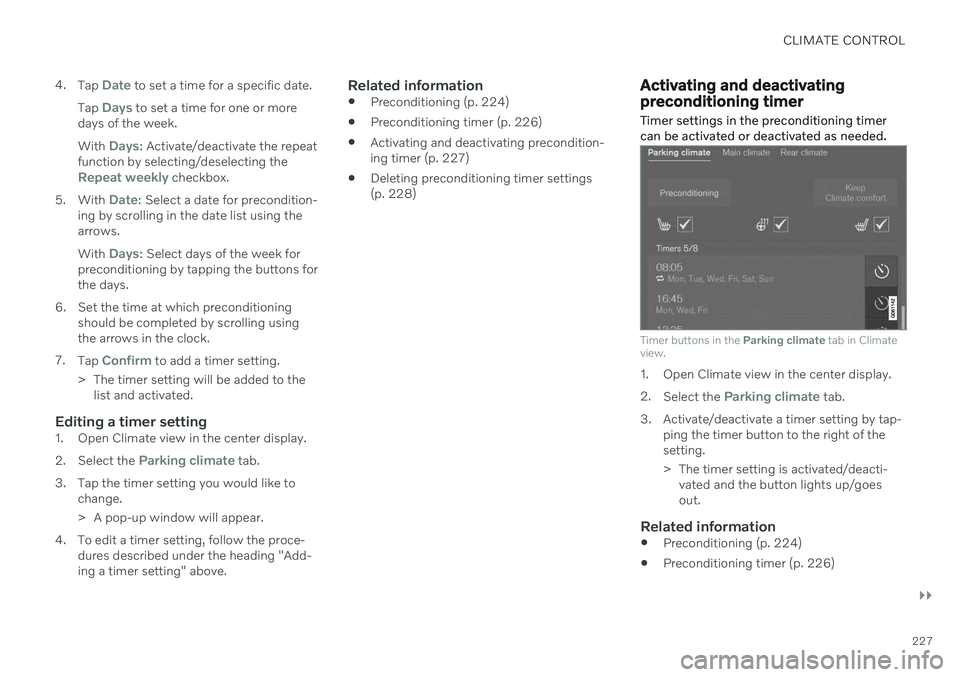
Timer buttons in the Parking climate tab in Climate
view.
1. Open Climate view in the center display. 2. Select the
Parking climate tab.
3. Activate/deactivate a timer setting by tap- ping the timer button to the right of the setting.
> The timer setting is activated/deacti-vated and the button lights up/goes out.
Related information
Preconditioning (p. 224)
Preconditioning timer (p. 226)
Page 231 of 655

CLIMATE CONTROL
229
Climate comfort retaining function
The climate in the passenger compartment can be maintained when the vehicle isparked, e.g. if the engine is turned off but thedriver or passengers remain in the vehicle.
This function can only be direct-started. The function utilizes several of the vehicle's systems:
Residual heat from the engine is used tohelp heat the passenger compartment to acomfortable temperature.
In warm weather, the ventilation systemcools the passenger compartment byblowing air in from outside.
NOTE
Climate comfort maintenance will be deac- tivated if the vehicle is locked from the out-side in order to avoid using residual engineheat unnecessarily. This function isintended to be used to maintain climatecomfort when the driver or a passengerremains in the vehicle after the engine isturned off.
Related information
Parking climate (p. 224)
Starting and switching off the climate retaining function when parking (p. 229)
Starting and switching off the climate retaining function whenparking
The climate retaining function maintains the climate settings in the vehicle after theengine has been switched off. The functioncan be activated in the center display.
1. Tap the symbol in the center of the climate bar to open Climate view in the center dis- play.
2. Select the
Parking climate tab.
3. Tap
Keep climate comfort.
> The climate comfort retaining function will be activated/deactivated and the button light will go on/off.
NOTE
Maintained climate comfort is not possible when there is not sufficient residual engineheat to maintain the climate settings in thepassenger compartment, or if the outsidetemperature is above approximately 20 °C(68 °F).
NOTE
Climate comfort maintenance will be deac- tivated if the vehicle is locked from the out-side in order to avoid using residual engineheat unnecessarily. This function isintended to be used to maintain climatecomfort when the driver or a passengerremains in the vehicle after the engine isturned off.
Related information
Climate comfort retaining function (p. 229)
Page 236 of 655

KEY, LOCKS AND ALARM
* Option/accessory.
234
Lock indication
The turn signals will flash when the vehicle is locked or unlocked.
Exterior confirmationLocking
The turn signals will flash once and the door mirrors will fold in 1
to confirm the
vehicle is locked.
Unlocking
The turn signals will flash twice and thedoor mirrors will fold out 1
to confirm the
vehicle is unlocked.
The trunk lid, hood and all doors must be closed for confirmation to be given. If only thedriver's door is closed when the vehicle is locked 2
, the vehicle will be locked but the turn
signals will only flash to indicate locking when all doors and the trunk and hood have beenclosed.
Lock and alarm indicators on the dashboard
The locks and alarm indicator will display the status of the locking system:
One long flash indicates locking.
When the vehicle is locked, this will beindicated by short, pulsating flashes.
Rapid flashing after disabling the alarmindicates that the alarm has been trig-gered.
Lock button indicators
Front door
Lock buttons with indicator lights in front door.
Illuminated indicator lights in both front door lock buttons indicate that all doors are locked.If any door is opened, the lights in both doorswill go out.
1
Only vehicles with power folding mirrors.
2 Does not apply to vehicles equipped with keyless locking/unlocking *.
Page 237 of 655

KEY, LOCKS AND ALARM
* Option/accessory.235
Rear door*
Lock button with indicator light in rear door.
Illuminated indicator lights in each door indi- cate that that particular door is locked. If anydoor is unlocked and opened, the indicatorlight in that door will go out. The lights in theother doors will remain illuminated.
Other indicatorsThe approach lighting and home safe lightingfunctions may be activated when locking andunlocking.
Related information
Lock confirmation settings (p. 235)
Welcome Light (p. 159)
Using home safe lighting (p. 159)
Lock confirmation settings
Settings for how the vehicle confirms locking and unlocking can be adjusted in the centerdisplay's Settings menu.
To change the locking response settings: 1. Tap
Settings in the center display's Top
view.
2. Tap
My CarLocking.
3. Tap
Visible Locking Feedback to select
when the vehicle should provide a visible response:
Lock
Unlock
Both
Or turn off the function by marking Off .
4. Select to receive an audible response when locking the vehicle by marking
Audible Locking Feedback.
To change the settings for folding door mir- rors * when locking:
1. Tap
Settings in the center display's Top
view.
2. Tap
My CarMirrors and Convenience.
3. Select
Fold Mirror When Locked to acti-
vate or deactivate the function.
Related information
Lock indication (p. 234)
Page 238 of 655
KEY, LOCKS AND ALARM
* Option/accessory.
236
Remote key
The remote key is used to lock and unlock doors and the trunk lid. The remote key mustbe in the vehicle in order to start the engine.
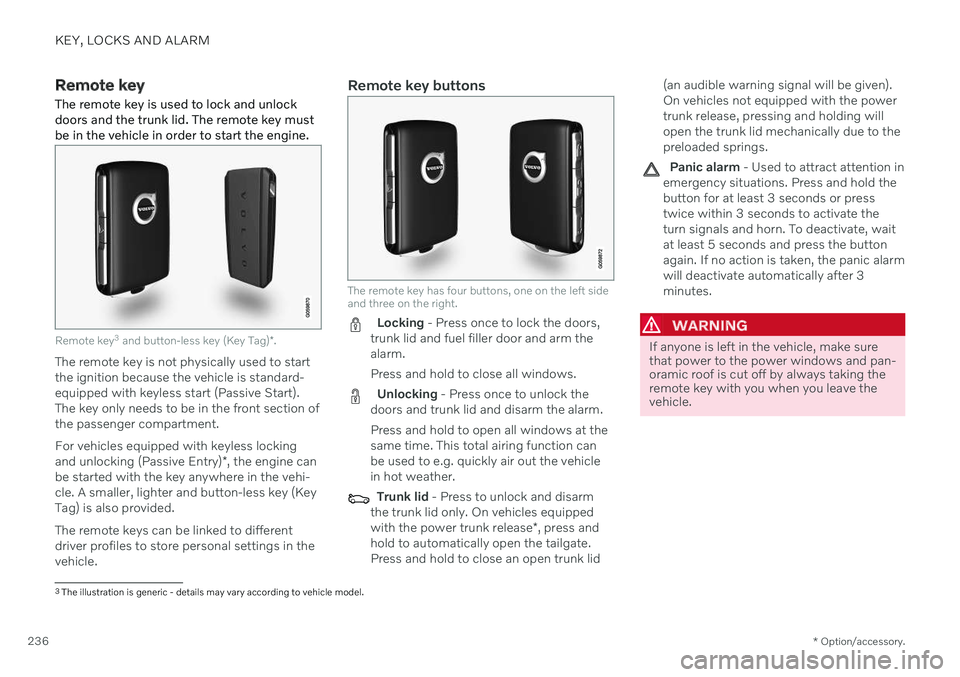
Remote key 3
and button-less key (Key Tag) *.
The remote key is not physically used to start the ignition because the vehicle is standard-equipped with keyless start (Passive Start).The key only needs to be in the front section ofthe passenger compartment. For vehicles equipped with keyless locking and unlocking (Passive Entry) *, the engine can
be started with the key anywhere in the vehi- cle. A smaller, lighter and button-less key (KeyTag) is also provided. The remote keys can be linked to different driver profiles to store personal settings in thevehicle.
Remote key buttons
The remote key has four buttons, one on the left side and three on the right.
Locking - Press once to lock the doors,
trunk lid and fuel filler door and arm the alarm. Press and hold to close all windows.
Unlocking - Press once to unlock the
doors and trunk lid and disarm the alarm. Press and hold to open all windows at the same time. This total airing function canbe used to e.g. quickly air out the vehiclein hot weather.
Trunk lid - Press to unlock and disarm
the trunk lid only. On vehicles equipped with the power trunk release *, press and
hold to automatically open the tailgate. Press and hold to close an open trunk lid (an audible warning signal will be given).On vehicles not equipped with the powertrunk release, pressing and holding willopen the trunk lid mechanically due to thepreloaded springs.
Panic alarm - Used to attract attention in
emergency situations. Press and hold the button for at least 3 seconds or presstwice within 3 seconds to activate theturn signals and horn. To deactivate, waitat least 5 seconds and press the buttonagain. If no action is taken, the panic alarmwill deactivate automatically after 3minutes.
WARNING
If anyone is left in the vehicle, make sure that power to the power windows and pan-oramic roof is cut off by always taking theremote key with you when you leave thevehicle.
3 The illustration is generic - details may vary according to vehicle model.
Page 239 of 655

KEY, LOCKS AND ALARM
}}
* Option/accessory.237
NOTE
Be aware of the risk of locking the remote key in the vehicle. If the remote key or key tag is left in the vehicle, it will be deactivated whenthe vehicle is locked and the alarm setusing another valid key. The key will bereactivated when the vehicle isunlocked.
If the remote key or Red Key is left inthe vehicle, it will be deactivated evenif the vehicle is locked using Volvo OnCall, and will be reactivated when thevehicle is unlocked using Volvo On Callor another valid key.
Button-less key (Key Tag)
*
The button-less key4
provided with the keyless
locking and unlocking function works in the same way as the regular remote key for key-less start, locking and unlocking. The key iswaterproof up to a depth of approx. 10 meters(30 feet) for up to 60 minutes. It does nothave a detachable key blade and its batterycannot be replaced.
Red Key - restricted remote key *A Red Key is a key that makes it possible to set restrictions for some of the vehicle's func- tions, e.g. maximum speed and maximum audio system volume. It helps vehicle ownersensure that the vehicle is being operatedresponsibly by other drivers.
InterferenceElectromagnetic fields or obstructing objectsmay interfere with the remote key's functionsfor keyless start and keyless locking and unlocking
*.
NOTE
Avoid storing the remote control key near metal objects or electronic devices, e.g.cell phones, tablets, laptops or chargers –preferably no closer than 10-15 cm(4-6 in.).
If you experience interference, use the remote key's detachable blade to unlock the vehicleand then place the remote key in the backupreader in the tunnel console cup holder to dis-arm the alarm and start the vehicle.
NOTE
When the remote control key is placed in the cup holder, make sure that no othervehicle keys, metal objects or electronicdevices (e.g. cell phones, tablets, laptopsor chargers) are found in the cup holder.Multiple vehicle keys close to each other inthe cup holder can disrupt their functional-ity.
WARNING
California Proposition 65 Operating, servicing and maintaining a pas- senger vehicle can expose you to chemi-cals including engine exhaust, carbon mon-oxide, phthalates, and lead, which areknown to the State of California to causecancer and birth defects or other reproduc-tive harm. To minimize exposure, avoidbreathing exhaust, do not idle the engineexcept as necessary, service your vehicle ina well ventilated area and wear gloves orwash your hands frequently when servicingyour vehicle. For more information go towww.P65Warnings.ca.gov/passenger-vehicle.
4
Also called sport key.
Page 240 of 655

||
KEY, LOCKS AND ALARM
* Option/accessory.
238
Related information
Starting the vehicle (p. 398)
Locking and unlocking using the remote key (p. 238)
Remote key range (p. 239)
Replacing the remote key's battery(p. 240)
Detachable key blade (p. 246)
Electronic immobilizer (p. 248)
Linking a remote key to a driver profile(p. 135)
Locking and unlocking using the remote key
All doors and the trunk lid can be locked and unlocked simultaneously using the buttonson the remote key.
Locking with remote key
The illustration is generic - details may vary accord- ing to vehicle model.
–Press the button on the remote key to
lock the vehicle.
To activate the locking sequence, the driver's door must be closed 5
. If any of the other doors
or the trunk lid are open, they will be locked and the alarm will be armed once they areclosed.
NOTE
Be aware of the risk of locking the remote key in the vehicle. If the remote key or key tag is left in the vehicle, it will be deactivated whenthe vehicle is locked and the alarm setusing another valid key. The key will bereactivated when the vehicle isunlocked.
If the remote key or Red Key is left inthe vehicle, it will be deactivated evenif the vehicle is locked using Volvo OnCall, and will be reactivated when thevehicle is unlocked using Volvo On Callor another valid key.
Locking when the trunk lid is open
NOTE
If the vehicle is locked and the trunk lid is still open, make sure that the remote key isnot left in the trunk when the trunk lid is closed and the entire vehicle is locked 6
.
Unlocking with remote key
–Press the button on the remote key to
unlock the vehicle.
5 If the vehicle is equipped with keyless locking/unlocking *, all side doors must be closed.
6 If the vehicle is equipped with keyless locking/unlocking and the key is detected inside the vehicle, the trunk lid will not lock when it is closed. *