change wheel VOLVO V60 2012 User Guide
[x] Cancel search | Manufacturer: VOLVO, Model Year: 2012, Model line: V60, Model: VOLVO V60 2012Pages: 400, PDF Size: 9.28 MB
Page 181 of 400
04 Comfort and driving pleasure
Adaptive cruise control*
04
* Option/accessory, for more information, see Introduction.179
•the gear selector is moved to N position
(automatic gearbox)
•the driver maintains a speed higher than
the set speed for longer than 1 minute
The driver must then regulate the speed.
A temporary increase in speed with the accel-
erator pedal, e.g. during overtaking, does not
affect the cruise control setting - the car returns
to the last stored speed when the accelerator
pedal is released.
Automatic standby modeAdaptive cruise control is dependent on other
systems e.g. stability and traction control
(DSTC). If any of these systems stop working
then cruise control is automatically deacti-
vated.
In the event of automatic deactivation a signal
will sound and the message
Cruise control
Cancelled is shown in the display. The driver
must then intervene and adapt the speed and
distance to the vehicle ahead.
An automatic deactivation can be due to:
•engine speed is too low/high
•speed falls below 30 km/h8
•wheels lose traction
•brake temperature is high
•the radar sensor is covered e.g. by wet
snow or heavy rain (radar waves blocked).
Resume set speedCruise control in standby mode is re-activated
with one press on the steering wheel button
- the speed is then set to the last stored
speed.
NOTE
A significant increase in speed may arise
after the speed has been resumed with .
DeactivateThe cruise control is switched off with the
steering wheel button
. The set speed is
cleared and cannot be resumed with the
button.
Keypad without Speed limiterThe cruise control is switched off with a short
press on the steering wheel button
in
standby mode - or with one long press in active
mode. The set speed is cleared and cannot be
resumed with the
button.
Queue Assistant
In cars with automatic gearbox the adaptive
cruise control has the Queue Assistant function
(sometimes also referred to as "Queue
Assist").
Queue Assistant has the following functions:
•Extended speed range
•Change of target
•Automatic braking ceases when stationary
•Automatic activation parking brake.
Note that the lowest programmable speed for
the cruise control is 30 km/h - even though the
cruise control is capable of following another
vehicle down to a standstill, a lower speed
cannot be selected.
Extended speed range
NOTE
In order to activate the cruise control the
driver's door must be closed and the driver
must be wearing the seatbelt.
•With the automatic gearbox the cruise con-
trol can follow another vehicle within the
range of 0-200 km/h - right down to sta-
tionary and up to 200 km/h.
8Does not apply to a car with Queue Assistant - it manages right down to stationary.
ProCarManuals.com
Page 182 of 400
04 Comfort and driving pleasure
Adaptive cruise control*
04
180* Option/accessory, for more information, see Introduction.
NOTE
Activation of the cruise control below
30 km/h requires a vehicle in front within a
reasonable distance.
For shorter stops in connection with inching in
slow traffic or at traffic lights driving is auto-
matically resumed if the stops do not exceed
about 3 seconds - if it takes longer before the
car in front starts moving again then the cruise
control is set in standby mode. The driver must
then re-activate the cruise control in one of the
following ways:
•Press the steering wheel button .
or
•Press the accelerator pedal and accelerate
up to at least about 4 km/h (normal walking
pace).
The cruise control will then resume following
the vehicle in front.
NOTE
The cruise control can hold the car station-
ary for a maximum of 2 minutes - then the
parking brake is applied and the cruise con-
trol is disengaged.
•The driver has to release the parking
brake before the cruise control can be
reactivated.
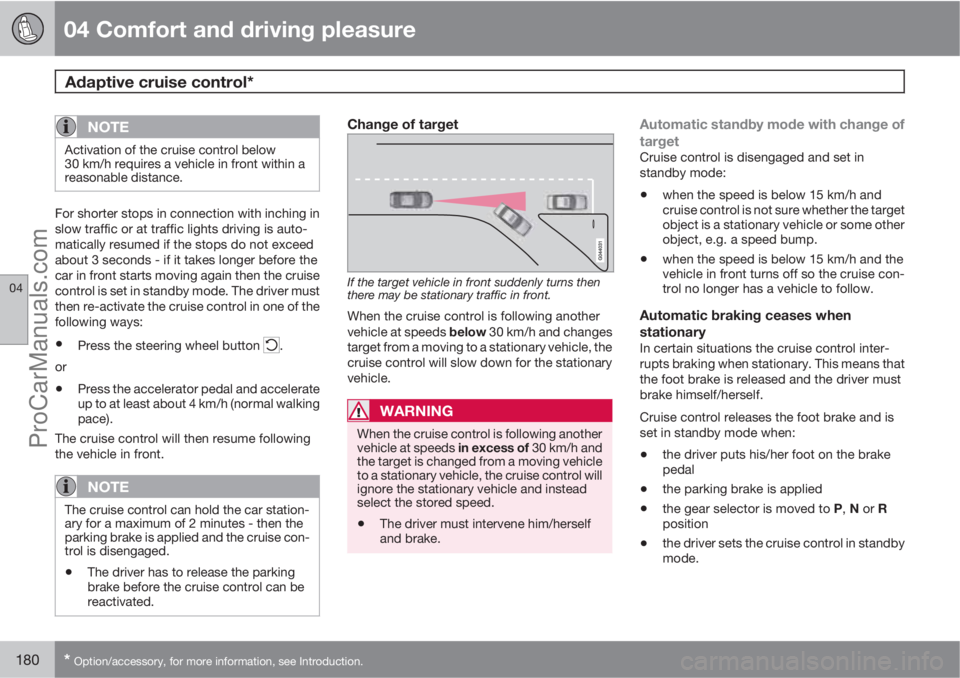
Change of target
If the target vehicle in front suddenly turns then
there may be stationary traffic in front.
When the cruise control is following another
vehicle at speeds below 30 km/h and changes
target from a moving to a stationary vehicle, the
cruise control will slow down for the stationary
vehicle.
WARNING
When the cruise control is following another
vehicle at speeds in excess of 30 km/h and
the target is changed from a moving vehicle
to a stationary vehicle, the cruise control will
ignore the stationary vehicle and instead
select the stored speed.
•The driver must intervene him/herself
and brake.
Automatic standby mode with change of
target
Cruise control is disengaged and set in
standby mode:
•when the speed is below 15 km/h and
cruise control is not sure whether the target
object is a stationary vehicle or some other
object, e.g. a speed bump.
•when the speed is below 15 km/h and the
vehicle in front turns off so the cruise con-
trol no longer has a vehicle to follow.
Automatic braking ceases when
stationary
In certain situations the cruise control inter-
rupts braking when stationary. This means that
the foot brake is released and the driver must
brake himself/herself.
Cruise control releases the foot brake and is
set in standby mode when:
•the driver puts his/her foot on the brake
pedal
•the parking brake is applied
•the gear selector is moved to P, N or R
position
•the driver sets the cruise control in standby
mode.
ProCarManuals.com
Page 196 of 400
04 Comfort and driving pleasure
Collision Warning with Auto Brake & Pedestrian Protection*
04
194* Option/accessory, for more information, see Introduction.
Activating/deactivating warning signalsThe warning lamp is activated automatically
when the engine is started if the system is
switched on.
The warning sound can be activated/deacti-
vated separately using the options for
On orOff in the menu system MY CAR under
Settings
Car settingsDriving support
systems
Warning sound if risk of
collision.
Set warning distanceThe warning distance regulates the distance at
which the visual and acoustic warnings are
deployed. Select one of the options from
Long, Normal or Short in the menu system
MY CAR under Settings
Car settings
Driving support systemsCollision
Warning
Warning distance.
The warning distance determines the system's
sensitivity. Warning distance
Long provides an
earlier warning. First test with Long and if this
setting produces too many warnings, which
could be perceived as irritating in certain sit-
uations, then change to warning distance
Normal.
Only use warning distance
Short in excep-
tional cases, e.g. for dynamic driving.
NOTE
When the adaptive cruise control is in use
the warning lamp and warning sound will be
used by the cruise control even if the colli-
sion warning system is switched off.
The collision warning system warns the
driver in the event of a risk of a collision, but
the function cannot shorten driver reaction
time.
In order for the collision warning system to
be effective, always drive with the Distance
Alert set at time interval 4 – 5. see
page 185.
NOTE
Even if the warning distance has been set toLong warnings could be perceived as being
late in certain situations, e.g. when there are
large differences in speed or if vehicles in
front brake heavily.
Checking settingsThe settings required can be controlled on the
centre console display screen. Search with the
menu system MY CAR under Settings
Car
settings
Driving support systems
Collision Warning, see page 144.
Limitations
The collision warning system is active from and
including approx. 4 km/h.
The visual warning signal may be difficult to
notice in the event of strong sunlight, reflec-
tions, when sunglasses are being worn or if the
driver is not looking straight ahead. The warn-
ing sound should therefore always be acti-
vated.
On slippery road surfaces the braking distance
is extended, which may reduce the capacity to
avoid a collision. In such situations the ABS
and DSTC systems will provide best possible
braking force with maintained stability.
NOTE
The visual warning signal can be temporarily
disengaged in the event of high passenger
compartment temperature caused by
strong sunlight for example. If this occurs
then the warning sound is activated even if
it is deactivated in the menu system.
•Warnings may not appear if the dis-
tance to the vehicle in front is small or if
steering wheel and pedal movements
are large, e.g. a very active driving style.
ProCarManuals.com
Page 210 of 400
04 Comfort and driving pleasure
Park assist camera*
04
208* Option/accessory, for more information, see Introduction.
General
The parking camera is an assist system and is
activated when reverse gear is engaged (can
be changed in the settings menu, see
page 144).
The camera image is shown on the centre con-
sole's screen.
WARNING
•The parking camera serves as an aid. It
does not relieve the driver of responsi-
bility when reversing.
•The camera has blind spots, where
obstacles cannot be detected.
•Be aware of people and animals in the
vicinity of the car.
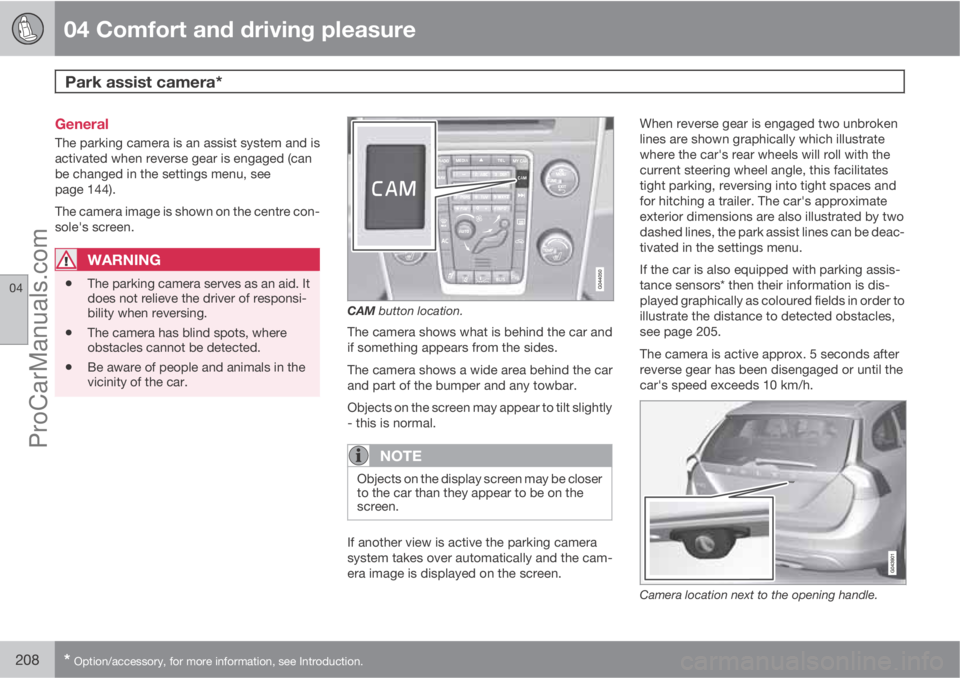
CAM button location.
The camera shows what is behind the car and
if something appears from the sides.
The camera shows a wide area behind the car
and part of the bumper and any towbar.
Objects on the screen may appear to tilt slightly
- this is normal.
NOTE
Objects on the display screen may be closer
to the car than they appear to be on the
screen.
If another view is active the parking camera
system takes over automatically and the cam-
era image is displayed on the screen.When reverse gear is engaged two unbroken
lines are shown graphically which illustrate
where the car's rear wheels will roll with the
current steering wheel angle, this facilitates
tight parking, reversing into tight spaces and
for hitching a trailer. The car's approximate
exterior dimensions are also illustrated by two
dashed lines, the park assist lines can be deac-
tivated in the settings menu.
If the car is also equipped with parking assis-
tance sensors* then their information is dis-
played graphically as coloured fields in order to
illustrate the distance to detected obstacles,
see page 205.
The camera is active approx. 5 seconds after
reverse gear has been disengaged or until the
car's speed exceeds 10 km/h.
Camera location next to the opening handle.
ProCarManuals.com
Page 226 of 400
05 Infotainment system
Quick start
05
224* Option/accessory, for more information, see Introduction.
Parent view
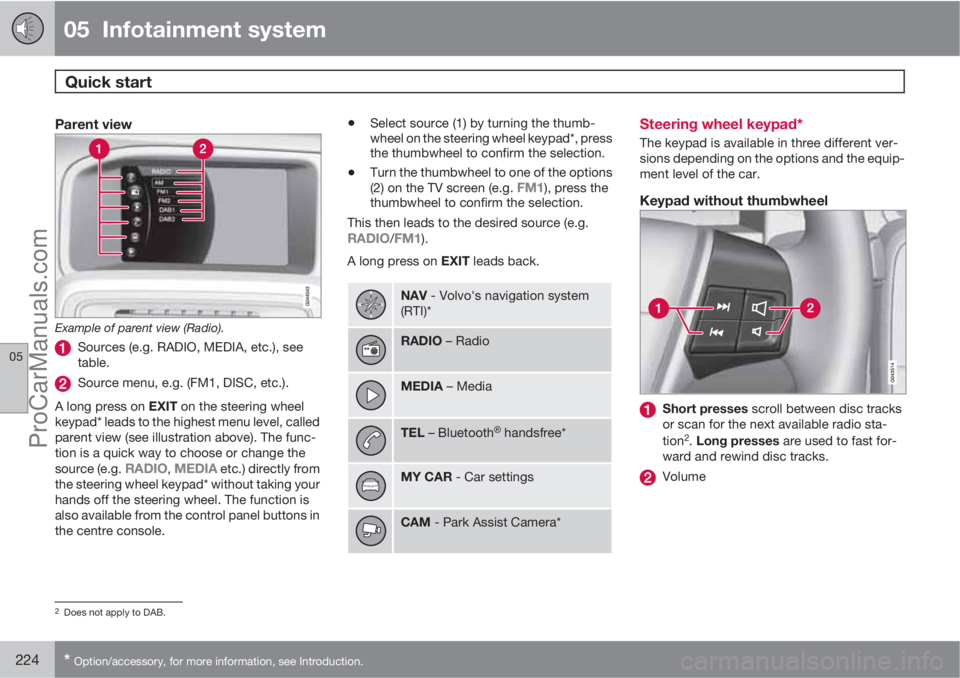
Example of parent view (Radio).
Sources (e.g. RADIO, MEDIA, etc.), see
table.
Source menu, e.g. (FM1, DISC, etc.).
A long press on EXIT on the steering wheel
keypad* leads to the highest menu level, called
parent view (see illustration above). The func-
tion is a quick way to choose or change the
source (e.g.
RADIO, MEDIA etc.) directly from
the steering wheel keypad* without taking your
hands off the steering wheel. The function is
also available from the control panel buttons in
the centre console.
•Select source (1) by turning the thumb-
wheel on the steering wheel keypad*, press
the thumbwheel to confirm the selection.
•Turn the thumbwheel to one of the options
(2) on the TV screen (e.g. FM1), press the
thumbwheel to confirm the selection.
This then leads to the desired source (e.g.
RADIO/FM1).
A long press on EXIT leads back.
NAV - Volvo's navigation system
(RTI)*
RADIO – Radio
MEDIA – Media
TEL – BluetoothŸ handsfree*
MY CAR - Car settings
CAM - Park Assist Camera*
Steering wheel keypad*
The keypad is available in three different ver-
sions depending on the options and the equip-
ment level of the car.
Keypad without thumbwheel
Short presses scroll between disc tracks
or scan for the next available radio sta-
tion
2. Long presses are used to fast for-
ward and rewind disc tracks.
Volume
2Does not apply to DAB.
ProCarManuals.com
Page 238 of 400
05 Infotainment system
Media player
05
236* Option/accessory, for more information, see Introduction.
CD/DVD1 functions
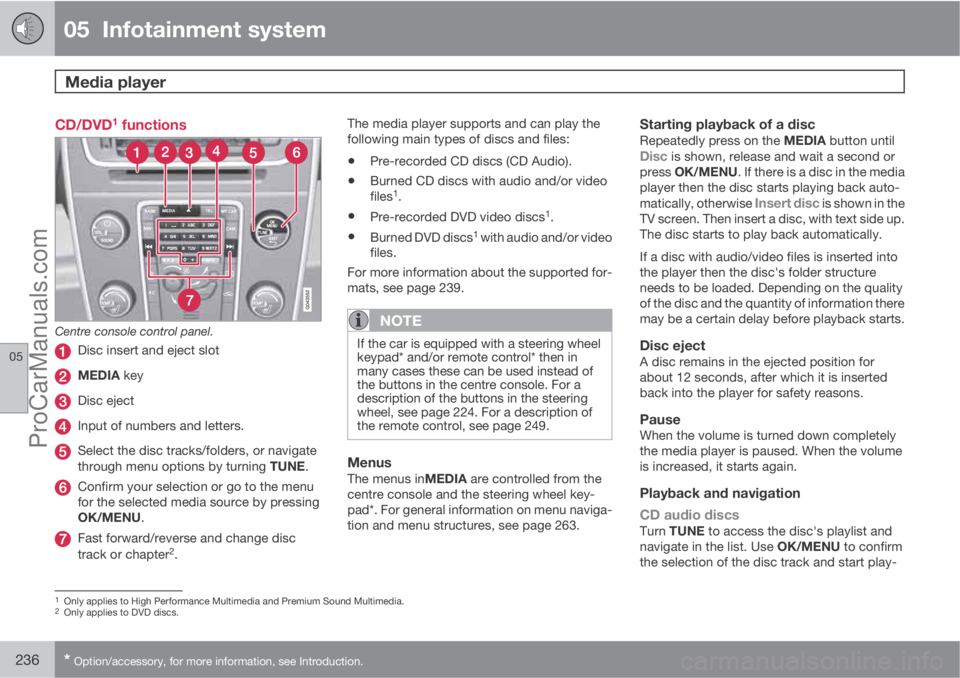
Centre console control panel.
Disc insert and eject slot
MEDIA key
Disc eject
Input of numbers and letters.
Select the disc tracks/folders, or navigate
through menu options by turning TUNE.
Confirm your selection or go to the menu
for the selected media source by pressing
OK/MENU.
Fast forward/reverse and change disc
track or chapter2.The media player supports and can play the
following main types of discs and files:
•Pre-recorded CD discs (CD Audio).
•Burned CD discs with audio and/or video
files1.
•Pre-recorded DVD video discs1.
•Burned DVD discs1 with audio and/or video
files.
For more information about the supported for-
mats, see page 239.
NOTE
If the car is equipped with a steering wheel
keypad* and/or remote control* then in
many cases these can be used instead of
the buttons in the centre console. For a
description of the buttons in the steering
wheel, see page 224. For a description of
the remote control, see page 249.
MenusThe menus inMEDIA are controlled from the
centre console and the steering wheel key-
pad*. For general information on menu naviga-
tion and menu structures, see page 263.
Starting playback of a discRepeatedly press on the MEDIA button untilDisc is shown, release and wait a second or
press OK/MENU. If there is a disc in the media
player then the disc starts playing back auto-
matically, otherwise
Insert disc is shown in the
TV screen. Then insert a disc, with text side up.
The disc starts to play back automatically.
If a disc with audio/video files is inserted into
the player then the disc's folder structure
needs to be loaded. Depending on the quality
of the disc and the quantity of information there
may be a certain delay before playback starts.
Disc ejectA disc remains in the ejected position for
about 12 seconds, after which it is inserted
back into the player for safety reasons.
PauseWhen the volume is turned down completely
the media player is paused. When the volume
is increased, it starts again.
Playback and navigation
CD audio discs
Turn TUNE to access the disc's playlist and
navigate in the list. Use OK/MENU to confirm
the selection of the disc track and start play-
1Only applies to High Performance Multimedia and Premium Sound Multimedia.2Only applies to DVD discs.
ProCarManuals.com
Page 239 of 400
05 Infotainment system
Media player
05
* Option/accessory, for more information, see Introduction.237
back. Press EXIT to cancel and exit the playlist.
A long press on EXIT leads to the playlist's root
level.
Disc tracks can also be changed by pressing
on
/ on the centre console or the
steering wheel keypad*.
Burned discs audio/video files1
Turn TUNE to access the disc's playlist/folder
structure and navigate in the list/structure. Use
OK/MENU to confirm either selection of sub-
folder or start of playback of the selected
audio/video file. Press EXIT to either stop and
exit the playlist or go up (back) in the folder
structure. A long press on EXIT leads to the
playlist's root level.
Audio/video files can also be changed by
pressing
/ on the centre console or the
steering wheel keypad*.
Audio files have the symbol
, video files1
have the symbol and folders have the
symbol
.
When playback of a file is complete the play-
back of the other files (of the same type) in that
particular folder continues. Change
3 of folder
takes place automatically when all the files inthe current folder have been played back. The
system automatically detects and changes
setting when a disc containing only audio files
or only video files is loaded into the media
player and then plays back these files. How-
ever, the system does not change setting if a
disc containing a mixture of audio and video
files is loaded into the media player, but instead
the player continues to play back the previous
file type.
NOTE
A video film is only shown when the car is
stationary. When the car is moving at a
speed of over about 8 km/h no picture is
shown and
No visual media available
during driving appears on the display
screen, although the audio is heard during
this time. The picture is shown again as
soon as the car's speed falls below about 6
km/h.
NOTE
Some audio files that are copy-protected by
record companies or privately copied audio
files cannot be loaded by the player.
DVD video discs1
For playback of DVD video discs, see
page 238.
Fast forward/reverse
Hold in the buttons / to fast forward/
rewind. Audio files are fast forwarded/rewound
at one speed, while video files are fast forwar-
ded/rewound at several speeds. Repeatedly
press the buttons
/ to increase the fast
forward/rewind speed for video files. Release
the button to return to viewing at normal speed.
Music recognition, GracenoteŸ
If the car is equipped with navigation* then
there is a hard drive in the car that contains a
database for music recognition of CD audio
discs. The database contains the most popular
songs at the moment. If the media player gets
a hit in the database then the album title and
artist name for the media are displayed, and
each track shows track title, artist and album.
If the current CD audio disc is not found in the
database then the CD text from the disc is
used. If there is no CD text on the disc then only
Track 1, Track 2 etc. is displayed.
1Only applies to High Performance Multimedia and Premium Sound Multimedia.3If Repeat folder is activated then this does not take place.
ProCarManuals.com
Page 240 of 400
05 Infotainment system
Media player
05
238* Option/accessory, for more information, see Introduction.
Scan4
This function plays the first ten seconds of
each disc track/audio file. To scan:
1.
Press OK/MENU
2.
Turn TUNE to
Scan
> The first 10 seconds of each disc track
or audio file are played.
3.
Cancel the scan with EXIT, the disc track
or audio file being played back will con-
tinue playing.
Random4
This function plays the tracks in random order.
To listen to the tracks in random order:
1.
Press OK/MENU
2.
Turn TUNE to
Random
3.
Press OK/MENU to activate/deactivate
the function.
Disc tracks/audio files can be changed by
pressing
/ on the centre console or the
steering wheel keypad*.
Repeat folder5
This function makes it possible to play files in
a folder over and over again. When the last filehas been played out, playback of the first file
starts again.
1.
Press OK/MENU
2.
Turn TUNE to
Repeat folder
3.
Press OK/MENU to activate/deactivate
the function.
Playback of DVD video discs1
PlaybackWhen playing back a DVD video disc a disc
menu may appear on the display screen. The
disc menu gives access to additional functions
and settings, such as selecting subtitles, lan-
guage and scene selection.
NOTE
A video film is only shown when the car is
stationary. When the car is moving at a
speed of over about 8 km/h no picture is
shown and
No visual media available
during driving appears on the display
screen, although the audio is heard during
this time. The picture is shown again as
soon as the car's speed falls below about 6
km/h.
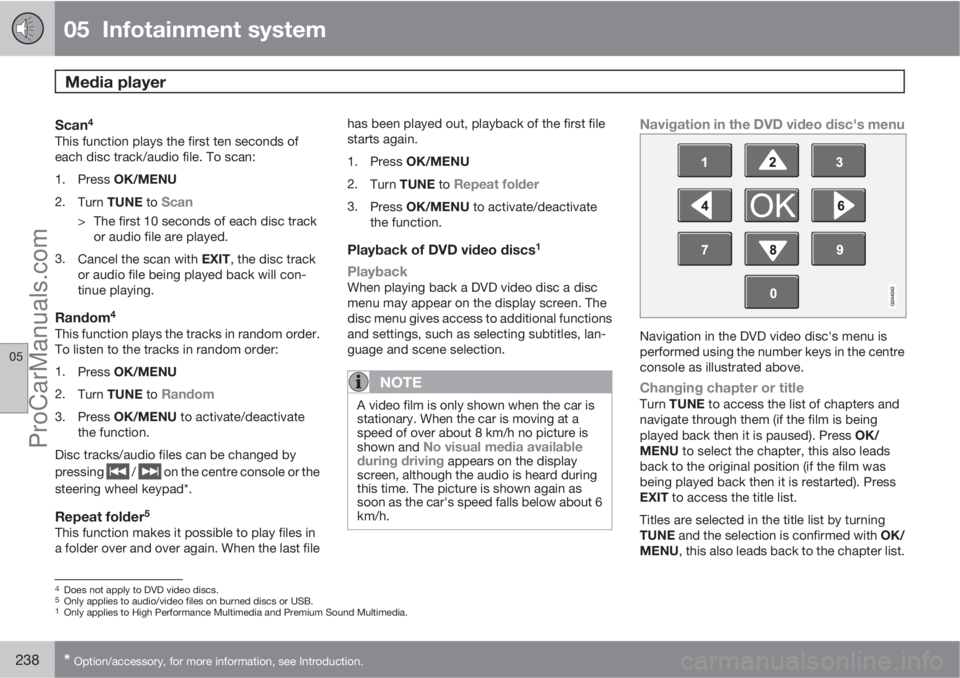
Navigation in the DVD video disc's menu
Navigation in the DVD video disc's menu is
performed using the number keys in the centre
console as illustrated above.
Changing chapter or titleTurn TUNE to access the list of chapters and
navigate through them (if the film is being
played back then it is paused). Press OK/
MENU to select the chapter, this also leads
back to the original position (if the film was
being played back then it is restarted). Press
EXIT to access the title list.
Titles are selected in the title list by turning
TUNE and the selection is confirmed with OK/
MENU, this also leads back to the chapter list.
4Does not apply to DVD video discs.5Only applies to audio/video files on burned discs or USB.1Only applies to High Performance Multimedia and Premium Sound Multimedia.
ProCarManuals.com
Page 241 of 400
05 Infotainment system
Media player
05
* Option/accessory, for more information, see Introduction.239
Press OK/MENU to activate the selection and
return to the start position. Use EXIT to cancel
the selection and this leads back to the original
position (without any selection being made).
The chapter can also be changed by pressing
on
/ on the centre console or the
steering wheel keypad*.
Advanced settings6
AngleIf the DVD video disc supports it, the function
can be used to choose from which camera
position a particular scene should be shown.
Go in disc mode to Disc menu
Advanced
settings
Angle.
DivXŸ Video On DemandThe media player can be registered in order to
play DivX VOD type files from burned discs or
USB. The code for registration can be found in
the menu system MY CAR Settings
InformationDivX® VOD code. For general
information on menus, see under MY CAR, see
page 144.
For more information visit www.divx.com/vod.
Picture settings6
You can adjust the settings (when the car is
stationary) for brightness and contrast.
1.
Press OK/MENU and select
Image
settings, confirm with OK/MENU.
2.
Turn TUNE to the adjustment option and
confirm with OK/MENU.
3.
Adjust the setting by turning TUNE and
confirm with OK/MENU.
To return to the settings list, press the OK/
MENU or EXIT.
The picture settings can be reset to factory
settings with the
Reset option.
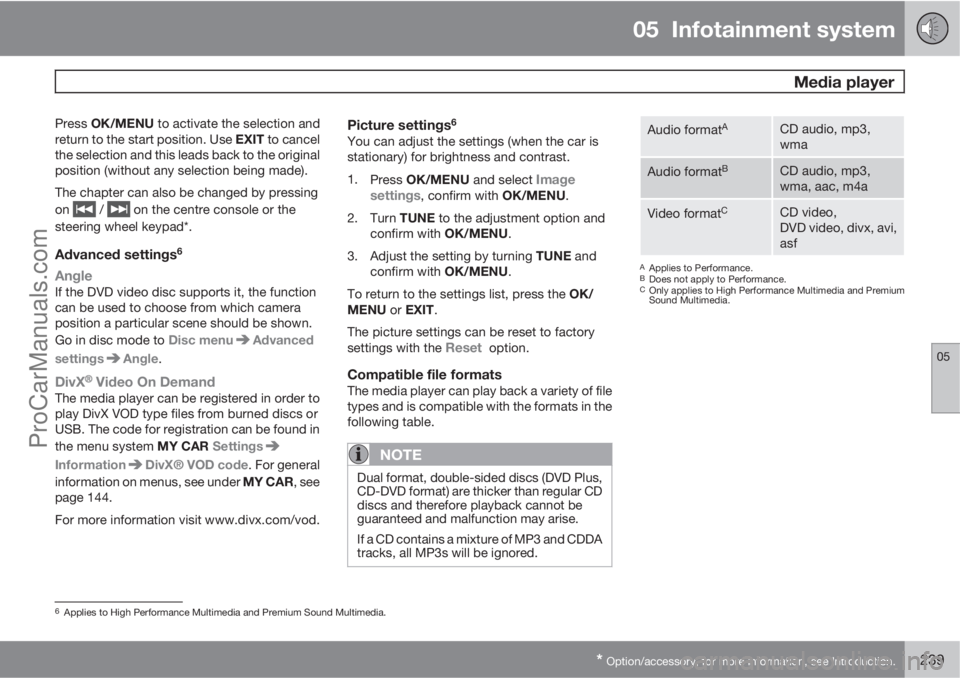
Compatible file formatsThe media player can play back a variety of file
types and is compatible with the formats in the
following table.
NOTE
Dual format, double-sided discs (DVD Plus,
CD-DVD format) are thicker than regular CD
discs and therefore playback cannot be
guaranteed and malfunction may arise.
If a CD contains a mixture of MP3 and CDDA
tracks, all MP3s will be ignored.
Audio formatACD audio, mp3,
wma
Audio formatBCD audio, mp3,
wma, aac, m4a
Video formatCCD video,
DVD video, divx, avi,
asf
AApplies to Performance.BDoes not apply to Performance.COnly applies to High Performance Multimedia and Premium
Sound Multimedia.
6Applies to High Performance Multimedia and Premium Sound Multimedia.
ProCarManuals.com
Page 243 of 400
05 Infotainment system
External audio source via AUX/USB* input
05
* Option/accessory, for more information, see Introduction.241
Playback and navigation3
Turn TUNE to access the playlist/folder struc-
ture and navigate in the list/structure. Use OK/
MENU to either confirm selection of subfolder
or start of playback of the selected audio/video
file. Press EXIT to either stop and exit the play-
list or go up (back) in the folder structure. A long
press on EXIT leads to the playlist's root level.
Audio/video files can also be changed by
pressing
/ on the centre console or the
steering wheel keypad*.
Audio files have the symbol
, video files4
have the symbol and folders have the
symbol
.
When playback of a file is complete the play-
back of the other files (of the same type) in that
particular folder continues. Change
5 of folder
takes place automatically when all the files in
the current folder have been played back. The
system automatically detects and changes
setting when a device containing only audio
files or only video files is connected to the USB
port and then it plays back these files. How-
ever, the system does not change setting if a
device containing a mixture of audio and video
files is connected to the USB port, but insteadthe player continues to play back the previous
file type.
Fast forward/reverse3
See page 237.
Scan3
See page 238.
Random3
See page 238.
Search function3
The keypad on the control panel in the centre
console can be used to find a filename in the
current folder.
The search function is accessed either by turn-
ing TUNE (to access the folder structure) or by
pressing one of the letter keys. As a letter or
character in a search string is entered you get
closer to your search target.
Start playback of a file by pressing OK/
MENU.
Repeat folder6
See page 238.
Audio sources
USB memory
To facilitate the use of a USB memory stick,
only store music files on it. It takes a lot longer
for the system to load storage media that con-
tains anything other than compatible music
files.
NOTE
The system supports mobile media compli-
ant with USB 2.0 and the FAT32 file system
and can handle 1000 folders with a maxi-
mum of 254 subfolders/files in every folder.
The top level, which can handle up to 1000
subfolders/files, is an exception to this.
NOTE
When using a longer model USB memory
stick the use of a USB adapter cable is rec-
ommended. This is to avoid mechanical
wear to the USB input and the connected
USB memory stick.
USB hubIt is possible to connect a USB hub to the USB
connection and thereby connect multiple USB
devices simultaneously. Selection of USB
3Only applies to USB and iPodŸ.4Applies to High Performance Multimedia and Premium Sound Multimedia.5If Repeat folder is activated then this does not take place.6Only applies to USB.
ProCarManuals.com