warning VOLVO V60 2012 Owner's Manual
[x] Cancel search | Manufacturer: VOLVO, Model Year: 2012, Model line: V60, Model: VOLVO V60 2012Pages: 400, PDF Size: 9.28 MB
Page 40 of 400
01 Safety
Child safety 01
38
Press down with your hand in the centre of
the cushion in order to lock it.
WARNING
If the instructions regarding the two-stage
booster cushion are not followed then this
could cause serious injury to a child in the
event of an accident.
IMPORTANT
Check that there are no loose objects (e.g.
toys) left behind in the space under the
cushion before lowering.
NOTE
The booster cushion must be lowered first
when lowering the backrest.
Child safety locks, rear doors
The controls for operating the rear door power
windows and the rear door opening handles
can be blocked from opening from the inside.
For more information, see page 64.
ISOFIX fixture system for child seats
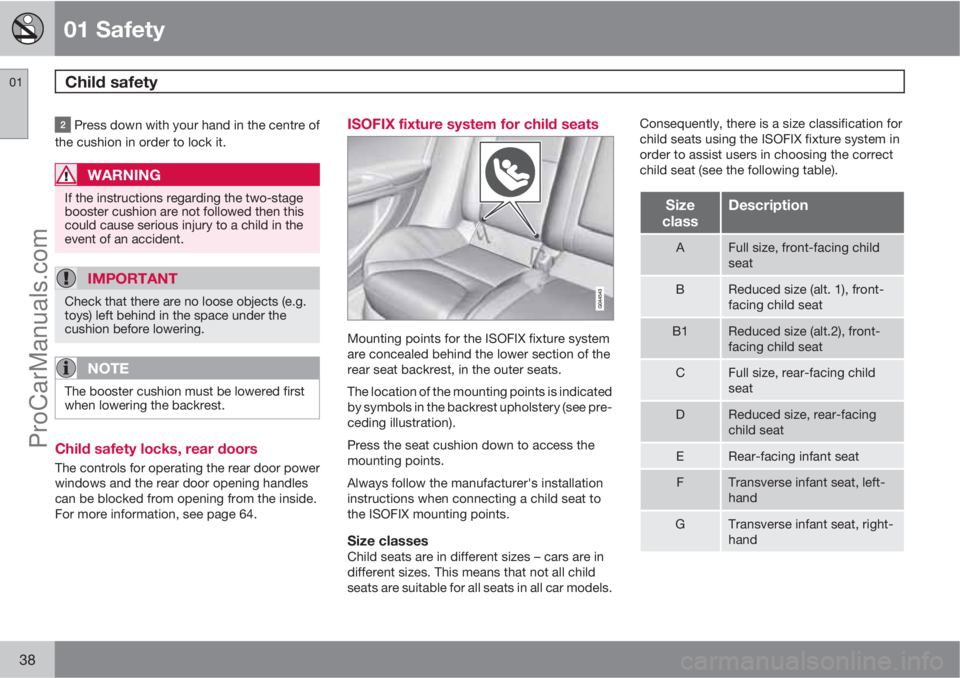
Mounting points for the ISOFIX fixture system
are concealed behind the lower section of the
rear seat backrest, in the outer seats.
The location of the mounting points is indicated
by symbols in the backrest upholstery (see pre-
ceding illustration).
Press the seat cushion down to access the
mounting points.
Always follow the manufacturer's installation
instructions when connecting a child seat to
the ISOFIX mounting points.
Size classesChild seats are in different sizes – cars are in
different sizes. This means that not all child
seats are suitable for all seats in all car models.Consequently, there is a size classification for
child seats using the ISOFIX fixture system in
order to assist users in choosing the correct
child seat (see the following table).
Size
classDescription
AFull size, front-facing child
seat
BReduced size (alt. 1), front-
facing child seat
B1Reduced size (alt.2), front-
facing child seat
CFull size, rear-facing child
seat
DReduced size, rear-facing
child seat
ERear-facing infant seat
FTransverse infant seat, left-
hand
GTransverse infant seat, right-
hand
ProCarManuals.com
Page 41 of 400
01 Safety
Child safety01
39
WARNING
Never place a child in the passenger seat if
the car is equipped with an activated airbag.
NOTE
If an ISOFIX child seat has no size classifi-
cation then the car model must be included
on the child seat's vehicle list.
NOTE
Volvo recommends that you contact an
authorised Volvo dealer for recommenda-
tions about which ISOFIX child seats Volvo
recommends.
Types of ISOFIX child seat
Type of child seatWeightSize classPassenger seats for ISOFIX installation of child seats
Front seatOuter rear seat
Infant seat transversemax 10 kgFXX
GXX
Infant seat, rear-facingmax 10 kgEXOK
(IL)
ProCarManuals.com
Page 44 of 400
01 Safety
Child safety 01
42
Upper mounting points for child seats
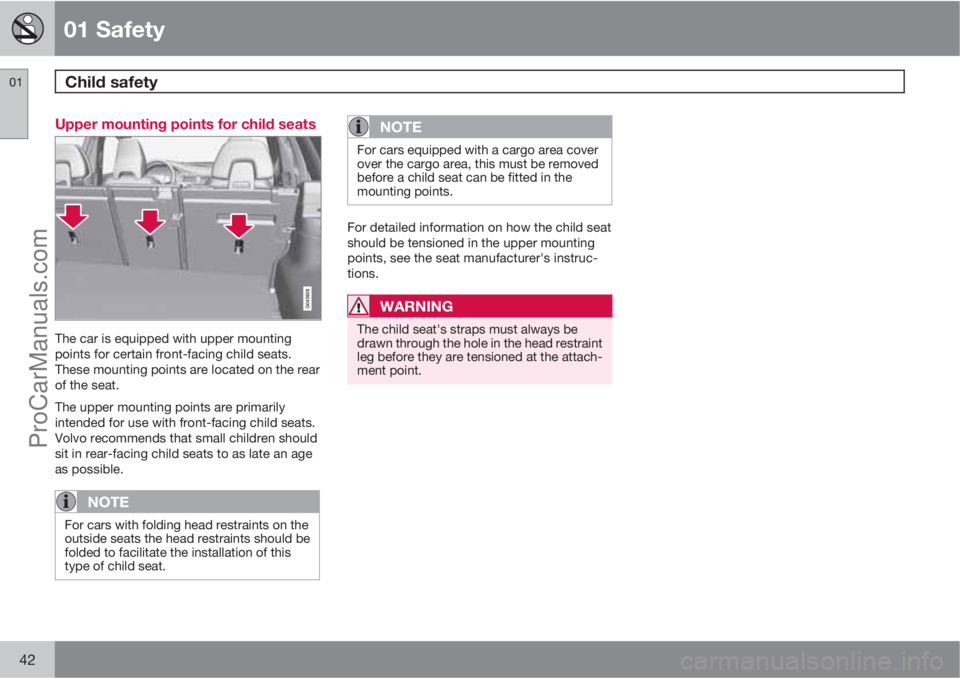
The car is equipped with upper mounting
points for certain front-facing child seats.
These mounting points are located on the rear
of the seat.
The upper mounting points are primarily
intended for use with front-facing child seats.
Volvo recommends that small children should
sit in rear-facing child seats to as late an age
as possible.
NOTE
For cars with folding head restraints on the
outside seats the head restraints should be
folded to facilitate the installation of this
type of child seat.
NOTE
For cars equipped with a cargo area cover
over the cargo area, this must be removed
before a child seat can be fitted in the
mounting points.
For detailed information on how the child seat
should be tensioned in the upper mounting
points, see the seat manufacturer's instruc-
tions.
WARNING
The child seat's straps must always be
drawn through the hole in the head restraint
leg before they are tensioned at the attach-
ment point.
ProCarManuals.com
Page 48 of 400
02 Locks and alarm
Remote control key/key blade
02
46
General
The car is supplied with 2 remote control keys
or PCCs (Personal Car Communicator). They
are used to start the car and for locking and
unlocking.
More remote control keys can be ordered – up
to 6 can be programmed and used for the same
car.
The PCC has increased functionality com-
pared with the remote control key. The contin-
uation of this chapter describes the functions
available in both the PCC and the remote con-
trol key.
WARNING
If there are children in the car:
Always remember to switch off the power
supply to power windows and sunroof by
removing the remote control key if the driver
leaves the car.
Loss of a remote control keyIf you lose a remote control key then new ones
can be ordered at a workshop - an authorised
Volvo workshop is recommended. The remain-
ing remote control keys must then be taken to
the workshop. The code of the missing remotecontrol key must be erased from the system as
a theft prevention measure.
The current number of keys registered to the
car can be checked in the menu system MY
CAR under Information
Number of keys.
For a description of the menu system, see
page 144.
Key memory1 – door mirrors and driver's
seat
The settings are automatically connected to
each respective remote control key, see pages
83 and 102.
The function can be activated/deactivated in
the menu system MY CAR under Settings
Car settingsCar key memory.
For a description of the menu system, see
page 144.
For cars with Keyless drive system, see
page 55.
Indicator for locking/unlockingWhen the car is locked or unlocked using the
remote control key, the direction indicators
confirm that locking/unlocking was correctly
performed.
•Locking - one flash and the door mirrors
are folded2 in.
•Unlocking - two flashes and the door mir-
rors are folded2 out.
After locking the indication is only given if all
locks have been activated once the doors have
been closed.
Selecting the functionDifferent options for indicating locking/unlock-
ing with light can be set in the car's menu sys-
tem, see page 144.
Search in the menu system MY CAR for
Settings
Car settingsLight settings
and select
Lock confirmation light and/orUnlock confirmation light.
1Only in combination with power driver's seat and power mirrors.2Only for cars with retractable power door mirrors.
ProCarManuals.com
Page 50 of 400
02 Locks and alarm
Remote control key/key blade
02
48* Option/accessory, for more information, see Introduction.
G021079
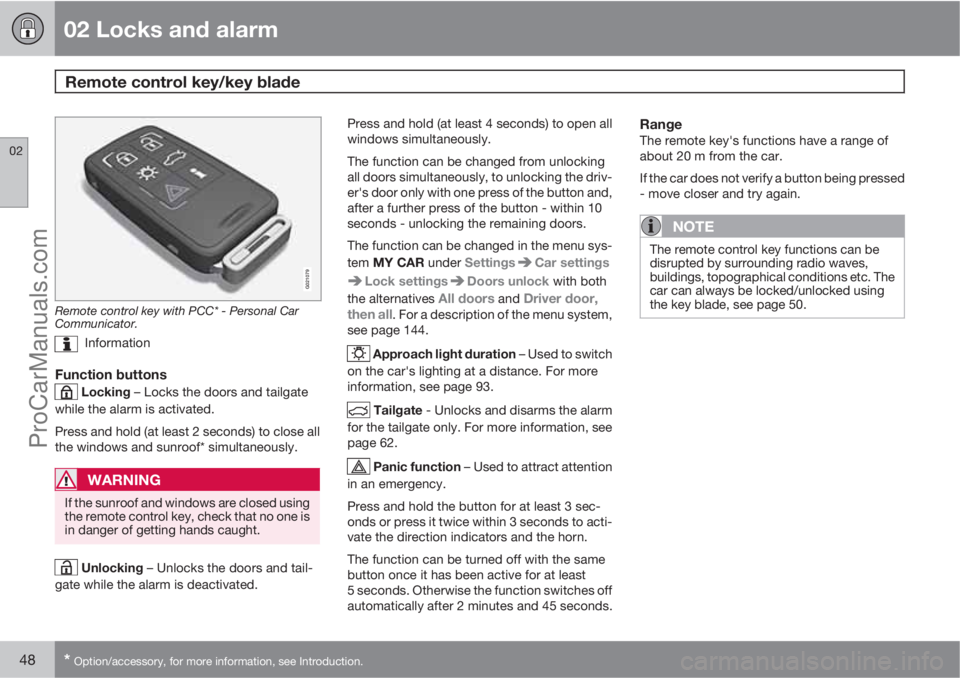
Remote control key with PCC* - Personal Car
Communicator.
Information
Function buttons
Locking – Locks the doors and tailgate
while the alarm is activated.
Press and hold (at least 2 seconds) to close all
the windows and sunroof* simultaneously.
WARNING
If the sunroof and windows are closed using
the remote control key, check that no one is
in danger of getting hands caught.
Unlocking – Unlocks the doors and tail-
gate while the alarm is deactivated.Press and hold (at least 4 seconds) to open all
windows simultaneously.
The function can be changed from unlocking
all doors simultaneously, to unlocking the driv-
er's door only with one press of the button and,
after a further press of the button - within 10
seconds - unlocking the remaining doors.
The function can be changed in the menu sys-
tem MY CAR under Settings
Car settings
Lock settingsDoors unlock with both
the alternatives
All doors and Driver door,
then all. For a description of the menu system,
see page 144.
Approach light duration – Used to switch
on the car's lighting at a distance. For more
information, see page 93.
Tailgate - Unlocks and disarms the alarm
for the tailgate only. For more information, see
page 62.
Panic function – Used to attract attention
in an emergency.
Press and hold the button for at least 3 sec-
onds or press it twice within 3 seconds to acti-
vate the direction indicators and the horn.
The function can be turned off with the same
button once it has been active for at least
5 seconds. Otherwise the function switches off
automatically after 2 minutes and 45 seconds.
RangeThe remote key's functions have a range of
about 20 m from the car.
If the car does not verify a button being pressed
- move closer and try again.
NOTE
The remote control key functions can be
disrupted by surrounding radio waves,
buildings, topographical conditions etc. The
car can always be locked/unlocked using
the key blade, see page 50.
ProCarManuals.com
Page 57 of 400
02 Locks and alarm
Keyless drive*
02
* Option/accessory, for more information, see Introduction.55 Keyless lock and ignition system (only
PCC
1)
General
The keyless drive function in the PCC allows
the car to be unlocked, driven and locked with-
out the need for a key. You simply have to have
the PCC with you. The system makes it easier
and more convenient to open the car, e.g.
when your hands are full.
Both of the car's PCCs incorporate the Keyless
function. Additional PCCs can be ordered, see
page 46.
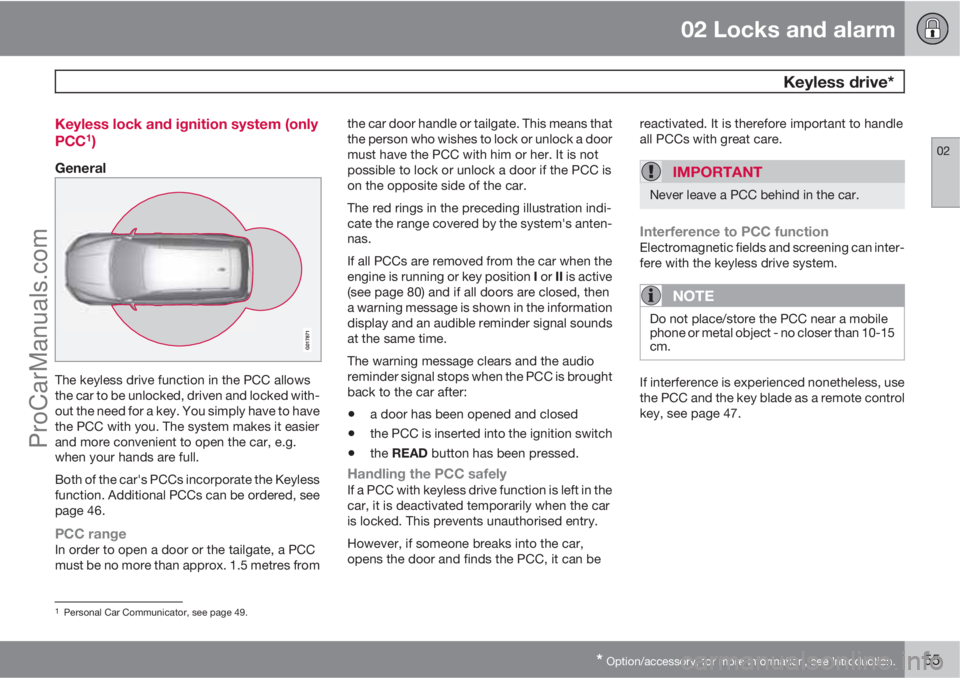
PCC rangeIn order to open a door or the tailgate, a PCC
must be no more than approx. 1.5 metres fromthe car door handle or tailgate. This means that
the person who wishes to lock or unlock a door
must have the PCC with him or her. It is not
possible to lock or unlock a door if the PCC is
on the opposite side of the car.
The red rings in the preceding illustration indi-
cate the range covered by the system's anten-
nas.
If all PCCs are removed from the car when the
engine is running or key position I or II is active
(see page 80) and if all doors are closed, then
a warning message is shown in the information
display and an audible reminder signal sounds
at the same time.
The warning message clears and the audio
reminder signal stops when the PCC is brought
back to the car after:
•a door has been opened and closed
•the PCC is inserted into the ignition switch
•the READ button has been pressed.
Handling the PCC safelyIf a PCC with keyless drive function is left in the
car, it is deactivated temporarily when the car
is locked. This prevents unauthorised entry.
However, if someone breaks into the car,
opens the door and finds the PCC, it can bereactivated. It is therefore important to handle
all PCCs with great care.
IMPORTANT
Never leave a PCC behind in the car.
Interference to PCC functionElectromagnetic fields and screening can inter-
fere with the keyless drive system.
NOTE
Do not place/store the PCC near a mobile
phone or metal object - no closer than 10-15
cm.
If interference is experienced nonetheless, use
the PCC and the key blade as a remote control
key, see page 47.
1Personal Car Communicator, see page 49.
ProCarManuals.com
Page 60 of 400
02 Locks and alarm
Keyless drive*
02
58* Option/accessory, for more information, see Introduction.
WARNING
People with pacemaker operations should
not come closer than 22 cm to the keyless
system's antennae with their pacemaker.
This is to prevent interference between the
pacemaker and the keyless system.
ProCarManuals.com
Page 61 of 400
02 Locks and alarm
Locking/unlocking
02
* Option/accessory, for more information, see Introduction.59 From the outside
The remote control key can lock/unlock all
doors and the tailgate simultaneously. Different
sequences for unlocking can be selected, see
"Unlocking with the remote control key" page
48.
In order that the lock sequence can be acti-
vated, the driver's door must be closed - if any
of the other doors or the tailgate is open, then
it/they is/are locked and the alarm is activated
only when it/they are closed. With the Key-
less* system all the doors and tailgate must be
closed.
NOTE
Be aware of the risk of locking the remote
control key in the car.
If it is not possible to lock/unlock with the
remote control key, the battery may be dis-
charged - lock or unlock the left-hand front
door with the detachable key blade, see
page 50.
NOTE
Remember that the alarm is triggered when
the door is opened after being unlocked
with the key blade - the alarm is switched
off when the remote control key is inserted
into the ignition switch.
WARNING
Be aware of the risk of being locked in the
car when it is locked from the outside using
the remote control key - it is then not pos-
sible to open any of the doors from the
inside with the door controls. Read more
about this in the section "Deadlocks" later
on.
Automatic relockingIf none of the doors or the tailgate is opened
within 2 minutes of unlocking, all are locked
again automatically. This function reduces the
risk that the car is left unlocked unintentionally.
(For cars with alarm, see page 65.)
Manual lockingIn certain situations the car must be lockable
manually, e.g. in the event of power failure.
The left-hand front door can be locked with its
lock cylinder and the remote control key's
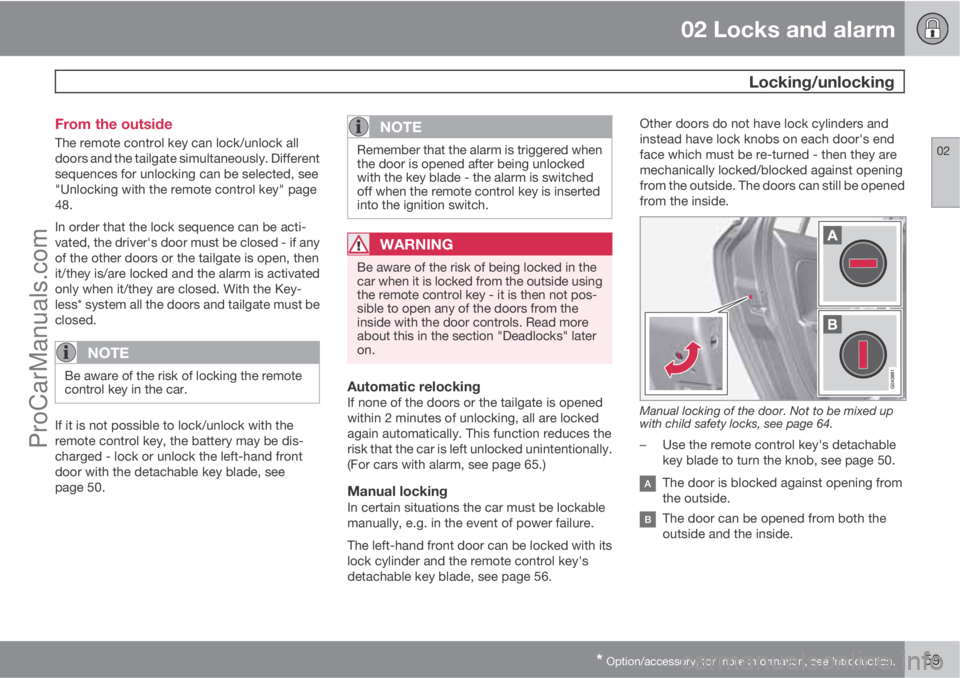
detachable key blade, see page 56.Other doors do not have lock cylinders and
instead have lock knobs on each door's end
face which must be re-turned - then they are
mechanically locked/blocked against opening
from the outside. The doors can still be opened
from the inside.
Manual locking of the door. Not to be mixed up
with child safety locks, see page 64.
–Use the remote control key's detachable
key blade to turn the knob, see page 50.
The door is blocked against opening from
the outside.
The door can be opened from both the
outside and the inside.
ProCarManuals.com
Page 64 of 400
02 Locks and alarm
Locking/unlocking
02
62* Option/accessory, for more information, see Introduction.
Unlocking with the remote control key
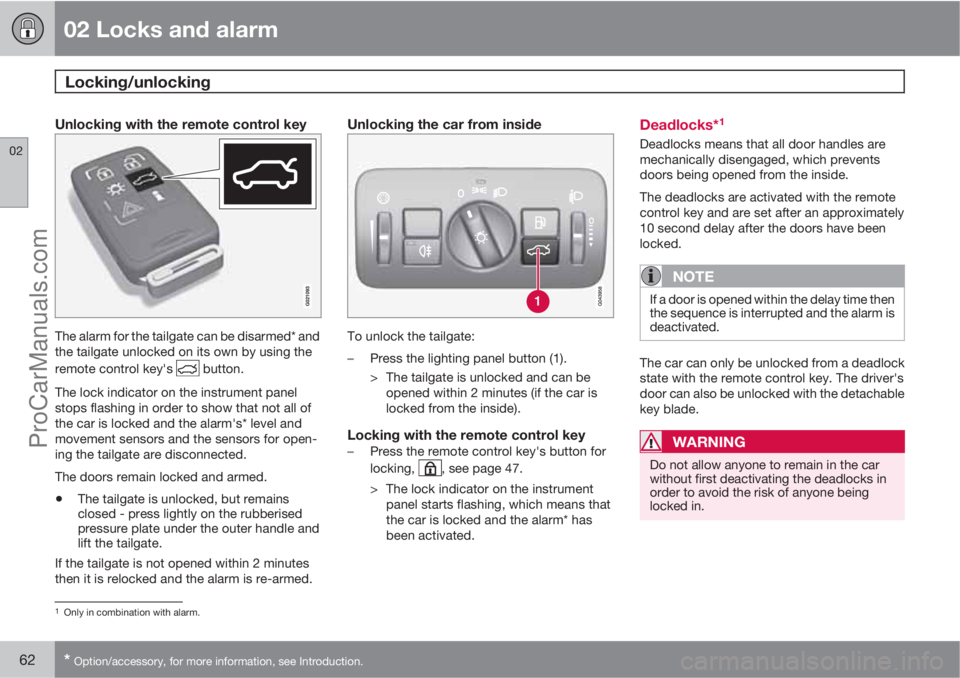
The alarm for the tailgate can be disarmed* and
the tailgate unlocked on its own by using the
remote control key's
button.
The lock indicator on the instrument panel
stops flashing in order to show that not all of
the car is locked and the alarm's* level and
movement sensors and the sensors for open-
ing the tailgate are disconnected.
The doors remain locked and armed.
•The tailgate is unlocked, but remains
closed - press lightly on the rubberised
pressure plate under the outer handle and
lift the tailgate.
If the tailgate is not opened within 2 minutes
then it is relocked and the alarm is re-armed.
Unlocking the car from inside
To unlock the tailgate:
–Press the lighting panel button (1).
> The tailgate is unlocked and can be
opened within 2 minutes (if the car is
locked from the inside).
Locking with the remote control key–Press the remote control key's button for
locking,
, see page 47.
> The lock indicator on the instrument
panel starts flashing, which means that
the car is locked and the alarm* has
been activated.
Deadlocks*1
Deadlocks means that all door handles are
mechanically disengaged, which prevents
doors being opened from the inside.
The deadlocks are activated with the remote
control key and are set after an approximately
10 second delay after the doors have been
locked.
NOTE
If a door is opened within the delay time then
the sequence is interrupted and the alarm is
deactivated.
The car can only be unlocked from a deadlock
state with the remote control key. The driver's
door can also be unlocked with the detachable
key blade.
WARNING
Do not allow anyone to remain in the car
without first deactivating the deadlocks in
order to avoid the risk of anyone being
locked in.
1Only in combination with alarm.
ProCarManuals.com
Page 66 of 400
02 Locks and alarm
Child safety locks
02
64* Option/accessory, for more information, see Introduction.
Manual blocking of the rear doors
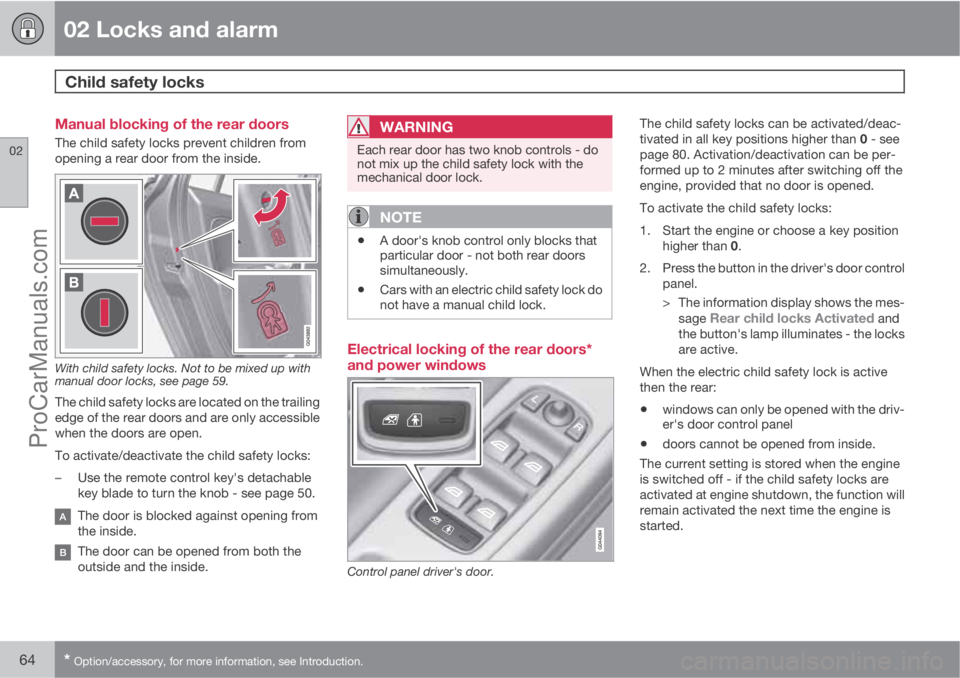
The child safety locks prevent children from
opening a rear door from the inside.
With child safety locks. Not to be mixed up with
manual door locks, see page 59.
The child safety locks are located on the trailing
edge of the rear doors and are only accessible
when the doors are open.
To activate/deactivate the child safety locks:
–Use the remote control key's detachable
key blade to turn the knob - see page 50.
The door is blocked against opening from
the inside.
The door can be opened from both the
outside and the inside.
WARNING
Each rear door has two knob controls - do
not mix up the child safety lock with the
mechanical door lock.
NOTE
•A door's knob control only blocks that
particular door - not both rear doors
simultaneously.
•Cars with an electric child safety lock do
not have a manual child lock.
Electrical locking of the rear doors*
and power windows
Control panel driver's door.
The child safety locks can be activated/deac-
tivated in all key positions higher than 0 - see
page 80. Activation/deactivation can be per-
formed up to 2 minutes after switching off the
engine, provided that no door is opened.
To activate the child safety locks:
1. Start the engine or choose a key position
higher than 0.
2. Press the button in the driver's door control
panel.
> The information display shows the mes-
sage
Rear child locks Activated and
the button's lamp illuminates - the locks
are active.
When the electric child safety lock is active
then the rear:
•windows can only be opened with the driv-
er's door control panel
•doors cannot be opened from inside.
The current setting is stored when the engine
is switched off - if the child safety locks are
activated at engine shutdown, the function will
remain activated the next time the engine is
started.
ProCarManuals.com