warning VOLVO V60 2012 Service Manual
[x] Cancel search | Manufacturer: VOLVO, Model Year: 2012, Model line: V60, Model: VOLVO V60 2012Pages: 400, PDF Size: 9.28 MB
Page 89 of 400
03 Your driving environment
Steering wheel
03
* Option/accessory, for more information, see Introduction.87 Adjusting
G021138
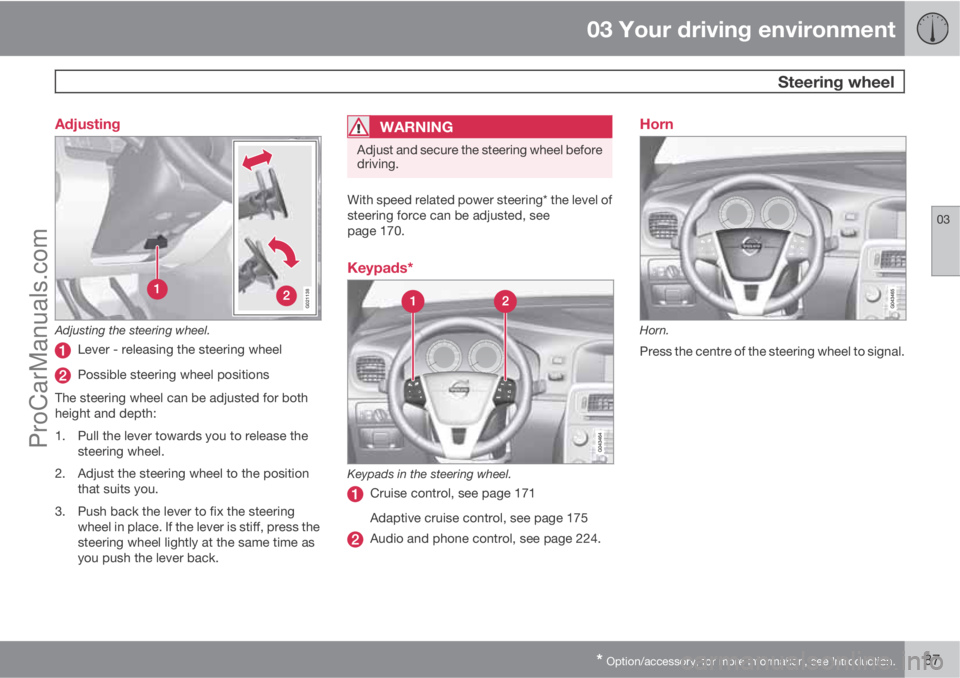
Adjusting the steering wheel.
Lever - releasing the steering wheel
Possible steering wheel positions
The steering wheel can be adjusted for both
height and depth:
1. Pull the lever towards you to release the
steering wheel.
2. Adjust the steering wheel to the position
that suits you.
3. Push back the lever to fix the steering
wheel in place. If the lever is stiff, press the
steering wheel lightly at the same time as
you push the lever back.
WARNING
Adjust and secure the steering wheel before
driving.
With speed related power steering* the level of
steering force can be adjusted, see
page 170.
Keypads*
Keypads in the steering wheel.
Cruise control, see page 171
Adaptive cruise control, see page 175
Audio and phone control, see page 224.
Horn
Horn.
Press the centre of the steering wheel to signal.
ProCarManuals.com
Page 92 of 400
03 Your driving environment
Lighting
03
90* Option/accessory, for more information, see Introduction.
SymbolDisplaySpecifica-
tion
Headlamp
failure
Service
requiredThe system
is disen-
gaged. Visit
a workshop
if the mes-
sage
remains.
Volvo rec-
ommends
that you
contact an
authorised
Volvo work-
shop.
The function is only active in twilight or dark-
ness and only when the car is moving.
The function
3 can be deactivated/activated in
the menu system MY CAR under My V60
Active bending lights or under Settings
Car settingsLight settingsActive
bending lights. For a description of the menu
system, see page 145.
For headlamp pattern adjustment, see
page 93.
Auxiliary lamps*If the car has auxiliary lamps, the driver can use
the MY CAR menu system to choose whether
they should be deactivated or switched on/off
simultaneously with the main beam
4, see
page 146.
Position/parking lamps
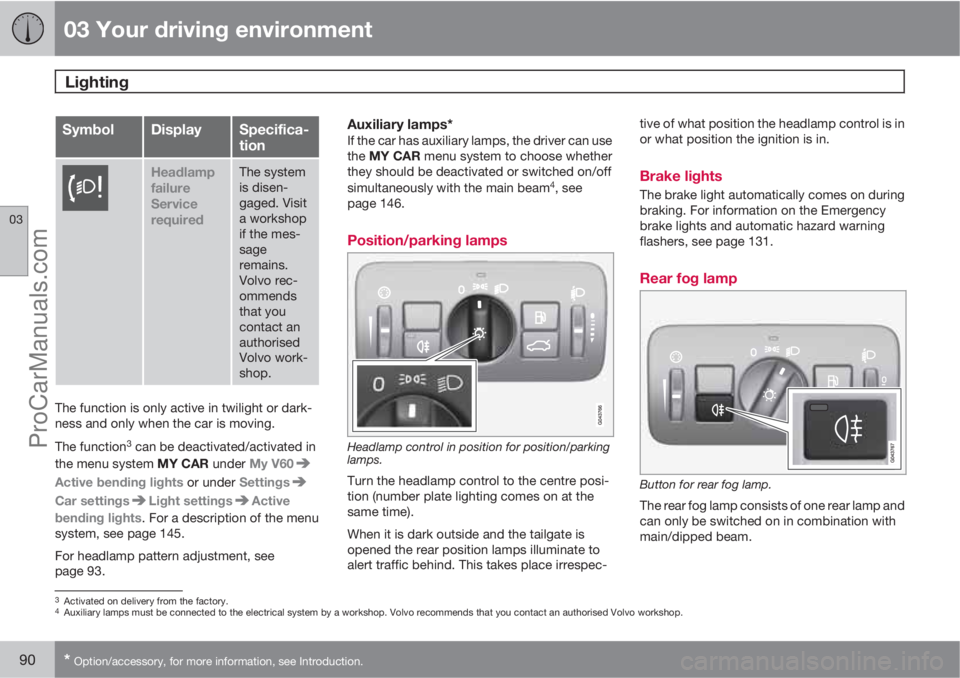
Headlamp control in position for position/parking
lamps.
Turn the headlamp control to the centre posi-
tion (number plate lighting comes on at the
same time).
When it is dark outside and the tailgate is
opened the rear position lamps illuminate to
alert traffic behind. This takes place irrespec-tive of what position the headlamp control is in
or what position the ignition is in.
Brake lights
The brake light automatically comes on during
braking. For information on the Emergency
brake lights and automatic hazard warning
flashers, see page 131.
Rear fog lamp
Button for rear fog lamp.
The rear fog lamp consists of one rear lamp and
can only be switched on in combination with
main/dipped beam.
3Activated on delivery from the factory.4Auxiliary lamps must be connected to the electrical system by a workshop. Volvo recommends that you contact an authorised Volvo workshop.
ProCarManuals.com
Page 93 of 400
03 Your driving environment
Lighting
03
91
Press the button for On/Off. The rear fog lamp
indicator symbol
on the combined
instrument panel and the light in the button illu-
minate when the rear fog lamp is switched on.
The rear fog lamp is switched off automatically
when the engine is switched off.
NOTE
Regulations for using rear fog lamps vary
between different countries.
Hazard warning flashers
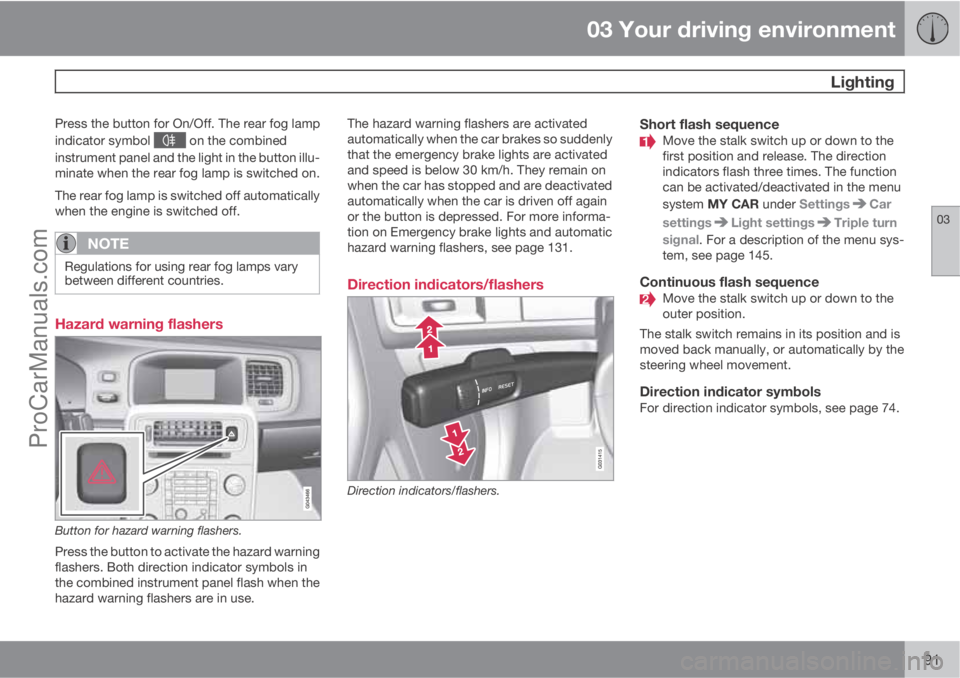
Button for hazard warning flashers.
Press the button to activate the hazard warning
flashers. Both direction indicator symbols in
the combined instrument panel flash when the
hazard warning flashers are in use.The hazard warning flashers are activated
automatically when the car brakes so suddenly
that the emergency brake lights are activated
and speed is below 30 km/h. They remain on
when the car has stopped and are deactivated
automatically when the car is driven off again
or the button is depressed. For more informa-
tion on Emergency brake lights and automatic
hazard warning flashers, see page 131.
Direction indicators/flashers
Direction indicators/flashers.
Short flash sequenceMove the stalk switch up or down to the
first position and release. The direction
indicators flash three times. The function
can be activated/deactivated in the menu
system MY CAR under Settings
Car
settings
Light settingsTriple turn
signal. For a description of the menu sys-
tem, see page 145.
Continuous flash sequenceMove the stalk switch up or down to the
outer position.
The stalk switch remains in its position and is
moved back manually, or automatically by the
steering wheel movement.
Direction indicator symbolsFor direction indicator symbols, see page 74.
ProCarManuals.com
Page 102 of 400
03 Your driving environment
Windows, rearview and door mirrors
03
100* Option/accessory, for more information, see Introduction.
General
Laminated glassThe glass is reinforced which pro-
vides better protection against
break-ins and improved sound insu-
lation in the passenger compartment.
The windscreen and other windows* have lami-
nated glass.
Water and dirt-repellent coating*Windows are treated with a coating
that improves the view in difficult
weather conditions. Maintenance, see
page 345.
IMPORTANT
Do not use a metal ice scraper to remove ice
from the windows. Use the defroster to
remove ice from the mirrors, see
page 103.
Heat-reflecting windscreen*
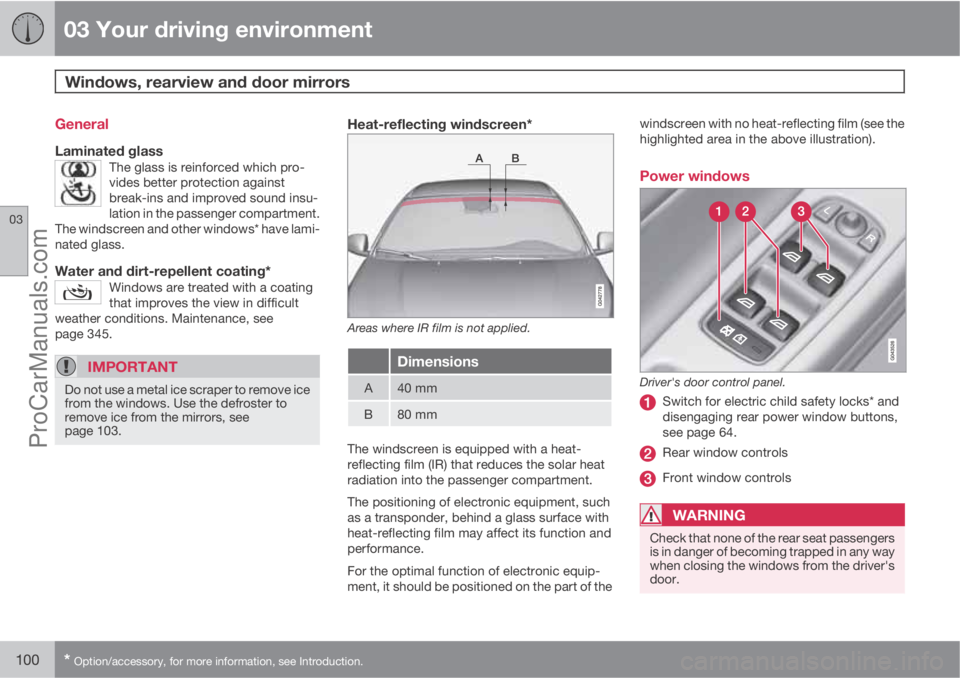
Areas where IR film is not applied.
Dimensions
A40 mm
B80 mm
The windscreen is equipped with a heat-
reflecting film (IR) that reduces the solar heat
radiation into the passenger compartment.
The positioning of electronic equipment, such
as a transponder, behind a glass surface with
heat-reflecting film may affect its function and
performance.
For the optimal function of electronic equip-
ment, it should be positioned on the part of thewindscreen with no heat-reflecting film (see the
highlighted area in the above illustration).
Power windows
Driver's door control panel.
Switch for electric child safety locks* and
disengaging rear power window buttons,
see page 64.
Rear window controls
Front window controls
WARNING
Check that none of the rear seat passengers
is in danger of becoming trapped in any way
when closing the windows from the driver's
door.
ProCarManuals.com
Page 103 of 400
03 Your driving environment
Windows, rearview and door mirrors
03
101
WARNING
Make sure that children or other passengers
are not in danger of becoming trapped in
any way when closing the windows, in par-
ticular when the remote control key is used.
WARNING
If there are children in the car - remember to
always switch off the power supply to the
power windows by selecting key position 0
and then take the remote control key with
you when leaving the car. For information on
key positions - see page 81.
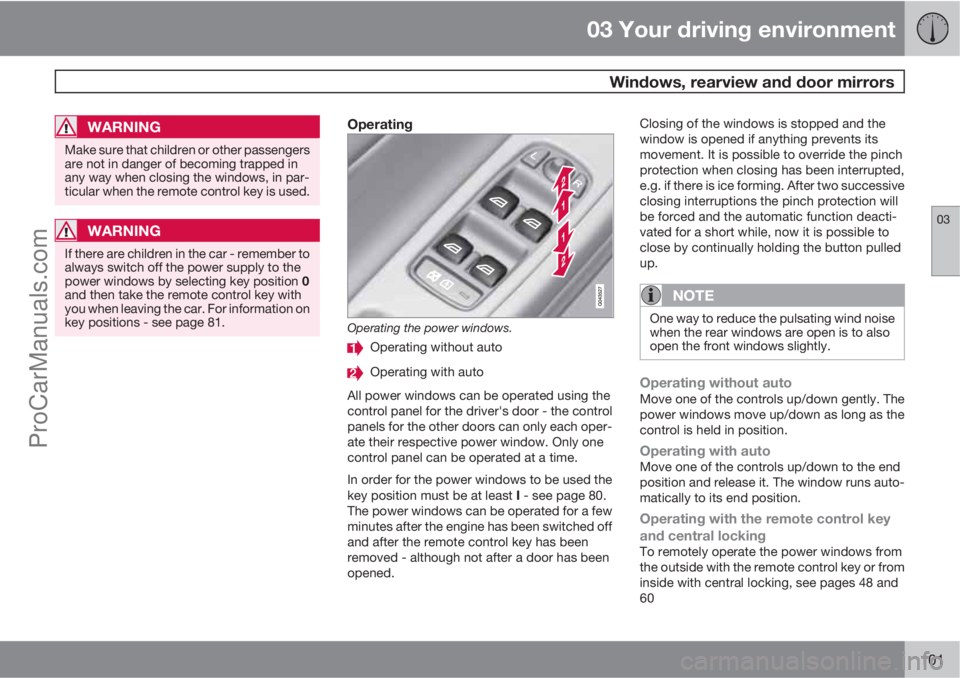
Operating
Operating the power windows.
Operating without auto
Operating with auto
All power windows can be operated using the
control panel for the driver's door - the control
panels for the other doors can only each oper-
ate their respective power window. Only one
control panel can be operated at a time.
In order for the power windows to be used the
key position must be at least I - see page 80.
The power windows can be operated for a few
minutes after the engine has been switched off
and after the remote control key has been
removed - although not after a door has been
opened.Closing of the windows is stopped and the
window is opened if anything prevents its
movement. It is possible to override the pinch
protection when closing has been interrupted,
e.g. if there is ice forming. After two successive
closing interruptions the pinch protection will
be forced and the automatic function deacti-
vated for a short while, now it is possible to
close by continually holding the button pulled
up.
NOTE
One way to reduce the pulsating wind noise
when the rear windows are open is to also
open the front windows slightly.
Operating without autoMove one of the controls up/down gently. The
power windows move up/down as long as the
control is held in position.
Operating with autoMove one of the controls up/down to the end
position and release it. The window runs auto-
matically to its end position.
Operating with the remote control key
and central locking
To remotely operate the power windows from
the outside with the remote control key or from
inside with central locking, see pages 48 and
60
ProCarManuals.com
Page 104 of 400
03 Your driving environment
Windows, rearview and door mirrors
03
102
ResettingIf the battery is disconnected then the function
for automatic opening must be reset so that it
can work correctly.
1. Gently raise the front section of the button
to raise the window to its end position and
hold it there for one second.
2. Release the button briefly.
3. Raise the front section of the button again
for one second.
WARNING
Resetting must be carried out to ensure that
pinch protection works.
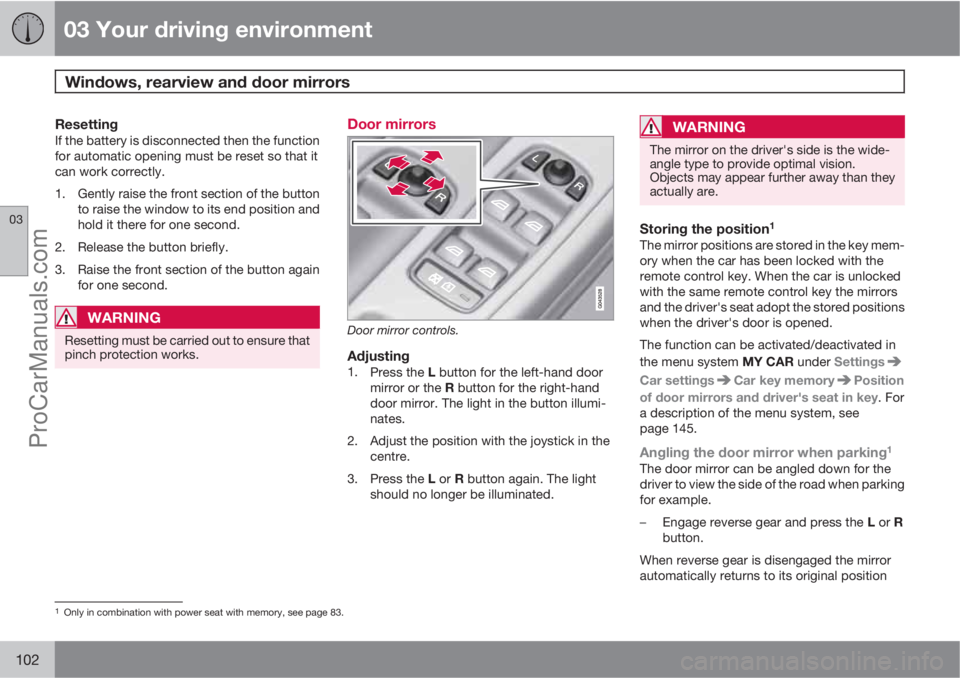
Door mirrors
Door mirror controls.
Adjusting1.
Press the L button for the left-hand door
mirror or the R button for the right-hand
door mirror. The light in the button illumi-
nates.
2. Adjust the position with the joystick in the
centre.
3.
Press the L or R button again. The light
should no longer be illuminated.
WARNING
The mirror on the driver's side is the wide-
angle type to provide optimal vision.
Objects may appear further away than they
actually are.
Storing the position1
The mirror positions are stored in the key mem-
ory when the car has been locked with the
remote control key. When the car is unlocked
with the same remote control key the mirrors
and the driver's seat adopt the stored positions
when the driver's door is opened.
The function can be activated/deactivated in
the menu system MY CAR under Settings
Car settingsCar key memoryPosition
of door mirrors and driver's seat in key. For
a description of the menu system, see
page 145.
Angling the door mirror when parking1
The door mirror can be angled down for the
driver to view the side of the road when parking
for example.
–
Engage reverse gear and press the L or R
button.
When reverse gear is disengaged the mirror
automatically returns to its original position
1Only in combination with power seat with memory, see page 83.
ProCarManuals.com
Page 108 of 400
03 Your driving environment
Power sunroof*
03
106* Option/accessory, for more information, see Introduction.
General
The sunroof controls are located in the roof
panel. The sunroof can be opened vertically at
the rear edge and horizontally. Key position I or
II is required for the sunroof to be opened.
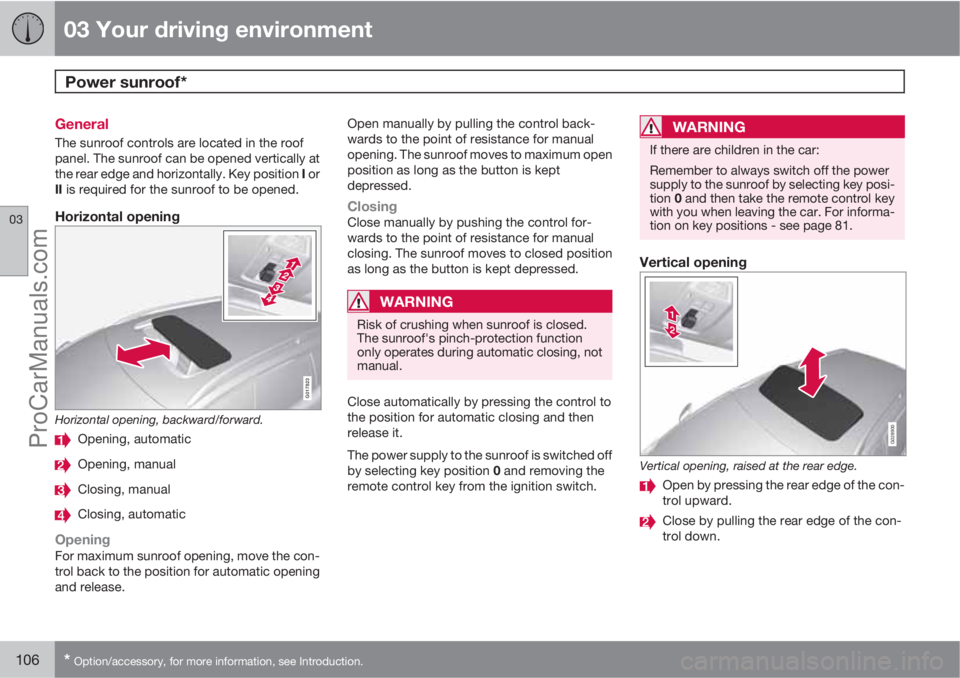
Horizontal opening
G017823
Horizontal opening, backward/forward.
Opening, automatic
Opening, manual
Closing, manual
Closing, automatic
OpeningFor maximum sunroof opening, move the con-
trol back to the position for automatic opening
and release.Open manually by pulling the control back-
wards to the point of resistance for manual
opening. The sunroof moves to maximum open
position as long as the button is kept
depressed.
ClosingClose manually by pushing the control for-
wards to the point of resistance for manual
closing. The sunroof moves to closed position
as long as the button is kept depressed.
WARNING
Risk of crushing when sunroof is closed.
The sunroof's pinch-protection function
only operates during automatic closing, not
manual.
Close automatically by pressing the control to
the position for automatic closing and then
release it.
The power supply to the sunroof is switched off
by selecting key position 0 and removing the
remote control key from the ignition switch.
WARNING
If there are children in the car:
Remember to always switch off the power
supply to the sunroof by selecting key posi-
tion 0 and then take the remote control key
with you when leaving the car. For informa-
tion on key positions - see page 81.
Vertical opening
G028900
Vertical opening, raised at the rear edge.
Open by pressing the rear edge of the con-
trol upward.
Close by pulling the rear edge of the con-
trol down.
ProCarManuals.com
Page 109 of 400
03 Your driving environment
Power sunroof*
03
* Option/accessory, for more information, see Introduction.107
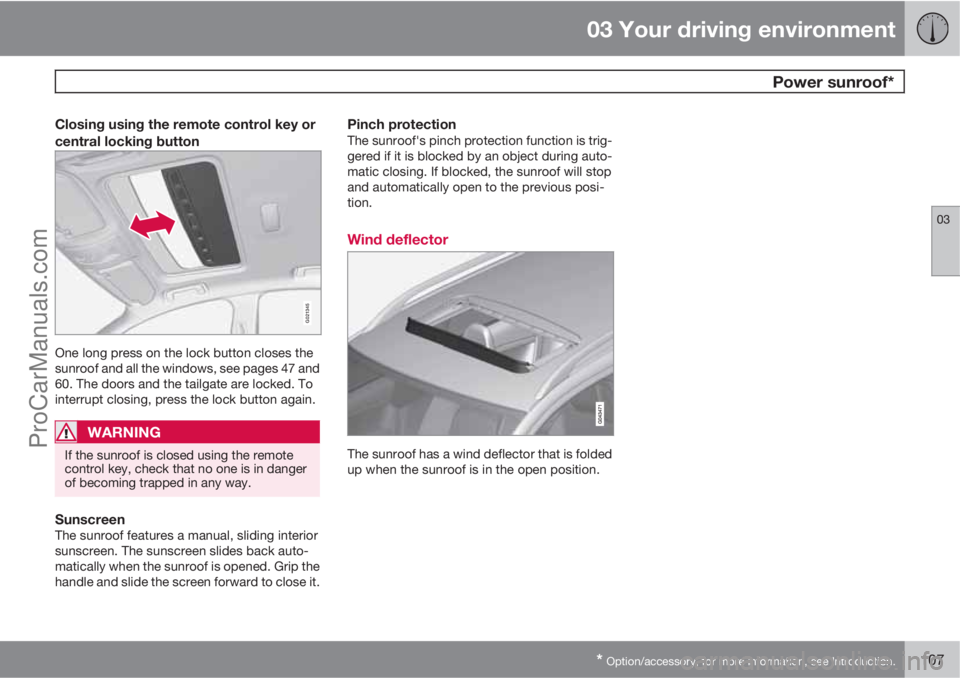
Closing using the remote control key or
central locking button
G021345
One long press on the lock button closes the
sunroof and all the windows, see pages 47 and
60. The doors and the tailgate are locked. To
interrupt closing, press the lock button again.
WARNING
If the sunroof is closed using the remote
control key, check that no one is in danger
of becoming trapped in any way.
SunscreenThe sunroof features a manual, sliding interior
sunscreen. The sunscreen slides back auto-
matically when the sunroof is opened. Grip the
handle and slide the screen forward to close it.
Pinch protectionThe sunroof's pinch protection function is trig-
gered if it is blocked by an object during auto-
matic closing. If blocked, the sunroof will stop
and automatically open to the previous posi-
tion.
Wind deflector
The sunroof has a wind deflector that is folded
up when the sunroof is in the open position.
ProCarManuals.com
Page 110 of 400
03 Your driving environment
Alcoguard*
03
108* Option/accessory, for more information, see Introduction.
General information on the alcolock
The function of the Alcolock is to prevent the
car from being driven by individuals under the
influence of alcohol. Before the engine can be
started the driver must take a breath test that
verifies that he/she is not under the influence
of alcohol. Alcolock calibration takes place in
accordance with each market's limit value in
force for driving legally.
WARNING
The Alcolock is an aid and does not exempt
the driver from responsibility. It is always the
responsibility of the driver to be sober and
to drive the car safely.
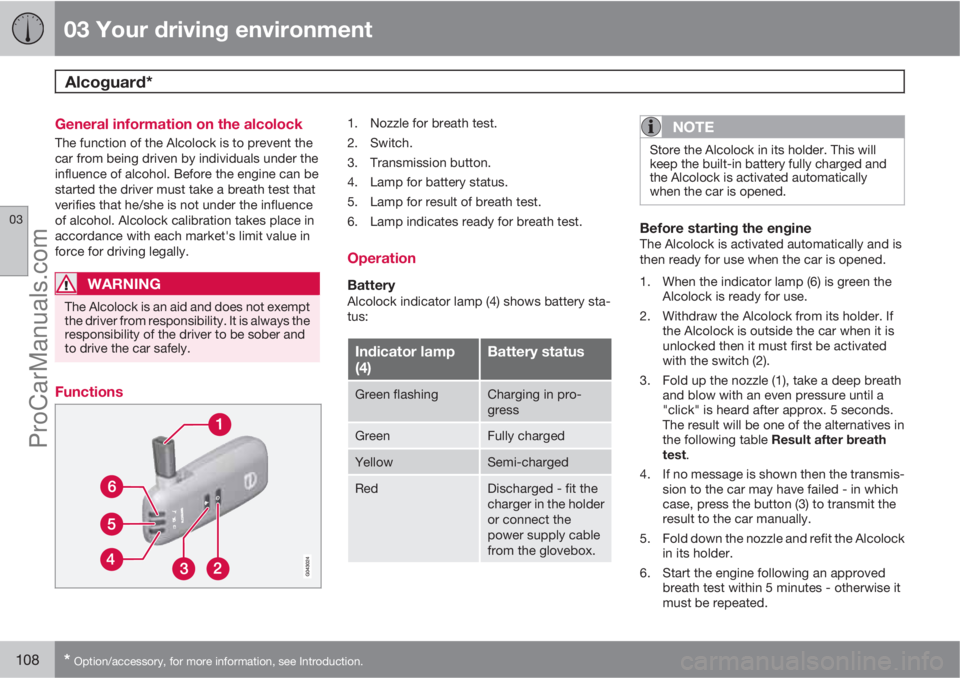
Functions
1. Nozzle for breath test.
2. Switch.
3. Transmission button.
4. Lamp for battery status.
5. Lamp for result of breath test.
6. Lamp indicates ready for breath test.
Operation
BatteryAlcolock indicator lamp (4) shows battery sta-
tus:
Indicator lamp
(4)Battery status
Green flashingCharging in pro-
gress
GreenFully charged
YellowSemi-charged
RedDischarged - fit the
charger in the holder
or connect the
power supply cable
from the glovebox.
NOTE
Store the Alcolock in its holder. This will
keep the built-in battery fully charged and
the Alcolock is activated automatically
when the car is opened.
Before starting the engineThe Alcolock is activated automatically and is
then ready for use when the car is opened.
1. When the indicator lamp (6) is green the
Alcolock is ready for use.
2. Withdraw the Alcolock from its holder. If
the Alcolock is outside the car when it is
unlocked then it must first be activated
with the switch (2).
3. Fold up the nozzle (1), take a deep breath
and blow with an even pressure until a
"click" is heard after approx. 5 seconds.
The result will be one of the alternatives in
the following table Result after breath
test.
4. If no message is shown then the transmis-
sion to the car may have failed - in which
case, press the button (3) to transmit the
result to the car manually.
5. Fold down the nozzle and refit the Alcolock
in its holder.
6. Start the engine following an approved
breath test within 5 minutes - otherwise it
must be repeated.
ProCarManuals.com
Page 112 of 400
03 Your driving environment
Alcoguard*
03
110* Option/accessory, for more information, see Introduction.
In extremely cold weather the heating time can
be reduced by taking the Alcolock indoors.
Emergency situationIn the event of an emergency situation, or if the
Alcolock is out of order or has been removed,
it is possible to bypass the Alcolock in order to
drive the car.
NOTE
All Bypass activation is logged and saved in
memory, see page 8 in the section, Record-
ing data.
After the Bypass function has been activated
the display shows Alcoguard Bypass
enabled the whole time while driving and can
only be reset by a workshop1.
The Bypass function can be tested without the
error message being logged - in which case,
carry out all the steps without starting the car.
The error message is cleared when the car is
locked.
When the Alcolock is installed, either the
Bypass or Emergency function is selected as
the bypassing option. This setting can be
changed afterwards at a workshop
1.
Activating the Bypass function
•Depress and hold the left-hand stalk
switch READ button and the button for
hazard warning flashers simultaneously for
approx. 5 seconds - the display first shows
Bypass activated Wait 1 minute and
then Alcoguard Bypass enabled - after
which the engine can be started.
This function can be activated several times.
The error message shown during driving can
only be cleared at a workshop
1.
Activating the Emergency function
•Depress and hold the left-hand stalk
switch READ button and the button for
hazard warning flashers simultaneously for
approx. 5 seconds - the display shows
Alcoguard Bypass enabled and the
engine can be started.
This function can be used once, after which a
reset must be made at a workshop
1.
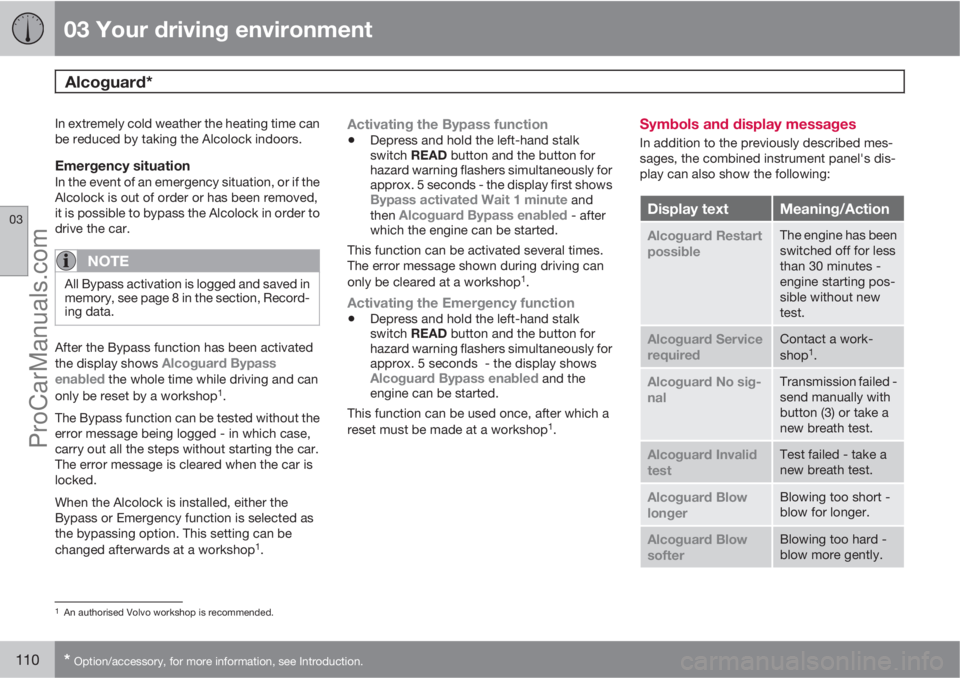
Symbols and display messages
In addition to the previously described mes-
sages, the combined instrument panel's dis-
play can also show the following:
Display textMeaning/Action
Alcoguard Restart
possibleThe engine has been
switched off for less
than 30 minutes -
engine starting pos-
sible without new
test.
Alcoguard Service
requiredContact a work-
shop1.
Alcoguard No sig-
nalTransmission failed -
send manually with
button (3) or take a
new breath test.
Alcoguard Invalid
testTest failed - take a
new breath test.
Alcoguard Blow
longerBlowing too short -
blow for longer.
Alcoguard Blow
softerBlowing too hard -
blow more gently.
1An authorised Volvo workshop is recommended.
ProCarManuals.com