steering VOLVO V60 2012 Service Manual
[x] Cancel search | Manufacturer: VOLVO, Model Year: 2012, Model line: V60, Model: VOLVO V60 2012Pages: 400, PDF Size: 9.28 MB
Page 211 of 400
04 Comfort and driving pleasure
Park assist camera*
04
* Option/accessory, for more information, see Introduction.209
Light conditionsThe camera image is adjusted automatically
according to prevailing light conditions.
Because of this, the image may vary slightly in
brightness and quality. Poor light conditions
can result in a slightly reduced image quality.
NOTE
Keep camera lenses clear of dirt, snow and
ice to ensure the best possible function.
This is particularly important in poor light.
Park assist lines
Examples of how the park assist lines can be dis-
played for the driver.
The lines on the screen are projected as if they
were at ground level behind the car and are
directly related to steering wheel movement,which shows the driver the path the car will
take, even when turning.
NOTE
•When reversing with a trailer which is
not connected electrically to the car, the
lines on the display show the route the
car will take - not the trailer.
•The screen shows no lines when a trailer
is connected electrically to the car's
electrical system.
•The parking camera is deactivated
automatically when towing a trailer if a
Volvo genuine trailer cable is used.
IMPORTANT
Bear in mind that the screen only shows the
area behind the car - pay attention to the
sides and front of the car when manoeuvring
during reversing.
Boundary lines
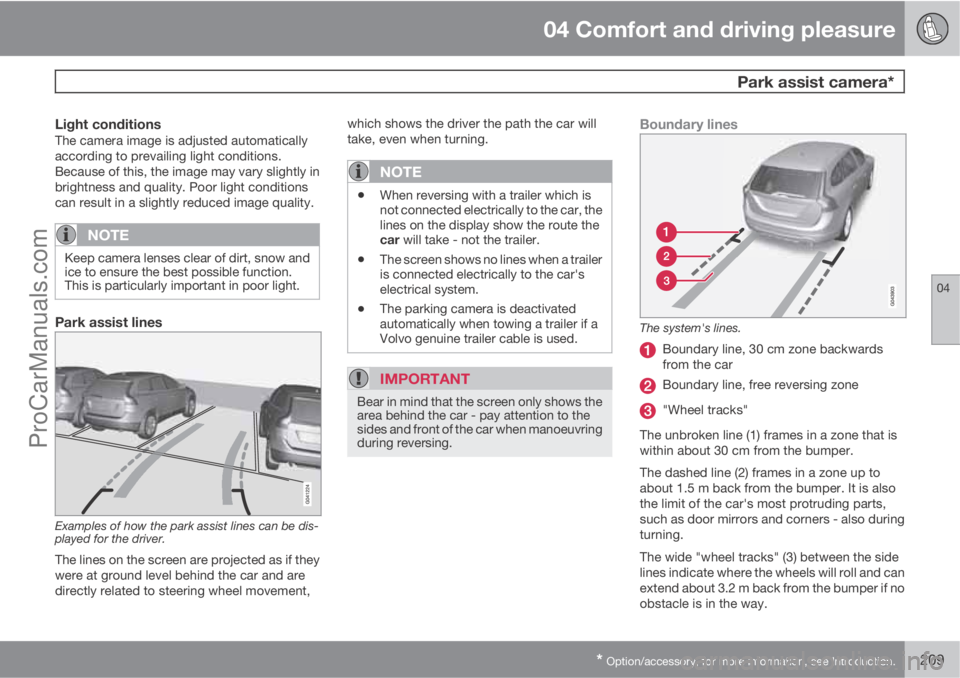
The system's lines.
Boundary line, 30 cm zone backwards
from the car
Boundary line, free reversing zone
"Wheel tracks"
The unbroken line (1) frames in a zone that is
within about 30 cm from the bumper.
The dashed line (2) frames in a zone up to
about 1.5 m back from the bumper. It is also
the limit of the car's most protruding parts,
such as door mirrors and corners - also during
turning.
The wide "wheel tracks" (3) between the side
lines indicate where the wheels will roll and can
extend about 3.2 m back from the bumper if no
obstacle is in the way.
ProCarManuals.com
Page 222 of 400
05 Infotainment system
General information on infotainment
05
220* Option/accessory, for more information, see Introduction.
General
The infotainment system in your car has one of
the following four levels:
Performance
•5" TV screen TFT
•Steering wheel keypad* without thumb-
wheel
•AM/FM radio
•CD
•AUX input
•6 speakers
•4x20W amplifier
High Performance
•5" TV screen TFT
•Steering wheel keypad* with thumbwheel
•AM/FM radio
•CD
•AUX and USB input (for e.g. iPodŸ)
•BluetoothŸ handsfree/streaming audio
•8 speakers
•4x40W amplifier
High Performance Multimedia
•7" TV screen TFT
•Steering wheel keypad* with thumbwheel
•AM/FM radio
•CD/DVD
•AUX and USB input (for e.g. iPodŸ)
•BluetoothŸ handsfree/streaming audio
•8 speakers
•4x40W amplifier
Premium Sound Multimedia
•7" TV screen TFT
•Steering wheel keypad* with thumbwheel
•AM/FM radio
•CD/DVD
•AUX and USB input (for e.g. iPodŸ)
•BluetoothŸ handsfree/streaming audio
•12 speakers
•5x130W amplifier
Dolby, Pro Logic
Made under license from Dolby Laboratories.
Dolby, Pro Logic and the double-D symbol are
trademarks of Dolby Laboratories.
Audyssey MultEQ1
The Audyssey MultEQ system has been used
in the development and tuning of the sound to
ensure a world-class sound experience.
Other
If the Infotainment System is active when the
engine is switched off then it is automatically
activated the next time the key is inserted into
position I or higher, and it continues with the
same source (e.g. radio) as before the engine
was switched off (the driver's door must be
closed on cars with Keyless systems*).
The infotainment system can be used for 15
minutes at a time without the remote control
1Only applies to Premium Sound Multimedia.
ProCarManuals.com
Page 224 of 400
05 Infotainment system
Quick start
05
222* Option/accessory, for more information, see Introduction.
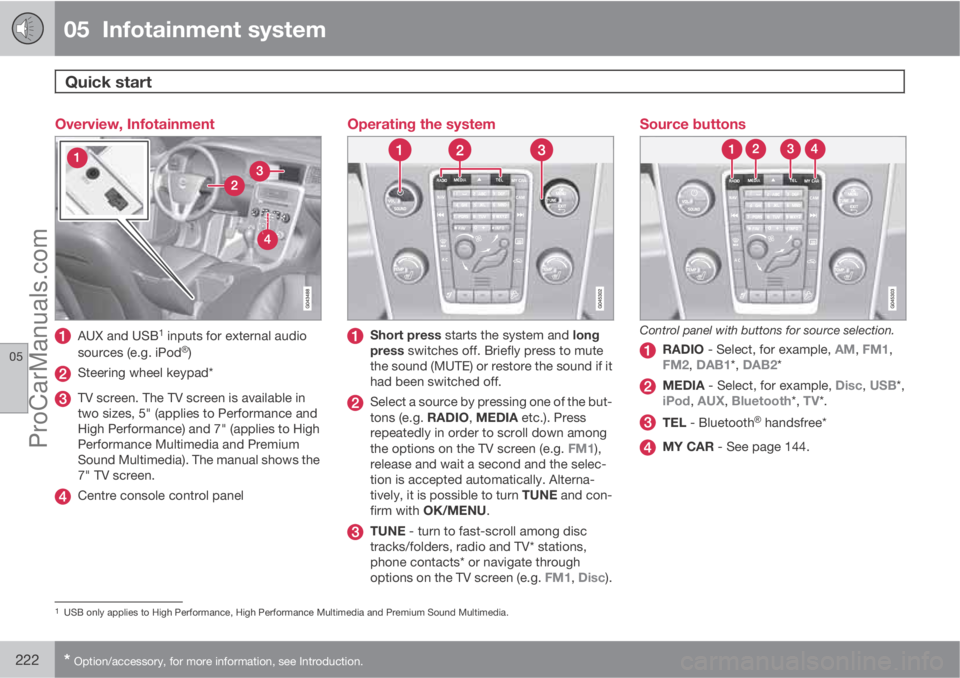
Overview, Infotainment
AUX and USB1 inputs for external audio
sources (e.g. iPodŸ)
Steering wheel keypad*
TV screen. The TV screen is available in
two sizes, 5" (applies to Performance and
High Performance) and 7" (applies to High
Performance Multimedia and Premium
Sound Multimedia). The manual shows the
7" TV screen.
Centre console control panel
Operating the system
Short press starts the system and long
press switches off. Briefly press to mute
the sound (MUTE) or restore the sound if it
had been switched off.
Select a source by pressing one of the but-
tons (e.g. RADIO, MEDIA etc.). Press
repeatedly in order to scroll down among
the options on the TV screen (e.g. FM1),
release and wait a second and the selec-
tion is accepted automatically. Alterna-
tively, it is possible to turn TUNE and con-
firm with OK/MENU.
TUNE - turn to fast-scroll among disc
tracks/folders, radio and TV* stations,
phone contacts* or navigate through
options on the TV screen (e.g. FM1, Disc).
Source buttons
Control panel with buttons for source selection.
RADIO - Select, for example, AM, FM1,
FM2, DAB1*, DAB2*
MEDIA - Select, for example, Disc, USB*,
iPod, AUX, Bluetooth*, TV*.
TEL - BluetoothŸ handsfree*
MY CAR - See page 144.
1USB only applies to High Performance, High Performance Multimedia and Premium Sound Multimedia.
ProCarManuals.com
Page 226 of 400
05 Infotainment system
Quick start
05
224* Option/accessory, for more information, see Introduction.
Parent view
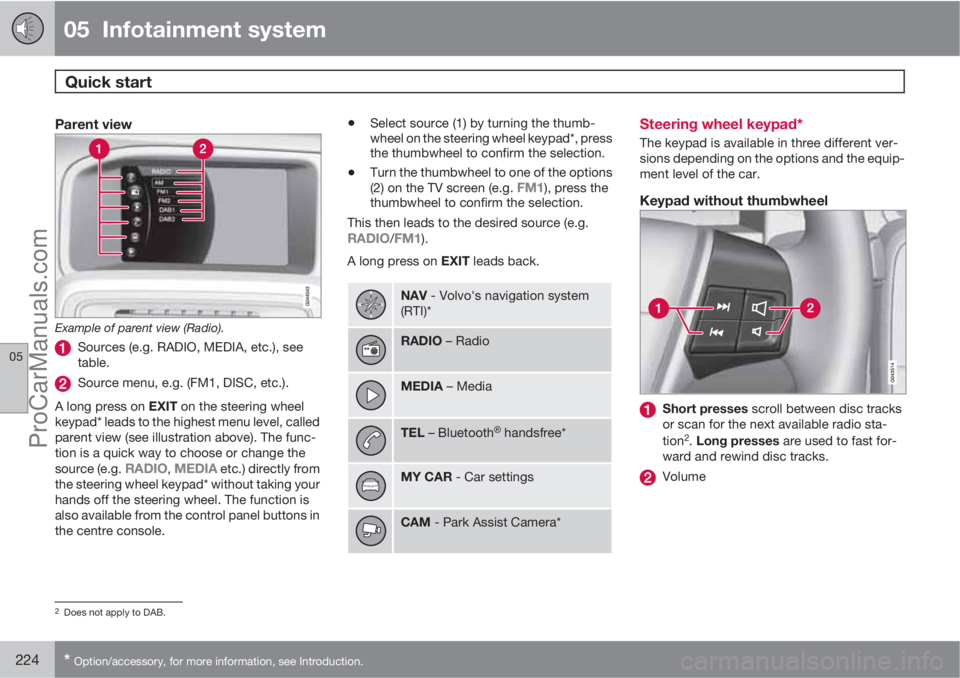
Example of parent view (Radio).
Sources (e.g. RADIO, MEDIA, etc.), see
table.
Source menu, e.g. (FM1, DISC, etc.).
A long press on EXIT on the steering wheel
keypad* leads to the highest menu level, called
parent view (see illustration above). The func-
tion is a quick way to choose or change the
source (e.g.
RADIO, MEDIA etc.) directly from
the steering wheel keypad* without taking your
hands off the steering wheel. The function is
also available from the control panel buttons in
the centre console.
•Select source (1) by turning the thumb-
wheel on the steering wheel keypad*, press
the thumbwheel to confirm the selection.
•Turn the thumbwheel to one of the options
(2) on the TV screen (e.g. FM1), press the
thumbwheel to confirm the selection.
This then leads to the desired source (e.g.
RADIO/FM1).
A long press on EXIT leads back.
NAV - Volvo's navigation system
(RTI)*
RADIO – Radio
MEDIA – Media
TEL – BluetoothŸ handsfree*
MY CAR - Car settings
CAM - Park Assist Camera*
Steering wheel keypad*
The keypad is available in three different ver-
sions depending on the options and the equip-
ment level of the car.
Keypad without thumbwheel
Short presses scroll between disc tracks
or scan for the next available radio sta-
tion
2. Long presses are used to fast for-
ward and rewind disc tracks.
Volume
2Does not apply to DAB.
ProCarManuals.com
Page 231 of 400
05 Infotainment system
Radio
05
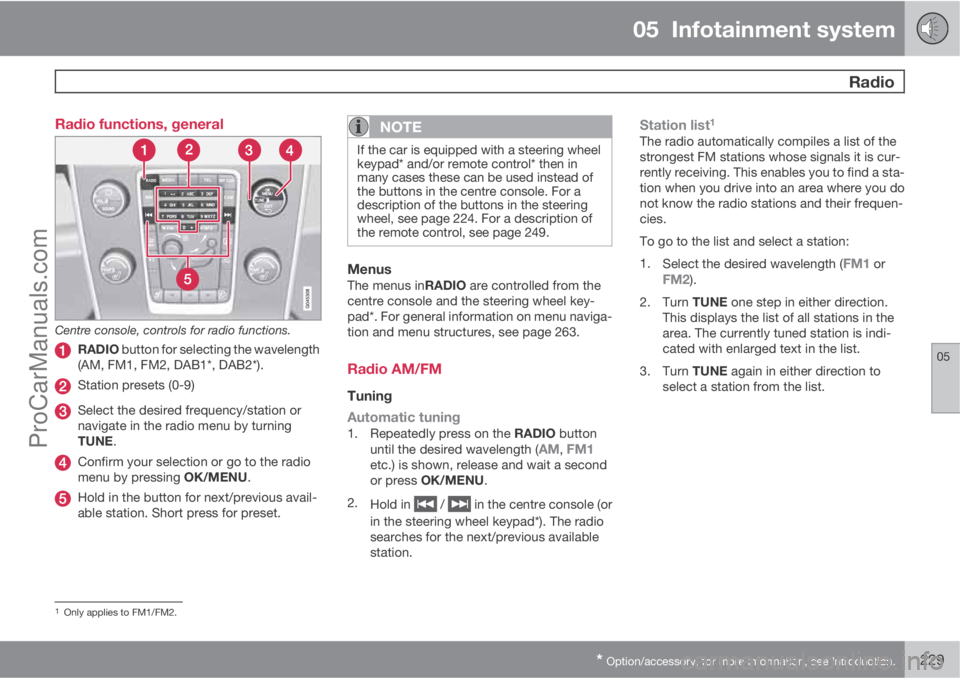
* Option/accessory, for more information, see Introduction.229 Radio functions, general
Centre console, controls for radio functions.
RADIO button for selecting the wavelength
(AM, FM1, FM2, DAB1*, DAB2*).
Station presets (0-9)
Select the desired frequency/station or
navigate in the radio menu by turning
TUNE.
Confirm your selection or go to the radio
menu by pressing OK/MENU.
Hold in the button for next/previous avail-
able station. Short press for preset.
NOTE
If the car is equipped with a steering wheel
keypad* and/or remote control* then in
many cases these can be used instead of
the buttons in the centre console. For a
description of the buttons in the steering
wheel, see page 224. For a description of
the remote control, see page 249.
MenusThe menus inRADIO are controlled from the
centre console and the steering wheel key-
pad*. For general information on menu naviga-
tion and menu structures, see page 263.
Radio AM/FM
Tuning
Automatic tuning
1.
Repeatedly press on the RADIO button
until the desired wavelength (AM, FM1etc.) is shown, release and wait a second
or press OK/MENU.
2.
Hold in
/ in the centre console (or
in the steering wheel keypad*). The radio
searches for the next/previous available
station.
Station list1
The radio automatically compiles a list of the
strongest FM stations whose signals it is cur-
rently receiving. This enables you to find a sta-
tion when you drive into an area where you do
not know the radio stations and their frequen-
cies.
To go to the list and select a station:
1.
Select the desired wavelength (
FM1 orFM2).
2.
Turn TUNE one step in either direction.
This displays the list of all stations in the
area. The currently tuned station is indi-
cated with enlarged text in the list.
3.
Turn TUNE again in either direction to
select a station from the list.
1Only applies to FM1/FM2.
ProCarManuals.com
Page 238 of 400
05 Infotainment system
Media player
05
236* Option/accessory, for more information, see Introduction.
CD/DVD1 functions
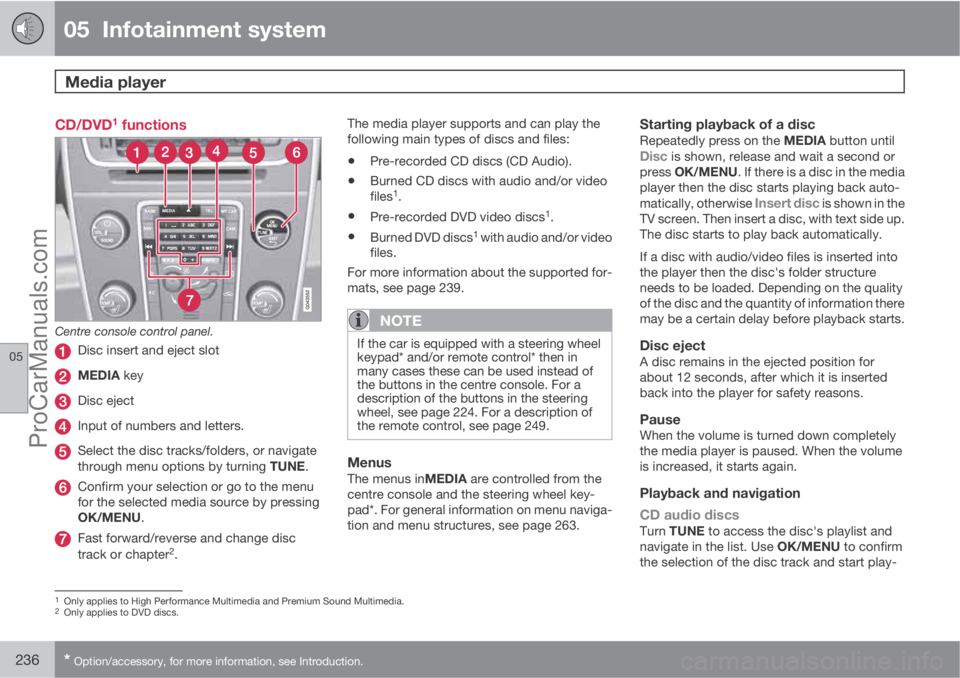
Centre console control panel.
Disc insert and eject slot
MEDIA key
Disc eject
Input of numbers and letters.
Select the disc tracks/folders, or navigate
through menu options by turning TUNE.
Confirm your selection or go to the menu
for the selected media source by pressing
OK/MENU.
Fast forward/reverse and change disc
track or chapter2.The media player supports and can play the
following main types of discs and files:
•Pre-recorded CD discs (CD Audio).
•Burned CD discs with audio and/or video
files1.
•Pre-recorded DVD video discs1.
•Burned DVD discs1 with audio and/or video
files.
For more information about the supported for-
mats, see page 239.
NOTE
If the car is equipped with a steering wheel
keypad* and/or remote control* then in
many cases these can be used instead of
the buttons in the centre console. For a
description of the buttons in the steering
wheel, see page 224. For a description of
the remote control, see page 249.
MenusThe menus inMEDIA are controlled from the
centre console and the steering wheel key-
pad*. For general information on menu naviga-
tion and menu structures, see page 263.
Starting playback of a discRepeatedly press on the MEDIA button untilDisc is shown, release and wait a second or
press OK/MENU. If there is a disc in the media
player then the disc starts playing back auto-
matically, otherwise
Insert disc is shown in the
TV screen. Then insert a disc, with text side up.
The disc starts to play back automatically.
If a disc with audio/video files is inserted into
the player then the disc's folder structure
needs to be loaded. Depending on the quality
of the disc and the quantity of information there
may be a certain delay before playback starts.
Disc ejectA disc remains in the ejected position for
about 12 seconds, after which it is inserted
back into the player for safety reasons.
PauseWhen the volume is turned down completely
the media player is paused. When the volume
is increased, it starts again.
Playback and navigation
CD audio discs
Turn TUNE to access the disc's playlist and
navigate in the list. Use OK/MENU to confirm
the selection of the disc track and start play-
1Only applies to High Performance Multimedia and Premium Sound Multimedia.2Only applies to DVD discs.
ProCarManuals.com
Page 239 of 400
05 Infotainment system
Media player
05
* Option/accessory, for more information, see Introduction.237
back. Press EXIT to cancel and exit the playlist.
A long press on EXIT leads to the playlist's root
level.
Disc tracks can also be changed by pressing
on
/ on the centre console or the
steering wheel keypad*.
Burned discs audio/video files1
Turn TUNE to access the disc's playlist/folder
structure and navigate in the list/structure. Use
OK/MENU to confirm either selection of sub-
folder or start of playback of the selected
audio/video file. Press EXIT to either stop and
exit the playlist or go up (back) in the folder
structure. A long press on EXIT leads to the
playlist's root level.
Audio/video files can also be changed by
pressing
/ on the centre console or the
steering wheel keypad*.
Audio files have the symbol
, video files1
have the symbol and folders have the
symbol
.
When playback of a file is complete the play-
back of the other files (of the same type) in that
particular folder continues. Change
3 of folder
takes place automatically when all the files inthe current folder have been played back. The
system automatically detects and changes
setting when a disc containing only audio files
or only video files is loaded into the media
player and then plays back these files. How-
ever, the system does not change setting if a
disc containing a mixture of audio and video
files is loaded into the media player, but instead
the player continues to play back the previous
file type.
NOTE
A video film is only shown when the car is
stationary. When the car is moving at a
speed of over about 8 km/h no picture is
shown and
No visual media available
during driving appears on the display
screen, although the audio is heard during
this time. The picture is shown again as
soon as the car's speed falls below about 6
km/h.
NOTE
Some audio files that are copy-protected by
record companies or privately copied audio
files cannot be loaded by the player.
DVD video discs1
For playback of DVD video discs, see
page 238.
Fast forward/reverse
Hold in the buttons / to fast forward/
rewind. Audio files are fast forwarded/rewound
at one speed, while video files are fast forwar-
ded/rewound at several speeds. Repeatedly
press the buttons
/ to increase the fast
forward/rewind speed for video files. Release
the button to return to viewing at normal speed.
Music recognition, GracenoteŸ
If the car is equipped with navigation* then
there is a hard drive in the car that contains a
database for music recognition of CD audio
discs. The database contains the most popular
songs at the moment. If the media player gets
a hit in the database then the album title and
artist name for the media are displayed, and
each track shows track title, artist and album.
If the current CD audio disc is not found in the
database then the CD text from the disc is
used. If there is no CD text on the disc then only
Track 1, Track 2 etc. is displayed.
1Only applies to High Performance Multimedia and Premium Sound Multimedia.3If Repeat folder is activated then this does not take place.
ProCarManuals.com
Page 240 of 400
05 Infotainment system
Media player
05
238* Option/accessory, for more information, see Introduction.
Scan4
This function plays the first ten seconds of
each disc track/audio file. To scan:
1.
Press OK/MENU
2.
Turn TUNE to
Scan
> The first 10 seconds of each disc track
or audio file are played.
3.
Cancel the scan with EXIT, the disc track
or audio file being played back will con-
tinue playing.
Random4
This function plays the tracks in random order.
To listen to the tracks in random order:
1.
Press OK/MENU
2.
Turn TUNE to
Random
3.
Press OK/MENU to activate/deactivate
the function.
Disc tracks/audio files can be changed by
pressing
/ on the centre console or the
steering wheel keypad*.
Repeat folder5
This function makes it possible to play files in
a folder over and over again. When the last filehas been played out, playback of the first file
starts again.
1.
Press OK/MENU
2.
Turn TUNE to
Repeat folder
3.
Press OK/MENU to activate/deactivate
the function.
Playback of DVD video discs1
PlaybackWhen playing back a DVD video disc a disc
menu may appear on the display screen. The
disc menu gives access to additional functions
and settings, such as selecting subtitles, lan-
guage and scene selection.
NOTE
A video film is only shown when the car is
stationary. When the car is moving at a
speed of over about 8 km/h no picture is
shown and
No visual media available
during driving appears on the display
screen, although the audio is heard during
this time. The picture is shown again as
soon as the car's speed falls below about 6
km/h.
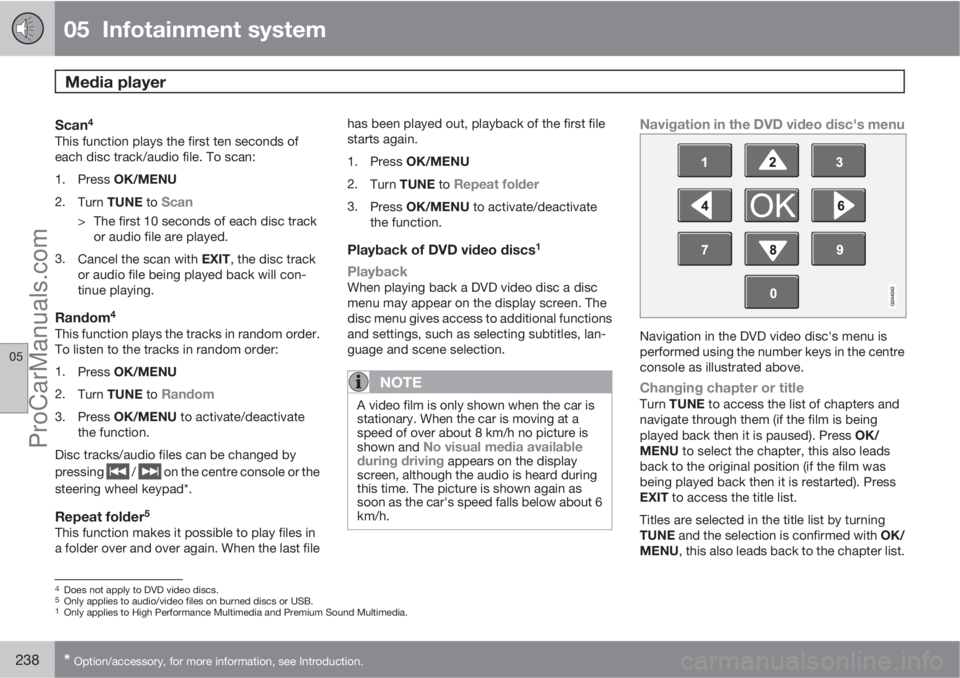
Navigation in the DVD video disc's menu
Navigation in the DVD video disc's menu is
performed using the number keys in the centre
console as illustrated above.
Changing chapter or titleTurn TUNE to access the list of chapters and
navigate through them (if the film is being
played back then it is paused). Press OK/
MENU to select the chapter, this also leads
back to the original position (if the film was
being played back then it is restarted). Press
EXIT to access the title list.
Titles are selected in the title list by turning
TUNE and the selection is confirmed with OK/
MENU, this also leads back to the chapter list.
4Does not apply to DVD video discs.5Only applies to audio/video files on burned discs or USB.1Only applies to High Performance Multimedia and Premium Sound Multimedia.
ProCarManuals.com
Page 241 of 400
05 Infotainment system
Media player
05
* Option/accessory, for more information, see Introduction.239
Press OK/MENU to activate the selection and
return to the start position. Use EXIT to cancel
the selection and this leads back to the original
position (without any selection being made).
The chapter can also be changed by pressing
on
/ on the centre console or the
steering wheel keypad*.
Advanced settings6
AngleIf the DVD video disc supports it, the function
can be used to choose from which camera
position a particular scene should be shown.
Go in disc mode to Disc menu
Advanced
settings
Angle.
DivXŸ Video On DemandThe media player can be registered in order to
play DivX VOD type files from burned discs or
USB. The code for registration can be found in
the menu system MY CAR Settings
InformationDivX® VOD code. For general
information on menus, see under MY CAR, see
page 144.
For more information visit www.divx.com/vod.
Picture settings6
You can adjust the settings (when the car is
stationary) for brightness and contrast.
1.
Press OK/MENU and select
Image
settings, confirm with OK/MENU.
2.
Turn TUNE to the adjustment option and
confirm with OK/MENU.
3.
Adjust the setting by turning TUNE and
confirm with OK/MENU.
To return to the settings list, press the OK/
MENU or EXIT.
The picture settings can be reset to factory
settings with the
Reset option.
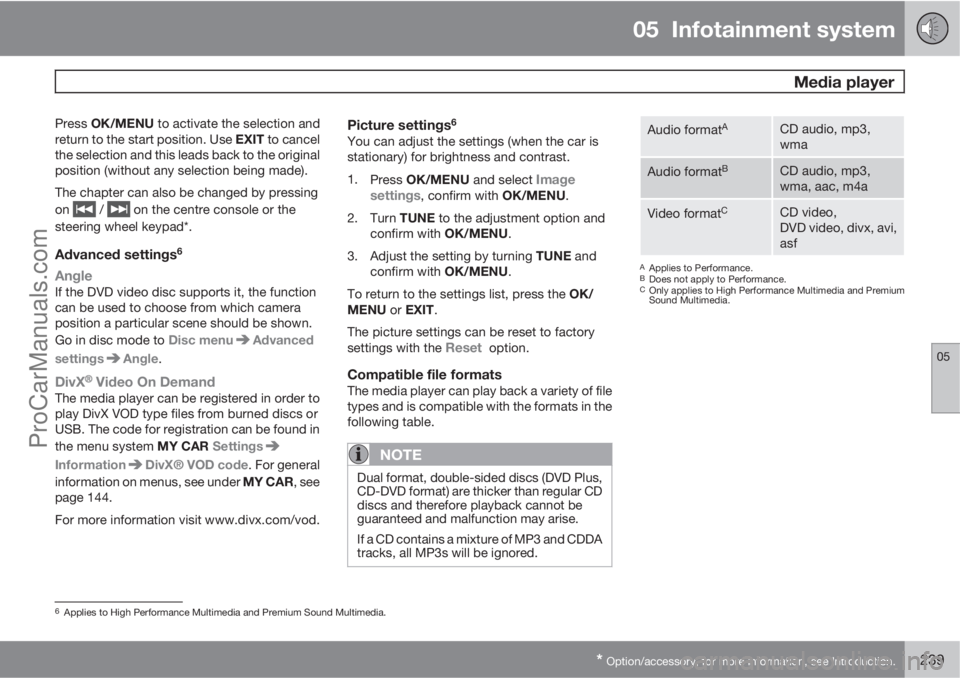
Compatible file formatsThe media player can play back a variety of file
types and is compatible with the formats in the
following table.
NOTE
Dual format, double-sided discs (DVD Plus,
CD-DVD format) are thicker than regular CD
discs and therefore playback cannot be
guaranteed and malfunction may arise.
If a CD contains a mixture of MP3 and CDDA
tracks, all MP3s will be ignored.
Audio formatACD audio, mp3,
wma
Audio formatBCD audio, mp3,
wma, aac, m4a
Video formatCCD video,
DVD video, divx, avi,
asf
AApplies to Performance.BDoes not apply to Performance.COnly applies to High Performance Multimedia and Premium
Sound Multimedia.
6Applies to High Performance Multimedia and Premium Sound Multimedia.
ProCarManuals.com
Page 242 of 400
05 Infotainment system
External audio source via AUX/USB* input
05
240* Option/accessory, for more information, see Introduction.
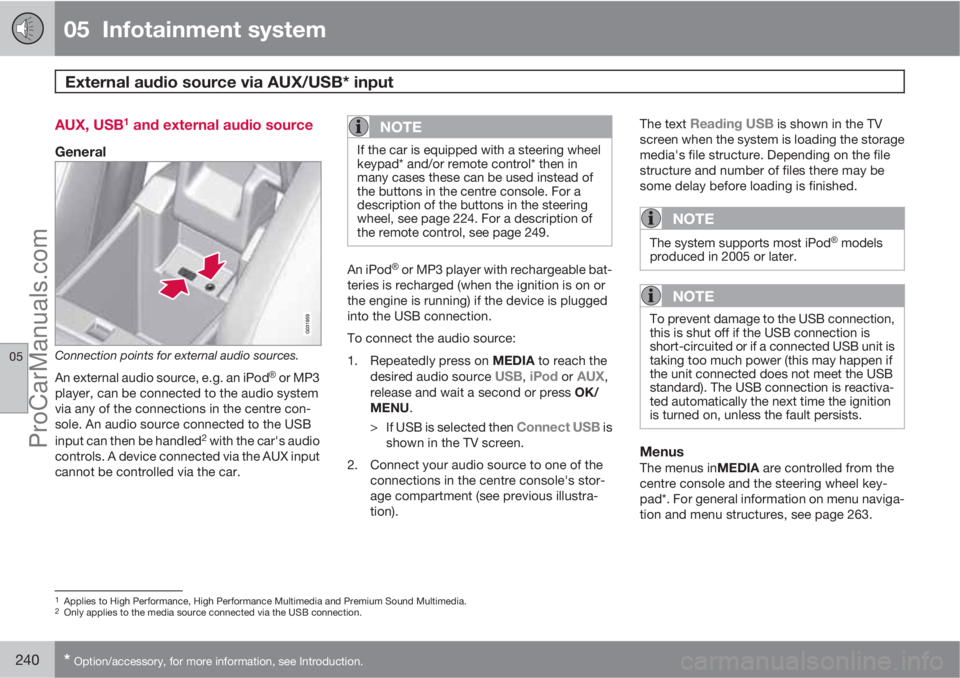
AUX, USB1 and external audio source
General
Connection points for external audio sources.
An external audio source, e.g. an iPodŸ or MP3
player, can be connected to the audio system
via any of the connections in the centre con-
sole. An audio source connected to the USB
input can then be handled
2 with the car's audio
controls. A device connected via the AUX input
cannot be controlled via the car.
NOTE
If the car is equipped with a steering wheel
keypad* and/or remote control* then in
many cases these can be used instead of
the buttons in the centre console. For a
description of the buttons in the steering
wheel, see page 224. For a description of
the remote control, see page 249.
An iPodŸ or MP3 player with rechargeable bat-
teries is recharged (when the ignition is on or
the engine is running) if the device is plugged
into the USB connection.
To connect the audio source:
1.
Repeatedly press on MEDIA to reach the
desired audio source
USB, iPod or AUX,
release and wait a second or press OK/
MENU.
>
If USB is selected then
Connect USB is
shown in the TV screen.
2. Connect your audio source to one of the
connections in the centre console's stor-
age compartment (see previous illustra-
tion).The text
Reading USB is shown in the TV
screen when the system is loading the storage
media's file structure. Depending on the file
structure and number of files there may be
some delay before loading is finished.
NOTE
The system supports most iPodŸ models
produced in 2005 or later.
NOTE
To prevent damage to the USB connection,
this is shut off if the USB connection is
short-circuited or if a connected USB unit is
taking too much power (this may happen if
the unit connected does not meet the USB
standard). The USB connection is reactiva-
ted automatically the next time the ignition
is turned on, unless the fault persists.
MenusThe menus inMEDIA are controlled from the
centre console and the steering wheel key-
pad*. For general information on menu naviga-
tion and menu structures, see page 263.
1Applies to High Performance, High Performance Multimedia and Premium Sound Multimedia.2Only applies to the media source connected via the USB connection.
ProCarManuals.com