light VOLVO V60 2012 Repair Manual
[x] Cancel search | Manufacturer: VOLVO, Model Year: 2012, Model line: V60, Model: VOLVO V60 2012Pages: 400, PDF Size: 9.28 MB
Page 219 of 400
04 Comfort and driving pleasure
Comfort inside the passenger compartment
04
* Option/accessory, for more information, see Introduction.217 Vanity mirror
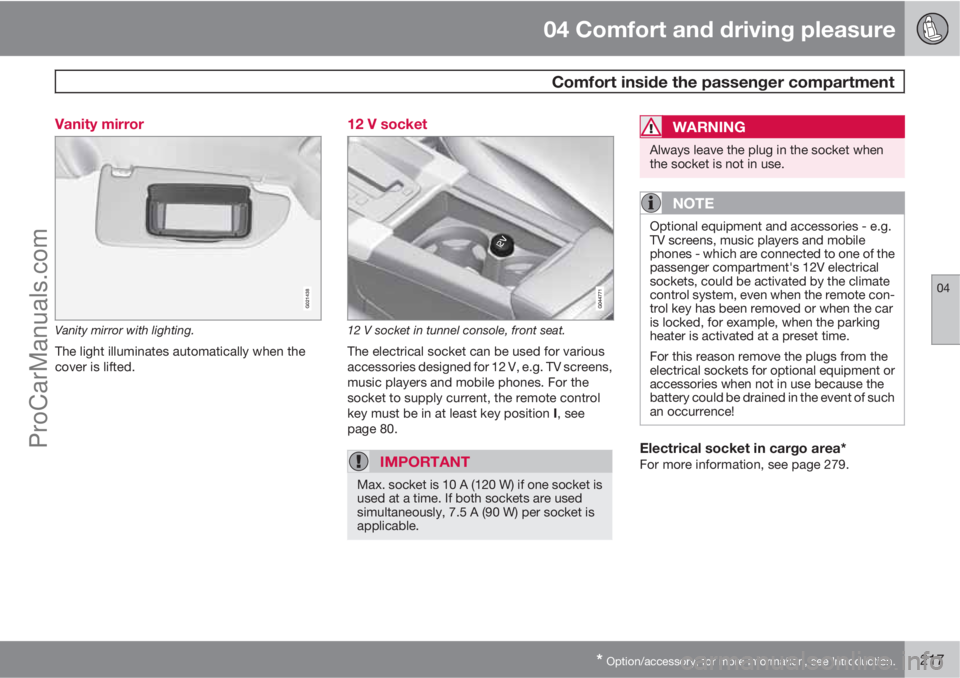
G021438
Vanity mirror with lighting.
The light illuminates automatically when the
cover is lifted.
12 V socket
12 V socket in tunnel console, front seat.
The electrical socket can be used for various
accessories designed for 12 V, e.g. TV screens,
music players and mobile phones. For the
socket to supply current, the remote control
key must be in at least key position I, see
page 80.
IMPORTANT
Max. socket is 10 A (120 W) if one socket is
used at a time. If both sockets are used
simultaneously, 7.5 A (90 W) per socket is
applicable.
WARNING
Always leave the plug in the socket when
the socket is not in use.
NOTE
Optional equipment and accessories - e.g.
TV screens, music players and mobile
phones - which are connected to one of the
passenger compartment's 12V electrical
sockets, could be activated by the climate
control system, even when the remote con-
trol key has been removed or when the car
is locked, for example, when the parking
heater is activated at a preset time.
For this reason remove the plugs from the
electrical sockets for optional equipment or
accessories when not in use because the
battery could be drained in the event of such
an occurrence!
Electrical socket in cargo area*For more information, see page 279.
ProCarManuals.com
Page 249 of 400
05 Infotainment system
TV*
05
* Option/accessory, for more information, see Introduction.247
•Turn TUNE, a list of all available channels
in the area is shown. If any of these chan-
nels is already saved as a preset then its
preset number is shown to the right of the
channel name. Continue turning TUNE to
reach the desired channel and press OK/
MENU.
•By pressing the preset buttons (0-9).
•Via a short press on the / buttons
the next available channel in the area is
shown.
NOTE
If the car has been moved within the coun-
try, for example, from one city to another, it
is not certain that the presets are available
at the new location as the frequency range
may have changed. In which case, carry out
a new search and save a new preset list, see
the function "Save the available TV channels
as presets", page 248.
NOTE
If no reception is available on the preset
buttons, it may be because the car is at a
location other than where the scan of TV
channels was run, for example, if the car
was driven from Germany to France. A new
selection of country and a new search may
then need to be carried out.
Searching TV channels/Preset list1.
Press TV mode on OK/MENU.
2.
Turn TUNE to
TV menu and press OK/
MENU.
3.
Turn TUNE to
Select country and press
OK/MENU.
> If one or more countries have previously
been selected then they are shown in a
list.
4.
Turn TUNE to either
Other countries or
one of the previously selected countries.
Press OK/MENU.
> A list of all available countries is shown.
5.
Turn TUNE to the desired country (e.g.
Sweden) and press OK/MENU.
> An automatic scan for available TV
channels starts, this scan takes a little
while. During this time the figure for
each channel found and added as a pre-
set is shown. When the scan is com-
plete a message is shown and the pic-
ture is shown. A preset list (max. 30 pre-
sets) has now been created and is avail-
able. To change channel, see
page 246.
The scan and preset storage can be cancelled
with EXIT.
NOTE
If the country of residence has changed, a
new scan of TV channels must be run.
Channel managementThe preset list can be edited. You can change
the order of the channels that are shown in the
preset list. A TV channel can have more than
one place in the preset list. The TV channel
positions can also vary in the preset list.
To change the order in the preset list, go in TV
mode to TV menu
Reorganize presets.
1.
Turn TUNE to the channel you want to
move in the list and confirm with OK/
MENU.
> The selected channel is highlighted.
2.
Turn TUNE to the new location in the list
and confirm with OK/MENU.
> The channels change places with each
other.
After the preset channels (max. 30) come all the
other channels available in the area. It is pos-
sible to move a channel up to a place in the
preset list.
ProCarManuals.com
Page 251 of 400
05 Infotainment system
Remote control*
05
* Option/accessory, for more information, see Introduction.249 Remote control*
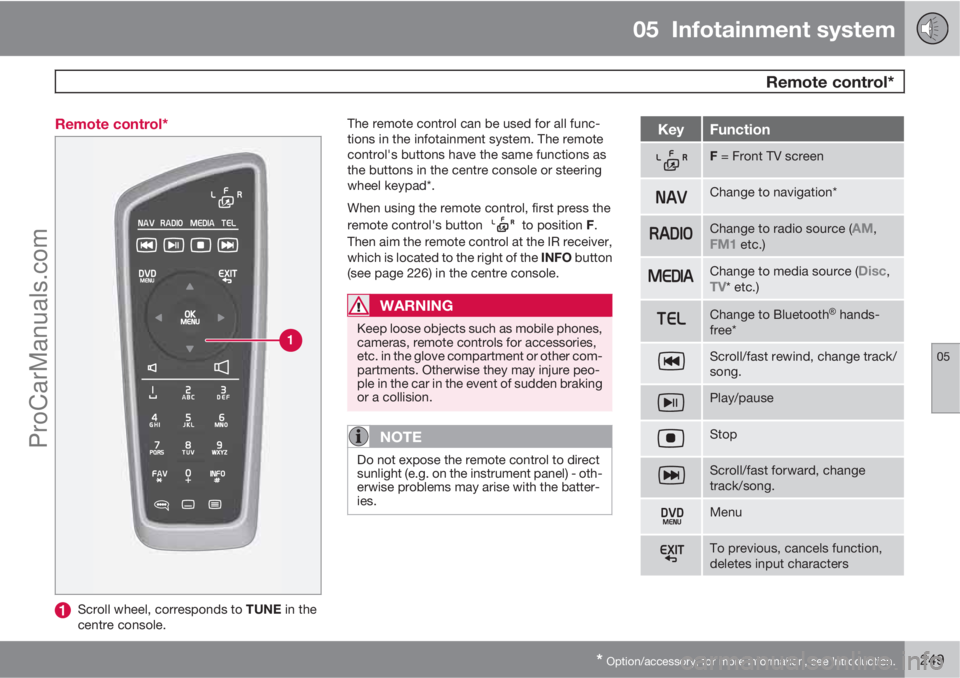
Scroll wheel, corresponds to TUNE in the
centre console.The remote control can be used for all func-
tions in the infotainment system. The remote
control's buttons have the same functions as
the buttons in the centre console or steering
wheel keypad*.
When using the remote control, first press the
remote control's button
to position F.
Then aim the remote control at the IR receiver,
which is located to the right of the INFO button
(see page 226) in the centre console.
WARNING
Keep loose objects such as mobile phones,
cameras, remote controls for accessories,
etc. in the glove compartment or other com-
partments. Otherwise they may injure peo-
ple in the car in the event of sudden braking
or a collision.
NOTE
Do not expose the remote control to direct
sunlight (e.g. on the instrument panel) - oth-
erwise problems may arise with the batter-
ies.
KeyFunction
F = Front TV screen
Change to navigation*
Change to radio source (AM,FM1 etc.)
Change to media source (Disc,TV* etc.)
Change to BluetoothŸ hands-
free*
Scroll/fast rewind, change track/
song.
Play/pause
Stop
Scroll/fast forward, change
track/song.
Menu
To previous, cancels function,
deletes input characters
ProCarManuals.com
Page 272 of 400
06 During your journey
Recommendations during driving
06
270
General
Economical drivingDriving economically means driving smoothly
while thinking ahead and adjusting your driving
style and speed to the prevailing conditions.
•Drive in the highest gear possible, adapted
to the current traffic situation and road -
lower engine speeds result in lower fuel
consumption.
•Avoid driving with open windows.
•Avoid sudden unnecessary acceleration
and heavy braking.
•Remove unnecessary items from the car -
the greater the load the higher the fuel con-
sumption.
•Use engine braking to slow down, when it
can take place without risk to other road
users.
•A roof load and ski box increase air resis-
tance, leading to higher fuel consumption
- remove the load carriers when not in use.
•Do not run the engine to operating tem-
perature at idling speed, but rather drive
with a light load as soon as possible - a
cold engine consumes more fuel than a
warm one.
•Cars with the D5 engine and 6-speed man-
ual transmission or DRIVe engine and 6-
speed manual transmission are started in2nd gear under normal conditions on level
ground.
For more information and further advice, see
the pages 12 and 363.
WARNING
Never switch off the engine while moving,
such as downhill, this deactivates important
systems such as the power steering and
brake servo.
Driving in waterThe car can be driven through water at a maxi-
mum depth of 25 cm at a maximum speed of
10 km/h. Extra caution should be exercised
when passing through flowing water.
During driving in water, maintain a low speed
and do not stop the car. When the water has
been passed, depress the brake pedal lightly
and check that full brake function is achieved.
Water and mud for example can make the
brake linings wet resulting in delayed brake
function.
•Clean the electric contacts of the electric
engine block heater and trailer coupling
after driving in water and mud.
•Do not let the car stand with water over the
sills for any long period of time - this could
cause electrical malfunctions.
IMPORTANT
Engine damage can occur if water enters
the air filter.
In depths greater than 25 cm, water could
enter the transmission. This reduces the
lubricating ability of the oils and shortens
the service life of these systems.
In the event of the engine stalling in water,
do not try restart - tow the car from the water
to a workshop - an authorised Volvo work-
shop is recommended. Risk of engine
breakdown.
Engine, gearbox and cooling systemUnder special conditions, for example hard
driving in hilly terrain and hot climate, there is
a risk that the engine and drive system may
overheat - in particular with a heavy load.
For information about overheating when driv-
ing with a trailer, see page 283.
•Remove any auxiliary lamps from in front
of the grille when driving in hot climates.
•If the temperature in the engine's cooling
system is too high the instrument panel's
warning symbol is illuminated and there is
a text message displayed there
High
engine temp Stop safely - stop the car in
a safe way and allow the engine to run at
idling speed for several minutes to cool
down.
ProCarManuals.com
Page 275 of 400
06 During your journey
Refuelling
06
273 Refuelling
Opening/closing the fuel filler flap
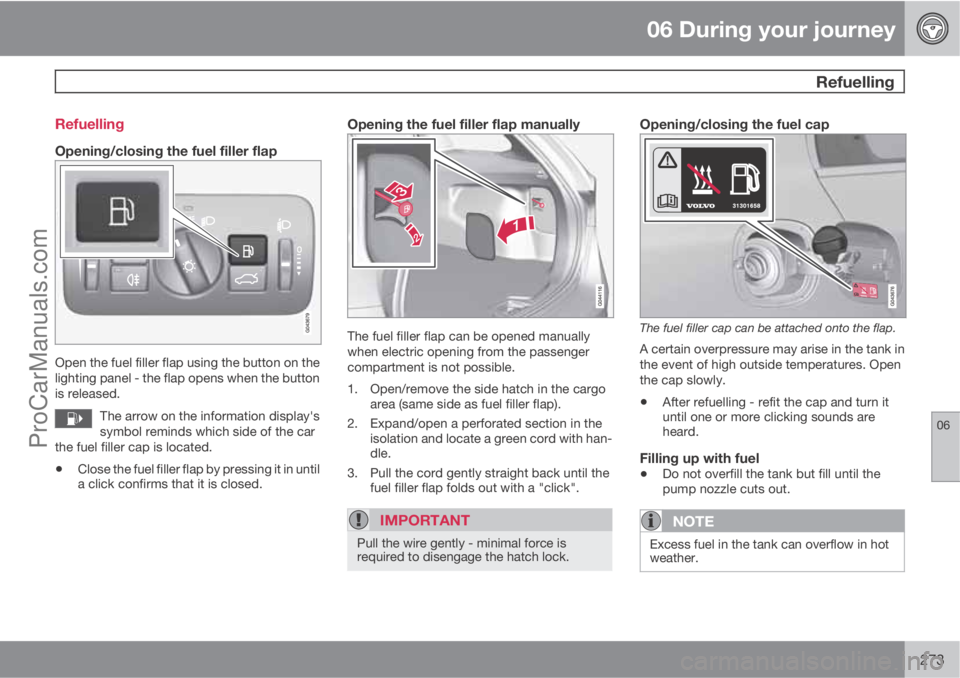
Open the fuel filler flap using the button on the
lighting panel - the flap opens when the button
is released.
The arrow on the information display's
symbol reminds which side of the car
the fuel filler cap is located.
•Close the fuel filler flap by pressing it in until
a click confirms that it is closed.
Opening the fuel filler flap manually
The fuel filler flap can be opened manually
when electric opening from the passenger
compartment is not possible.
1. Open/remove the side hatch in the cargo
area (same side as fuel filler flap).
2. Expand/open a perforated section in the
isolation and locate a green cord with han-
dle.
3. Pull the cord gently straight back until the
fuel filler flap folds out with a "click".
IMPORTANT
Pull the wire gently - minimal force is
required to disengage the hatch lock.
Opening/closing the fuel cap
The fuel filler cap can be attached onto the flap.
A certain overpressure may arise in the tank in
the event of high outside temperatures. Open
the cap slowly.
•After refuelling - refit the cap and turn it
until one or more clicking sounds are
heard.
Filling up with fuel
•Do not overfill the tank but fill until the
pump nozzle cuts out.
NOTE
Excess fuel in the tank can overflow in hot
weather.
ProCarManuals.com
Page 278 of 400
06 During your journey
Fuel
06
276* Option/accessory, for more information, see Introduction.
tank may need to be vented in the workshop in
order to restart the engine after fuelling.
Once the engine has stopped due to fuel star-
vation, the fuel system needs a few moments
to carry out a check. Do this before starting the
engine, once the fuel tank has been filled with
diesel:
1. Insert the remote control key in the ignition
switch and push it in to the end position
(see page 80).
2.
Press the START button without depress-
ing the brake and/or clutch pedal.
3. Wait approx. 1 minute.
4. To start the engine: Depress the brake and/
or clutch pedal and then press the
START button again.
NOTE
Before filling with fuel in the event of fuel
shortage:
•Stop the car on as flat/level ground as
possible - if the car is tilting there is a
risk of air pockets in the fuel supply.
Draining condensation from the fuel filterThe fuel filter separates condensation from the
fuel. Condensation can disrupt engine opera-
tion.The fuel filter must be drained at the intervals
specified in the Service and Warranty Booklet
or if you suspect that the car has been filled
with contaminated fuel.
IMPORTANT
Certain special additives remove the water
separation in the fuel filter.
Diesel particle filter (DPF)Diesel cars are equipped with a particle filter,
which results in more efficient emission con-
trol. The particles in the exhaust gases are col-
lected in the filter during normal driving. So-
called "regeneration" is started in order to burn
away the particles and empty the filter. This
requires the engine to have reached normal
operating temperature.
Regeneration of the filter is automatic and nor-
mally takes 10-20 minutes. It may take a little
longer at a low average speed. Fuel consump-
tion may increase slightly during regeneration.
Regeneration in cold weatherIf the car is frequently driven short distances in
cold weather then the engine does not reach
normal operating temperature. This means that
regeneration of the diesel particle filter does
not take place and the filter is not emptied.When the filter has become approximately
80% full of particles, a warning triangle on the
instrument panel illuminates, and the message
Soot filter full See manual is shown on the
instrument panel display.
Start regeneration of the filter by driving the car
until the engine reaches normal operating tem-
perature, preferably on a main road or motor-
way. The car should then be driven for approx-
imately 20 minutes more.
NOTE
A smaller reduction of engine power may be
noticed temporarily during regeneration.
When regeneration is complete the warning
text is cleared automatically.
Use the parking heater* in cold weather so that
the engine reaches normal operating tempera-
ture more quickly.
IMPORTANT
If the filter fills up with particles then it can
be difficult to start the engine and the filter
will be incapable of functioning. Then there
is a risk that the filter will have to be
replaced.
ProCarManuals.com
Page 280 of 400
06 During your journey
Loading
06
278
General information on loading
Payload depends on the car's kerb weight. The
total of the weight of the passengers and all
accessories reduces the car's payload by a
corresponding weight. For more detailed infor-
mation on weights, see page 355.
The tailgate is opened via a button on
the lighting panel or the remote con-
trol key, see page 61.
WARNING
The car's driving characteristics change
depending on the weight and distribution of
the load.
To bear in mind when loading
•Position the load firmly against the rear
seat's backrest.
Note that objects must not prevent the function
of the WHIPS system for the front seats if any
of the rear seat's backrests is folded down,see
page 27.
•Centre the load.
•Heavy objects should be placed as low as
possible. Avoid placing heavy loads on
lowered backrests.
•Cover sharp edges with something soft to
avoid damaging the upholstery.
•Secure all loads to the load retaining eye-
lets with straps or web lashings.
WARNING
A loose object weighing 20 kg can, in a
frontal collision at a speed of 50 km/h, carry
the impact of an item weighing 1000 kg.
WARNING
The protection provided by the inflatable
curtain in the headlining may be compro-
mised or eliminated by high loads.
•Never load cargo above the backrest.
WARNING
Always secure the load. During heavy brak-
ing the load may otherwise shift, causing
injury to the car's occupants.
Cover sharp edges and sharp corners with
something soft.
Switch off the engine and apply the parking
brake when loading/unloading long items.
Otherwise you may accidentally knock the
gear lever or gear selector with the load into
a drive position - and the car could then
move off.
Front seat
The passenger seat backrest can also be
folded for an extra long load, see page 82.
Roof load
Using load carriersTo avoid damaging the car and for maximum
possible safety while driving, the load carriers
designed by Volvo are recommended.
Carefully follow the installation instructions
supplied with the carriers.
•Check periodically that the load carriers
and load are properly secured. Lash the
load securely with retaining straps.
•Distribute the load evenly over the load
carriers. Put the heaviest objects at the
bottom.
•The size of the area exposed to the wind,
and therefore fuel consumption, increase
with the size of the load.
•Drive gently. Avoid quick acceleration,
heavy braking and hard cornering.
WARNING
The car's centre of gravity and driving cha-
racteristics are altered by roof loads. For
information on maximum permitted roof
load, including load carriers and any space
box, see page 355.
ProCarManuals.com
Page 285 of 400
06 During your journey
Driving with a trailer
06
* Option/accessory, for more information, see Introduction.283 General
Payload depends on the car's kerb weight. The
total of the weight of the passengers and all
accessories, e.g. towbar, reduces the car's
payload by a corresponding weight. For more
detailed information on weights, see
page 355.
If the towing bracket is mounted by Volvo, then
the car is delivered with the necessary equip-
ment for driving with a trailer.
•The car's towing bracket must be of an
approved type.
•If the towbar is retrofitted, check with your
Volvo dealer that the car is fully equipped
for driving with a trailer.
•Distribute the load on the trailer so that the
weight on the towing bracket complies
with the specified maximum towball load.
•Increase the tyre pressure to the recom-
mended pressure for a full load. For tyre
pressure label location, see page 301.
•The engine is loaded more heavily than
usual when driving with a trailer.
•Do not tow a heavy trailer when the car is
brand new. Wait until it has been driven at
least 1000 km.
•The brakes are loaded much more than
usual on long and steep downhill slopes.
Downshift to a lower gear and adjust your
speed.
•For safety reasons, the maximum permit-
ted speed for the car when coupled with a
trailer should not be exceeded. Follow the
regulations in force for the permitted
speeds and weights.
•Maintain a low speed when driving with a
trailer up long, steep ascents.
•Avoid driving with a trailer on inclines of
more than 12%.
Trailer cableAn adapter is required if the car's towing
bracket has 13 pin electrics and the trailer has
7 pin electrics. Use an adapter cable approved
by Volvo. Make sure the cable does not drag
on the ground.
Direction indicators and brake lights on
the trailer
If any of the trailer's lamps for direction indica-
tors are broken, then the combined instrument
panel's symbol for direction indicators flashes
faster than normal and the display shows the
text
Bulb fail - Ind. signal trailer.
If any of the trailer's lamps for the brake light
are broken then the
Bulb fail - Stop lamp
trailer text is shown.
Level control*The rear shock absorbers maintain a constant
height irrespective of the car's load (up to the
maximum permissible weight). When the car isstationary the rear of the car lowers slightly,
which is normal.
Trailer weightsFor information on Volvo's permitted trailer
weights, see page 356.
NOTE
The stated maximum permitted trailer
weights are those permitted by Volvo.
National vehicle regulations can further limit
trailer weights and speeds. Towbars can be
certified for higher towing weights than the
car can actually tow.
WARNING
Follow the stated recommendations for
trailer weights. Otherwise, the car and trailer
may be difficult to control in the event of
sudden movement and braking.
Manual gearbox
OverheatingWhen driving with a trailer in hilly terrain in a hot
climate there may be a risk of overheating.
•Do not run the engine at higher revolutions
than 4500 rpm (diesel engines: 3500 rpm)
- otherwise the oil temperature may
become too high.
ProCarManuals.com
Page 303 of 400
07 Wheels and tyres
Tyre pressure
07
301
Tyre pressure
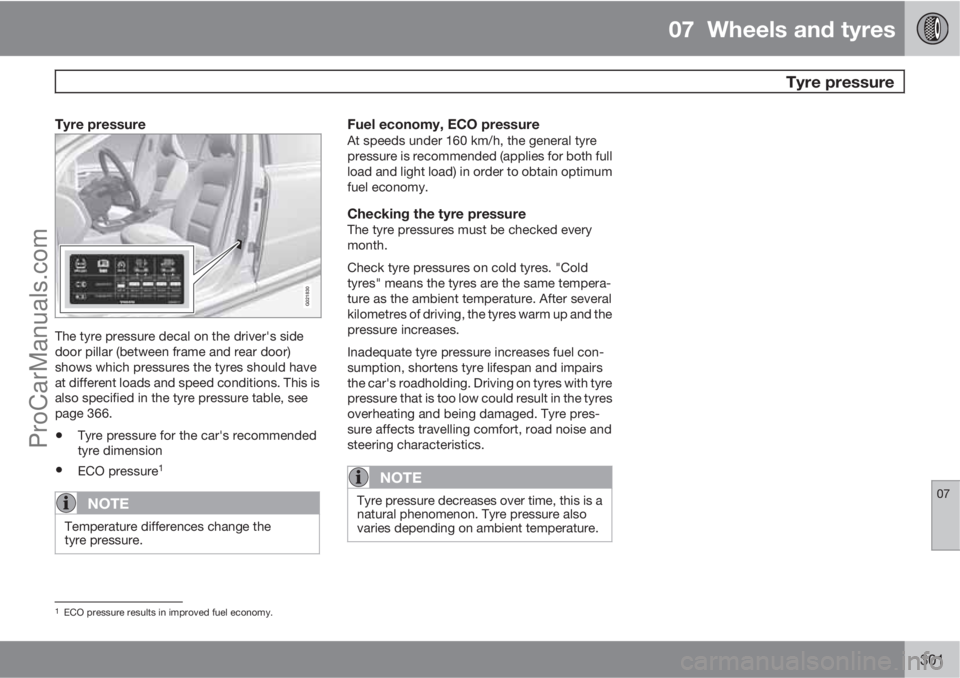
G021830
The tyre pressure decal on the driver's side
door pillar (between frame and rear door)
shows which pressures the tyres should have
at different loads and speed conditions. This is
also specified in the tyre pressure table, see
page 366.
•Tyre pressure for the car's recommended
tyre dimension
•ECO pressure1
NOTE
Temperature differences change the
tyre pressure.
Fuel economy, ECO pressureAt speeds under 160 km/h, the general tyre
pressure is recommended (applies for both full
load and light load) in order to obtain optimum
fuel economy.
Checking the tyre pressureThe tyre pressures must be checked every
month.
Check tyre pressures on cold tyres. "Cold
tyres" means the tyres are the same tempera-
ture as the ambient temperature. After several
kilometres of driving, the tyres warm up and the
pressure increases.
Inadequate tyre pressure increases fuel con-
sumption, shortens tyre lifespan and impairs
the car's roadholding. Driving on tyres with tyre
pressure that is too low could result in the tyres
overheating and being damaged. Tyre pres-
sure affects travelling comfort, road noise and
steering characteristics.
NOTE
Tyre pressure decreases over time, this is a
natural phenomenon. Tyre pressure also
varies depending on ambient temperature.
1ECO pressure results in improved fuel economy.
ProCarManuals.com
Page 321 of 400
08 Maintenance and service
Lamps
08
319 General
All bulbs are specified, see page 324. The fol-
lowing list contains locations of bulbs and
other light sources that are specialised or
unsuitable for changing except at a workshop:
•Active Xenon headlamps - ABL (Xenon
lamps)
•Direction indicators, door mirrors
•Approach lighting, door mirrors
•Courtesy lighting
•Glovebox lighting
•General interior lighting in the roof
•Reading lamps
•Side position, position lamps rear
•Brake light
•LED lights, general
WARNING
On cars with Xenon headlamps, the
replacement of Xenon lamps must be car-
ried out at a workshop - an authorised Volvo
workshop is recommended. Working with
Xenon lamps demands extreme caution
because the headlamp is equipped with a
high voltage unit.
IMPORTANT
Never touch the glass part of the bulbs with
your fingers. Grease and oils from your fin-
gers are vaporised by the heat, coating the
reflector and then causing damage.
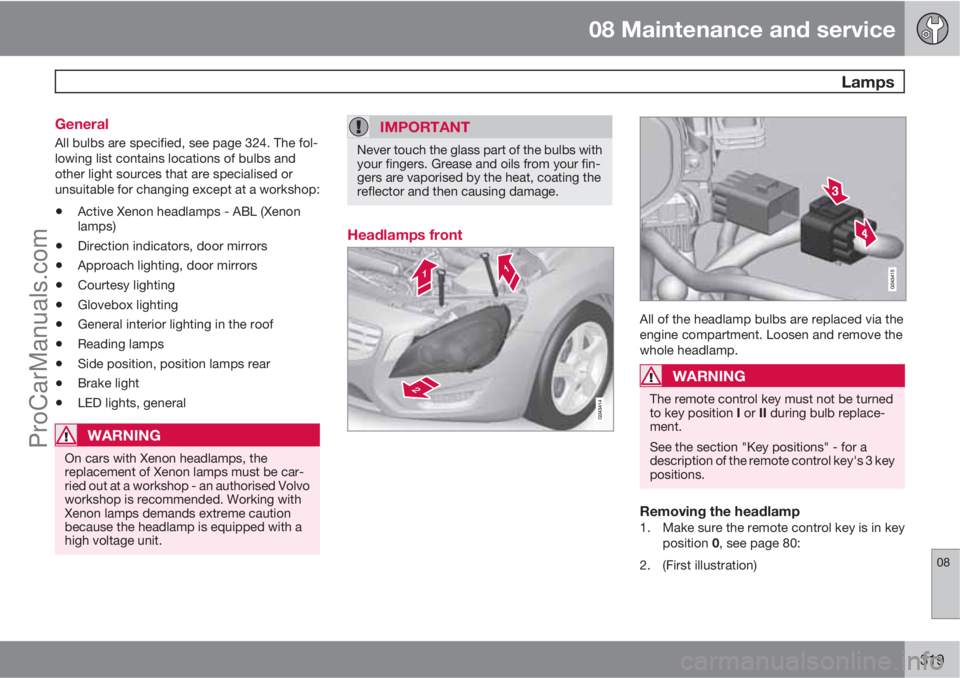
Headlamps front
All of the headlamp bulbs are replaced via the
engine compartment. Loosen and remove the
whole headlamp.
WARNING
The remote control key must not be turned
to key position I or II during bulb replace-
ment.
See the section "Key positions" - for a
description of the remote control key's 3 key
positions.
Removing the headlamp1. Make sure the remote control key is in key
position 0, see page 80:
2. (First illustration)
ProCarManuals.com