english VOLVO V60 2012 Owners Manual
[x] Cancel search | Manufacturer: VOLVO, Model Year: 2012, Model line: V60, Model: VOLVO V60 2012Pages: 400, PDF Size: 9.28 MB
Page 11 of 400
Introduction
Important information
9 Laser sensor
This vehicle is equipped with a sensor which
transmits laser light. It is absolutely essential to
follow the prescribed instructions when han-
dling the laser sensor.
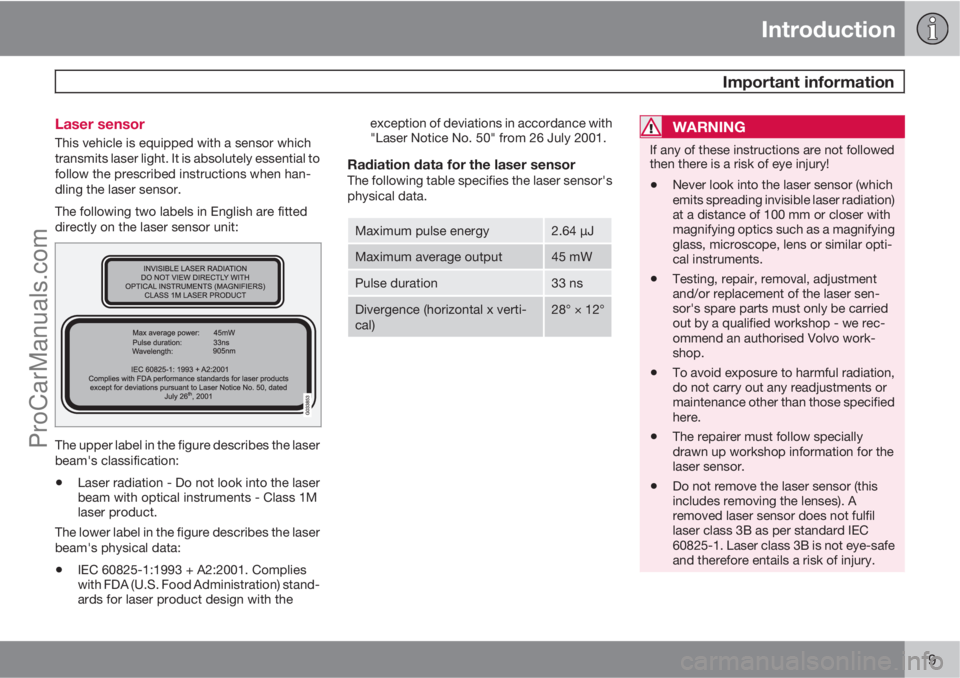
The following two labels in English are fitted
directly on the laser sensor unit:
The upper label in the figure describes the laser
beam's classification:
•Laser radiation - Do not look into the laser
beam with optical instruments - Class 1M
laser product.
The lower label in the figure describes the laser
beam's physical data:
•IEC 60825-1:1993 + A2:2001. Complies
with FDA (U.S. Food Administration) stand-
ards for laser product design with theexception of deviations in accordance with
"Laser Notice No. 50" from 26 July 2001.
Radiation data for the laser sensorThe following table specifies the laser sensor's
physical data.
Maximum pulse energy2.64 μJ
Maximum average output45 mW
Pulse duration33 ns
Divergence (horizontal x verti-
cal)28° × 12°
WARNING
If any of these instructions are not followed
then there is a risk of eye injury!
•Never look into the laser sensor (which
emits spreading invisible laser radiation)
at a distance of 100 mm or closer with
magnifying optics such as a magnifying
glass, microscope, lens or similar opti-
cal instruments.
•Testing, repair, removal, adjustment
and/or replacement of the laser sen-
sor's spare parts must only be carried
out by a qualified workshop - we rec-
ommend an authorised Volvo work-
shop.
•To avoid exposure to harmful radiation,
do not carry out any readjustments or
maintenance other than those specified
here.
•The repairer must follow specially
drawn up workshop information for the
laser sensor.
•Do not remove the laser sensor (this
includes removing the lenses). A
removed laser sensor does not fulfil
laser class 3B as per standard IEC
60825-1. Laser class 3B is not eye-safe
and therefore entails a risk of injury.
ProCarManuals.com
Page 107 of 400
03 Your driving environment
Compass*
03
* Option/accessory, for more information, see Introduction.105 Operation
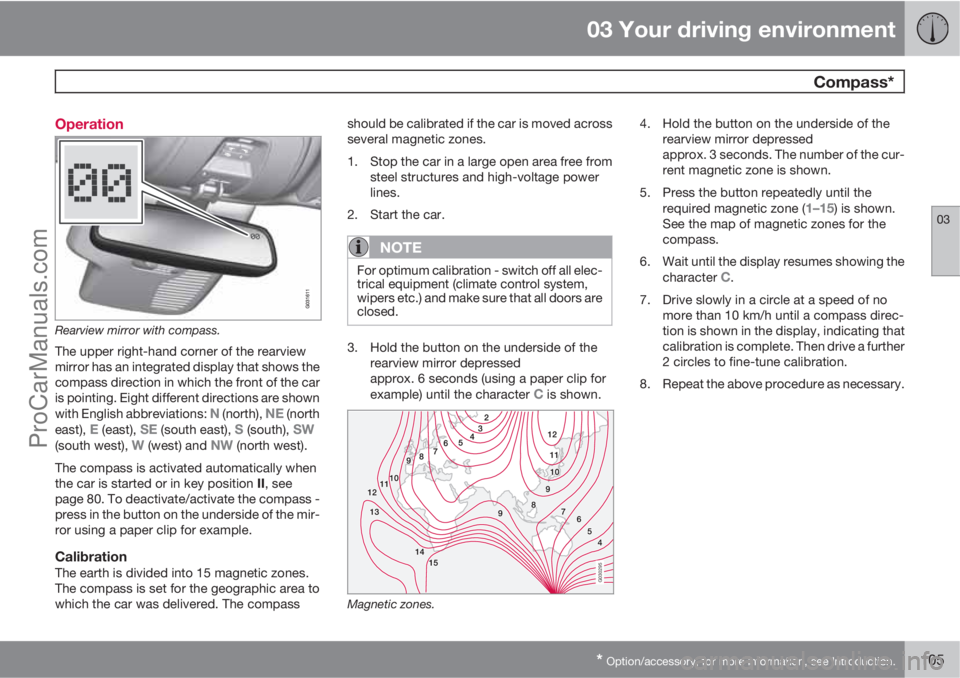
Rearview mirror with compass.
The upper right-hand corner of the rearview
mirror has an integrated display that shows the
compass direction in which the front of the car
is pointing. Eight different directions are shown
with English abbreviations:
N (north), NE (north
east), E (east), SE (south east), S (south), SW(south west), W (west) and NW (north west).
The compass is activated automatically when
the car is started or in key position II, see
page 80. To deactivate/activate the compass -
press in the button on the underside of the mir-
ror using a paper clip for example.
CalibrationThe earth is divided into 15 magnetic zones.
The compass is set for the geographic area to
which the car was delivered. The compassshould be calibrated if the car is moved across
several magnetic zones.
1. Stop the car in a large open area free from
steel structures and high-voltage power
lines.
2. Start the car.
NOTE
For optimum calibration - switch off all elec-
trical equipment (climate control system,
wipers etc.) and make sure that all doors are
closed.
3. Hold the button on the underside of the
rearview mirror depressed
approx. 6 seconds (using a paper clip for
example) until the character
C is shown.
G030295
Magnetic zones.
4. Hold the button on the underside of the
rearview mirror depressed
approx. 3 seconds. The number of the cur-
rent magnetic zone is shown.
5. Press the button repeatedly until the
required magnetic zone (
1–15) is shown.
See the map of magnetic zones for the
compass.
6. Wait until the display resumes showing the
character
C.
7. Drive slowly in a circle at a speed of no
more than 10 km/h until a compass direc-
tion is shown in the display, indicating that
calibration is complete. Then drive a further
2 circles to fine-tune calibration.
8. Repeat the above procedure as necessary.
ProCarManuals.com