battery VOLVO V60 2013 User Guide
[x] Cancel search | Manufacturer: VOLVO, Model Year: 2013, Model line: V60, Model: VOLVO V60 2013Pages: 422, PDF Size: 9.59 MB
Page 68 of 422
66* Option/accessory, for more information, see Introduction.
Instruments and controls........................................................................ 68
Volvo Sensus ......................................................................................... 77
Key positions.......................................................................................... 78
Seats....................................................................................................... 80
Steering wheel........................................................................................ 85
Lighting................................................................................................... 86
Wipers and washing................................................................................ 98
Windows, rearview and door mirrors....................................................101
Compass*.............................................................................................. 106
Power sunroof*..................................................................................... 107
Alcolock*............................................................................................... 109
Starting the engine................................................................................ 113
Starting the engine – Flexifuel............................................................... 118
Starting the engine – external battery................................................... 120
Gearboxes............................................................................................. 121
DRIVe Start/Stop*................................................................................. 127
All-wheel drive – AWD*.........................................................................134
Foot brake............................................................................................. 135
Parking brake........................................................................................ 137
HomeLink
Ÿ *.......................................................................................... 141
ProCarManuals.com
Page 80 of 422
03 Your driving environment
Key positions
03
78* Option/accessory, for more information, see Introduction.
Insert and remove the remote control
key
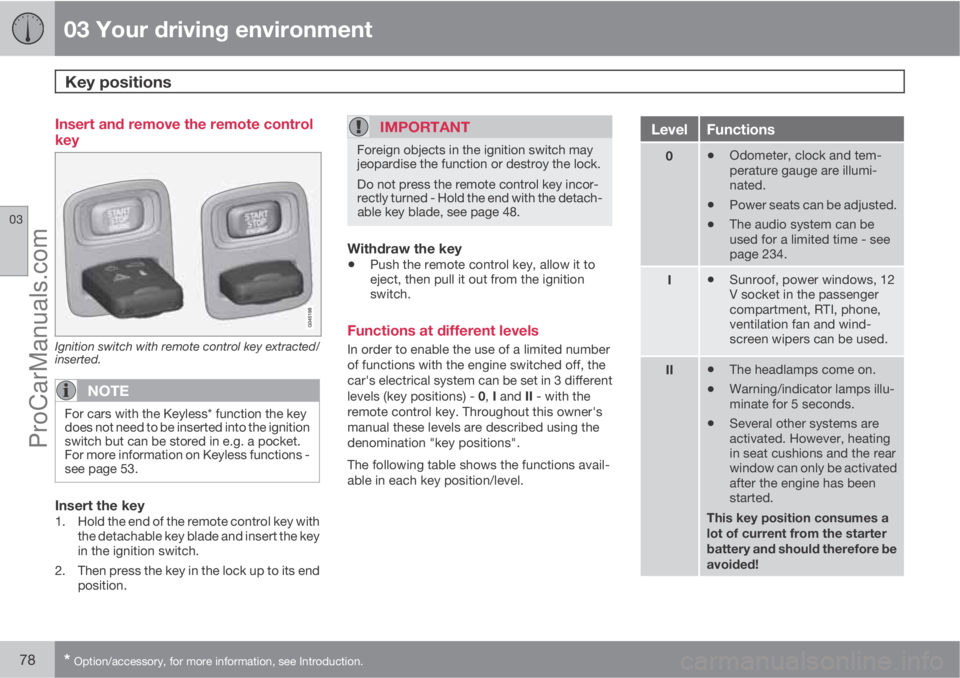
Ignition switch with remote control key extracted/
inserted.
NOTE
For cars with the Keyless* function the key
does not need to be inserted into the ignition
switch but can be stored in e.g. a pocket.
For more information on Keyless functions -
see page 53.
Insert the key1. Hold the end of the remote control key with
the detachable key blade and insert the key
in the ignition switch.
2. Then press the key in the lock up to its end
position.
IMPORTANT
Foreign objects in the ignition switch may
jeopardise the function or destroy the lock.
Do not press the remote control key incor-
rectly turned - Hold the end with the detach-
able key blade, see page 48.
Withdraw the key
•Push the remote control key, allow it to
eject, then pull it out from the ignition
switch.
Functions at different levels
In order to enable the use of a limited number
of functions with the engine switched off, the
car's electrical system can be set in 3 different
levels (key positions) - 0, I and II - with the
remote control key. Throughout this owner's
manual these levels are described using the
denomination "key positions".
The following table shows the functions avail-
able in each key position/level.
LevelFunctions
0•Odometer, clock and tem-
perature gauge are illumi-
nated.
•Power seats can be adjusted.
•The audio system can be
used for a limited time - see
page 234.
I•Sunroof, power windows, 12
V socket in the passenger
compartment, RTI, phone,
ventilation fan and wind-
screen wipers can be used.
II•The headlamps come on.
•Warning/indicator lamps illu-
minate for 5 seconds.
•Several other systems are
activated. However, heating
in seat cushions and the rear
window can only be activated
after the engine has been
started.
This key position consumes a
lot of current from the starter
battery and should therefore be
avoided!
ProCarManuals.com
Page 105 of 422
03 Your driving environment
Windows, rearview and door mirrors
03
103
ResettingIf the battery is disconnected then the function
for automatic opening must be reset so that it
can work correctly.
1. Gently raise the front section of the button
to raise the window to its end position and
hold it there for one second.
2. Release the button briefly.
3. Raise the front section of the button again
for one second.
WARNING
Resetting must be carried out to ensure that
pinch protection works.
Door mirrors
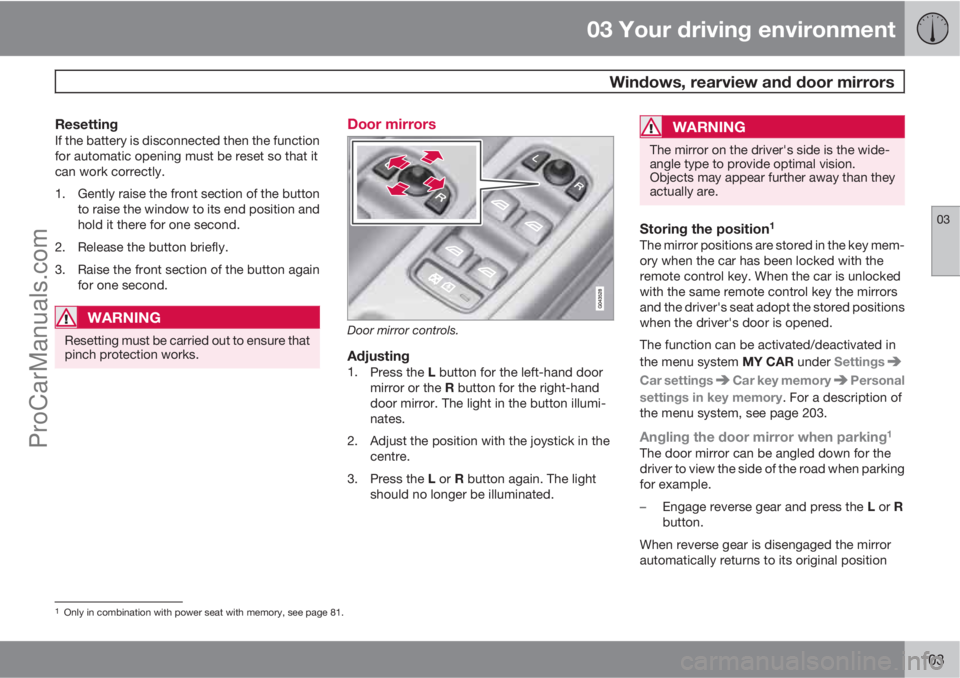
Door mirror controls.
Adjusting1.
Press the L button for the left-hand door
mirror or the R button for the right-hand
door mirror. The light in the button illumi-
nates.
2. Adjust the position with the joystick in the
centre.
3.
Press the L or R button again. The light
should no longer be illuminated.
WARNING
The mirror on the driver's side is the wide-
angle type to provide optimal vision.
Objects may appear further away than they
actually are.
Storing the position1
The mirror positions are stored in the key mem-
ory when the car has been locked with the
remote control key. When the car is unlocked
with the same remote control key the mirrors
and the driver's seat adopt the stored positions
when the driver's door is opened.
The function can be activated/deactivated in
the menu system MY CAR under Settings
Car settingsCar key memoryPersonal
settings in key memory. For a description of
the menu system, see page 203.
Angling the door mirror when parking1
The door mirror can be angled down for the
driver to view the side of the road when parking
for example.
–
Engage reverse gear and press the L or R
button.
When reverse gear is disengaged the mirror
automatically returns to its original position
1Only in combination with power seat with memory, see page 81.
ProCarManuals.com
Page 106 of 422
03 Your driving environment
Windows, rearview and door mirrors
03
104* Option/accessory, for more information, see Introduction.
after approx. 10 seconds, or sooner by press-
ing the L and R button.
Automatic angling of the door mirror
when parking1
When reverse gear is engaged the door mirror
is automatically angled down so that the driver
can see the side of the road when parking for
example. When reverse gear is disengaged the
mirror automatically returns to its original posi-
tion after a short time.
The function can be activated/deactivated in
the menu system MY CAR under Settings
Car settingsSide mirror settingsTilt
left mirror or
Tilt right mirror. For a descrip-
tion of the menu system, see page 203.
Automatic retraction when locking1
When the car is locked/unlocked with the
remote control key the door mirrors are auto-
matically retracted/extended.
The function can be activated/deactivated in
the menu system MY CAR under Settings
Car settingsSide mirror settingsFold
mirrors. For a description of the menu system,
see page 203.
Resetting to neutralMirrors that have been moved out of position
by an external force must be reset electrically
to the neutral position for electric retracting/
extending to work correctly:
1.
Retract the mirrors with the L and R but-
tons.
2.
Fold them out again with the L and R but-
tons.
3. Repeat the above procedure as necessary.
The mirrors are now reset in neutral position.
Retractable power door mirrors*The mirrors can be retracted for parking/driving
in narrow spaces:
1.
Depress the L and R buttons simultane-
ously (key position must be at least I).
2. Release them after
approximately 1 second. The mirrors auto-
matically stop in the fully retracted posi-
tion.
Fold out the mirrors by pressing down the L
and R buttons simultaneously. The mirrors
automatically stop in the fully extended posi-
tion.
Home safe and approach lightingThe light on the door mirrors illuminates when
approach lighting or home safe lighting is
selected, see page 94.
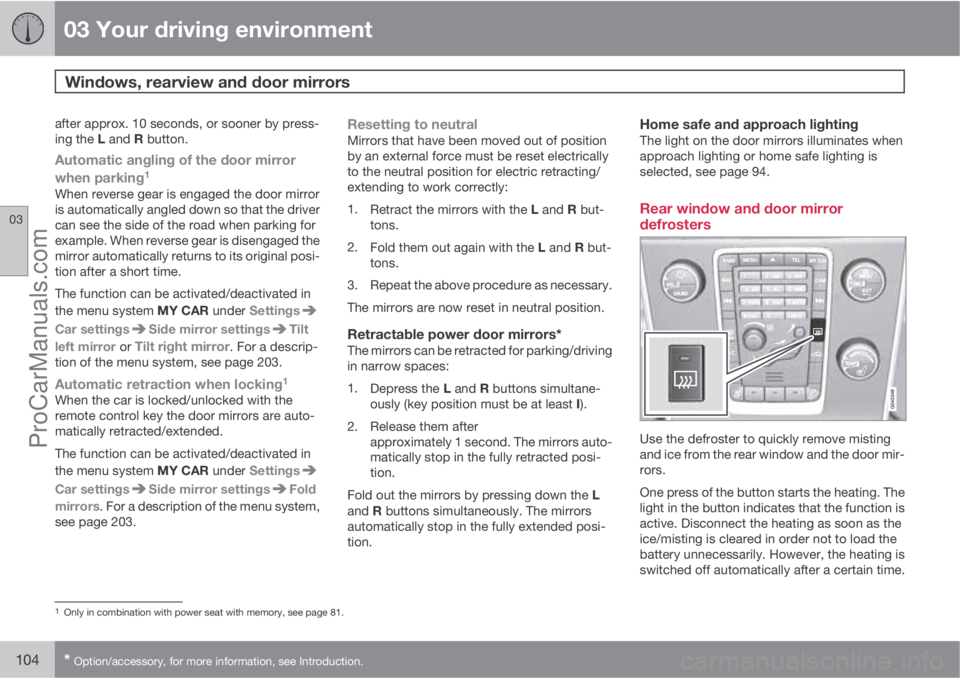
Rear window and door mirror
defrosters
Use the defroster to quickly remove misting
and ice from the rear window and the door mir-
rors.
One press of the button starts the heating. The
light in the button indicates that the function is
active. Disconnect the heating as soon as the
ice/misting is cleared in order not to load the
battery unnecessarily. However, the heating is
switched off automatically after a certain time.
1Only in combination with power seat with memory, see page 81.
ProCarManuals.com
Page 111 of 422
03 Your driving environment
Alcolock*
03
* Option/accessory, for more information, see Introduction.109 General information on the alcolock
The alcolock's1 function is to prevent the car
from being driven by individuals under the
influence of alcohol. Before the engine can be
started the driver must take a breath test that
verifies that he/she is not under the influence
of alcohol. Alcolock calibration takes place in
accordance with each market's limit value in
force for driving legally.
WARNING
The Alcolock is an aid and does not exempt
the driver from responsibility. It is always the
responsibility of the driver to be sober and
to drive the car safely.
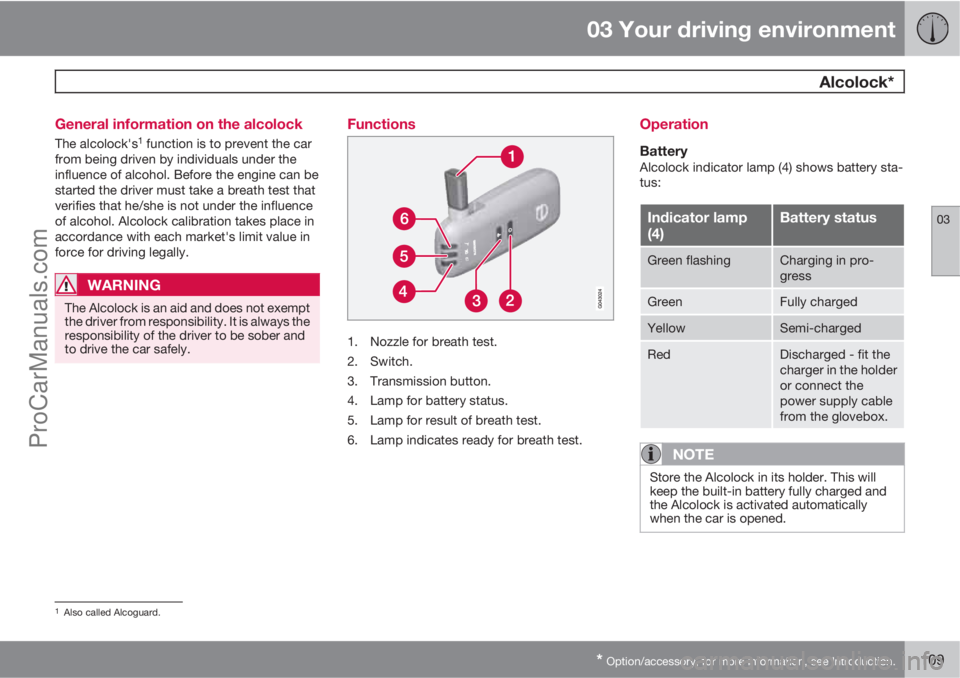
Functions
1. Nozzle for breath test.
2. Switch.
3. Transmission button.
4. Lamp for battery status.
5. Lamp for result of breath test.
6. Lamp indicates ready for breath test.
Operation
BatteryAlcolock indicator lamp (4) shows battery sta-
tus:
Indicator lamp
(4)Battery status
Green flashingCharging in pro-
gress
GreenFully charged
YellowSemi-charged
RedDischarged - fit the
charger in the holder
or connect the
power supply cable
from the glovebox.
NOTE
Store the Alcolock in its holder. This will
keep the built-in battery fully charged and
the Alcolock is activated automatically
when the car is opened.
1Also called Alcoguard.
ProCarManuals.com
Page 115 of 422
03 Your driving environment
Starting the engine
03
* Option/accessory, for more information, see Introduction.113 Petrol and diesel engines
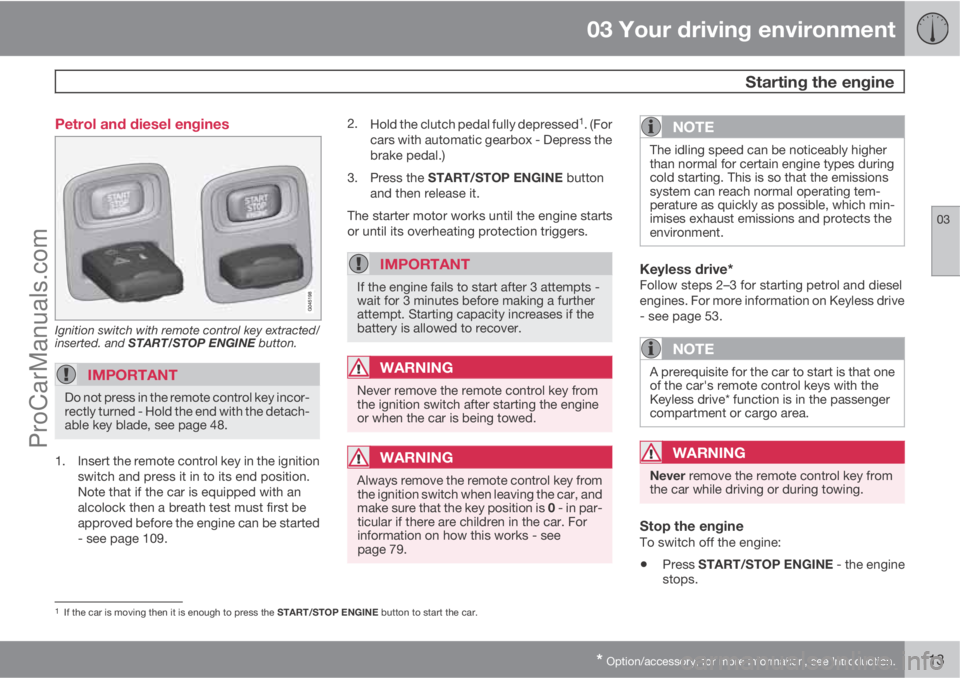
Ignition switch with remote control key extracted/
inserted. and START/STOP ENGINE button.
IMPORTANT
Do not press in the remote control key incor-
rectly turned - Hold the end with the detach-
able key blade, see page 48.
1. Insert the remote control key in the ignition
switch and press it in to its end position.
Note that if the car is equipped with an
alcolock then a breath test must first be
approved before the engine can be started
- see page 109.2.
Hold the clutch pedal fully depressed
1. (For
cars with automatic gearbox - Depress the
brake pedal.)
3.
Press the START/STOP ENGINE button
and then release it.
The starter motor works until the engine starts
or until its overheating protection triggers.
IMPORTANT
If the engine fails to start after 3 attempts -
wait for 3 minutes before making a further
attempt. Starting capacity increases if the
battery is allowed to recover.
WARNING
Never remove the remote control key from
the ignition switch after starting the engine
or when the car is being towed.
WARNING
Always remove the remote control key from
the ignition switch when leaving the car, and
make sure that the key position is 0 - in par-
ticular if there are children in the car. For
information on how this works - see
page 79.
NOTE
The idling speed can be noticeably higher
than normal for certain engine types during
cold starting. This is so that the emissions
system can reach normal operating tem-
perature as quickly as possible, which min-
imises exhaust emissions and protects the
environment.
Keyless drive*Follow steps 2–3 for starting petrol and diesel
engines. For more information on Keyless drive
- see page 53.
NOTE
A prerequisite for the car to start is that one
of the car's remote control keys with the
Keyless drive* function is in the passenger
compartment or cargo area.
WARNING
Never remove the remote control key from
the car while driving or during towing.
Stop the engineTo switch off the engine:
•Press START/STOP ENGINE - the engine
stops.
1If the car is moving then it is enough to press the START/STOP ENGINE button to start the car.
ProCarManuals.com
Page 118 of 422
03 Your driving environment
Starting the engine
03
116
•Accelerator pedal or brake pedal is
depressed
•The gear selector is moved out of P posi-
tion
•There is less than approx.10 litres left in the
fuel tank
•Active ERS time passes 15 minutes.
When an ERS-started engine is switched off,
all direction indicators illuminate with a con-
stant glow for 3 seconds.
Symbols and messages in the displayIn situations where the ERS function fails or is
interrupted, a symbol is shown on the instru-
ment panel, supplemented by an explanatory
message - Follow any recommendation given.
ERS function unavailable
MessageSpecification
No remote start
door openERS unavailable
because a door/tail-
gate was not closed.
No remote start
car not lockedERS unavailable
because the car was
not locked.
MessageSpecification
No remote start
low batteryERS unavailable due
to low battery volt-
age. Charge the bat-
tery by starting the
engine.
No remote start
driver in carERS unavailable
because someone
was in the passen-
ger compartment.
No remote start
engine warningERS unavailable due
to warning message
from engine. Con-
tact a workshop
A.
No remote start
gear not in PERS unavailable
because gear selec-
tor was not in P posi-
tion.
No remote start
engine coolantERS unavailable due
to error message
from cooling sys-
tem, see page 332.
MessageSpecification
No remote start
low fuel levelERS unavailable
because fuel level
too low.
No remote start
Max 2 startsERS unavailable
because a maximum
of 2 ERS activations
in succession are
allowed.
AAn authorised Volvo workshop is recommended.
Interrupted ERS function
MessageSpecification
Remote start off
low batteryERS interrupted
because battery
voltage too low.
Remote start off
low fuel levelERS interrupted
because fuel level
too low.
Remote start off
engine warningERS interrupted due
to error message
from engine. Con-
tact a workshop
A.
ProCarManuals.com
Page 121 of 422
03 Your driving environment
Starting the engine – Flexifuel
03
119 Fuel adaptation
Flexifuel engines can be driven on both 95
octane unleaded petrol and bioethanol E85.
Both fuels are filled in the common fuel tank so
that any variations of mixing ratios between
these two fuels is possible.
If the fuel tank is filled with petrol after the car
has been driven on bioethanol E85 (or vice
versa) then the engine may run slightly
unevenly for a time. For this reason it is impor-
tant to allow the engine to accustom itself
(adapt) to the new fuel mixture.
Adaptation takes place automatically when the
car is driven for a short period at an even
speed.
IMPORTANT
After the fuel mixture in the tank has been
changed an adaptation should be made by
driving at an even speed for about 15
minutes.
If the battery has been discharged or discon-
nected then a slightly longer period of driving
is required for the adaptation as the memory
for the electronics has been cleared.
ProCarManuals.com
Page 122 of 422
03 Your driving environment
Starting the engine – external battery
03
120
Jump starting
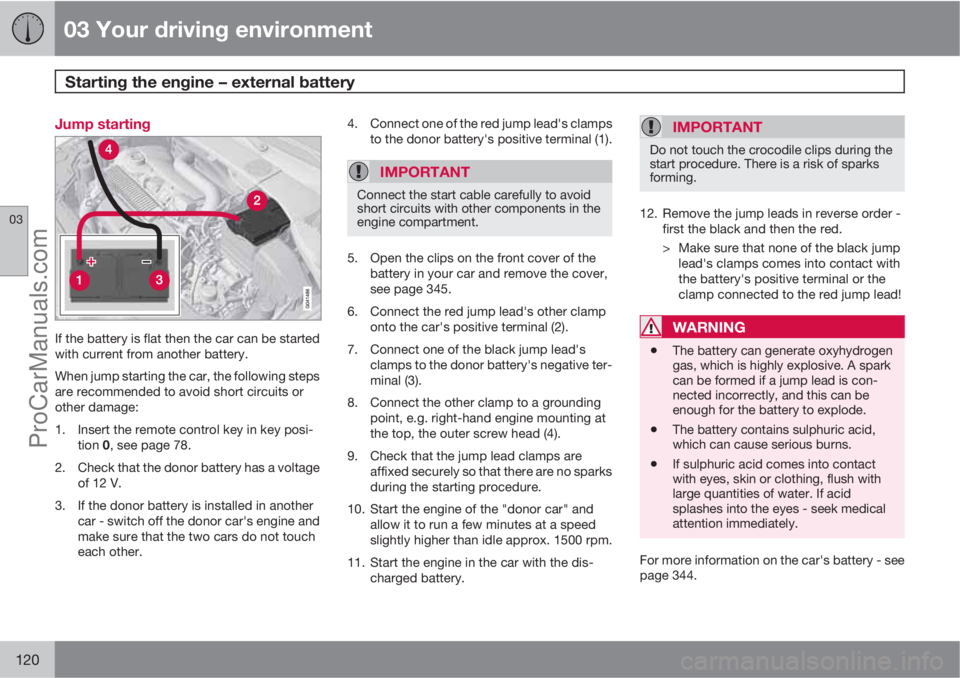
If the battery is flat then the car can be started
with current from another battery.
When jump starting the car, the following steps
are recommended to avoid short circuits or
other damage:
1. Insert the remote control key in key posi-
tion 0, see page 78.
2. Check that the donor battery has a voltage
of 12 V.
3. If the donor battery is installed in another
car - switch off the donor car's engine and
make sure that the two cars do not touch
each other.4. Connect one of the red jump lead's clamps
to the donor battery's positive terminal (1).
IMPORTANT
Connect the start cable carefully to avoid
short circuits with other components in the
engine compartment.
5. Open the clips on the front cover of the
battery in your car and remove the cover,
see page 345.
6. Connect the red jump lead's other clamp
onto the car's positive terminal (2).
7. Connect one of the black jump lead's
clamps to the donor battery's negative ter-
minal (3).
8. Connect the other clamp to a grounding
point, e.g. right-hand engine mounting at
the top, the outer screw head (4).
9. Check that the jump lead clamps are
affixed securely so that there are no sparks
during the starting procedure.
10. Start the engine of the "donor car" and
allow it to run a few minutes at a speed
slightly higher than idle approx. 1500 rpm.
11. Start the engine in the car with the dis-
charged battery.
IMPORTANT
Do not touch the crocodile clips during the
start procedure. There is a risk of sparks
forming.
12. Remove the jump leads in reverse order -
first the black and then the red.
> Make sure that none of the black jump
lead's clamps comes into contact with
the battery's positive terminal or the
clamp connected to the red jump lead!
WARNING
•The battery can generate oxyhydrogen
gas, which is highly explosive. A spark
can be formed if a jump lead is con-
nected incorrectly, and this can be
enough for the battery to explode.
•The battery contains sulphuric acid,
which can cause serious burns.
•If sulphuric acid comes into contact
with eyes, skin or clothing, flush with
large quantities of water. If acid
splashes into the eyes - seek medical
attention immediately.
For more information on the car's battery - see
page 344.
ProCarManuals.com
Page 126 of 422
03 Your driving environment
Gearboxes
03
124
Geartronic does not permit downshifting/kick-
down which would result in an engine speed
high enough to damage the engine. Nothing
happens if the driver still tries to shift down in
this way at high engine speed – the original
gear remains engaged.
When kick-down is activated the car can
change one or more gears at a time depending
on engine speed. The car changes up when the
engine reaches its maximum speed in order to
prevent damage to the engine.
Mechanical gear selector inhibitor
G021351
The gear selector can be moved forward and
back freely between N and D. Other positions
are locked with a latch that is released with the
inhibitor button on the gear selector.With the inhibitor button depressed the lever
can be moved forwards or backwards between
P, R, N and D.
Automatic gear selector inhibitorThe automatic gearbox has special safety sys-
tems:
Parking position (P)Stationary car with engine running:
Keep your foot on the brake pedal when mov-
ing the gear selector to another position.
Electric gear inhibitor – Shiftlock Parking
position (P)
To be able to move the gear selector from P to
other gear positions, the brake pedal must be
depressed and the remote control key must be
in position II, see page 78.
Shiftlock – Neutral (N)If the gear selector is in N position and the car
has been stationary for at least 3 seconds (irre-
spective of whether the engine is running) then
the gear selector is locked.
To be able to move the gear selector from N to
other gear positions, the brake pedal must be
depressed and the remote control key must be
in position II, see page 78.
Deactivate automatic gear selector
inhibitor
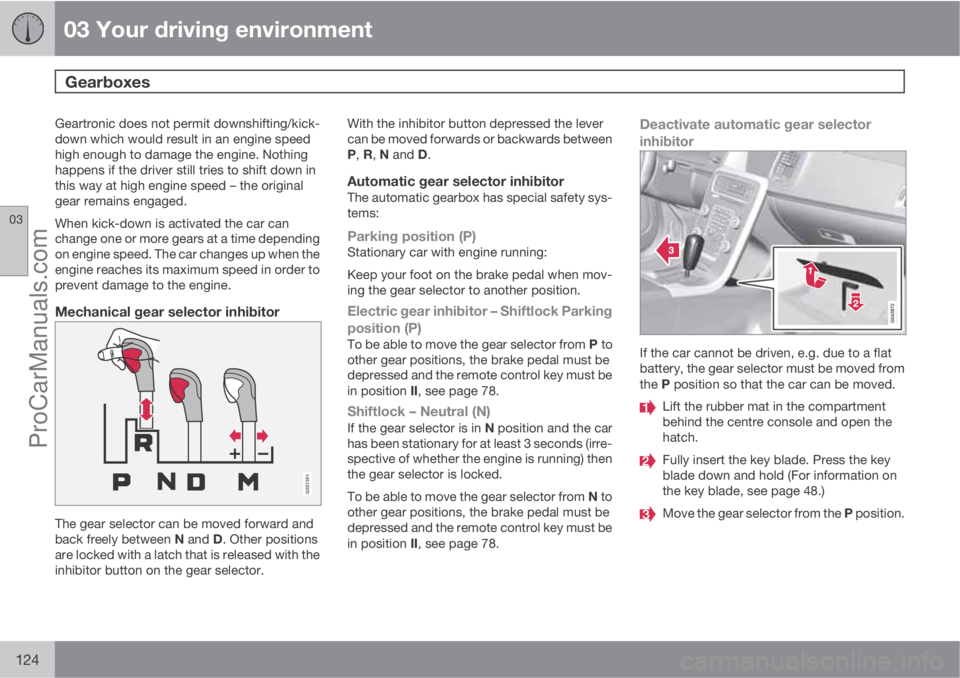
If the car cannot be driven, e.g. due to a flat
battery, the gear selector must be moved from
the P position so that the car can be moved.
Lift the rubber mat in the compartment
behind the centre console and open the
hatch.
Fully insert the key blade. Press the key
blade down and hold (For information on
the key blade, see page 48.)
Move the gear selector from the P position.
ProCarManuals.com