brake VOLVO V60 2013 User Guide
[x] Cancel search | Manufacturer: VOLVO, Model Year: 2013, Model line: V60, Model: VOLVO V60 2013Pages: 422, PDF Size: 9.59 MB
Page 81 of 422
03 Your driving environment
Key positions
03
* Option/accessory, for more information, see Introduction.79
Choosing key position/level
Key position 0
•Unlock the car - this means that the car's
electrical system is at level 0.
Key position I
•With the remote control key fully inserted
into the ignition switch1 - Briefly press
START/STOP ENGINE.
NOTE
To reach level I or II without starting the
engine - do not depress the brake/clutch
pedal when these key positions are due to
be selected.
Key position II
•With the remote control key fully inserted
into the ignition switch1 - Give a long2 press
on START/STOP ENGINE.
Back to key position 0
•To return to key position 0 from position II
and I - Briefly press on START/STOP
ENGINE.
Audio systemFor information on the audio system's func-
tions with remote control key removed - see
page 234.
Starting and stopping the engineFor information about starting/switching off the
engine - see page 113.
TowingFor important information about the remote
control key during towing - see page 304.
1Not necessary for cars with the Keyless* function.2Approx. 2 seconds.
ProCarManuals.com
Page 93 of 422
03 Your driving environment
Lighting
03
* Option/accessory, for more information, see Introduction.91
Active Bending Lights or under Settings
Car settingsLight settingsActive
Bending Lights. For a description of the menu
system, see page 203.
For headlamp pattern adjustment, see
page 94.
Auxiliary lamps*If the car has auxiliary lamps, the driver can use
the MY CAR menu system to choose whether
they should be deactivated or switched on/off
simultaneously with the main beam
4, see
page 204.
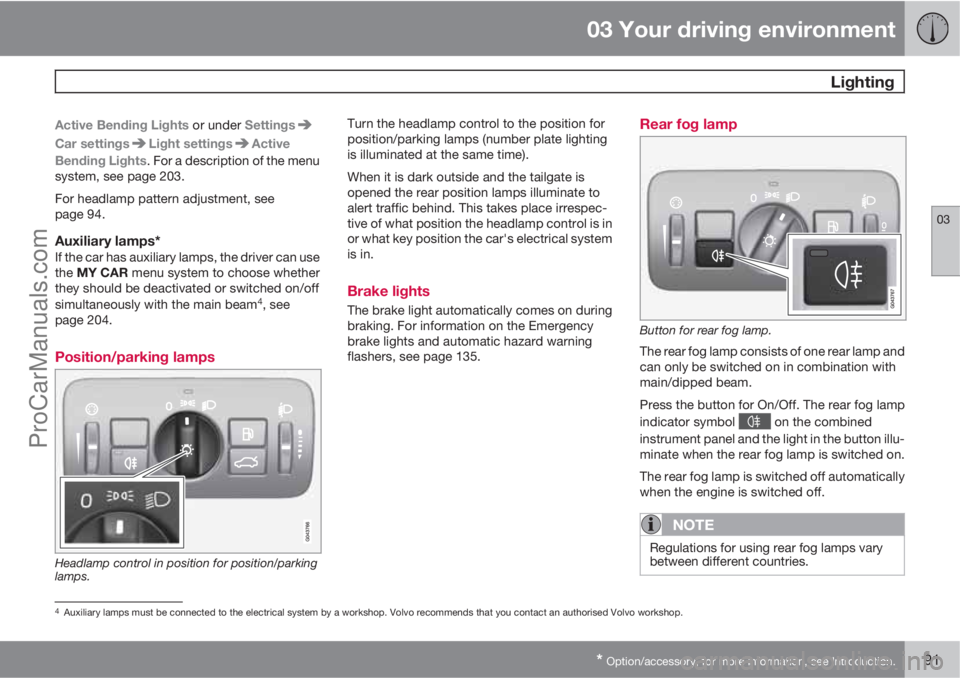
Position/parking lamps
Headlamp control in position for position/parking
lamps.
Turn the headlamp control to the position for
position/parking lamps (number plate lighting
is illuminated at the same time).
When it is dark outside and the tailgate is
opened the rear position lamps illuminate to
alert traffic behind. This takes place irrespec-
tive of what position the headlamp control is in
or what key position the car's electrical system
is in.
Brake lights
The brake light automatically comes on during
braking. For information on the Emergency
brake lights and automatic hazard warning
flashers, see page 135.
Rear fog lamp
Button for rear fog lamp.
The rear fog lamp consists of one rear lamp and
can only be switched on in combination with
main/dipped beam.
Press the button for On/Off. The rear fog lamp
indicator symbol
on the combined
instrument panel and the light in the button illu-
minate when the rear fog lamp is switched on.
The rear fog lamp is switched off automatically
when the engine is switched off.
NOTE
Regulations for using rear fog lamps vary
between different countries.
4Auxiliary lamps must be connected to the electrical system by a workshop. Volvo recommends that you contact an authorised Volvo workshop.
ProCarManuals.com
Page 94 of 422
03 Your driving environment
Lighting
03
92
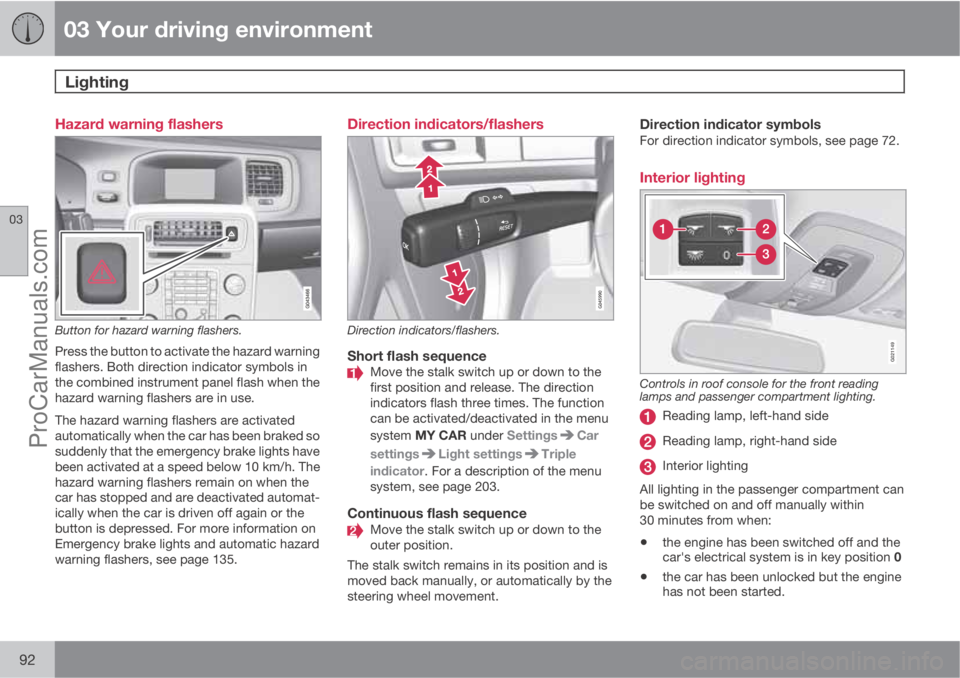
Hazard warning flashers
Button for hazard warning flashers.
Press the button to activate the hazard warning
flashers. Both direction indicator symbols in
the combined instrument panel flash when the
hazard warning flashers are in use.
The hazard warning flashers are activated
automatically when the car has been braked so
suddenly that the emergency brake lights have
been activated at a speed below 10 km/h. The
hazard warning flashers remain on when the
car has stopped and are deactivated automat-
ically when the car is driven off again or the
button is depressed. For more information on
Emergency brake lights and automatic hazard
warning flashers, see page 135.
Direction indicators/flashers
Direction indicators/flashers.
Short flash sequenceMove the stalk switch up or down to the
first position and release. The direction
indicators flash three times. The function
can be activated/deactivated in the menu
system MY CAR under Settings
Car
settings
Light settingsTriple
indicator. For a description of the menu
system, see page 203.
Continuous flash sequenceMove the stalk switch up or down to the
outer position.
The stalk switch remains in its position and is
moved back manually, or automatically by the
steering wheel movement.
Direction indicator symbolsFor direction indicator symbols, see page 72.
Interior lighting
G021149
Controls in roof console for the front reading
lamps and passenger compartment lighting.
Reading lamp, left-hand side
Reading lamp, right-hand side
Interior lighting
All lighting in the passenger compartment can
be switched on and off manually within
30 minutes from when:
•the engine has been switched off and the
car's electrical system is in key position 0
•the car has been unlocked but the engine
has not been started.
ProCarManuals.com
Page 115 of 422
03 Your driving environment
Starting the engine
03
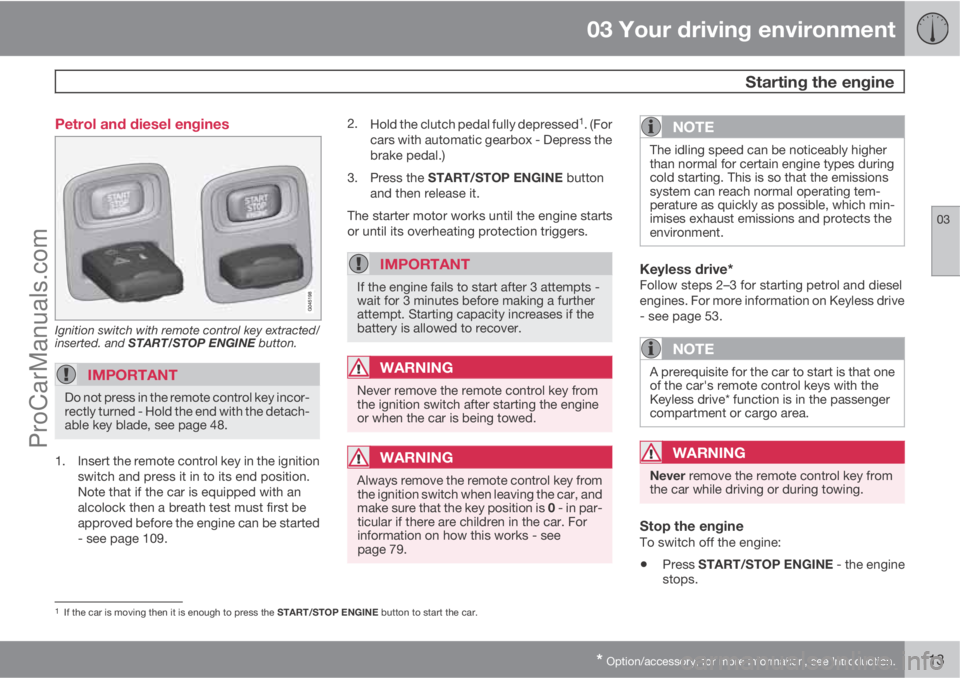
* Option/accessory, for more information, see Introduction.113 Petrol and diesel engines
Ignition switch with remote control key extracted/
inserted. and START/STOP ENGINE button.
IMPORTANT
Do not press in the remote control key incor-
rectly turned - Hold the end with the detach-
able key blade, see page 48.
1. Insert the remote control key in the ignition
switch and press it in to its end position.
Note that if the car is equipped with an
alcolock then a breath test must first be
approved before the engine can be started
- see page 109.2.
Hold the clutch pedal fully depressed
1. (For
cars with automatic gearbox - Depress the
brake pedal.)
3.
Press the START/STOP ENGINE button
and then release it.
The starter motor works until the engine starts
or until its overheating protection triggers.
IMPORTANT
If the engine fails to start after 3 attempts -
wait for 3 minutes before making a further
attempt. Starting capacity increases if the
battery is allowed to recover.
WARNING
Never remove the remote control key from
the ignition switch after starting the engine
or when the car is being towed.
WARNING
Always remove the remote control key from
the ignition switch when leaving the car, and
make sure that the key position is 0 - in par-
ticular if there are children in the car. For
information on how this works - see
page 79.
NOTE
The idling speed can be noticeably higher
than normal for certain engine types during
cold starting. This is so that the emissions
system can reach normal operating tem-
perature as quickly as possible, which min-
imises exhaust emissions and protects the
environment.
Keyless drive*Follow steps 2–3 for starting petrol and diesel
engines. For more information on Keyless drive
- see page 53.
NOTE
A prerequisite for the car to start is that one
of the car's remote control keys with the
Keyless drive* function is in the passenger
compartment or cargo area.
WARNING
Never remove the remote control key from
the car while driving or during towing.
Stop the engineTo switch off the engine:
•Press START/STOP ENGINE - the engine
stops.
1If the car is moving then it is enough to press the START/STOP ENGINE button to start the car.
ProCarManuals.com
Page 118 of 422
03 Your driving environment
Starting the engine
03
116
•Accelerator pedal or brake pedal is
depressed
•The gear selector is moved out of P posi-
tion
•There is less than approx.10 litres left in the
fuel tank
•Active ERS time passes 15 minutes.
When an ERS-started engine is switched off,
all direction indicators illuminate with a con-
stant glow for 3 seconds.
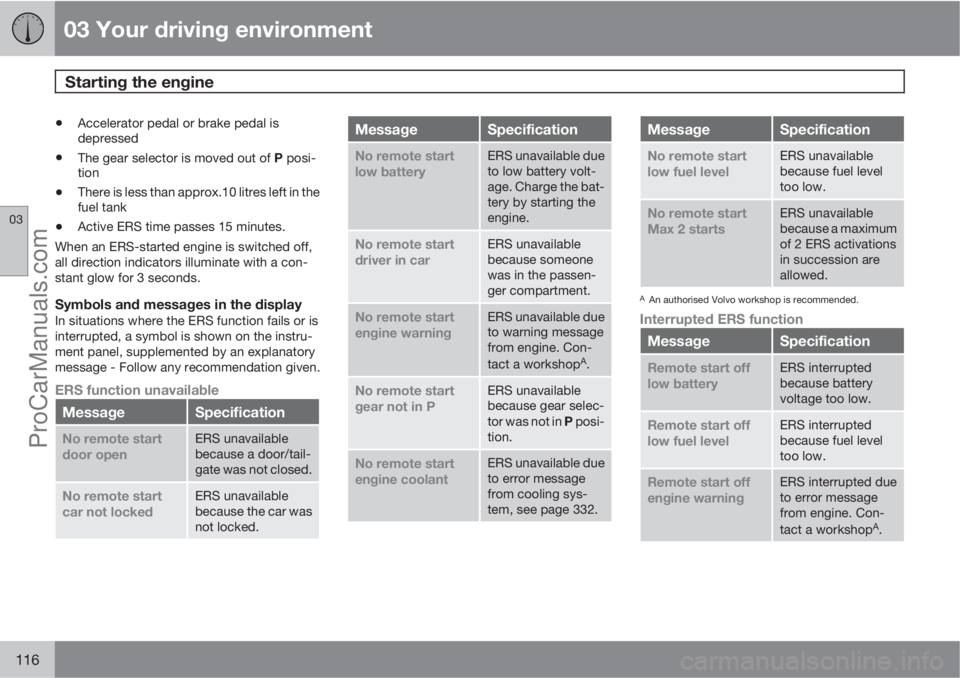
Symbols and messages in the displayIn situations where the ERS function fails or is
interrupted, a symbol is shown on the instru-
ment panel, supplemented by an explanatory
message - Follow any recommendation given.
ERS function unavailable
MessageSpecification
No remote start
door openERS unavailable
because a door/tail-
gate was not closed.
No remote start
car not lockedERS unavailable
because the car was
not locked.
MessageSpecification
No remote start
low batteryERS unavailable due
to low battery volt-
age. Charge the bat-
tery by starting the
engine.
No remote start
driver in carERS unavailable
because someone
was in the passen-
ger compartment.
No remote start
engine warningERS unavailable due
to warning message
from engine. Con-
tact a workshop
A.
No remote start
gear not in PERS unavailable
because gear selec-
tor was not in P posi-
tion.
No remote start
engine coolantERS unavailable due
to error message
from cooling sys-
tem, see page 332.
MessageSpecification
No remote start
low fuel levelERS unavailable
because fuel level
too low.
No remote start
Max 2 startsERS unavailable
because a maximum
of 2 ERS activations
in succession are
allowed.
AAn authorised Volvo workshop is recommended.
Interrupted ERS function
MessageSpecification
Remote start off
low batteryERS interrupted
because battery
voltage too low.
Remote start off
low fuel levelERS interrupted
because fuel level
too low.
Remote start off
engine warningERS interrupted due
to error message
from engine. Con-
tact a workshop
A.
ProCarManuals.com
Page 123 of 422
03 Your driving environment
Gearboxes
03
121
IMPORTANT
The operating temperature of the gearbox is
checked in order to prevent damage to any
of the drive system's components. In the
event of a risk of overheating a warning
symbol illuminates on the instrument panel
combined with a text message - In which
case, follow the recommendation given.
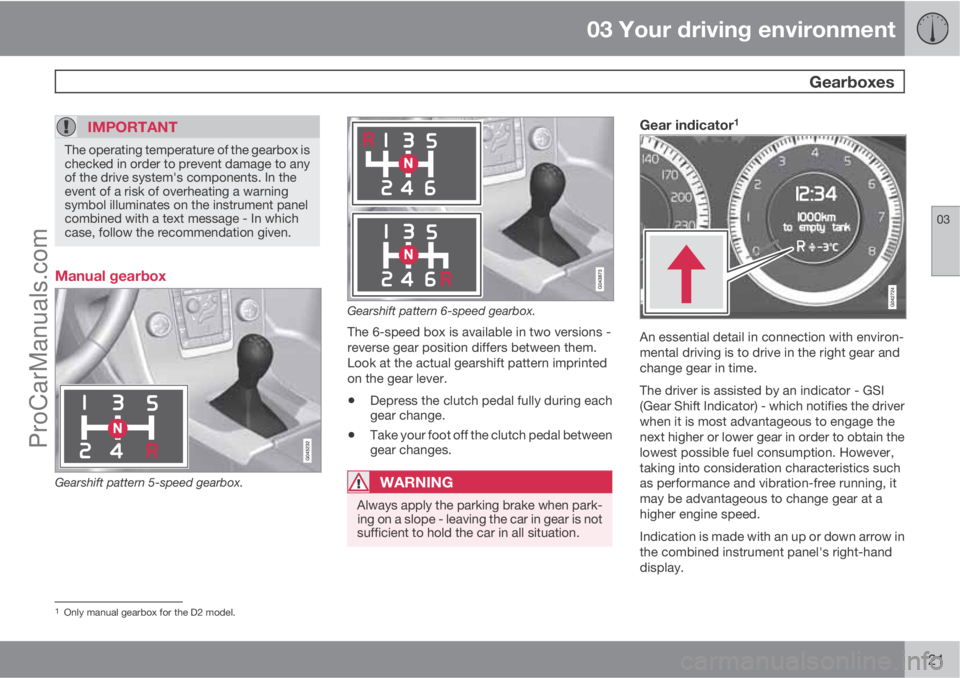
Manual gearbox
Gearshift pattern 5-speed gearbox.
Gearshift pattern 6-speed gearbox.
The 6-speed box is available in two versions -
reverse gear position differs between them.
Look at the actual gearshift pattern imprinted
on the gear lever.
•Depress the clutch pedal fully during each
gear change.
•Take your foot off the clutch pedal between
gear changes.
WARNING
Always apply the parking brake when park-
ing on a slope - leaving the car in gear is not
sufficient to hold the car in all situation.
Gear indicator1
An essential detail in connection with environ-
mental driving is to drive in the right gear and
change gear in time.
The driver is assisted by an indicator - GSI
(Gear Shift Indicator) - which notifies the driver
when it is most advantageous to engage the
next higher or lower gear in order to obtain the
lowest possible fuel consumption. However,
taking into consideration characteristics such
as performance and vibration-free running, it
may be advantageous to change gear at a
higher engine speed.
Indication is made with an up or down arrow in
the combined instrument panel's right-hand
display.
1Only manual gearbox for the D2 model.
ProCarManuals.com
Page 124 of 422
03 Your driving environment
Gearboxes
03
122* Option/accessory, for more information, see Introduction.
Reverse gear inhibitorThe reverse gear inhibitor hinders the possibil-
ity of mistakenly attempting to engage reverse
gear during normal forward travel.
•Follow the gearing pattern printed on the
gear lever and start from neutral position,
N before moving it to R position.
•Only engage reverse gear when the car is
stationary.
NOTE
With the upper variant of the shifting pattern
for 6-speed gearbox (see previous illustra-
tion) - first press down the gear lever in the
N position in order to engage reverse gear.
Automatic gearbox Geartronic*
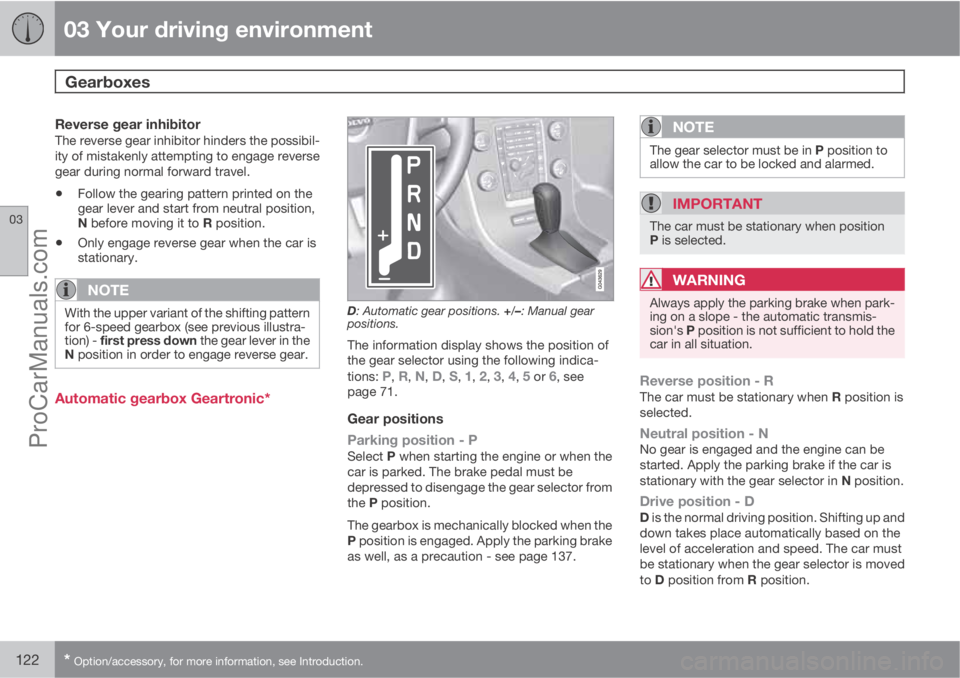
D: Automatic gear positions. +/–: Manual gear
positions.
The information display shows the position of
the gear selector using the following indica-
tions:
P, R, N, D, S, 1, 2, 3, 4, 5 or 6, see
page 71.
Gear positions
Parking position - P
Select P when starting the engine or when the
car is parked. The brake pedal must be
depressed to disengage the gear selector from
the P position.
The gearbox is mechanically blocked when the
P position is engaged. Apply the parking brake
as well, as a precaution - see page 137.
NOTE
The gear selector must be in P position to
allow the car to be locked and alarmed.
IMPORTANT
The car must be stationary when position
P is selected.
WARNING
Always apply the parking brake when park-
ing on a slope - the automatic transmis-
sion's P position is not sufficient to hold the
car in all situation.
Reverse position - RThe car must be stationary when R position is
selected.
Neutral position - NNo gear is engaged and the engine can be
started. Apply the parking brake if the car is
stationary with the gear selector in N position.
Drive position - DD is the normal driving position. Shifting up and
down takes place automatically based on the
level of acceleration and speed. The car must
be stationary when the gear selector is moved
to D position from R position.
ProCarManuals.com
Page 125 of 422
03 Your driving environment
Gearboxes
03
123
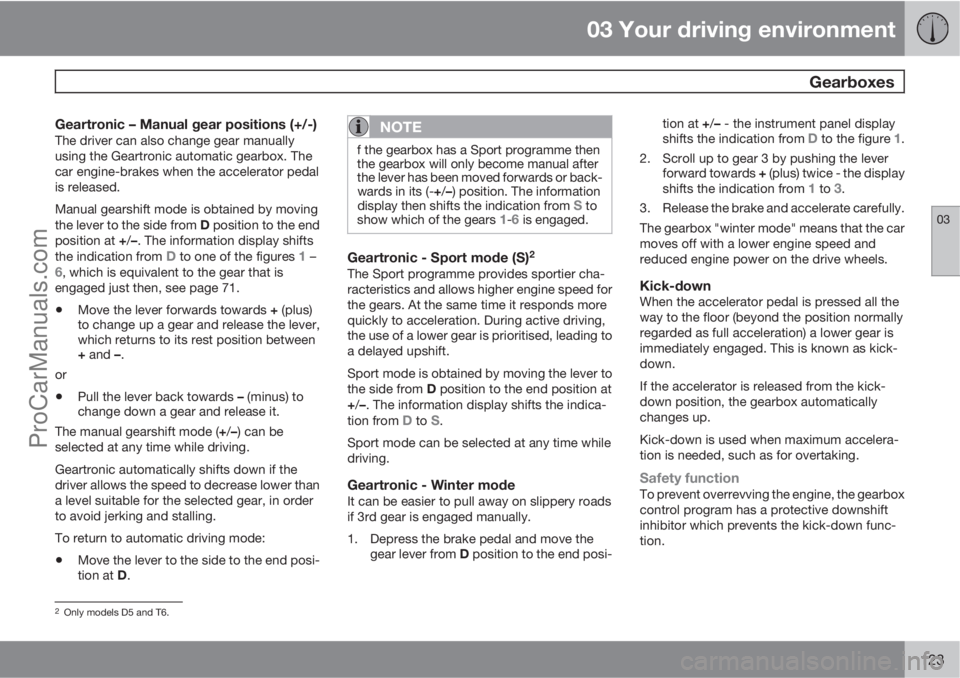
Geartronic – Manual gear positions (+/-)The driver can also change gear manually
using the Geartronic automatic gearbox. The
car engine-brakes when the accelerator pedal
is released.
Manual gearshift mode is obtained by moving
the lever to the side from D position to the end
position at +/–. The information display shifts
the indication from
D to one of the figures 1 –6, which is equivalent to the gear that is
engaged just then, see page 71.
•Move the lever forwards towards + (plus)
to change up a gear and release the lever,
which returns to its rest position between
+ and –.
or
•Pull the lever back towards – (minus) to
change down a gear and release it.
The manual gearshift mode (+/–) can be
selected at any time while driving.
Geartronic automatically shifts down if the
driver allows the speed to decrease lower than
a level suitable for the selected gear, in order
to avoid jerking and stalling.
To return to automatic driving mode:
•Move the lever to the side to the end posi-
tion at D.
NOTE
f the gearbox has a Sport programme then
the gearbox will only become manual after
the lever has been moved forwards or back-
wards in its (-+/–) position. The information
display then shifts the indication from
S to
show which of the gears 1-6 is engaged.
Geartronic - Sport mode (S)2
The Sport programme provides sportier cha-
racteristics and allows higher engine speed for
the gears. At the same time it responds more
quickly to acceleration. During active driving,
the use of a lower gear is prioritised, leading to
a delayed upshift.
Sport mode is obtained by moving the lever to
the side from D position to the end position at
+/–. The information display shifts the indica-
tion from
D to S.
Sport mode can be selected at any time while
driving.
Geartronic - Winter modeIt can be easier to pull away on slippery roads
if 3rd gear is engaged manually.
1. Depress the brake pedal and move the
gear lever from D position to the end posi-tion at +/– - the instrument panel display
shifts the indication from
D to the figure 1.
2. Scroll up to gear 3 by pushing the lever
forward towards + (plus) twice - the display
shifts the indication from
1 to 3.
3. Release the brake and accelerate carefully.
The gearbox "winter mode" means that the car
moves off with a lower engine speed and
reduced engine power on the drive wheels.
Kick-downWhen the accelerator pedal is pressed all the
way to the floor (beyond the position normally
regarded as full acceleration) a lower gear is
immediately engaged. This is known as kick-
down.
If the accelerator is released from the kick-
down position, the gearbox automatically
changes up.
Kick-down is used when maximum accelera-
tion is needed, such as for overtaking.
Safety functionTo prevent overrevving the engine, the gearbox
control program has a protective downshift
inhibitor which prevents the kick-down func-
tion.
2Only models D5 and T6.
ProCarManuals.com
Page 126 of 422
03 Your driving environment
Gearboxes
03
124
Geartronic does not permit downshifting/kick-
down which would result in an engine speed
high enough to damage the engine. Nothing
happens if the driver still tries to shift down in
this way at high engine speed – the original
gear remains engaged.
When kick-down is activated the car can
change one or more gears at a time depending
on engine speed. The car changes up when the
engine reaches its maximum speed in order to
prevent damage to the engine.
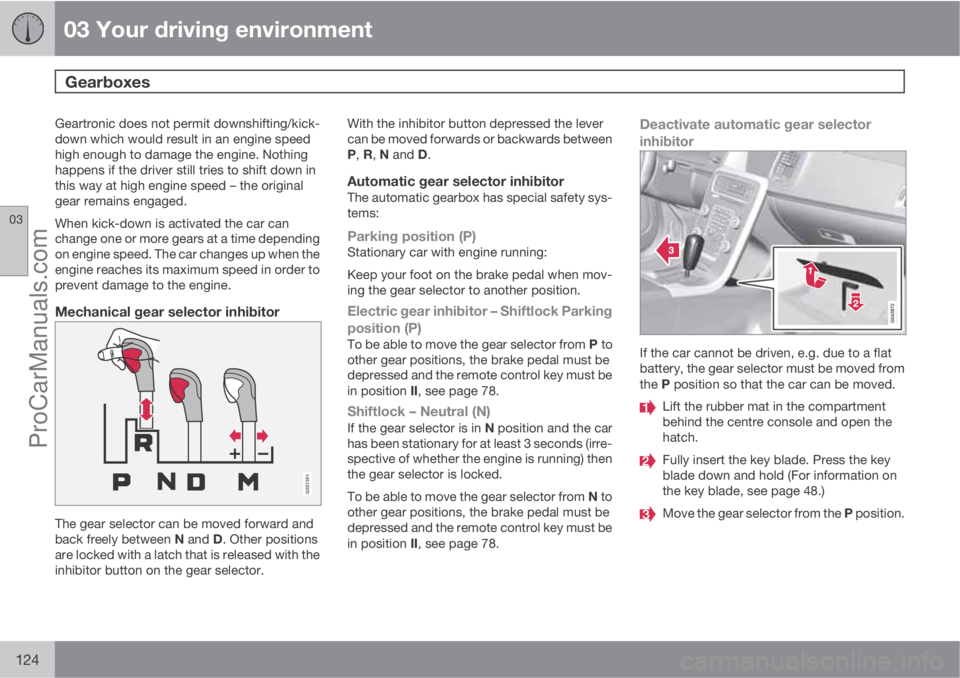
Mechanical gear selector inhibitor
G021351
The gear selector can be moved forward and
back freely between N and D. Other positions
are locked with a latch that is released with the
inhibitor button on the gear selector.With the inhibitor button depressed the lever
can be moved forwards or backwards between
P, R, N and D.
Automatic gear selector inhibitorThe automatic gearbox has special safety sys-
tems:
Parking position (P)Stationary car with engine running:
Keep your foot on the brake pedal when mov-
ing the gear selector to another position.
Electric gear inhibitor – Shiftlock Parking
position (P)
To be able to move the gear selector from P to
other gear positions, the brake pedal must be
depressed and the remote control key must be
in position II, see page 78.
Shiftlock – Neutral (N)If the gear selector is in N position and the car
has been stationary for at least 3 seconds (irre-
spective of whether the engine is running) then
the gear selector is locked.
To be able to move the gear selector from N to
other gear positions, the brake pedal must be
depressed and the remote control key must be
in position II, see page 78.
Deactivate automatic gear selector
inhibitor
If the car cannot be driven, e.g. due to a flat
battery, the gear selector must be moved from
the P position so that the car can be moved.
Lift the rubber mat in the compartment
behind the centre console and open the
hatch.
Fully insert the key blade. Press the key
blade down and hold (For information on
the key blade, see page 48.)
Move the gear selector from the P position.
ProCarManuals.com
Page 127 of 422
03 Your driving environment
Gearboxes
03
* Option/accessory, for more information, see Introduction.125 Automatic gearbox Powershift*
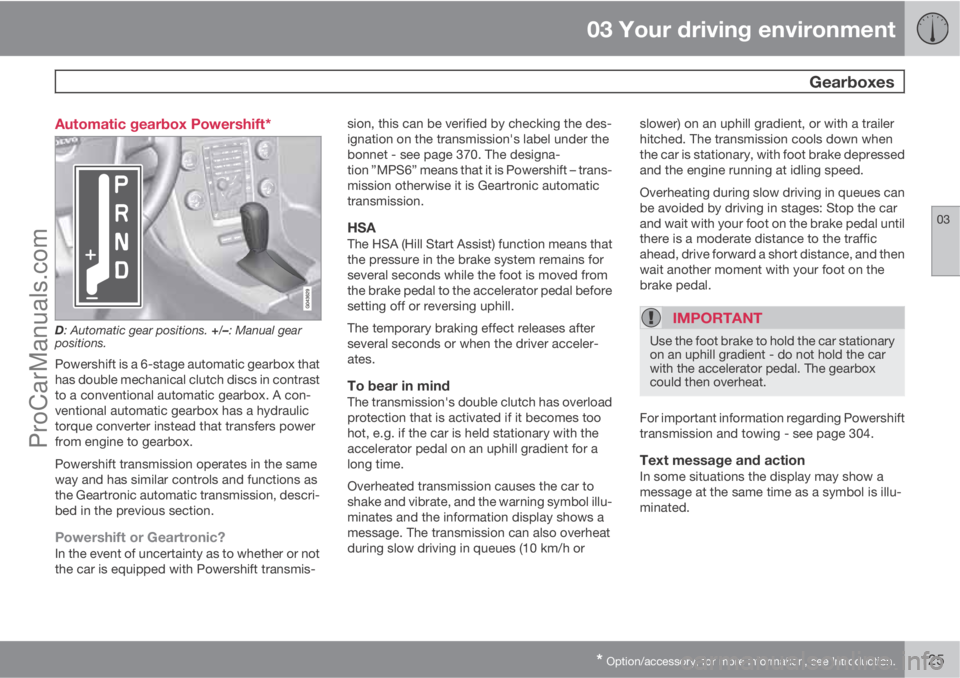
D: Automatic gear positions. +/–: Manual gear
positions.
Powershift is a 6-stage automatic gearbox that
has double mechanical clutch discs in contrast
to a conventional automatic gearbox. A con-
ventional automatic gearbox has a hydraulic
torque converter instead that transfers power
from engine to gearbox.
Powershift transmission operates in the same
way and has similar controls and functions as
the Geartronic automatic transmission, descri-
bed in the previous section.
Powershift or Geartronic?In the event of uncertainty as to whether or not
the car is equipped with Powershift transmis-sion, this can be verified by checking the des-
ignation on the transmission's label under the
bonnet - see page 370. The designa-
tion ”MPS6” means that it is Powershift – trans-
mission otherwise it is Geartronic automatic
transmission.
HSAThe HSA (Hill Start Assist) function means that
the pressure in the brake system remains for
several seconds while the foot is moved from
the brake pedal to the accelerator pedal before
setting off or reversing uphill.
The temporary braking effect releases after
several seconds or when the driver acceler-
ates.
To bear in mindThe transmission's double clutch has overload
protection that is activated if it becomes too
hot, e.g. if the car is held stationary with the
accelerator pedal on an uphill gradient for a
long time.
Overheated transmission causes the car to
shake and vibrate, and the warning symbol illu-
minates and the information display shows a
message. The transmission can also overheat
during slow driving in queues (10 km/h orslower) on an uphill gradient, or with a trailer
hitched. The transmission cools down when
the car is stationary, with foot brake depressed
and the engine running at idling speed.
Overheating during slow driving in queues can
be avoided by driving in stages: Stop the car
and wait with your foot on the brake pedal until
there is a moderate distance to the traffic
ahead, drive forward a short distance, and then
wait another moment with your foot on the
brake pedal.
IMPORTANT
Use the foot brake to hold the car stationary
on an uphill gradient - do not hold the car
with the accelerator pedal. The gearbox
could then overheat.
For important information regarding Powershift
transmission and towing - see page 304.
Text message and actionIn some situations the display may show a
message at the same time as a symbol is illu-
minated.
ProCarManuals.com