brake light VOLVO V60 2013 User Guide
[x] Cancel search | Manufacturer: VOLVO, Model Year: 2013, Model line: V60, Model: VOLVO V60 2013Pages: 422, PDF Size: 9.59 MB
Page 176 of 422
04 Driver support
Collision Warning with Auto Brake & Pedestrian Protection*
04
174* Option/accessory, for more information, see Introduction.
The collision warning system and City
Safety™ complement each other. For more
information on City Safety™, see page 168.
1 - Collision warningThe driver is first warned of a potentially immi-
nent collision.
The collision warning system detects pedes-
trians, stationary vehicles as well as vehicles
driving in the same direction in front of the car.
If there is a risk of collision with a pedestrian or
a vehicle, the driver's attention is attracted with
a flashing red warning signal (no. [1] in the illus-
tration on page 173) and an acoustic signal.
2 - Brake support2
If the risk of collision has increased further after
the collision warning then the brake support is
activated.
This means that the brake system is prepared
for rapid braking by applying the brakes lightly,
which may feel like a slight jolt.
If the brake pedal is depressed sufficiently
quickly then full brake function is implemented.
Brake support also reinforces the driver's brak-
ing if the system considers that the braking is
not sufficient to avoid a collision.
3 - Auto Brake2
The automatic brake function is activated last.
If in this situation the driver has not yet started
to take evasive action and the risk of collision
is imminent then the automatic braking func-
tion is deployed - this takes place irrespective
of whether or not the driver brakes. Braking
then takes place with full brake force in order
to reduce collision speed, or with limited brake
force if it is sufficient to avoid a collision.WARNING
The collision warning system does not
engage in all driving situations or traffic,
weather or road conditions. The collision
warning system does not react to vehicles
driving in another direction to the car or to
animals.
Warning only activated in the event of a high
risk for collision. This section "Function"
and the section "Limitations" inform about
limitations that the driver must be aware of
before using the Collision Warning system
with Auto Brake.
Warnings and brake interventions for
pedestrians are switched off at vehicle
speeds exceeding 80 km/h.
Warnings and brake interventions for
pedestrians do not work in darkness and
tunnels - not even when streetlights are lit.
The auto-brake function can prevent a col-
lision or reduce collision speed. To ensure
full brake performance, the driver should
always depress the brake pedal - even when
the car auto-brakes.
Never wait for a collision warning. The driver
is always responsible that the correct dis-
tance and speed are maintained - even
when the collision warning system with
auto-brake is used.
2With system Level 2 only.
ProCarManuals.com
Page 177 of 422
04 Driver support
Collision Warning with Auto Brake & Pedestrian Protection*
04
* Option/accessory, for more information, see Introduction.175 Detection of pedestrians
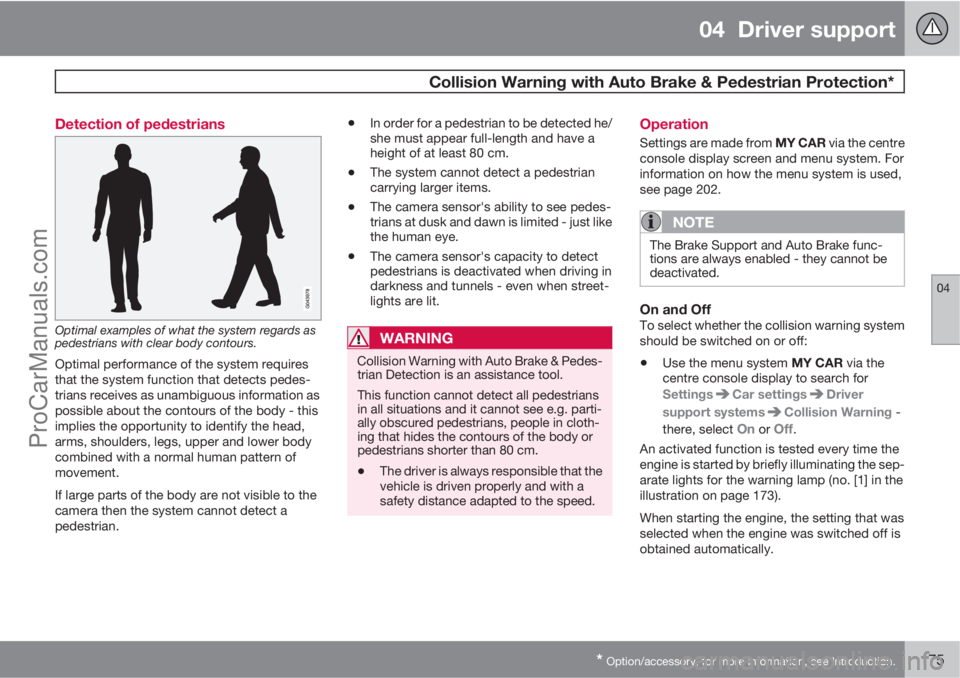
Optimal examples of what the system regards as
pedestrians with clear body contours.
Optimal performance of the system requires
that the system function that detects pedes-
trians receives as unambiguous information as
possible about the contours of the body - this
implies the opportunity to identify the head,
arms, shoulders, legs, upper and lower body
combined with a normal human pattern of
movement.
If large parts of the body are not visible to the
camera then the system cannot detect a
pedestrian.
•In order for a pedestrian to be detected he/
she must appear full-length and have a
height of at least 80 cm.
•The system cannot detect a pedestrian
carrying larger items.
•The camera sensor's ability to see pedes-
trians at dusk and dawn is limited - just like
the human eye.
•The camera sensor's capacity to detect
pedestrians is deactivated when driving in
darkness and tunnels - even when street-
lights are lit.
WARNING
Collision Warning with Auto Brake & Pedes-
trian Detection is an assistance tool.
This function cannot detect all pedestrians
in all situations and it cannot see e.g. parti-
ally obscured pedestrians, people in cloth-
ing that hides the contours of the body or
pedestrians shorter than 80 cm.
•The driver is always responsible that the
vehicle is driven properly and with a
safety distance adapted to the speed.
Operation
Settings are made from MY CAR via the centre
console display screen and menu system. For
information on how the menu system is used,
see page 202.
NOTE
The Brake Support and Auto Brake func-
tions are always enabled - they cannot be
deactivated.
On and OffTo select whether the collision warning system
should be switched on or off:
•Use the menu system MY CAR via the
centre console display to search for
Settings
Car settingsDriver
support systems
Collision Warning -
there, select
On or Off.
An activated function is tested every time the
engine is started by briefly illuminating the sep-
arate lights for the warning lamp (no. [1] in the
illustration on page 173).
When starting the engine, the setting that was
selected when the engine was switched off is
obtained automatically.
ProCarManuals.com
Page 179 of 422
04 Driver support
Collision Warning with Auto Brake & Pedestrian Protection*
04
* Option/accessory, for more information, see Introduction.177
For the sensors to work correctly, they must be
kept clear of dirt, ice and snow, and be cleaned
regularly with water and car shampoo.
NOTE
Dirt, ice and snow covering the sensors will
reduce their function and may prevent
measurement.
Limitations
Collision Warning with Auto Brake and Pedes-
trian Detection is active from approx. 4 km/h.
The visual warning signal (no. [1] in the illustra-
tion on page 173) may be difficult to notice in
the event of strong sunlight, reflections, when
sunglasses are being worn or if the driver is not
looking straight ahead. The warning sound
should therefore always be activated.
On slippery road surfaces the braking distance
is extended, which may reduce the capacity to
avoid a collision. In such situations the ABS
and DSTC systems will provide best possible
braking force with maintained stability.
NOTE
The visual warning signal can be temporarily
disengaged in the event of high passenger
compartment temperature caused by
strong sunlight for example. If this occurs
then the warning sound is activated even if
it is deactivated in the menu system.
•Warnings may not appear if the dis-
tance to the vehicle in front is small or if
steering wheel and pedal movements
are large, e.g. a very active driving style.
WARNING
Warnings and brake interventions could be
implemented late or not at all if the traffic
situation or external influences mean that
the radar or camera sensor cannot detect a
pedestrian or a vehicle in front correctly.
The sensor system has a limited range for
pedestrians and the system therefore pro-
vides effective warnings and brake inter-
ventions at vehicle speeds up to 50 km/h.
For stationary or slow-moving vehicles,
warnings and brake interventions are effec-
tive at vehicle speeds up to 70 km/h.
Warnings for stationary or slow-moving
vehicles could be disengaged due to dark-
ness or poor visibility.
Warnings and brake interventions for
pedestrians are switched off at vehicle
speeds exceeding 80 km/h.
The collision warning system uses the same
radar sensors as adaptive cruise control. For
more information on the radar sensor and its
limitations, see page 178.
If warnings are perceived as being too frequent
or disturbing then the warning distance can be
reduced. This then leads to the system provid-
ing a warning at a later stage, which reduces
the total number of warnings; see the section
"Set warning distance" on page 176.
ProCarManuals.com
Page 180 of 422
04 Driver support
Collision Warning with Auto Brake & Pedestrian Protection*
04
178* Option/accessory, for more information, see Introduction.
Collision Warning with Auto Brake is tempo-
rarily deactivated with reverse gear engaged.
Collision Warning with Auto Brake is not acti-
vated at low speeds - under 4 km/h, which is
why the system does not intervene in situations
where the car is approaching a vehicle in front
very slowly, e.g. when parking.
In situations where the driver demonstrates
active, aware driving behaviour, a collision
warning may be postponed slightly in order to
keep unnecessary warnings to a minimum.
When Auto Brake has prevented a collision
with a stationary object the car remains sta-
tionary for a maximum of 1.5 seconds. If the car
is braked for a vehicle in front that is moving,
then speed is reduced to the same speed as
that maintained by the vehicle in front.
On a car with manual gearbox the engine stops
when Auto Brake has stopped the car, unless
the driver manages to depress the clutch pedal
beforehand.
Camera sensor limitationsThe car’s camera sensor is also used - as well
as by Collision Warning with Auto Brake - by
the functions:
•Automatic main/dipped beam dimming -
see page 88
•Road sign information - see page 148
•Driver Alert Control – see page 182
•Lane Departure Warning – see page 185.
NOTE
Keep the windscreen surface in front of the
camera sensor clean from ice, snow, mist
and dirt.
Do not attach or fit anything to the wind-
screen in front of the camera sensor, as this
could reduce or prevent the function of one
or more camera-dependent systems.
The camera sensors have limitations similar to
the human eye, i.e. they "see" worse in dark-
ness, heavy snowfall or rain and in thick fog for
example. Under such conditions the functions
of camera-dependent systems could be sig-
nificantly reduced or temporarily disengaged.
Strong oncoming light, reflections in the car-
riageway, snow or ice on the road surface, dirty
road surfaces or unclear lane markings could
also significantly reduce camera sensor func-
tion when it is used to scan the carriageway
and detect pedestrians and other vehicles.
The field of vision of the camera sensor is lim-
ited, which is why pedestrians and vehicles
cannot be detected in some situations, or they
are detected later than anticipated.
During very high temperatures the camera is
temporarily switched off for about 15 minutesafter the engine is started in order to protect
camera functionality.
Fault tracing and action
If the display shows the message Windscreen
Sensors blocked then this means that the
camera sensor is blocked and cannot detect
pedestrians, vehicles or road markings in front
of the car.
At the same time, this means that - besides
Collision Warning with Auto Brake - the Auto-
matic main/dipped beam dimming, Road sign
information, Driver Alert Control and Lane
Departure Warning functions will not have full
functionality either.
The following table presents possible causes
for a message being shown along with the
appropriate action.
ProCarManuals.com
Page 286 of 422
07 During your journey
Recommendations during driving
07
284
General
Economical drivingDriving economically means driving smoothly
while thinking ahead and adjusting your driving
style and speed to the prevailing conditions.
•Drive in the highest gear possible, adapted
to the current traffic situation and road -
lower engine speeds result in lower fuel
consumption.
•Avoid driving with open windows.
•Avoid sudden unnecessary acceleration
and heavy braking.
•Remove unnecessary items from the car -
the greater the load the higher the fuel con-
sumption.
•Use engine braking to slow down, when it
can take place without risk to other road
users.
•A roof load and ski box increase air resis-
tance, leading to higher fuel consumption
- remove the load carriers when not in use.
•Do not run the engine to operating tem-
perature at idling speed, but rather drive
with a light load as soon as possible - a
cold engine consumes more fuel than a
warm one.
•A car with D2, D3, D4 or D5 engine in com-
bination with a 6-speed manual gearbox is
started in 2nd gear.For more information and further advice, see
the pages 12 and 384.
WARNING
Never switch off the engine while moving,
such as downhill, this deactivates important
systems such as the power steering and
brake servo.
Driving in waterThe car can be driven through water at a maxi-
mum depth of 25 cm at a maximum speed of
10 km/h. Extra caution should be exercised
when passing through flowing water.
During driving in water, maintain a low speed
and do not stop the car. When the water has
been passed, depress the brake pedal lightly
and check that full brake function is achieved.
Water and mud for example can make the
brake linings wet resulting in delayed brake
function.
•Clean the electric contacts of the electric
engine block heater and trailer coupling
after driving in water and mud.
•Do not let the car stand with water over the
sills for any long period of time - this could
cause electrical malfunctions.
IMPORTANT
Engine damage can occur if water enters
the air filter.
In depths greater than 25 cm, water could
enter the transmission. This reduces the
lubricating ability of the oils and shortens
the service life of these systems.
In the event of the engine stalling in water,
do not try restart - tow the car from the water
to a workshop - an authorised Volvo work-
shop is recommended. Risk of engine
breakdown.
Engine, gearbox and cooling systemUnder special conditions, for example hard
driving in hilly terrain and hot climate, there is
a risk that the engine and drive system may
overheat - in particular with a heavy load.
For information about overheating when driv-
ing with a trailer, see page 298.
•Remove any auxiliary lamps from in front
of the grille when driving in hot climates.
•If the temperature in the engine's cooling
system is too high the instrument panel's
warning symbol is illuminated and there is
a text message displayed there
High
engine temp Stop safely - stop the car in
a safe way and allow the engine to run at
idling speed for several minutes to cool
down.
ProCarManuals.com
Page 292 of 422
07 During your journey
Fuel
07
290* Option/accessory, for more information, see Introduction.
tank may need to be vented in the workshop in
order to restart the engine after fuelling.
Once the engine has stopped due to fuel star-
vation, the fuel system needs a few moments
to carry out a check. Do this before starting the
engine, once the fuel tank has been filled with
diesel:
1. Insert the remote control key in the ignition
switch and push it in to the end position
(see page 78).
2.
Press the START button without depress-
ing the brake and/or clutch pedal.
3. Wait approx. 1 minute.
4. To start the engine: Depress the brake and/
or clutch pedal and then press the
START button again.
NOTE
Before filling with fuel in the event of fuel
shortage:
•Stop the car on as flat/level ground as
possible - if the car is tilting there is a
risk of air pockets in the fuel supply.
Draining condensation from the fuel filterThe fuel filter separates condensation from the
fuel. Condensation can disrupt engine opera-
tion.The fuel filter must be drained at the intervals
specified in the Service and Warranty Booklet
or if you suspect that the car has been filled
with contaminated fuel.
IMPORTANT
Certain special additives remove the water
separation in the fuel filter.
Diesel particle filter (DPF)Diesel cars are equipped with a particle filter,
which results in more efficient emission con-
trol. The particles in the exhaust gases are col-
lected in the filter during normal driving. So-
called "regeneration" is started in order to burn
away the particles and empty the filter. This
requires the engine to have reached normal
operating temperature.
Regeneration of the filter is automatic and nor-
mally takes 10-20 minutes. It may take a little
longer at a low average speed. Fuel consump-
tion may increase slightly during regeneration.
Regeneration in cold weatherIf the car is frequently driven short distances in
cold weather then the engine does not reach
normal operating temperature. This means that
regeneration of the diesel particle filter does
not take place and the filter is not emptied.When the filter has become approximately
80% full of particles, a warning triangle on the
instrument panel illuminates, and the message
Soot filter full See manual is shown on the
instrument panel display.
Start regeneration of the filter by driving the car
until the engine reaches normal operating tem-
perature, preferably on a main road or motor-
way. The car should then be driven for approx-
imately 20 minutes more.
NOTE
A smaller reduction of engine power may be
noticed temporarily during regeneration.
When regeneration is complete the warning
text is cleared automatically.
Use the parking heater* in cold weather so that
the engine reaches normal operating tempera-
ture more quickly.
IMPORTANT
If the filter fills up with particles then it can
be difficult to start the engine and the filter
will be incapable of functioning. Then there
is a risk that the filter will have to be
replaced.
ProCarManuals.com
Page 294 of 422

07 During your journey
Loading
07
292
General information on loading
Payload depends on the car's kerb weight. The
total of the weight of the passengers and all
accessories reduces the car's payload by a
corresponding weight. For more detailed infor-
mation on weights, see page 373.
The tailgate is opened via a button on
the lighting panel or the remote con-
trol key, see page 59.
WARNING
The car's driving characteristics change
depending on the weight and distribution of
the load.
To bear in mind when loading
•Position the load firmly against the rear
seat's backrest.
Note that objects must not prevent the function
of the WHIPS system for the front seats if any
of the rear seat's backrests is folded down,see
page 27.
•Centre the load.
•Heavy objects should be placed as low as
possible. Avoid placing heavy loads on
lowered backrests.
•Cover sharp edges with something soft to
avoid damaging the upholstery.
•Secure all loads to the load retaining eye-
lets with straps or web lashings.
WARNING
A loose object weighing 20 kg can, in a
frontal collision at a speed of 50 km/h, carry
the impact of an item weighing 1000 kg.
WARNING
The protection provided by the inflatable
curtain in the headlining may be compro-
mised or eliminated by high loads.
•Never load cargo above the backrest.
WARNING
Always secure the load. During heavy brak-
ing the load may otherwise shift, causing
injury to the car's occupants.
Cover sharp edges and sharp corners with
something soft.
Switch off the engine and apply the parking
brake when loading/unloading long items.
Otherwise you may accidentally knock the
gear lever or gear selector with the load into
a drive position - and the car could then
move off.
Front seat
The passenger seat backrest can also be
folded for an extra long load, see page 80.
Roof load
Using load carriersTo avoid damaging the car and for maximum
possible safety while driving, the load carriers
designed by Volvo are recommended.
Carefully follow the installation instructions
supplied with the carriers.
•Check periodically that the load carriers
and load are properly secured. Lash the
load securely with retaining straps.
•Distribute the load evenly over the load
carriers. Put the heaviest objects at the
bottom.
•The size of the area exposed to the wind,
and therefore fuel consumption, increase
with the size of the load.
•Drive gently. Avoid quick acceleration,
heavy braking and hard cornering.
WARNING
The car's centre of gravity and driving cha-
racteristics are altered by roof loads. For
information on maximum permitted roof
load, including load carriers and any space
box, see page 373.
ProCarManuals.com
Page 300 of 422
07 During your journey
Driving with a trailer
07
298* Option/accessory, for more information, see Introduction.
General
Payload depends on the car's kerb weight. The
total of the weight of the passengers and all
accessories, e.g. towbar, reduces the car's
payload by a corresponding weight. For more
detailed information on weights, see
page 373.
If the towing bracket is mounted by Volvo, then
the car is delivered with the necessary equip-
ment for driving with a trailer.
•The car's towing bracket must be of an
approved type.
•If the towbar is retrofitted, check with your
Volvo dealer that the car is fully equipped
for driving with a trailer.
•Distribute the load on the trailer so that the
weight on the towing bracket complies
with the specified maximum towball load.
•Increase the tyre pressure to the recom-
mended pressure for a full load. For tyre
pressure label location, see page 317.
•The engine is loaded more heavily than
usual when driving with a trailer.
•Do not tow a heavy trailer when the car is
brand new. Wait until it has been driven at
least 1000 km.
•The brakes are loaded much more than
usual on long and steep downhill slopes.
Downshift to a lower gear and adjust your
speed.
•For safety reasons, the maximum permit-
ted speed for the car when coupled with a
trailer should not be exceeded. Follow the
regulations in force for the permitted
speeds and weights.
•Maintain a low speed when driving with a
trailer up long, steep ascents.
•Avoid driving with a trailer on inclines of
more than 12%.
Trailer cableAn adapter is required if the car's towing
bracket has 13 pin electrics and the trailer has
7 pin electrics. Use an adapter cable approved
by Volvo. Make sure the cable does not drag
on the ground.
Direction indicators and brake lights on
the trailer
If any of the trailer's lamps for direction indica-
tors are broken, then the combined instrument
panel's symbol for direction indicators flashes
faster than normal and the display shows the
text
Bulb fail - Ind. signal trailer.
If any of the trailer's lamps for the brake light
are broken then the
Bulb fail - Stop lamp
trailer text is shown.
Level control*The rear shock absorbers maintain a constant
height irrespective of the car's load (up to the
maximum permissible weight). When the car isstationary the rear of the car lowers slightly,
which is normal.
Trailer weightsFor information on Volvo's permitted trailer
weights, see page 374.
NOTE
The stated maximum permitted trailer
weights are those permitted by Volvo.
National vehicle regulations can further limit
trailer weights and speeds. Towbars can be
certified for higher towing weights than the
car can actually tow.
WARNING
Follow the stated recommendations for
trailer weights. Otherwise, the car and trailer
may be difficult to control in the event of
sudden movement and braking.
Manual gearbox
OverheatingWhen driving with a trailer in hilly terrain in a hot
climate there may be a risk of overheating.
•Do not run the engine at higher revolutions
than 4500 rpm (diesel engines: 3500 rpm)
- otherwise the oil temperature may
become too high.
ProCarManuals.com
Page 336 of 422
09 Maintenance and service
Engine compartment 09
334
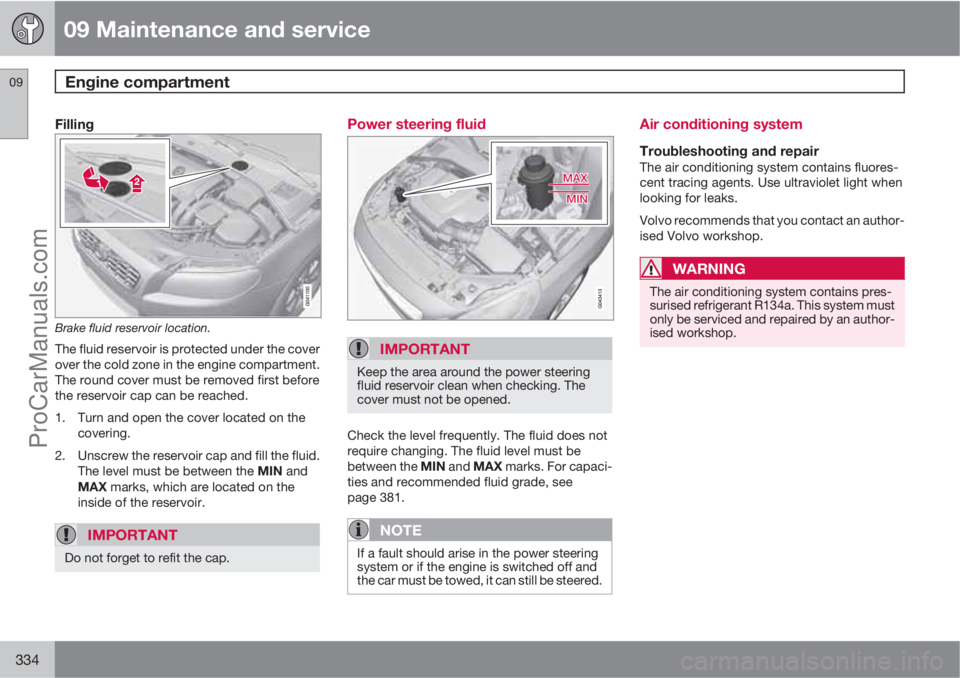
Filling
Brake fluid reservoir location.
The fluid reservoir is protected under the cover
over the cold zone in the engine compartment.
The round cover must be removed first before
the reservoir cap can be reached.
1. Turn and open the cover located on the
covering.
2. Unscrew the reservoir cap and fill the fluid.
The level must be between the MIN and
MAX marks, which are located on the
inside of the reservoir.
IMPORTANT
Do not forget to refit the cap.
Power steering fluid
IMPORTANT
Keep the area around the power steering
fluid reservoir clean when checking. The
cover must not be opened.
Check the level frequently. The fluid does not
require changing. The fluid level must be
between the MIN and MAX marks. For capaci-
ties and recommended fluid grade, see
page 381.
NOTE
If a fault should arise in the power steering
system or if the engine is switched off and
the car must be towed, it can still be steered.
Air conditioning system
Troubleshooting and repairThe air conditioning system contains fluores-
cent tracing agents. Use ultraviolet light when
looking for leaks.
Volvo recommends that you contact an author-
ised Volvo workshop.
WARNING
The air conditioning system contains pres-
surised refrigerant R134a. This system must
only be serviced and repaired by an author-
ised workshop.
ProCarManuals.com
Page 337 of 422
09 Maintenance and service
Lamps09
335 General
All bulbs are specified, see page 339. The fol-
lowing list contains locations of bulbs and
other light sources that are specialised or
unsuitable for changing except at a workshop:
•Active Xenon headlamps - ABL (Xenon
lamps)
•Direction indicators, door mirrors
•Approach lighting, door mirrors
•Courtesy lighting
•Glovebox lighting
•General interior lighting in the roof
•Reading lamps
•Side position, position lamps rear
•Brake light
•LED lights, general
WARNING
On cars with Xenon headlamps, the
replacement of Xenon lamps must be car-
ried out at a workshop - an authorised Volvo
workshop is recommended. Working with
Xenon lamps demands extreme caution
because the headlamp is equipped with a
high voltage unit.
WARNING
The car’s electrical system must be in key
position 0 when replacing bulbs, see
page 78
IMPORTANT
Never touch the glass part of the bulbs with
your fingers. Grease and oils from your fin-
gers are vaporised by the heat, coating the
reflector and then causing damage.
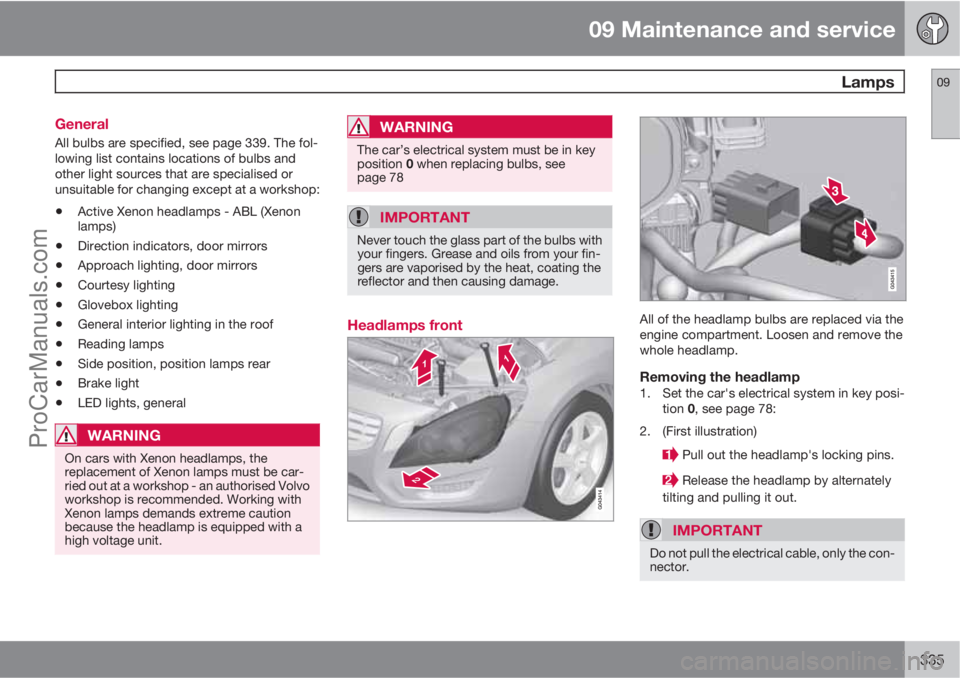
Headlamps frontAll of the headlamp bulbs are replaced via the
engine compartment. Loosen and remove the
whole headlamp.
Removing the headlamp1. Set the car's electrical system in key posi-
tion 0, see page 78:
2. (First illustration)
Pull out the headlamp's locking pins.
Release the headlamp by alternately
tilting and pulling it out.
IMPORTANT
Do not pull the electrical cable, only the con-
nector.
ProCarManuals.com