instrument panel VOLVO V60 2013 User Guide
[x] Cancel search | Manufacturer: VOLVO, Model Year: 2013, Model line: V60, Model: VOLVO V60 2013Pages: 422, PDF Size: 9.59 MB
Page 74 of 422
03 Your driving environment
Instruments and controls
03
72* Option/accessory, for more information, see Introduction.
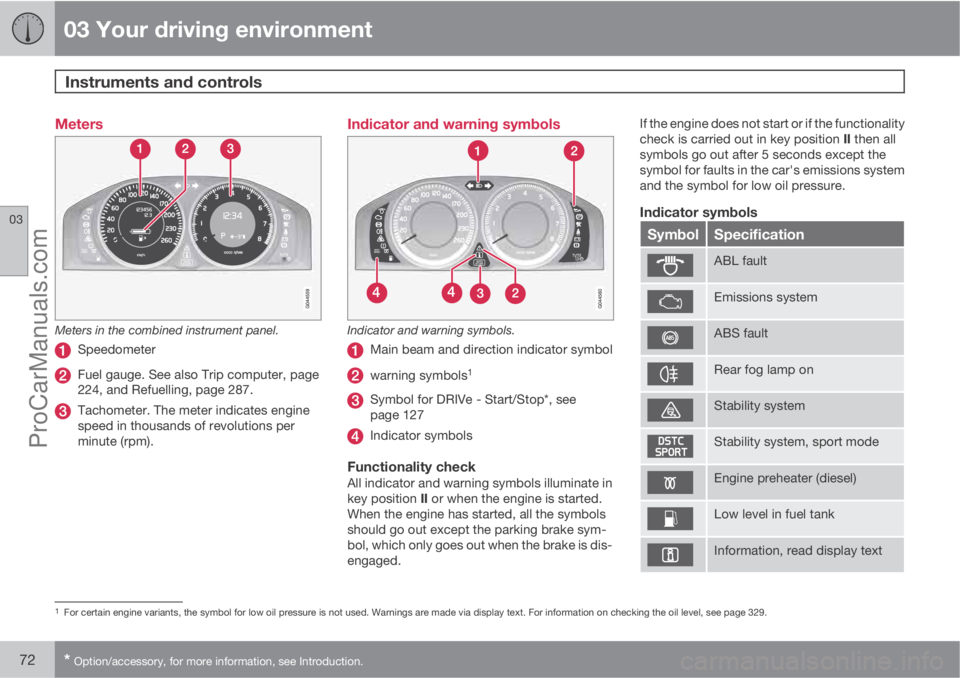
Meters
Meters in the combined instrument panel.
Speedometer
Fuel gauge. See also Trip computer, page
224, and Refuelling, page 287.
Tachometer. The meter indicates engine
speed in thousands of revolutions per
minute (rpm).
Indicator and warning symbols
Indicator and warning symbols.
Main beam and direction indicator symbol
warning symbols1
Symbol for DRIVe - Start/Stop*, see
page 127
Indicator symbols
Functionality checkAll indicator and warning symbols illuminate in
key position II or when the engine is started.
When the engine has started, all the symbols
should go out except the parking brake sym-
bol, which only goes out when the brake is dis-
engaged.If the engine does not start or if the functionality
check is carried out in key position II then all
symbols go out after 5 seconds except the
symbol for faults in the car's emissions system
and the symbol for low oil pressure.
Indicator symbols
SymbolSpecification
ABL fault
Emissions system
ABS fault
Rear fog lamp on
Stability system
Stability system, sport mode
Engine preheater (diesel)
Low level in fuel tank
Information, read display text
1For certain engine variants, the symbol for low oil pressure is not used. Warnings are made via display text. For information on checking the oil level, see page 329.
ProCarManuals.com
Page 77 of 422
03 Your driving environment
Instruments and controls
03
* Option/accessory, for more information, see Introduction.75
WARNING
If the brake and ABS symbols are illumi-
nated at the same time, there is a risk that
the rear end will skid during heavy braking.
WarningThe red warning symbol illuminates when a
fault has been indicated which could affect the
safety and/or driveability of the car. An explan-
atory text is shown on the information display
at the same time. The symbol remains visible
until the fault has been rectified but the text
message can be cleared with the OK button,
see page 200. The warning symbol can also
illuminate in conjunction with other symbols.
Action:
1. Stop in a safe place. Do not drive the car
further.
2. Read the information on the information
display. Implement the action in accord-
ance with the message in the display. Clear
the message using the OK button.
Reminder – doors not closed
If one of the doors, the bonnet2 or tailgate is not
closed properly then the information or warn-
ing symbol illuminates together with an explan-
atory text message in the combined instrumentpanel. Stop the car in a safe place as soon as
possible and close the door, bonnet or boot lid,
whichever is open.
If the car is driven at a speed lower than
approx. 7 km/h then the information
symbol illuminates.
If the car is driven at a speed higher
than approx. 7 km/h then the warning
symbol illuminates.
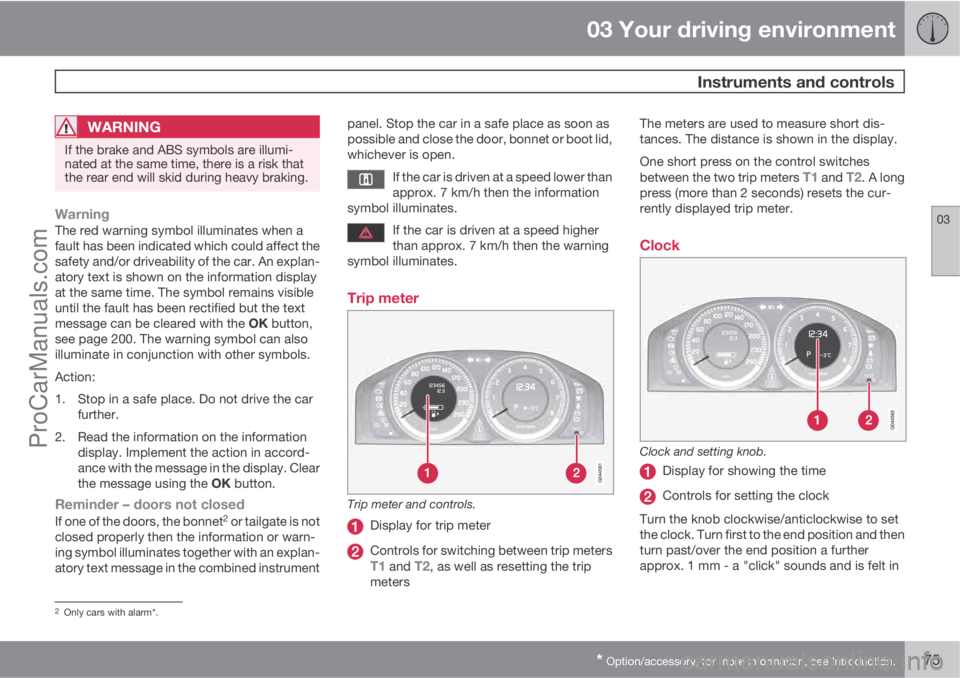
Trip meter
Trip meter and controls.
Display for trip meter
Controls for switching between trip metersT1 and T2, as well as resetting the trip
metersThe meters are used to measure short dis-
tances. The distance is shown in the display.
One short press on the control switches
between the two trip meters
T1 and T2. A long
press (more than 2 seconds) resets the cur-
rently displayed trip meter.
Clock
Clock and setting knob.
Display for showing the time
Controls for setting the clock
Turn the knob clockwise/anticlockwise to set
the clock. Turn first to the end position and then
turn past/over the end position a further
approx. 1 mm - a "click" sounds and is felt in
2Only cars with alarm*.
ProCarManuals.com
Page 91 of 422
03 Your driving environment
Lighting
03
89
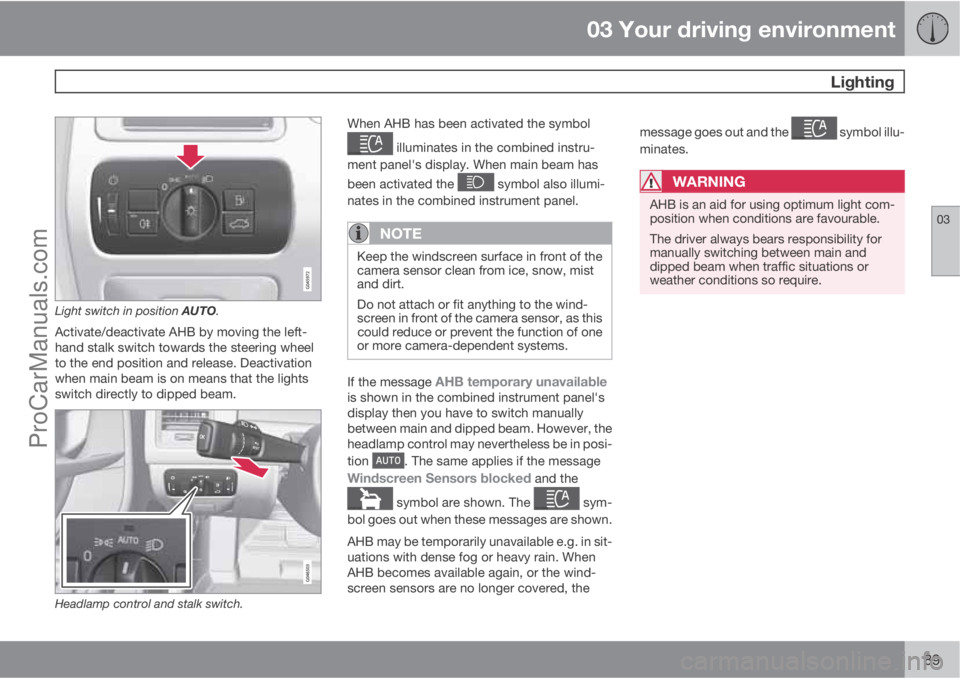
Light switch in position AUTO.
Activate/deactivate AHB by moving the left-
hand stalk switch towards the steering wheel
to the end position and release. Deactivation
when main beam is on means that the lights
switch directly to dipped beam.
Headlamp control and stalk switch.
When AHB has been activated the symbol
illuminates in the combined instru-
ment panel's display. When main beam has
been activated the
symbol also illumi-
nates in the combined instrument panel.
NOTE
Keep the windscreen surface in front of the
camera sensor clean from ice, snow, mist
and dirt.
Do not attach or fit anything to the wind-
screen in front of the camera sensor, as this
could reduce or prevent the function of one
or more camera-dependent systems.
If the message AHB temporary unavailableis shown in the combined instrument panel's
display then you have to switch manually
between main and dipped beam. However, the
headlamp control may nevertheless be in posi-
tion
. The same applies if the message
Windscreen Sensors blocked and the
symbol are shown. The sym-
bol goes out when these messages are shown.
AHB may be temporarily unavailable e.g. in sit-
uations with dense fog or heavy rain. When
AHB becomes available again, or the wind-
screen sensors are no longer covered, themessage goes out and the
symbol illu-
minates.
WARNING
AHB is an aid for using optimum light com-
position when conditions are favourable.
The driver always bears responsibility for
manually switching between main and
dipped beam when traffic situations or
weather conditions so require.
ProCarManuals.com
Page 92 of 422
03 Your driving environment
Lighting
03
90* Option/accessory, for more information, see Introduction.
IMPORTANT
Examples of when manual switching
between main and dipped beam may be
required:
•In heavy rain or dense fog
•In snow flurries or slush
•In moonlight
•When driving in poorly lit built-up areas
•When the traffic ahead has weak light-
ing
•If there are pedestrians on or beside the
road
•If there are highly reflective objects such
as signs in the vicinity of the road
•When the lighting from oncoming traffic
is obscured by e.g. a crash barrier
•When there is traffic on connecting
roads
•On the brow of a hill or in a hollow
•In sharp bends.
For more information on the limitations of the
camera sensor, see page 178.
Tunnel detection*In cars with rain sensor* the rain sensor detects
the changed light conditions when the car ise.g. driven into a tunnel, and dipped beam is
activated within a second in markets without
automatic dipped beam. Dipped beam is deac-
tivated approx. 20 seconds after the car has
been driven out of the tunnel. Note! - The head-
lamp control must be in
position for tun-
nel detection to work.
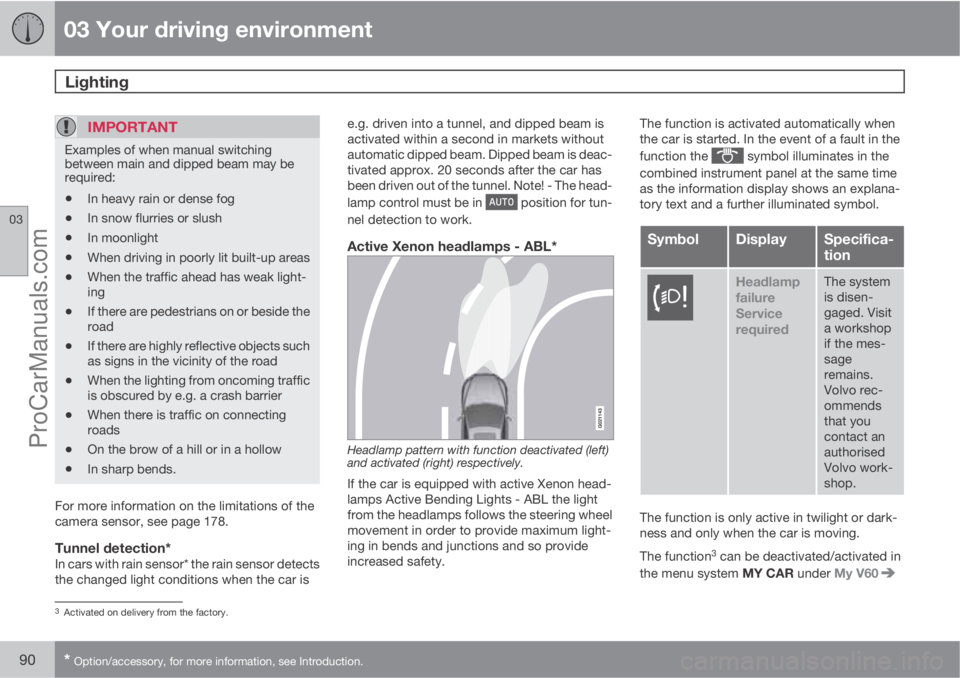
Active Xenon headlamps - ABL*
Headlamp pattern with function deactivated (left)
and activated (right) respectively.
If the car is equipped with active Xenon head-
lamps Active Bending Lights - ABL the light
from the headlamps follows the steering wheel
movement in order to provide maximum light-
ing in bends and junctions and so provide
increased safety.The function is activated automatically when
the car is started. In the event of a fault in the
function the
symbol illuminates in the
combined instrument panel at the same time
as the information display shows an explana-
tory text and a further illuminated symbol.
SymbolDisplaySpecifica-
tion
Headlamp
failure
Service
requiredThe system
is disen-
gaged. Visit
a workshop
if the mes-
sage
remains.
Volvo rec-
ommends
that you
contact an
authorised
Volvo work-
shop.
The function is only active in twilight or dark-
ness and only when the car is moving.
The function
3 can be deactivated/activated in
the menu system MY CAR under My V60
3Activated on delivery from the factory.
ProCarManuals.com
Page 93 of 422
03 Your driving environment
Lighting
03
* Option/accessory, for more information, see Introduction.91
Active Bending Lights or under Settings
Car settingsLight settingsActive
Bending Lights. For a description of the menu
system, see page 203.
For headlamp pattern adjustment, see
page 94.
Auxiliary lamps*If the car has auxiliary lamps, the driver can use
the MY CAR menu system to choose whether
they should be deactivated or switched on/off
simultaneously with the main beam
4, see
page 204.
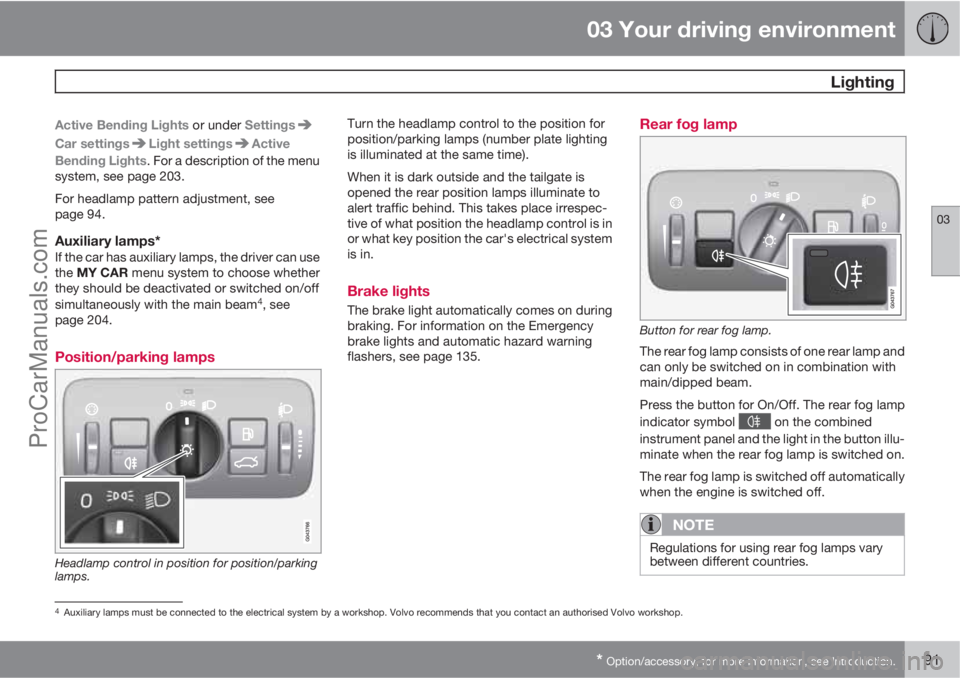
Position/parking lamps
Headlamp control in position for position/parking
lamps.
Turn the headlamp control to the position for
position/parking lamps (number plate lighting
is illuminated at the same time).
When it is dark outside and the tailgate is
opened the rear position lamps illuminate to
alert traffic behind. This takes place irrespec-
tive of what position the headlamp control is in
or what key position the car's electrical system
is in.
Brake lights
The brake light automatically comes on during
braking. For information on the Emergency
brake lights and automatic hazard warning
flashers, see page 135.
Rear fog lamp
Button for rear fog lamp.
The rear fog lamp consists of one rear lamp and
can only be switched on in combination with
main/dipped beam.
Press the button for On/Off. The rear fog lamp
indicator symbol
on the combined
instrument panel and the light in the button illu-
minate when the rear fog lamp is switched on.
The rear fog lamp is switched off automatically
when the engine is switched off.
NOTE
Regulations for using rear fog lamps vary
between different countries.
4Auxiliary lamps must be connected to the electrical system by a workshop. Volvo recommends that you contact an authorised Volvo workshop.
ProCarManuals.com
Page 94 of 422
03 Your driving environment
Lighting
03
92
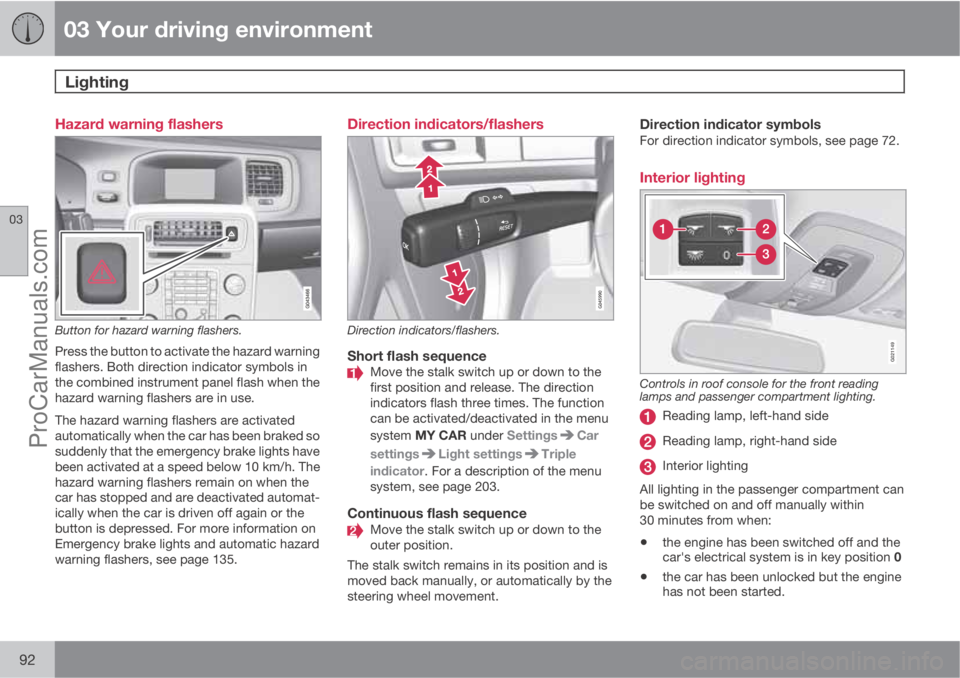
Hazard warning flashers
Button for hazard warning flashers.
Press the button to activate the hazard warning
flashers. Both direction indicator symbols in
the combined instrument panel flash when the
hazard warning flashers are in use.
The hazard warning flashers are activated
automatically when the car has been braked so
suddenly that the emergency brake lights have
been activated at a speed below 10 km/h. The
hazard warning flashers remain on when the
car has stopped and are deactivated automat-
ically when the car is driven off again or the
button is depressed. For more information on
Emergency brake lights and automatic hazard
warning flashers, see page 135.
Direction indicators/flashers
Direction indicators/flashers.
Short flash sequenceMove the stalk switch up or down to the
first position and release. The direction
indicators flash three times. The function
can be activated/deactivated in the menu
system MY CAR under Settings
Car
settings
Light settingsTriple
indicator. For a description of the menu
system, see page 203.
Continuous flash sequenceMove the stalk switch up or down to the
outer position.
The stalk switch remains in its position and is
moved back manually, or automatically by the
steering wheel movement.
Direction indicator symbolsFor direction indicator symbols, see page 72.
Interior lighting
G021149
Controls in roof console for the front reading
lamps and passenger compartment lighting.
Reading lamp, left-hand side
Reading lamp, right-hand side
Interior lighting
All lighting in the passenger compartment can
be switched on and off manually within
30 minutes from when:
•the engine has been switched off and the
car's electrical system is in key position 0
•the car has been unlocked but the engine
has not been started.
ProCarManuals.com
Page 100 of 422
03 Your driving environment
Wipers and washing
03
98* Option/accessory, for more information, see Introduction.
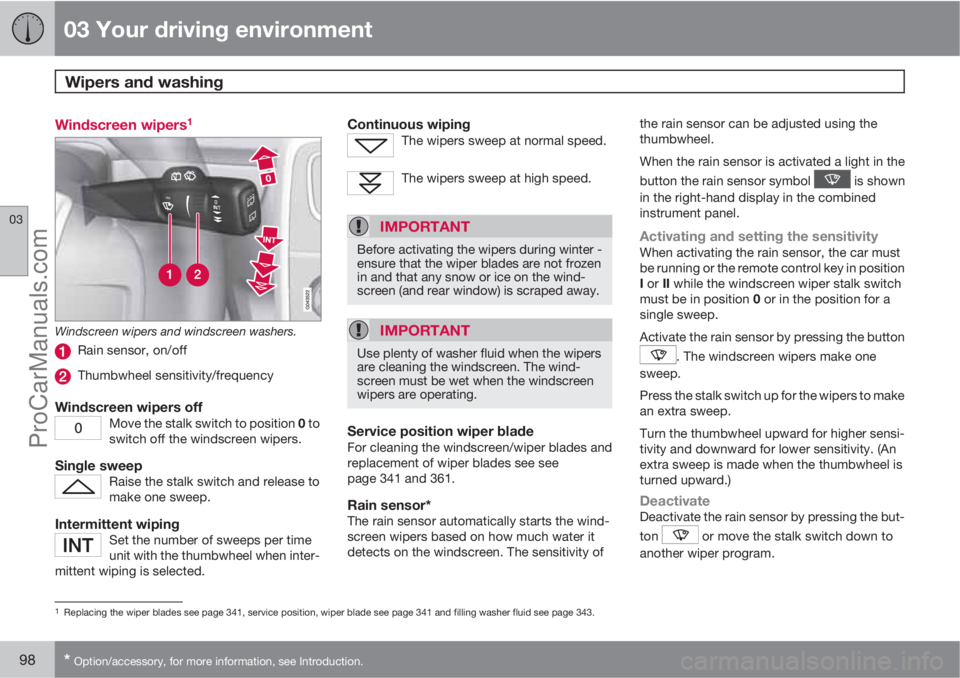
Windscreen wipers1
Windscreen wipers and windscreen washers.
Rain sensor, on/off
Thumbwheel sensitivity/frequency
Windscreen wipers offMove the stalk switch to position 0 to
switch off the windscreen wipers.
Single sweepRaise the stalk switch and release to
make one sweep.
Intermittent wipingSet the number of sweeps per time
unit with the thumbwheel when inter-
mittent wiping is selected.
Continuous wipingThe wipers sweep at normal speed.
The wipers sweep at high speed.
IMPORTANT
Before activating the wipers during winter -
ensure that the wiper blades are not frozen
in and that any snow or ice on the wind-
screen (and rear window) is scraped away.
IMPORTANT
Use plenty of washer fluid when the wipers
are cleaning the windscreen. The wind-
screen must be wet when the windscreen
wipers are operating.
Service position wiper bladeFor cleaning the windscreen/wiper blades and
replacement of wiper blades see see
page 341 and 361.
Rain sensor*The rain sensor automatically starts the wind-
screen wipers based on how much water it
detects on the windscreen. The sensitivity ofthe rain sensor can be adjusted using the
thumbwheel.
When the rain sensor is activated a light in the
button the rain sensor symbol
is shown
in the right-hand display in the combined
instrument panel.
Activating and setting the sensitivityWhen activating the rain sensor, the car must
be running or the remote control key in position
I or II while the windscreen wiper stalk switch
must be in position 0 or in the position for a
single sweep.
Activate the rain sensor by pressing the button
. The windscreen wipers make one
sweep.
Press the stalk switch up for the wipers to make
an extra sweep.
Turn the thumbwheel upward for higher sensi-
tivity and downward for lower sensitivity. (An
extra sweep is made when the thumbwheel is
turned upward.)
DeactivateDeactivate the rain sensor by pressing the but-
ton
or move the stalk switch down to
another wiper program.
1Replacing the wiper blades see page 341, service position, wiper blade see page 341 and filling washer fluid see page 343.
ProCarManuals.com
Page 101 of 422
03 Your driving environment
Wipers and washing
03
* Option/accessory, for more information, see Introduction.99
The rain sensor is automatically deactivated
when the remote control key is removed from
the ignition switch or five minutes after the
engine has been switched off.
IMPORTANT
The windscreen wipers could start and be
damaged in an automatic car wash. Deac-
tivate the rain sensor while the car is running
or the remote control key is in position I or
II. The symbol in the combined instrument
panel and the lamp in the button go out.
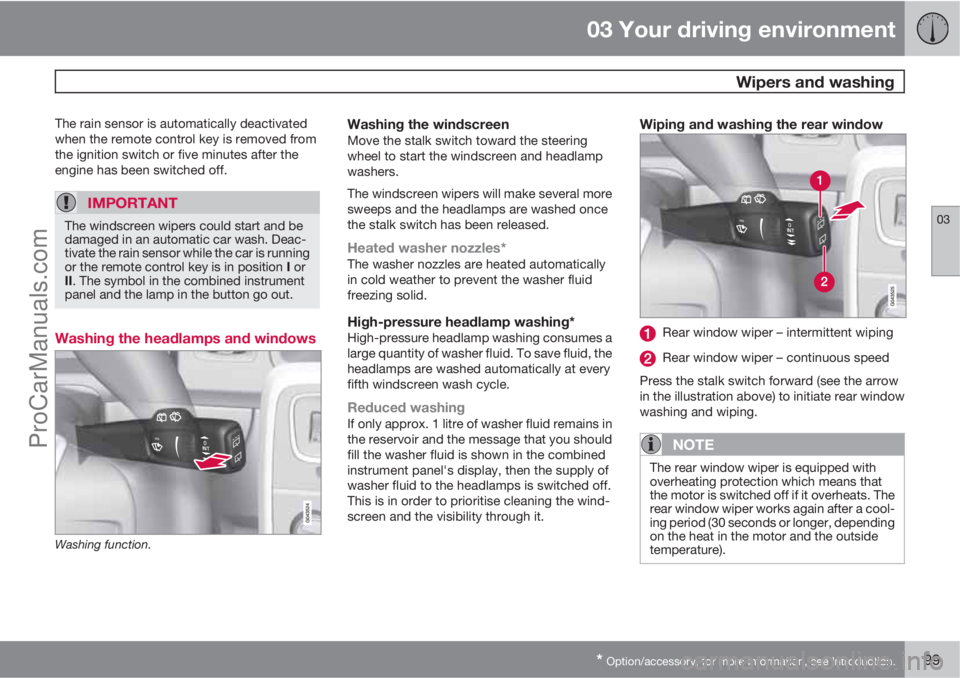
Washing the headlamps and windows
Washing function.
Washing the windscreenMove the stalk switch toward the steering
wheel to start the windscreen and headlamp
washers.
The windscreen wipers will make several more
sweeps and the headlamps are washed once
the stalk switch has been released.
Heated washer nozzles*The washer nozzles are heated automatically
in cold weather to prevent the washer fluid
freezing solid.
High-pressure headlamp washing*High-pressure headlamp washing consumes a
large quantity of washer fluid. To save fluid, the
headlamps are washed automatically at every
fifth windscreen wash cycle.
Reduced washingIf only approx. 1 litre of washer fluid remains in
the reservoir and the message that you should
fill the washer fluid is shown in the combined
instrument panel's display, then the supply of
washer fluid to the headlamps is switched off.
This is in order to prioritise cleaning the wind-
screen and the visibility through it.
Wiping and washing the rear window
Rear window wiper – intermittent wiping
Rear window wiper – continuous speed
Press the stalk switch forward (see the arrow
in the illustration above) to initiate rear window
washing and wiping.
NOTE
The rear window wiper is equipped with
overheating protection which means that
the motor is switched off if it overheats. The
rear window wiper works again after a cool-
ing period (30 seconds or longer, depending
on the heat in the motor and the outside
temperature).
ProCarManuals.com
Page 114 of 422
03 Your driving environment
Alcolock*
03
112* Option/accessory, for more information, see Introduction.
Activating the Bypass function
•Depress and hold the left-hand stalk
switch OK button and the button for haz-
ard warning flashers simultaneously for
approx. 5 seconds - the display first shows
Bypass activated Wait 1 minute and
then Alcoguard Bypass enabled - after
which the engine can be started.
This function can be activated several times.
The error message shown during driving can
only be cleared at a workshop
2.
Activating the Emergency function
•Depress and hold the left-hand stalk
switch OK button and the button for haz-
ard warning flashers simultaneously for
approx. 5 seconds - the display shows
Alcoguard Bypass enabled and the
engine can be started.
This function can be used once, after which a
reset must be made at a workshop
2.
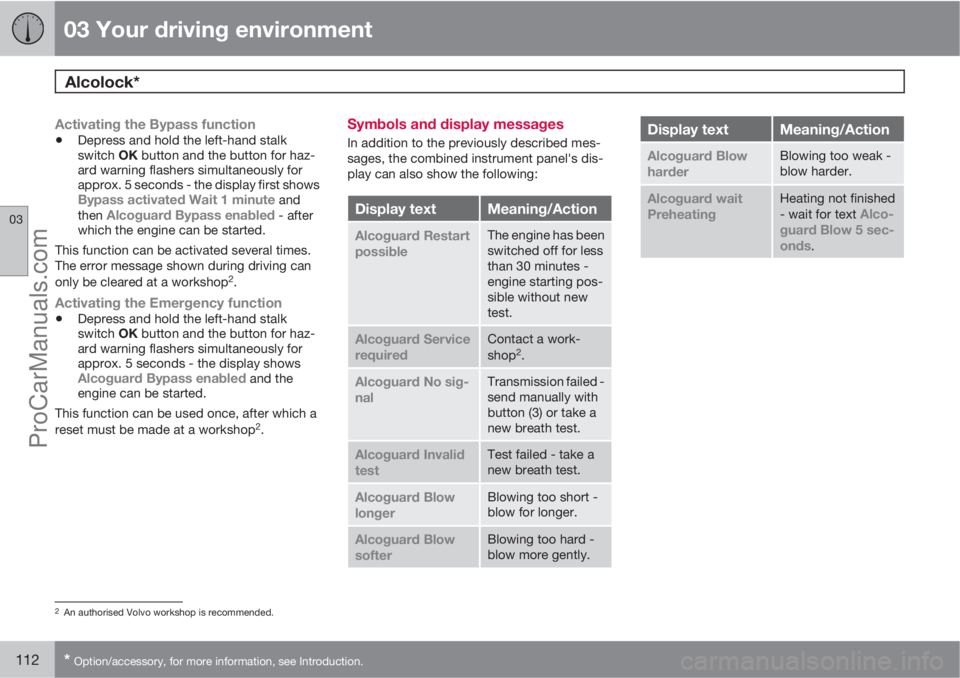
Symbols and display messages
In addition to the previously described mes-
sages, the combined instrument panel's dis-
play can also show the following:
Display textMeaning/Action
Alcoguard Restart
possibleThe engine has been
switched off for less
than 30 minutes -
engine starting pos-
sible without new
test.
Alcoguard Service
requiredContact a work-
shop2.
Alcoguard No sig-
nalTransmission failed -
send manually with
button (3) or take a
new breath test.
Alcoguard Invalid
testTest failed - take a
new breath test.
Alcoguard Blow
longerBlowing too short -
blow for longer.
Alcoguard Blow
softerBlowing too hard -
blow more gently.
Display textMeaning/Action
Alcoguard Blow
harderBlowing too weak -
blow harder.
Alcoguard wait
PreheatingHeating not finished
- wait for text Alco-
guard Blow 5 sec-
onds
.
2An authorised Volvo workshop is recommended.
ProCarManuals.com
Page 123 of 422
03 Your driving environment
Gearboxes
03
121
IMPORTANT
The operating temperature of the gearbox is
checked in order to prevent damage to any
of the drive system's components. In the
event of a risk of overheating a warning
symbol illuminates on the instrument panel
combined with a text message - In which
case, follow the recommendation given.
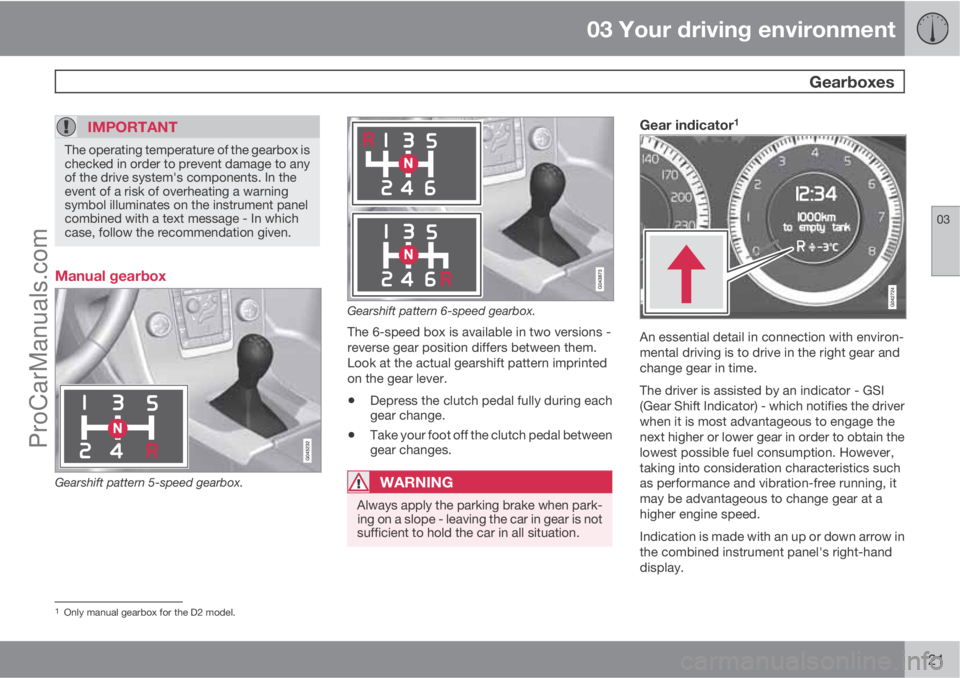
Manual gearbox
Gearshift pattern 5-speed gearbox.
Gearshift pattern 6-speed gearbox.
The 6-speed box is available in two versions -
reverse gear position differs between them.
Look at the actual gearshift pattern imprinted
on the gear lever.
•Depress the clutch pedal fully during each
gear change.
•Take your foot off the clutch pedal between
gear changes.
WARNING
Always apply the parking brake when park-
ing on a slope - leaving the car in gear is not
sufficient to hold the car in all situation.
Gear indicator1
An essential detail in connection with environ-
mental driving is to drive in the right gear and
change gear in time.
The driver is assisted by an indicator - GSI
(Gear Shift Indicator) - which notifies the driver
when it is most advantageous to engage the
next higher or lower gear in order to obtain the
lowest possible fuel consumption. However,
taking into consideration characteristics such
as performance and vibration-free running, it
may be advantageous to change gear at a
higher engine speed.
Indication is made with an up or down arrow in
the combined instrument panel's right-hand
display.
1Only manual gearbox for the D2 model.
ProCarManuals.com