instrument panel VOLVO V60 2013 Owner's Manual
[x] Cancel search | Manufacturer: VOLVO, Model Year: 2013, Model line: V60, Model: VOLVO V60 2013Pages: 422, PDF Size: 9.59 MB
Page 125 of 422
03 Your driving environment
Gearboxes
03
123
Geartronic – Manual gear positions (+/-)The driver can also change gear manually
using the Geartronic automatic gearbox. The
car engine-brakes when the accelerator pedal
is released.
Manual gearshift mode is obtained by moving
the lever to the side from D position to the end
position at +/–. The information display shifts
the indication from
D to one of the figures 1 –6, which is equivalent to the gear that is
engaged just then, see page 71.
•Move the lever forwards towards + (plus)
to change up a gear and release the lever,
which returns to its rest position between
+ and –.
or
•Pull the lever back towards – (minus) to
change down a gear and release it.
The manual gearshift mode (+/–) can be
selected at any time while driving.
Geartronic automatically shifts down if the
driver allows the speed to decrease lower than
a level suitable for the selected gear, in order
to avoid jerking and stalling.
To return to automatic driving mode:
•Move the lever to the side to the end posi-
tion at D.
NOTE
f the gearbox has a Sport programme then
the gearbox will only become manual after
the lever has been moved forwards or back-
wards in its (-+/–) position. The information
display then shifts the indication from
S to
show which of the gears 1-6 is engaged.
Geartronic - Sport mode (S)2
The Sport programme provides sportier cha-
racteristics and allows higher engine speed for
the gears. At the same time it responds more
quickly to acceleration. During active driving,
the use of a lower gear is prioritised, leading to
a delayed upshift.
Sport mode is obtained by moving the lever to
the side from D position to the end position at
+/–. The information display shifts the indica-
tion from
D to S.
Sport mode can be selected at any time while
driving.
Geartronic - Winter modeIt can be easier to pull away on slippery roads
if 3rd gear is engaged manually.
1. Depress the brake pedal and move the
gear lever from D position to the end posi-tion at +/– - the instrument panel display
shifts the indication from
D to the figure 1.
2. Scroll up to gear 3 by pushing the lever
forward towards + (plus) twice - the display
shifts the indication from
1 to 3.
3. Release the brake and accelerate carefully.
The gearbox "winter mode" means that the car
moves off with a lower engine speed and
reduced engine power on the drive wheels.
Kick-downWhen the accelerator pedal is pressed all the
way to the floor (beyond the position normally
regarded as full acceleration) a lower gear is
immediately engaged. This is known as kick-
down.
If the accelerator is released from the kick-
down position, the gearbox automatically
changes up.
Kick-down is used when maximum accelera-
tion is needed, such as for overtaking.
Safety functionTo prevent overrevving the engine, the gearbox
control program has a protective downshift
inhibitor which prevents the kick-down func-
tion.
2Only models D5 and T6.
ProCarManuals.com
Page 138 of 422
03 Your driving environment
Foot brake
03
136
fied in the Service and Warranty Booklet, see
page 328.
IMPORTANT
The wear on the brake system's compo-
nents must be checked regularly.
Contact a workshop for information about
the procedure or engage a workshop to
carry out the inspection - an authorised
Volvo workshop is recommended.
Symbols in the combined instrument
panel
SymbolSpecification
Constant glow – Check the
brake fluid level. If the level is
low, fill with brake fluid and
check for the cause of the brake
fluid loss.
Constant glow for 2 seconds
when the engine is started –
There was a fault in the brake
system's ABS function when
the engine was last running.
WARNING
If and illuminate at the same
time, there may be a fault in the brake sys-
tem.
If the level in the brake fluid reservoir is nor-
mal at this stage, drive carefully to the near-
est workshop and have the brake system
checked - an authorised Volvo workshop is
recommended.
If the brake fluid is under the MIN level in the
brake fluid reservoir, do not drive further
before topping up the brake fluid.
The reason for the loss of brake fluid must
be investigated.
ProCarManuals.com
Page 139 of 422
03 Your driving environment
Parking brake
03
137 General
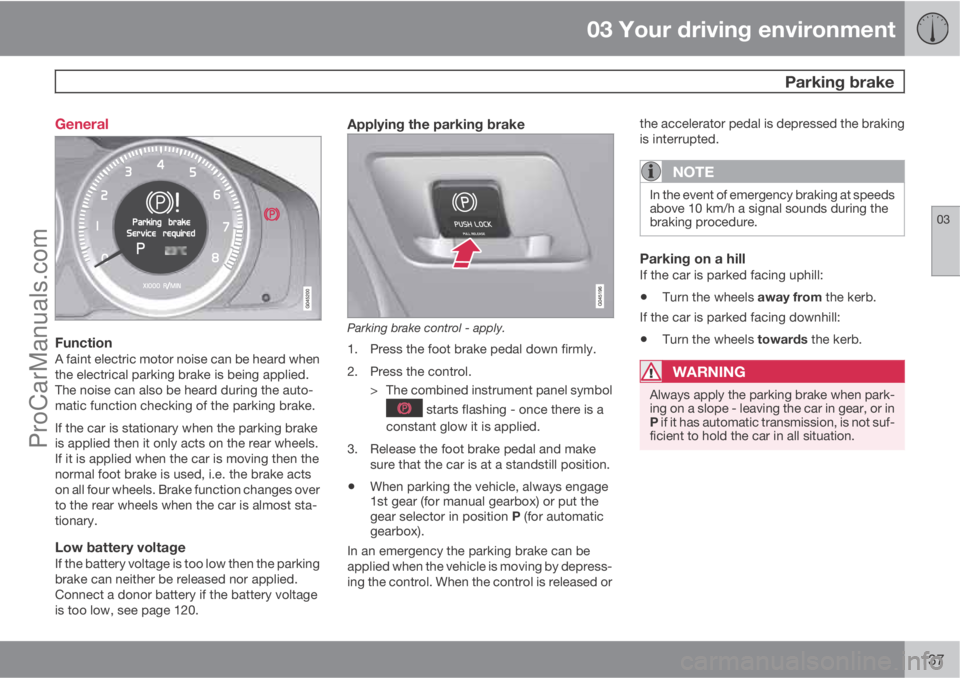
FunctionA faint electric motor noise can be heard when
the electrical parking brake is being applied.
The noise can also be heard during the auto-
matic function checking of the parking brake.
If the car is stationary when the parking brake
is applied then it only acts on the rear wheels.
If it is applied when the car is moving then the
normal foot brake is used, i.e. the brake acts
on all four wheels. Brake function changes over
to the rear wheels when the car is almost sta-
tionary.
Low battery voltageIf the battery voltage is too low then the parking
brake can neither be released nor applied.
Connect a donor battery if the battery voltage
is too low, see page 120.
Applying the parking brake
Parking brake control - apply.
1. Press the foot brake pedal down firmly.
2. Press the control.
> The combined instrument panel symbol
starts flashing - once there is a
constant glow it is applied.
3. Release the foot brake pedal and make
sure that the car is at a standstill position.
•When parking the vehicle, always engage
1st gear (for manual gearbox) or put the
gear selector in position P (for automatic
gearbox).
In an emergency the parking brake can be
applied when the vehicle is moving by depress-
ing the control. When the control is released orthe accelerator pedal is depressed the braking
is interrupted.
NOTE
In the event of emergency braking at speeds
above 10 km/h a signal sounds during the
braking procedure.
Parking on a hillIf the car is parked facing uphill:
•Turn the wheels away from the kerb.
If the car is parked facing downhill:
•Turn the wheels towards the kerb.
WARNING
Always apply the parking brake when park-
ing on a slope - leaving the car in gear, or in
P if it has automatic transmission, is not suf-
ficient to hold the car in all situation.
ProCarManuals.com
Page 140 of 422
03 Your driving environment
Parking brake
03
138
Disengaging the parking brake
Parking brake control - release.
Cars with manual gearbox
Releasing manually
1. Insert the remote control key in the ignition
switch.1
2. Press the foot brake pedal down firmly.
3. Pull the control.
> The parking brake releases and the
combined instrument panel symbol
goes out.
NOTE
The parking brake can also be released
manually by depressing the clutch pedal
instead of the brake pedal. Volvo recom-
mends the use of the brake pedal.
Releasing automatically1. Start the engine.
2. Engage 1st gear or reverse gear.
3. Ease up the clutch and depress the accel-
erator.
> The parking brake releases and the
combined instrument panel symbol
goes out.
Cars with automatic gearbox
Releasing manually
1. Insert the remote control key in the ignition
switch1.
2. Press the foot brake pedal down firmly.
3. Pull the control.
> The parking brake releases and the
combined instrument panel symbol
goes out.
Releasing automatically1. Put the seatbelt on.
2. Start the engine.
3. Press the foot brake pedal down firmly.
4.
Move the gear selector to position D or R
and depress the accelerator.
> The parking brake releases and the
combined instrument panel symbol
goes out.
NOTE
For safety reasons, the parking brake is only
released automatically if the engine is run-
ning and the driver is wearing a seatbelt. The
parking brake is released immediately on
cars with automatic gearbox when the
accelerator pedal is depressed and the gear
selector is in position D or R.
Heavy load uphillA heavy load, such as a trailer, can cause the
car to roll backward when the parking brake is
released automatically on a steep incline.
Avoid this by depressing the control while driv-
ing off. Release the control when the engine
achieves traction.
1For a car with the Keyless system: Press START/STOP ENGINE.
ProCarManuals.com
Page 150 of 422
04 Driver support
Road sign information - RSI*
04
148* Option/accessory, for more information, see Introduction.
General information on RSI
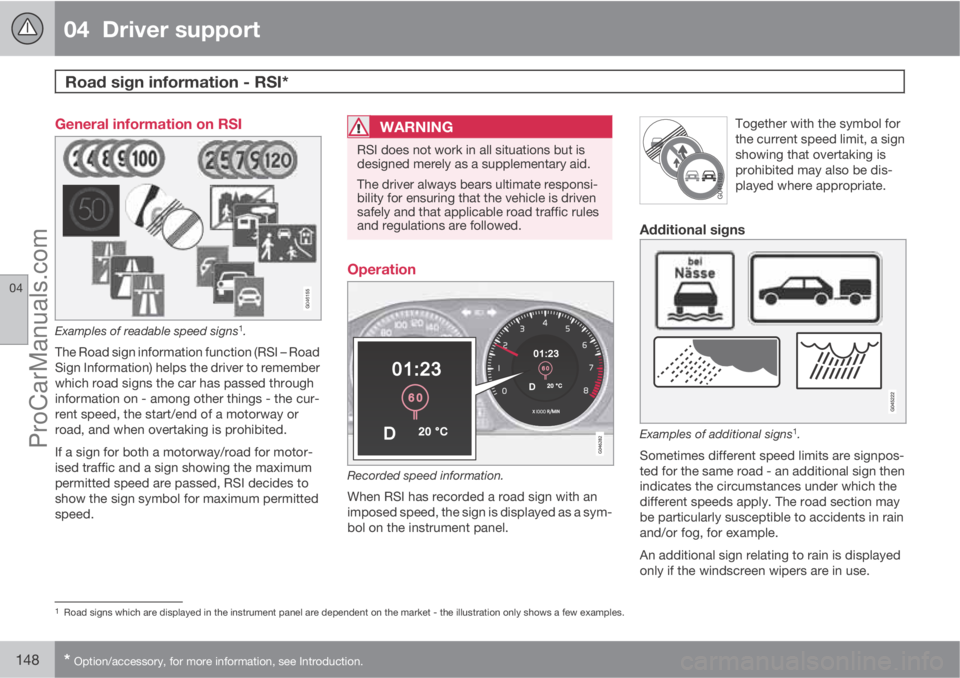
Examples of readable speed signs1.
The Road sign information function (RSI – Road
Sign Information) helps the driver to remember
which road signs the car has passed through
information on - among other things - the cur-
rent speed, the start/end of a motorway or
road, and when overtaking is prohibited.
If a sign for both a motorway/road for motor-
ised traffic and a sign showing the maximum
permitted speed are passed, RSI decides to
show the sign symbol for maximum permitted
speed.
WARNING
RSI does not work in all situations but is
designed merely as a supplementary aid.
The driver always bears ultimate responsi-
bility for ensuring that the vehicle is driven
safely and that applicable road traffic rules
and regulations are followed.
Operation
Recorded speed information.
When RSI has recorded a road sign with an
imposed speed, the sign is displayed as a sym-
bol on the instrument panel.Together with the symbol for
the current speed limit, a sign
showing that overtaking is
prohibited may also be dis-
played where appropriate.
Additional signs
Examples of additional signs1.
Sometimes different speed limits are signpos-
ted for the same road - an additional sign then
indicates the circumstances under which the
different speeds apply. The road section may
be particularly susceptible to accidents in rain
and/or fog, for example.
An additional sign relating to rain is displayed
only if the windscreen wipers are in use.
1Road signs which are displayed in the instrument panel are dependent on the market - the illustration only shows a few examples.
ProCarManuals.com
Page 151 of 422
04 Driver support
Road sign information - RSI*
04
* Option/accessory, for more information, see Introduction.149
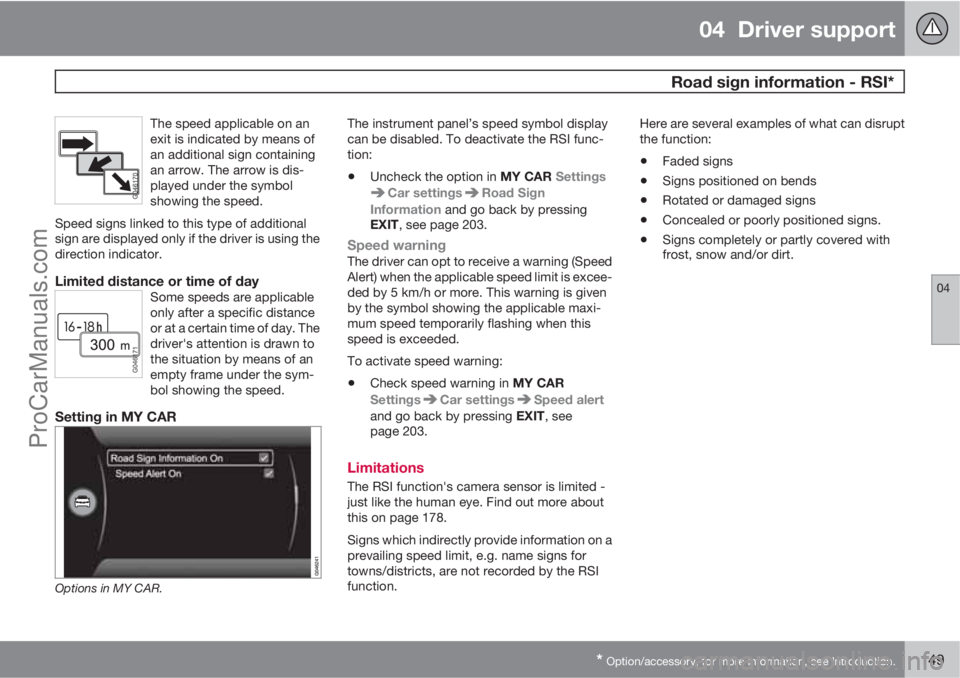
The speed applicable on an
exit is indicated by means of
an additional sign containing
an arrow. The arrow is dis-
played under the symbol
showing the speed.
Speed signs linked to this type of additional
sign are displayed only if the driver is using the
direction indicator.
Limited distance or time of daySome speeds are applicable
only after a specific distance
or at a certain time of day. The
driver's attention is drawn to
the situation by means of an
empty frame under the sym-
bol showing the speed.
Setting in MY CAR
Options in MY CAR.
The instrument panel’s speed symbol display
can be disabled. To deactivate the RSI func-
tion:
•Uncheck the option in MY CAR Settings
Car settingsRoad Sign
Information and go back by pressing
EXIT, see page 203.
Speed warningThe driver can opt to receive a warning (Speed
Alert) when the applicable speed limit is excee-
ded by 5 km/h or more. This warning is given
by the symbol showing the applicable maxi-
mum speed temporarily flashing when this
speed is exceeded.
To activate speed warning:
•Check speed warning in MY CAR
Settings
Car settingsSpeed alert
and go back by pressing EXIT, see
page 203.
Limitations
The RSI function's camera sensor is limited -
just like the human eye. Find out more about
this on page 178.
Signs which indirectly provide information on a
prevailing speed limit, e.g. name signs for
towns/districts, are not recorded by the RSI
function.Here are several examples of what can disrupt
the function:
•Faded signs
•Signs positioned on bends
•Rotated or damaged signs
•Concealed or poorly positioned signs.
•Signs completely or partly covered with
frost, snow and/or dirt.
ProCarManuals.com
Page 152 of 422
04 Driver support
Speed limiter*
04
150* Option/accessory, for more information, see Introduction.
General information on the speed
limiter
A speed limiter (Speed Limiter) can be regar-
ded as a reverse cruise control - the driver reg-
ulates the speed using the accelerator pedal
but is prevented from accidentally exceeding a
pre-selected/set speed by the speed limiter.
Operation
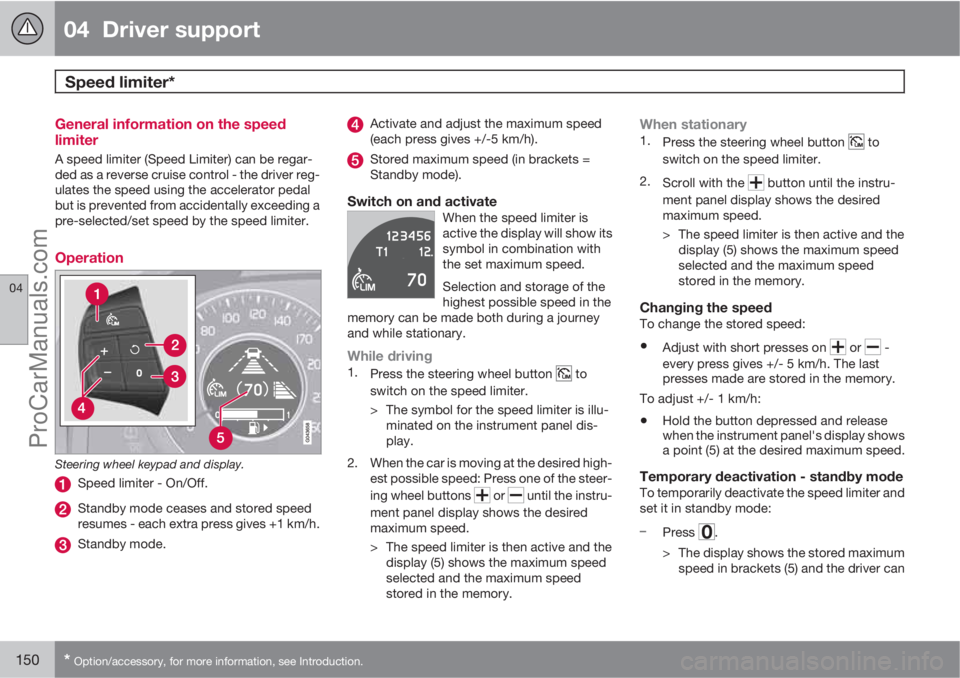
Steering wheel keypad and display.
Speed limiter - On/Off.
Standby mode ceases and stored speed
resumes - each extra press gives +1 km/h.
Standby mode.
Activate and adjust the maximum speed
(each press gives +/-5 km/h).
Stored maximum speed (in brackets =
Standby mode).
Switch on and activateWhen the speed limiter is
active the display will show its
symbol in combination with
the set maximum speed.
Selection and storage of the
highest possible speed in the
memory can be made both during a journey
and while stationary.
While driving1.
Press the steering wheel button to
switch on the speed limiter.
> The symbol for the speed limiter is illu-
minated on the instrument panel dis-
play.
2. When the car is moving at the desired high-
est possible speed: Press one of the steer-
ing wheel buttons
or until the instru-
ment panel display shows the desired
maximum speed.
> The speed limiter is then active and the
display (5) shows the maximum speed
selected and the maximum speed
stored in the memory.
When stationary1.
Press the steering wheel button to
switch on the speed limiter.
2.
Scroll with the
button until the instru-
ment panel display shows the desired
maximum speed.
> The speed limiter is then active and the
display (5) shows the maximum speed
selected and the maximum speed
stored in the memory.
Changing the speedTo change the stored speed:
•Adjust with short presses on or -
every press gives +/- 5 km/h. The last
presses made are stored in the memory.
To adjust +/- 1 km/h:
•Hold the button depressed and release
when the instrument panel's display shows
a point (5) at the desired maximum speed.
Temporary deactivation - standby modeTo temporarily deactivate the speed limiter and
set it in standby mode:
–
Press
.
> The display shows the stored maximum
speed in brackets (5) and the driver can
ProCarManuals.com
Page 171 of 422
04 Driver support
City Safety™
04
169
If the difference in speed between the vehicles
is greater than 15 km/h then City Safety™ may
not prevent the collision on its own. To obtain
full brake force, the driver must depress the
brake pedal. This could then make it possible
to prevent a collision, even at speed differen-
ces above 15 km/h.
When the function is activated and brakes, the
instrument panel display shows a message to
the effect that the function is/has been active.
NOTE
The brake lights come on when City
Safety™ brakes the car.
Operation
NOTE
The City Safety™ function is always ena-
bled after the engine has been started via
key position I and II (see page 78 on key
positions).
On and OffIn certain situations, it may advisable to disable
City Safety™, e.g. where leafy branches could
sweep over the bonnet and/or windscreen.
After starting the engine City Safety™ can be
deactivated as follows:
•Using MY CAR on the centre console dis-
play screen with its menu system, search
and locate Settings
Car settings
Driver support systemsCity Safety.
Select the
Off option. For more information
on the menu system MY CAR, see
page 202.
However, the function will be enabled the
next time the engine is started, regardless
of whether the system was enabled or dis-
abled when the engine was switched off.
WARNING
The laser sensor also transmits laser light
when City Safety™ is disabled manually.
To enable City Safety™ again:
•Follow the same procedure as for disa-
bling, but select the On option.
Limitations
The sensor in City Safety™ is designed to
detect cars and other large vehicles in front of
the car irrespective of whether it is day or night.
However, the sensor has limitations and has
poorer functionality - or none at all - in e.g.
heavy snowfall or rain, dense fog, dust storms
or snow flurries. Mist, dirt, ice or snow on the
windscreen may disrupt the function.Low-hanging objects, e.g. a flag/pennant for
projecting load, or accessories such as auxili-
ary lamps and bull bars that are higher than the
bonnet limit the function.
The laser light from the sensor in City
Safety™ measures how the light is reflected.
The sensor cannot detect objects with low
reflection capacity. The rear sections of the
vehicle generally reflect the light sufficiently
thanks to the number plate and rear light reflec-
tors.
On slippery road surfaces the braking distance
is extended, which may reduce the capacity of
City Safety™ to avoid a collision. In such sit-
uations the ABS and DSTC systems will pro-
vide best possible braking force with main-
tained stability.
When your own car is reversing, City Safety™
is temporarily deactivated.
City Safety™ is not activated at low speeds -
under 4 km/h, which is why the system does
not intervene in situations where a vehicle in
front is being approached very slowly, e.g.
when parking.
Driver commands are always prioritised, which
is why City Safety™ does not intervene in sit-
uations where the driver is steering or acceler-
ating in a clear manner, even if a collision is
unavoidable.
ProCarManuals.com
Page 172 of 422
04 Driver support
City Safety™
04
170
When City Safety™ has prevented a collision
with a stationary object the car remains sta-
tionary for a maximum of 1.5 seconds. If the car
is braked for a vehicle in front that is moving,
then speed is reduced to the same speed as
that maintained by the vehicle in front.
On a car with manual gearbox the engine stops
when City Safety™ has stopped the car, unless
the driver manages to depress the clutch pedal
beforehand.
NOTE
•Keep the windscreen surface in front of
the laser sensor free from ice, snow and
dirt (see the illustration for sensor loca-
tion, page 168).
•Do not affix or mount anything on the
windscreen in front of the laser sensor
•Remove ice and snow from the bonnet
- snow and ice must not exceed a height
of 5 cm.
Fault tracing and action
If the message Windscreen Sensors
blocked is shown on the instrument panel dis-
play, it indicates that the laser sensor is
blocked and cannot detect vehicles in front of
the car. This means that City Safety™ is not
operational.The
Windscreen Sensors blocked message
is not shown for all situations in which the laser
sensor is blocked. The driver must therefore be
diligent about keeping the windscreen and
area in front of the laser sensor clean.
The following table presents possible causes
for the message being shown, along with sug-
gestions for appropriate action.
CauseAction
The windscreen sur-
face in front of the
laser sensor is dirty
or covered with ice
or snow.Clean the wind-
screen surface in
front of the sensor
from dirt, ice and
snow.
The laser sensor
field of vision is
blocked.Remove the block-
ing object.
IMPORTANT
If there are cracks, scratches or stone chips
in the windscreen in front of either of the
laser sensor's "windows" and they cover a
surface of approx. 0.5 x 3.0 mm (or larger),
then a workshop must be contacted for
repair or replacement of the windscreen
(see the illustration for sensor location, page
168) - an authorised Volvo workshop is rec-
ommended.
Failure to take action may result in reduced
performance for City Safety™.
To avoid the risk of reducing City Safety™
performance the following also applies:
•Before replacing a windscreen, contact
an authorised Volvo workshop to verify
that the correct windscreen is ordered
and fitted. Using the wrong windscreen
may result in the City Safety function
failing to operate or operating incor-
rectly.
•The same type or Volvo-approved
windscreen wipers must be fitted during
replacement.
ProCarManuals.com
Page 173 of 422
04 Driver support
City Safety™
04
171 Laser sensor
The City Safety™ function includes a sensor
which transmits laser light. Contact a qualified
workshop in the event of a fault or if the laser
sensor needs servicing - an authorised Volvo
workshop is recommended.
WARNING
Never look into the laser sensor (which
emits spreading invisible laser radiation) at
a distance of 100 mm or closer with magni-
fying optics such as a magnifying glass,
microscope, lens or similar optical instru-
ments - this would involve a risk of eye injury
(the illustration on page 168 shows sensor
location).
For more information on the laser sensor, see
page 9.
Symbols and messages in the display
In conjunction with automatic braking by the
City Safety™ system, one or more symbols
may illuminate on the instrument panel and a
message may appear on its display.
A text message can be acknowledged by
briefly pressing the OK button on the direction
indicator stalk.
ProCarManuals.com