sensor VOLVO V60 2013 User Guide
[x] Cancel search | Manufacturer: VOLVO, Model Year: 2013, Model line: V60, Model: VOLVO V60 2013Pages: 422, PDF Size: 9.59 MB
Page 65 of 422
02 Locks and alarm
Alarm*
02
* Option/accessory, for more information, see Introduction.63 General
Activated alarm is triggered if:
•a door, the bonnet or the tailgate is opened
•a movement is detected in the passenger
compartment (if fitted with a movement
detector*)
•the car is raised or towed away (if fitted
with a tilt detector*)
•the battery's cable is disconnected
•the siren is disconnected.
If there is a fault in the alarm system, the infor-
mation display shows a message. In which
case, contact a workshop - an authorised
Volvo workshop is recommended.
NOTE
The movement sensors trigger an alarm in
the event of movement in the passenger
compartment - air currents are also regis-
tered. For this reason the alarm is triggered
if the car is left with a window or the sunroof
open or if the passenger compartment
heater is used.
To avoid this: Close the window/sunroof
when leaving the car. If the car's integrated
passenger compartment heater (or a porta-
ble electric heater) shall be used - direct the
airflow from the air vents so that they are not
pointing upwards in the passenger com-
partment.
NOTE
Do not attempt to repair or modify alarm
system components. All such attempts
could affect the terms of insurance.
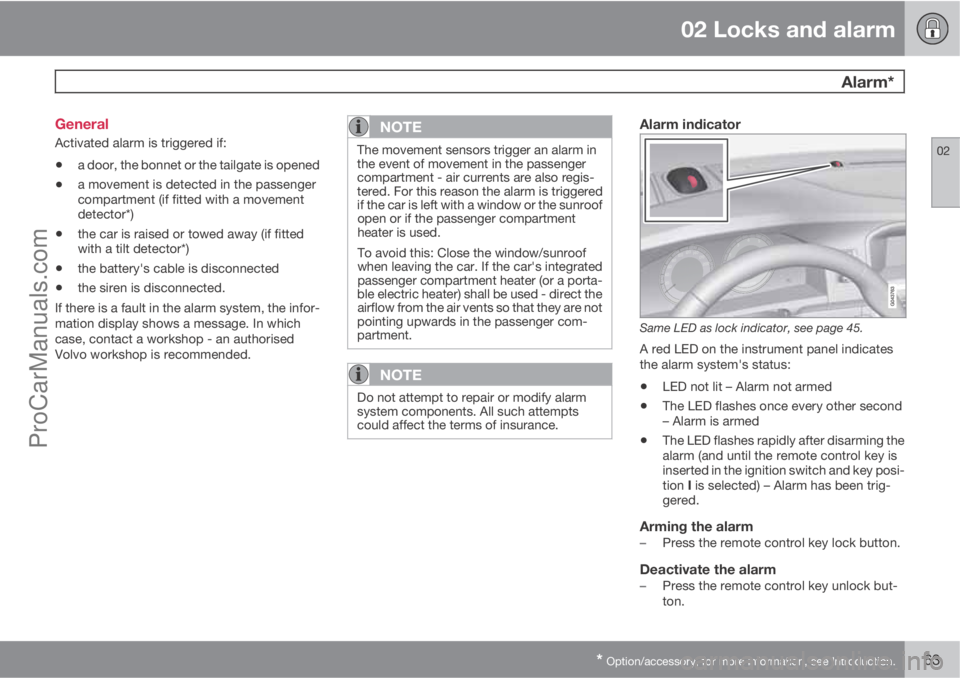
Alarm indicator
Same LED as lock indicator, see page 45.
A red LED on the instrument panel indicates
the alarm system's status:
•LED not lit – Alarm not armed
•The LED flashes once every other second
– Alarm is armed
•The LED flashes rapidly after disarming the
alarm (and until the remote control key is
inserted in the ignition switch and key posi-
tion I is selected) – Alarm has been trig-
gered.
Arming the alarm–Press the remote control key lock button.
Deactivate the alarm–Press the remote control key unlock but-
ton.
ProCarManuals.com
Page 90 of 422
03 Your driving environment
Lighting
03
88* Option/accessory, for more information, see Introduction.
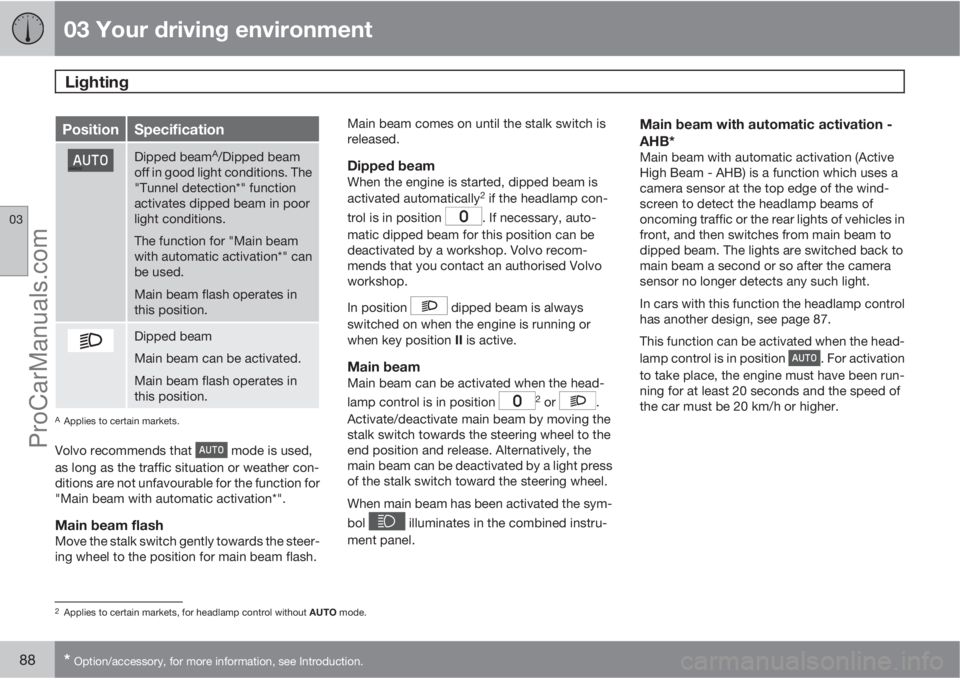
PositionSpecification
Dipped beamA/Dipped beam
off in good light conditions. The
"Tunnel detection*" function
activates dipped beam in poor
light conditions.
The function for "Main beam
with automatic activation*" can
be used.
Main beam flash operates in
this position.
Dipped beam
Main beam can be activated.
Main beam flash operates in
this position.
AApplies to certain markets.
Volvo recommends that mode is used,
as long as the traffic situation or weather con-
ditions are not unfavourable for the function for
"Main beam with automatic activation*".
Main beam flashMove the stalk switch gently towards the steer-
ing wheel to the position for main beam flash.Main beam comes on until the stalk switch is
released.
Dipped beamWhen the engine is started, dipped beam is
activated automatically2 if the headlamp con-
trol is in position
. If necessary, auto-
matic dipped beam for this position can be
deactivated by a workshop. Volvo recom-
mends that you contact an authorised Volvo
workshop.
In position
dipped beam is always
switched on when the engine is running or
when key position II is active.
Main beamMain beam can be activated when the head-
lamp control is in position 2 or .
Activate/deactivate main beam by moving the
stalk switch towards the steering wheel to the
end position and release. Alternatively, the
main beam can be deactivated by a light press
of the stalk switch toward the steering wheel.
When main beam has been activated the sym-
bol
illuminates in the combined instru-
ment panel.
Main beam with automatic activation -
AHB*
Main beam with automatic activation (Active
High Beam - AHB) is a function which uses a
camera sensor at the top edge of the wind-
screen to detect the headlamp beams of
oncoming traffic or the rear lights of vehicles in
front, and then switches from main beam to
dipped beam. The lights are switched back to
main beam a second or so after the camera
sensor no longer detects any such light.
In cars with this function the headlamp control
has another design, see page 87.
This function can be activated when the head-
lamp control is in position
. For activation
to take place, the engine must have been run-
ning for at least 20 seconds and the speed of
the car must be 20 km/h or higher.
2Applies to certain markets, for headlamp control without AUTO mode.
ProCarManuals.com
Page 91 of 422
03 Your driving environment
Lighting
03
89
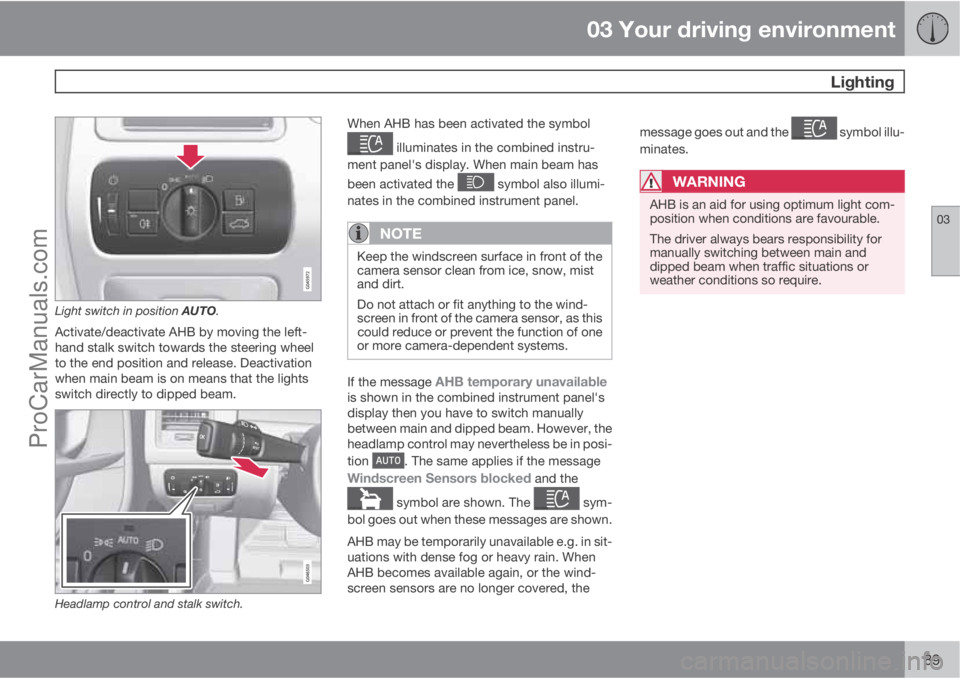
Light switch in position AUTO.
Activate/deactivate AHB by moving the left-
hand stalk switch towards the steering wheel
to the end position and release. Deactivation
when main beam is on means that the lights
switch directly to dipped beam.
Headlamp control and stalk switch.
When AHB has been activated the symbol
illuminates in the combined instru-
ment panel's display. When main beam has
been activated the
symbol also illumi-
nates in the combined instrument panel.
NOTE
Keep the windscreen surface in front of the
camera sensor clean from ice, snow, mist
and dirt.
Do not attach or fit anything to the wind-
screen in front of the camera sensor, as this
could reduce or prevent the function of one
or more camera-dependent systems.
If the message AHB temporary unavailableis shown in the combined instrument panel's
display then you have to switch manually
between main and dipped beam. However, the
headlamp control may nevertheless be in posi-
tion
. The same applies if the message
Windscreen Sensors blocked and the
symbol are shown. The sym-
bol goes out when these messages are shown.
AHB may be temporarily unavailable e.g. in sit-
uations with dense fog or heavy rain. When
AHB becomes available again, or the wind-
screen sensors are no longer covered, themessage goes out and the
symbol illu-
minates.
WARNING
AHB is an aid for using optimum light com-
position when conditions are favourable.
The driver always bears responsibility for
manually switching between main and
dipped beam when traffic situations or
weather conditions so require.
ProCarManuals.com
Page 92 of 422
03 Your driving environment
Lighting
03
90* Option/accessory, for more information, see Introduction.
IMPORTANT
Examples of when manual switching
between main and dipped beam may be
required:
•In heavy rain or dense fog
•In snow flurries or slush
•In moonlight
•When driving in poorly lit built-up areas
•When the traffic ahead has weak light-
ing
•If there are pedestrians on or beside the
road
•If there are highly reflective objects such
as signs in the vicinity of the road
•When the lighting from oncoming traffic
is obscured by e.g. a crash barrier
•When there is traffic on connecting
roads
•On the brow of a hill or in a hollow
•In sharp bends.
For more information on the limitations of the
camera sensor, see page 178.
Tunnel detection*In cars with rain sensor* the rain sensor detects
the changed light conditions when the car ise.g. driven into a tunnel, and dipped beam is
activated within a second in markets without
automatic dipped beam. Dipped beam is deac-
tivated approx. 20 seconds after the car has
been driven out of the tunnel. Note! - The head-
lamp control must be in
position for tun-
nel detection to work.
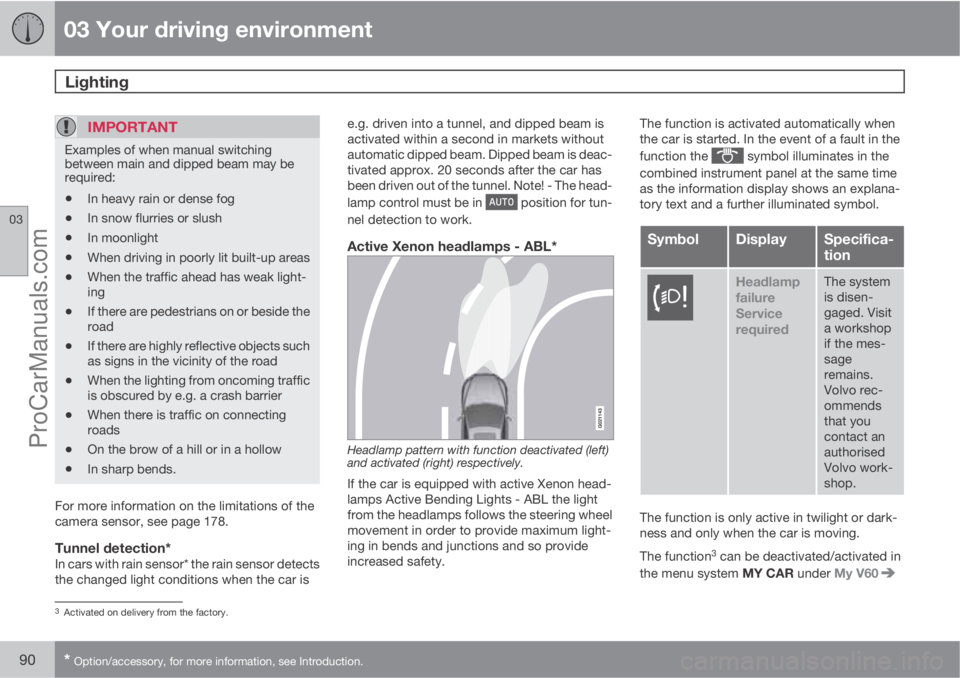
Active Xenon headlamps - ABL*
Headlamp pattern with function deactivated (left)
and activated (right) respectively.
If the car is equipped with active Xenon head-
lamps Active Bending Lights - ABL the light
from the headlamps follows the steering wheel
movement in order to provide maximum light-
ing in bends and junctions and so provide
increased safety.The function is activated automatically when
the car is started. In the event of a fault in the
function the
symbol illuminates in the
combined instrument panel at the same time
as the information display shows an explana-
tory text and a further illuminated symbol.
SymbolDisplaySpecifica-
tion
Headlamp
failure
Service
requiredThe system
is disen-
gaged. Visit
a workshop
if the mes-
sage
remains.
Volvo rec-
ommends
that you
contact an
authorised
Volvo work-
shop.
The function is only active in twilight or dark-
ness and only when the car is moving.
The function
3 can be deactivated/activated in
the menu system MY CAR under My V60
3Activated on delivery from the factory.
ProCarManuals.com
Page 100 of 422
03 Your driving environment
Wipers and washing
03
98* Option/accessory, for more information, see Introduction.
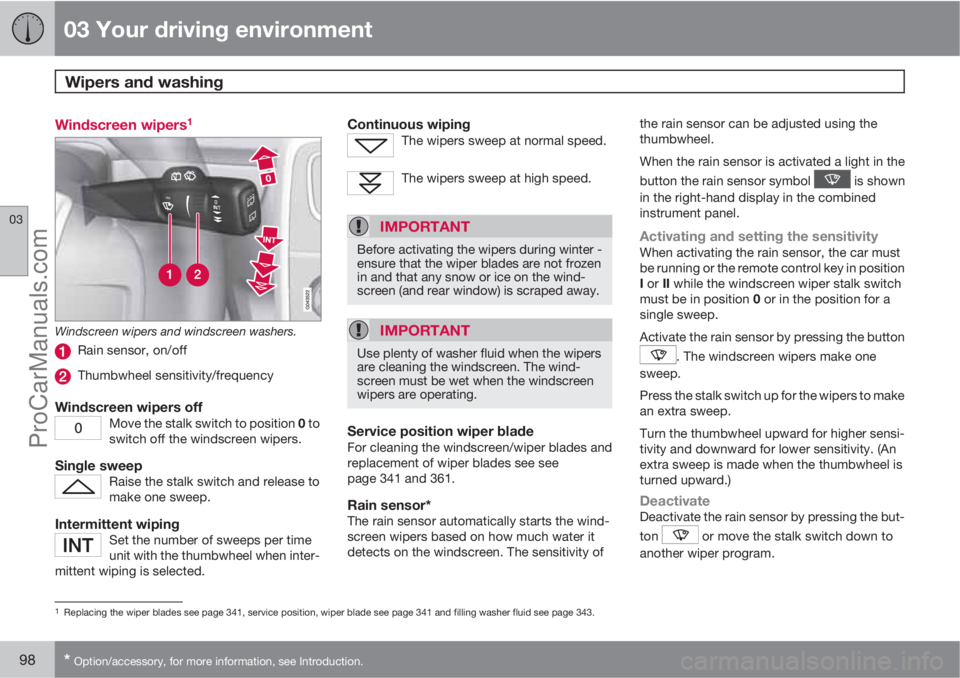
Windscreen wipers1
Windscreen wipers and windscreen washers.
Rain sensor, on/off
Thumbwheel sensitivity/frequency
Windscreen wipers offMove the stalk switch to position 0 to
switch off the windscreen wipers.
Single sweepRaise the stalk switch and release to
make one sweep.
Intermittent wipingSet the number of sweeps per time
unit with the thumbwheel when inter-
mittent wiping is selected.
Continuous wipingThe wipers sweep at normal speed.
The wipers sweep at high speed.
IMPORTANT
Before activating the wipers during winter -
ensure that the wiper blades are not frozen
in and that any snow or ice on the wind-
screen (and rear window) is scraped away.
IMPORTANT
Use plenty of washer fluid when the wipers
are cleaning the windscreen. The wind-
screen must be wet when the windscreen
wipers are operating.
Service position wiper bladeFor cleaning the windscreen/wiper blades and
replacement of wiper blades see see
page 341 and 361.
Rain sensor*The rain sensor automatically starts the wind-
screen wipers based on how much water it
detects on the windscreen. The sensitivity ofthe rain sensor can be adjusted using the
thumbwheel.
When the rain sensor is activated a light in the
button the rain sensor symbol
is shown
in the right-hand display in the combined
instrument panel.
Activating and setting the sensitivityWhen activating the rain sensor, the car must
be running or the remote control key in position
I or II while the windscreen wiper stalk switch
must be in position 0 or in the position for a
single sweep.
Activate the rain sensor by pressing the button
. The windscreen wipers make one
sweep.
Press the stalk switch up for the wipers to make
an extra sweep.
Turn the thumbwheel upward for higher sensi-
tivity and downward for lower sensitivity. (An
extra sweep is made when the thumbwheel is
turned upward.)
DeactivateDeactivate the rain sensor by pressing the but-
ton
or move the stalk switch down to
another wiper program.
1Replacing the wiper blades see page 341, service position, wiper blade see page 341 and filling washer fluid see page 343.
ProCarManuals.com
Page 101 of 422
03 Your driving environment
Wipers and washing
03
* Option/accessory, for more information, see Introduction.99
The rain sensor is automatically deactivated
when the remote control key is removed from
the ignition switch or five minutes after the
engine has been switched off.
IMPORTANT
The windscreen wipers could start and be
damaged in an automatic car wash. Deac-
tivate the rain sensor while the car is running
or the remote control key is in position I or
II. The symbol in the combined instrument
panel and the lamp in the button go out.
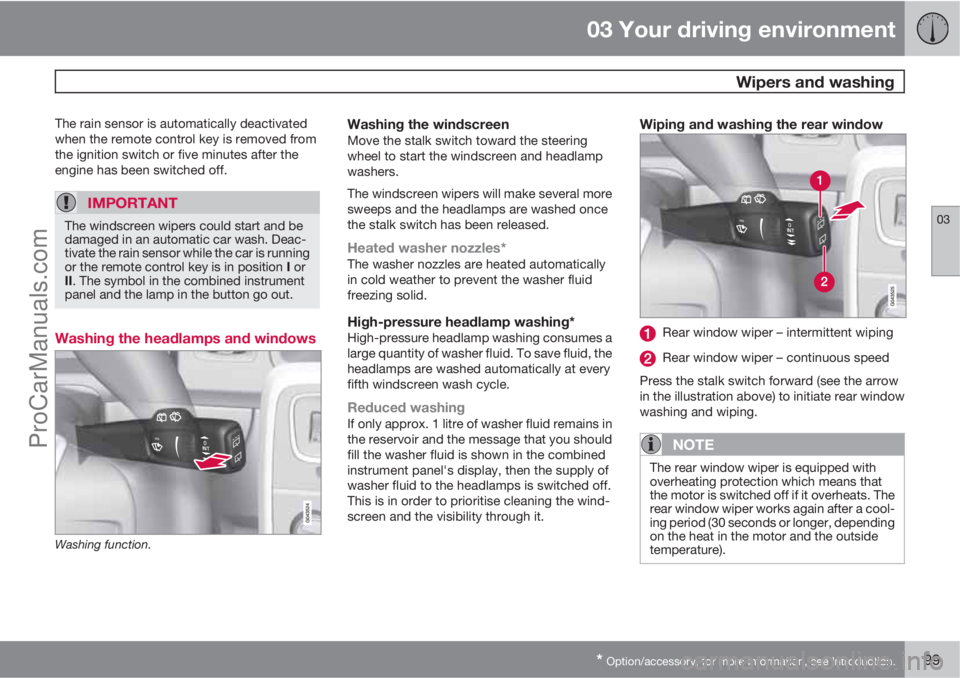
Washing the headlamps and windows
Washing function.
Washing the windscreenMove the stalk switch toward the steering
wheel to start the windscreen and headlamp
washers.
The windscreen wipers will make several more
sweeps and the headlamps are washed once
the stalk switch has been released.
Heated washer nozzles*The washer nozzles are heated automatically
in cold weather to prevent the washer fluid
freezing solid.
High-pressure headlamp washing*High-pressure headlamp washing consumes a
large quantity of washer fluid. To save fluid, the
headlamps are washed automatically at every
fifth windscreen wash cycle.
Reduced washingIf only approx. 1 litre of washer fluid remains in
the reservoir and the message that you should
fill the washer fluid is shown in the combined
instrument panel's display, then the supply of
washer fluid to the headlamps is switched off.
This is in order to prioritise cleaning the wind-
screen and the visibility through it.
Wiping and washing the rear window
Rear window wiper – intermittent wiping
Rear window wiper – continuous speed
Press the stalk switch forward (see the arrow
in the illustration above) to initiate rear window
washing and wiping.
NOTE
The rear window wiper is equipped with
overheating protection which means that
the motor is switched off if it overheats. The
rear window wiper works again after a cool-
ing period (30 seconds or longer, depending
on the heat in the motor and the outside
temperature).
ProCarManuals.com
Page 102 of 422
03 Your driving environment
Wipers and washing
03
100
Wiper – reversingEngaging reverse gear while the windscreen
wipers are on initiates intermittent rear window
wiping
2. The function stops when reverse gear
is disengaged.
If the rear window wiper is already on at con-
tinuous speed, no change is made.
NOTE
On cars with rain sensor, the rear window
wiper is activated with reversing, if the sen-
sor is activated and it is raining.
2This function (intermittent wiping when reversing) can be deactivated. Visit a workshop. Volvo recommends that you contact an authorised Volvo workshop.
ProCarManuals.com
Page 151 of 422
04 Driver support
Road sign information - RSI*
04
* Option/accessory, for more information, see Introduction.149
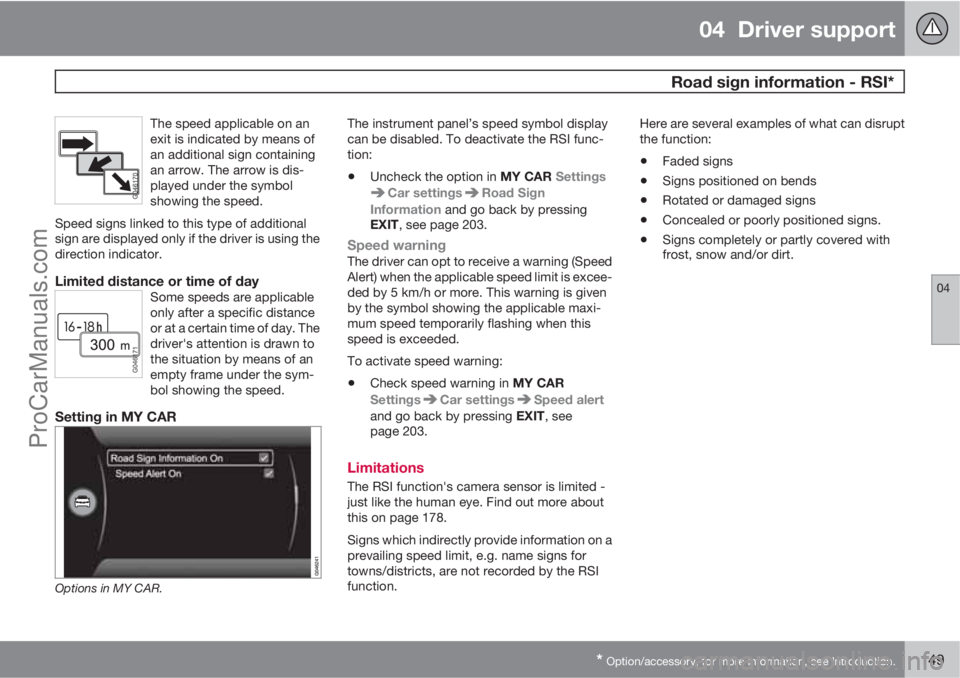
The speed applicable on an
exit is indicated by means of
an additional sign containing
an arrow. The arrow is dis-
played under the symbol
showing the speed.
Speed signs linked to this type of additional
sign are displayed only if the driver is using the
direction indicator.
Limited distance or time of daySome speeds are applicable
only after a specific distance
or at a certain time of day. The
driver's attention is drawn to
the situation by means of an
empty frame under the sym-
bol showing the speed.
Setting in MY CAR
Options in MY CAR.
The instrument panel’s speed symbol display
can be disabled. To deactivate the RSI func-
tion:
•Uncheck the option in MY CAR Settings
Car settingsRoad Sign
Information and go back by pressing
EXIT, see page 203.
Speed warningThe driver can opt to receive a warning (Speed
Alert) when the applicable speed limit is excee-
ded by 5 km/h or more. This warning is given
by the symbol showing the applicable maxi-
mum speed temporarily flashing when this
speed is exceeded.
To activate speed warning:
•Check speed warning in MY CAR
Settings
Car settingsSpeed alert
and go back by pressing EXIT, see
page 203.
Limitations
The RSI function's camera sensor is limited -
just like the human eye. Find out more about
this on page 178.
Signs which indirectly provide information on a
prevailing speed limit, e.g. name signs for
towns/districts, are not recorded by the RSI
function.Here are several examples of what can disrupt
the function:
•Faded signs
•Signs positioned on bends
•Rotated or damaged signs
•Concealed or poorly positioned signs.
•Signs completely or partly covered with
frost, snow and/or dirt.
ProCarManuals.com
Page 156 of 422
04 Driver support
Adaptive cruise control*
04
154* Option/accessory, for more information, see Introduction.
General information on ACC
The adaptive cruise control (ACC – Adaptive
Cruise Control) helps the driver maintain a safe
distance from the vehicle ahead. An adaptive
cruise control provides a more relaxing driving
experience on long journeys on motorways
and long straight main roads in smooth traffic
flows.
The driver sets the desired speed and time
interval to the car in front. When the radar
detector detects a slower vehicle in front of the
car, the speed is automatically adapted to that.
When the road is clear again the car returns to
the selected speed.
If the adaptive cruise control is switched off or
set to the standby mode and the car comes too
close to a vehicle in front, then the driver is
warned by Distance Warning (see page 165)
about the short distance.WARNING
The driver must always be observant with
regard to the traffic conditions and intervene
when the adaptive cruise control is not
maintaining a suitable speed or suitable dis-
tance.
The adaptive cruise control cannot handle
all traffic, weather and road conditions.
Read the whole of this section for informa-
tion on the limitations of the adaptive cruise
control. The driver must be familiar with this
information before using the adaptive cruise
control.
The driver always bears responsibility for
maintaining the correct distance and speed,
even when the adaptive cruise control is
being used.
IMPORTANT
Maintenance of adaptive cruise control
components must only be performed at a
workshop - an authorised Volvo workshop
is recommended.
Automatic gearboxCars with automatic gearbox have enhanced
functionality with the adaptive cruise control's
Queue Assistant, see page 159.
Function
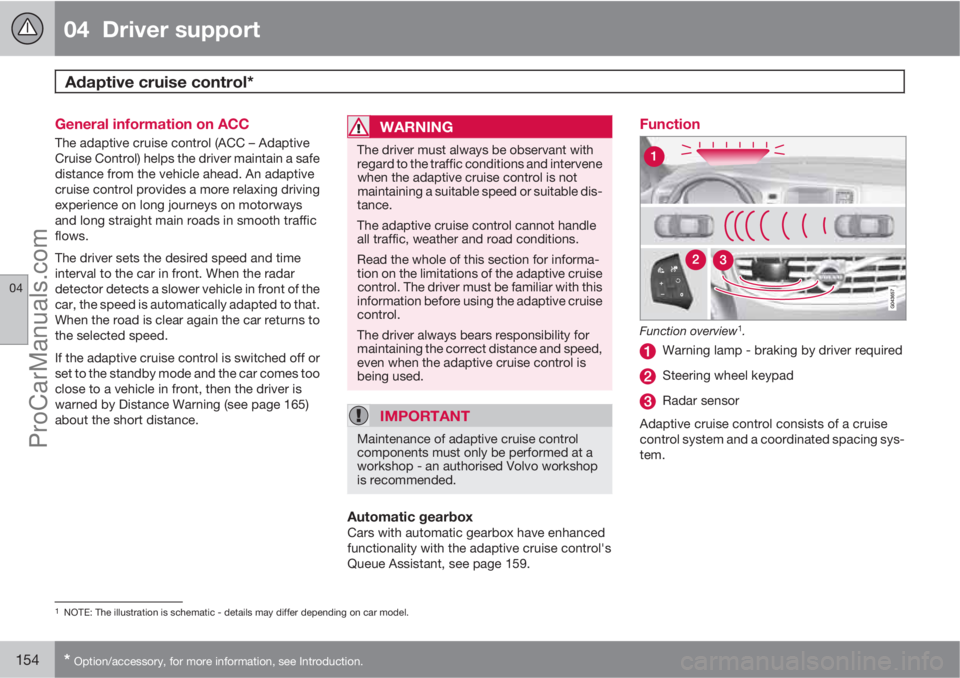
Function overview1.
Warning lamp - braking by driver required
Steering wheel keypad
Radar sensor
Adaptive cruise control consists of a cruise
control system and a coordinated spacing sys-
tem.
1NOTE: The illustration is schematic - details may differ depending on car model.
ProCarManuals.com
Page 157 of 422
04 Driver support
Adaptive cruise control*
04
* Option/accessory, for more information, see Introduction.155
WARNING
Adaptive cruise control is not a collision
avoidance system. The driver must inter-
vene if the system does not detect a vehicle
in front.
The adaptive cruise control does not brake
for humans or animals, and not for small
vehicles such as bicycles and motorcycles.
Nor for oncoming, slow or stationary vehi-
cles and objects.
Do not use the adaptive cruise control, for
example, in city traffic, in dense traffic, at
junctions, on slippery surfaces, with a lot of
water or slush on the road, in heavy rain/
snow, in poor visibility, on winding roads or
on slip roads.
The distance to the vehicle ahead is mainly
measured by a radar sensor. Cruise control
regulates the speed with acceleration and
braking. It is normal for the brakes to emit a low
sound when they are being used by the Adap-
tive cruise control.
WARNING
The brake pedal moves when the cruise
control brakes. Do not rest your foot under
the brake pedal as it could become trapped.
The adaptive cruise control aims to follow the
vehicle ahead in the same lane at a time interval
set by the driver. If the radar sensor cannot see
any vehicle in front then the car will instead
maintain the cruise control's set speed. This
also happens if the speed of the vehicle in front
exceeds the cruise control's set speed.
The adaptive cruise control aims to control the
speed in a smooth way. In situations that
demand sudden braking the driver must brake
himself/herself. This applies with large differ-
ences in speed, or if the vehicle in front brakes
heavily. Due to limitations in the radar sensor,
braking may come unexpectedly or not at all,
see page 160.
The adaptive cruise control can be activated to
follow another vehicle at speeds from
30 km/h
2 up to 200 km/h. If the speed falls
below 30 km/h or if the engine speed becomes
too low, the cruise control is set in standby
mode at which automatic braking ceases - the
driver must then take over himself/herself to
maintain a safe distance to the vehicle ahead.
Warning lamp - braking by driver
required
Adaptive cruise control has a braking capacity
that is equivalent to more than 40% of the car's
braking capacity.If the car needs to be braked more heavily than
cruise control capacity and the driver does not
brake, then the cruise control uses the collision
warning system's warning lamp and warning
sound (see page 173) to alert the driver that
immediate intervention is required.
NOTE
The warning lamp may be difficult to notice
in strong sunlight or when sunglasses are
being worn.
WARNING
Cruise control only warns of vehicles
detected by the radar sensor. Consequently
there may be no warning or it may be sub-
ject to a delay. Do not wait for a warning but
brake when it is necessary.
Steep roads and/or heavy loadBear in mind that the adaptive cruise control is
primarily intended for use when driving on level
road surfaces. It may have difficultly in keeping
the correct distance from the vehicle ahead
when driving on steep roads, with a heavy load
or with a trailer - in which case, be extra atten-
tive and ready to slow down.
2Queue Assistant (in cars with automatic gearbox) can operate in the range of 0-200 km/h, see page 159.
ProCarManuals.com