sensor VOLVO V60 2013 Owner's Guide
[x] Cancel search | Manufacturer: VOLVO, Model Year: 2013, Model line: V60, Model: VOLVO V60 2013Pages: 422, PDF Size: 9.59 MB
Page 172 of 422
04 Driver support
City Safety™
04
170
When City Safety™ has prevented a collision
with a stationary object the car remains sta-
tionary for a maximum of 1.5 seconds. If the car
is braked for a vehicle in front that is moving,
then speed is reduced to the same speed as
that maintained by the vehicle in front.
On a car with manual gearbox the engine stops
when City Safety™ has stopped the car, unless
the driver manages to depress the clutch pedal
beforehand.
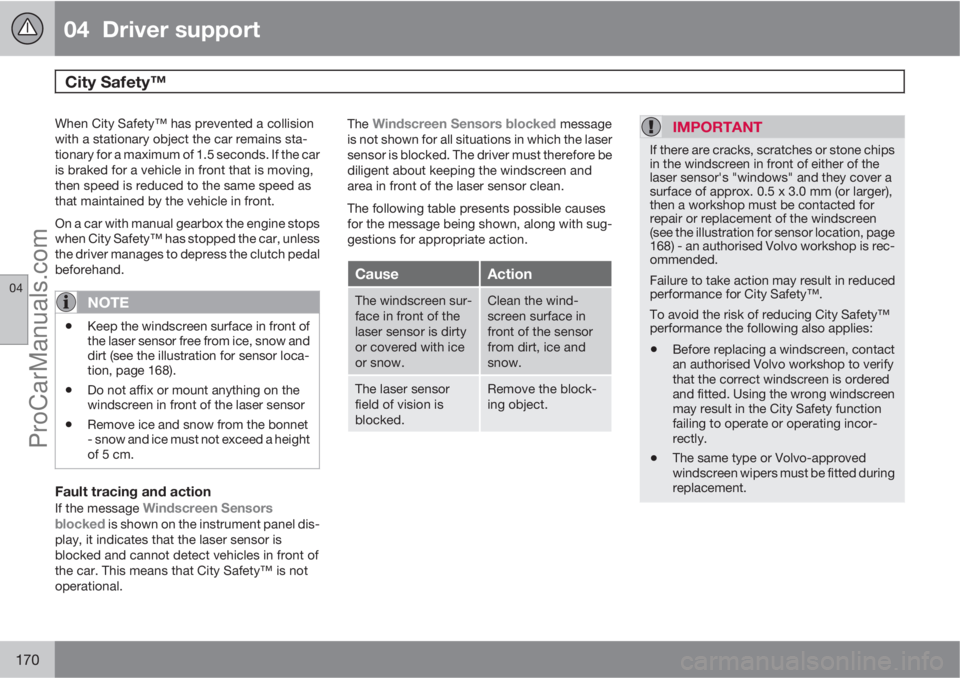
NOTE
•Keep the windscreen surface in front of
the laser sensor free from ice, snow and
dirt (see the illustration for sensor loca-
tion, page 168).
•Do not affix or mount anything on the
windscreen in front of the laser sensor
•Remove ice and snow from the bonnet
- snow and ice must not exceed a height
of 5 cm.
Fault tracing and action
If the message Windscreen Sensors
blocked is shown on the instrument panel dis-
play, it indicates that the laser sensor is
blocked and cannot detect vehicles in front of
the car. This means that City Safety™ is not
operational.The
Windscreen Sensors blocked message
is not shown for all situations in which the laser
sensor is blocked. The driver must therefore be
diligent about keeping the windscreen and
area in front of the laser sensor clean.
The following table presents possible causes
for the message being shown, along with sug-
gestions for appropriate action.
CauseAction
The windscreen sur-
face in front of the
laser sensor is dirty
or covered with ice
or snow.Clean the wind-
screen surface in
front of the sensor
from dirt, ice and
snow.
The laser sensor
field of vision is
blocked.Remove the block-
ing object.
IMPORTANT
If there are cracks, scratches or stone chips
in the windscreen in front of either of the
laser sensor's "windows" and they cover a
surface of approx. 0.5 x 3.0 mm (or larger),
then a workshop must be contacted for
repair or replacement of the windscreen
(see the illustration for sensor location, page
168) - an authorised Volvo workshop is rec-
ommended.
Failure to take action may result in reduced
performance for City Safety™.
To avoid the risk of reducing City Safety™
performance the following also applies:
•Before replacing a windscreen, contact
an authorised Volvo workshop to verify
that the correct windscreen is ordered
and fitted. Using the wrong windscreen
may result in the City Safety function
failing to operate or operating incor-
rectly.
•The same type or Volvo-approved
windscreen wipers must be fitted during
replacement.
ProCarManuals.com
Page 173 of 422
04 Driver support
City Safety™
04
171 Laser sensor
The City Safety™ function includes a sensor
which transmits laser light. Contact a qualified
workshop in the event of a fault or if the laser
sensor needs servicing - an authorised Volvo
workshop is recommended.
WARNING
Never look into the laser sensor (which
emits spreading invisible laser radiation) at
a distance of 100 mm or closer with magni-
fying optics such as a magnifying glass,
microscope, lens or similar optical instru-
ments - this would involve a risk of eye injury
(the illustration on page 168 shows sensor
location).
For more information on the laser sensor, see
page 9.
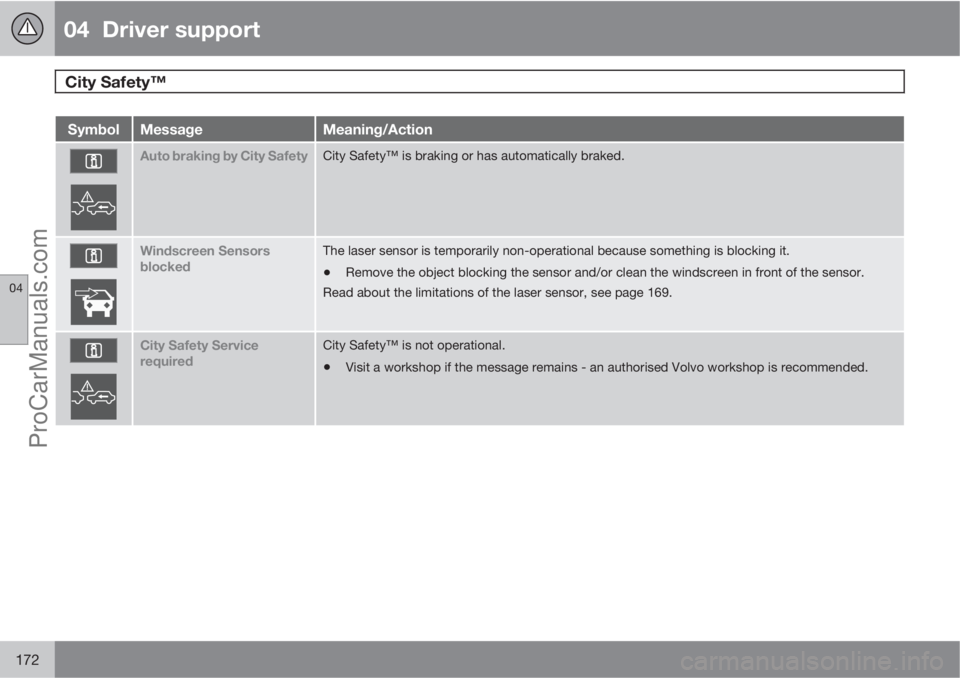
Symbols and messages in the display
In conjunction with automatic braking by the
City Safety™ system, one or more symbols
may illuminate on the instrument panel and a
message may appear on its display.
A text message can be acknowledged by
briefly pressing the OK button on the direction
indicator stalk.
ProCarManuals.com
Page 174 of 422
04 Driver support
City Safety™
04
172
SymbolMessageMeaning/Action
Auto braking by City SafetyCity Safety™ is braking or has automatically braked.
Windscreen Sensors
blockedThe laser sensor is temporarily non-operational because something is blocking it.
•Remove the object blocking the sensor and/or clean the windscreen in front of the sensor.
Read about the limitations of the laser sensor, see page 169.
City Safety Service
requiredCity Safety™ is not operational.
•Visit a workshop if the message remains - an authorised Volvo workshop is recommended.
ProCarManuals.com
Page 175 of 422
04 Driver support
Collision Warning with Auto Brake & Pedestrian Protection*
04
* Option/accessory, for more information, see Introduction.173 General
"Collision Warning with Auto Brake & Pedes-
trian Detection" is an aid to assist the driver
when there is a risk of colliding with a pedes-
trian or vehicle in front that is stationary or
moving in the same direction.
Collision Warning with Auto Brake & Pedestrian
Detection is activated in situations where the
driver should have started braking earlier,
which is why it cannot help the driver in every
situation.
Collision Warning with Auto Brake & Pedestrian
Detection is designed to be activated as late as
possible in order to avoid unnecessary inter-
vention.
Collision Warning with Auto Brake & Pedestrian
Detection may prevent a collision or reduce the
collision speed.
Collision Warning with Auto Brake & Pedestrian
Detection must not be used as an excuse for
the driver to change his/her driving style. If the
driver solely relies on Collision Warning with
Auto Brake to do the braking, there will be a
collision sooner or later.
Two system levelsDepending on how the car equipped, the Col-
lision Warning with Auto Brake & Pedestrian
Detection function may appear in two variants:
Level 1 and Level 2.
Level 1The driver is merely warned of occurring obsta-
cles by means of visual and acoustic signals -
no automatic braking intervenes, the driver
must himself brake.
Level 2The driver is warned of occurring obstacles by
means of visual and acoustic signals - the car
is braked automatically if the driver himself
does not act within a reasonable time.
IMPORTANT
Maintenance of components included in
Collision Warning with Auto Brake & Pedes-
trian Detection must only be carried out in a
workshop - an authorised Volvo workshop
is recommended.
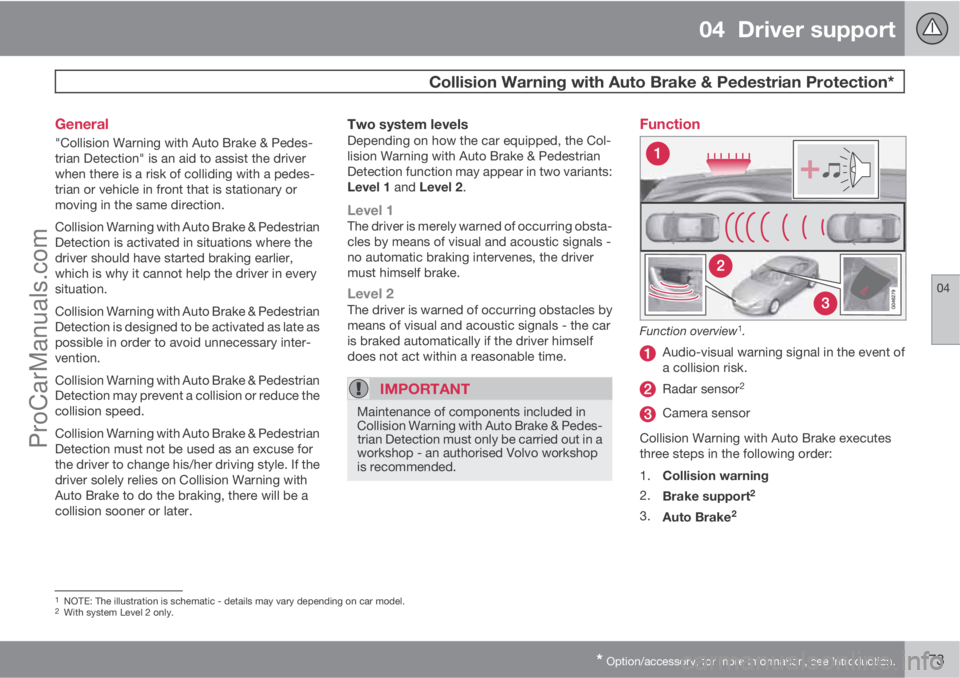
Function
Function overview1.
Audio-visual warning signal in the event of
a collision risk.
Radar sensor2
Camera sensor
Collision Warning with Auto Brake executes
three steps in the following order:
1.
Collision warning
2.
Brake support
2
3.
Auto Brake2
1NOTE: The illustration is schematic - details may vary depending on car model.2With system Level 2 only.
ProCarManuals.com
Page 177 of 422
04 Driver support
Collision Warning with Auto Brake & Pedestrian Protection*
04
* Option/accessory, for more information, see Introduction.175 Detection of pedestrians
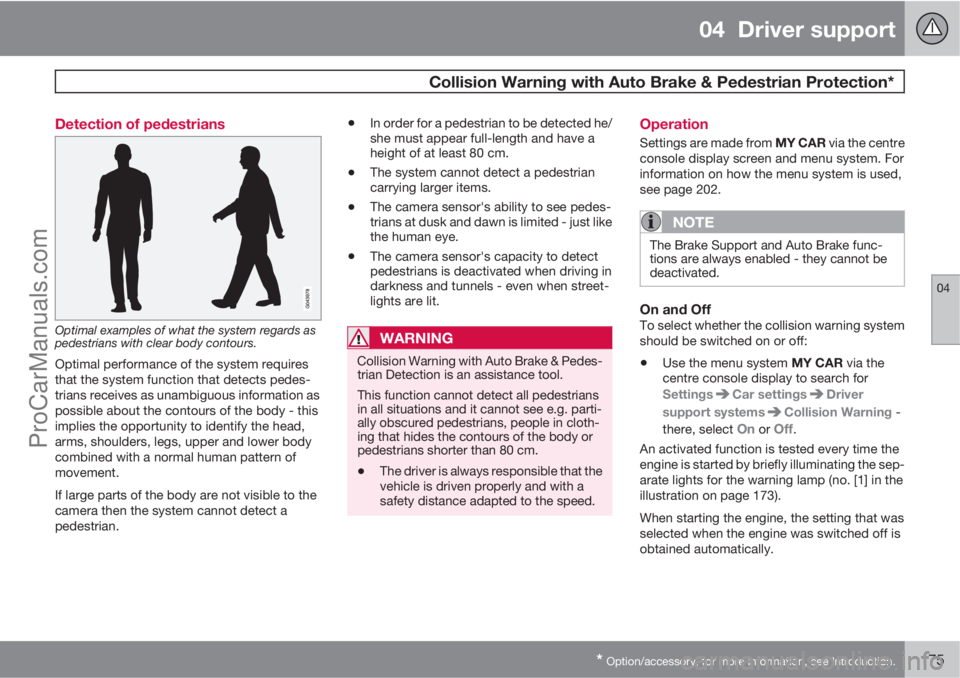
Optimal examples of what the system regards as
pedestrians with clear body contours.
Optimal performance of the system requires
that the system function that detects pedes-
trians receives as unambiguous information as
possible about the contours of the body - this
implies the opportunity to identify the head,
arms, shoulders, legs, upper and lower body
combined with a normal human pattern of
movement.
If large parts of the body are not visible to the
camera then the system cannot detect a
pedestrian.
•In order for a pedestrian to be detected he/
she must appear full-length and have a
height of at least 80 cm.
•The system cannot detect a pedestrian
carrying larger items.
•The camera sensor's ability to see pedes-
trians at dusk and dawn is limited - just like
the human eye.
•The camera sensor's capacity to detect
pedestrians is deactivated when driving in
darkness and tunnels - even when street-
lights are lit.
WARNING
Collision Warning with Auto Brake & Pedes-
trian Detection is an assistance tool.
This function cannot detect all pedestrians
in all situations and it cannot see e.g. parti-
ally obscured pedestrians, people in cloth-
ing that hides the contours of the body or
pedestrians shorter than 80 cm.
•The driver is always responsible that the
vehicle is driven properly and with a
safety distance adapted to the speed.
Operation
Settings are made from MY CAR via the centre
console display screen and menu system. For
information on how the menu system is used,
see page 202.
NOTE
The Brake Support and Auto Brake func-
tions are always enabled - they cannot be
deactivated.
On and OffTo select whether the collision warning system
should be switched on or off:
•Use the menu system MY CAR via the
centre console display to search for
Settings
Car settingsDriver
support systems
Collision Warning -
there, select
On or Off.
An activated function is tested every time the
engine is started by briefly illuminating the sep-
arate lights for the warning lamp (no. [1] in the
illustration on page 173).
When starting the engine, the setting that was
selected when the engine was switched off is
obtained automatically.
ProCarManuals.com
Page 178 of 422
04 Driver support
Collision Warning with Auto Brake & Pedestrian Protection*
04
176* Option/accessory, for more information, see Introduction.
Activating/deactivating warning signalsThe warning lamp (no. [1] in the illustration on
page 173) is activated automatically when the
engine is started if Collision Warning is ena-
bled.
The warning sound can be activated/deacti-
vated separately:
•Select On or Off in the menu system MY
CAR under Settings
Car settings
Driver support systemsCollision
Warning
Warning sound.
Set warning distanceThe warning distance regulates the distance at
which the visual and acoustic warnings are
deployed.
•Select one of the options from Long,Normal or Short in the menu system MY
CAR under Settings
Car settings
Driver support systemsCollision
Warning
Warning distance.
The warning distance determines the system's
sensitivity. Warning distance
Long provides an
earlier warning. First test with Long and if this
setting produces too many warnings, which
could be perceived as irritating in certain sit-uations, then change to warning distance
Normal.
Only use warning distance
Short in excep-
tional cases, e.g. for dynamic driving.
NOTE
When the adaptive cruise control is in use
the warning lamp and warning sound will be
used by the cruise control even if the colli-
sion warning system is switched off.
The collision warning system warns the
driver in the event of a risk of a collision, but
the function cannot shorten driver reaction
time.
In order for the collision warning system to
be effective, always drive with the Distance
Alert set at time interval 4 – 5. see
page 165.
NOTE
Even if the warning distance has been set toLong warnings could be perceived as being
late in certain situations, e.g. when there are
large differences in speed or if vehicles in
front brake heavily.
WARNING
No automatic system can guarantee
100 % correct function in all situations.
Therefore, never test the Auto Brake system
by driving at people or vehicles - this may
cause severe damage and injury and risk
lives.
Checking settingsThe settings required can be controlled on the
centre console display screen. Search with the
menu system MY CAR under Settings
Car
settings
Driver support systems
Collision Warning, see page 202.
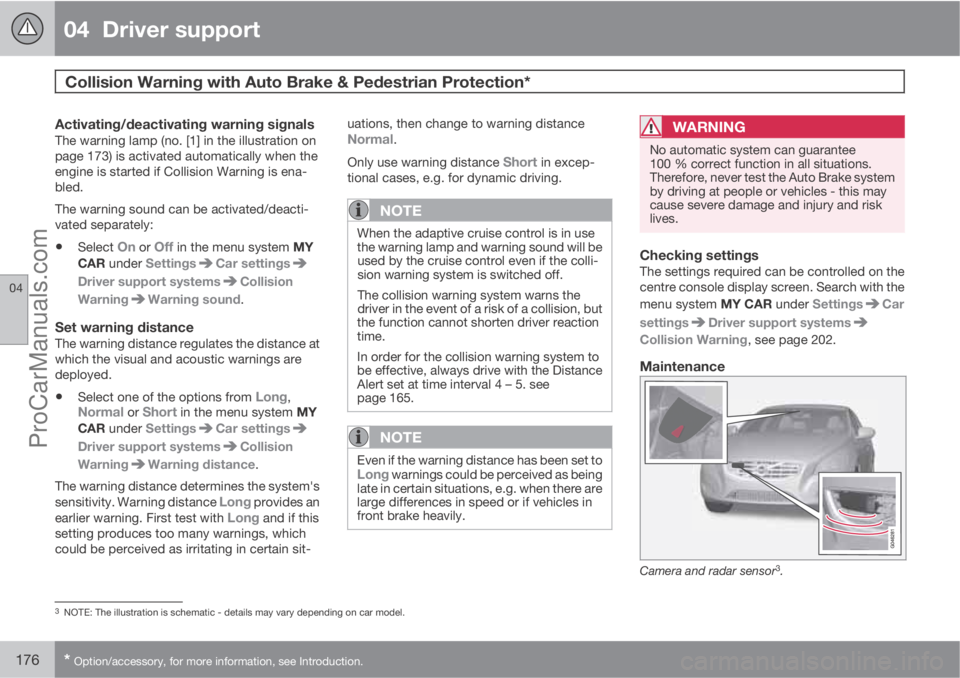
Maintenance
Camera and radar sensor3.
3NOTE: The illustration is schematic - details may vary depending on car model.
ProCarManuals.com
Page 179 of 422
04 Driver support
Collision Warning with Auto Brake & Pedestrian Protection*
04
* Option/accessory, for more information, see Introduction.177
For the sensors to work correctly, they must be
kept clear of dirt, ice and snow, and be cleaned
regularly with water and car shampoo.
NOTE
Dirt, ice and snow covering the sensors will
reduce their function and may prevent
measurement.
Limitations
Collision Warning with Auto Brake and Pedes-
trian Detection is active from approx. 4 km/h.
The visual warning signal (no. [1] in the illustra-
tion on page 173) may be difficult to notice in
the event of strong sunlight, reflections, when
sunglasses are being worn or if the driver is not
looking straight ahead. The warning sound
should therefore always be activated.
On slippery road surfaces the braking distance
is extended, which may reduce the capacity to
avoid a collision. In such situations the ABS
and DSTC systems will provide best possible
braking force with maintained stability.
NOTE
The visual warning signal can be temporarily
disengaged in the event of high passenger
compartment temperature caused by
strong sunlight for example. If this occurs
then the warning sound is activated even if
it is deactivated in the menu system.
•Warnings may not appear if the dis-
tance to the vehicle in front is small or if
steering wheel and pedal movements
are large, e.g. a very active driving style.
WARNING
Warnings and brake interventions could be
implemented late or not at all if the traffic
situation or external influences mean that
the radar or camera sensor cannot detect a
pedestrian or a vehicle in front correctly.
The sensor system has a limited range for
pedestrians and the system therefore pro-
vides effective warnings and brake inter-
ventions at vehicle speeds up to 50 km/h.
For stationary or slow-moving vehicles,
warnings and brake interventions are effec-
tive at vehicle speeds up to 70 km/h.
Warnings for stationary or slow-moving
vehicles could be disengaged due to dark-
ness or poor visibility.
Warnings and brake interventions for
pedestrians are switched off at vehicle
speeds exceeding 80 km/h.
The collision warning system uses the same
radar sensors as adaptive cruise control. For
more information on the radar sensor and its
limitations, see page 178.
If warnings are perceived as being too frequent
or disturbing then the warning distance can be
reduced. This then leads to the system provid-
ing a warning at a later stage, which reduces
the total number of warnings; see the section
"Set warning distance" on page 176.
ProCarManuals.com
Page 180 of 422
04 Driver support
Collision Warning with Auto Brake & Pedestrian Protection*
04
178* Option/accessory, for more information, see Introduction.
Collision Warning with Auto Brake is tempo-
rarily deactivated with reverse gear engaged.
Collision Warning with Auto Brake is not acti-
vated at low speeds - under 4 km/h, which is
why the system does not intervene in situations
where the car is approaching a vehicle in front
very slowly, e.g. when parking.
In situations where the driver demonstrates
active, aware driving behaviour, a collision
warning may be postponed slightly in order to
keep unnecessary warnings to a minimum.
When Auto Brake has prevented a collision
with a stationary object the car remains sta-
tionary for a maximum of 1.5 seconds. If the car
is braked for a vehicle in front that is moving,
then speed is reduced to the same speed as
that maintained by the vehicle in front.
On a car with manual gearbox the engine stops
when Auto Brake has stopped the car, unless
the driver manages to depress the clutch pedal
beforehand.
Camera sensor limitationsThe car’s camera sensor is also used - as well
as by Collision Warning with Auto Brake - by
the functions:
•Automatic main/dipped beam dimming -
see page 88
•Road sign information - see page 148
•Driver Alert Control – see page 182
•Lane Departure Warning – see page 185.
NOTE
Keep the windscreen surface in front of the
camera sensor clean from ice, snow, mist
and dirt.
Do not attach or fit anything to the wind-
screen in front of the camera sensor, as this
could reduce or prevent the function of one
or more camera-dependent systems.
The camera sensors have limitations similar to
the human eye, i.e. they "see" worse in dark-
ness, heavy snowfall or rain and in thick fog for
example. Under such conditions the functions
of camera-dependent systems could be sig-
nificantly reduced or temporarily disengaged.
Strong oncoming light, reflections in the car-
riageway, snow or ice on the road surface, dirty
road surfaces or unclear lane markings could
also significantly reduce camera sensor func-
tion when it is used to scan the carriageway
and detect pedestrians and other vehicles.
The field of vision of the camera sensor is lim-
ited, which is why pedestrians and vehicles
cannot be detected in some situations, or they
are detected later than anticipated.
During very high temperatures the camera is
temporarily switched off for about 15 minutesafter the engine is started in order to protect
camera functionality.
Fault tracing and action
If the display shows the message Windscreen
Sensors blocked then this means that the
camera sensor is blocked and cannot detect
pedestrians, vehicles or road markings in front
of the car.
At the same time, this means that - besides
Collision Warning with Auto Brake - the Auto-
matic main/dipped beam dimming, Road sign
information, Driver Alert Control and Lane
Departure Warning functions will not have full
functionality either.
The following table presents possible causes
for a message being shown along with the
appropriate action.
ProCarManuals.com
Page 182 of 422
04 Driver support
Collision Warning with Auto Brake & Pedestrian Protection*
04
180* Option/accessory, for more information, see Introduction.
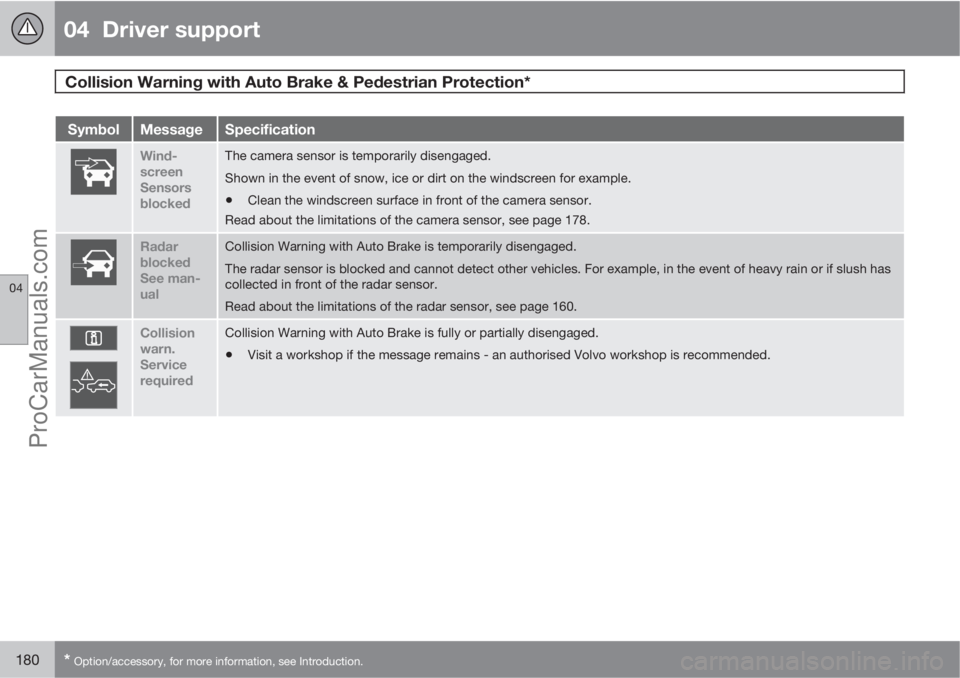
SymbolMessageSpecification
Wind-
screen
Sensors
blockedThe camera sensor is temporarily disengaged.
Shown in the event of snow, ice or dirt on the windscreen for example.
•Clean the windscreen surface in front of the camera sensor.
Read about the limitations of the camera sensor, see page 178.
Radar
blocked
See man-
ualCollision Warning with Auto Brake is temporarily disengaged.
The radar sensor is blocked and cannot detect other vehicles. For example, in the event of heavy rain or if slush has
collected in front of the radar sensor.
Read about the limitations of the radar sensor, see page 160.
Collision
warn.
Service
requiredCollision Warning with Auto Brake is fully or partially disengaged.
•Visit a workshop if the message remains - an authorised Volvo workshop is recommended.
ProCarManuals.com
Page 184 of 422
04 Driver support
Driver Alert System - DAC*
04
182* Option/accessory, for more information, see Introduction.
General information on DAC
The DAC (Driver Alert Control) function is
intended to attract the driver's attention when
he/she starts to drive less consistently, e.g. if
he/she becomes distracted or starts to fall
asleep.
A camera detects the side markings painted on
the carriageway and compares the section of
the road with the driver's steering wheel move-
ments. The driver is alerted if the vehicle does
not follow the carriageway evenly.
NOTE
The camera sensor has certain limitations,
see page 178.
The objective for DAC is to detect slowly dete-
riorating driving ability and it is primarily
intended for major roads. The function is not
intended for city traffic.
In some cases driving ability is not affected
despite driver fatigue. In which case there may
not be any warning issued for the driver. For
this reason it is always important to stop and
take a break in the event of any signs of driver
fatigue, irrespective of whether or not DAC
issues a warning.
NOTE
The function must not be used to extend a
driving stint. Always plan breaks at regular
intervals and ensure that you are fully
rested.
LimitationIn some cases the system may issue a warning
despite driving ability not deteriorating, for
example:
•if the driver tests the LDW function.
•in strong side winds.
•on rutted road surfaces.
Operation
Some settings are made from the centre con-
sole display screen and its menu system. For
information on how the menu system is used,
see page 202.
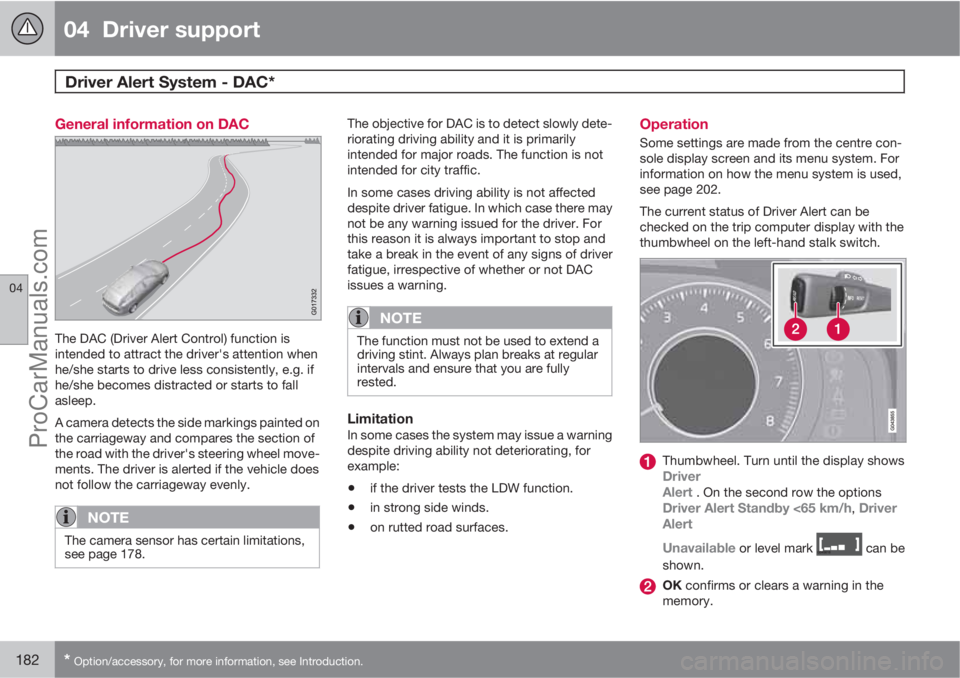
The current status of Driver Alert can be
checked on the trip computer display with the
thumbwheel on the left-hand stalk switch.
Thumbwheel. Turn until the display showsDriver
Alert . On the second row the optionsDriver Alert Standby <65 km/h, Driver
Alert
Unavailable
or level mark can be
shown.
OK confirms or clears a warning in the
memory.
ProCarManuals.com