gearbox VOLVO V60 2013 Owner's Manual
[x] Cancel search | Manufacturer: VOLVO, Model Year: 2013, Model line: V60, Model: VOLVO V60 2013Pages: 422, PDF Size: 9.59 MB
Page 157 of 422
04 Driver support
Adaptive cruise control*
04
* Option/accessory, for more information, see Introduction.155
WARNING
Adaptive cruise control is not a collision
avoidance system. The driver must inter-
vene if the system does not detect a vehicle
in front.
The adaptive cruise control does not brake
for humans or animals, and not for small
vehicles such as bicycles and motorcycles.
Nor for oncoming, slow or stationary vehi-
cles and objects.
Do not use the adaptive cruise control, for
example, in city traffic, in dense traffic, at
junctions, on slippery surfaces, with a lot of
water or slush on the road, in heavy rain/
snow, in poor visibility, on winding roads or
on slip roads.
The distance to the vehicle ahead is mainly
measured by a radar sensor. Cruise control
regulates the speed with acceleration and
braking. It is normal for the brakes to emit a low
sound when they are being used by the Adap-
tive cruise control.
WARNING
The brake pedal moves when the cruise
control brakes. Do not rest your foot under
the brake pedal as it could become trapped.
The adaptive cruise control aims to follow the
vehicle ahead in the same lane at a time interval
set by the driver. If the radar sensor cannot see
any vehicle in front then the car will instead
maintain the cruise control's set speed. This
also happens if the speed of the vehicle in front
exceeds the cruise control's set speed.
The adaptive cruise control aims to control the
speed in a smooth way. In situations that
demand sudden braking the driver must brake
himself/herself. This applies with large differ-
ences in speed, or if the vehicle in front brakes
heavily. Due to limitations in the radar sensor,
braking may come unexpectedly or not at all,
see page 160.
The adaptive cruise control can be activated to
follow another vehicle at speeds from
30 km/h
2 up to 200 km/h. If the speed falls
below 30 km/h or if the engine speed becomes
too low, the cruise control is set in standby
mode at which automatic braking ceases - the
driver must then take over himself/herself to
maintain a safe distance to the vehicle ahead.
Warning lamp - braking by driver
required
Adaptive cruise control has a braking capacity
that is equivalent to more than 40% of the car's
braking capacity.If the car needs to be braked more heavily than
cruise control capacity and the driver does not
brake, then the cruise control uses the collision
warning system's warning lamp and warning
sound (see page 173) to alert the driver that
immediate intervention is required.
NOTE
The warning lamp may be difficult to notice
in strong sunlight or when sunglasses are
being worn.
WARNING
Cruise control only warns of vehicles
detected by the radar sensor. Consequently
there may be no warning or it may be sub-
ject to a delay. Do not wait for a warning but
brake when it is necessary.
Steep roads and/or heavy loadBear in mind that the adaptive cruise control is
primarily intended for use when driving on level
road surfaces. It may have difficultly in keeping
the correct distance from the vehicle ahead
when driving on steep roads, with a heavy load
or with a trailer - in which case, be extra atten-
tive and ready to slow down.
2Queue Assistant (in cars with automatic gearbox) can operate in the range of 0-200 km/h, see page 159.
ProCarManuals.com
Page 160 of 422
04 Driver support
Adaptive cruise control*
04
158* Option/accessory, for more information, see Introduction.
Keypad without Speed limiter*To temporarily disengage Cruise control and
set it in standby mode:
•Press the steering wheel button .
Standby mode due to driver interventionCruise control is temporarily disengaged and
set in standby mode if:
•the foot brake is used
•the clutch pedal is depressed for longer
than 1 minute6
•the gear selector is moved to N position
(automatic gearbox)
•the driver maintains a speed higher than
the set speed for longer than 1 minute.
The driver must then regulate the speed.
A temporary increase in speed with the accel-
erator pedal, e.g. during overtaking, does not
affect the cruise control setting - the car returns
to the last stored speed when the accelerator
pedal is released.
Automatic standby modeThe Adaptive cruise control is dependent on
other systems, e.g.. DSTC (see page 146). Ifany of these systems stop working then cruise
control is automatically deactivated.
In the event of automatic deactivation a signal
will sound and the message
Cruise control
Cancelled is shown in the display. The driver
must then intervene and adapt the speed and
distance to the vehicle ahead.
An automatic deactivation can be due to:
•engine speed is too low/high
•speed falls below 30 km/h7
•wheels lose traction
•brake temperature is high
•the radar sensor is covered e.g. by wet
snow or heavy rain (radar waves blocked).
Resume set speedCruise control in standby mode is re-activated
with one press on the steering wheel button
- the speed is then set to the last stored
speed.
NOTE
A significant increase in speed may arise
after the speed has been resumed with .
Overtaking another vehicleWhen the car is following another vehicle and
the driver indicates an imminent overtake with
the direction indicator
8, the Cruise control
helps to briefly accelerate the car towards the
vehicle in front.
The function is active at speeds
above 70 km/h.
WARNING
Be aware that this function can be activated
in more situations other than during over-
taking, e.g. when a direction indicator is
used to indicate a change of lane or exit to
another road - the car will then accelerate
briefly.
Deactivate
Keypad with Speed limiter
Adaptive cruise control is deactivated with the
steering wheel button
. The set speed is
cleared and cannot be resumed with the
button.
Keypad without Speed limiterWith a short press on the steering wheel button
the cruise control is set in standby mode.
6Disengaging and selecting a higher or lower gear does not involve standby mode.7Does not apply to a car with Queue Assistant - it manages right down to stationary.8On left flash only in left-hand drive car, or right flash in right-hand drive car.
ProCarManuals.com
Page 161 of 422
04 Driver support
Adaptive cruise control*
04
* Option/accessory, for more information, see Introduction.159
With a further short press the cruise control is
deactivated. The set speed is cleared and can-
not be resumed with the
button.
Queue Assistant
In cars with automatic gearbox Adaptive cruise
control is supplemented with the Queue Assis-
tant function (also referred to as "Queue
Assist").
Queue Assistant has the following functions:
•Extended speed range - also below 30 km/
h and at standstill
•Change of target
•Automatic braking ceases when stationary
•Automatic activation parking brake.
Note that the lowest programmable speed for
the cruise control is 30 km/h - even though the
cruise control is capable of following another
vehicle down to a standstill, a lower speed
cannot be selected.
Extended speed range
NOTE
In order to activate the cruise control the
driver's door must be closed and the driver
must be wearing the seatbelt.
With automatic gearbox the cruise control can
follow another vehicle within the range of
0-200 km/h.
NOTE
Activation of the cruise control below
30 km/h requires a vehicle in front within a
reasonable distance.
For shorter stops in connection with inching in
slow traffic or at traffic lights driving is auto-
matically resumed if the stops do not exceed
about 3 seconds - if it takes longer before the
car in front starts moving again then the cruise
control is set in standby mode with automatic
braking. The driver must then re-activate the
cruise control in one of the following ways:
•Press the steering wheel button .
or
•Depress the accelerator pedal.
> The cruise control will then resume follow-
ing the vehicle in front.
NOTE
Queue Assist can hold the car stationary for
a maximum of 4 minutes - then the parking
brake is applied and Cruise Control is dis-
engaged.
•The driver has to release the parking
brake before the cruise control can be
reactivated.
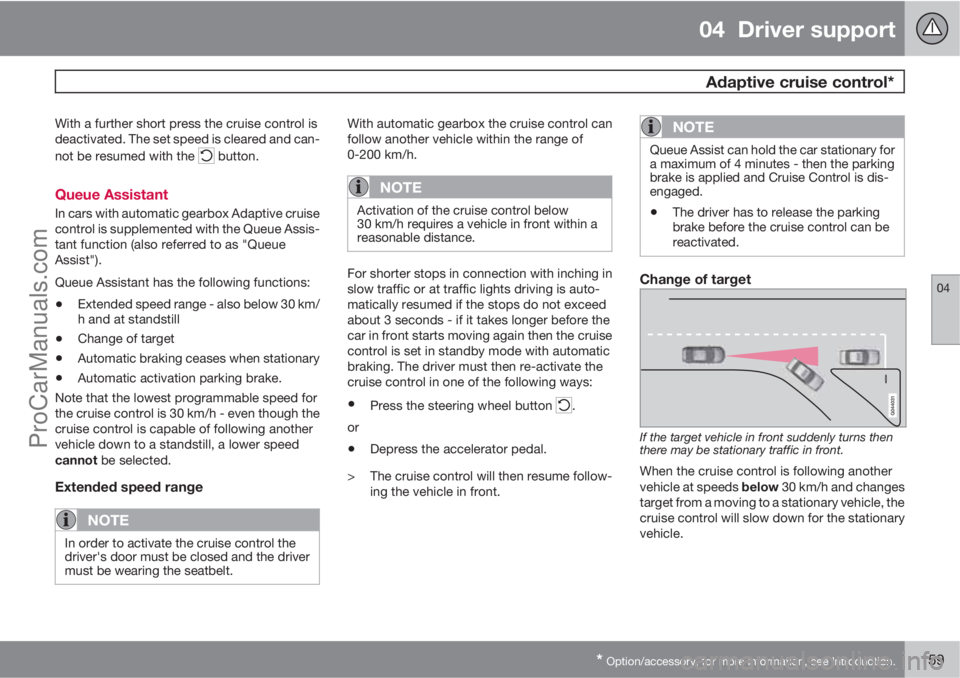
Change of target
If the target vehicle in front suddenly turns then
there may be stationary traffic in front.
When the cruise control is following another
vehicle at speeds below 30 km/h and changes
target from a moving to a stationary vehicle, the
cruise control will slow down for the stationary
vehicle.
ProCarManuals.com
Page 172 of 422
04 Driver support
City Safety™
04
170
When City Safety™ has prevented a collision
with a stationary object the car remains sta-
tionary for a maximum of 1.5 seconds. If the car
is braked for a vehicle in front that is moving,
then speed is reduced to the same speed as
that maintained by the vehicle in front.
On a car with manual gearbox the engine stops
when City Safety™ has stopped the car, unless
the driver manages to depress the clutch pedal
beforehand.
NOTE
•Keep the windscreen surface in front of
the laser sensor free from ice, snow and
dirt (see the illustration for sensor loca-
tion, page 168).
•Do not affix or mount anything on the
windscreen in front of the laser sensor
•Remove ice and snow from the bonnet
- snow and ice must not exceed a height
of 5 cm.
Fault tracing and action
If the message Windscreen Sensors
blocked is shown on the instrument panel dis-
play, it indicates that the laser sensor is
blocked and cannot detect vehicles in front of
the car. This means that City Safety™ is not
operational.The
Windscreen Sensors blocked message
is not shown for all situations in which the laser
sensor is blocked. The driver must therefore be
diligent about keeping the windscreen and
area in front of the laser sensor clean.
The following table presents possible causes
for the message being shown, along with sug-
gestions for appropriate action.
CauseAction
The windscreen sur-
face in front of the
laser sensor is dirty
or covered with ice
or snow.Clean the wind-
screen surface in
front of the sensor
from dirt, ice and
snow.
The laser sensor
field of vision is
blocked.Remove the block-
ing object.
IMPORTANT
If there are cracks, scratches or stone chips
in the windscreen in front of either of the
laser sensor's "windows" and they cover a
surface of approx. 0.5 x 3.0 mm (or larger),
then a workshop must be contacted for
repair or replacement of the windscreen
(see the illustration for sensor location, page
168) - an authorised Volvo workshop is rec-
ommended.
Failure to take action may result in reduced
performance for City Safety™.
To avoid the risk of reducing City Safety™
performance the following also applies:
•Before replacing a windscreen, contact
an authorised Volvo workshop to verify
that the correct windscreen is ordered
and fitted. Using the wrong windscreen
may result in the City Safety function
failing to operate or operating incor-
rectly.
•The same type or Volvo-approved
windscreen wipers must be fitted during
replacement.
ProCarManuals.com
Page 180 of 422
04 Driver support
Collision Warning with Auto Brake & Pedestrian Protection*
04
178* Option/accessory, for more information, see Introduction.
Collision Warning with Auto Brake is tempo-
rarily deactivated with reverse gear engaged.
Collision Warning with Auto Brake is not acti-
vated at low speeds - under 4 km/h, which is
why the system does not intervene in situations
where the car is approaching a vehicle in front
very slowly, e.g. when parking.
In situations where the driver demonstrates
active, aware driving behaviour, a collision
warning may be postponed slightly in order to
keep unnecessary warnings to a minimum.
When Auto Brake has prevented a collision
with a stationary object the car remains sta-
tionary for a maximum of 1.5 seconds. If the car
is braked for a vehicle in front that is moving,
then speed is reduced to the same speed as
that maintained by the vehicle in front.
On a car with manual gearbox the engine stops
when Auto Brake has stopped the car, unless
the driver manages to depress the clutch pedal
beforehand.
Camera sensor limitationsThe car’s camera sensor is also used - as well
as by Collision Warning with Auto Brake - by
the functions:
•Automatic main/dipped beam dimming -
see page 88
•Road sign information - see page 148
•Driver Alert Control – see page 182
•Lane Departure Warning – see page 185.
NOTE
Keep the windscreen surface in front of the
camera sensor clean from ice, snow, mist
and dirt.
Do not attach or fit anything to the wind-
screen in front of the camera sensor, as this
could reduce or prevent the function of one
or more camera-dependent systems.
The camera sensors have limitations similar to
the human eye, i.e. they "see" worse in dark-
ness, heavy snowfall or rain and in thick fog for
example. Under such conditions the functions
of camera-dependent systems could be sig-
nificantly reduced or temporarily disengaged.
Strong oncoming light, reflections in the car-
riageway, snow or ice on the road surface, dirty
road surfaces or unclear lane markings could
also significantly reduce camera sensor func-
tion when it is used to scan the carriageway
and detect pedestrians and other vehicles.
The field of vision of the camera sensor is lim-
ited, which is why pedestrians and vehicles
cannot be detected in some situations, or they
are detected later than anticipated.
During very high temperatures the camera is
temporarily switched off for about 15 minutesafter the engine is started in order to protect
camera functionality.
Fault tracing and action
If the display shows the message Windscreen
Sensors blocked then this means that the
camera sensor is blocked and cannot detect
pedestrians, vehicles or road markings in front
of the car.
At the same time, this means that - besides
Collision Warning with Auto Brake - the Auto-
matic main/dipped beam dimming, Road sign
information, Driver Alert Control and Lane
Departure Warning functions will not have full
functionality either.
The following table presents possible causes
for a message being shown along with the
appropriate action.
ProCarManuals.com
Page 203 of 422
05 Comfort and driving pleasure
Menus and messages
05
201
NOTE
If a warning message appears while you are
using the trip computer, the message must
be read (press OK) before the previous
activity can be resumed.
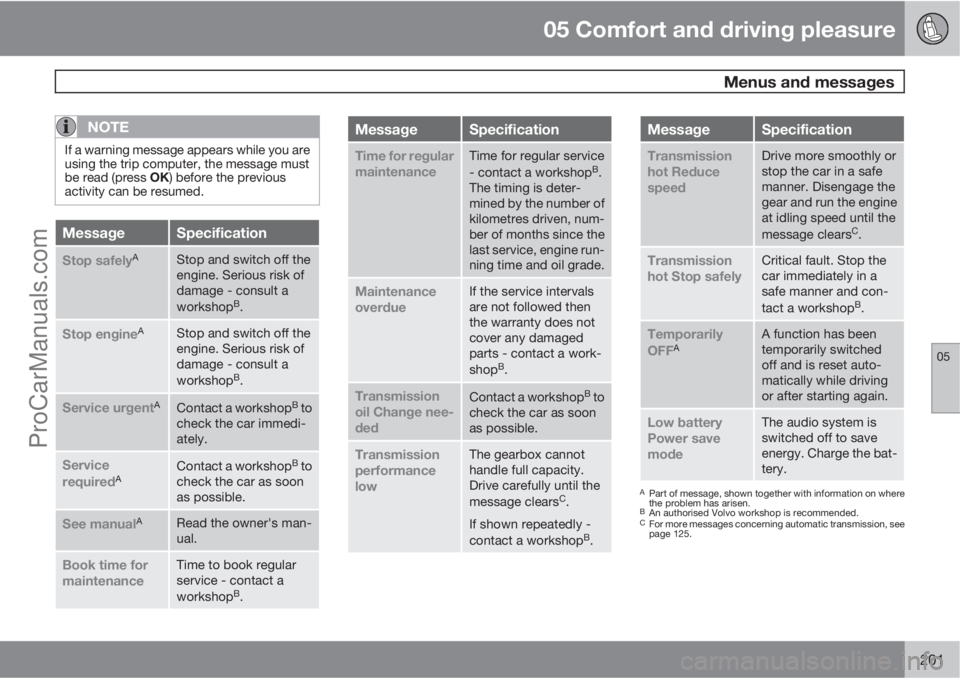
MessageSpecification
Stop safelyAStop and switch off the
engine. Serious risk of
damage - consult a
workshop
B.
Stop engineAStop and switch off the
engine. Serious risk of
damage - consult a
workshop
B.
Service urgentAContact a workshopB to
check the car immedi-
ately.
Service
requiredAContact a workshopB to
check the car as soon
as possible.
See manualARead the owner's man-
ual.
Book time for
maintenanceTime to book regular
service - contact a
workshop
B.
MessageSpecification
Time for regular
maintenanceTime for regular service
- contact a workshopB.
The timing is deter-
mined by the number of
kilometres driven, num-
ber of months since the
last service, engine run-
ning time and oil grade.
Maintenance
overdueIf the service intervals
are not followed then
the warranty does not
cover any damaged
parts - contact a work-
shop
B.
Transmission
oil Change nee-
dedContact a workshopB to
check the car as soon
as possible.
Transmission
performance
lowThe gearbox cannot
handle full capacity.
Drive carefully until the
message clears
C.
If shown repeatedly -
contact a workshop
B.
MessageSpecification
Transmission
hot Reduce
speedDrive more smoothly or
stop the car in a safe
manner. Disengage the
gear and run the engine
at idling speed until the
message clears
C.
Transmission
hot Stop safelyCritical fault. Stop the
car immediately in a
safe manner and con-
tact a workshop
B.
Temporarily
OFFAA function has been
temporarily switched
off and is reset auto-
matically while driving
or after starting again.
Low battery
Power save
modeThe audio system is
switched off to save
energy. Charge the bat-
tery.
APart of message, shown together with information on where
the problem has arisen.
BAn authorised Volvo workshop is recommended.CFor more messages concerning automatic transmission, see
page 125.
ProCarManuals.com
Page 286 of 422
07 During your journey
Recommendations during driving
07
284
General
Economical drivingDriving economically means driving smoothly
while thinking ahead and adjusting your driving
style and speed to the prevailing conditions.
•Drive in the highest gear possible, adapted
to the current traffic situation and road -
lower engine speeds result in lower fuel
consumption.
•Avoid driving with open windows.
•Avoid sudden unnecessary acceleration
and heavy braking.
•Remove unnecessary items from the car -
the greater the load the higher the fuel con-
sumption.
•Use engine braking to slow down, when it
can take place without risk to other road
users.
•A roof load and ski box increase air resis-
tance, leading to higher fuel consumption
- remove the load carriers when not in use.
•Do not run the engine to operating tem-
perature at idling speed, but rather drive
with a light load as soon as possible - a
cold engine consumes more fuel than a
warm one.
•A car with D2, D3, D4 or D5 engine in com-
bination with a 6-speed manual gearbox is
started in 2nd gear.For more information and further advice, see
the pages 12 and 384.
WARNING
Never switch off the engine while moving,
such as downhill, this deactivates important
systems such as the power steering and
brake servo.
Driving in waterThe car can be driven through water at a maxi-
mum depth of 25 cm at a maximum speed of
10 km/h. Extra caution should be exercised
when passing through flowing water.
During driving in water, maintain a low speed
and do not stop the car. When the water has
been passed, depress the brake pedal lightly
and check that full brake function is achieved.
Water and mud for example can make the
brake linings wet resulting in delayed brake
function.
•Clean the electric contacts of the electric
engine block heater and trailer coupling
after driving in water and mud.
•Do not let the car stand with water over the
sills for any long period of time - this could
cause electrical malfunctions.
IMPORTANT
Engine damage can occur if water enters
the air filter.
In depths greater than 25 cm, water could
enter the transmission. This reduces the
lubricating ability of the oils and shortens
the service life of these systems.
In the event of the engine stalling in water,
do not try restart - tow the car from the water
to a workshop - an authorised Volvo work-
shop is recommended. Risk of engine
breakdown.
Engine, gearbox and cooling systemUnder special conditions, for example hard
driving in hilly terrain and hot climate, there is
a risk that the engine and drive system may
overheat - in particular with a heavy load.
For information about overheating when driv-
ing with a trailer, see page 298.
•Remove any auxiliary lamps from in front
of the grille when driving in hot climates.
•If the temperature in the engine's cooling
system is too high the instrument panel's
warning symbol is illuminated and there is
a text message displayed there
High
engine temp Stop safely - stop the car in
a safe way and allow the engine to run at
idling speed for several minutes to cool
down.
ProCarManuals.com
Page 287 of 422
07 During your journey
Recommendations during driving
07
285
•If the text message High engine temp
Stop engine or Coolant level low, Stop
engine is shown then the engine must be
switched off after stopping the car.
•In the event of overheating in the gearbox
a built-in protection function is activated
which, amongst other things, illuminates
the instrument panel's warning symbol and
there is a text message displayed there
Transmission hot Reduce speed orTransmission hot Stop safely - follow
the recommendation given and lower the
speed and stop the car in a safe way and
allow the engine to run at idling speed for
a few minutes to allow the gearbox to cool
down.
•If the car overheats, the air conditioning
may be switched off temporarily.
•Do not turn the engine off immediately you
stop after a hard drive.
NOTE
It is normal for the engine's cooling fan to
operate for a while after the engine has been
switched off.
Open tailgate
WARNING
Do not drive with the tailgate open. Toxic
exhaust fumes could be drawn into the car
through the cargo area.
Do not overload the batteryThe electrical functions in the car load the bat-
tery to varying degrees. Avoid using the key
position II when the engine is switched off.
Instead use the I mode - which uses less
power.
Also, be aware of different accessories that
load the electrical system. Do not use functions
which use a lot of power when the engine is
switched off. Examples of such functions are:
•ventilation fan
•headlamps
•windscreen wiper
•audio system (high volume).
If the battery voltage is low the information dis-
play shows the text
Low battery Power save
mode. The energy-saving function then shuts
down certain functions or reduces certain
functions such as the ventilation fan and/or
audio system.
–In which case, charge the battery by star-
ting the engine and then running it for atleast 15 minutes - battery charging is more
effective during driving than running the
engine at idling speed while stationary.
Before a long journey
•Check that the engine is working normally
and that fuel consumption is normal.
•Make sure that there are no leaks (fuel, oil
or other fluid).
•Check all bulbs and tyre tread depths.
•Carrying a warning triangle is a legal
requirement in certain countries.
Winter drivingCheck the following in particular before the
cold season:
•The engine coolant must contain at least
50% glycol. This mixture protects the
engine against frost erosion down to
approximately –35 °C. To achieve optimum
antifreeze protection, different types of gly-
col must not be mixed.
•The fuel tank must be kept filled to prevent
condensation.
•Engine oil viscosity is important. Oils with
lower viscosity (thinner oils) facilitate star-
ting in cold weather and also reduce fuel
consumption while the engine is cold. For
more information on suitable oils, see
page 379.
ProCarManuals.com
Page 300 of 422
07 During your journey
Driving with a trailer
07
298* Option/accessory, for more information, see Introduction.
General
Payload depends on the car's kerb weight. The
total of the weight of the passengers and all
accessories, e.g. towbar, reduces the car's
payload by a corresponding weight. For more
detailed information on weights, see
page 373.
If the towing bracket is mounted by Volvo, then
the car is delivered with the necessary equip-
ment for driving with a trailer.
•The car's towing bracket must be of an
approved type.
•If the towbar is retrofitted, check with your
Volvo dealer that the car is fully equipped
for driving with a trailer.
•Distribute the load on the trailer so that the
weight on the towing bracket complies
with the specified maximum towball load.
•Increase the tyre pressure to the recom-
mended pressure for a full load. For tyre
pressure label location, see page 317.
•The engine is loaded more heavily than
usual when driving with a trailer.
•Do not tow a heavy trailer when the car is
brand new. Wait until it has been driven at
least 1000 km.
•The brakes are loaded much more than
usual on long and steep downhill slopes.
Downshift to a lower gear and adjust your
speed.
•For safety reasons, the maximum permit-
ted speed for the car when coupled with a
trailer should not be exceeded. Follow the
regulations in force for the permitted
speeds and weights.
•Maintain a low speed when driving with a
trailer up long, steep ascents.
•Avoid driving with a trailer on inclines of
more than 12%.
Trailer cableAn adapter is required if the car's towing
bracket has 13 pin electrics and the trailer has
7 pin electrics. Use an adapter cable approved
by Volvo. Make sure the cable does not drag
on the ground.
Direction indicators and brake lights on
the trailer
If any of the trailer's lamps for direction indica-
tors are broken, then the combined instrument
panel's symbol for direction indicators flashes
faster than normal and the display shows the
text
Bulb fail - Ind. signal trailer.
If any of the trailer's lamps for the brake light
are broken then the
Bulb fail - Stop lamp
trailer text is shown.
Level control*The rear shock absorbers maintain a constant
height irrespective of the car's load (up to the
maximum permissible weight). When the car isstationary the rear of the car lowers slightly,
which is normal.
Trailer weightsFor information on Volvo's permitted trailer
weights, see page 374.
NOTE
The stated maximum permitted trailer
weights are those permitted by Volvo.
National vehicle regulations can further limit
trailer weights and speeds. Towbars can be
certified for higher towing weights than the
car can actually tow.
WARNING
Follow the stated recommendations for
trailer weights. Otherwise, the car and trailer
may be difficult to control in the event of
sudden movement and braking.
Manual gearbox
OverheatingWhen driving with a trailer in hilly terrain in a hot
climate there may be a risk of overheating.
•Do not run the engine at higher revolutions
than 4500 rpm (diesel engines: 3500 rpm)
- otherwise the oil temperature may
become too high.
ProCarManuals.com
Page 301 of 422
07 During your journey
Driving with a trailer
07
299
Diesel engine 5-cyl
•In the event of a risk of overheating the
optimal speed for the engine is 2300-3000
rpm for optimal circulation of the coolant.
Automatic gearbox
OverheatingWhen driving with a trailer in hilly terrain in a hot
climate there may be a risk of overheating.
•An automatic gearbox selects the optimum
gear related to load and engine speed.
•In the event of overheating a warning sym-
bol illuminates on the instrument panel
combined with a text message - follow the
recommendation given.
Steep inclines
•Do not lock the automatic transmission in
a higher gear than the engine "can cope
with" - it is not always a good idea to drive
at a high gear with low engine revolutions.
IMPORTANT
See also the specific information on slow
driving with trailer for cars with the
Powershift automatic transmission on page
125.
Parking on a hill1. Depress the foot brake.2. Activate the parking brake.
3.
Move the gear selector to position P.
4. Release the foot brake.
•Move the gear selector to park position P
when parking an automatic car with a
hitched trailer. Always use the parking
brake.
•Block the wheels with chocks when park-
ing a car with hitched trailer on a hill.
Starting on a hill1. Depress the foot brake.
2. Move the gear selector to driving posi-
tion D.
3. Release the parking brake.
4. Release the foot brake and start driving off.
Towing bracket
If the car is equipped with a detachable towbar,
the installation instructions for the loose sec-
tion must be followed carefully, see page 301.
WARNING
If the car is fitted with a Volvo detachable
towbar:
•Follow the installation instructions care-
fully.
•The detachable section must be locked
with the key before setting off.
•Check that the indicator window shows
green.
Important checks
•The towbar's towball must be cleaned and
greased regularly.
NOTE
If a towball hitch with vibration damper is
used, it is not necessary to grease the tow-
ball.
ProCarManuals.com