ECU VOLVO V60 2014 User Guide
[x] Cancel search | Manufacturer: VOLVO, Model Year: 2014, Model line: V60, Model: VOLVO V60 2014Pages: 442, PDF Size: 13.85 MB
Page 53 of 442
02 Safety
02
51
Child seats - upper mounting points
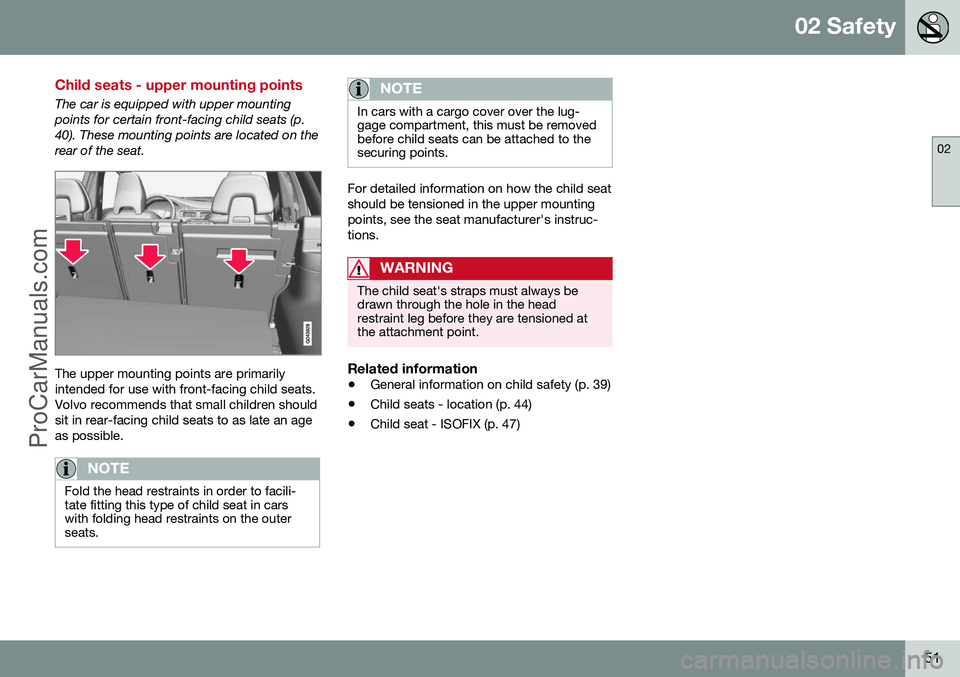
The car is equipped with upper mounting points for certain front-facing child seats (p.40). These mounting points are located on therear of the seat.
The upper mounting points are primarily intended for use with front-facing child seats.Volvo recommends that small children shouldsit in rear-facing child seats to as late an ageas possible.
NOTE
Fold the head restraints in order to facili- tate fitting this type of child seat in carswith folding head restraints on the outerseats.
NOTE
In cars with a cargo cover over the lug- gage compartment, this must be removedbefore child seats can be attached to thesecuring points.
For detailed information on how the child seat should be tensioned in the upper mountingpoints, see the seat manufacturer's instruc-tions.
WARNING
The child seat's straps must always be drawn through the hole in the headrestraint leg before they are tensioned atthe attachment point.
Related information
•General information on child safety (p. 39)
• Child seats - location (p. 44)
• Child seat - ISOFIX (p. 47)
ProCarManuals.co’
Page 99 of 442
03 Instruments and controls
03
* Option/accessory, for more information, see Introduction.97
Automatic dimming*Bright light from behind is automatically dimmed by the rearview mirror. The controlfor manual dimming is not available on mir-rors with automatic dimming. The rearview mirror contains two sensors - one forward facing and one rearward facing -that work together to identify and eliminatedazzling light. The forward facing sensordetects ambient light, while the rearward fac-ing sensor detects the light from vehicleheadlights behind.
NOTE
If the sensors are obscured by e.g. parking permits, transponders, sun visors orobjects in the seats or in the cargo area insuch a way that light is prevented fromreaching the sensors, then the dimmingfunction of the interior rearview and doormirrors is reduced.
The compass (p. 97) can only be specified for a rearview mirror with automatic dimming.
Related information
• Door mirrors (p. 94)
Compass*
The rearview mirror contains an integrated display that shows the compass direction inwhich the front of the car is pointing.
Operation
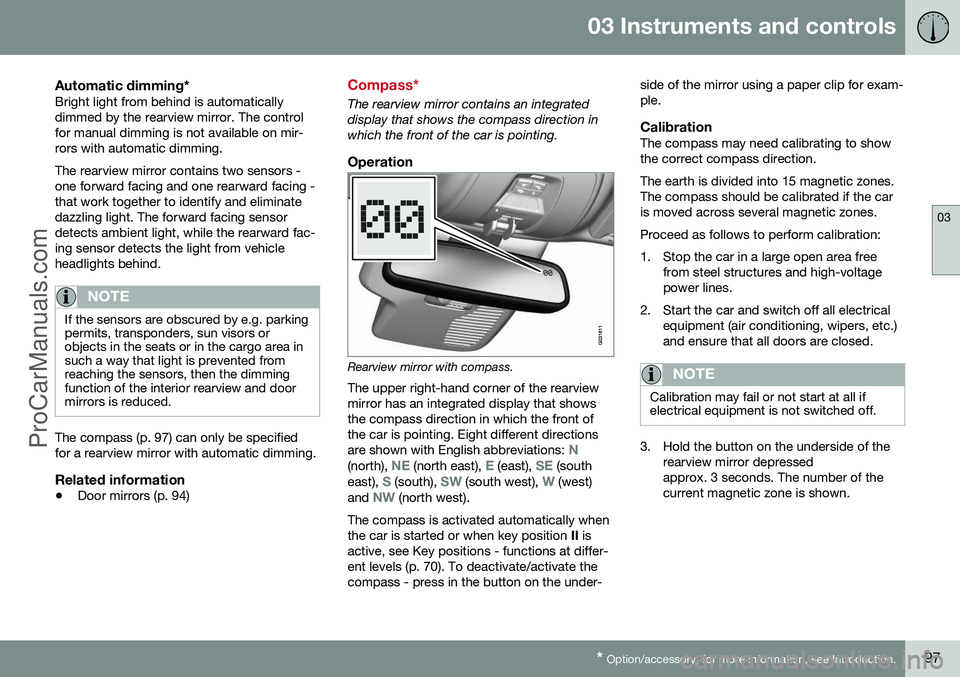
Rearview mirror with compass.
The upper right-hand corner of the rearview mirror has an integrated display that showsthe compass direction in which the front ofthe car is pointing. Eight different directions are shown with English abbreviations:
N(north), NE (north east), E (east), SE (south
east), S (south), SW (south west), W (west)
and NW (north west).
The compass is activated automatically when the car is started or when key position II is
active, see Key positions - functions at differ-ent levels (p. 70). To deactivate/activate thecompass - press in the button on the under- side of the mirror using a paper clip for exam-ple.
CalibrationThe compass may need calibrating to showthe correct compass direction. The earth is divided into 15 magnetic zones. The compass should be calibrated if the caris moved across several magnetic zones. Proceed as follows to perform calibration:
1. Stop the car in a large open area free
from steel structures and high-voltage power lines.
2. Start the car and switch off all electrical equipment (air conditioning, wipers, etc.)and ensure that all doors are closed.
NOTE
Calibration may fail or not start at all if electrical equipment is not switched off.
3. Hold the button on the underside of therearview mirror depressed approx. 3 seconds. The number of thecurrent magnetic zone is shown.
ProCarManuals.co’
Page 115 of 442
03 Instruments and controls
03
* Option/accessory, for more information, see Introduction.113
Change unitYou can change unit (km/miles) for distance and speed in the menu system My Car, seeMY CAR (p. 103).
NOTE
In addition to in the trip computer, these units are also changed in Volvo's naviga-tion system*.
Related information
• Trip computer - trip statistics* (p. 113)
Trip computer - trip statistics*
Information is stored about completed trips containing average fuel consumption andaverage speed, which can be viewed in thecentre console's screen as a bar chart.
Function
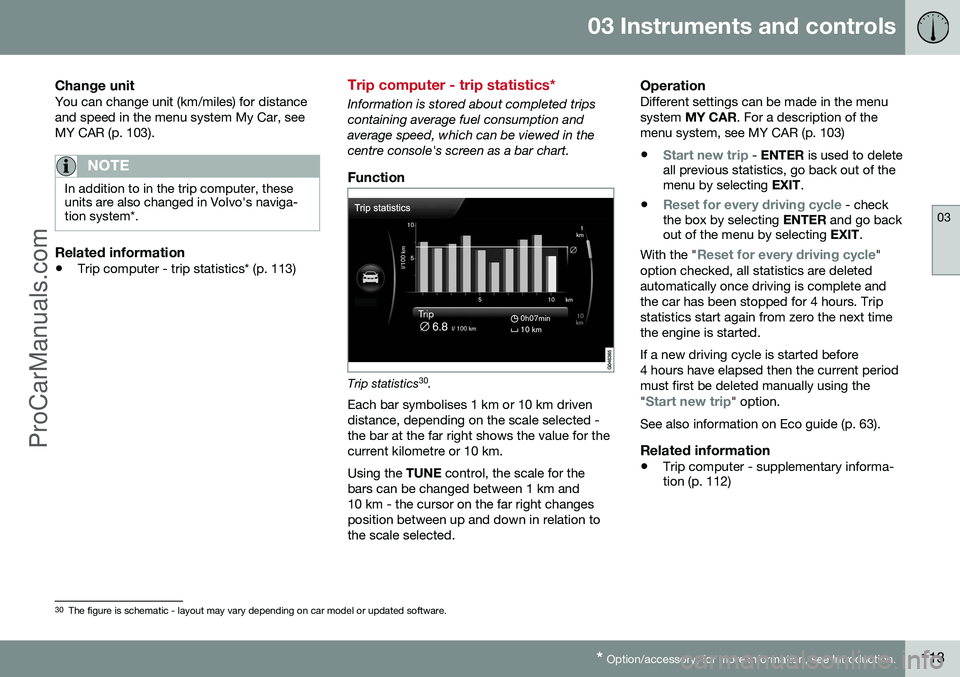
Trip statistics 30
.
Each bar symbolises 1 km or 10 km driven distance, depending on the scale selected -the bar at the far right shows the value for thecurrent kilometre or 10 km. Using the TUNE control, the scale for the
bars can be changed between 1 km and 10 km - the cursor on the far right changesposition between up and down in relation tothe scale selected.
OperationDifferent settings can be made in the menusystem MY CAR . For a description of the
menu system, see MY CAR (p. 103)
•
Start new trip - ENTER is used to delete
all previous statistics, go back out of the menu by selecting EXIT.
•
Reset for every driving cycle - check
the box by selecting ENTER and go back
out of the menu by selecting EXIT.
With the "
Reset for every driving cycle"
option checked, all statistics are deleted automatically once driving is complete andthe car has been stopped for 4 hours. Tripstatistics start again from zero the next timethe engine is started. If a new driving cycle is started before 4 hours have elapsed then the current periodmust first be deleted manually using the "
Start new trip" option.
See also information on Eco guide (p. 63).
Related information
• Trip computer - supplementary informa- tion (p. 112)
30
The figure is schematic - layout may vary depending on car model or updated software.
ProCarManuals.co’
Page 142 of 442
05 Loading and storage
05
140* Option/accessory, for more information, see Introduction.
Glovebox
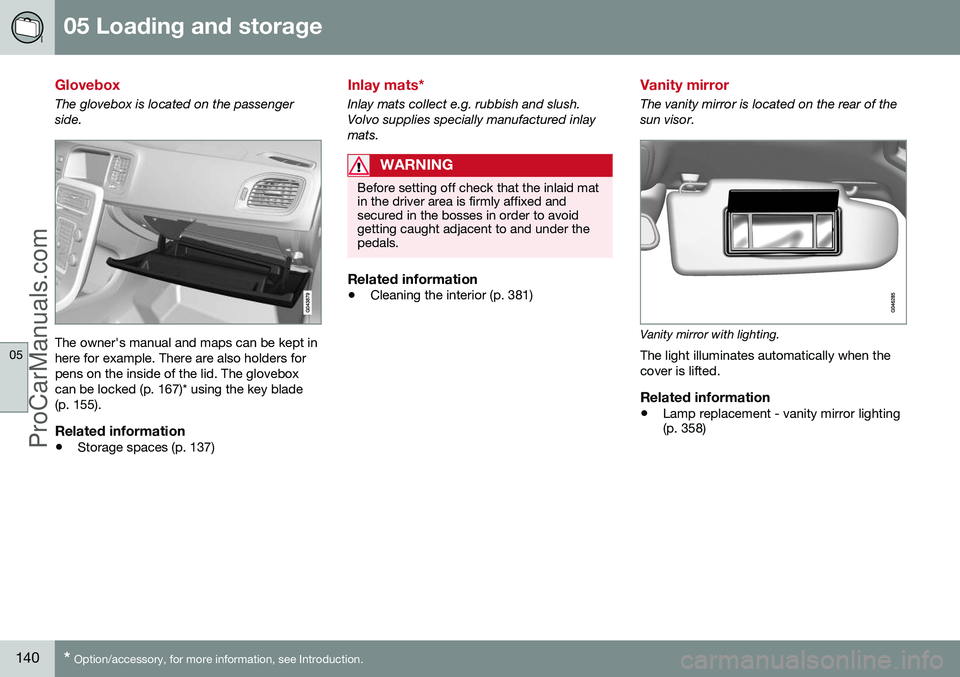
The glovebox is located on the passenger side.
The owner's manual and maps can be kept in here for example. There are also holders forpens on the inside of the lid. The gloveboxcan be locked (p. 167)* using the key blade(p. 155).
Related information
• Storage spaces (p. 137)
Inlay mats*
Inlay mats collect e.g. rubbish and slush. Volvo supplies specially manufactured inlaymats.
WARNING
Before setting off check that the inlaid mat in the driver area is firmly affixed andsecured in the bosses in order to avoidgetting caught adjacent to and under thepedals.
Related information
•Cleaning the interior (p. 381)
Vanity mirror
The vanity mirror is located on the rear of the sun visor.
Vanity mirror with lighting.
The light illuminates automatically when the cover is lifted.
Related information
• Lamp replacement - vanity mirror lighting (p. 358)
ProCarManuals.co’
Page 144 of 442
05 Loading and storage
05
142* Option/accessory, for more information, see Introduction.
Loading
Payload depends on the car's kerb weight. Payload depends on the car's kerb weight. The total of the weight of the passengers andall accessories reduces the car's payload bya corresponding weight. For more detailedinformation on weights, see Weights (p. 390).
The tailgate is opened via a buttonon the lighting panel or the remotecontrol key, see Locking/unlocking -
tailgate (p. 167).
WARNING
The car’s driving properties change depending on the weight and positioningof the load.
To bear in mind when loading
• Position the load firmly against the rear seat's backrest.
Note that objects must not prevent the func- tion of the WHIPS system for the front seats ifany of the rear seat's backrests is foldeddown, seeWHIPS - seating position (p. 35).
• Centre the load.
• Heavy objects should be placed as low as possible. Avoid placing heavy loads onlowered backrests.
• Cover sharp edges with something soft toavoid damaging the upholstery. •
Secure all loads to the load retaining eye-lets with straps or web lashings.
WARNING
A loose object weighing 20 kg can, in a frontal collision at a speed of 50 km/h,carry the impact of an item weighing1000 kg.
WARNING
The protection provided by the inflatable curtain in the headlining may be compro-mised or eliminated by high loads.
• Never load cargo above the backrest.
WARNING
Always secure the load. During heavy braking the load may otherwise shift, caus-ing injury to the car's occupants. Cover sharp edges and sharp corners with something soft. Switch off the engine and apply the park- ing brake when loading/unloading longitems. Otherwise you may accidentallyknock the gear lever or gear selector withthe load into a drive position - and the carcould then move off.
Related information
•
Load retaining eyelets (p. 143)
• Safety net* (p. 145) •
Loading - long load (p. 143)
• Roof load (p. 143)
ProCarManuals.co’
Page 145 of 442
05 Loading and storage
05
143
Loading - long load
To simplify loading (p. 142) in the cargo area, the rear seat backrest can be folded down.The passenger seat backrest can also be folded for an extra long load2
.
Lowering the rear seat backrestTo simplify loading in the cargo area, the rear seat backrest can be folded down, see Seats,rear (p. 74).
Roof load
The load carriers recommended for roof loads are the ones developed by Volvo. This is inorder to avoid damage to the car and in orderto achieve the maximum possible safety dur-ing a journey. Carefully follow the installation instructions supplied with the carriers.
• Check periodically that the load carriers and load are properly secured. Lash theload securely with retaining straps.
• Distribute the load evenly over the loadcarriers. Put the heaviest objects at thebottom.
• The size of the area exposed to the wind,and therefore fuel consumption, increasewith the size of the load.
• Drive gently. Avoid quick acceleration,heavy braking and hard cornering.
WARNING
The car's centre of gravity and driving cha- racteristics are altered by roof loads. Forinformation about the maximum allowableload on the roof, including load carriersand any space box, Weights (p. 390).
Related information
•
Loading (p. 142)
Load retaining eyelets
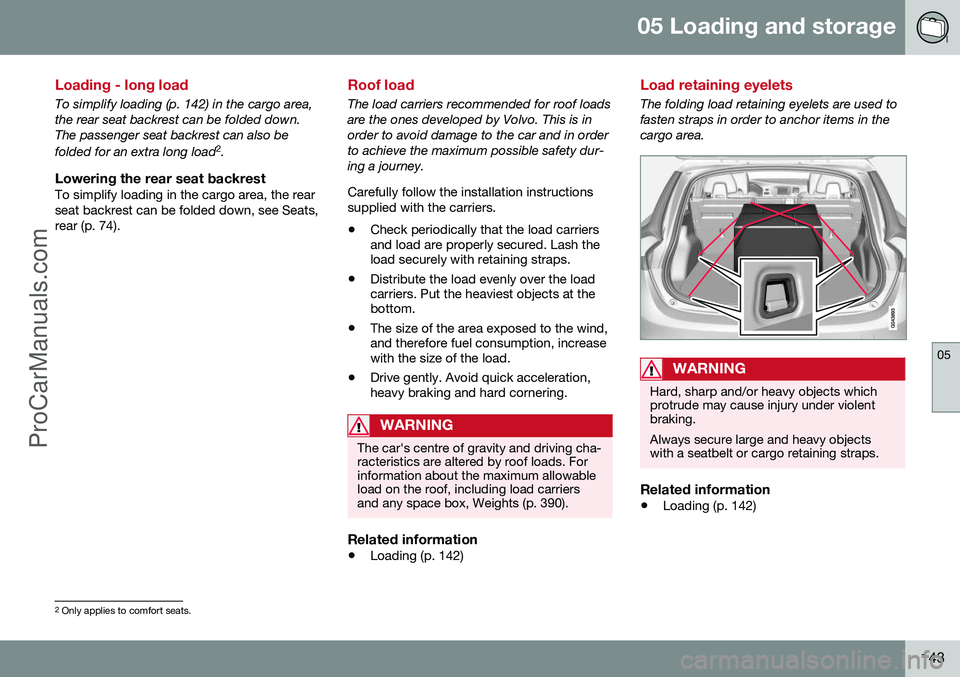
The folding load retaining eyelets are used to fasten straps in order to anchor items in thecargo area.
WARNING
Hard, sharp and/or heavy objects which protrude may cause injury under violentbraking. Always secure large and heavy objects with a seatbelt or cargo retaining straps.
Related information
• Loading (p. 142)
2
Only applies to comfort seats.
ProCarManuals.co’
Page 146 of 442
05 Loading and storage
05
144* Option/accessory, for more information, see Introduction.
Loading - bag holder
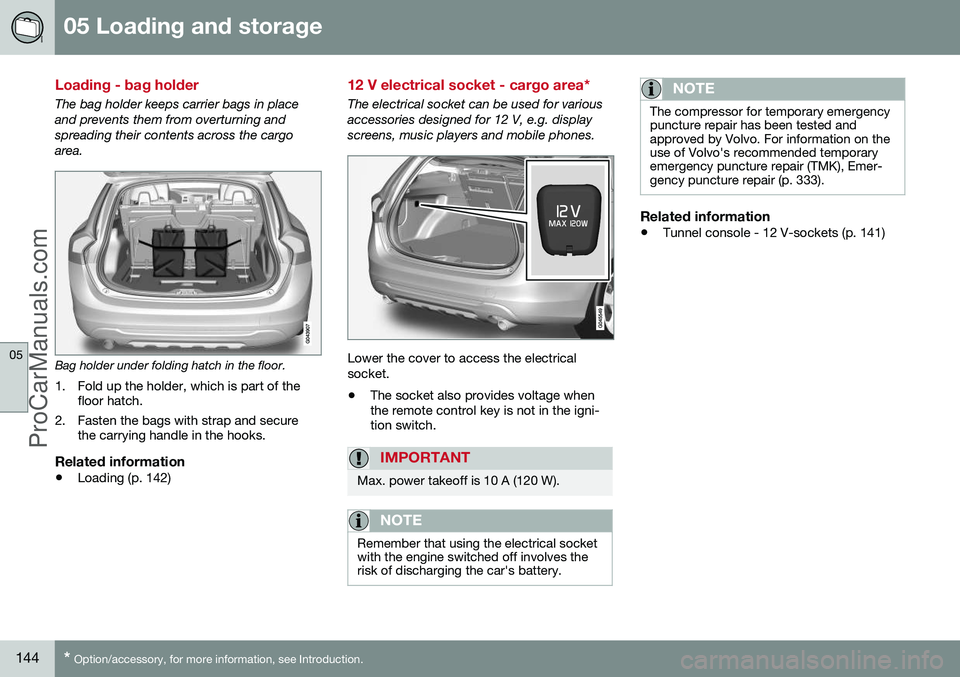
The bag holder keeps carrier bags in place and prevents them from overturning andspreading their contents across the cargoarea.
Bag holder under folding hatch in the floor.
1. Fold up the holder, which is part of the floor hatch.
2. Fasten the bags with strap and secure the carrying handle in the hooks.
Related information
• Loading (p. 142)
12 V electrical socket - cargo area*
The electrical socket can be used for various accessories designed for 12 V, e.g. displayscreens, music players and mobile phones.
Lower the cover to access the electrical socket. •The socket also provides voltage when the remote control key is not in the igni-tion switch.
IMPORTANT
Max. power takeoff is 10 A (120 W).
NOTE
Remember that using the electrical socket with the engine switched off involves therisk of discharging the car's battery.
NOTE
The compressor for temporary emergency puncture repair has been tested andapproved by Volvo. For information on theuse of Volvo's recommended temporaryemergency puncture repair (TMK), Emer-gency puncture repair (p. 333).
Related information
• Tunnel console - 12 V-sockets (p. 141)
ProCarManuals.co’
Page 147 of 442
05 Loading and storage
05
}}
* Option/accessory, for more information, see Introduction.145
Safety net*
A safety net prevents loads from being thrown forward in the passenger compartment in theevent of sudden braking.
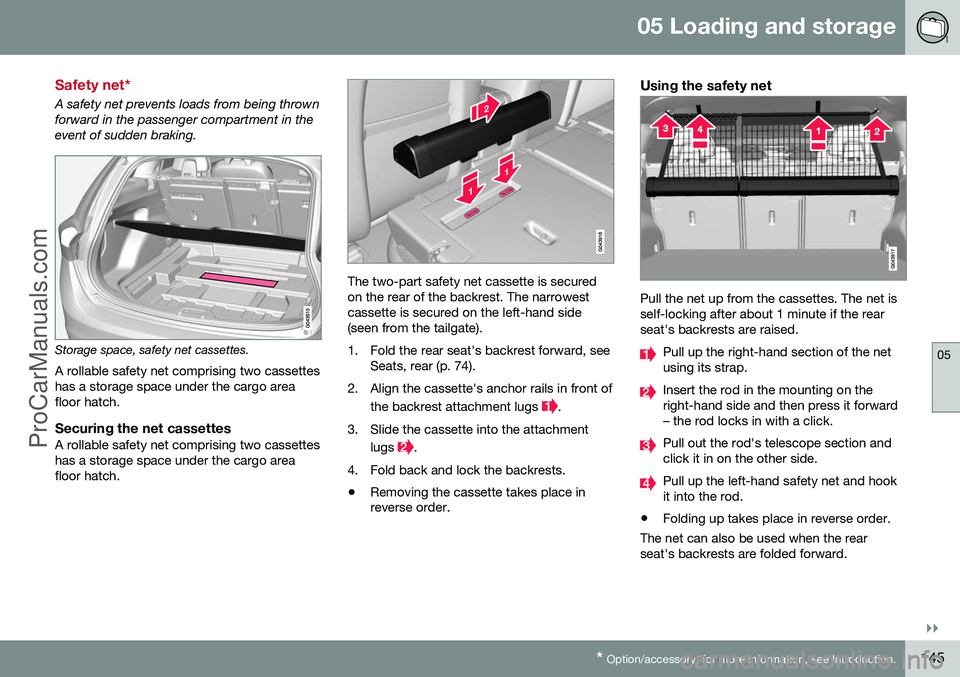
Storage space, safety net cassettes.
A rollable safety net comprising two cassettes has a storage space under the cargo areafloor hatch.
Securing the net cassettesA rollable safety net comprising two cassetteshas a storage space under the cargo areafloor hatch.
The two-part safety net cassette is secured on the rear of the backrest. The narrowestcassette is secured on the left-hand side (seen from the tailgate).
1. Fold the rear seat's backrest forward, see Seats, rear (p. 74).
2. Align the cassette's anchor rails in front of the backrest attachment lugs
.
3. Slide the cassette into the attachment lugs
.
4. Fold back and lock the backrests.
• Removing the cassette takes place in reverse order.
Using the safety net
Pull the net up from the cassettes. The net is self-locking after about 1 minute if the rearseat's backrests are raised.
Pull up the right-hand section of the net using its strap.
Insert the rod in the mounting on the right-hand side and then press it forward– the rod locks in with a click.
Pull out the rod's telescope section and click it in on the other side.
Pull up the left-hand safety net and hook it into the rod.
• Folding up takes place in reverse order.
The net can also be used when the rearseat's backrests are folded forward.
ProCarManuals.co’
Page 149 of 442
05 Loading and storage
05
* Option/accessory, for more information, see Introduction.147
desired, the safety grille can be dismantled and removed from the car. For information about the tools required and methods for fitting/removal, see the installa- tion instructions
3
that were included with the
initial purchase. For safety reasons, the safety grille must always be correctly fastened and securedwhen being refitted.
Related information
• Safety net* (p. 145)
• Loading (p. 142)
• Load retaining eyelets (p. 143)
Cargo cover
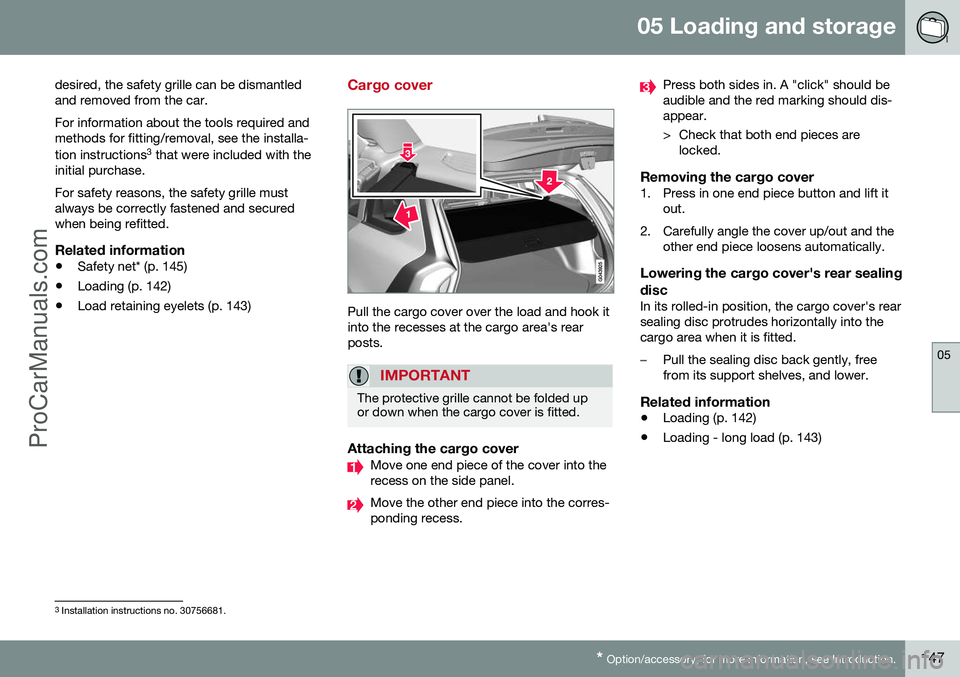
Pull the cargo cover over the load and hook it into the recesses at the cargo area's rearposts.
IMPORTANT
The protective grille cannot be folded up or down when the cargo cover is fitted.
Attaching the cargo coverMove one end piece of the cover into the recess on the side panel.
Move the other end piece into the corres- ponding recess.
Press both sides in. A "click" should be audible and the red marking should dis-appear.
> Check that both end pieces are
locked.
Removing the cargo cover1. Press in one end piece button and lift it out.
2. Carefully angle the cover up/out and the other end piece loosens automatically.
Lowering the cargo cover's rear sealing disc
In its rolled-in position, the cargo cover's rear sealing disc protrudes horizontally into thecargo area when it is fitted.
–Pull the sealing disc back gently, free from its support shelves, and lower.
Related information
• Loading (p. 142)
• Loading - long load (p. 143)
3
Installation instructions no. 30756681.
ProCarManuals.co’
Page 160 of 442
06 Locks and alarm
06
158* Option/accessory, for more information, see Introduction.
Remote control key/PCC - replacing the battery
The batteries for the remote control key/PCC can be replaced. The batteries for the remote control key/PCC should be replaced if: • the information symbol in the combined instrument panel illuminates and the dis- play shows
Low battery in remote
control. Please change batteries.
and/or
• the locks repeatedly do not react to sig- nals from the remote control key within20 metres from the car.
Opening
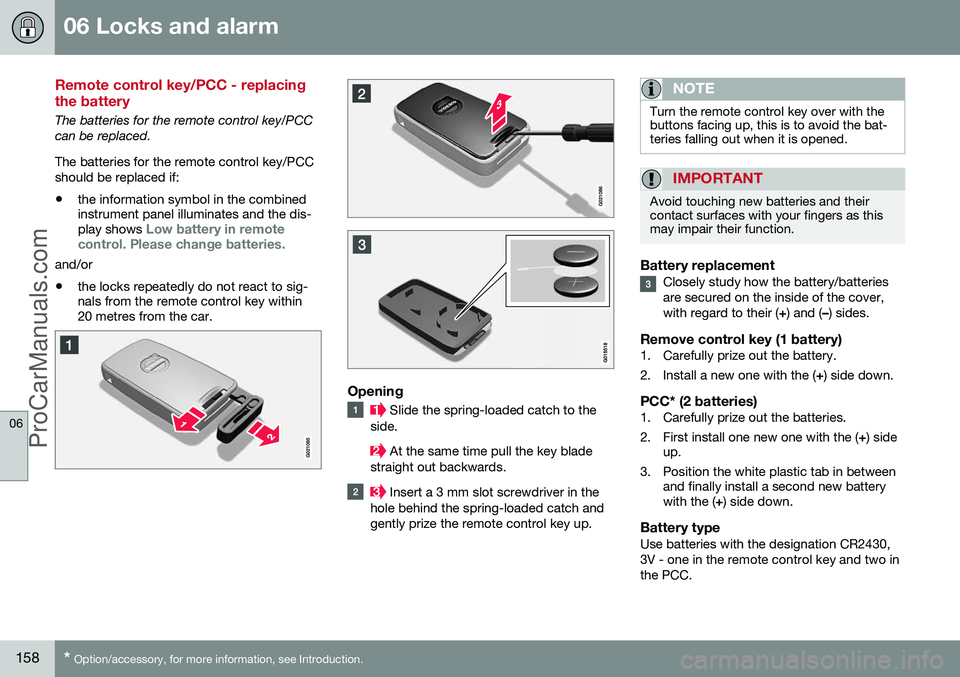
Slide the spring-loaded catch to the
side.
At the same time pull the key blade
straight out backwards.
Insert a 3 mm slot screwdriver in the
hole behind the spring-loaded catch and gently prize the remote control key up.
NOTE
Turn the remote control key over with the buttons facing up, this is to avoid the bat-teries falling out when it is opened.
IMPORTANT
Avoid touching new batteries and their contact surfaces with your fingers as thismay impair their function.
Battery replacementClosely study how the battery/batteries are secured on the inside of the cover,with regard to their ( +) and ( –) sides.
Remove control key (1 battery)1. Carefully prize out the battery.
2. Install a new one with the ( +) side down.
PCC* (2 batteries)1. Carefully prize out the batteries.
2. First install one new one with the ( +) side
up.
3. Position the white plastic tab in between and finally install a second new battery with the ( +) side down.
Battery typeUse batteries with the designation CR2430, 3V - one in the remote control key and two inthe PCC.
ProCarManuals.co’