ECU VOLVO V60 2014 Owner's Manual
[x] Cancel search | Manufacturer: VOLVO, Model Year: 2014, Model line: V60, Model: VOLVO V60 2014Pages: 442, PDF Size: 13.85 MB
Page 215 of 442
07 Driver support
07
}}
* Option/accessory, for more information, see Introduction.213
Collision warning system* - function
"Collision Warning with Auto Brake and Cyclist and Pedestrian Detection" is an aid toassist the driver when there is a risk of collid-ing with a pedestrian, bicycle or vehicle infront that are stationary or moving in the samedirection.
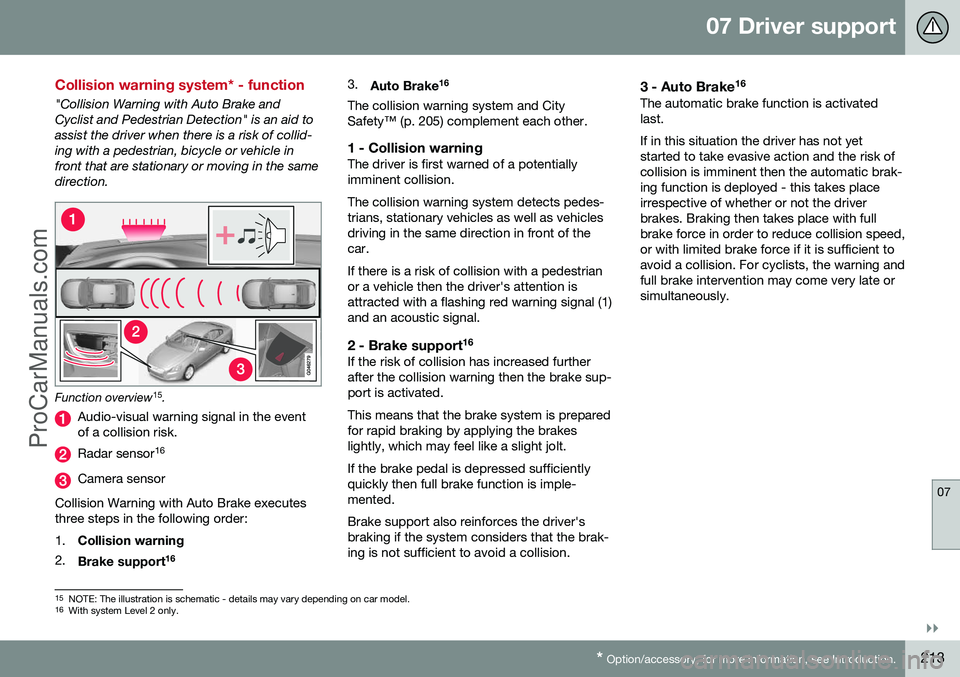
Function overview 15
.
Audio-visual warning signal in the event of a collision risk.
Radar sensor 16
Camera sensor
Collision Warning with Auto Brake executes three steps in the following order: 1. Collision warning
2. Brake support 16 3.
Auto Brake 16
The collision warning system and City Safety™ (p. 205) complement each other.
1 - Collision warningThe driver is first warned of a potentiallyimminent collision. The collision warning system detects pedes- trians, stationary vehicles as well as vehiclesdriving in the same direction in front of thecar. If there is a risk of collision with a pedestrian or a vehicle then the driver's attention isattracted with a flashing red warning signal (1)and an acoustic signal.
2 - Brake support 16If the risk of collision has increased furtherafter the collision warning then the brake sup-port is activated. This means that the brake system is prepared for rapid braking by applying the brakeslightly, which may feel like a slight jolt. If the brake pedal is depressed sufficiently quickly then full brake function is imple-mented. Brake support also reinforces the driver's braking if the system considers that the brak-ing is not sufficient to avoid a collision.
3 - Auto Brake
16The automatic brake function is activatedlast. If in this situation the driver has not yet started to take evasive action and the risk ofcollision is imminent then the automatic brak-ing function is deployed - this takes placeirrespective of whether or not the driverbrakes. Braking then takes place with fullbrake force in order to reduce collision speed,or with limited brake force if it is sufficient toavoid a collision. For cyclists, the warning andfull brake intervention may come very late orsimultaneously.
15
NOTE: The illustration is schematic - details may vary depending on car model.
16 With system Level 2 only.
ProCarManuals.co’
Page 246 of 442
07 Driver support
07
244* Option/accessory, for more information, see Introduction.
Park assist camera
The parking camera is an assist system and is activated when reverse gear is engaged (canbe changed in the settings menu (p. 246)). The camera image is shown on the centre console's screen.
NOTE
When a towbar is configured with the car's electrical system, the protrusion of thetowbar is included when the functionmeasures the parking space.
WARNING
• The parking camera serves as an aid. It does not relieve the driver of respon-sibility when reversing.
• The camera has blind spots, whereobstacles cannot be detected.
• Be aware of people and animals in thevicinity of the car.
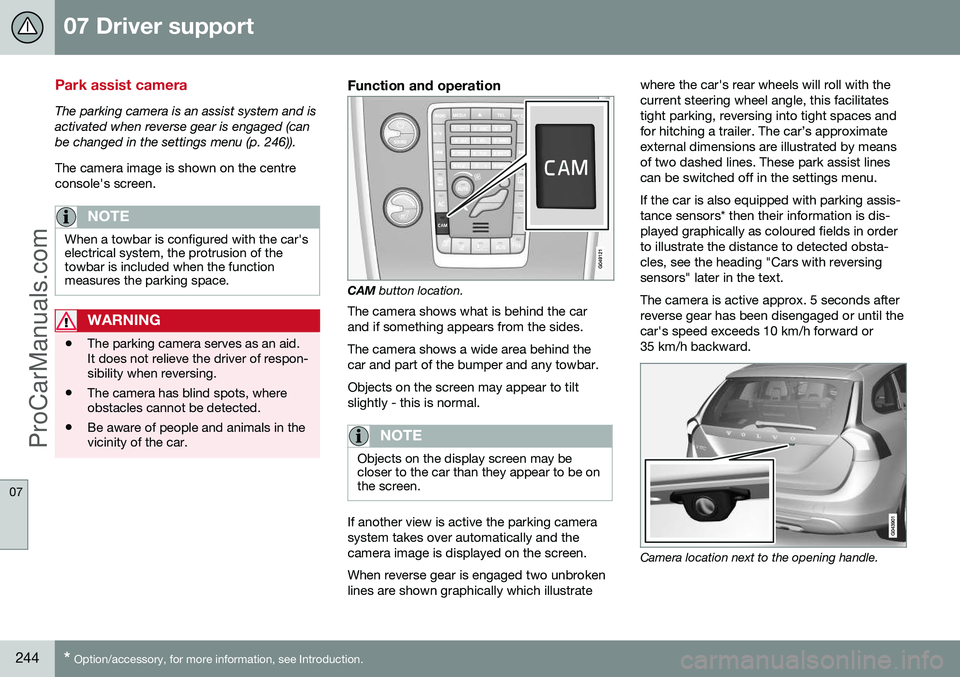
Function and operation
CAM
button location.
The camera shows what is behind the car and if something appears from the sides. The camera shows a wide area behind the car and part of the bumper and any towbar. Objects on the screen may appear to tilt slightly - this is normal.
NOTE
Objects on the display screen may be closer to the car than they appear to be onthe screen.
If another view is active the parking camera system takes over automatically and thecamera image is displayed on the screen. When reverse gear is engaged two unbroken lines are shown graphically which illustrate where the car's rear wheels will roll with thecurrent steering wheel angle, this facilitatestight parking, reversing into tight spaces andfor hitching a trailer. The car’s approximateexternal dimensions are illustrated by meansof two dashed lines. These park assist linescan be switched off in the settings menu. If the car is also equipped with parking assis- tance sensors* then their information is dis-played graphically as coloured fields in orderto illustrate the distance to detected obsta-cles, see the heading "Cars with reversingsensors" later in the text. The camera is active approx. 5 seconds after reverse gear has been disengaged or until thecar's speed exceeds 10 km/h forward or35 km/h backward.
Camera location next to the opening handle.
ProCarManuals.com
Page 272 of 442
||
08 Starting and driving
08
270
IMPORTANT
After the fuel mixture in the tank has been changed an adaptation should be made bydriving at an even speed for about 15minutes.
If the battery has been discharged or discon- nected then a slightly longer period of drivingis required for the adaptation as the memoryfor the electronics has been cleared.
Related information
•Jump starting with battery (p. 270)
• Starting the engine (p. 264)
Jump starting with battery
If the starter battery (p. 361) is discharged then the car can be started with current fromanother battery.
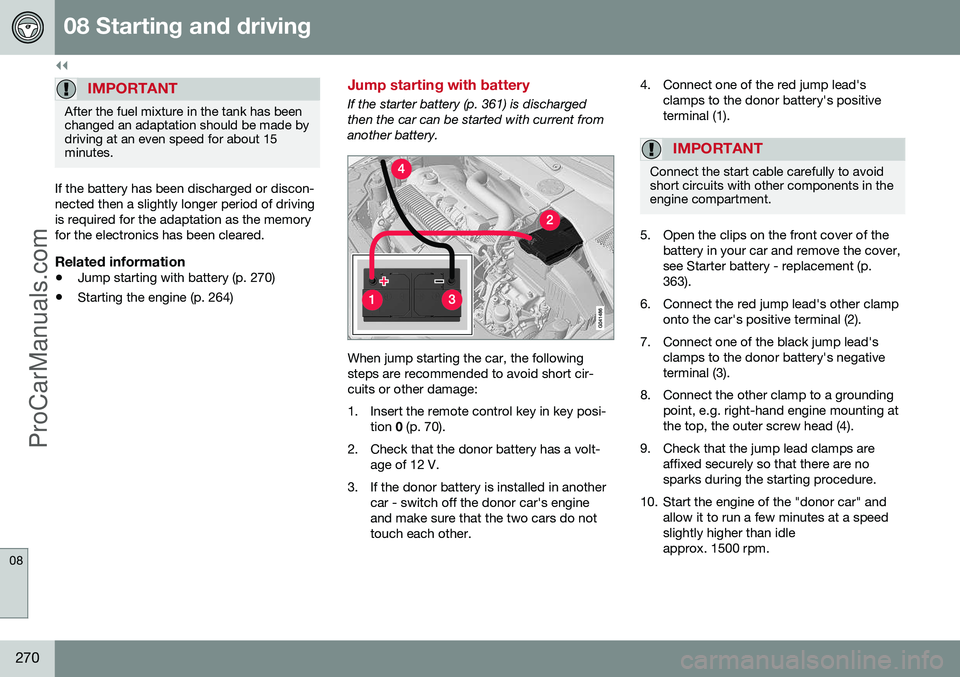
When jump starting the car, the following steps are recommended to avoid short cir-cuits or other damage:
1. Insert the remote control key in key posi-
tion 0 (p. 70).
2. Check that the donor battery has a volt- age of 12 V.
3. If the donor battery is installed in another car - switch off the donor car's engine and make sure that the two cars do nottouch each other. 4. Connect one of the red jump lead's
clamps to the donor battery's positiveterminal (1).
IMPORTANT
Connect the start cable carefully to avoid short circuits with other components in theengine compartment.
5. Open the clips on the front cover of thebattery in your car and remove the cover, see Starter battery - replacement (p.363).
6. Connect the red jump lead's other clamp onto the car's positive terminal (2).
7. Connect one of the black jump lead's clamps to the donor battery's negativeterminal (3).
8. Connect the other clamp to a grounding point, e.g. right-hand engine mounting atthe top, the outer screw head (4).
9. Check that the jump lead clamps are affixed securely so that there are nosparks during the starting procedure.
10. Start the engine of the "donor car" and allow it to run a few minutes at a speedslightly higher than idleapprox. 1500 rpm.
ProCarManuals.co’
Page 306 of 442
||
08 Starting and driving
08
304
Related information
•Economical driving (p. 305)
• Fuel - petrol (p. 302)
• Fuel - diesel (p. 302)
Fuel - bioethanol E85
Bioetanol E85 is used as the fuel for the car's engine. Do not modify the fuel system or its compo- nents, and do not replace components withparts that are not specifically designed foruse with bioethanol.
WARNING
Methanol must not be used. A decal on the inside of the fuel filler flap shows thecorrect alternative fuel. The use of components not designed for bioethanol engines could cause fire, injuryor engine damage.
Reserve fuel canThe reserve fuel can should be filled with pet- rol. For more information, see Starting theengine – Flexifuel (p. 269).
IMPORTANT
Make sure the reserve fuel can is securely fastened and that its cap is sealed.
WARNING
Ethanol is sensitive to sparks, and explo- sive gases could form in the reserve fuelcan if it is refuelled with ethanol.
Related information
• Fuel - handling (p. 301)
• Economical driving (p. 305)
ProCarManuals.co’
Page 313 of 442
08 Starting and driving
08
}}
311
G000000
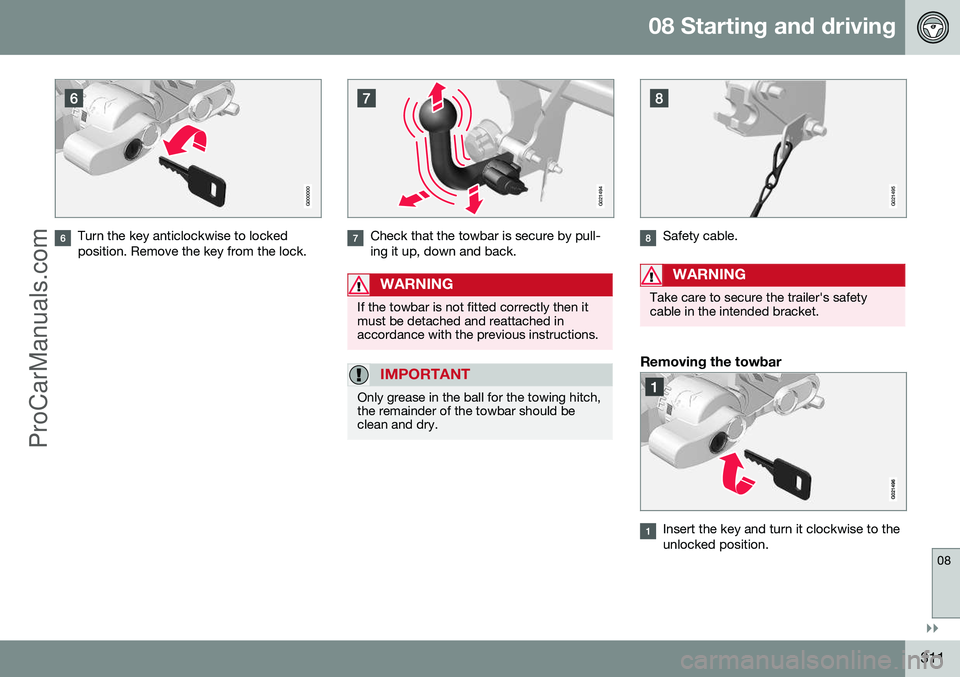
Turn the key anticlockwise to locked position. Remove the key from the lock.
G021494
Check that the towbar is secure by pull- ing it up, down and back.
WARNING
If the towbar is not fitted correctly then it must be detached and reattached inaccordance with the previous instructions.
IMPORTANT
Only grease in the ball for the towing hitch, the remainder of the towbar should beclean and dry.
G021495
Safety cable.
WARNING
Take care to secure the trailer's safety cable in the intended bracket.
Removing the towbar
Insert the key and turn it clockwise to the unlocked position.
ProCarManuals.co’
Page 314 of 442
||
08 Starting and driving
08
312
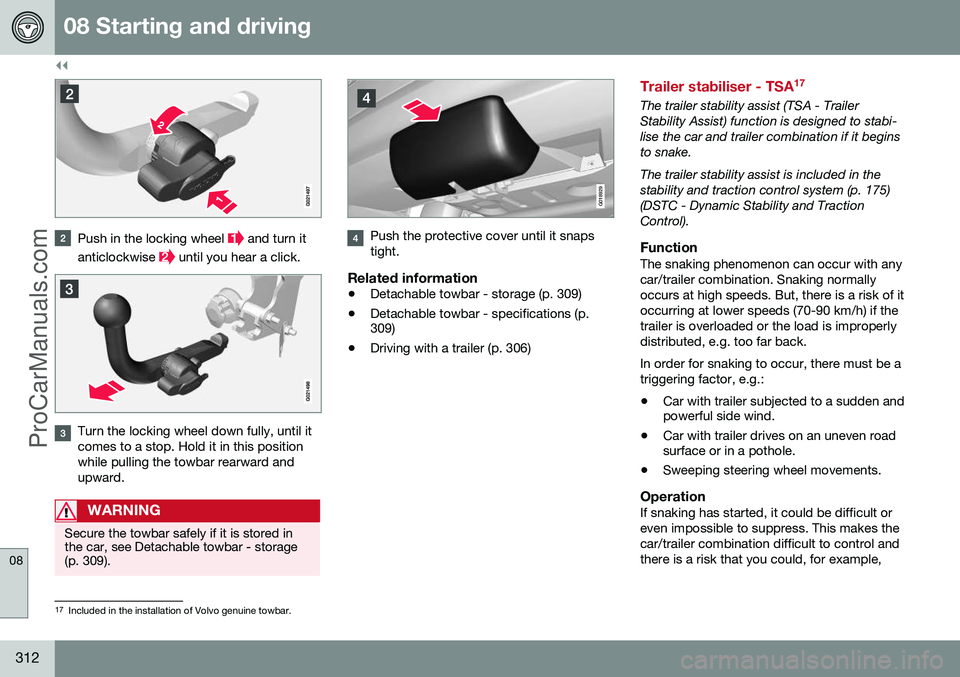
Push in the locking wheel and turn it
anticlockwise
until you hear a click.
Turn the locking wheel down fully, until it comes to a stop. Hold it in this positionwhile pulling the towbar rearward andupward.
WARNING
Secure the towbar safely if it is stored in the car, see Detachable towbar - storage(p. 309).
G018929
Push the protective cover until it snaps tight.
Related information
• Detachable towbar - storage (p. 309)
• Detachable towbar - specifications (p. 309)
• Driving with a trailer (p. 306)
Trailer stabiliser - TSA 17
The trailer stability assist (TSA - Trailer Stability Assist) function is designed to stabi-lise the car and trailer combination if it beginsto snake. The trailer stability assist is included in the stability and traction control system (p. 175)(DSTC - Dynamic Stability and TractionControl).
FunctionThe snaking phenomenon can occur with anycar/trailer combination. Snaking normallyoccurs at high speeds. But, there is a risk of itoccurring at lower speeds (70-90 km/h) if thetrailer is overloaded or the load is improperlydistributed, e.g. too far back. In order for snaking to occur, there must be a triggering factor, e.g.:
• Car with trailer subjected to a sudden and powerful side wind.
• Car with trailer drives on an uneven roadsurface or in a pothole.
• Sweeping steering wheel movements.
OperationIf snaking has started, it could be difficult or even impossible to suppress. This makes thecar/trailer combination difficult to control andthere is a risk that you could, for example,
17
Included in the installation of Volvo genuine towbar.
ProCarManuals.co’
Page 326 of 442
||
09 Wheels and tyres
09
324* Option/accessory, for more information, see Introduction.
W270 km/h
Y300 km/h
WARNING
The car must be fitted with tyres which have the same or a higher load index (p.323) (LI) and speed rating (SS) than speci-fied. If a tyre with too low a load index orspeed rating is used, it may overheat.
Related information
• Tyres - dimensions (p. 322)
• Tyres - load index (p. 323)
• Tyres - direction of rotation (p. 318)
Changing wheels - removing wheels
The car's wheels can be changed for e.g. win- ter wheels/winter tyres.
Spare wheel*The following instructions only apply if aspare wheel has been purchased as an accessory for the car.
If the car is not equip-
ped with a spare wheel - see information about Emergency puncture repair (TMK) (p.333). The spare wheel (Temporary spare) is only intended for use temporarily and must bereplaced by an ordinary wheel as soon aspossible. The car's handling may be alteredby the use of the spare wheel. The sparewheel is smaller than the normal wheel. Thecar's ground clearance is affected accord-ingly. Pay attention to high kerbs and do notmachine wash the car. If the spare wheel isfitted on the front axle, you cannot use snowchains at the same time. On all-wheel drivecars the drive on the rear axle can be discon-nected. The spare wheel must not berepaired. The correct tyre pressure for the spare wheel is stated in the tyre pressure table (p. 407).
IMPORTANT
• Never drive faster than 80 km/h with a spare wheel on the car.
• The car must never be driven fittedwith more than one "TemporarySpare" wheel.
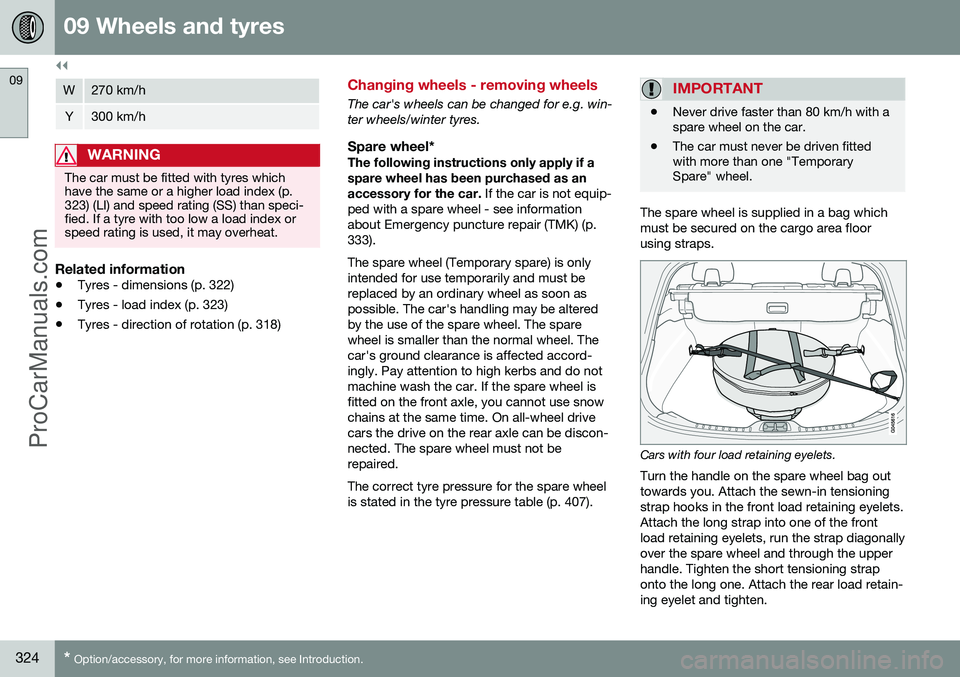
The spare wheel is supplied in a bag which must be secured on the cargo area floorusing straps.
Cars with four load retaining eyelets.
Turn the handle on the spare wheel bag out towards you. Attach the sewn-in tensioningstrap hooks in the front load retaining eyelets.Attach the long strap into one of the frontload retaining eyelets, run the strap diagonallyover the spare wheel and through the upperhandle. Tighten the short tensioning straponto the long one. Attach the rear load retain-ing eyelet and tighten.
ProCarManuals.co’
Page 331 of 442
09 Wheels and tyres
09
* Option/accessory, for more information, see Introduction.329
Warning triangle
The warning triangle is used to warn other road users of a stationary vehicle.
Storage and folding up
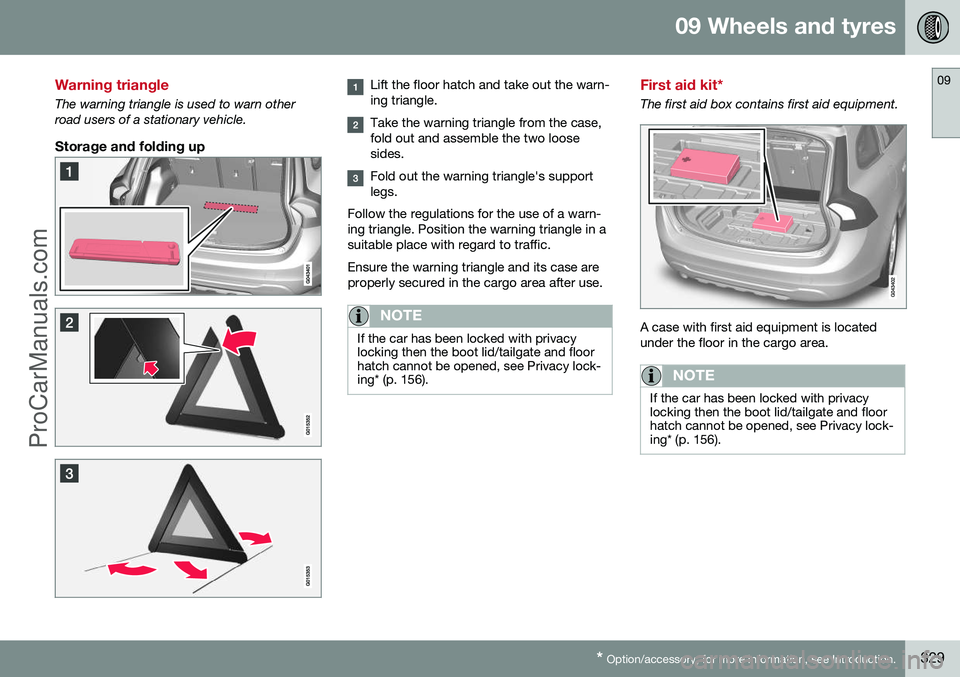
Lift the floor hatch and take out the warn- ing triangle.
Take the warning triangle from the case, fold out and assemble the two loosesides.
Fold out the warning triangle's support legs.
Follow the regulations for the use of a warn-ing triangle. Position the warning triangle in asuitable place with regard to traffic. Ensure the warning triangle and its case are properly secured in the cargo area after use.
NOTE
If the car has been locked with privacy locking then the boot lid/tailgate and floorhatch cannot be opened, see Privacy lock-ing* (p. 156).
First aid kit*
The first aid box contains first aid equipment.
A case with first aid equipment is located under the floor in the cargo area.
NOTE
If the car has been locked with privacy locking then the boot lid/tailgate and floorhatch cannot be opened, see Privacy lock-ing* (p. 156).
ProCarManuals.co’
Page 355 of 442
10 Maintenance and service
10
353
NOTE
Outside lighting such as headlamps, fog lamps and rear lamps may temporarilyhave condensation on the inside of thelens. This is normal, all exterior lighting isdesigned to withstand this. Condensationis normally vented out of the lamp housingwhen the lamp has been switched on for atime.
Related information
•Lamp replacement - headlamps (p. 353)
• Lamp replacement - location of rear lamps (p. 357)
• Lamp replacement - vanity mirror lighting(p. 358)
• Lamp replacement - lighting in cargo area(p. 357)
• Lamp replacement - number plate lighting(p. 357)
Lamp replacement - headlamps
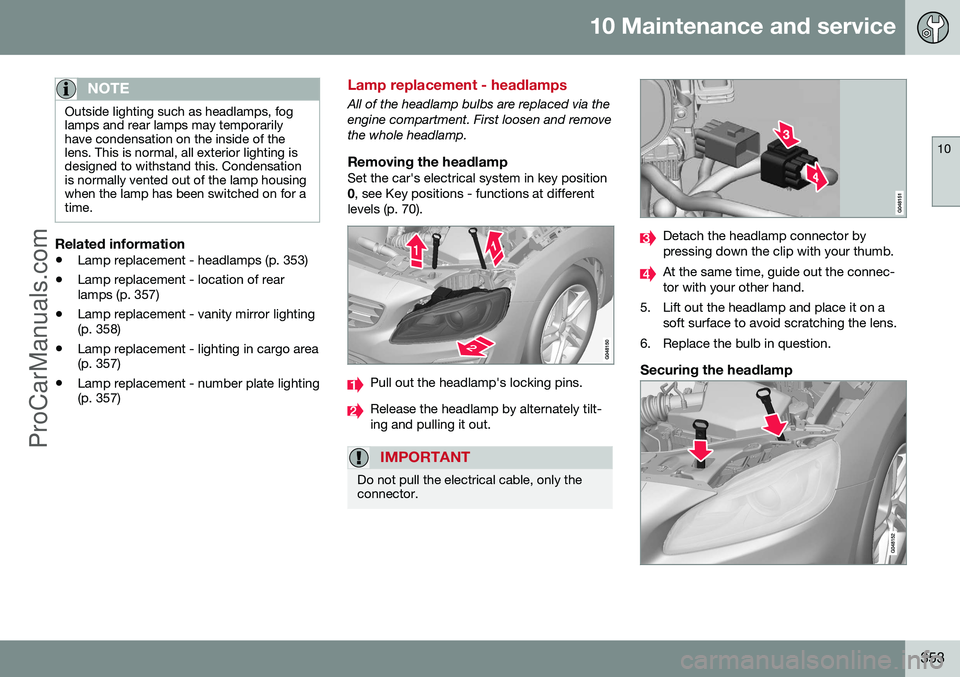
All of the headlamp bulbs are replaced via the engine compartment. First loosen and removethe whole headlamp.
Removing the headlampSet the car's electrical system in key position0
, see Key positions - functions at different
levels (p. 70).
Pull out the headlamp's locking pins.
Release the headlamp by alternately tilt- ing and pulling it out.
IMPORTANT
Do not pull the electrical cable, only the connector.
Detach the headlamp connector by pressing down the clip with your thumb.
At the same time, guide out the connec- tor with your other hand.
5. Lift out the headlamp and place it on a soft surface to avoid scratching the lens.
6. Replace the bulb in question.
Securing the headlamp
ProCarManuals.com
Page 357 of 442
10 Maintenance and service
10
* Option/accessory, for more information, see Introduction.355
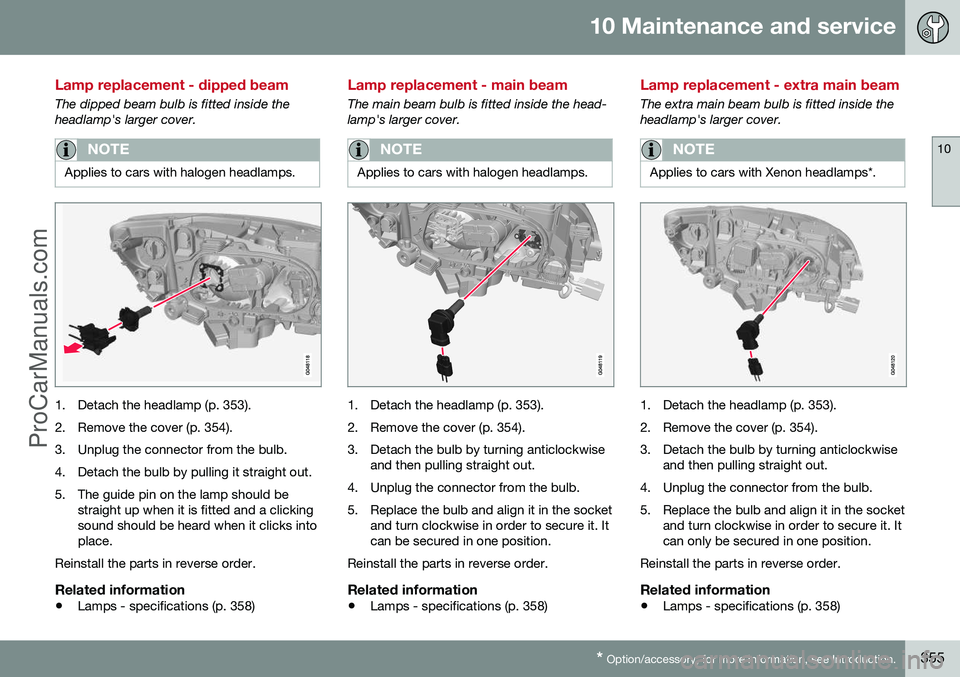
Lamp replacement - dipped beam
The dipped beam bulb is fitted inside the headlamp's larger cover.
NOTE
Applies to cars with halogen headlamps.
1. Detach the headlamp (p. 353).
2. Remove the cover (p. 354).
3. Unplug the connector from the bulb.
4. Detach the bulb by pulling it straight out.
5. The guide pin on the lamp should be
straight up when it is fitted and a clicking sound should be heard when it clicks intoplace.
Reinstall the parts in reverse order.
Related information
• Lamps - specifications (p. 358)
Lamp replacement - main beam
The main beam bulb is fitted inside the head- lamp's larger cover.
NOTE
Applies to cars with halogen headlamps.
1. Detach the headlamp (p. 353).
2. Remove the cover (p. 354).
3. Detach the bulb by turning anticlockwise
and then pulling straight out.
4. Unplug the connector from the bulb.
5. Replace the bulb and align it in the socket and turn clockwise in order to secure it. It can be secured in one position.
Reinstall the parts in reverse order.
Related information
• Lamps - specifications (p. 358)
Lamp replacement - extra main beam
The extra main beam bulb is fitted inside the headlamp's larger cover.
NOTE
Applies to cars with Xenon headlamps*.
1. Detach the headlamp (p. 353).
2. Remove the cover (p. 354).
3. Detach the bulb by turning anticlockwise
and then pulling straight out.
4. Unplug the connector from the bulb.
5. Replace the bulb and align it in the socket and turn clockwise in order to secure it. It can only be secured in one position.
Reinstall the parts in reverse order.
Related information
• Lamps - specifications (p. 358)
ProCarManuals.co’