audio VOLVO V60 2014 User Guide
[x] Cancel search | Manufacturer: VOLVO, Model Year: 2014, Model line: V60, Model: VOLVO V60 2014Pages: 442, PDF Size: 13.85 MB
Page 104 of 442
||
03 Instruments and controls
03
102* Option/accessory, for more information, see Introduction.
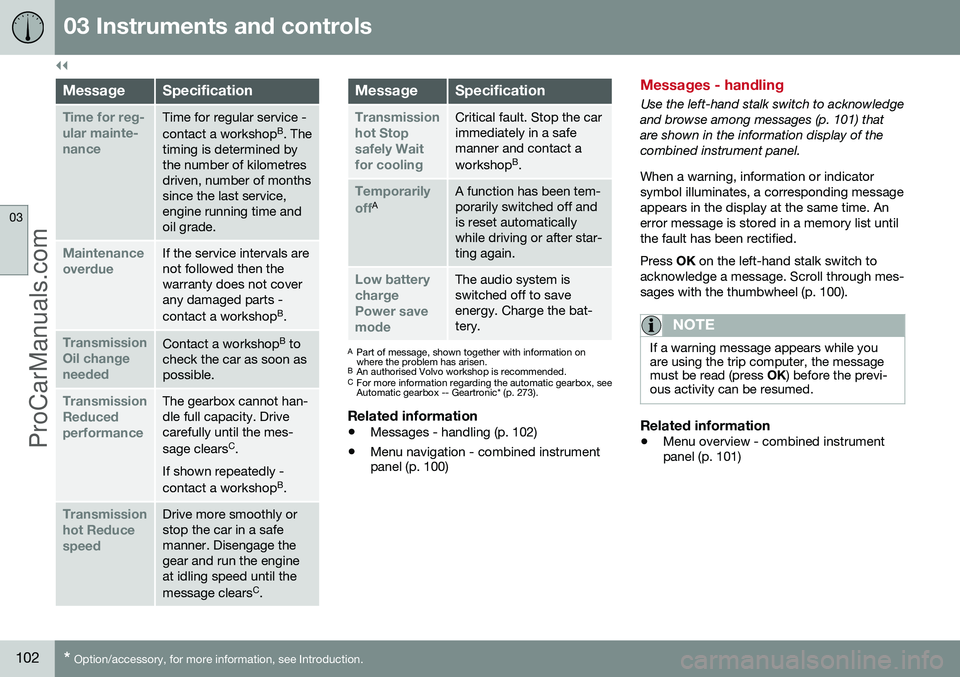
MessageSpecification
Time for reg- ular mainte-nanceTime for regular service - contact a workshop B
. The
timing is determined by the number of kilometresdriven, number of monthssince the last service,engine running time andoil grade.
Maintenance overdueIf the service intervals are not followed then thewarranty does not coverany damaged parts - contact a workshop B
.
Transmission Oil changeneededContact a workshop B
to
check the car as soon as possible.
Transmission ReducedperformanceThe gearbox cannot han- dle full capacity. Drivecarefully until the mes- sage clears C
.
If shown repeatedly -contact a workshop B
.
Transmission hot ReducespeedDrive more smoothly or stop the car in a safemanner. Disengage thegear and run the engineat idling speed until the message clears C
.
MessageSpecification
Transmission hot Stopsafely Waitfor coolingCritical fault. Stop the car immediately in a safemanner and contact a workshop B
.
Temporarily offAA function has been tem- porarily switched off andis reset automaticallywhile driving or after star-ting again.
Low battery chargePower savemodeThe audio system is switched off to saveenergy. Charge the bat-tery.
A Part of message, shown together with information on where the problem has arisen.
B An authorised Volvo workshop is recommended.
C For more information regarding the automatic gearbox, seeAutomatic gearbox -- Geartronic* (p. 273).
Related information
• Messages - handling (p. 102)
• Menu navigation - combined instrument panel (p. 100)
Messages - handling
Use the left-hand stalk switch to acknowledge and browse among messages (p. 101) thatare shown in the information display of thecombined instrument panel. When a warning, information or indicator symbol illuminates, a corresponding messageappears in the display at the same time. Anerror message is stored in a memory list untilthe fault has been rectified. Press
OK on the left-hand stalk switch to
acknowledge a message. Scroll through mes- sages with the thumbwheel (p. 100).
NOTE
If a warning message appears while you are using the trip computer, the messagemust be read (press OK) before the previ-
ous activity can be resumed.
Related information
• Menu overview - combined instrument panel (p. 101)
ProCarManuals.co’
Page 155 of 442
06 Locks and alarm
06
* Option/accessory, for more information, see Introduction.153
Remote control key - range
Remote control key (p. 149) functions have a range of about 20 metres from the car. If the car does not verify a button being pressed - move closer and try again.
NOTE
The remote control key functions may be disrupted by surrounding radio waves,buildings, topographical conditions, etc.The car can always be locked/unlockedwith the key blade, Detachable key blade -unlocking doors (p. 156).
If the remote control key is removed from the car when the engine is running or key position(p. 70) I or II is active, and if all doors are
closed, then a warning message is shown inthe information display in the combinedinstrument panel and an audio reminder sig-nal sounds at the same time. The message is extinguished and the audible reminder signal stops when the remote con-trol key is brought back to the car aftereither/or:
• The remote control key has been inserted into the ignition switch.
• Speed exceeds 30 km/h.
• the
OK button has been pressed.
Related information
• Remote control key - functions (p. 151)
PCC* - unique functions
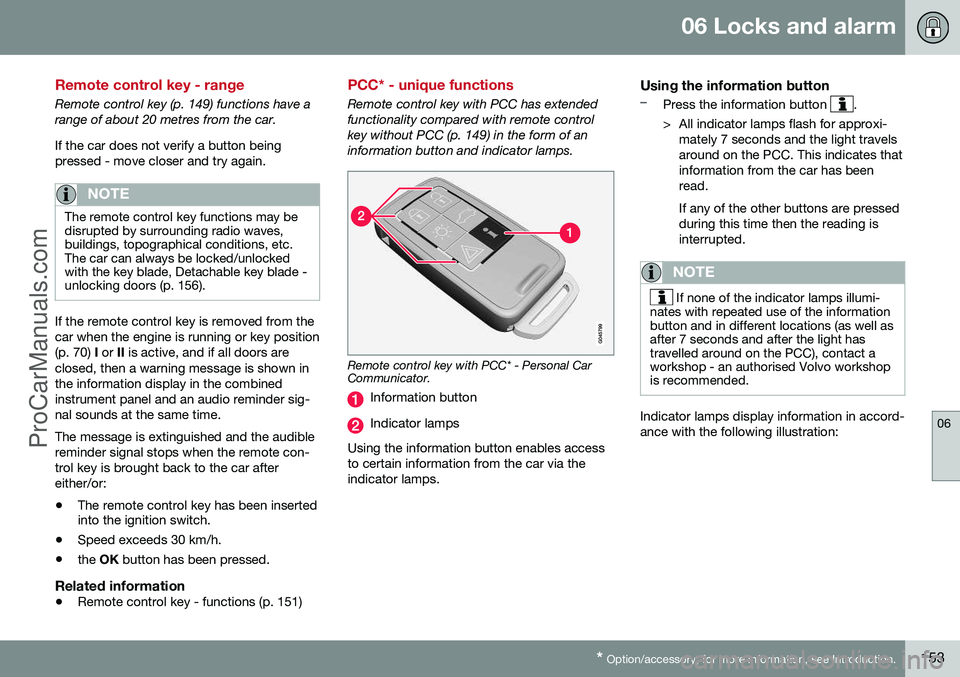
Remote control key with PCC has extended functionality compared with remote controlkey without PCC (p. 149) in the form of aninformation button and indicator lamps.
Remote control key with PCC* - Personal Car Communicator.
Information button
Indicator lamps
Using the information button enables access to certain information from the car via theindicator lamps.
Using the information button–Press the information button .
> All indicator lamps flash for approxi- mately 7 seconds and the light travels around on the PCC. This indicates thatinformation from the car has beenread. If any of the other buttons are pressed during this time then the reading isinterrupted.
NOTE
If none of the indicator lamps illumi-
nates with repeated use of the information button and in different locations (as well asafter 7 seconds and after the light hastravelled around on the PCC), contact aworkshop - an authorised Volvo workshopis recommended.
Indicator lamps display information in accord- ance with the following illustration:
ProCarManuals.co’
Page 161 of 442
06 Locks and alarm
06
* Option/accessory, for more information, see Introduction.159
NOTE
Volvo recommends that the batteries to be used in the remote control key/PCC fulfilUN Manual of Test and Criteria, Part III,sub-section 38.3. Batteries fitted in thefactory or replaced by an authorised Volvoworkshop fulfil the above criteria.
Assembly1. Press the remote control key together.
2. Hold the remote control key with the slot
pointed up and lower the key blade into its slot.
3. Lightly press the key blade. You should hear a "click" when the key blade islocked in.
IMPORTANT
Make sure that exhausted batteries are disposed of in a manner which is kind tothe environment.
Related information
• Remote control key with key blade (p. 149)
• Remote control key - functions (p. 151)
Keyless drive*
Keyless drive, only with PCC (p. 153) 2
means
that the car's lock and starting systems can be operated keylessly. The Keyless drive function in the PCC allows the car to be unlocked (p. 161), driven andlocked without the need for a key. You simplyhave to have the PCC with you. The systemmakes it easier and more convenient to openthe car, e.g. when your hands are full. Both of the car's PCCs incorporate the Keyless function. Additional PCCs can beordered, see Remote control key with keyblade (p. 149). The car's electrical system can be set to three different levels - key position 0, I and II
(p. 70) - with the remote control key.
Related information
• Keyless drive* - PCC range (p. 159)
• Keyless drive* - handling the PCC safely (p. 160)
• Keyless drive* - interference to PCC func-tion (p. 160)
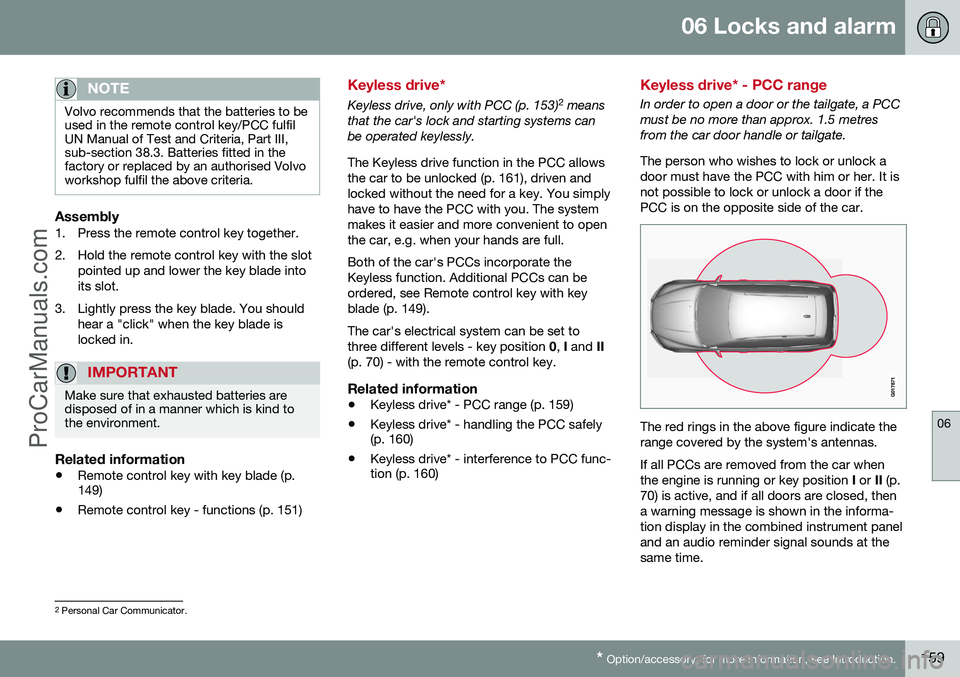
Keyless drive* - PCC range
In order to open a door or the tailgate, a PCC must be no more than approx. 1.5 metresfrom the car door handle or tailgate. The person who wishes to lock or unlock a door must have the PCC with him or her. It isnot possible to lock or unlock a door if thePCC is on the opposite side of the car.
The red rings in the above figure indicate the range covered by the system's antennas. If all PCCs are removed from the car when the engine is running or key position
I or II (p.
70) is active, and if all doors are closed, thena warning message is shown in the informa-tion display in the combined instrument paneland an audio reminder signal sounds at thesame time.
2 Personal Car Communicator.
ProCarManuals.co’
Page 215 of 442
07 Driver support
07
}}
* Option/accessory, for more information, see Introduction.213
Collision warning system* - function
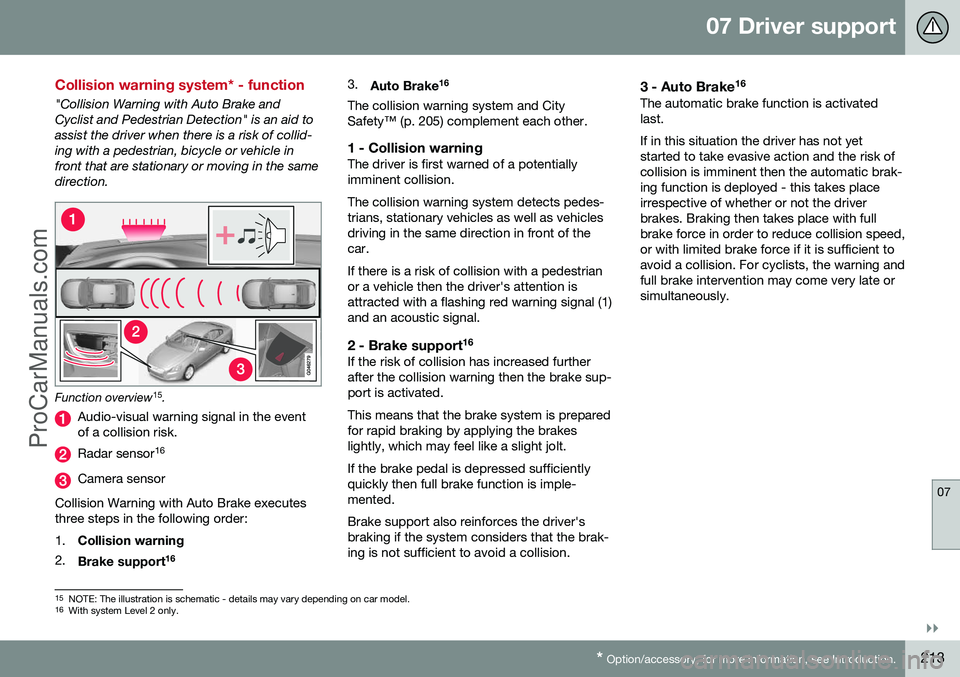
"Collision Warning with Auto Brake and Cyclist and Pedestrian Detection" is an aid toassist the driver when there is a risk of collid-ing with a pedestrian, bicycle or vehicle infront that are stationary or moving in the samedirection.
Function overview 15
.
Audio-visual warning signal in the event of a collision risk.
Radar sensor 16
Camera sensor
Collision Warning with Auto Brake executes three steps in the following order: 1. Collision warning
2. Brake support 16 3.
Auto Brake 16
The collision warning system and City Safety™ (p. 205) complement each other.
1 - Collision warningThe driver is first warned of a potentiallyimminent collision. The collision warning system detects pedes- trians, stationary vehicles as well as vehiclesdriving in the same direction in front of thecar. If there is a risk of collision with a pedestrian or a vehicle then the driver's attention isattracted with a flashing red warning signal (1)and an acoustic signal.
2 - Brake support 16If the risk of collision has increased furtherafter the collision warning then the brake sup-port is activated. This means that the brake system is prepared for rapid braking by applying the brakeslightly, which may feel like a slight jolt. If the brake pedal is depressed sufficiently quickly then full brake function is imple-mented. Brake support also reinforces the driver's braking if the system considers that the brak-ing is not sufficient to avoid a collision.
3 - Auto Brake
16The automatic brake function is activatedlast. If in this situation the driver has not yet started to take evasive action and the risk ofcollision is imminent then the automatic brak-ing function is deployed - this takes placeirrespective of whether or not the driverbrakes. Braking then takes place with fullbrake force in order to reduce collision speed,or with limited brake force if it is sufficient toavoid a collision. For cyclists, the warning andfull brake intervention may come very late orsimultaneously.
15
NOTE: The illustration is schematic - details may vary depending on car model.
16 With system Level 2 only.
ProCarManuals.co’
Page 242 of 442
07 Driver support
07
240* Option/accessory, for more information, see Introduction.
Park Assist*
Parking assistance is used as an aid to park- ing. An acoustic signal as well as symbols onthe centre console's display screen indicatethe distance to the detected obstacle. Parking assistance sound level can be adjusted during the ongoing acoustic signalusing the centre console's VOL knob. The
sound level can also be adjusted in the audiosettings menu, which is accessed by pressingSOUND or in the car's menu system (p. 103)
MY CAR 22
.
Parking assistance is available in two vari-ants:
• Rear only
• Both front and rear.
NOTE
When a towbar is configured with the car's electrical system, the protrusion of thetowbar is included when the functionmeasures the parking space.
WARNING
•Parking assistance does not relinquish the driver's own responsibility duringparking.
• The sensors have blind spots whereobstacles cannot be detected.
• Be aware of e.g. people or animalsnear the car.
Related information
•
Park assist syst* - cleaning the sensors (p. 243)
• Park assist syst* - function (p. 240)
• Park assist syst* - forward (p. 242)
• Park assist syst* - fault indication (p. 243)
• Park assist syst* - backward (p. 241)
• Park assist camera (p. 244)
Park assist syst* - function
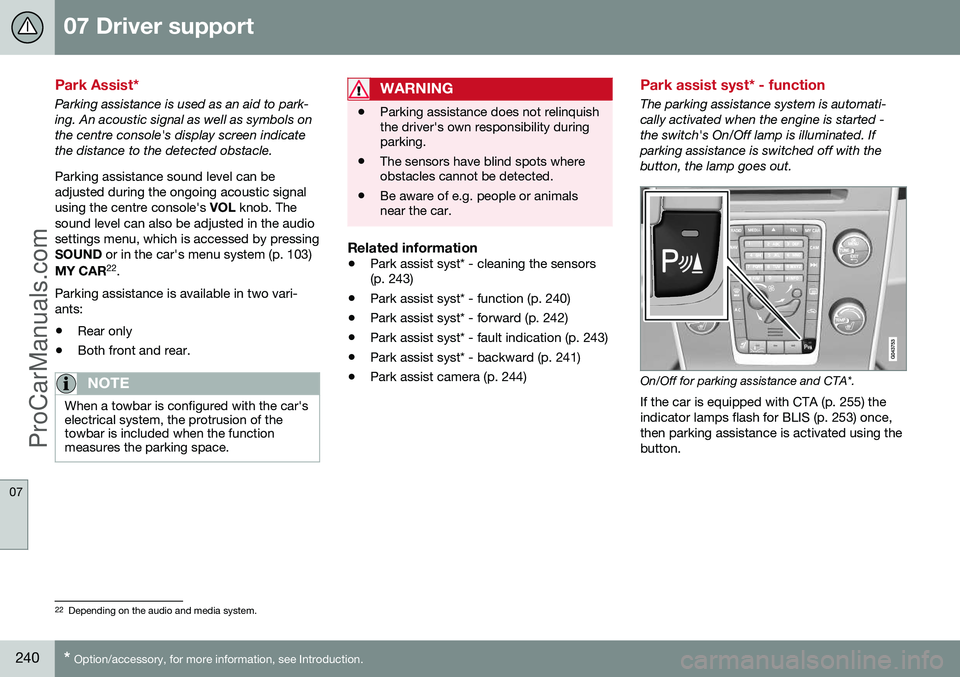
The parking assistance system is automati- cally activated when the engine is started -the switch's On/Off lamp is illuminated. Ifparking assistance is switched off with thebutton, the lamp goes out.
On/Off for parking assistance and CTA*.
If the car is equipped with CTA (p. 255) the indicator lamps flash for BLIS (p. 253) once,then parking assistance is activated using thebutton.
22 Depending on the audio and media system.
ProCarManuals.co’
Page 243 of 442
07 Driver support
07
* Option/accessory, for more information, see Introduction.241
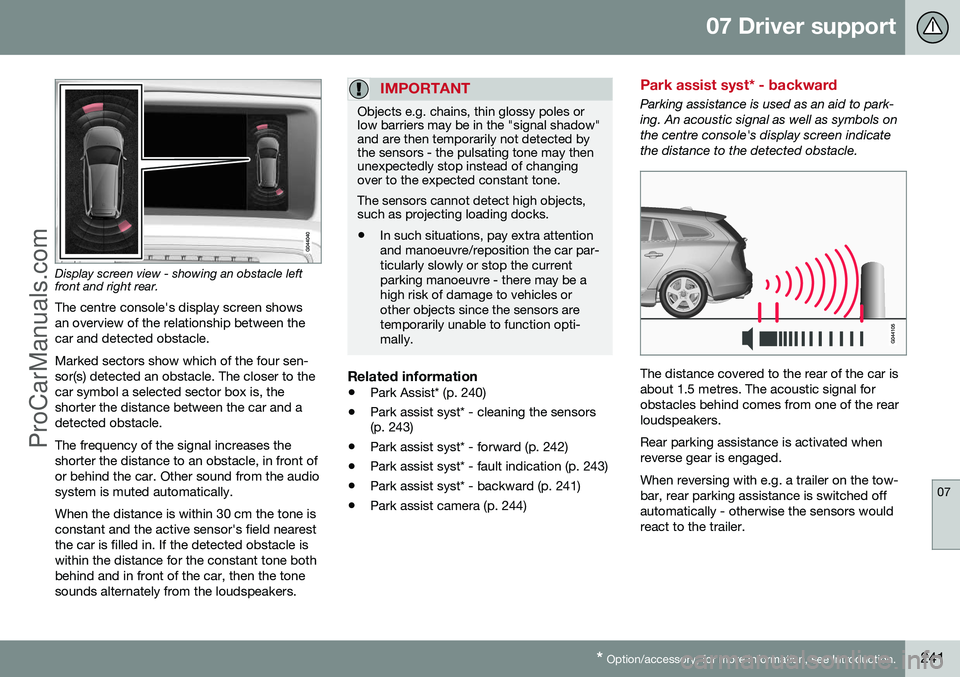
Display screen view - showing an obstacle left front and right rear. The centre console's display screen shows an overview of the relationship between thecar and detected obstacle. Marked sectors show which of the four sen- sor(s) detected an obstacle. The closer to thecar symbol a selected sector box is, theshorter the distance between the car and adetected obstacle. The frequency of the signal increases the shorter the distance to an obstacle, in front ofor behind the car. Other sound from the audiosystem is muted automatically. When the distance is within 30 cm the tone is constant and the active sensor's field nearestthe car is filled in. If the detected obstacle iswithin the distance for the constant tone bothbehind and in front of the car, then the tonesounds alternately from the loudspeakers.
IMPORTANT
Objects e.g. chains, thin glossy poles or low barriers may be in the "signal shadow"and are then temporarily not detected bythe sensors - the pulsating tone may thenunexpectedly stop instead of changingover to the expected constant tone. The sensors cannot detect high objects, such as projecting loading docks.
• In such situations, pay extra attention and manoeuvre/reposition the car par-ticularly slowly or stop the currentparking manoeuvre - there may be ahigh risk of damage to vehicles orother objects since the sensors aretemporarily unable to function opti-mally.
Related information
•
Park Assist* (p. 240)
• Park assist syst* - cleaning the sensors (p. 243)
• Park assist syst* - forward (p. 242)
• Park assist syst* - fault indication (p. 243)
• Park assist syst* - backward (p. 241)
• Park assist camera (p. 244)
Park assist syst* - backward
Parking assistance is used as an aid to park- ing. An acoustic signal as well as symbols onthe centre console's display screen indicatethe distance to the detected obstacle.
The distance covered to the rear of the car is about 1.5 metres. The acoustic signal forobstacles behind comes from one of the rearloudspeakers. Rear parking assistance is activated when reverse gear is engaged. When reversing with e.g. a trailer on the tow- bar, rear parking assistance is switched offautomatically - otherwise the sensors wouldreact to the trailer.
ProCarManuals.co’
Page 268 of 442
08 Starting and driving
08
266* Option/accessory, for more information, see Introduction.
Remote start (ERS)*
Remote start (ERS – Engine Remote Start) means that the car's engine can be startedremotely using the remote control key or thePCC key. This is so that the passenger com-partment can be warmed up/cooled downbefore departure. The climate control system and audio system start with the same settings that were in usewhen the car was parked. An ERS-started engine is activated for a maximum of 15 minutes, then it is switchedoff. After two ERS-activations the enginemust be started in the normal way beforeERS can be re-used. The optional ERS function is available on most cars with automatic gearbox.
NOTE
The service life of the remote control key's battery is affected by the ERS function. Inthe event of frequent use of ERS the bat-tery should therefore be changed once peryear, see Remote control key/PCC -replacing the battery (p. 158).
NOTE
Follow local/national rules/regulations on idling.
WARNING
To remote-start the engine, the following criteria must be met:
• The car must be supervised.
• There must be no people or animals inside the car.
• The car must not be parked in aclosed, unventilated area - the exhaustgases may seriously injure humansand animals.
Related information
•
Remote start (ERS) - operation (p. 266)
• Remote start (ERS) - symbols and mes- sages (p. 268)
Remote start (ERS) - operation
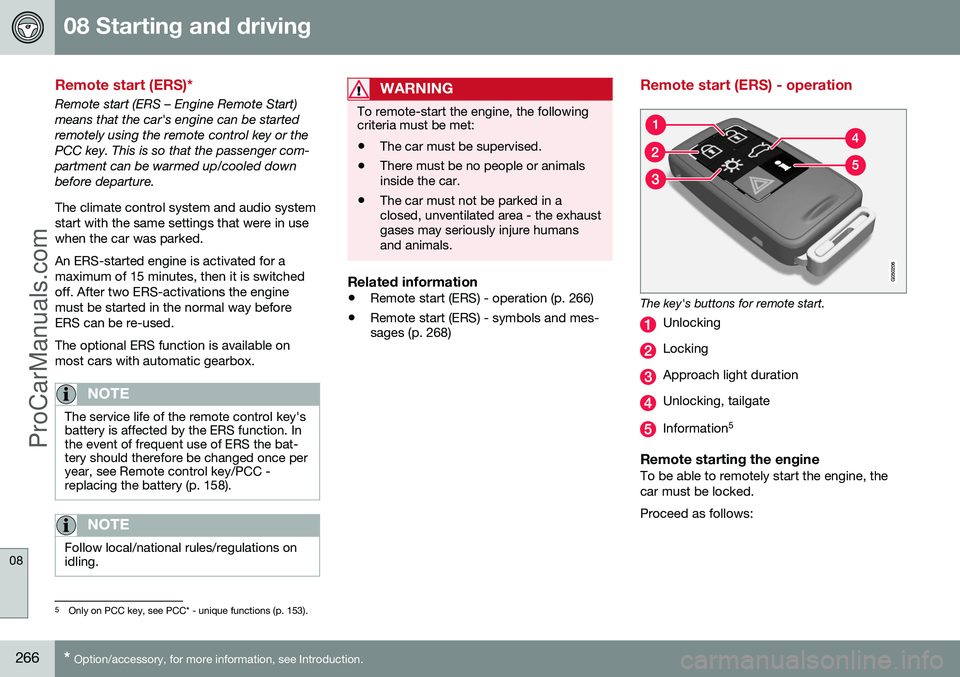
The key's buttons for remote start.
Unlocking
Locking
Approach light duration
Unlocking, tailgate
Information 5
Remote starting the engineTo be able to remotely start the engine, the car must be locked. Proceed as follows:
5
Only on PCC key, see PCC* - unique functions (p. 153).
ProCarManuals.co’
Page 269 of 442
08 Starting and driving
08
* Option/accessory, for more information, see Introduction.267
1. Briefly press on the key's button (2).
2. Follow this immediately afterwards with a
long press - at least 2 seconds - on button (3).
If the conditions for ERS are fulfilled then the following takes place:
1. The direction indicators flash quickly sev- eral times.
2. The engine starts.
3. The direction indicators illuminate with a constant glow for 3 seconds to verify that the engine has started.
NOTE
After remote starting, the car continues to be locked but with deactivated movementdetector*.
With PCC 6
keyThe light indication for Approach lighting 7
flashes several times when
the button is pressed and then goes to constant glow if all criteria for
ERS have been fulfilled. However, this doesnot mean that ERS has started the engine. To check whether ERS has started the engine, the user can press the button (5) - ifthe engine has started, there is a light indica-tion by the buttons (2) and (3).
Active functionsThe following functions are activated with a remote started engine: • Ventilation system
• Audio/video system
• Approach light duration.
Deactivated functionsThe following functions are deactivated with a remote started engine: • Headlamps
• Position lamps
• Number plate lighting
• Windscreen wiper.
ERS is interruptedThe following steps switch off an ERS-started engine: • The remote control key's button (1), (2) or (4) is depressed
• The car is unlocked
• A door is opened
• Accelerator pedal or brake pedal isdepressed
• The gear selector is moved out of
P posi-
tion
• There is approx.10 litres left in the fueltank •
Active ERS time exceeds 15 minutes.
When an ERS-started engine is switched off, the direction indicators illuminate with a con-stant glow for 3 seconds.
Related information
• Remote start (ERS)* (p. 266)
• Remote start (ERS) - symbols and mes- sages (p. 268)
6
For more information on the PCC key, see PCC* - unique functions (p. 153).7
For more information on Approach lighting, see Remote control key - functions (p. 151) and Approach light duration (p. 89).
ProCarManuals.co’
Page 282 of 442
||
08 Starting and driving
08
280* Option/accessory, for more information, see Introduction.
The Start/Stop function gives the driver the opportunity for a more active environmentallyconscious way of driving the car by means ofbeing able to allow the engine to stop auto-matically, whenever appropriate. Manual or Automatic Note that there are differences in the Start/Stop function depending on whether thegearbox is manual or automatic.
Related information
• Start/Stop* - function and operation (p. 280)
• Starting the engine (p. 264)
• Start/Stop* - settings (p. 285)
• Start/Stop* - the engine does not auto-start (p. 284)
• Start/Stop* - the engine auto-starts (p.283)
• Start/Stop* - the engine does not stop (p.282)
• Start/Stop* - involuntary engine stoppagemanual gearbox (p. 284)
• Start/Stop* - symbols and messages (p.286)
• Battery - Start/Stop (p. 365)
Start/Stop* - function and operation
Some engine and gearbox combinations are equipped with a Start/Stop function whichengages in the event of e.g. stationary trafficor waiting at traffic lights. The Start/Stopfunction is activated automatically when theengine is started with the key.
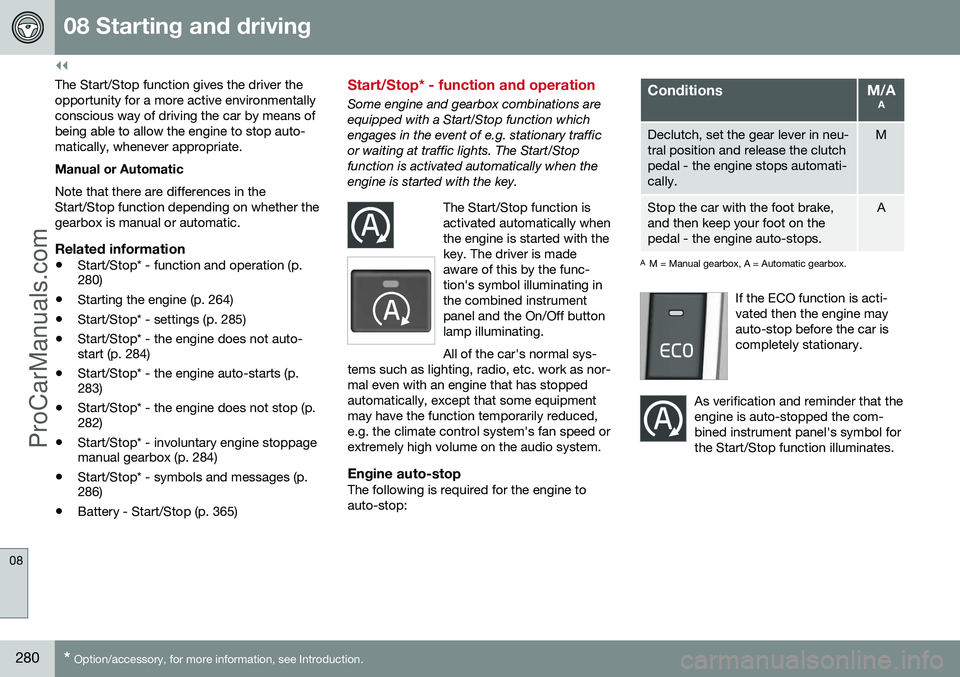
The Start/Stop function isactivated automatically whenthe engine is started with thekey. The driver is madeaware of this by the func-tion's symbol illuminating inthe combined instrumentpanel and the On/Off buttonlamp illuminating. All of the car's normal sys-
tems such as lighting, radio, etc. work as nor- mal even with an engine that has stoppedautomatically, except that some equipmentmay have the function temporarily reduced,e.g. the climate control system's fan speed orextremely high volume on the audio system.
Engine auto-stopThe following is required for the engine to auto-stop:
ConditionsM/A A
Declutch, set the gear lever in neu- tral position and release the clutchpedal - the engine stops automati-cally.M
Stop the car with the foot brake, and then keep your foot on thepedal - the engine auto-stops.A
AM = Manual gearbox, A = Automatic gearbox.
If the ECO function is acti- vated then the engine mayauto-stop before the car iscompletely stationary.
As verification and reminder that the engine is auto-stopped the com-bined instrument panel's symbol forthe Start/Stop function illuminates.
ProCarManuals.co’
Page 300 of 442
08 Starting and driving
08
298
speed for a few minutes in order to allow the gearbox to cool down.
• If the car overheats, the air conditioningmay be switched off temporarily.
• Do not turn the engine off immediatelyyou stop after a hard drive.
NOTE
It is normal for the engine's cooling fan to operate for a time after the engine hasbeen switched off.
Driving with open tailgate
When driving with the tailgate open, toxic exhaust fumes can be sucked into the carthrough the cargo area.
WARNING
Do not drive with an open tailgate! Toxic exhaust fumes could be drawn into the carthrough the cargo area.
Related information
•Loading (p. 142)
Overload - starter battery
The electrical functions in the car load the starter battery (p. 361) to varying degrees.Avoid using the key position (p. 70)
II when
the engine is switched off. Instead use the I
mode - which uses less power. Also, be aware of different accessories that load the electrical system. Do not use func-tions which use a lot of power when theengine is switched off. Examples of suchfunctions are: • ventilation fan
• headlamps
• windscreen wiper
• audio system (high volume).
If the starter battery voltage is low then the combined instrument panel's information dis- play shows the text
Low battery Power
save mode. The energy-saving function then
shuts down certain functions or reduces cer- tain functions such as the ventilation fanand/or audio system.
–In which case, charge the battery by star- ting the engine and then running it for atleast 15 minutes - starter battery chargingis more effective during driving than run-ning the engine at idling speed while sta-tionary.
ProCarManuals.co’