lights VOLVO V60 2014 User Guide
[x] Cancel search | Manufacturer: VOLVO, Model Year: 2014, Model line: V60, Model: VOLVO V60 2014Pages: 442, PDF Size: 13.85 MB
Page 87 of 442
03 Instruments and controls
03
* Option/accessory, for more information, see Introduction.85
the same time as the information display shows an explanatory text and a further illu-minated symbol.
SymbolDisplaySpecification
Headlamp systemmalfunc-tion Serv-icerequiredThe system is disengaged. Visita workshop ifthe messageremains. Volvorecommendsthat you contactan authorisedVolvo workshop.
The function is only active in twilight or dark- ness and only when the car is moving. The function
23
can be deactivated/activated
in the menu system MY CAR, see MY CAR (p. 103). For headlamp pattern adjustment, see Head- lamps - adjusting headlamp pattern (p. 90).
Cornering lightsActive Xenon headlamps are equipped withcornering lights that temporarily illuminate thearea diagonally in front of the car in the direc-tion the steering wheel is turned in a sharpbend, or in the direction for which the direc-tion indicators are used. The function is activated when main beam ordipped beam is used and the car's speed islower than approx. 30 km/h. In addition, both cornering lights are switched on as a supplement to the reversing lampduring reversing.
Related information
•
Main/dipped beam (p. 81)
• Active high beam* (p. 82)
• Light switches (p. 78)
Rear fog lamp
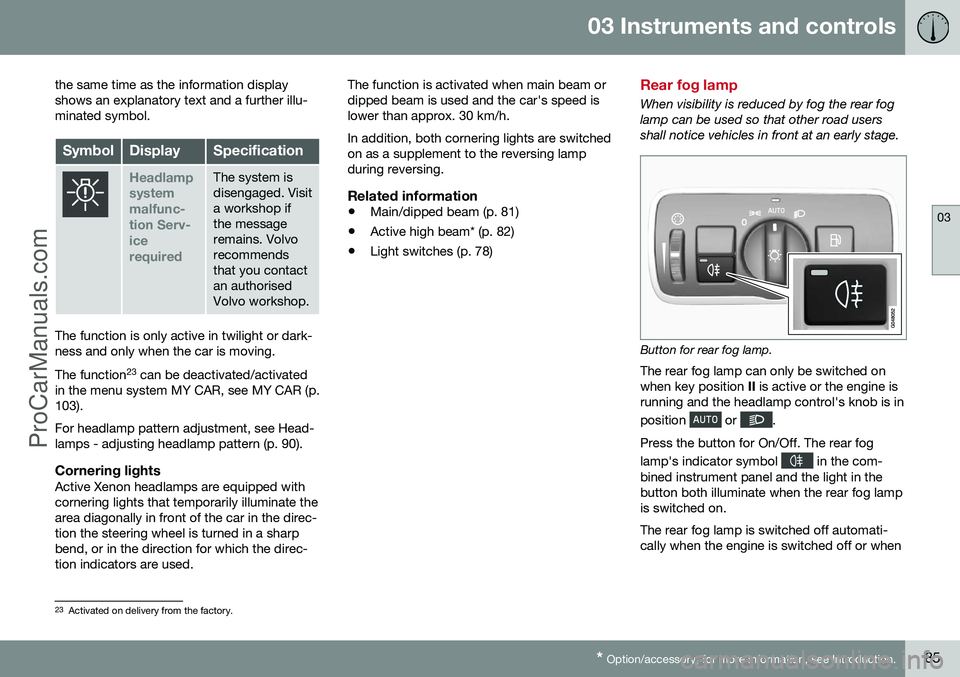
When visibility is reduced by fog the rear fog lamp can be used so that other road usersshall notice vehicles in front at an early stage.
Button for rear fog lamp.
The rear fog lamp can only be switched on when key position II is active or the engine is
running and the headlamp control's knob is in position
or .
Press the button for On/Off. The rear fog lamp's indicator symbol
in the com-
bined instrument panel and the light in the button both illuminate when the rear fog lampis switched on. The rear fog lamp is switched off automati- cally when the engine is switched off or when
23 Activated on delivery from the factory.
ProCarManuals.co’
Page 88 of 442
||
03 Instruments and controls
03
86
the headlamp control's knob is turned to position
or .
NOTE
Regulations on the use of rear fog lamps vary from country to country.
Related information
•Light switches (p. 78)
Brake lights
The brake light automatically comes on during braking. The brake light is switched on when the brake pedal is depressed. In addition, it is switchedon when one of driving support systemsAdaptive cruise control (p. 188), City Safety(p. 205) or Collision warning system (p. 212)brakes the car. For information on emergency brake lights and automatic hazard warning flashers, seeFoot brake - emergency brake lights andautomatic hazard warning flashers (p. 291).
Hazard warning flashers
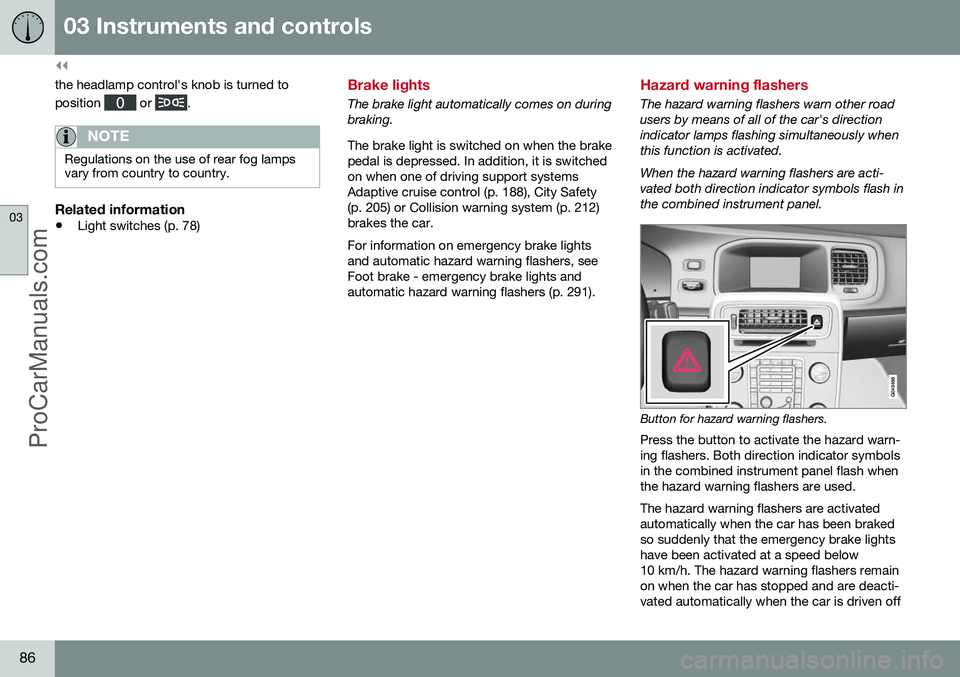
The hazard warning flashers warn other road users by means of all of the car's directionindicator lamps flashing simultaneously whenthis function is activated. When the hazard warning flashers are acti- vated both direction indicator symbols flash inthe combined instrument panel.
Button for hazard warning flashers.
Press the button to activate the hazard warn- ing flashers. Both direction indicator symbolsin the combined instrument panel flash whenthe hazard warning flashers are used. The hazard warning flashers are activated automatically when the car has been brakedso suddenly that the emergency brake lightshave been activated at a speed below10 km/h. The hazard warning flashers remainon when the car has stopped and are deacti-vated automatically when the car is driven off
ProCarManuals.co’
Page 89 of 442
03 Instruments and controls
03
87
again or the button is depressed. For more information on emergency brake lights andautomatic hazard warning flashers, see Footbrake - emergency brake lights and auto-matic hazard warning flashers (p. 291).
Related information
•
Direction indicators (p. 87)
Direction indicators
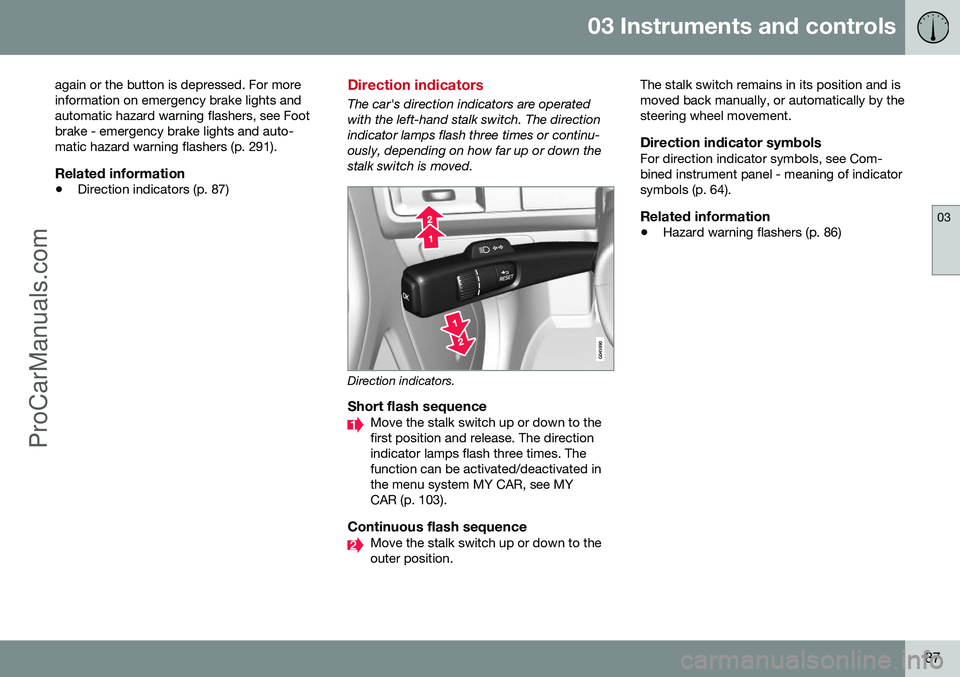
The car's direction indicators are operated with the left-hand stalk switch. The directionindicator lamps flash three times or continu-ously, depending on how far up or down thestalk switch is moved.
Direction indicators.
Short flash sequenceMove the stalk switch up or down to the first position and release. The directionindicator lamps flash three times. Thefunction can be activated/deactivated inthe menu system MY CAR, see MYCAR (p. 103).
Continuous flash sequenceMove the stalk switch up or down to the outer position. The stalk switch remains in its position and ismoved back manually, or automatically by thesteering wheel movement.
Direction indicator symbolsFor direction indicator symbols, see Com-bined instrument panel - meaning of indicatorsymbols (p. 64).
Related information
•
Hazard warning flashers (p. 86)
ProCarManuals.co’
Page 91 of 442
03 Instruments and controls
03
89
Passenger compartment lighting is switched off when:
• the engine is started
• the car is locked.
The passenger compartment lighting comeson and remains on for two minutes if one ofthe doors is open. If any lighting is switched on manually and the car is locked then it will be switched offautomatically after two minutes.
Mood lightsWhen the normal passenger compartmentlighting is switched off and the engine is run-ning, a number of LEDs illuminate, includingone in the ceiling lighting, in order to providea low-light and enhance the mood while driv-ing. This lighting goes out for a little whileafter the normal passenger compartmentlighting when the car is locked. The bright-ness is controlled using the thumbwheel onthe headlamp control (p. 78).
Home safe light duration
Home safe lighting consists of dipped beam, parking lamps, lamps in the door mirrors,number plate lighting, interior roof lighting aswell as courtesy lighting. Some of the exterior lighting can be kept switched on to work as home safe lightingafter the car has been locked.
1. Remove the remote control key from the ignition switch.
2. Move the left-hand stalk switch toward the steering wheel to the end position and release it. The function can be activatedin the same way as with main beam flash;see Main/dipped beam (p. 81).
3. Get out of the car and lock the door. When the function is activated, dipped beam, parking lamps, door mirror lamps, numberplate lighting, interior roof lamps and courtesylighting are switched on. The length of time for which the home safe lighting should be kept on can be set in themenu system MY CAR, see MY CAR (p. 103).
Related information
• Approach light duration (p. 89)
Approach light duration
Approach light duration consists of parking lamps, lamps in the door mirrors, numberplate lighting, interior roof lighting as well ascourtesy lighting. Approach lighting is switched on with the remote control key, see Remote control key -functions (p. 151), and is used to switch onthe car's lighting at a distance. When the function is activated with the remote control, the parking lamps, door mir-ror lamps, number plate lighting, interior rooflamps and courtesy lighting are switched on. The length of time for which the approach lighting should be kept on can be set in themenu system MY CAR, see MY CAR (p. 103).
Related information
• Home safe light duration (p. 89)
ProCarManuals.co’
Page 98 of 442
03 Instruments and controls
03
96* Option/accessory, for more information, see Introduction.
Windows and rearview and door mirrors - heating
The defroster is used to quickly remove mist- ing and ice from the windscreen, rear windowand door mirrors.
Heated windscreen*, rear window and
door mirrors
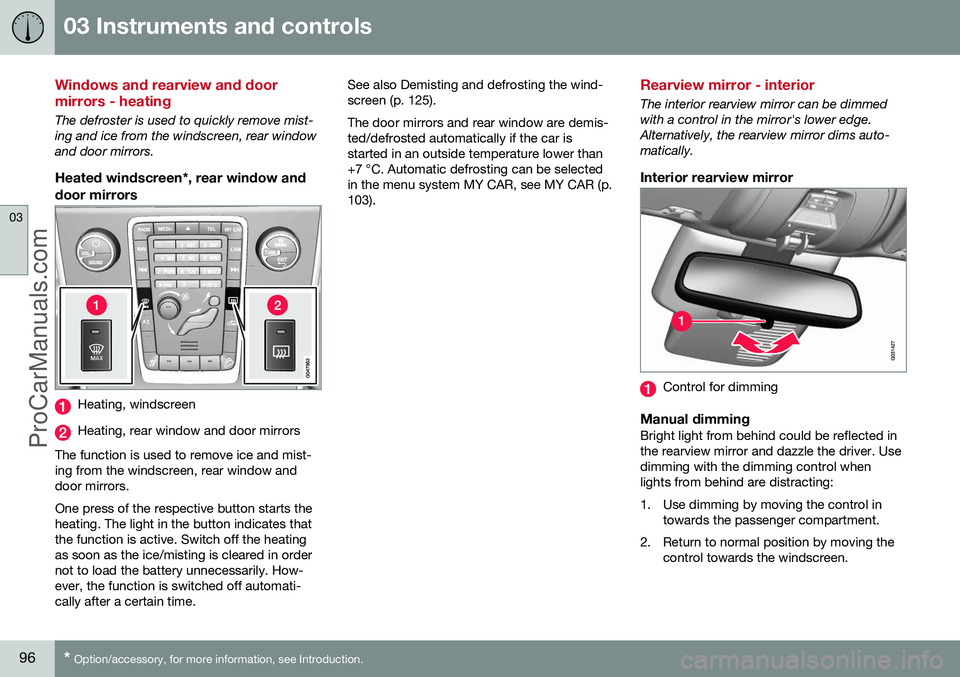
Heating, windscreen
Heating, rear window and door mirrors
The function is used to remove ice and mist- ing from the windscreen, rear window anddoor mirrors. One press of the respective button starts the heating. The light in the button indicates thatthe function is active. Switch off the heatingas soon as the ice/misting is cleared in ordernot to load the battery unnecessarily. How-ever, the function is switched off automati-cally after a certain time. See also Demisting and defrosting the wind-screen (p. 125). The door mirrors and rear window are demis- ted/defrosted automatically if the car isstarted in an outside temperature lower than+7 °C. Automatic defrosting can be selectedin the menu system MY CAR, see MY CAR (p.103).
Rearview mirror - interior
The interior rearview mirror can be dimmed with a control in the mirror's lower edge.Alternatively, the rearview mirror dims auto-matically.
Interior rearview mirror
Control for dimming
Manual dimmingBright light from behind could be reflected in the rearview mirror and dazzle the driver. Usedimming with the dimming control whenlights from behind are distracting:
1. Use dimming by moving the control in
towards the passenger compartment.
2. Return to normal position by moving the control towards the windscreen.
ProCarManuals.co’
Page 99 of 442
03 Instruments and controls
03
* Option/accessory, for more information, see Introduction.97
Automatic dimming*Bright light from behind is automatically dimmed by the rearview mirror. The controlfor manual dimming is not available on mir-rors with automatic dimming. The rearview mirror contains two sensors - one forward facing and one rearward facing -that work together to identify and eliminatedazzling light. The forward facing sensordetects ambient light, while the rearward fac-ing sensor detects the light from vehicleheadlights behind.
NOTE
If the sensors are obscured by e.g. parking permits, transponders, sun visors orobjects in the seats or in the cargo area insuch a way that light is prevented fromreaching the sensors, then the dimmingfunction of the interior rearview and doormirrors is reduced.
The compass (p. 97) can only be specified for a rearview mirror with automatic dimming.
Related information
• Door mirrors (p. 94)
Compass*
The rearview mirror contains an integrated display that shows the compass direction inwhich the front of the car is pointing.
Operation
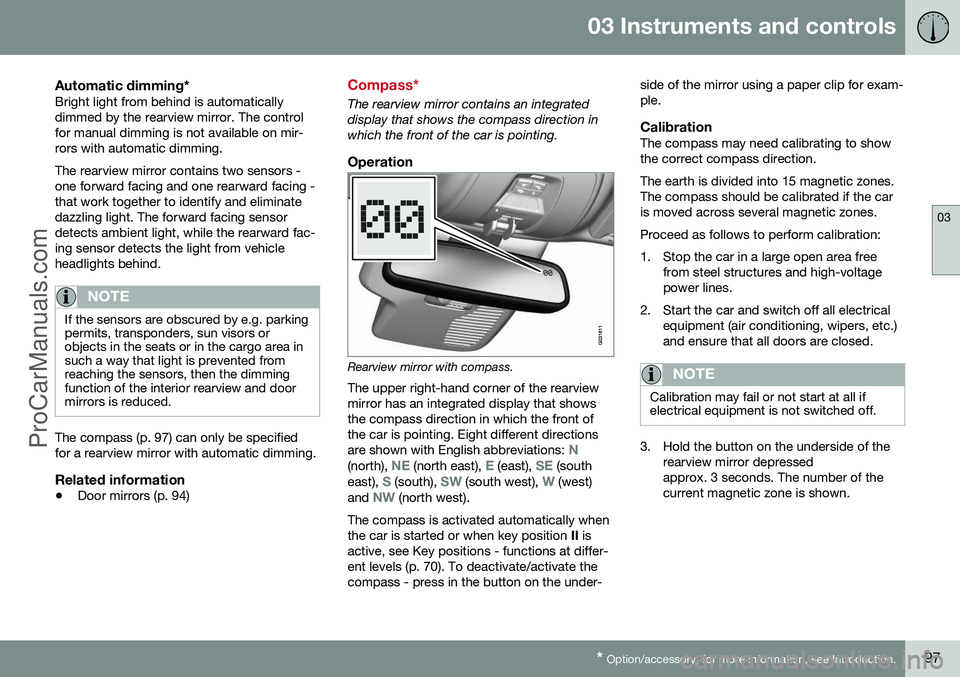
Rearview mirror with compass.
The upper right-hand corner of the rearview mirror has an integrated display that showsthe compass direction in which the front ofthe car is pointing. Eight different directions are shown with English abbreviations:
N(north), NE (north east), E (east), SE (south
east), S (south), SW (south west), W (west)
and NW (north west).
The compass is activated automatically when the car is started or when key position II is
active, see Key positions - functions at differ-ent levels (p. 70). To deactivate/activate thecompass - press in the button on the under- side of the mirror using a paper clip for exam-ple.
CalibrationThe compass may need calibrating to showthe correct compass direction. The earth is divided into 15 magnetic zones. The compass should be calibrated if the caris moved across several magnetic zones. Proceed as follows to perform calibration:
1. Stop the car in a large open area free
from steel structures and high-voltage power lines.
2. Start the car and switch off all electrical equipment (air conditioning, wipers, etc.)and ensure that all doors are closed.
NOTE
Calibration may fail or not start at all if electrical equipment is not switched off.
3. Hold the button on the underside of therearview mirror depressed approx. 3 seconds. The number of thecurrent magnetic zone is shown.
ProCarManuals.co’
Page 197 of 442
07 Driver support
07
}}
* Option/accessory, for more information, see Introduction.195
Adaptive Cruise Control* - Queue Assist
The adaptive cruise control (ACC – Adaptive Cruise Control) helps the driver to maintain aneven speed and a safe distance from the vehi-cle ahead. Queue Assist also provides theAdaptive Cruise Control with enhanced func-tionality at speeds below 30 km/h.. In cars with automatic gearbox the adaptive cruise control is supplemented with theQueue Assist function (also referred to as"Queue Assist"). Queue Assistant has the following functions:
• Extended speed range - also below 30 km/h and when stationary
• Change of target
• Automatic braking ceases when station-ary
• Automatic activation parking brake.
Note that the lowest programmable speed for the adaptive cruise control is 30 km/h - eventhough it is capable of following another vehi-cle down to a standstill, a lower speed can-
not be selected.
Extended speed range
NOTE
In order to activate the cruise control the driver's door must be closed and the drivermust be wearing the seatbelt.
With an automatic gearbox, the adaptive cruise control can follow another vehiclewithin the range 0-200 km/h.
NOTE
Activation of the cruise control below 30 km/h requires a vehicle in front within areasonable distance.
For shorter stops in connection with inching in slow traffic or at traffic lights driving isautomatically resumed if the stops do notexceed about 3 seconds - if it takes longerbefore the car in front starts moving againthen the Adaptive cruise control is set instandby mode with automatic braking. Thedriver must then reactivate it in one of the fol-lowing ways:
• Press the steering wheel button
.
or
• Depress the accelerator pedal.
> The cruise control will then resume fol- lowing the vehicle in front.
NOTE
Queue Assist can hold the car stationary for a maximum of 4 minutes - then theparking brake is applied and Cruise Con-trol is disengaged.
• The driver has to release the parking brake before the cruise control can bereactivated.
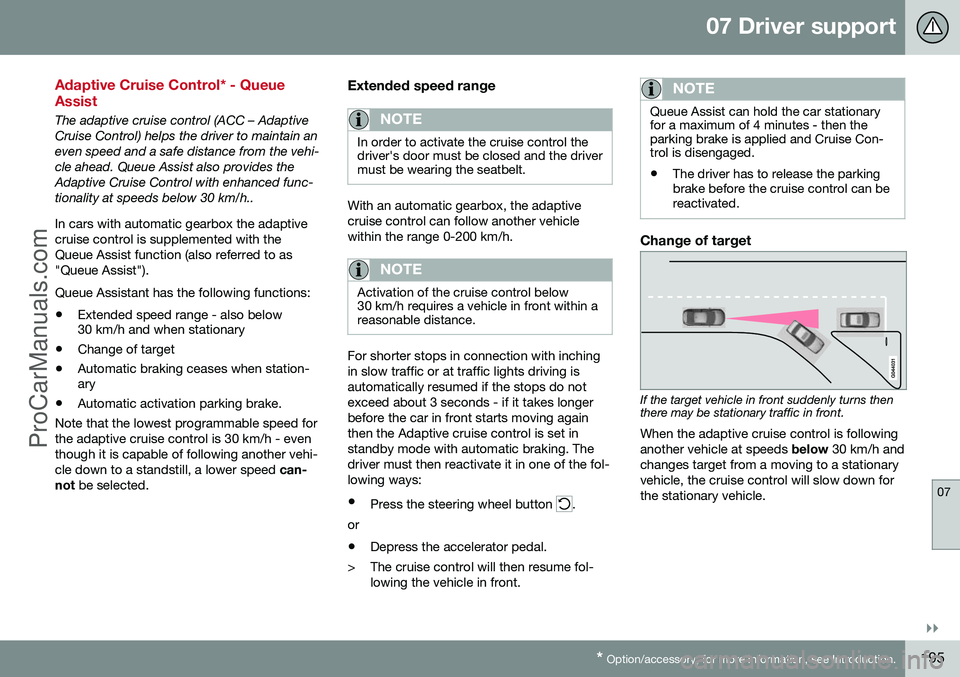
Change of target
If the target vehicle in front suddenly turns then there may be stationary traffic in front.
When the adaptive cruise control is following another vehicle at speeds below 30 km/h and
changes target from a moving to a stationaryvehicle, the cruise control will slow down forthe stationary vehicle.
ProCarManuals.co’
Page 208 of 442
||
07 Driver support
07
206
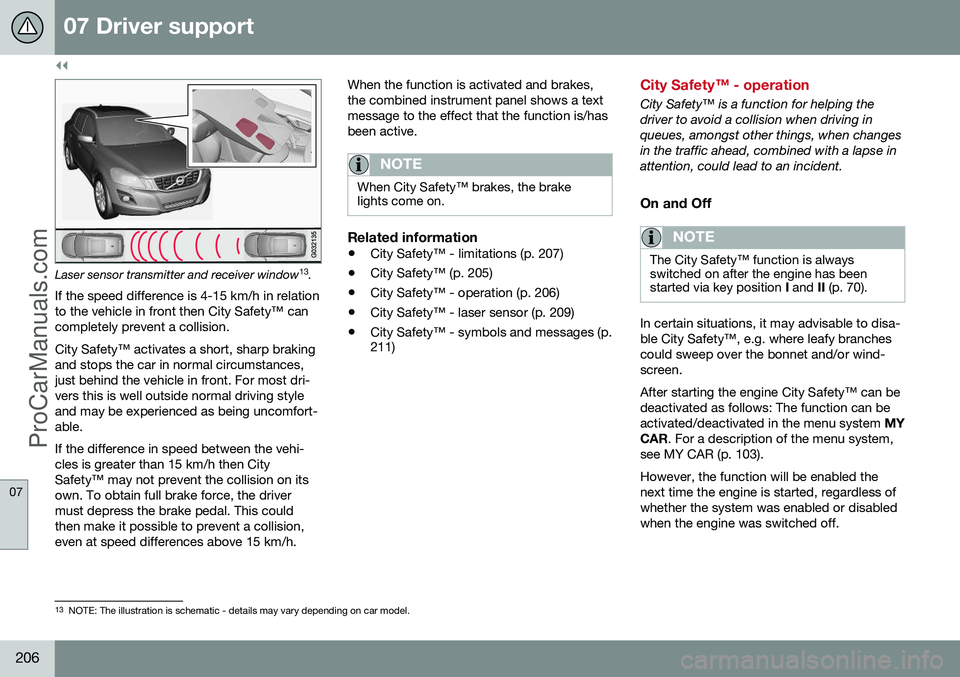
Laser sensor transmitter and receiver window13
.
If the speed difference is 4-15 km/h in relation to the vehicle in front then City Safety™ cancompletely prevent a collision. City Safety™ activates a short, sharp braking and stops the car in normal circumstances,just behind the vehicle in front. For most dri-vers this is well outside normal driving styleand may be experienced as being uncomfort-able. If the difference in speed between the vehi- cles is greater than 15 km/h then CitySafety™ may not prevent the collision on itsown. To obtain full brake force, the drivermust depress the brake pedal. This couldthen make it possible to prevent a collision,even at speed differences above 15 km/h. When the function is activated and brakes,the combined instrument panel shows a textmessage to the effect that the function is/hasbeen active.
NOTE
When City Safety™ brakes, the brake lights come on.
Related information
•
City Safety™ - limitations (p. 207)
• City Safety™ (p. 205)
• City Safety™ - operation (p. 206)
• City Safety™ - laser sensor (p. 209)
• City Safety™ - symbols and messages (p. 211)
City Safety™ - operation
City Safety™ is a function for helping the driver to avoid a collision when driving inqueues, amongst other things, when changesin the traffic ahead, combined with a lapse inattention, could lead to an incident.
On and Off
NOTE
The City Safety™ function is always switched on after the engine has beenstarted via key position
I and II (p. 70).
In certain situations, it may advisable to disa- ble City Safety™, e.g. where leafy branchescould sweep over the bonnet and/or wind-screen. After starting the engine City Safety™ can be deactivated as follows: The function can beactivated/deactivated in the menu system MY
CAR . For a description of the menu system,
see MY CAR (p. 103). However, the function will be enabled the next time the engine is started, regardless ofwhether the system was enabled or disabledwhen the engine was switched off.
13 NOTE: The illustration is schematic - details may vary depending on car model.
ProCarManuals.co’
Page 216 of 442
||
07 Driver support
07
214* Option/accessory, for more information, see Introduction.
WARNING
The collision warning system does not engage in all driving situations or traffic,weather or road conditions. The collisionwarning system does not react to vehiclesor cyclists driving in another direction tothe car or to animals. Warning only activated in the event of a high risk for collision. This section "Func-tion" and the section "Limitations" informabout limitations that the driver must beaware of before using the Collision Warn-ing system with Auto Brake. Warnings and brake interventions for pedestrians and cyclists are deactivated ata vehicle speed exceeding 80 km/h. Warnings and brake interventions for pedestrians and cyclists do not work indarkness and tunnels - not even whenstreetlights are lit. The auto-brake function can prevent a col- lision or reduce collision speed. To ensurefull brake performance, the driver shouldalways depress the brake pedal - evenwhen the car auto-brakes. Never wait for a collision warning. The driver is always responsible that the cor-rect distance and speed are maintained -even when the collision warning systemwith auto-brake is used.
Related information
• Collision warning system* (p. 212)
• Collision warning system* - detection of pedestrians (p. 216)
• Collision warning system* - cyclist detec-tion (p. 214)
• Collision warning system* - operation (p.217)
• Collision warning system* - general limita-tions (p. 218)
• Collision warning system* - camera sen-sor limitations (p. 220)
• Collision warning system* - symbols andmessages (p. 222)
Collision warning system* - cyclist detection
"Collision Warning with Auto Brake and Cyclist and Pedestrian Detection" is an aid toassist the driver when there is a risk of collid-ing with a pedestrian, bicycle or vehicle infront that are stationary or moving in the samedirection.
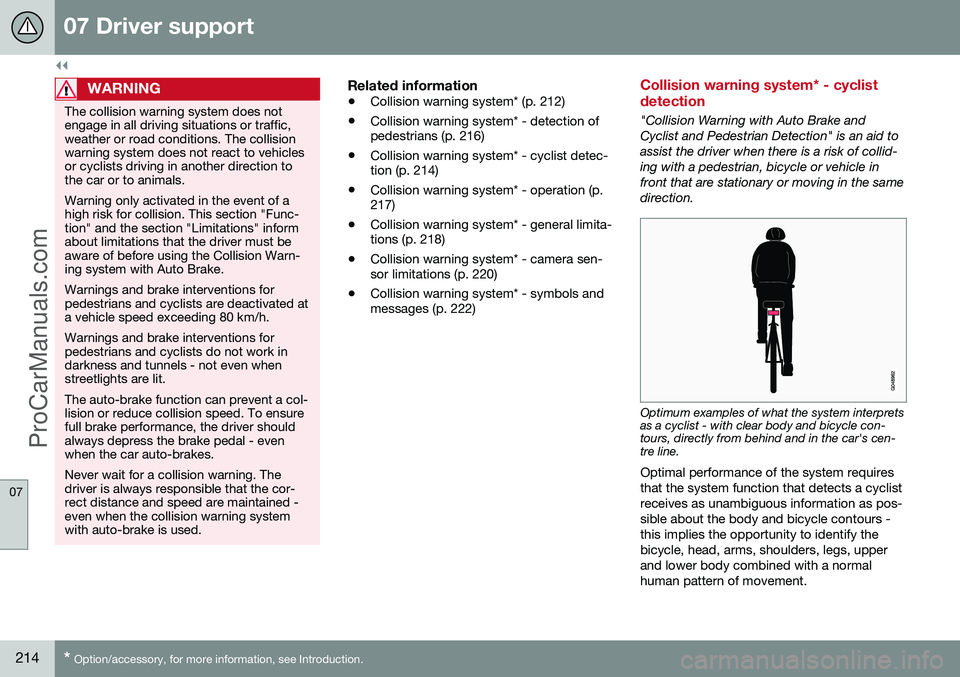
Optimum examples of what the system interprets as a cyclist - with clear body and bicycle con-tours, directly from behind and in the car's cen-tre line.
Optimal performance of the system requires that the system function that detects a cyclistreceives as unambiguous information as pos-sible about the body and bicycle contours -this implies the opportunity to identify thebicycle, head, arms, shoulders, legs, upperand lower body combined with a normalhuman pattern of movement.
ProCarManuals.co’
Page 217 of 442
07 Driver support
07
* Option/accessory, for more information, see Introduction.215
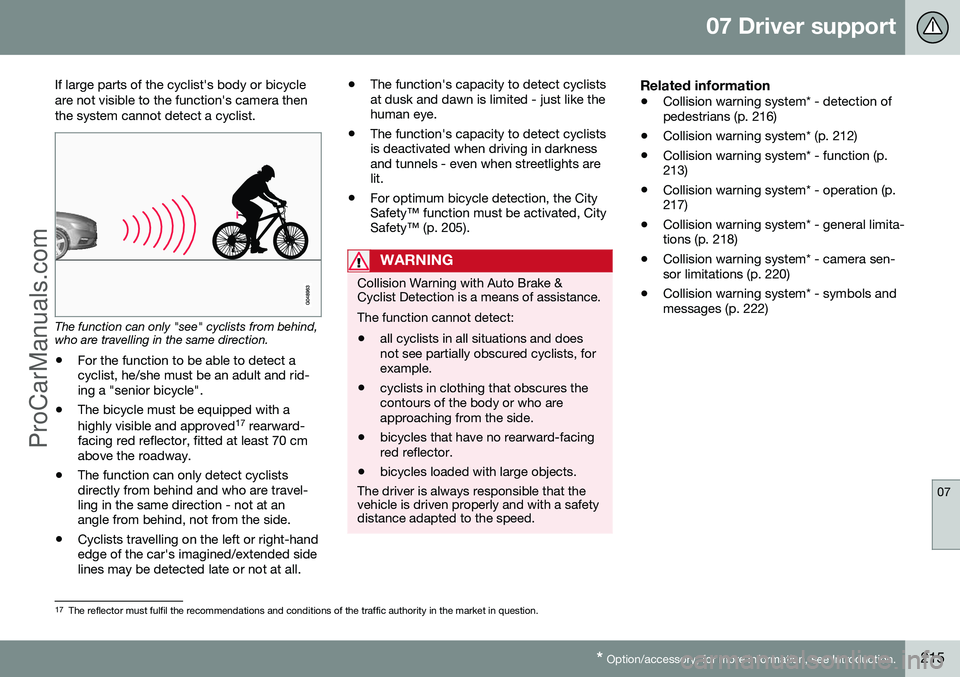
If large parts of the cyclist's body or bicycle are not visible to the function's camera thenthe system cannot detect a cyclist.
The function can only "see" cyclists from behind, who are travelling in the same direction.
• For the function to be able to detect a cyclist, he/she must be an adult and rid-ing a "senior bicycle".
• The bicycle must be equipped with a highly visible and approved 17
rearward-
facing red reflector, fitted at least 70 cm above the roadway.
• The function can only detect cyclistsdirectly from behind and who are travel-ling in the same direction - not at anangle from behind, not from the side.
• Cyclists travelling on the left or right-handedge of the car's imagined/extended sidelines may be detected late or not at all. •
The function's capacity to detect cyclistsat dusk and dawn is limited - just like thehuman eye.
• The function's capacity to detect cyclistsis deactivated when driving in darknessand tunnels - even when streetlights arelit.
• For optimum bicycle detection, the CitySafety™ function must be activated, CitySafety™ (p. 205).
WARNING
Collision Warning with Auto Brake & Cyclist Detection is a means of assistance. The function cannot detect: •all cyclists in all situations and does not see partially obscured cyclists, forexample.
• cyclists in clothing that obscures thecontours of the body or who areapproaching from the side.
• bicycles that have no rearward-facingred reflector.
• bicycles loaded with large objects.
The driver is always responsible that the vehicle is driven properly and with a safetydistance adapted to the speed.
Related information
• Collision warning system* - detection of pedestrians (p. 216)
• Collision warning system* (p. 212)
• Collision warning system* - function (p.213)
• Collision warning system* - operation (p.217)
• Collision warning system* - general limita-tions (p. 218)
• Collision warning system* - camera sen-sor limitations (p. 220)
• Collision warning system* - symbols andmessages (p. 222)
17
The reflector must fulfil the recommendations and conditions of the traffic authority in the market in question.
ProCarManuals.co’