navigation VOLVO V60 2014 User Guide
[x] Cancel search | Manufacturer: VOLVO, Model Year: 2014, Model line: V60, Model: VOLVO V60 2014Pages: 442, PDF Size: 13.85 MB
Page 104 of 442
||
03 Instruments and controls
03
102* Option/accessory, for more information, see Introduction.
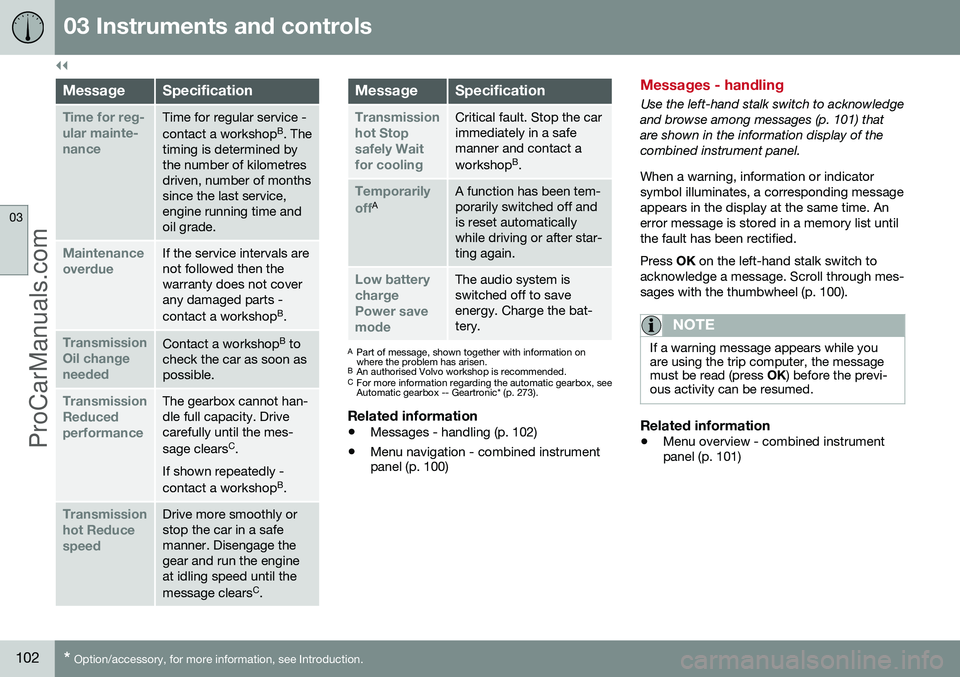
MessageSpecification
Time for reg- ular mainte-nanceTime for regular service - contact a workshop B
. The
timing is determined by the number of kilometresdriven, number of monthssince the last service,engine running time andoil grade.
Maintenance overdueIf the service intervals are not followed then thewarranty does not coverany damaged parts - contact a workshop B
.
Transmission Oil changeneededContact a workshop B
to
check the car as soon as possible.
Transmission ReducedperformanceThe gearbox cannot han- dle full capacity. Drivecarefully until the mes- sage clears C
.
If shown repeatedly -contact a workshop B
.
Transmission hot ReducespeedDrive more smoothly or stop the car in a safemanner. Disengage thegear and run the engineat idling speed until the message clears C
.
MessageSpecification
Transmission hot Stopsafely Waitfor coolingCritical fault. Stop the car immediately in a safemanner and contact a workshop B
.
Temporarily offAA function has been tem- porarily switched off andis reset automaticallywhile driving or after star-ting again.
Low battery chargePower savemodeThe audio system is switched off to saveenergy. Charge the bat-tery.
A Part of message, shown together with information on where the problem has arisen.
B An authorised Volvo workshop is recommended.
C For more information regarding the automatic gearbox, seeAutomatic gearbox -- Geartronic* (p. 273).
Related information
• Messages - handling (p. 102)
• Menu navigation - combined instrument panel (p. 100)
Messages - handling
Use the left-hand stalk switch to acknowledge and browse among messages (p. 101) thatare shown in the information display of thecombined instrument panel. When a warning, information or indicator symbol illuminates, a corresponding messageappears in the display at the same time. Anerror message is stored in a memory list untilthe fault has been rectified. Press
OK on the left-hand stalk switch to
acknowledge a message. Scroll through mes- sages with the thumbwheel (p. 100).
NOTE
If a warning message appears while you are using the trip computer, the messagemust be read (press OK) before the previ-
ous activity can be resumed.
Related information
• Menu overview - combined instrument panel (p. 101)
ProCarManuals.co’
Page 105 of 442
03 Instruments and controls
03
103
MY CAR
MY CAR is a menu source that handles many of the car's functions, e.g. City Safety, locksand alarm, automatic fan speed, setting theclock, etc. Certain functions are standard, others are optional - the range also varies depending onthe market.
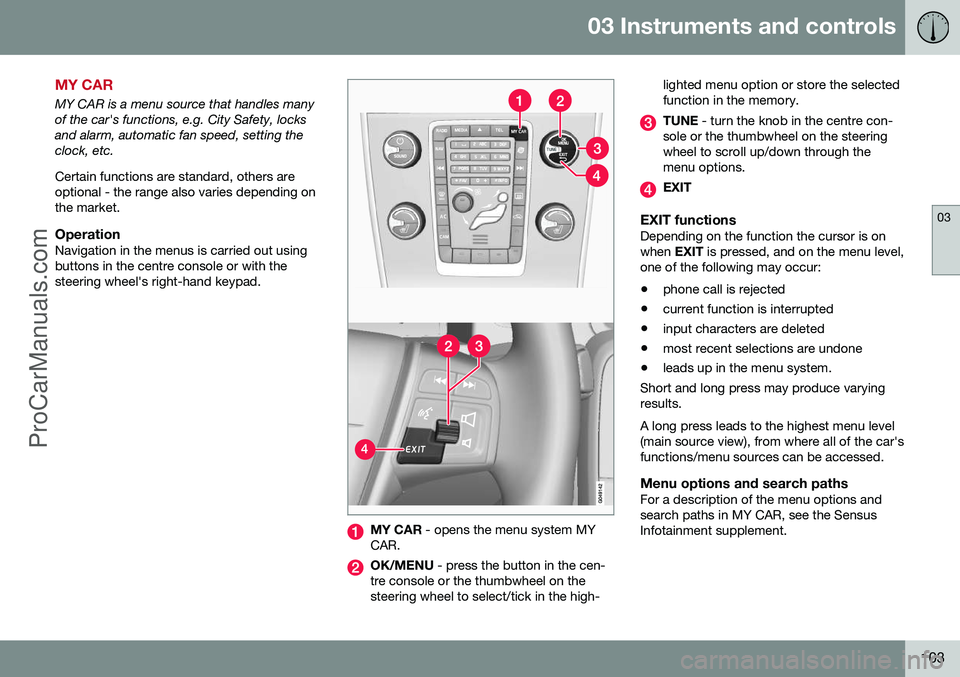
OperationNavigation in the menus is carried out usingbuttons in the centre console or with thesteering wheel's right-hand keypad.
MY CAR - opens the menu system MY
CAR.
OK/MENU - press the button in the cen-
tre console or the thumbwheel on the steering wheel to select/tick in the high- lighted menu option or store the selectedfunction in the memory.
TUNE
- turn the knob in the centre con-
sole or the thumbwheel on the steering wheel to scroll up/down through themenu options.
EXIT
EXIT functionsDepending on the function the cursor is on when EXIT is pressed, and on the menu level,
one of the following may occur:
• phone call is rejected
• current function is interrupted
• input characters are deleted
• most recent selections are undone
• leads up in the menu system.
Short and long press may produce varyingresults. A long press leads to the highest menu level (main source view), from where all of the car'sfunctions/menu sources can be accessed.
Menu options and search pathsFor a description of the menu options andsearch paths in MY CAR, see the SensusInfotainment supplement.
ProCarManuals.co’
Page 349 of 442
10 Maintenance and service
10
}}
347
WARNING
Never fill above the MAX mark. The level
should never be above MAX or below MIN
as this could lead to engine damage.
WARNING
Do not spill oil onto the hot exhaust mani- fold due to the risk of fire.
Engine with electronic oil level sensor, 4-cyl. 2.0 l 6
Filler pipe.
7
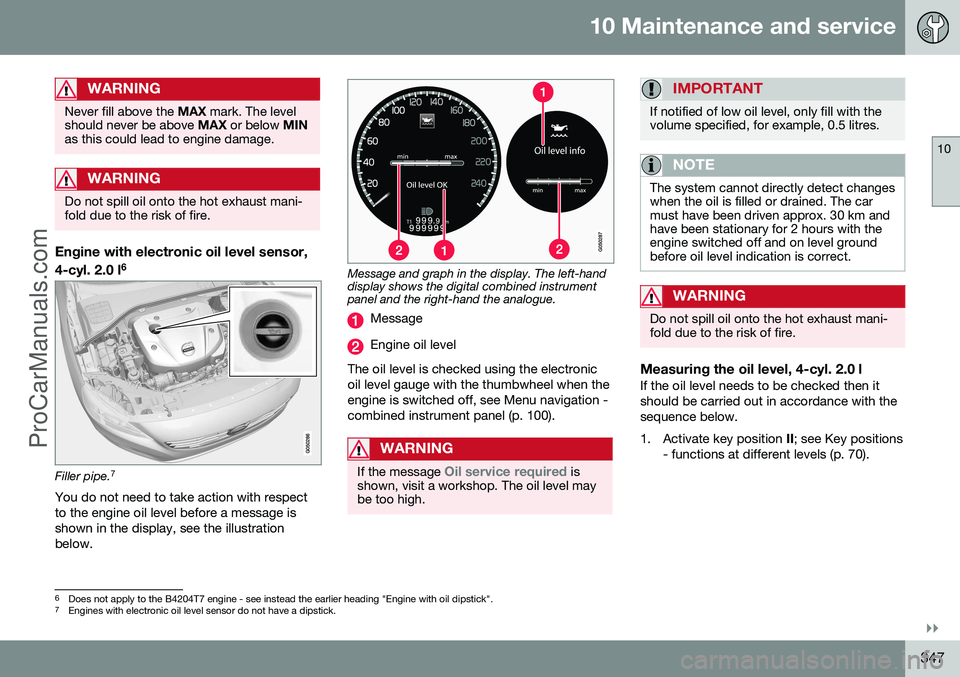
You do not need to take action with respect to the engine oil level before a message isshown in the display, see the illustrationbelow.
Message and graph in the display. The left-hand display shows the digital combined instrumentpanel and the right-hand the analogue.
Message
Engine oil level
The oil level is checked using the electronic oil level gauge with the thumbwheel when theengine is switched off, see Menu navigation -combined instrument panel (p. 100).
WARNING
If the message Oil service required is
shown, visit a workshop. The oil level may be too high.
IMPORTANT
If notified of low oil level, only fill with the volume specified, for example, 0.5 litres.
NOTE
The system cannot directly detect changes when the oil is filled or drained. The carmust have been driven approx. 30 km andhave been stationary for 2 hours with theengine switched off and on level groundbefore oil level indication is correct.
WARNING
Do not spill oil onto the hot exhaust mani- fold due to the risk of fire.
Measuring the oil level, 4-cyl. 2.0 lIf the oil level needs to be checked then it should be carried out in accordance with thesequence below.
1. Activate key position II; see Key positions
- functions at different levels (p. 70).
6 Does not apply to the B4204T7 engine - see instead the earlier heading "Engine with oil dipstick".7
Engines with electronic oil level sensor do not have a dipstick.
ProCarManuals.co’
Page 350 of 442
||
10 Maintenance and service
10
348
2. Rotate the thumbwheel on the left-handstalk switch to position Oil level.
> You will then see information displayed about the engine oil level. For more information on menu naviga- tion, see Menu navigation - combinedinstrument panel (p. 100).
NOTE
If the right conditions for measuring the oil level are not met (time after engine shut-down, the car's inclination, outside tem- perature, etc.) then the message
Not
available will be shown. This does not
mean that there is something wrong in the car's systems.
Engine with electronic oil level sensor, 5-cyl. diesel
Filler pipe. 8
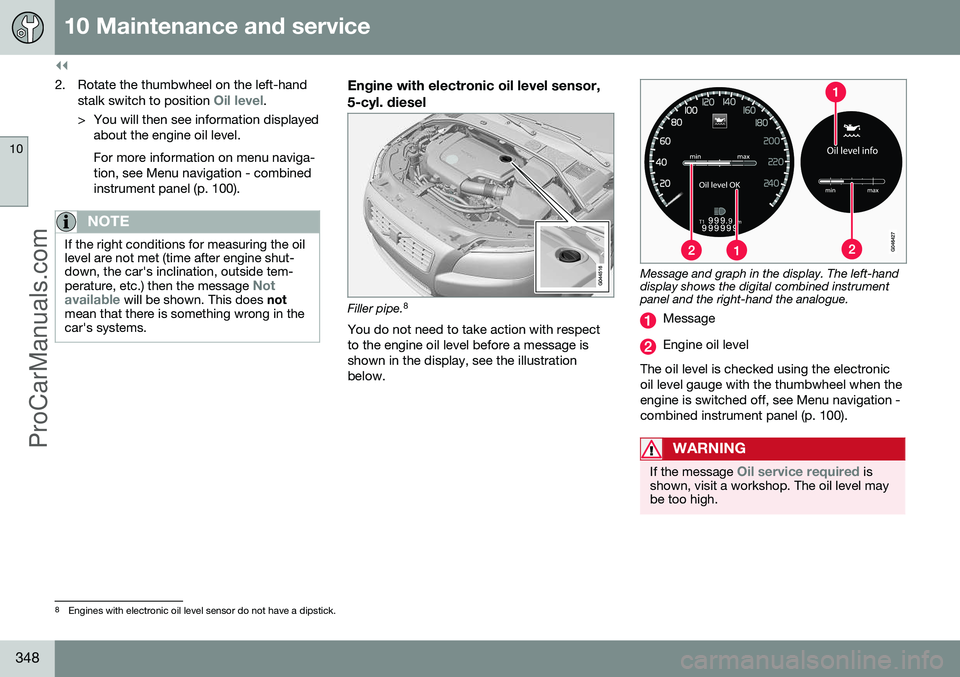
You do not need to take action with respect to the engine oil level before a message isshown in the display, see the illustrationbelow.
Message and graph in the display. The left-hand display shows the digital combined instrumentpanel and the right-hand the analogue.
Message
Engine oil level
The oil level is checked using the electronic oil level gauge with the thumbwheel when theengine is switched off, see Menu navigation -combined instrument panel (p. 100).
WARNING
If the message Oil service required is
shown, visit a workshop. The oil level may be too high.
8 Engines with electronic oil level sensor do not have a dipstick.
ProCarManuals.co’
Page 351 of 442
10 Maintenance and service
10
349
IMPORTANT
In the event of the message Oil level low
Refill 0.5 litre, only fill with 0.5 litres.
NOTE
The oil level is only detected by the system during driving. The system cannot directlydetect changes when the oil is filled ordrained. The car must be drivenabout 30 km before the oil level display iscorrect.
WARNING
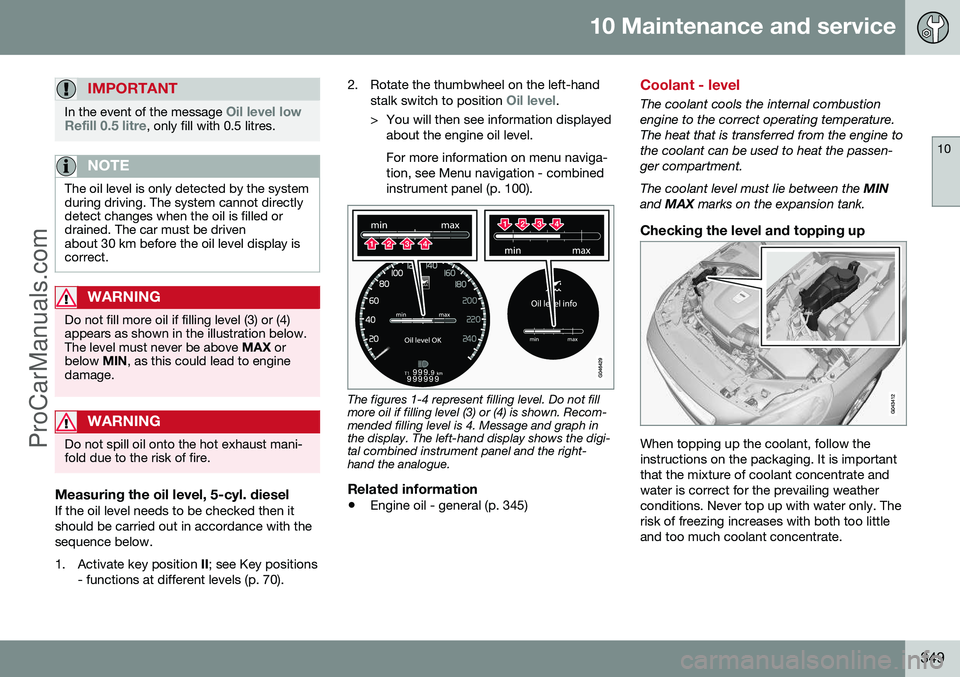
Do not fill more oil if filling level (3) or (4) appears as shown in the illustration below.The level must never be above MAX or
below MIN, as this could lead to engine
damage.
WARNING
Do not spill oil onto the hot exhaust mani- fold due to the risk of fire.
Measuring the oil level, 5-cyl. dieselIf the oil level needs to be checked then it should be carried out in accordance with thesequence below.
1. Activate key position II; see Key positions
- functions at different levels (p. 70). 2. Rotate the thumbwheel on the left-hand
stalk switch to position
Oil level.
> You will then see information displayed about the engine oil level. For more information on menu naviga- tion, see Menu navigation - combinedinstrument panel (p. 100).
The figures 1-4 represent filling level. Do not fill more oil if filling level (3) or (4) is shown. Recom-mended filling level is 4. Message and graph inthe display. The left-hand display shows the digi-tal combined instrument panel and the right-hand the analogue.
Related information
• Engine oil - general (p. 345)
Coolant - level
The coolant cools the internal combustion engine to the correct operating temperature.The heat that is transferred from the engine tothe coolant can be used to heat the passen-ger compartment. The coolant level must lie between the
MIN
and MAX marks on the expansion tank.
Checking the level and topping up
When topping up the coolant, follow the instructions on the packaging. It is importantthat the mixture of coolant concentrate andwater is correct for the prevailing weatherconditions. Never top up with water only. Therisk of freezing increases with both too littleand too much coolant concentrate.
ProCarManuals.co’
Page 422 of 442
||
11 Specifications
11
420
Country/ Area
South Korea:제품 정 보
Volvo Car Korea
신청자 코드: KCC-CMM-N25-IAM21L3, KCC-CMM-N25-IAM21L2 and KCC-CMM-N25-IAM21L1
제품 명: Bluetooth Audio Navigation Radio
모델 명: IAM2.1
산 날짜: March/2010 Alpine Electronics, Inc Made in Japan 고 객 정 보
Volvo Car Korea 볼보자동차코리아
서울시 용산구 한남 2 동 726-173 볼보빌딩 4 층
볼보자동차 고객센터 1588-1777 http://www.volvocars.com/kr 사 용자 주 의사항
※당해 무선설비는 전파혼신 가능성이 있으므로 인명안전과 관련된 서비스는 할 수 없습니다
ProCarManuals.com