trailer VOLVO V60 2014 User Guide
[x] Cancel search | Manufacturer: VOLVO, Model Year: 2014, Model line: V60, Model: VOLVO V60 2014Pages: 442, PDF Size: 13.85 MB
Page 249 of 442
07 Driver support
07
* Option/accessory, for more information, see Introduction.247
towbar's intended "trajectory" toward the trailer can be shown on the screen - just asfor the "wheel tracks".
• If precise manoeuvring is required then the towbar can be zoomed in by pressingCAM
- pressing the button again returns
to normal view.
The towbar's park assist line is activated in
the menu system after pressing OK/MENU
where you can select to display either the "wheel tracks" or the towbar's trajectory -both options cannot be shown simultane-ously.
Related information
• Park assist camera (p. 244)
• Park assist camera - limitations (p. 247)
• Park Assist* (p. 240)
• MY CAR (p. 103)
Park assist camera - limitations
The parking camera is an assist system and is activated when reverse gear is engaged.
NOTE
A bike carrier or other accessory mounted on the rear of the car could obscure thecamera's view.
To bear in mindPay attention to the possibility that, even if it only looks like a relatively small part of theimage is obscured, it could be a relativelylarge sector that is hidden from view. Obsta-cles could thereby go undetected until theyare very close to the car.
• Keep the camera lens free from dirt, ice and snow.
• Clean the camera lens regularly with luke-warm water and car shampoo - take carenot to scratch the lens.
Related information
•Park assist camera (p. 244)
• Park assist camera - settings (p. 246)
• Park Assist* (p. 240)
Park Assist Pilot (PAP)*
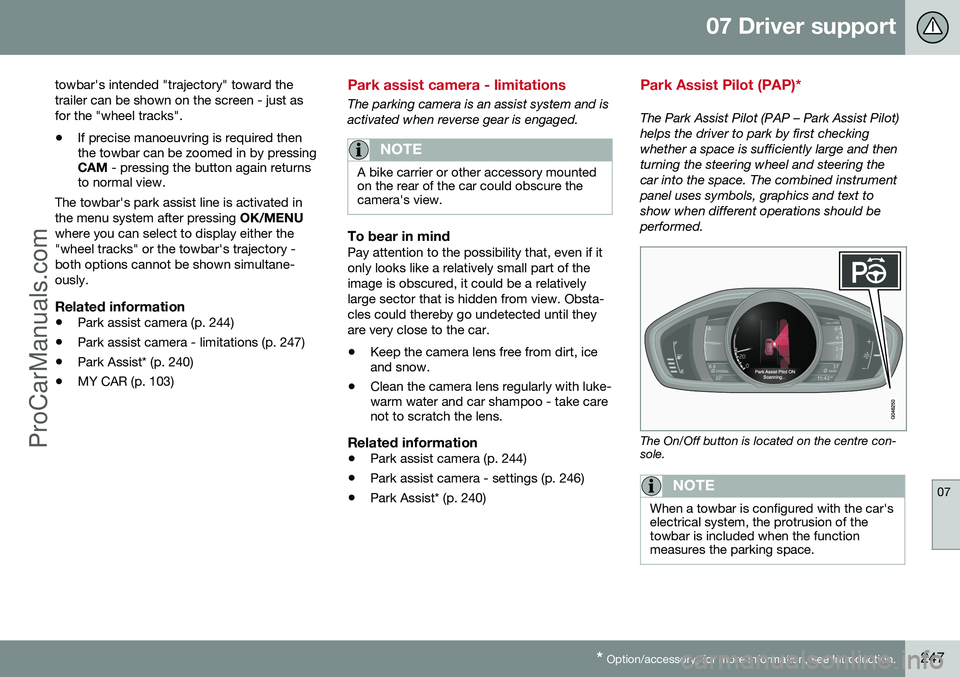
The Park Assist Pilot (PAP – Park Assist Pilot) helps the driver to park by first checkingwhether a space is sufficiently large and thenturning the steering wheel and steering thecar into the space. The combined instrumentpanel uses symbols, graphics and text toshow when different operations should beperformed.
The On/Off button is located on the centre con- sole.
NOTE
When a towbar is configured with the car's electrical system, the protrusion of thetowbar is included when the functionmeasures the parking space.
ProCarManuals.co’
Page 250 of 442
||
07 Driver support
07
248* Option/accessory, for more information, see Introduction.
WARNING
PAP does not work in all situations but is designed merely as a supplementary aid. The driver always has the final responsibil- ity for driving the vehicle in a safe mannerand for paying attention to the surround-ings and other road users approaching orpassing during parking.
Related information
• Park Assist Pilot (PAP)* - symbols and messages (p. 252)
• Park Assist Pilot (PAP)* - operation (p.249)
• Park Assist Pilot (PAP)* - function (p.248)
• Park Assist Pilot (PAP)* - limitations (p.251)
• Park Assist* (p. 240)
• Park assist camera (p. 244)
Park Assist Pilot (PAP)* - function
The Park Assist Pilot (PAP – Park Assist Pilot) helps the driver to park by first checkingwhether a space is sufficiently large and thenturning the steering wheel and steering thecar into the space. The combined instrumentpanel uses symbols, graphics and text toshow when different operations should beperformed.
NOTE
The PAP function measures the space and turns the steering wheel - the driver's taskis to follow the combined instrument pan-el's instructions and select the gear(reverse/forward), control the speed, brakeand stop.
PAP can be activated if the following criteria are met once the engine has been started:
• The functions DSTC or ABS must not intervene while the PAP function is ena-bled - these can be activated due to asteep or slippery surface, for example;see the sections on Foot brake and Sta-bility and traction control system for moreinformation.
• A trailer must not be connected to thecar.
• The speed must be below 50 km/h.
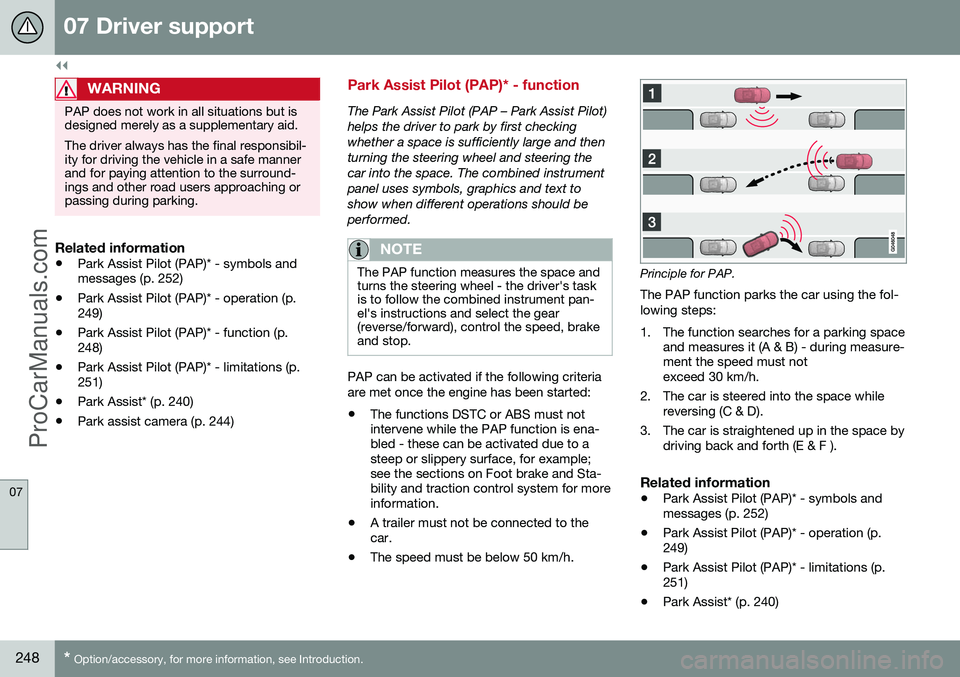
Principle for PAP.
The PAP function parks the car using the fol- lowing steps:
1. The function searches for a parking space and measures it (A & B) - during measure- ment the speed must notexceed 30 km/h.
2. The car is steered into the space while reversing (C & D).
3. The car is straightened up in the space by driving back and forth (E & F ).
Related information
• Park Assist Pilot (PAP)* - symbols andmessages (p. 252)
• Park Assist Pilot (PAP)* - operation (p.249)
• Park Assist Pilot (PAP)* - limitations (p.251)
• Park Assist* (p. 240)
ProCarManuals.co’
Page 256 of 442
07 Driver support
07
254* Option/accessory, for more information, see Introduction.
BLIS* (Blind Spot Information System) - operation
BLIS (Blind Spot Information System) is a function designed for providing support forthe driver when driving in dense traffic onroads with several lanes in the same direction.
Activate/deactivate BLISBLIS is activated when the engine is started.This is confirmed by the indicator lamps inthe door panels flashing once.
Button for activating/deactivating.
The BLIS function can be deactivated/acti-
vated by pressing the BLIS button on the
centre console. Some combinations of the selected equip- ment leave no vacant space for a button inthe centre console - in which case the func-tion is handled by the car's menu system (p.103) MY CAR . When BLIS is deactivated/activated the lampin the button extinguishes/illuminates and thecombined instrument panel confirms thechange with a text message. The door panelindicator lamps flash once upon activation. To extinguish the message:
• Press the left stalk switch
OK button.
or
• Wait approx. 5 seconds - the message extinguishes.
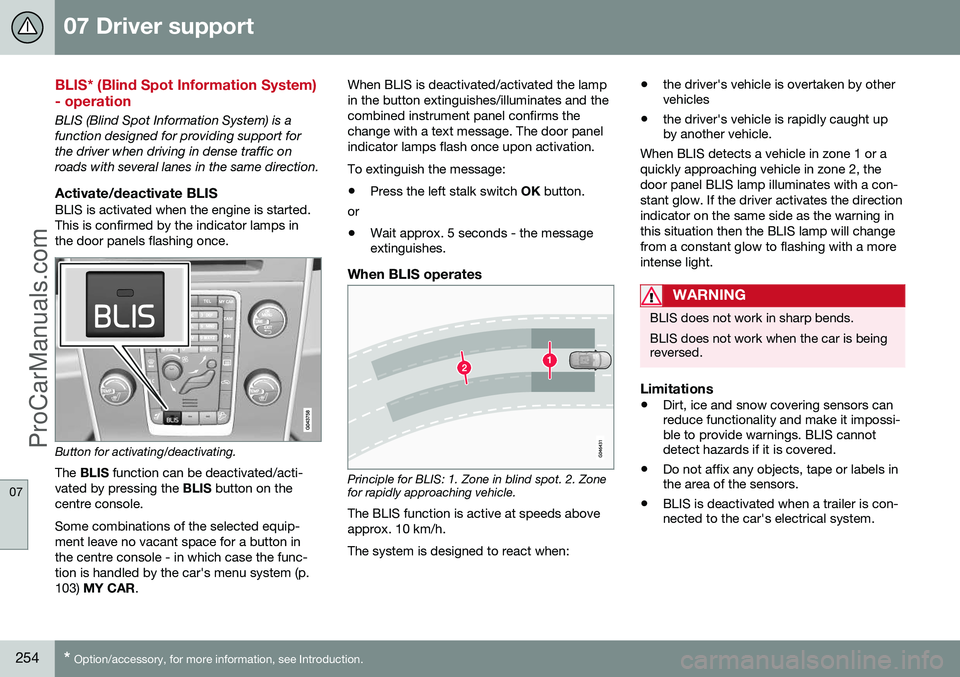
When BLIS operates
Principle for BLIS: 1. Zone in blind spot. 2. Zone for rapidly approaching vehicle.
The BLIS function is active at speeds above approx. 10 km/h. The system is designed to react when: •
the driver's vehicle is overtaken by other vehicles
• the driver's vehicle is rapidly caught upby another vehicle.
When BLIS detects a vehicle in zone 1 or a quickly approaching vehicle in zone 2, thedoor panel BLIS lamp illuminates with a con-stant glow. If the driver activates the directionindicator on the same side as the warning inthis situation then the BLIS lamp will changefrom a constant glow to flashing with a moreintense light.
WARNING
BLIS does not work in sharp bends. BLIS does not work when the car is being reversed.
Limitations
• Dirt, ice and snow covering sensors can reduce functionality and make it impossi-ble to provide warnings. BLIS cannotdetect hazards if it is covered.
• Do not affix any objects, tape or labels inthe area of the sensors.
• BLIS is deactivated when a trailer is con-nected to the car's electrical system.
ProCarManuals.co’
Page 258 of 442
||
07 Driver support
07
256
CTA is only active during reversing and is activated automatically when the gearbox'sreverse position is selected. •If CTA detects something approaching from the side, an acoustic warning signalsounds. The signal comes from either theleft or the right-hand speaker, dependingon the direction from which the object isapproaching.
• CTA also warns by illuminating the BLISlamps.
• An additional warning is provided in theform of an illuminated icon in the displayscreen's PAS graphics (p. 240).
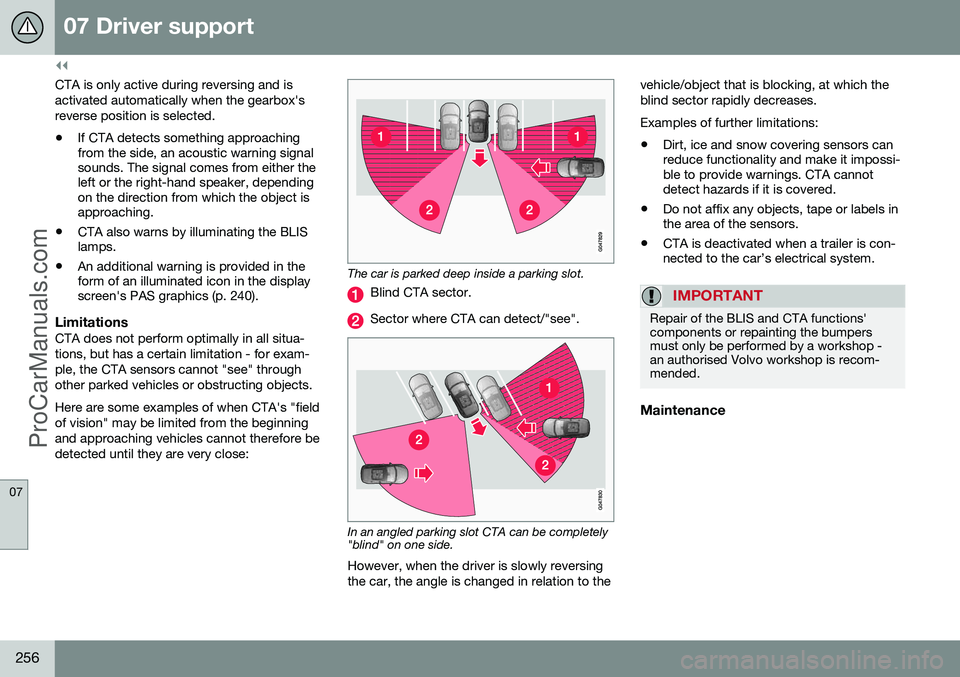
LimitationsCTA does not perform optimally in all situa- tions, but has a certain limitation - for exam-ple, the CTA sensors cannot "see" throughother parked vehicles or obstructing objects. Here are some examples of when CTA's "field of vision" may be limited from the beginningand approaching vehicles cannot therefore bedetected until they are very close:
The car is parked deep inside a parking slot.
Blind CTA sector.
Sector where CTA can detect/"see".
In an angled parking slot CTA can be completely "blind" on one side.
However, when the driver is slowly reversing the car, the angle is changed in relation to the vehicle/object that is blocking, at which theblind sector rapidly decreases. Examples of further limitations:
• Dirt, ice and snow covering sensors can reduce functionality and make it impossi-ble to provide warnings. CTA cannotdetect hazards if it is covered.
• Do not affix any objects, tape or labels inthe area of the sensors.
• CTA is deactivated when a trailer is con-nected to the car’s electrical system.
IMPORTANT
Repair of the BLIS and CTA functions' components or repainting the bumpersmust only be performed by a workshop -an authorised Volvo workshop is recom-mended.
Maintenance
ProCarManuals.com
Page 259 of 442
07 Driver support
07
* Option/accessory, for more information, see Introduction.257
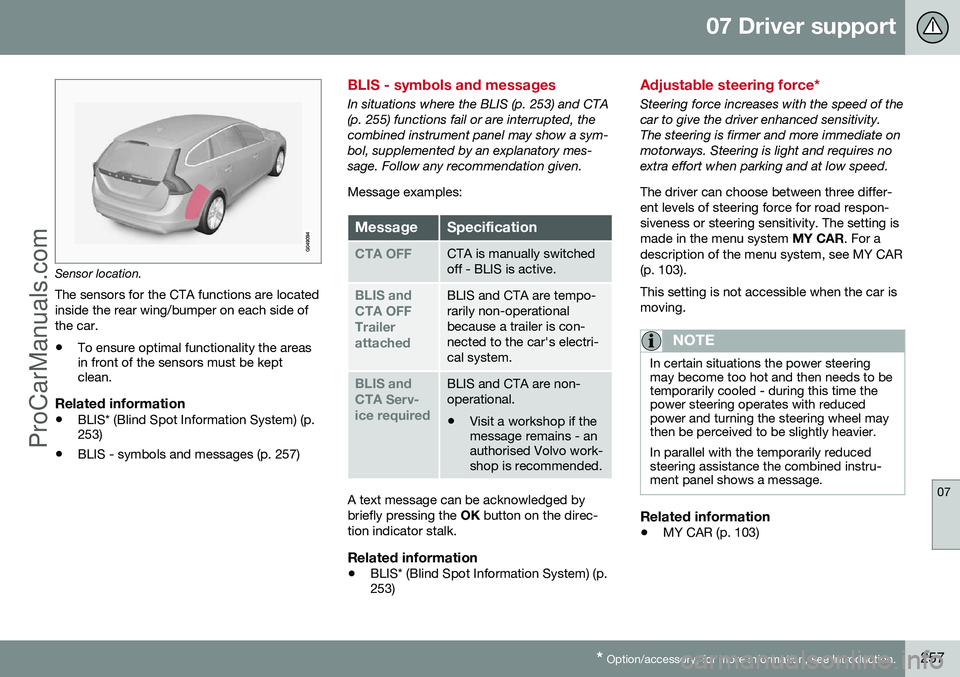
Sensor location.
The sensors for the CTA functions are located inside the rear wing/bumper on each side ofthe car.
• To ensure optimal functionality the areas in front of the sensors must be keptclean.
Related information
•BLIS* (Blind Spot Information System) (p.253)
• BLIS - symbols and messages (p. 257)
BLIS - symbols and messages
In situations where the BLIS (p. 253) and CTA (p. 255) functions fail or are interrupted, thecombined instrument panel may show a sym-bol, supplemented by an explanatory mes-sage. Follow any recommendation given. Message examples:
MessageSpecification
CTA OFFCTA is manually switched off - BLIS is active.
BLIS and CTA OFFTrailerattachedBLIS and CTA are tempo- rarily non-operationalbecause a trailer is con-nected to the car's electri-cal system.
BLIS and CTA Serv-ice requiredBLIS and CTA are non- operational.
• Visit a workshop if the message remains - anauthorised Volvo work-shop is recommended.
A text message can be acknowledged by briefly pressing the
OK button on the direc-
tion indicator stalk.
Related information
• BLIS* (Blind Spot Information System) (p. 253)
Adjustable steering force*
Steering force increases with the speed of the car to give the driver enhanced sensitivity.The steering is firmer and more immediate onmotorways. Steering is light and requires noextra effort when parking and at low speed. The driver can choose between three differ- ent levels of steering force for road respon-siveness or steering sensitivity. The setting ismade in the menu system
MY CAR. For a
description of the menu system, see MY CAR(p. 103). This setting is not accessible when the car is moving.
NOTE
In certain situations the power steering may become too hot and then needs to betemporarily cooled - during this time thepower steering operates with reducedpower and turning the steering wheel maythen be perceived to be slightly heavier. In parallel with the temporarily reduced steering assistance the combined instru-ment panel shows a message.
Related information
• MY CAR (p. 103)
ProCarManuals.co’
Page 278 of 442
08 Starting and driving
08
276* Option/accessory, for more information, see Introduction.
Automatic gearbox -- Powershift*
An automatic gearbox with Powershift differs from an automatic gearbox with Geartronic (p.273), in that it has double mechanical clutchdiscs.
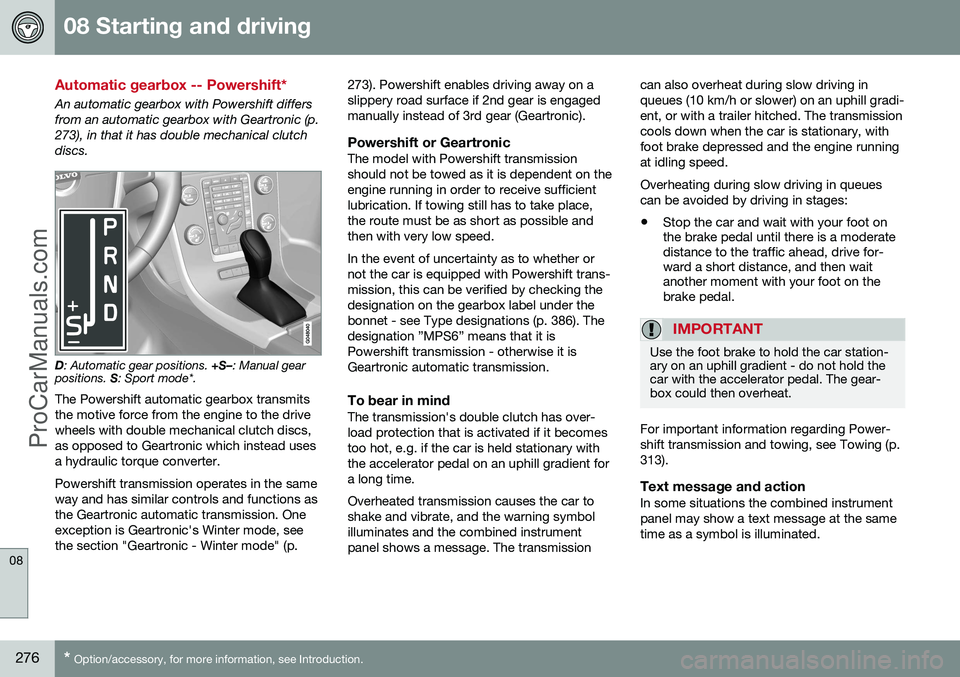
D : Automatic gear positions. +S–: Manual gear
positions. S: Sport mode*.
The Powershift automatic gearbox transmits the motive force from the engine to the drivewheels with double mechanical clutch discs,as opposed to Geartronic which instead usesa hydraulic torque converter. Powershift transmission operates in the same way and has similar controls and functions asthe Geartronic automatic transmission. Oneexception is Geartronic's Winter mode, seethe section "Geartronic - Winter mode" (p. 273). Powershift enables driving away on aslippery road surface if 2nd gear is engagedmanually instead of 3rd gear (Geartronic).
Powershift or GeartronicThe model with Powershift transmissionshould not be towed as it is dependent on theengine running in order to receive sufficientlubrication. If towing still has to take place,the route must be as short as possible andthen with very low speed. In the event of uncertainty as to whether or not the car is equipped with Powershift trans-mission, this can be verified by checking thedesignation on the gearbox label under thebonnet - see Type designations (p. 386). Thedesignation ”MPS6” means that it isPowershift transmission - otherwise it isGeartronic automatic transmission.
To bear in mindThe transmission's double clutch has over-load protection that is activated if it becomestoo hot, e.g. if the car is held stationary withthe accelerator pedal on an uphill gradient fora long time. Overheated transmission causes the car to shake and vibrate, and the warning symbolilluminates and the combined instrumentpanel shows a message. The transmissioncan also overheat during slow driving inqueues (10 km/h or slower) on an uphill gradi-ent, or with a trailer hitched. The transmissioncools down when the car is stationary, withfoot brake depressed and the engine runningat idling speed. Overheating during slow driving in queues can be avoided by driving in stages:
• Stop the car and wait with your foot on the brake pedal until there is a moderatedistance to the traffic ahead, drive for-ward a short distance, and then waitanother moment with your foot on thebrake pedal.
IMPORTANT
Use the foot brake to hold the car station- ary on an uphill gradient - do not hold thecar with the accelerator pedal. The gear-box could then overheat.
For important information regarding Power- shift transmission and towing, see Towing (p.313).
Text message and actionIn some situations the combined instrumentpanel may show a text message at the sametime as a symbol is illuminated.
ProCarManuals.co’
Page 284 of 442
08 Starting and driving
08
282* Option/accessory, for more information, see Introduction.
Start/Stop* - the engine does not stop
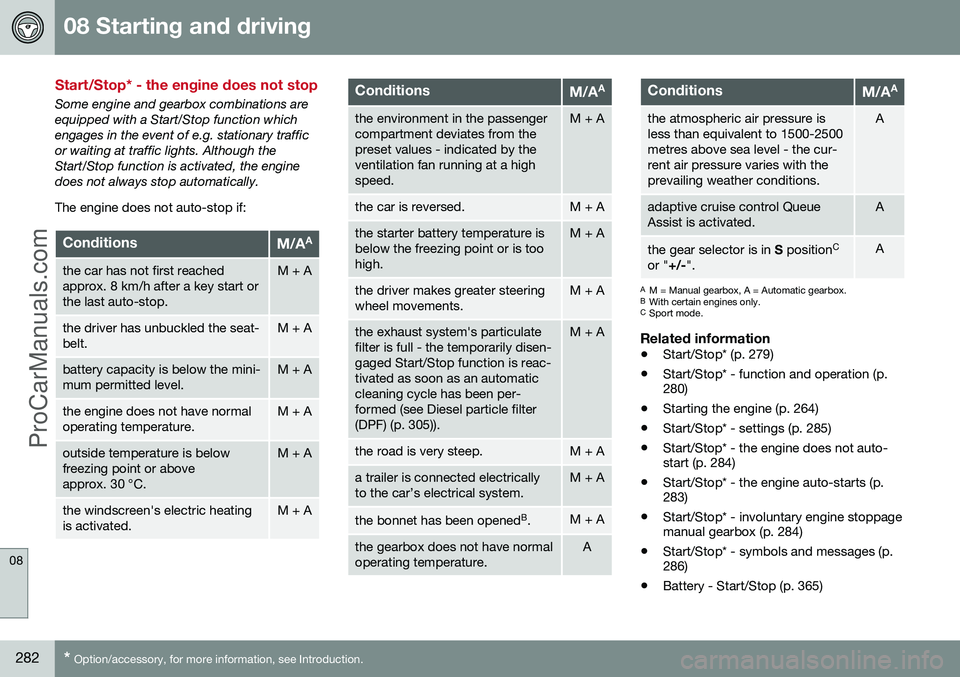
Some engine and gearbox combinations are equipped with a Start/Stop function whichengages in the event of e.g. stationary trafficor waiting at traffic lights. Although theStart/Stop function is activated, the enginedoes not always stop automatically. The engine does not auto-stop if:
ConditionsM/A A
the car has not first reached approx. 8 km/h after a key start orthe last auto-stop.M + A
the driver has unbuckled the seat- belt.M + A
battery capacity is below the mini- mum permitted level.M + A
the engine does not have normal operating temperature.M + A
outside temperature is below freezing point or aboveapprox. 30 °C.M + A
the windscreen's electric heating is activated.M + A
ConditionsM/AA
the environment in the passenger compartment deviates from thepreset values - indicated by theventilation fan running at a highspeed.M + A
the car is reversed.M + A
the starter battery temperature is below the freezing point or is toohigh.M + A
the driver makes greater steering wheel movements.M + A
the exhaust system's particulate filter is full - the temporarily disen-gaged Start/Stop function is reac-tivated as soon as an automaticcleaning cycle has been per-formed (see Diesel particle filter(DPF) (p. 305)).M + A
the road is very steep.M + A
a trailer is connected electrically to the car’s electrical system.M + A
the bonnet has been opened
B
.M + A
the gearbox does not have normal operating temperature.A
ConditionsM/A A
the atmospheric air pressure is less than equivalent to 1500-2500metres above sea level - the cur-rent air pressure varies with theprevailing weather conditions.A
adaptive cruise control Queue Assist is activated.A
the gear selector is in
S position C
or " +/-".A
A
M = Manual gearbox, A = Automatic gearbox.
B With certain engines only.
C Sport mode.
Related information
• Start/Stop* (p. 279)
• Start/Stop* - function and operation (p. 280)
• Starting the engine (p. 264)
• Start/Stop* - settings (p. 285)
• Start/Stop* - the engine does not auto-start (p. 284)
• Start/Stop* - the engine auto-starts (p.283)
• Start/Stop* - involuntary engine stoppagemanual gearbox (p. 284)
• Start/Stop* - symbols and messages (p.286)
• Battery - Start/Stop (p. 365)
ProCarManuals.co’
Page 296 of 442
||
08 Starting and driving
08
294
Disengaging the parking brake
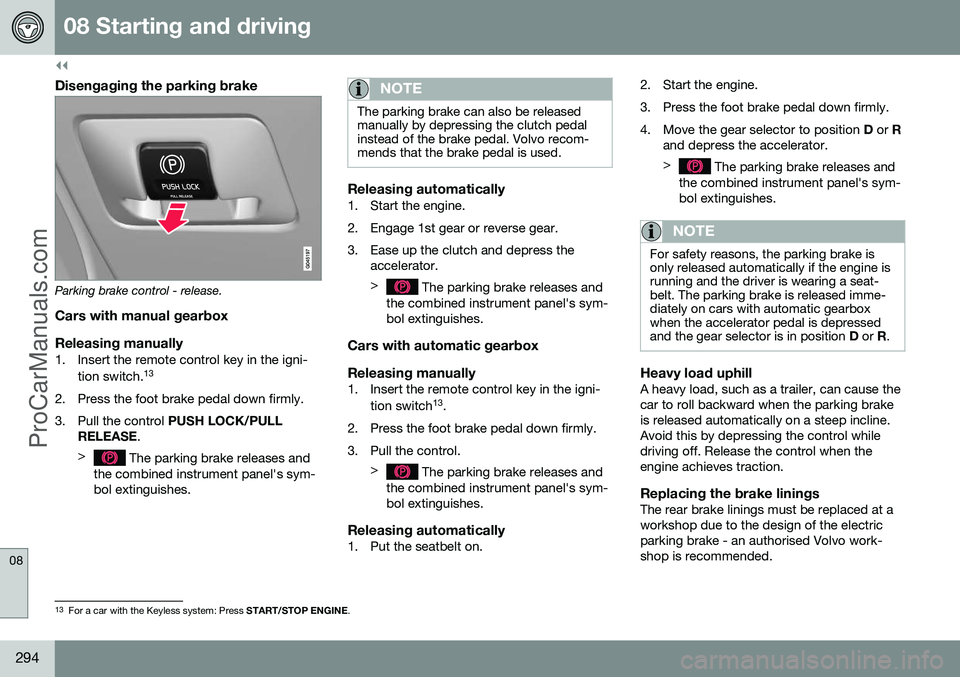
Parking brake control - release.
Cars with manual gearbox
Releasing manually
1. Insert the remote control key in the igni- tion switch. 13
2. Press the foot brake pedal down firmly.
3. Pull the control PUSH LOCK/PULL
RELEASE .
>
The parking brake releases and
the combined instrument panel's sym- bol extinguishes.
NOTE
The parking brake can also be released manually by depressing the clutch pedalinstead of the brake pedal. Volvo recom-mends that the brake pedal is used.
Releasing automatically1. Start the engine.
2. Engage 1st gear or reverse gear.
3. Ease up the clutch and depress the accelerator. >
The parking brake releases and
the combined instrument panel's sym- bol extinguishes.
Cars with automatic gearbox Releasing manually
1. Insert the remote control key in the igni-
tion switch 13
.
2. Press the foot brake pedal down firmly.
3. Pull the control. >
The parking brake releases and
the combined instrument panel's sym- bol extinguishes.
Releasing automatically1. Put the seatbelt on. 2. Start the engine.
3. Press the foot brake pedal down firmly.
4. Move the gear selector to position
D or R
and depress the accelerator. >
The parking brake releases and
the combined instrument panel's sym- bol extinguishes.
NOTE
For safety reasons, the parking brake is only released automatically if the engine isrunning and the driver is wearing a seat-belt. The parking brake is released imme-diately on cars with automatic gearboxwhen the accelerator pedal is depressedand the gear selector is in position D or R.
Heavy load uphillA heavy load, such as a trailer, can cause the car to roll backward when the parking brakeis released automatically on a steep incline.Avoid this by depressing the control whiledriving off. Release the control when theengine achieves traction.
Replacing the brake liningsThe rear brake linings must be replaced at aworkshop due to the design of the electricparking brake - an authorised Volvo work-shop is recommended.
13
For a car with the Keyless system: Press START/STOP ENGINE.
ProCarManuals.co’
Page 299 of 442
08 Starting and driving
08
297
Fording
Fording means that the car is driven through a water-covered roadway. Fording must be car-ried out with great caution. The car can be driven through water at a maximum depth of 25 cm at a maximumspeed of 10 km/h. Extra caution should beexercised when passing through flowingwater. During driving in water, maintain a low speed and do not stop the car. When the water hasbeen passed, depress the brake pedal lightlyand check that full brake function is achieved.Water and mud for example can make thebrake linings wet resulting in delayed brakefunction. •Clean the electric contacts of the electric engine block heater and trailer couplingafter driving in water and mud.
• Do not let the car stand with water overthe sills for any long period of time - thiscould cause electrical malfunctions.IMPORTANT
Engine damage can occur if water enters the air filter. In depths greater than 25 cm, water could enter the transmission. This reduces thelubricating ability of the oils and shortensthe service life of these systems. In the event of the engine stalling in water, do not try restart - tow the car from thewater to a workshop - an authorised Volvoworkshop is recommended. Risk of enginebreakdown.
Related information
•Recovery (p. 316)
• Towing (p. 313)
Overheating
Under special conditions, for example hard driving in hilly terrain and hot climate, there isa risk that the engine and drive system mayoverheat - in particular with a heavy load. For information about overheating when driv- ing with a trailer, see Driving with a trailer (p.306). • Remove any auxiliary lamps from in front of the grille when driving in hot climates.
• If the temperature in the engine's coolingsystem is too high then a warning symbolis illuminated in the combined instrumentpanel's information display and a text message
High engine temp Stop safelyis shown there - stop the car in a safe way and allow the engine to run at idlingspeed for several minutes in order to cooldown.
• If the text message
High engine temp
Stop engine or Coolant level low, Stop
engine is shown then the engine must be
switched off after stopping the car.
• In the event of overheating in the gearbox a built-in protection function is activatedwhich, amongst other things, illuminatesa warning symbol in the combined instru-ment panel, and its display shows the text message
Transmission hot Reduce
speed or Transmission hot Stop safely- follow the recommendation given and lower the speed and stop the car in a safeway and allow the engine to run at idling
ProCarManuals.co’
Page 303 of 442
08 Starting and driving
08
301
Filling with a fuel can14When filling with a fuel can, use the funnel located under the floor hatch in the cargoarea. The funnel is located by the spare wheelor in the well under the floor hatch. Make sure you insert the funnel's pipe firmly into the filler pipe. The filler pipe has an open-able cap and the funnel's pipe must bemoved past the cap before filling can begin.
Related information
•
Fuel filler flap - manual opening (p. 300)
• Fuel - handling (p. 301)
Fuel - handling
Fuel of a lower quality than that recom- mended by Volvo must not be used as enginepower and fuel consumption is negativelyaffected.
WARNING
Always avoid inhaling fuel vapour and get- ting fuel splashes in the eyes. In the event of fuel in the eyes, remove any contact lenses and rinse the eyes in plentyof water for at least 15 minutes and seekmedical attention. Never swallow fuel. Fuels such as petrol, bioethanol and mixtures of them and die-sel are highly toxic and could cause per-manent injury or be fatal if swallowed.Seek medical attention immediately if fuelhas been swallowed.
WARNING
Fuel which spills onto the ground can be ignited. Switch off the fuel-driven heater before starting to refuel. Never carry an activated mobile phone when refuelling. The ring signal couldcause spark build-up and ignite petrolfumes, leading to fire and injury.
IMPORTANT
Mixing different types of fuel or the use of fuel not recommended invalidates Volvo'sguarantees, and any associated serviceagreement. This applies to all engines.NOTE: It does not apply to cars withengines that are adapted to run on ethanolfuel (E85).
NOTE
Extreme weather conditions, driving with a trailer or driving at high altitudes in combi-nation with fuel grade are factors thatcould affect the car's performance.
Related information
•Economical driving (p. 305)
• Fuel - diesel (p. 302)
• Diesel particle filter (DPF) (p. 305)
• Fuel consumption and CO2 emissions (p. 403)
• Fuel tank - volume (p. 402)
14
Only applies to cars with diesel engine.
ProCarManuals.co’