wiper VOLVO V60 2014 User Guide
[x] Cancel search | Manufacturer: VOLVO, Model Year: 2014, Model line: V60, Model: VOLVO V60 2014Pages: 442, PDF Size: 13.85 MB
Page 99 of 442
03 Instruments and controls
03
* Option/accessory, for more information, see Introduction.97
Automatic dimming*Bright light from behind is automatically dimmed by the rearview mirror. The controlfor manual dimming is not available on mir-rors with automatic dimming. The rearview mirror contains two sensors - one forward facing and one rearward facing -that work together to identify and eliminatedazzling light. The forward facing sensordetects ambient light, while the rearward fac-ing sensor detects the light from vehicleheadlights behind.
NOTE
If the sensors are obscured by e.g. parking permits, transponders, sun visors orobjects in the seats or in the cargo area insuch a way that light is prevented fromreaching the sensors, then the dimmingfunction of the interior rearview and doormirrors is reduced.
The compass (p. 97) can only be specified for a rearview mirror with automatic dimming.
Related information
• Door mirrors (p. 94)
Compass*
The rearview mirror contains an integrated display that shows the compass direction inwhich the front of the car is pointing.
Operation
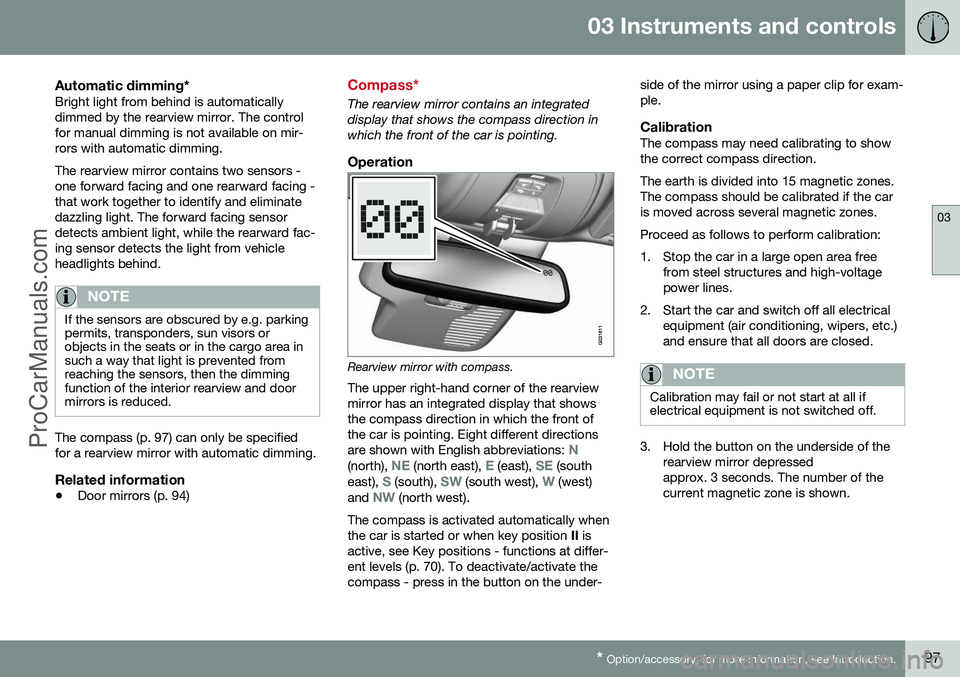
Rearview mirror with compass.
The upper right-hand corner of the rearview mirror has an integrated display that showsthe compass direction in which the front ofthe car is pointing. Eight different directions are shown with English abbreviations:
N(north), NE (north east), E (east), SE (south
east), S (south), SW (south west), W (west)
and NW (north west).
The compass is activated automatically when the car is started or when key position II is
active, see Key positions - functions at differ-ent levels (p. 70). To deactivate/activate thecompass - press in the button on the under- side of the mirror using a paper clip for exam-ple.
CalibrationThe compass may need calibrating to showthe correct compass direction. The earth is divided into 15 magnetic zones. The compass should be calibrated if the caris moved across several magnetic zones. Proceed as follows to perform calibration:
1. Stop the car in a large open area free
from steel structures and high-voltage power lines.
2. Start the car and switch off all electrical equipment (air conditioning, wipers, etc.)and ensure that all doors are closed.
NOTE
Calibration may fail or not start at all if electrical equipment is not switched off.
3. Hold the button on the underside of therearview mirror depressed approx. 3 seconds. The number of thecurrent magnetic zone is shown.
ProCarManuals.co’
Page 182 of 442
||
07 Driver support
07
180
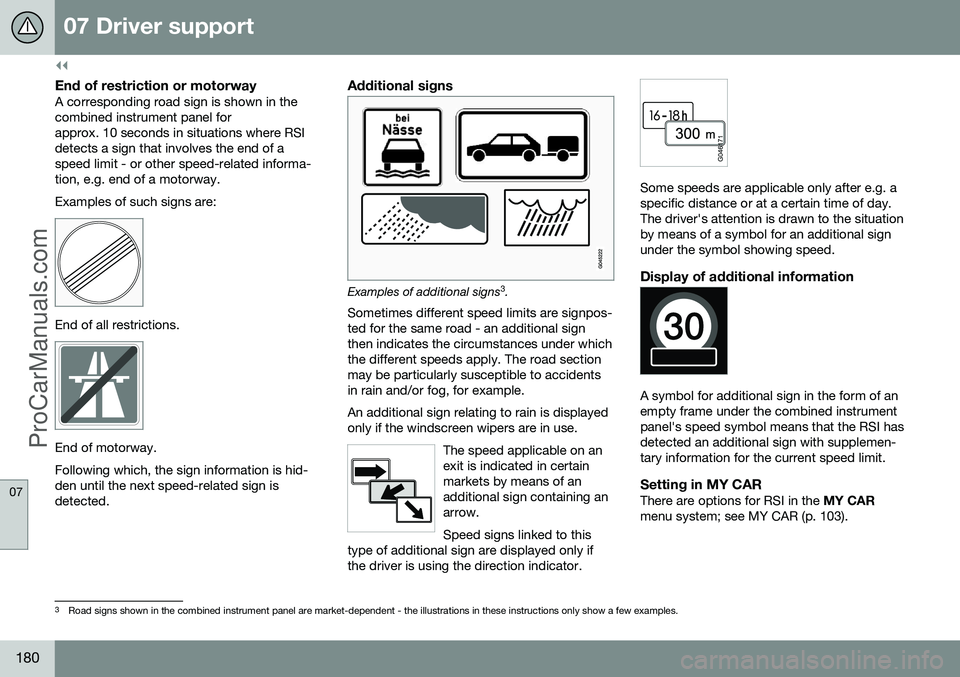
End of restriction or motorwayA corresponding road sign is shown in the combined instrument panel forapprox. 10 seconds in situations where RSIdetects a sign that involves the end of aspeed limit - or other speed-related informa-tion, e.g. end of a motorway. Examples of such signs are:
End of all restrictions.
End of motorway. Following which, the sign information is hid- den until the next speed-related sign isdetected.
Additional signs
Examples of additional signs3
.
Sometimes different speed limits are signpos- ted for the same road - an additional signthen indicates the circumstances under whichthe different speeds apply. The road sectionmay be particularly susceptible to accidentsin rain and/or fog, for example. An additional sign relating to rain is displayed only if the windscreen wipers are in use.
The speed applicable on anexit is indicated in certainmarkets by means of anadditional sign containing anarrow. Speed signs linked to this
type of additional sign are displayed only if the driver is using the direction indicator.
Some speeds are applicable only after e.g. a specific distance or at a certain time of day.The driver's attention is drawn to the situationby means of a symbol for an additional signunder the symbol showing speed.
Display of additional information
A symbol for additional sign in the form of an empty frame under the combined instrumentpanel's speed symbol means that the RSI hasdetected an additional sign with supplemen-tary information for the current speed limit.
Setting in MY CARThere are options for RSI in the MY CAR
menu system; see MY CAR (p. 103).
3 Road signs shown in the combined instrument panel are market-dependent - the illustrations in these instructions only show a few examples.
ProCarManuals.co’
Page 210 of 442
||
07 Driver support
07
208
Fault tracing and action
If the message Windscreen Sensors
blocked is shown in the combined instru-
ment panel it indicates that the laser sensor is blocked and cannot detect vehicles in front ofthe car. This means in turn that City Safety™is not operational. The
Windscreen Sensors blocked message
is not shown for all situations in which the laser sensor is blocked. The driver musttherefore be diligent about keeping the wind-screen and area in front of the laser sensorclean. The following table presents possible causes for the message being shown, along withsuggestions for appropriate action.
CauseAction
The windscreen sur- face in front of thelaser sensor is dirty orcovered with ice orsnow.Clean the wind- screen surface infront of the sensorfrom dirt, ice andsnow.
The laser sensor field of vision is blocked.Remove the blocking object.
IMPORTANT
If there are cracks, scratches or stone chips in the windscreen in front of either ofthe laser sensor's "windows" and theycover a surface of approx. 0.5 x 3.0 mm(or larger), then a workshop must be con-tacted for replacement of the windscreen(see the illustration for sensor location (p.205)) - an authorised Volvo workshop isrecommended. Failure to take action may result in reduced performance for City Safety™. To avoid the risk of failed, deficient or reduced operation for City Safety™, thefollowing also applies:
• Volvo recommends that you do
not
repair cracks, scratches or stone chips in the area in front of the laser sensor -instead, the whole windscreen shouldbe replaced.
• Before replacing a windscreen, con-tact an authorised Volvo workshop toverify that the correct windscreen isordered and fitted.
• The same type or Volvo-approvedwindscreen wipers must be fitted dur-ing replacement.
Related information
•
City Safety™ (p. 205)
• City Safety™ - function (p. 205)
• City Safety™ - operation (p. 206) •
City Safety™ - laser sensor (p. 209)
• City Safety™ - symbols and messages (p. 211)
ProCarManuals.co’
Page 269 of 442
08 Starting and driving
08
* Option/accessory, for more information, see Introduction.267
1. Briefly press on the key's button (2).
2. Follow this immediately afterwards with a
long press - at least 2 seconds - on button (3).
If the conditions for ERS are fulfilled then the following takes place:
1. The direction indicators flash quickly sev- eral times.
2. The engine starts.
3. The direction indicators illuminate with a constant glow for 3 seconds to verify that the engine has started.
NOTE
After remote starting, the car continues to be locked but with deactivated movementdetector*.
With PCC 6
keyThe light indication for Approach lighting 7
flashes several times when
the button is pressed and then goes to constant glow if all criteria for
ERS have been fulfilled. However, this doesnot mean that ERS has started the engine. To check whether ERS has started the engine, the user can press the button (5) - ifthe engine has started, there is a light indica-tion by the buttons (2) and (3).
Active functionsThe following functions are activated with a remote started engine: • Ventilation system
• Audio/video system
• Approach light duration.
Deactivated functionsThe following functions are deactivated with a remote started engine: • Headlamps
• Position lamps
• Number plate lighting
• Windscreen wiper.
ERS is interruptedThe following steps switch off an ERS-started engine: • The remote control key's button (1), (2) or (4) is depressed
• The car is unlocked
• A door is opened
• Accelerator pedal or brake pedal isdepressed
• The gear selector is moved out of
P posi-
tion
• There is approx.10 litres left in the fueltank •
Active ERS time exceeds 15 minutes.
When an ERS-started engine is switched off, the direction indicators illuminate with a con-stant glow for 3 seconds.
Related information
• Remote start (ERS)* (p. 266)
• Remote start (ERS) - symbols and mes- sages (p. 268)
6
For more information on the PCC key, see PCC* - unique functions (p. 153).7
For more information on Approach lighting, see Remote control key - functions (p. 151) and Approach light duration (p. 89).
ProCarManuals.co’
Page 300 of 442
08 Starting and driving
08
298
speed for a few minutes in order to allow the gearbox to cool down.
• If the car overheats, the air conditioningmay be switched off temporarily.
• Do not turn the engine off immediatelyyou stop after a hard drive.
NOTE
It is normal for the engine's cooling fan to operate for a time after the engine hasbeen switched off.
Driving with open tailgate
When driving with the tailgate open, toxic exhaust fumes can be sucked into the carthrough the cargo area.
WARNING
Do not drive with an open tailgate! Toxic exhaust fumes could be drawn into the carthrough the cargo area.
Related information
•Loading (p. 142)
Overload - starter battery
The electrical functions in the car load the starter battery (p. 361) to varying degrees.Avoid using the key position (p. 70)
II when
the engine is switched off. Instead use the I
mode - which uses less power. Also, be aware of different accessories that load the electrical system. Do not use func-tions which use a lot of power when theengine is switched off. Examples of suchfunctions are: • ventilation fan
• headlamps
• windscreen wiper
• audio system (high volume).
If the starter battery voltage is low then the combined instrument panel's information dis- play shows the text
Low battery Power
save mode. The energy-saving function then
shuts down certain functions or reduces cer- tain functions such as the ventilation fanand/or audio system.
–In which case, charge the battery by star- ting the engine and then running it for atleast 15 minutes - starter battery chargingis more effective during driving than run-ning the engine at idling speed while sta-tionary.
ProCarManuals.co’
Page 361 of 442
10 Maintenance and service
10
359
LightingWAType
–––
Reversing lamp21P21W LL
Rear fog lamp21H21W LL
A
Watt
Related information
• Lamp replacement (p. 352)
• Lamp replacement - location of rear lamps (p. 357)
• Lamp replacement - vanity mirror lighting(p. 358)
Wiper blades
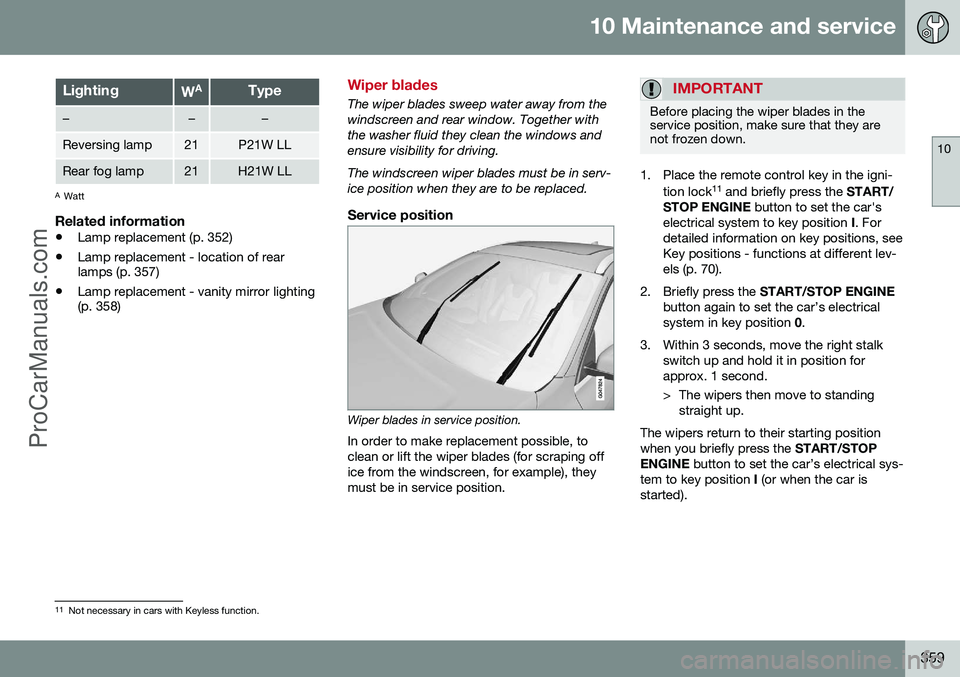
The wiper blades sweep water away from the windscreen and rear window. Together withthe washer fluid they clean the windows andensure visibility for driving. The windscreen wiper blades must be in serv- ice position when they are to be replaced.
Service position
Wiper blades in service position.
In order to make replacement possible, to clean or lift the wiper blades (for scraping office from the windscreen, for example), theymust be in service position.
IMPORTANT
Before placing the wiper blades in the service position, make sure that they arenot frozen down.
1. Place the remote control key in the igni- tion lock 11
and briefly press the START/
STOP ENGINE button to set the car's
electrical system to key position I. For
detailed information on key positions, see Key positions - functions at different lev-els (p. 70).
2. Briefly press the START/STOP ENGINE
button again to set the car’s electricalsystem in key position 0.
3. Within 3 seconds, move the right stalk switch up and hold it in position forapprox. 1 second.
> The wipers then move to standingstraight up.
The wipers return to their starting position when you briefly press the START/STOP
ENGINE button to set the car’s electrical sys-
tem to key position I (or when the car is
started).
11 Not necessary in cars with Keyless function.
ProCarManuals.co’
Page 362 of 442
||
10 Maintenance and service
10
360
IMPORTANT
If the wiper arms in service position have been folded up from the windscreen, theymust be folded back down onto the wind-screen before the wipers are allowed toreturn to their starting position. This is toavoid scraping the paint on the bonnet.
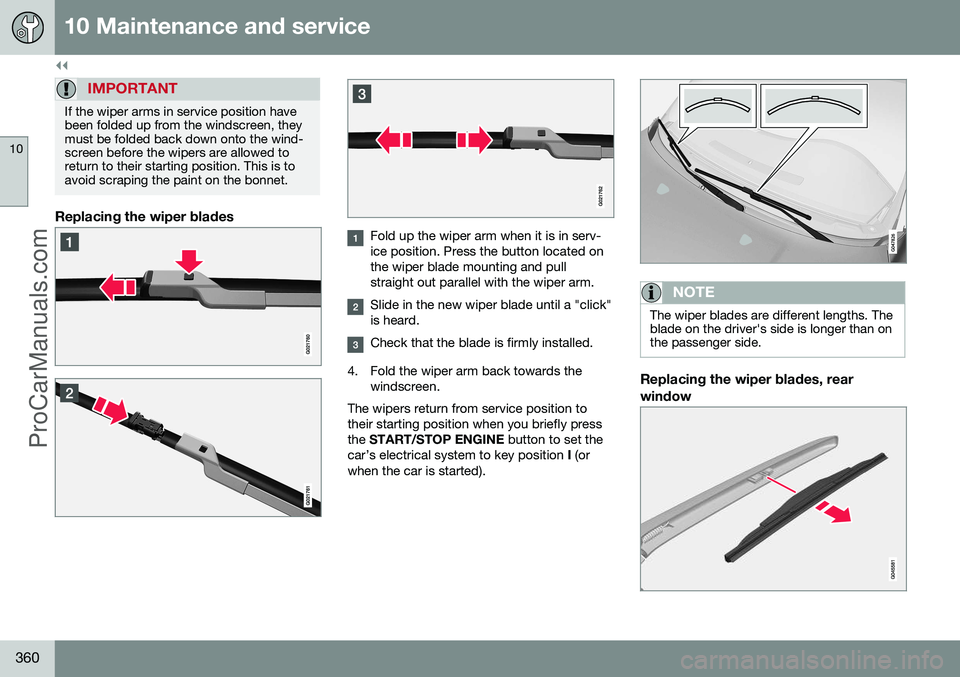
Replacing the wiper blades
Fold up the wiper arm when it is in serv- ice position. Press the button located onthe wiper blade mounting and pullstraight out parallel with the wiper arm.
Slide in the new wiper blade until a "click" is heard.
Check that the blade is firmly installed.
4. Fold the wiper arm back towards the windscreen.
The wipers return from service position to their starting position when you briefly pressthe START/STOP ENGINE button to set the
car’s electrical system to key position I (or
when the car is started).
NOTE
The wiper blades are different lengths. The blade on the driver's side is longer than onthe passenger side.
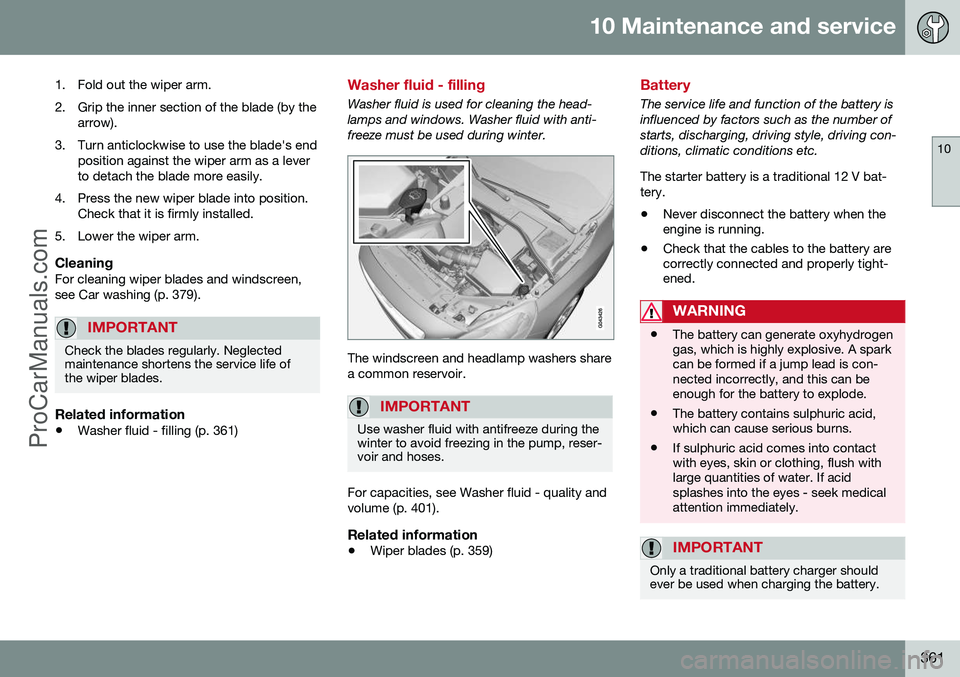
Replacing the wiper blades, rear window
ProCarManuals.com
Page 363 of 442
10 Maintenance and service
10
361
1. Fold out the wiper arm.
2. Grip the inner section of the blade (by the arrow).
3. Turn anticlockwise to use the blade's end position against the wiper arm as a lever to detach the blade more easily.
4. Press the new wiper blade into position. Check that it is firmly installed.
5. Lower the wiper arm.
CleaningFor cleaning wiper blades and windscreen,see Car washing (p. 379).
IMPORTANT
Check the blades regularly. Neglected maintenance shortens the service life ofthe wiper blades.
Related information
• Washer fluid - filling (p. 361)
Washer fluid - filling
Washer fluid is used for cleaning the head- lamps and windows. Washer fluid with anti-freeze must be used during winter.
The windscreen and headlamp washers share a common reservoir.
IMPORTANT
Use washer fluid with antifreeze during the winter to avoid freezing in the pump, reser-voir and hoses.
For capacities, see Washer fluid - quality and volume (p. 401).
Related information
•Wiper blades (p. 359)
Battery
The service life and function of the battery is influenced by factors such as the number ofstarts, discharging, driving style, driving con-ditions, climatic conditions etc. The starter battery is a traditional 12 V bat- tery.
• Never disconnect the battery when the engine is running.
• Check that the cables to the battery arecorrectly connected and properly tight-ened.
WARNING
•The battery can generate oxyhydrogen gas, which is highly explosive. A sparkcan be formed if a jump lead is con-nected incorrectly, and this can beenough for the battery to explode.
• The battery contains sulphuric acid,which can cause serious burns.
• If sulphuric acid comes into contactwith eyes, skin or clothing, flush withlarge quantities of water. If acidsplashes into the eyes - seek medicalattention immediately.
IMPORTANT
Only a traditional battery charger should ever be used when charging the battery.
ProCarManuals.co’
Page 371 of 442
10 Maintenance and service
10
}}
* Option/accessory, for more information, see Introduction.369
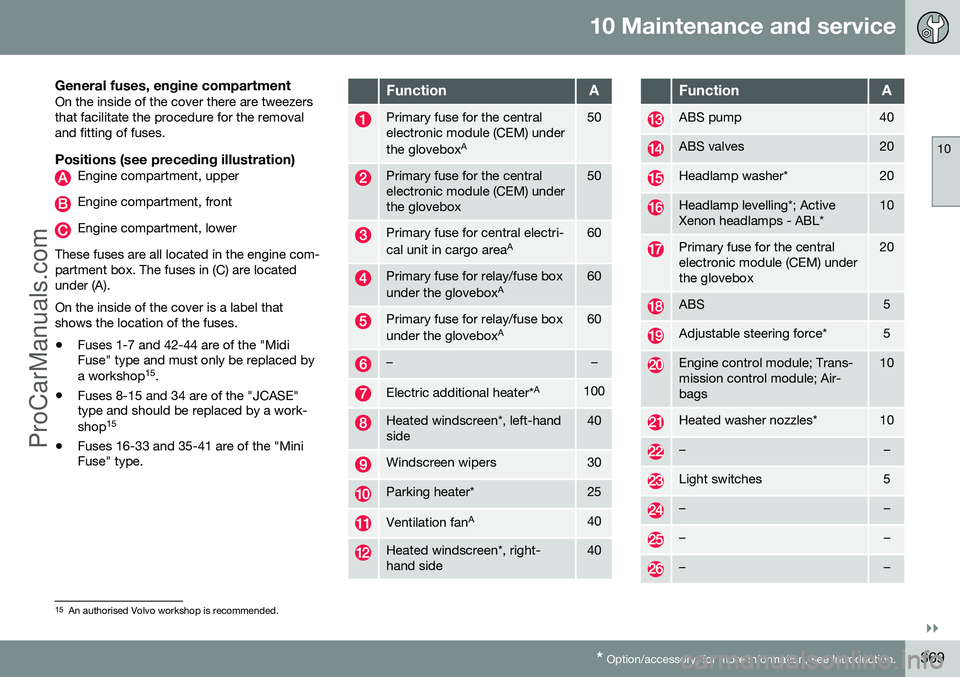
General fuses, engine compartmentOn the inside of the cover there are tweezers that facilitate the procedure for the removaland fitting of fuses.
Positions (see preceding illustration)Engine compartment, upper
Engine compartment, front
Engine compartment, lower
These fuses are all located in the engine com- partment box. The fuses in (C) are locatedunder (A). On the inside of the cover is a label that shows the location of the fuses. • Fuses 1-7 and 42-44 are of the "Midi Fuse" type and must only be replaced by a workshop 15
.
• Fuses 8-15 and 34 are of the "JCASE" type and should be replaced by a work- shop 15
• Fuses 16-33 and 35-41 are of the "Mini Fuse" type.
FunctionA
Primary fuse for the central electronic module (CEM) under the glovebox A50
Primary fuse for the central electronic module (CEM) underthe glovebox50
Primary fuse for central electri- cal unit in cargo area
A60
Primary fuse for relay/fuse box under the gloveboxA60
Primary fuse for relay/fuse box under the gloveboxA60
––
Electric additional heater* A100
Heated windscreen*, left-hand side40
Windscreen wipers30
Parking heater*25
Ventilation fanA40
Heated windscreen*, right- hand side40
FunctionA
ABS pump40
ABS valves20
Headlamp washer*20
Headlamp levelling*; Active Xenon headlamps - ABL*10
Primary fuse for the central electronic module (CEM) underthe glovebox20
ABS5
Adjustable steering force*5
Engine control module; Trans- mission control module; Air-bags10
Heated washer nozzles*10
––
Light switches5
––
––
––
15
An authorised Volvo workshop is recommended.
ProCarManuals.co’
Page 376 of 442
10 Maintenance and service
10
374* Option/accessory, for more information, see Introduction.
Fuses - in the control module under the glovebox
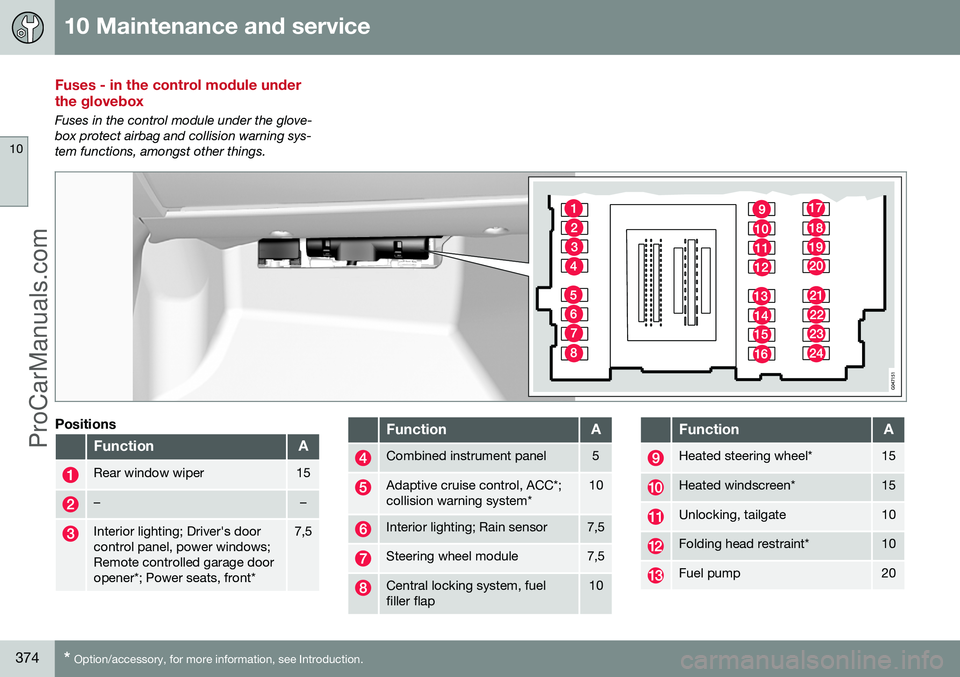
Fuses in the control module under the glove- box protect airbag and collision warning sys-tem functions, amongst other things.
Positions
FunctionA
Rear window wiper15
––
Interior lighting; Driver's door control panel, power windows;Remote controlled garage dooropener*; Power seats, front*7,5
FunctionA
Combined instrument panel5
Adaptive cruise control, ACC*; collision warning system*10
Interior lighting; Rain sensor7,5
Steering wheel module7,5
Central locking system, fuel filler flap10
FunctionA
Heated steering wheel*15
Heated windscreen*15
Unlocking, tailgate10
Folding head restraint*10
Fuel pump20
ProCarManuals.co’