ECO mode VOLVO V60 2014 Owner's Manual
[x] Cancel search | Manufacturer: VOLVO, Model Year: 2014, Model line: V60, Model: VOLVO V60 2014Pages: 442, PDF Size: 13.85 MB
Page 191 of 442
07 Driver support
07
}}
* Option/accessory, for more information, see Introduction.189
Adaptive cruise control* - function
The adaptive cruise control (ACC – Adaptive Cruise Control) helps the driver to maintain aneven speed and a safe distance from the vehi-cle ahead. It consists of a cruise control sys-tem and a coordinated spacing system.
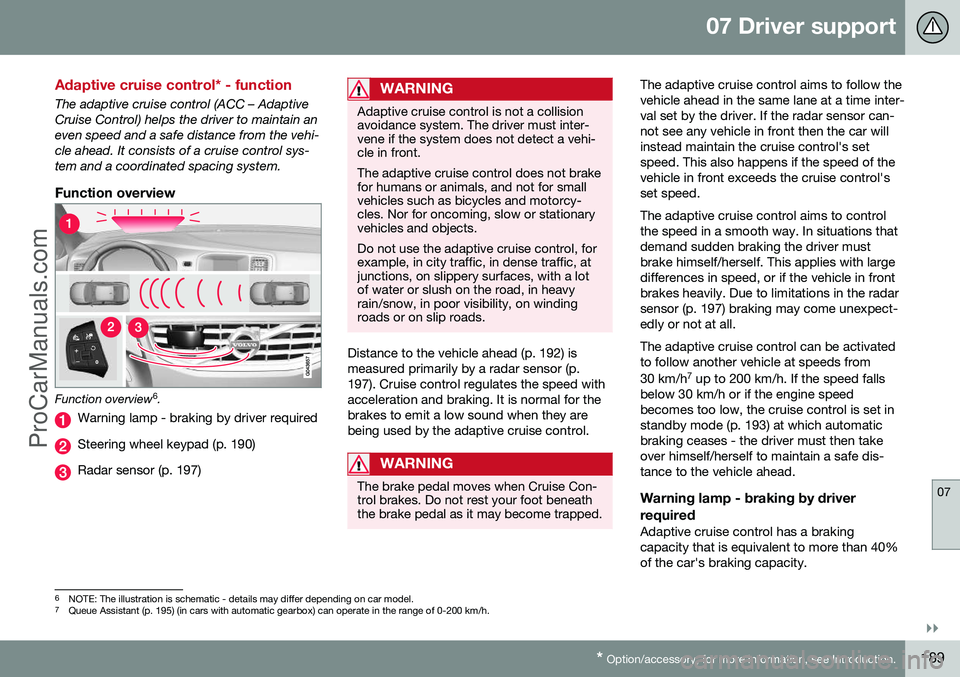
Function overview
Function overview 6
.
Warning lamp - braking by driver required
Steering wheel keypad (p. 190)
Radar sensor (p. 197)
WARNING
Adaptive cruise control is not a collision avoidance system. The driver must inter-vene if the system does not detect a vehi-cle in front. The adaptive cruise control does not brake for humans or animals, and not for smallvehicles such as bicycles and motorcy-cles. Nor for oncoming, slow or stationaryvehicles and objects. Do not use the adaptive cruise control, for example, in city traffic, in dense traffic, atjunctions, on slippery surfaces, with a lotof water or slush on the road, in heavyrain/snow, in poor visibility, on windingroads or on slip roads.
Distance to the vehicle ahead (p. 192) is measured primarily by a radar sensor (p.197). Cruise control regulates the speed withacceleration and braking. It is normal for thebrakes to emit a low sound when they arebeing used by the adaptive cruise control.
WARNING
The brake pedal moves when Cruise Con- trol brakes. Do not rest your foot beneaththe brake pedal as it may become trapped.
The adaptive cruise control aims to follow the vehicle ahead in the same lane at a time inter-val set by the driver. If the radar sensor can-not see any vehicle in front then the car willinstead maintain the cruise control's setspeed. This also happens if the speed of thevehicle in front exceeds the cruise control'sset speed. The adaptive cruise control aims to control the speed in a smooth way. In situations thatdemand sudden braking the driver mustbrake himself/herself. This applies with largedifferences in speed, or if the vehicle in frontbrakes heavily. Due to limitations in the radarsensor (p. 197) braking may come unexpect-edly or not at all. The adaptive cruise control can be activated to follow another vehicle at speeds from 30 km/h 7
up to 200 km/h. If the speed falls
below 30 km/h or if the engine speed becomes too low, the cruise control is set instandby mode (p. 193) at which automaticbraking ceases - the driver must then takeover himself/herself to maintain a safe dis-tance to the vehicle ahead.
Warning lamp - braking by driver required
Adaptive cruise control has a braking capacity that is equivalent to more than 40%of the car's braking capacity.
6 NOTE: The illustration is schematic - details may differ depending on car model.
7 Queue Assistant (p. 195) (in cars with automatic gearbox) can operate in the range of 0-200 km/h.
ProCarManuals.co’
Page 192 of 442
||
07 Driver support
07
190* Option/accessory, for more information, see Introduction.
If the car needs to be braked more heavily than cruise control capacity and the driverdoes not brake, then cruise control uses thewarning lamp and warning sound from theCollision warning system (p. 212) in order toalert the driver that immediate intervention isrequired.
NOTE
The warning lamp may be difficult to see in strong sunlight or when wearing sun-glasses.
WARNING
Cruise Control warns only of vehicles which the radar sensor has detected.Hence the warning may not be given, or itmay be given with a certain delay. Do notwait for a warning without braking when sorequired.
Steep roads and/or heavy loadBear in mind that the adaptive cruise control is primarily intended for use when driving onlevel road surfaces. It may have difficulty inkeeping the correct distance from the vehicleahead when driving on steep downhill slopes,with a heavy load or with a trailer - in whichcase, be extra attentive and ready to slowdown.
Related information
• Adaptive cruise control - ACC* (p. 188)
• Adaptive cruise control* - deactivate (p. 194)
• Adaptive cruise control* - overtakinganother vehicle (p. 194)
Adaptive cruise control* - overview
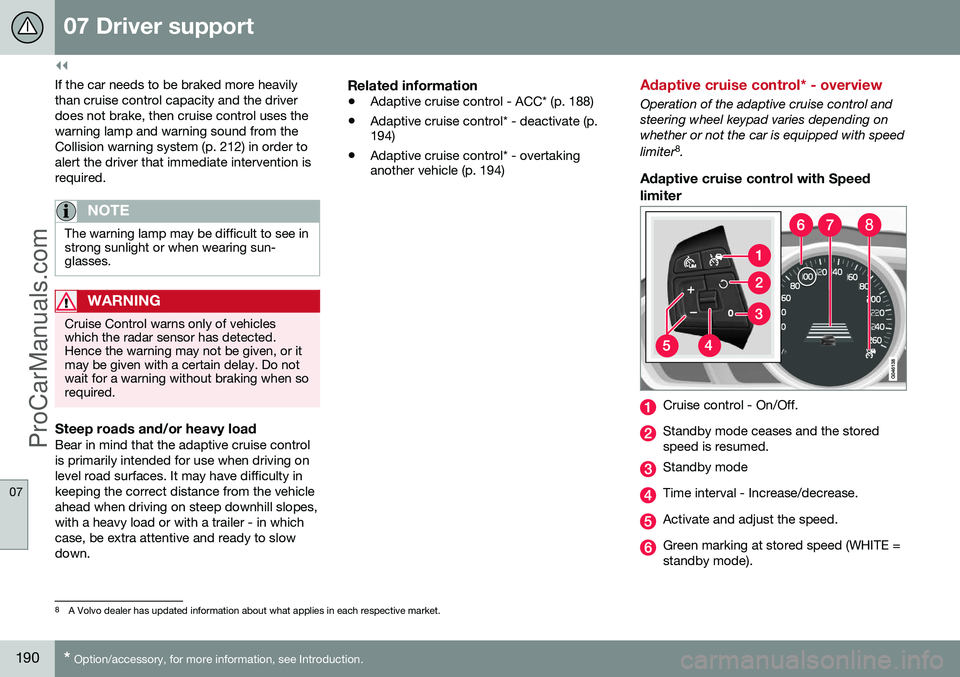
Operation of the adaptive cruise control and steering wheel keypad varies depending onwhether or not the car is equipped with speed limiter 8
.
Adaptive cruise control with Speed
limiter
Cruise control - On/Off.
Standby mode ceases and the stored speed is resumed.
Standby mode
Time interval - Increase/decrease.
Activate and adjust the speed.
Green marking at stored speed (WHITE = standby mode).
8 A Volvo dealer has updated information about what applies in each respective market.
ProCarManuals.co’
Page 193 of 442
07 Driver support
07
* Option/accessory, for more information, see Introduction.191
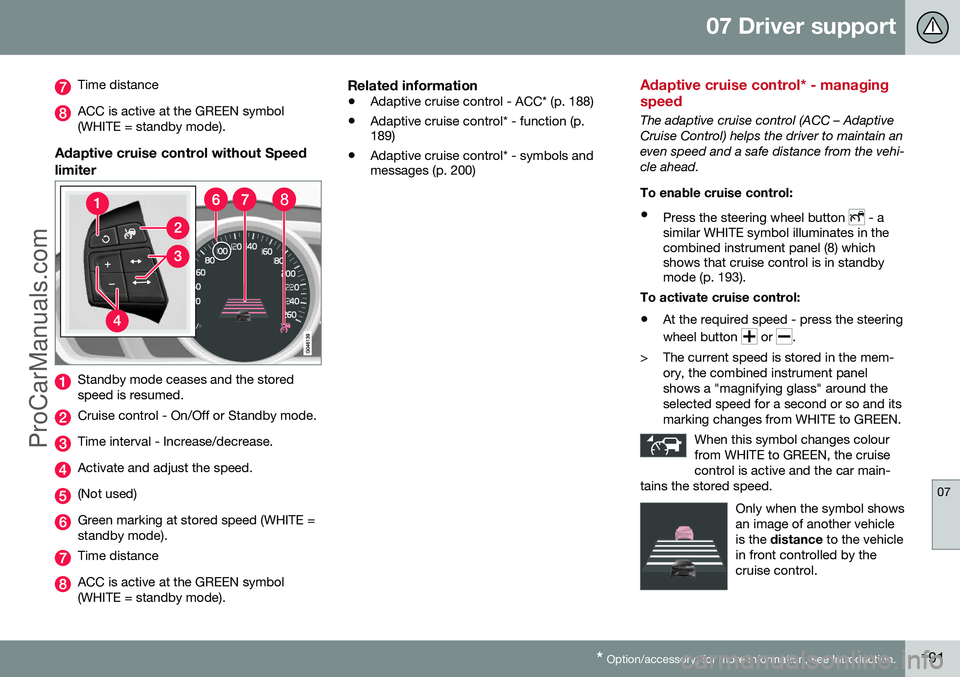
Time distance
ACC is active at the GREEN symbol (WHITE = standby mode).
Adaptive cruise control without Speed limiter
Standby mode ceases and the stored speed is resumed.
Cruise control - On/Off or Standby mode.
Time interval - Increase/decrease.
Activate and adjust the speed.
(Not used)
Green marking at stored speed (WHITE = standby mode).
Time distance
ACC is active at the GREEN symbol (WHITE = standby mode).
Related information
• Adaptive cruise control - ACC* (p. 188)
• Adaptive cruise control* - function (p. 189)
• Adaptive cruise control* - symbols andmessages (p. 200)
Adaptive cruise control* - managing speed
The adaptive cruise control (ACC – Adaptive Cruise Control) helps the driver to maintain aneven speed and a safe distance from the vehi-cle ahead. To enable cruise control:
• Press the steering wheel button
- a
similar WHITE symbol illuminates in the combined instrument panel (8) whichshows that cruise control is in standbymode (p. 193).
To activate cruise control: • At the required speed - press the steering wheel button
or .
> The current speed is stored in the mem- ory, the combined instrument panel shows a "magnifying glass" around theselected speed for a second or so and itsmarking changes from WHITE to GREEN.
When this symbol changes colourfrom WHITE to GREEN, the cruisecontrol is active and the car main-
tains the stored speed.
Only when the symbol shows an image of another vehicleis the distance to the vehicle
in front controlled by thecruise control.
ProCarManuals.co’
Page 195 of 442
07 Driver support
07
* Option/accessory, for more information, see Introduction.193
The same symbol is also shown when Dis- tance Warning (p. 202) function is activated.
NOTE
Only use the time intervals permitted by local traffic regulations. If Cruise Control does not appear to react when activated, this may be because thetime distance to the car in front is prevent-ing an increase in speed. The higher the speed the longer the calcu- lated distance in metres for a given timeinterval.
Related information
•
Adaptive cruise control - ACC* (p. 188)
• Adaptive cruise control* - overview (p. 190)
• Adaptive cruise control* - function (p.189)
• Adaptive cruise control* - deactivate (p.194)
Adaptive cruise control* - temporary deactivation, and standby mode
The adaptive cruise control (ACC – Adaptive Cruise Control) helps the driver to maintain aneven speed and a safe distance from the vehi-cle ahead. The cruise control can be tempo-rarily deactivated and set in standby mode.
Temporary deactivation - standby mode
with Speed limiter
To temporarily disengage the adaptive cruisecontrol and set it in standby mode:
• Press the steering wheel button
This symbol and the stored speed's marking then change colour fromGREEN to WHITE.
Temporary deactivation - standby mode without Speed limiter
To temporarily disengage the adaptive cruise control and set it in standby mode:
• Press the steering wheel button
Standby mode due to driver interventionCruise control is temporarily disengaged and set in standby mode if:
• the foot brake is used
• the clutch pedal is depressed for longer than 1 minute 9 •
the gear selector is moved to
N position
(automatic gearbox)
• the driver maintains a speed higher than the set speed for longer than 1 minute.
The driver must then regulate the speed. A temporary increase in speed with the accel- erator pedal, e.g. during overtaking, does notaffect the cruise control setting - the carreturns to the last stored speed when theaccelerator pedal is released.
Automatic standby modeThe adaptive cruise control is dependent onother systems, e.g. DSTC (Stability and trac-tion control system) (p. 175). If any of thesesystems stop working then cruise control isautomatically deactivated. In the event of automatic deactivation a signal will sound and the message
Cruise control
Cancelled is shown in the combined instru-
ment panel. The driver must then intervene and adapt the speed and distance to thevehicle ahead. An automatic deactivation can be due to:
• the driver opens the door
• the driver takes off his seatbelt
• engine speed is too low/high
• speed has fallen below 30 km/h 10
9
Disengaging and selecting a higher or lower gear does not involve standby mode.
10 Does not apply to a car with Queue Assistant - it manages right down to stationary.
ProCarManuals.co’
Page 197 of 442
07 Driver support
07
}}
* Option/accessory, for more information, see Introduction.195
Adaptive Cruise Control* - Queue Assist
The adaptive cruise control (ACC – Adaptive Cruise Control) helps the driver to maintain aneven speed and a safe distance from the vehi-cle ahead. Queue Assist also provides theAdaptive Cruise Control with enhanced func-tionality at speeds below 30 km/h.. In cars with automatic gearbox the adaptive cruise control is supplemented with theQueue Assist function (also referred to as"Queue Assist"). Queue Assistant has the following functions:
• Extended speed range - also below 30 km/h and when stationary
• Change of target
• Automatic braking ceases when station-ary
• Automatic activation parking brake.
Note that the lowest programmable speed for the adaptive cruise control is 30 km/h - eventhough it is capable of following another vehi-cle down to a standstill, a lower speed can-
not be selected.
Extended speed range
NOTE
In order to activate the cruise control the driver's door must be closed and the drivermust be wearing the seatbelt.
With an automatic gearbox, the adaptive cruise control can follow another vehiclewithin the range 0-200 km/h.
NOTE
Activation of the cruise control below 30 km/h requires a vehicle in front within areasonable distance.
For shorter stops in connection with inching in slow traffic or at traffic lights driving isautomatically resumed if the stops do notexceed about 3 seconds - if it takes longerbefore the car in front starts moving againthen the Adaptive cruise control is set instandby mode with automatic braking. Thedriver must then reactivate it in one of the fol-lowing ways:
• Press the steering wheel button
.
or
• Depress the accelerator pedal.
> The cruise control will then resume fol- lowing the vehicle in front.
NOTE
Queue Assist can hold the car stationary for a maximum of 4 minutes - then theparking brake is applied and Cruise Con-trol is disengaged.
• The driver has to release the parking brake before the cruise control can bereactivated.
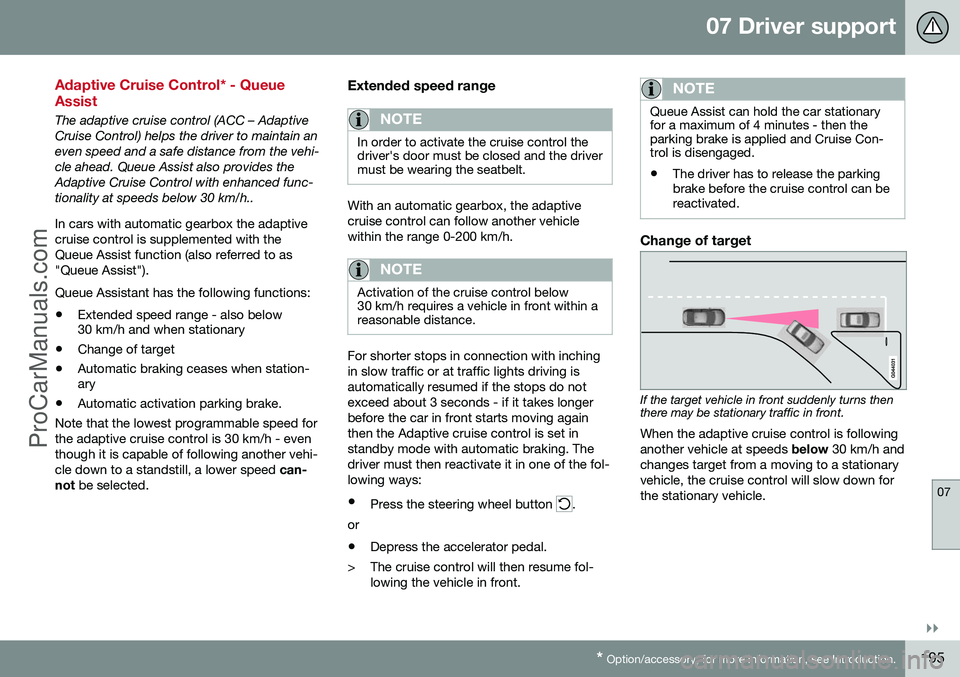
Change of target
If the target vehicle in front suddenly turns then there may be stationary traffic in front.
When the adaptive cruise control is following another vehicle at speeds below 30 km/h and
changes target from a moving to a stationaryvehicle, the cruise control will slow down forthe stationary vehicle.
ProCarManuals.co’
Page 198 of 442
||
07 Driver support
07
196* Option/accessory, for more information, see Introduction.
WARNING
When the cruise control is following another vehicle at speeds in excess of
30 km/h and the target is changed from amoving vehicle to a stationary vehicle, thecruise control will ignore the stationaryvehicle and instead select the storedspeed. • The driver must intervene him/herself and brake.
Automatic standby mode with change of target
The adaptive cruise control is disengaged and set in standby mode:
• when the speed is below 5 km/h and cruise control is not sure whether the tar-get object is a stationary vehicle or someother object, e.g. a speed bump.
• when the speed is below 5 km/h and thevehicle in front turns off so the cruisecontrol no longer has a vehicle to follow.
Termination of automatic braking at a
standstill
In certain situations, Queue Assist stops automatic braking at a standstill. This meansthat the brakes are released and the car maystart to roll - the driver must therefore inter-vene and brake the car himself/herself inorder to maintain its position. Queue Assist releases the foot brake and setsthe adaptive cruise control in standby modein the following situations:
• the driver puts his/her foot on the brake pedal
• the parking brake is applied
• the gear selector is moved to
P, N or R
position
• the driver sets the cruise control instandby mode.
Automatic activation parking brakeIn certain situations Queue Assist applies the parking brake in order to keep the car remain-ing stationary. This takes place if:
• the driver opens the door or takes off his/her seatbelt
• DSTC is changed from
Normal to Sport
mode
• Queue Assist has held the car stationaryfor more than 4 minutes
• the engine is switched off
• the brakes have overheated.
Related information
•Adaptive cruise control - ACC* (p. 188)
• Adaptive cruise control* - overview (p.190)
• Adaptive cruise control* - function (p.189)
Adaptive cruise control* - switch cruise control functionality
The adaptive cruise control (ACC – Adaptive Cruise Control) helps the driver maintain asafe distance from the vehicle ahead.
Changing from ACC to CCWith one press of the button the adaptivepart (spacing system) in the cruise control isdeactivated, at which point the car just fol-lows the set speed.
• Give a
long press on the steering wheel
button
- the combined instrument
panel's symbol changes from
to .
> By these means the standard cruise con- trol (p. 185) CC (Cruise Control) is activated.
WARNING
The car no longer brakes automatically after switching from ACC to CC - it merelyfollows the set speed.
Changing back from CC to ACCSwitch off cruise control with 1-2 presses on
in accordance with the deactivation
instructions (p. 194). The next time the sys- tem is switched on it is the Adaptive cruisecontrol that is activated.
ProCarManuals.co’
Page 202 of 442
07 Driver support
07
200* Option/accessory, for more information, see Introduction.
Adaptive cruise control* - symbols and messages
The adaptive cruise control (ACC – Adaptive Cruise Control) helps the driver to maintain an even speed and a safe distance from the vehi-cle ahead. Sometimes the adaptive cruisecontrol may display a symbol and/or text
message. Here are several examples - followthe recommendation given if appropriate:
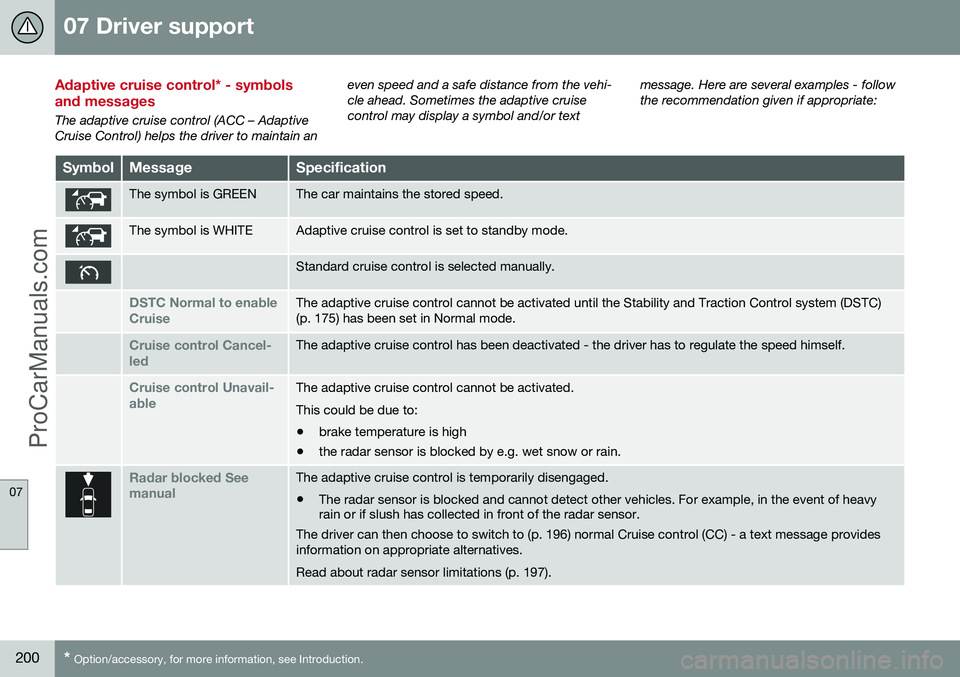
SymbolMessageSpecification
The symbol is GREENThe car maintains the stored speed.
The symbol is WHITEAdaptive cruise control is set to standby mode.
Standard cruise control is selected manually.
DSTC Normal to enable CruiseThe adaptive cruise control cannot be activated until the Stability and Traction Control system (DSTC) (p. 175) has been set in Normal mode.
Cruise control Cancel- ledThe adaptive cruise control has been deactivated - the driver has to regulate the speed himself.
Cruise control Unavail- ableThe adaptive cruise control cannot be activated. This could be due to:
• brake temperature is high
• the radar sensor is blocked by e.g. wet snow or rain.
Radar blocked See manualThe adaptive cruise control is temporarily disengaged.
• The radar sensor is blocked and cannot detect other vehicles. For example, in the event of heavy rain or if slush has collected in front of the radar sensor.
The driver can then choose to switch to (p. 196) normal Cruise control (CC) - a text message provides information on appropriate alternatives. Read about radar sensor limitations (p. 197).
ProCarManuals.co’
Page 204 of 442
07 Driver support
07
202* Option/accessory, for more information, see Introduction.
Distance Warning*
Distance Warning (Distance Alert) is a function that informs the driver about the time intervalto vehicles in front. Distance Warning is active at speeds above 30 km/h and only reacts to vehicles driving infront of the car, in the same direction. No dis-tance information is provided for oncoming,slow or stationary vehicles.
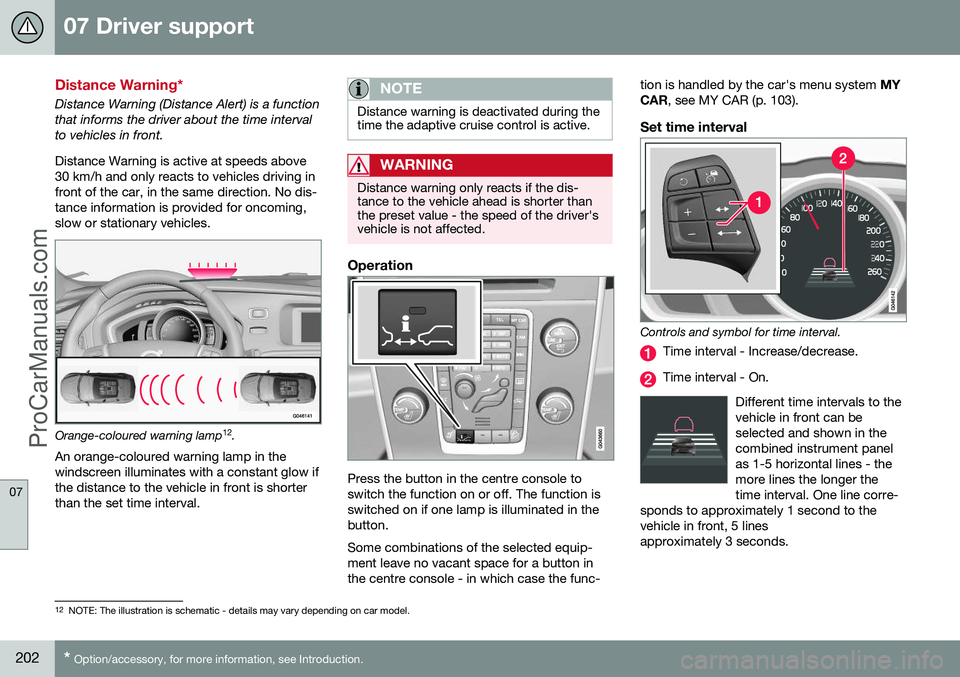
Orange-coloured warning lamp 12
.
An orange-coloured warning lamp in the
windscreen illuminates with a constant glow if the distance to the vehicle in front is shorterthan the set time interval.
NOTE
Distance warning is deactivated during the time the adaptive cruise control is active.
WARNING
Distance warning only reacts if the dis- tance to the vehicle ahead is shorter thanthe preset value - the speed of the driver'svehicle is not affected.
Operation
Press the button in the centre console to switch the function on or off. The function isswitched on if one lamp is illuminated in thebutton. Some combinations of the selected equip- ment leave no vacant space for a button inthe centre console - in which case the func- tion is handled by the car's menu system
MY
CAR , see MY CAR (p. 103).
Set time interval
Controls and symbol for time interval.
Time interval - Increase/decrease.
Time interval - On.
Different time intervals to the vehicle in front can beselected and shown in thecombined instrument panelas 1-5 horizontal lines - themore lines the longer thetime interval. One line corre-
sponds to approximately 1 second to thevehicle in front, 5 linesapproximately 3 seconds.
12 NOTE: The illustration is schematic - details may vary depending on car model.
ProCarManuals.co’
Page 206 of 442
07 Driver support
07
204* Option/accessory, for more information, see Introduction.
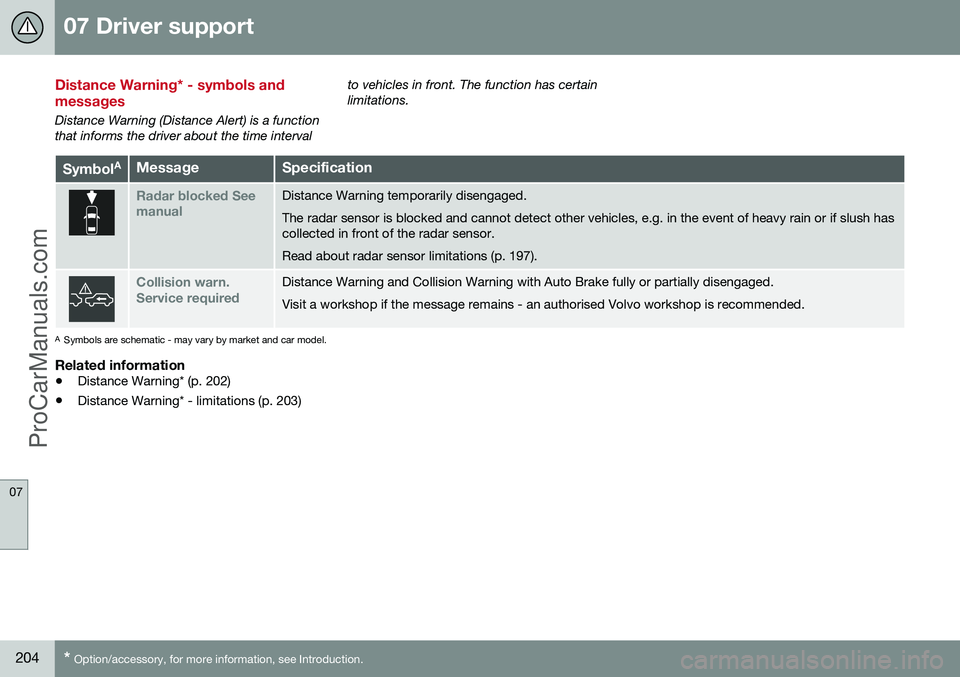
Distance Warning* - symbols and messages
Distance Warning (Distance Alert) is a function that informs the driver about the time interval to vehicles in front. The function has certainlimitations.
Symbol
AMessageSpecification
Radar blocked See manualDistance Warning temporarily disengaged. The radar sensor is blocked and cannot detect other vehicles, e.g. in the event of heavy rain or if slush has collected in front of the radar sensor. Read about radar sensor limitations (p. 197).
Collision warn. Service requiredDistance Warning and Collision Warning with Auto Brake fully or partially disengaged. Visit a workshop if the message remains - an authorised Volvo workshop is recommended.
A
Symbols are schematic - may vary by market and car model.
Related information
• Distance Warning* (p. 202)
• Distance Warning* - limitations (p. 203)
ProCarManuals.co’
Page 225 of 442
07 Driver support
07
* Option/accessory, for more information, see Introduction.223
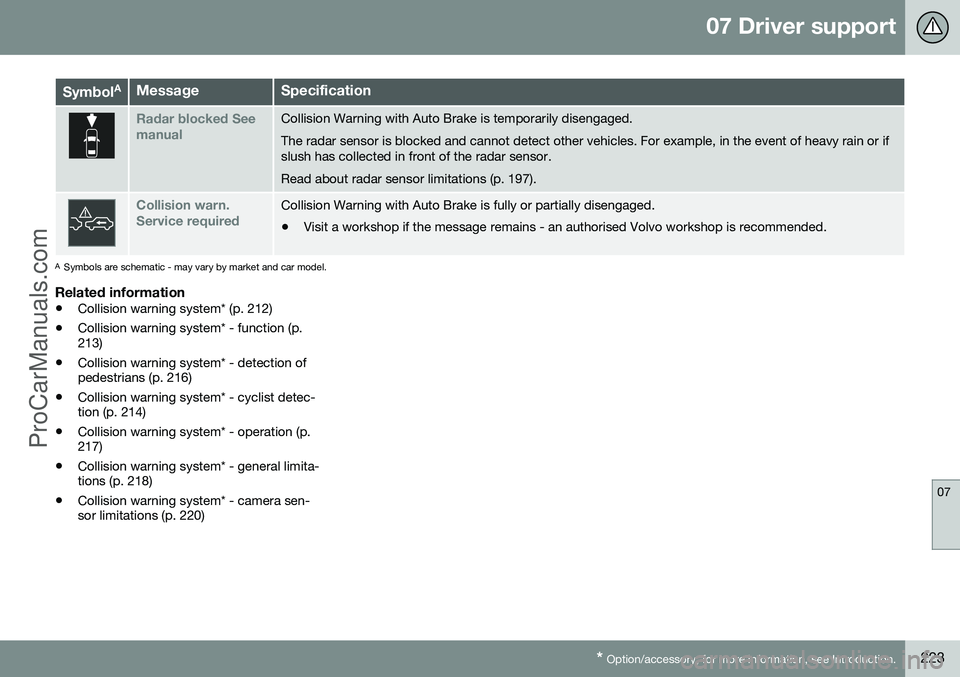
Symbol AMessageSpecification
Radar blocked See manualCollision Warning with Auto Brake is temporarily disengaged. The radar sensor is blocked and cannot detect other vehicles. For example, in the event of heavy rain or if slush has collected in front of the radar sensor. Read about radar sensor limitations (p. 197).
Collision warn. Service requiredCollision Warning with Auto Brake is fully or partially disengaged.
• Visit a workshop if the message remains - an authorised Volvo workshop is recommended.
A
Symbols are schematic - may vary by market and car model.
Related information
• Collision warning system* (p. 212)
• Collision warning system* - function (p. 213)
• Collision warning system* - detection ofpedestrians (p. 216)
• Collision warning system* - cyclist detec-tion (p. 214)
• Collision warning system* - operation (p.217)
• Collision warning system* - general limita-tions (p. 218)
• Collision warning system* - camera sen-sor limitations (p. 220)
ProCarManuals.co’