seats VOLVO V60 2014 Owner's Manual
[x] Cancel search | Manufacturer: VOLVO, Model Year: 2014, Model line: V60, Model: VOLVO V60 2014Pages: 442, PDF Size: 13.85 MB
Page 73 of 442
03 Instruments and controls
03
* Option/accessory, for more information, see Introduction.71
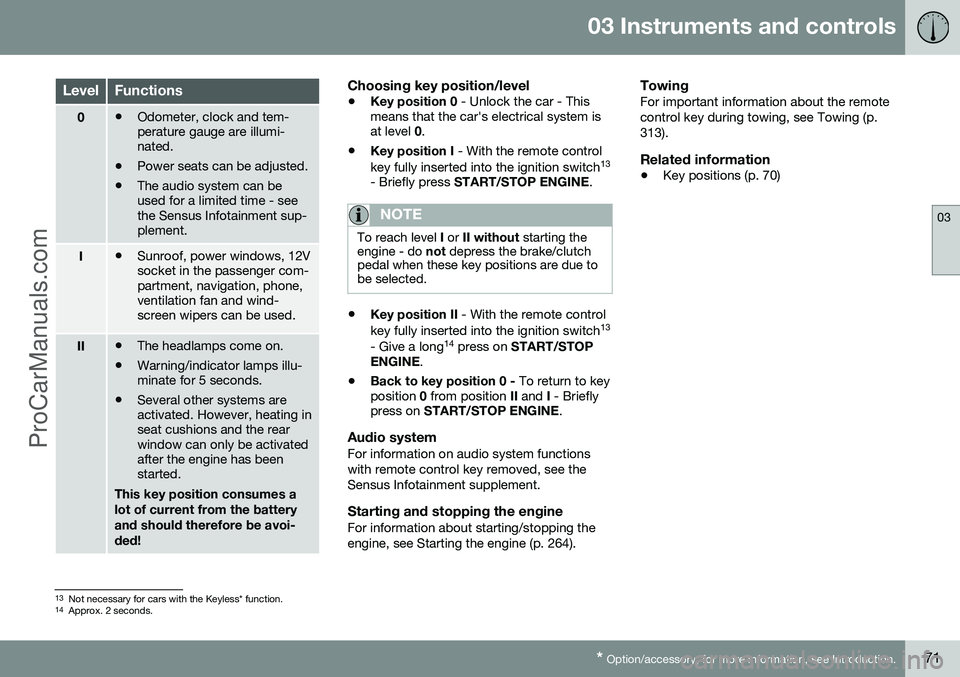
LevelFunctions
0• Odometer, clock and tem- perature gauge are illumi-nated.
• Power seats can be adjusted.
• The audio system can beused for a limited time - seethe Sensus Infotainment sup-plement.
I•Sunroof, power windows, 12V socket in the passenger com-partment, navigation, phone,ventilation fan and wind-screen wipers can be used.
II•The headlamps come on.
• Warning/indicator lamps illu- minate for 5 seconds.
• Several other systems areactivated. However, heating inseat cushions and the rearwindow can only be activatedafter the engine has beenstarted.
This key position consumes a lot of current from the batteryand should therefore be avoi-ded!
Choosing key position/level
• Key position 0
- Unlock the car - This
means that the car's electrical system is at level 0.
• Key position I
- With the remote control
key fully inserted into the ignition switch 13
- Briefly press START/STOP ENGINE .
NOTE
To reach level I or II without starting the
engine - do not depress the brake/clutch
pedal when these key positions are due to be selected.
• Key position II
- With the remote control
key fully inserted into the ignition switch 13
- Give a long 14
press on START/STOP
ENGINE .
• Back to key position 0 -
To return to key
position 0 from position II and I - Briefly
press on START/STOP ENGINE .
Audio systemFor information on audio system functions with remote control key removed, see theSensus Infotainment supplement.
Starting and stopping the engineFor information about starting/stopping theengine, see Starting the engine (p. 264).
TowingFor important information about the remotecontrol key during towing, see Towing (p.313).
Related information
•Key positions (p. 70)
13
Not necessary for cars with the Keyless* function.
14 Approx. 2 seconds.
ProCarManuals.co’
Page 74 of 442
03 Instruments and controls
03
72* Option/accessory, for more information, see Introduction.
Seats, front
The car's front seats have different setting options for optimum seating comfort.
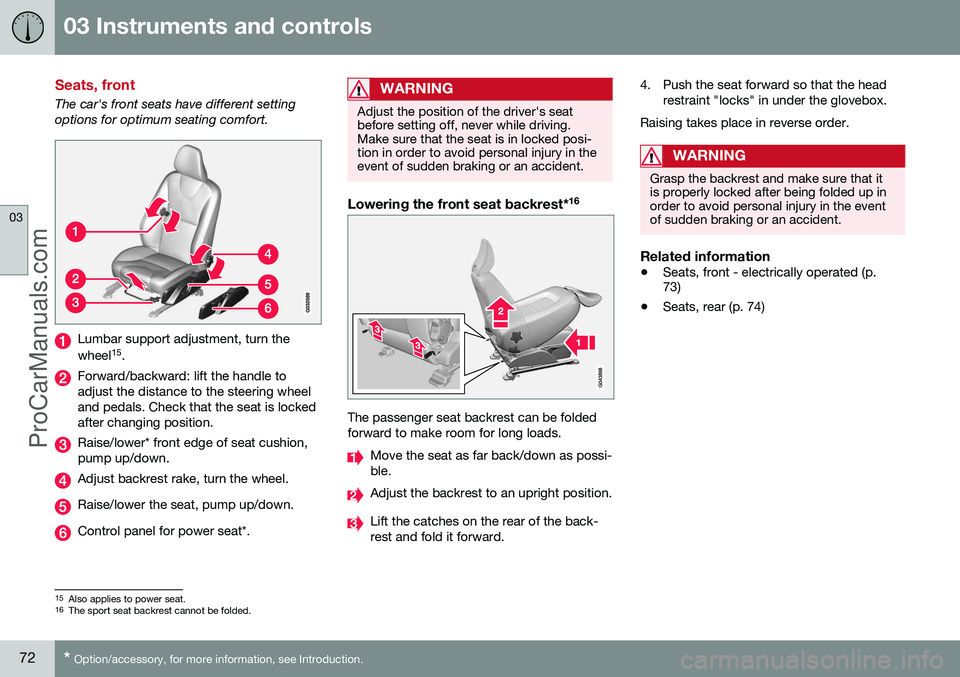
Lumbar support adjustment, turn the wheel 15
.
Forward/backward: lift the handle to adjust the distance to the steering wheeland pedals. Check that the seat is lockedafter changing position.
Raise/lower* front edge of seat cushion, pump up/down.
Adjust backrest rake, turn the wheel.
Raise/lower the seat, pump up/down.
Control panel for power seat*.
WARNING
Adjust the position of the driver's seat before setting off, never while driving.Make sure that the seat is in locked posi-tion in order to avoid personal injury in theevent of sudden braking or an accident.
Lowering the front seat backrest* 16
The passenger seat backrest can be folded forward to make room for long loads.
Move the seat as far back/down as possi- ble.
Adjust the backrest to an upright position.
Lift the catches on the rear of the back- rest and fold it forward. 4. Push the seat forward so that the head
restraint "locks" in under the glovebox.
Raising takes place in reverse order.
WARNING
Grasp the backrest and make sure that it is properly locked after being folded up inorder to avoid personal injury in the eventof sudden braking or an accident.
Related information
• Seats, front - electrically operated (p. 73)
• Seats, rear (p. 74)
15
Also applies to power seat.16
The sport seat backrest cannot be folded.
ProCarManuals.co’
Page 75 of 442

03 Instruments and controls
03
* Option/accessory, for more information, see Introduction.73
Seats, front - electrically operated
The car's front seats have different setting options for optimum seating comfort. Thepower seat can be moved forward/backwardand up/down. The front edge of the seatcushion can be raised/lowered. The backrestangle can be changed.
Power seat*
Front edge of seat cushion up/down
Seat forward/backward and up/down
Backrest rake
The power front seats have overload protec- tion which is tripped if a seat is blocked by anobject. If this happens, go to key position I or
0 and wait a short time before adjusting the
seat again. Only one movement (forward/back/up/down) can be made at a time.
PreparationsThe seats can be adjusted for a certain timeafter unlocking the door with the remote con-trol key without the key in the ignition switch.Seat adjustment is normally made in keyposition I and can always be made when the
engine is running.
Seat with memory function*
The memory function stores settings for the seat and the door mirrors.
Store settingMemory button
Memory button
Memory button
Button for storing settings
1. Adjust the seat and the door mirrors. 2. Hold the button depressed to store set-
tings while depressing one of the memory buttons.
Using a stored settingHold one of the memory buttons depresseduntil the seat and the door mirrors stop. If yourelease the button then the movement of theseat will stop.
Heated seatsFor heated seats, see Heated front seats* (p.122) and Heated rear seat* (p. 122).
Related information
• Seats, front (p. 72)
• Seats, rear (p. 74)
ProCarManuals.co’
Page 76 of 442
03 Instruments and controls
03
74* Option/accessory, for more information, see Introduction.
Key memory* in remote control key 17
All remote control keys can be used by differ- ent drivers to store the settings for the driver's seat and door mirrors
18
.
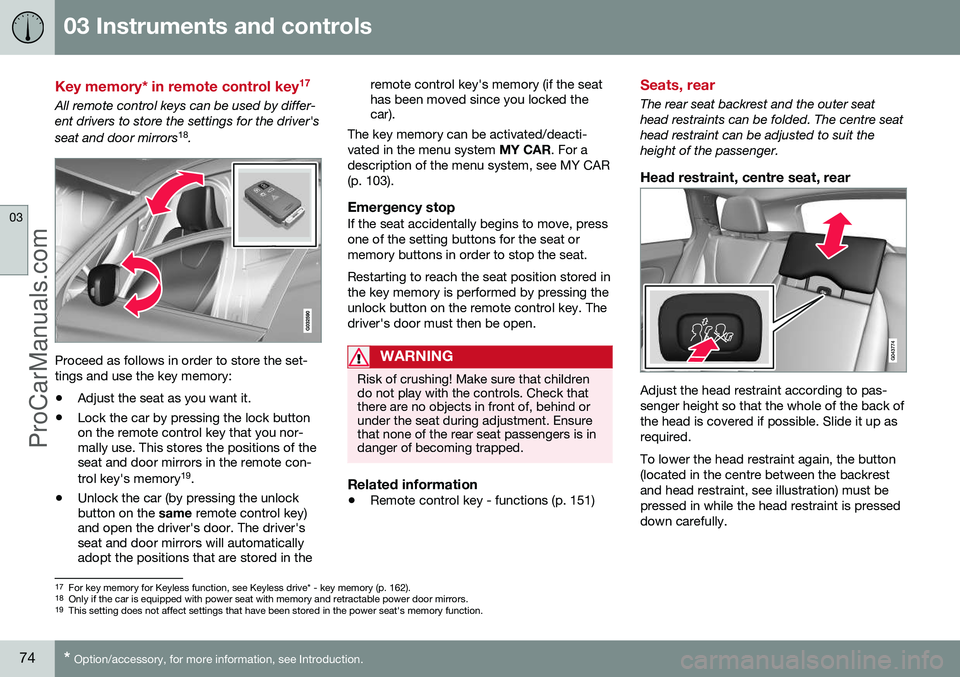
Proceed as follows in order to store the set- tings and use the key memory:
• Adjust the seat as you want it.
• Lock the car by pressing the lock button on the remote control key that you nor-mally use. This stores the positions of theseat and door mirrors in the remote con- trol key's memory 19
.
• Unlock the car (by pressing the unlock button on the
same remote control key)
and open the driver's door. The driver'sseat and door mirrors will automaticallyadopt the positions that are stored in the remote control key's memory (if the seathas been moved since you locked thecar).
The key memory can be activated/deacti- vated in the menu system MY CAR. For a
description of the menu system, see MY CAR(p. 103).
Emergency stopIf the seat accidentally begins to move, pressone of the setting buttons for the seat ormemory buttons in order to stop the seat. Restarting to reach the seat position stored in the key memory is performed by pressing theunlock button on the remote control key. Thedriver's door must then be open.
WARNING
Risk of crushing! Make sure that children do not play with the controls. Check thatthere are no objects in front of, behind orunder the seat during adjustment. Ensurethat none of the rear seat passengers is indanger of becoming trapped.
Related information
• Remote control key - functions (p. 151)
Seats, rear
The rear seat backrest and the outer seat head restraints can be folded. The centre seathead restraint can be adjusted to suit theheight of the passenger.
Head restraint, centre seat, rear
Adjust the head restraint according to pas- senger height so that the whole of the back ofthe head is covered if possible. Slide it up asrequired. To lower the head restraint again, the button (located in the centre between the backrestand head restraint, see illustration) must bepressed in while the head restraint is presseddown carefully.
17
For key memory for Keyless function, see Keyless drive* - key memory (p. 162).
18 Only if the car is equipped with power seat with memory and retractable power door mirrors.
19 This setting does not affect settings that have been stored in the power seat's memory function.
ProCarManuals.co’
Page 77 of 442
03 Instruments and controls
03
}}
75
Manual lowering of the outer head restraints, rear seat
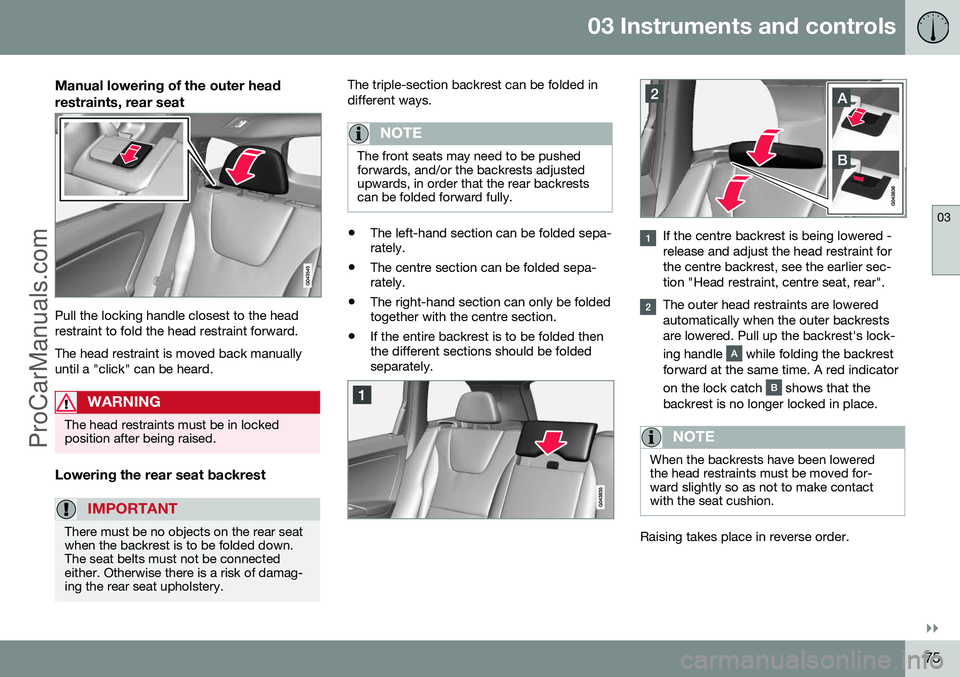
Pull the locking handle closest to the head restraint to fold the head restraint forward. The head restraint is moved back manually until a "click" can be heard.
WARNING
The head restraints must be in locked position after being raised.
Lowering the rear seat backrest
IMPORTANT
There must be no objects on the rear seat when the backrest is to be folded down.The seat belts must not be connectedeither. Otherwise there is a risk of damag-ing the rear seat upholstery.
The triple-section backrest can be folded in different ways.
NOTE
The front seats may need to be pushed forwards, and/or the backrests adjustedupwards, in order that the rear backrestscan be folded forward fully.
•The left-hand section can be folded sepa- rately.
• The centre section can be folded sepa-rately.
• The right-hand section can only be foldedtogether with the centre section.
• If the entire backrest is to be folded thenthe different sections should be foldedseparately.If the centre backrest is being lowered - release and adjust the head restraint forthe centre backrest, see the earlier sec-tion "Head restraint, centre seat, rear".
The outer head restraints are lowered automatically when the outer backrestsare lowered. Pull up the backrest's lock- ing handle
while folding the backrest
forward at the same time. A red indicator on the lock catch
shows that the
backrest is no longer locked in place.
NOTE
When the backrests have been lowered the head restraints must be moved for-ward slightly so as not to make contactwith the seat cushion.
Raising takes place in reverse order.
ProCarManuals.co’
Page 78 of 442
||
03 Instruments and controls
03
76* Option/accessory, for more information, see Introduction.
NOTE
When the backrest has been raised, the red indicator should no longer be showing.If it is still showing then the backrest is notlocked in place.
WARNING
Check that the backrests and head restraints in the rear seat are locked prop-erly after being folded up.
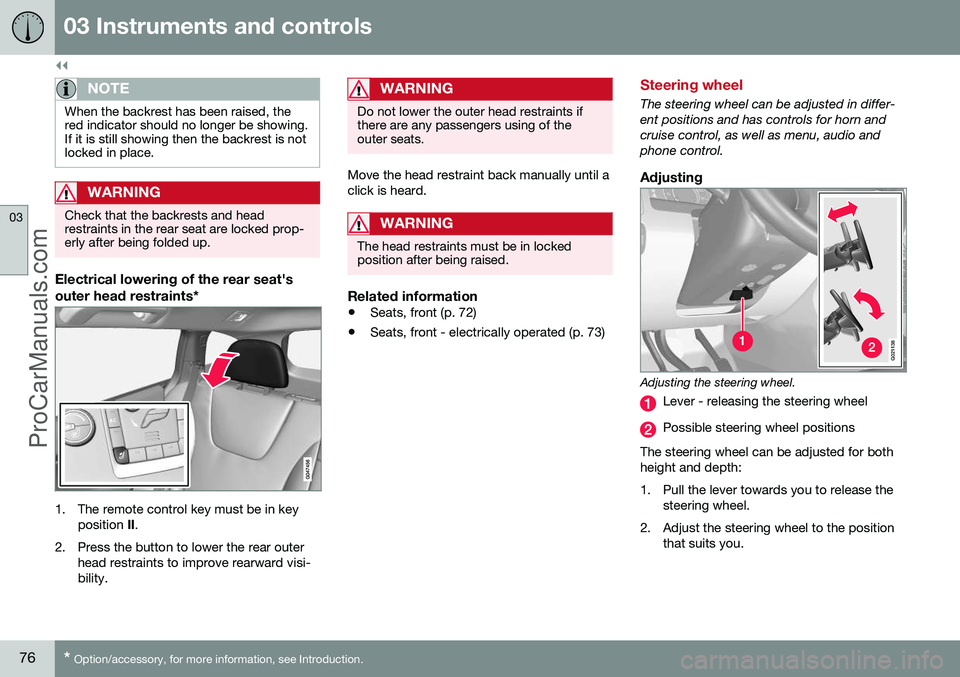
Electrical lowering of the rear seat's
outer head restraints*
1. The remote control key must be in key
position II.
2. Press the button to lower the rear outer head restraints to improve rearward visi- bility.
WARNING
Do not lower the outer head restraints if there are any passengers using of theouter seats.
Move the head restraint back manually until a click is heard.
WARNING
The head restraints must be in locked position after being raised.
Related information
• Seats, front (p. 72)
• Seats, front - electrically operated (p. 73)
Steering wheel
The steering wheel can be adjusted in differ- ent positions and has controls for horn andcruise control, as well as menu, audio andphone control.
Adjusting
G021138
Adjusting the steering wheel.
Lever - releasing the steering wheel
Possible steering wheel positions
The steering wheel can be adjusted for both height and depth:
1. Pull the lever towards you to release the steering wheel.
2. Adjust the steering wheel to the position that suits you.
ProCarManuals.co’
Page 81 of 442
03 Instruments and controls
03
* Option/accessory, for more information, see Introduction.79
Posi-
tionSpecification
Daytime running lights, side marker lamps front and posi-tion/parking lamps/side markerlamps rear during the day whenthe car's electrical system is inkey position II or the engine is
running. Automatic switching to dipped beam and position/parkinglamps/side marker lamps inpoor light conditions or whenthe windscreen wipers or rearfog lamps are activated. The tunnel detection (p. 81)* function is activated. The active high beam (p. 82)* function can be used. Main beam can be activated when dipped beam is switchedon. Main beam flash can be used.
Posi-
tionSpecification
Dipped beam and position/ parking lamps/side markerlamps. Main beam can be activated.Main beam flash can be used.
A Fitted in or under the front bumper.
Volvo recommends that
mode is used
when the car is being driven, as long as traffic situations or weather conditions are unfavour-able for the active high beam function*.
Instrument lightingDifferent display and instrument lighting isswitched on depending on key position; seeKey positions - functions at different levels (p.70). The display lighting is automatically subdued in darkness - the sensitivity is set with thethumbwheel. The intensity of the instrument lighting is adjusted with the thumbwheel.
Headlamp levellingThe load in the car changes the vertical align-ment of the headlamp beam, which coulddazzle oncoming motorists. Avoid this byadjusting the height of the beam. Lower thebeam if the car is heavily laden. 1. Leave the engine running, or have the
car's electrical system in key position I.
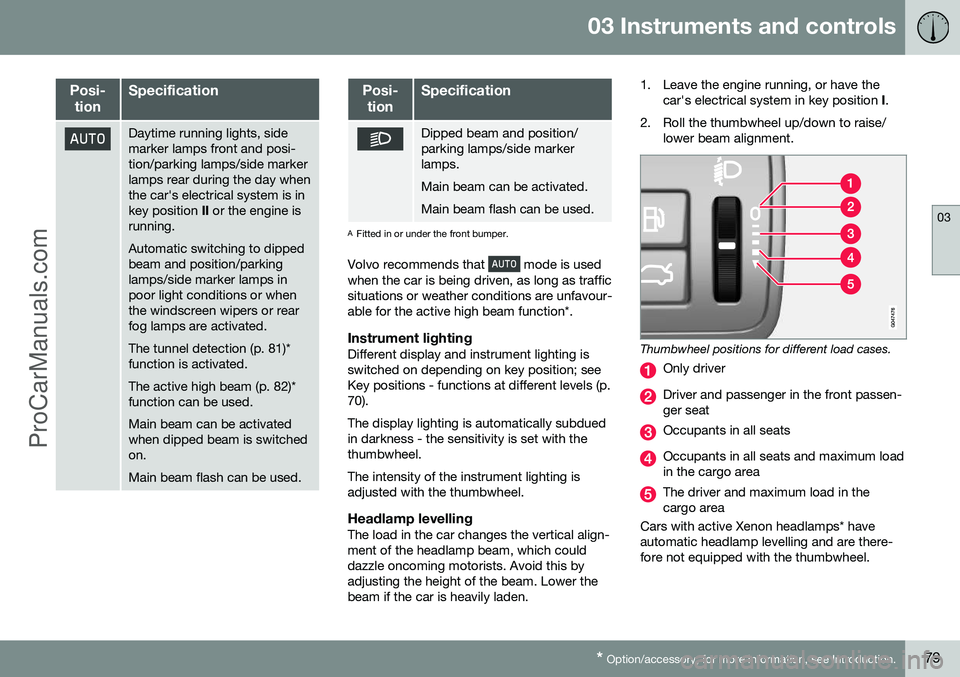
2. Roll the thumbwheel up/down to raise/ lower beam alignment.
Thumbwheel positions for different load cases.
Only driver
Driver and passenger in the front passen- ger seat
Occupants in all seats
Occupants in all seats and maximum load in the cargo area
The driver and maximum load in the cargo area
Cars with active Xenon headlamps* haveautomatic headlamp levelling and are there-fore not equipped with the thumbwheel.
ProCarManuals.co’
Page 90 of 442
03 Instruments and controls
03
88
Interior lighting
The passenger compartment lighting is acti- vated/deactivated with the buttons in the con-trols above the front seats and the rear seat.
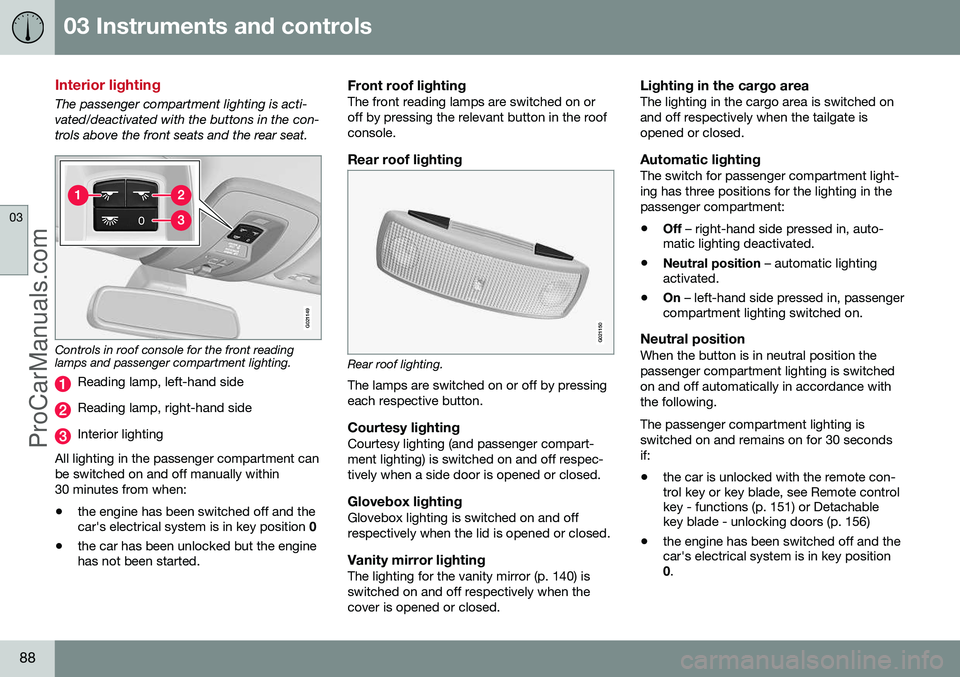
G021149
Controls in roof console for the front reading lamps and passenger compartment lighting.
Reading lamp, left-hand side
Reading lamp, right-hand side
Interior lighting
All lighting in the passenger compartment can be switched on and off manually within30 minutes from when:
• the engine has been switched off and the car's electrical system is in key position
0
• the car has been unlocked but the enginehas not been started.
Front roof lightingThe front reading lamps are switched on or off by pressing the relevant button in the roofconsole.
Rear roof lighting
G021150
Rear roof lighting.
The lamps are switched on or off by pressing each respective button.
Courtesy lightingCourtesy lighting (and passenger compart-ment lighting) is switched on and off respec-tively when a side door is opened or closed.
Glovebox lightingGlovebox lighting is switched on and offrespectively when the lid is opened or closed.
Vanity mirror lightingThe lighting for the vanity mirror (p. 140) isswitched on and off respectively when thecover is opened or closed.
Lighting in the cargo areaThe lighting in the cargo area is switched onand off respectively when the tailgate isopened or closed.
Automatic lightingThe switch for passenger compartment light-ing has three positions for the lighting in thepassenger compartment:
• Off
– right-hand side pressed in, auto-
matic lighting deactivated.
• Neutral position
– automatic lighting
activated.
• On
– left-hand side pressed in, passenger
compartment lighting switched on.
Neutral positionWhen the button is in neutral position thepassenger compartment lighting is switchedon and off automatically in accordance withthe following. The passenger compartment lighting is switched on and remains on for 30 secondsif:
• the car is unlocked with the remote con- trol key or key blade, see Remote control key - functions (p. 151) or Detachable key blade - unlocking doors (p. 156)
• the engine has been switched off and thecar's electrical system is in key position0
.
ProCarManuals.co’
Page 96 of 442
||
03 Instruments and controls
03
94
ResettingIf the battery is disconnected then the func- tion for automatic opening must be reset sothat it can work correctly.
1. Gently raise the front section of the but-ton to raise the window to its end position and hold it there for one second.
2. Release the button briefly.
3. Raise the front section of the button again for one second.
WARNING
A reset must take place for pinch protec- tion to work.
Door mirrors
The door mirror positions are adjusted with the joystick in the driver's door controls.
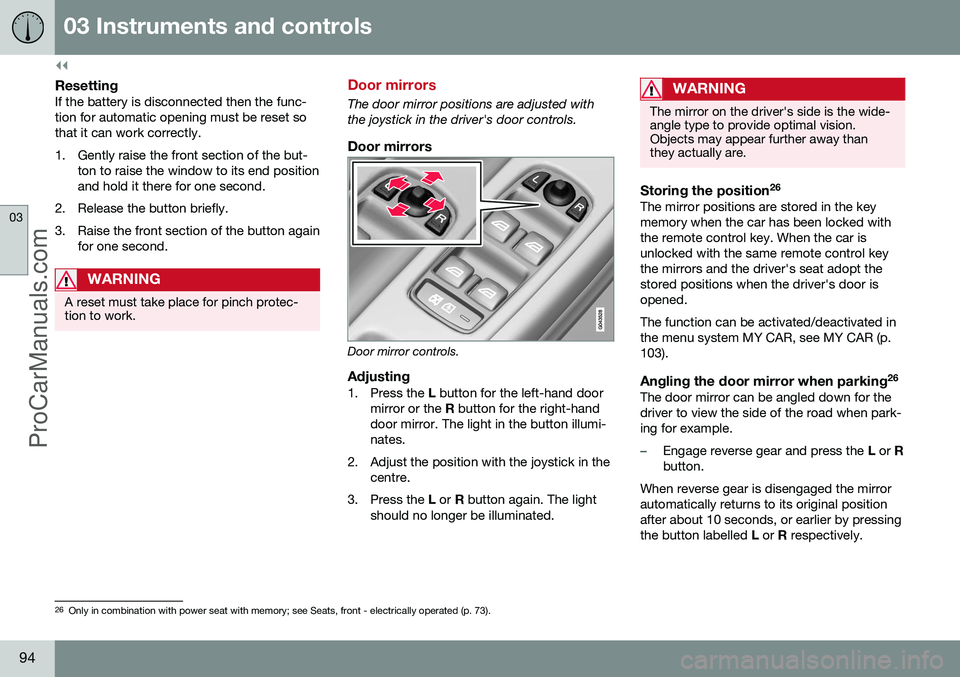
Door mirrors
Door mirror controls.
Adjusting1. Press the L button for the left-hand door
mirror or the R button for the right-hand
door mirror. The light in the button illumi- nates.
2. Adjust the position with the joystick in the centre.
3. Press the L or R button again. The light
should no longer be illuminated.
WARNING
The mirror on the driver's side is the wide- angle type to provide optimal vision.Objects may appear further away thanthey actually are.
Storing the position 26The mirror positions are stored in the key memory when the car has been locked withthe remote control key. When the car isunlocked with the same remote control keythe mirrors and the driver's seat adopt thestored positions when the driver's door isopened. The function can be activated/deactivated in the menu system MY CAR, see MY CAR (p.103).
Angling the door mirror when parking 26The door mirror can be angled down for thedriver to view the side of the road when park-ing for example.
–Engage reverse gear and press the
L or R
button.
When reverse gear is disengaged the mirror automatically returns to its original positionafter about 10 seconds, or earlier by pressingthe button labelled L or R respectively.
26
Only in combination with power seat with memory; see Seats, front - electrically operated (p. 73).
ProCarManuals.co’
Page 97 of 442
03 Instruments and controls
03
* Option/accessory, for more information, see Introduction.95
Automatic angling of the door mirror when parking 26
When reverse gear is engaged the door mirror is automatically angled down so that thedriver can see the side of the road whenparking for example. When reverse gear isdisengaged the mirror automatically returnsto its original position after a short time. The function can be activated/deactivated in the menu system MY CAR, see MY CAR (p.103).
Automatic retraction when locking 26When the car is locked/unlocked with theremote control key the door mirrors are auto-matically retracted/extended. The function can be activated/deactivated in the menu system MY CAR, see MY CAR (p.103).
Resetting to neutralMirrors that have been moved out of positionby an external force must be reset electricallyto the neutral position for electric retracting/extending to work correctly:
1. Retract the mirrors with the
L and R but-
tons.
2. Fold them out again with the L and R but-
tons. 3. Repeat the above procedure as neces-
sary.
The mirrors are now reset in neutral position.
Automatic dimming*For the door mirrors to be fitted with this function requires that the interior rearviewmirror also has automatic dimming, see Rear-view mirror - interior (p. 96).
Retractable power door mirrors*The mirrors can be retracted for parking/driv-ing in narrow spaces:
1. Depress the L and R buttons simultane-
ously (key position must be at least I).
2. Release them after approximately 1 second. The mirrors automatically stop in the fully retractedposition.
Fold out the mirrors by pressing down the L
and R buttons simultaneously. The mirrors
automatically stop in the fully extended posi-tion.
Home safe and approach lightingThe lamp on the door mirrors illuminateswhen approach lighting (p. 89) or home safelighting (p. 89) is selected.
Related information
• Rearview mirror - interior (p. 96)
• Windows and rearview and door mirrors - heating (p. 96)
26
Only in combination with power seat with memory; see Seats, front - electrically operated (p. 73).
ProCarManuals.co’