seats VOLVO V60 2014 Owner's Guide
[x] Cancel search | Manufacturer: VOLVO, Model Year: 2014, Model line: V60, Model: VOLVO V60 2014Pages: 442, PDF Size: 13.85 MB
Page 99 of 442
03 Instruments and controls
03
* Option/accessory, for more information, see Introduction.97
Automatic dimming*Bright light from behind is automatically dimmed by the rearview mirror. The controlfor manual dimming is not available on mir-rors with automatic dimming. The rearview mirror contains two sensors - one forward facing and one rearward facing -that work together to identify and eliminatedazzling light. The forward facing sensordetects ambient light, while the rearward fac-ing sensor detects the light from vehicleheadlights behind.
NOTE
If the sensors are obscured by e.g. parking permits, transponders, sun visors orobjects in the seats or in the cargo area insuch a way that light is prevented fromreaching the sensors, then the dimmingfunction of the interior rearview and doormirrors is reduced.
The compass (p. 97) can only be specified for a rearview mirror with automatic dimming.
Related information
• Door mirrors (p. 94)
Compass*
The rearview mirror contains an integrated display that shows the compass direction inwhich the front of the car is pointing.
Operation
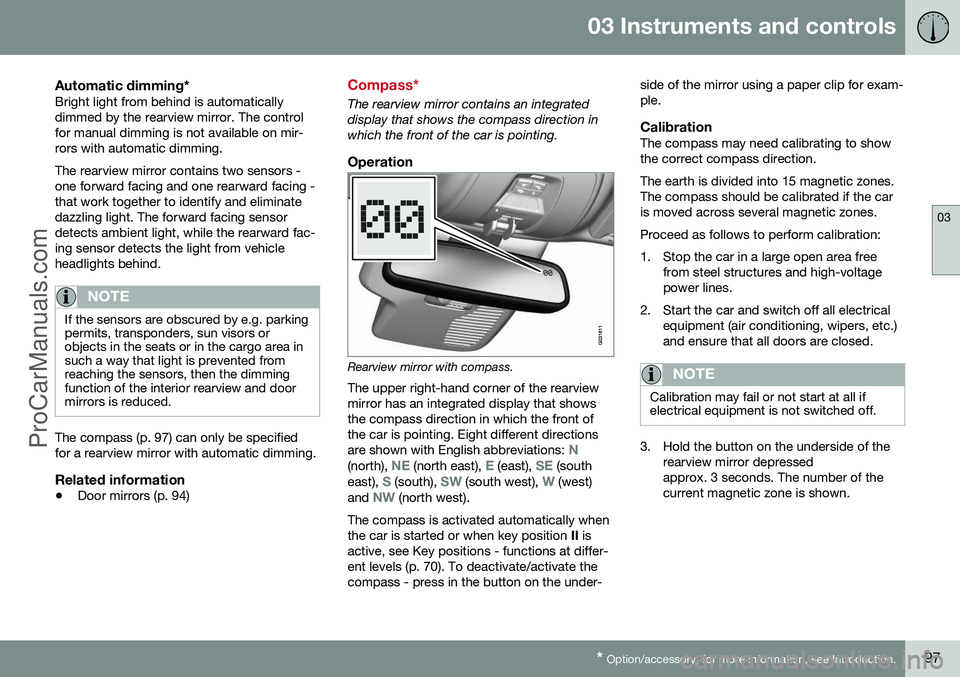
Rearview mirror with compass.
The upper right-hand corner of the rearview mirror has an integrated display that showsthe compass direction in which the front ofthe car is pointing. Eight different directions are shown with English abbreviations:
N(north), NE (north east), E (east), SE (south
east), S (south), SW (south west), W (west)
and NW (north west).
The compass is activated automatically when the car is started or when key position II is
active, see Key positions - functions at differ-ent levels (p. 70). To deactivate/activate thecompass - press in the button on the under- side of the mirror using a paper clip for exam-ple.
CalibrationThe compass may need calibrating to showthe correct compass direction. The earth is divided into 15 magnetic zones. The compass should be calibrated if the caris moved across several magnetic zones. Proceed as follows to perform calibration:
1. Stop the car in a large open area free
from steel structures and high-voltage power lines.
2. Start the car and switch off all electrical equipment (air conditioning, wipers, etc.)and ensure that all doors are closed.
NOTE
Calibration may fail or not start at all if electrical equipment is not switched off.
3. Hold the button on the underside of therearview mirror depressed approx. 3 seconds. The number of thecurrent magnetic zone is shown.
ProCarManuals.co’
Page 124 of 442
04 Climate control
04
122* Option/accessory, for more information, see Introduction.
Heated front seats*
The front seat heating has three positions for increasing the comfort for driver and passen-ger when it is cold.
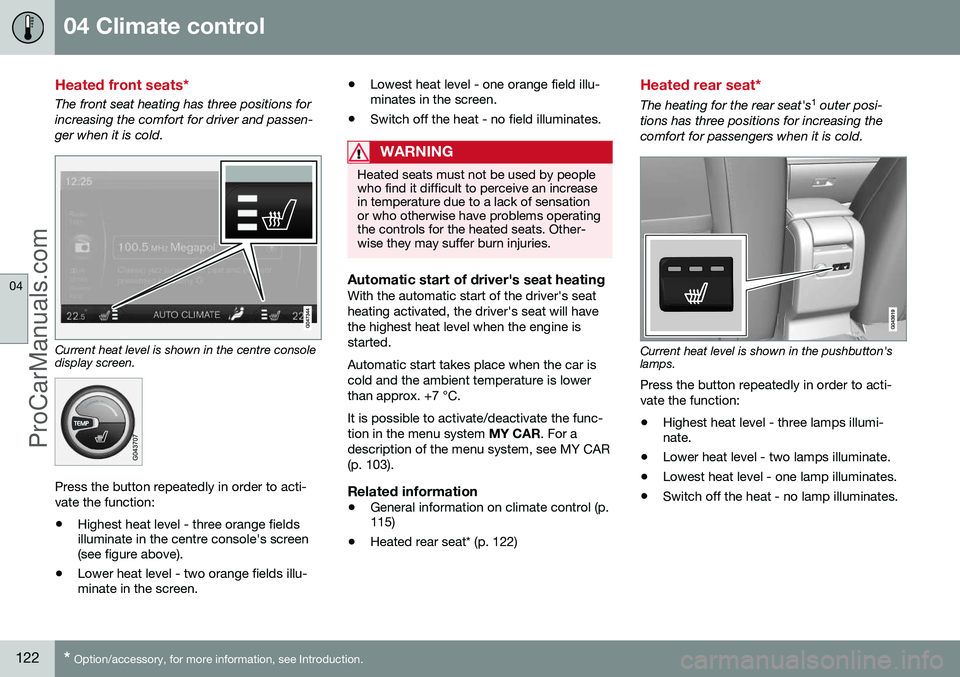
Current heat level is shown in the centre console display screen.
Press the button repeatedly in order to acti- vate the function:
• Highest heat level - three orange fields illuminate in the centre console's screen(see figure above).
• Lower heat level - two orange fields illu-minate in the screen. •
Lowest heat level - one orange field illu-minates in the screen.
• Switch off the heat - no field illuminates.
WARNING
Heated seats must not be used by people who find it difficult to perceive an increasein temperature due to a lack of sensationor who otherwise have problems operatingthe controls for the heated seats. Other-wise they may suffer burn injuries.
Automatic start of driver's seat heatingWith the automatic start of the driver's seat heating activated, the driver's seat will havethe highest heat level when the engine isstarted. Automatic start takes place when the car is cold and the ambient temperature is lowerthan approx. +7 °C. It is possible to activate/deactivate the func- tion in the menu system
MY CAR. For a
description of the menu system, see MY CAR(p. 103).
Related information
• General information on climate control (p. 115)
• Heated rear seat* (p. 122)
Heated rear seat*
The heating for the rear seat's 1
outer posi-
tions has three positions for increasing the comfort for passengers when it is cold.
Current heat level is shown in the pushbutton's lamps. Press the button repeatedly in order to acti- vate the function:
• Highest heat level - three lamps illumi- nate.
• Lower heat level - two lamps illuminate.
• Lowest heat level - one lamp illuminates.
• Switch off the heat - no lamp illuminates.
ProCarManuals.co’
Page 125 of 442
04 Climate control
04
* Option/accessory, for more information, see Introduction.123
WARNING
Heated seats must not be used by people who find it difficult to perceive an increasein temperature due to a lack of sensationor who otherwise have problems operatingthe controls for the heated seats. Other-wise they may suffer burn injuries.
Related information
• General information on climate control (p. 115)
• Heated front seats* (p. 122)
Fan
The fan should always be activated in order to avoid misting on the windows.
NOTE
If the fan is fully switched off then the air conditioning is not engaged - which cancause a risk of misting on the windows.
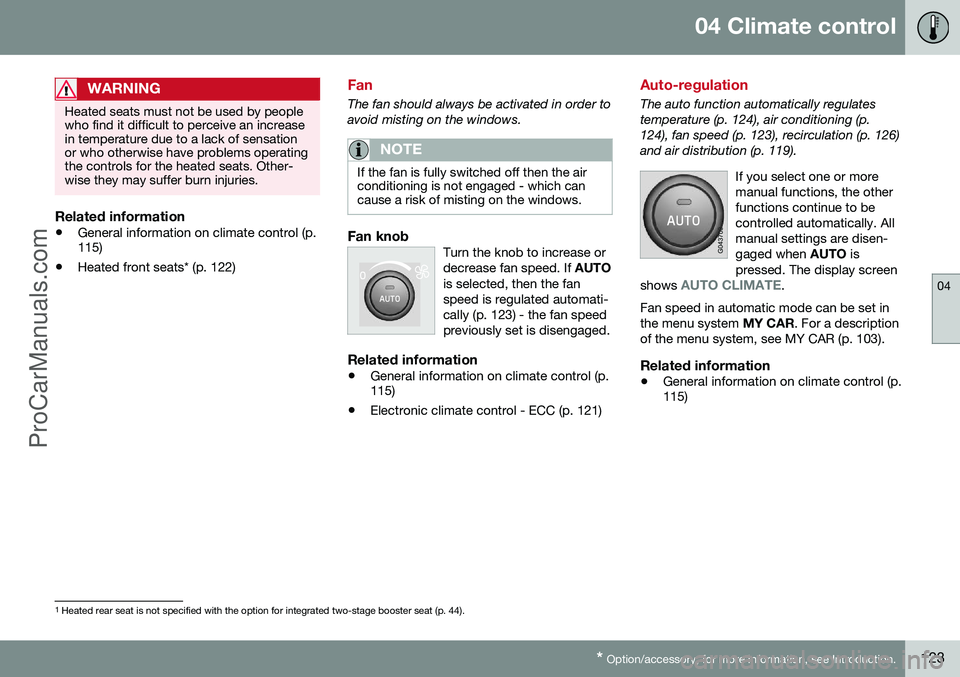
Fan knobTurn the knob to increase or decrease fan speed. If
AUTO
is selected, then the fanspeed is regulated automati-cally (p. 123) - the fan speedpreviously set is disengaged.
Related information
• General information on climate control (p. 115)
• Electronic climate control - ECC (p. 121)
Auto-regulation
The auto function automatically regulates temperature (p. 124), air conditioning (p.124), fan speed (p. 123), recirculation (p. 126)and air distribution (p. 119).
If you select one or moremanual functions, the otherfunctions continue to becontrolled automatically. Allmanual settings are disen-gaged when AUTO is
pressed. The display screen
shows
AUTO CLIMATE.
Fan speed in automatic mode can be set in the menu system MY CAR. For a description
of the menu system, see MY CAR (p. 103).
Related information
• General information on climate control (p. 115)
1
Heated rear seat is not specified with the option for integrated two-stage booster seat (p. 44).
ProCarManuals.co’
Page 141 of 442
05 Loading and storage
05
* Option/accessory, for more information, see Introduction.139
Jacket holder
The coat hanger is located on the left-hand side of the passenger seat's head restraint. The jacket holder is only designed for light clothing.
Related information
• Storage spaces (p. 137)
Tunnel console
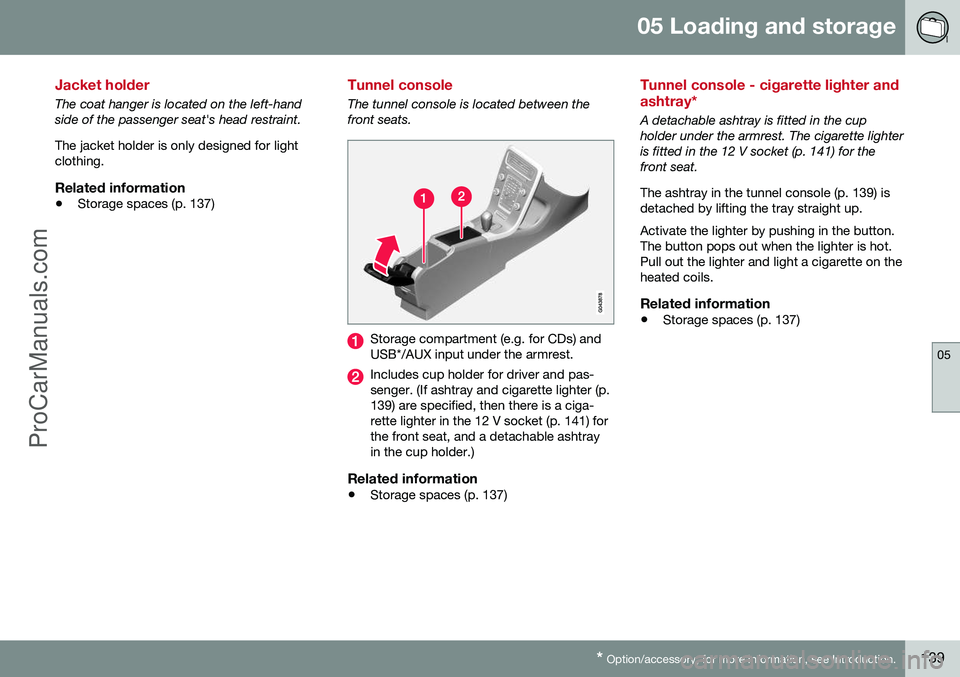
The tunnel console is located between the front seats.
Storage compartment (e.g. for CDs) and USB*/AUX input under the armrest.
Includes cup holder for driver and pas- senger. (If ashtray and cigarette lighter (p.139) are specified, then there is a ciga-rette lighter in the 12 V socket (p. 141) forthe front seat, and a detachable ashtrayin the cup holder.)
Related information
•Storage spaces (p. 137)
Tunnel console - cigarette lighter and ashtray*
A detachable ashtray is fitted in the cup holder under the armrest. The cigarette lighteris fitted in the 12 V socket (p. 141) for thefront seat. The ashtray in the tunnel console (p. 139) is detached by lifting the tray straight up. Activate the lighter by pushing in the button. The button pops out when the lighter is hot.Pull out the lighter and light a cigarette on theheated coils.
Related information
• Storage spaces (p. 137)
ProCarManuals.co’
Page 144 of 442
05 Loading and storage
05
142* Option/accessory, for more information, see Introduction.
Loading
Payload depends on the car's kerb weight. Payload depends on the car's kerb weight. The total of the weight of the passengers andall accessories reduces the car's payload bya corresponding weight. For more detailedinformation on weights, see Weights (p. 390).
The tailgate is opened via a buttonon the lighting panel or the remotecontrol key, see Locking/unlocking -
tailgate (p. 167).
WARNING
The car’s driving properties change depending on the weight and positioningof the load.
To bear in mind when loading
• Position the load firmly against the rear seat's backrest.
Note that objects must not prevent the func- tion of the WHIPS system for the front seats ifany of the rear seat's backrests is foldeddown, seeWHIPS - seating position (p. 35).
• Centre the load.
• Heavy objects should be placed as low as possible. Avoid placing heavy loads onlowered backrests.
• Cover sharp edges with something soft toavoid damaging the upholstery. •
Secure all loads to the load retaining eye-lets with straps or web lashings.
WARNING
A loose object weighing 20 kg can, in a frontal collision at a speed of 50 km/h,carry the impact of an item weighing1000 kg.
WARNING
The protection provided by the inflatable curtain in the headlining may be compro-mised or eliminated by high loads.
• Never load cargo above the backrest.
WARNING
Always secure the load. During heavy braking the load may otherwise shift, caus-ing injury to the car's occupants. Cover sharp edges and sharp corners with something soft. Switch off the engine and apply the park- ing brake when loading/unloading longitems. Otherwise you may accidentallyknock the gear lever or gear selector withthe load into a drive position - and the carcould then move off.
Related information
•
Load retaining eyelets (p. 143)
• Safety net* (p. 145) •
Loading - long load (p. 143)
• Roof load (p. 143)
ProCarManuals.co’
Page 145 of 442
05 Loading and storage
05
143
Loading - long load
To simplify loading (p. 142) in the cargo area, the rear seat backrest can be folded down.The passenger seat backrest can also be folded for an extra long load2
.
Lowering the rear seat backrestTo simplify loading in the cargo area, the rear seat backrest can be folded down, see Seats,rear (p. 74).
Roof load
The load carriers recommended for roof loads are the ones developed by Volvo. This is inorder to avoid damage to the car and in orderto achieve the maximum possible safety dur-ing a journey. Carefully follow the installation instructions supplied with the carriers.
• Check periodically that the load carriers and load are properly secured. Lash theload securely with retaining straps.
• Distribute the load evenly over the loadcarriers. Put the heaviest objects at thebottom.
• The size of the area exposed to the wind,and therefore fuel consumption, increasewith the size of the load.
• Drive gently. Avoid quick acceleration,heavy braking and hard cornering.
WARNING
The car's centre of gravity and driving cha- racteristics are altered by roof loads. Forinformation about the maximum allowableload on the roof, including load carriersand any space box, Weights (p. 390).
Related information
•
Loading (p. 142)
Load retaining eyelets
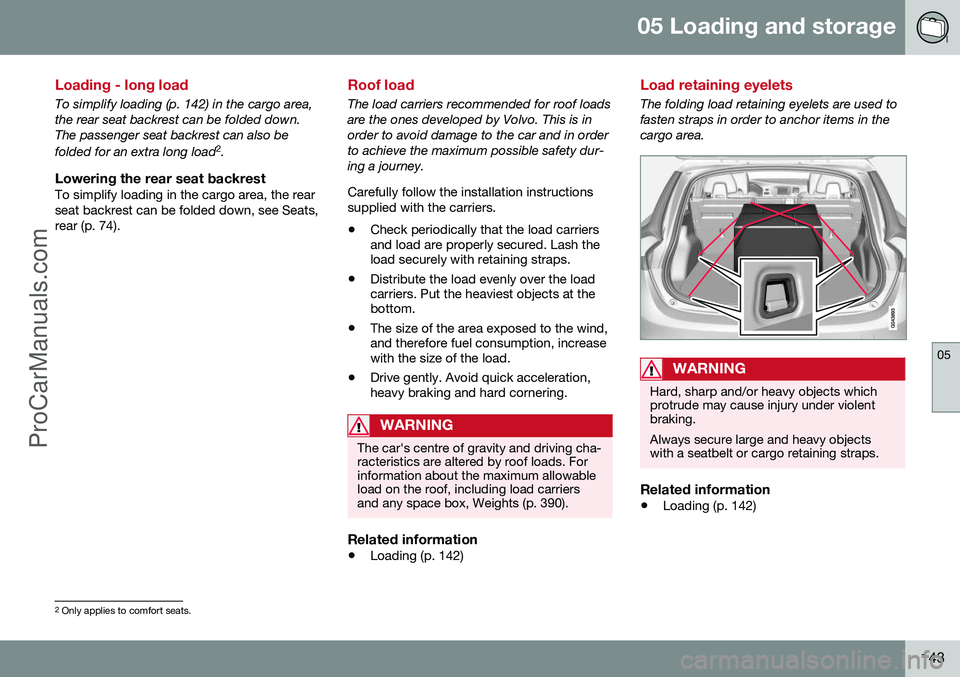
The folding load retaining eyelets are used to fasten straps in order to anchor items in thecargo area.
WARNING
Hard, sharp and/or heavy objects which protrude may cause injury under violentbraking. Always secure large and heavy objects with a seatbelt or cargo retaining straps.
Related information
• Loading (p. 142)
2
Only applies to comfort seats.
ProCarManuals.co’
Page 147 of 442
05 Loading and storage
05
}}
* Option/accessory, for more information, see Introduction.145
Safety net*
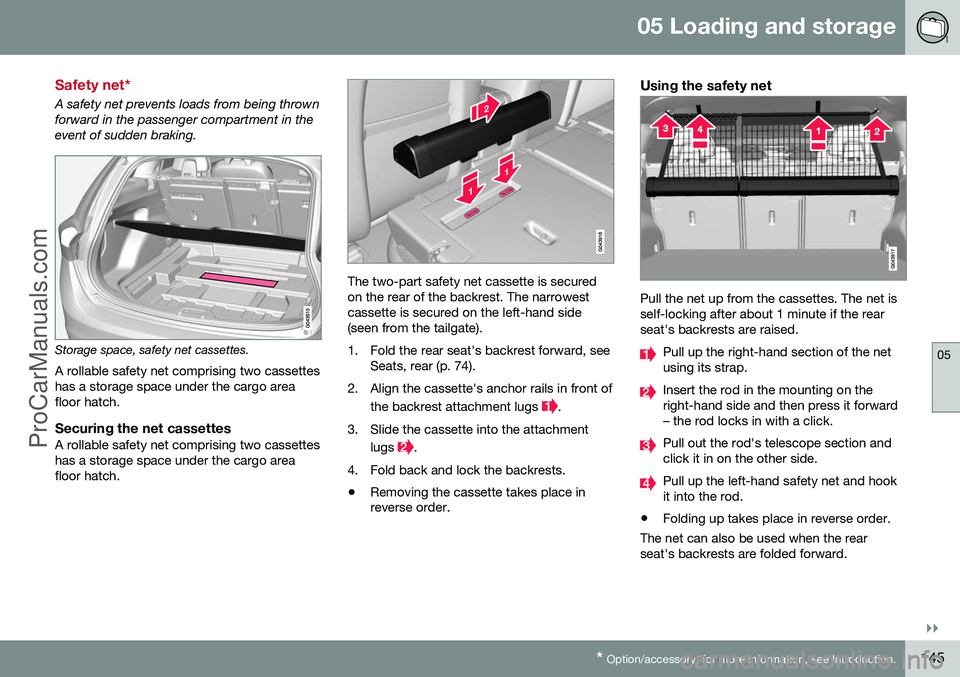
A safety net prevents loads from being thrown forward in the passenger compartment in theevent of sudden braking.
Storage space, safety net cassettes.
A rollable safety net comprising two cassettes has a storage space under the cargo areafloor hatch.
Securing the net cassettesA rollable safety net comprising two cassetteshas a storage space under the cargo areafloor hatch.
The two-part safety net cassette is secured on the rear of the backrest. The narrowestcassette is secured on the left-hand side (seen from the tailgate).
1. Fold the rear seat's backrest forward, see Seats, rear (p. 74).
2. Align the cassette's anchor rails in front of the backrest attachment lugs
.
3. Slide the cassette into the attachment lugs
.
4. Fold back and lock the backrests.
• Removing the cassette takes place in reverse order.
Using the safety net
Pull the net up from the cassettes. The net is self-locking after about 1 minute if the rearseat's backrests are raised.
Pull up the right-hand section of the net using its strap.
Insert the rod in the mounting on the right-hand side and then press it forward– the rod locks in with a click.
Pull out the rod's telescope section and click it in on the other side.
Pull up the left-hand safety net and hook it into the rod.
• Folding up takes place in reverse order.
The net can also be used when the rearseat's backrests are folded forward.
ProCarManuals.co’
Page 164 of 442
06 Locks and alarm
06
162* Option/accessory, for more information, see Introduction.
Keyless drive* - unlocking with the key blade
If central locking cannot be unlocked with the PCC, e.g. if the batteries are discharged, thenthe left-hand front door can be opened withthe PCC's detachable key blade (see Detach-able key blade - detaching/attaching (p. 155)).
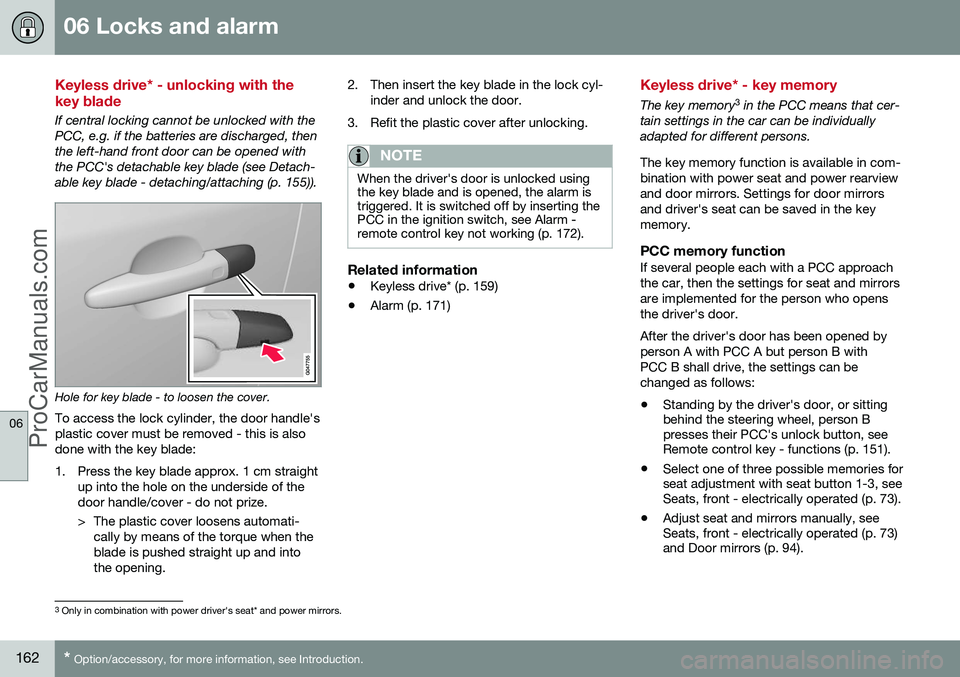
Hole for key blade - to loosen the cover.
To access the lock cylinder, the door handle's plastic cover must be removed - this is alsodone with the key blade:
1. Press the key blade approx. 1 cm straight up into the hole on the underside of the door handle/cover - do not prize.
> The plastic cover loosens automati-cally by means of the torque when the blade is pushed straight up and intothe opening. 2. Then insert the key blade in the lock cyl-
inder and unlock the door.
3. Refit the plastic cover after unlocking.
NOTE
When the driver's door is unlocked using the key blade and is opened, the alarm istriggered. It is switched off by inserting thePCC in the ignition switch, see Alarm -remote control key not working (p. 172).
Related information
• Keyless drive* (p. 159)
• Alarm (p. 171)
Keyless drive* - key memory
The key memory 3
in the PCC means that cer-
tain settings in the car can be individually adapted for different persons. The key memory function is available in com- bination with power seat and power rearviewand door mirrors. Settings for door mirrorsand driver's seat can be saved in the keymemory.
PCC memory functionIf several people each with a PCC approachthe car, then the settings for seat and mirrorsare implemented for the person who opensthe driver's door. After the driver's door has been opened by person A with PCC A but person B withPCC B shall drive, the settings can bechanged as follows:
• Standing by the driver's door, or sitting behind the steering wheel, person Bpresses their PCC's unlock button, seeRemote control key - functions (p. 151).
• Select one of three possible memories forseat adjustment with seat button 1-3, seeSeats, front - electrically operated (p. 73).
• Adjust seat and mirrors manually, seeSeats, front - electrically operated (p. 73)and Door mirrors (p. 94).
3
Only in combination with power driver's seat* and power mirrors.
ProCarManuals.co’
Page 376 of 442
10 Maintenance and service
10
374* Option/accessory, for more information, see Introduction.
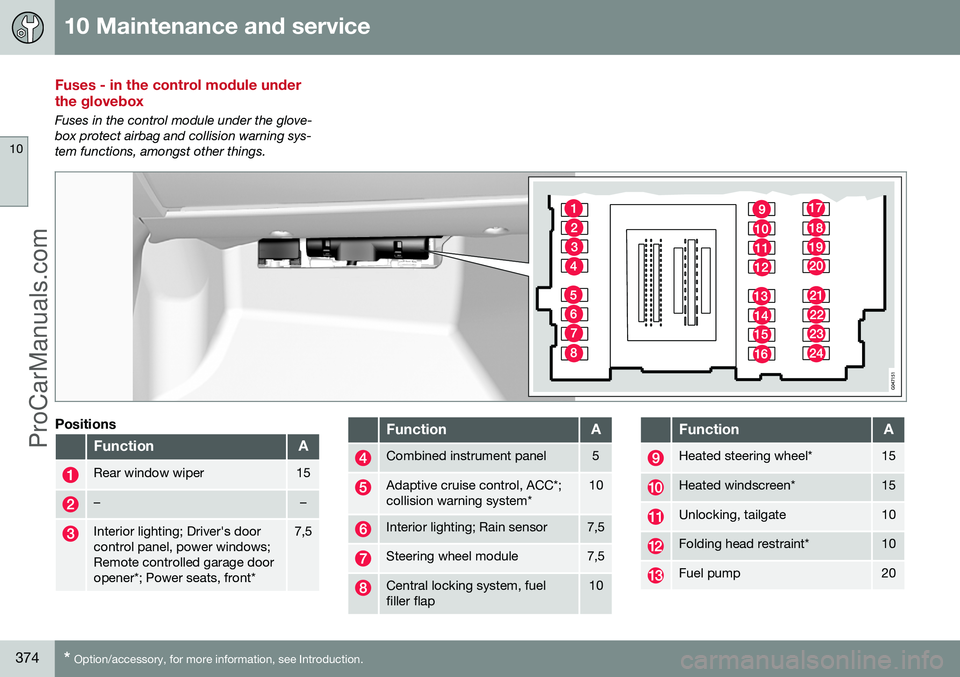
Fuses - in the control module under the glovebox
Fuses in the control module under the glove- box protect airbag and collision warning sys-tem functions, amongst other things.
Positions
FunctionA
Rear window wiper15
––
Interior lighting; Driver's door control panel, power windows;Remote controlled garage dooropener*; Power seats, front*7,5
FunctionA
Combined instrument panel5
Adaptive cruise control, ACC*; collision warning system*10
Interior lighting; Rain sensor7,5
Steering wheel module7,5
Central locking system, fuel filler flap10
FunctionA
Heated steering wheel*15
Heated windscreen*15
Unlocking, tailgate10
Folding head restraint*10
Fuel pump20
ProCarManuals.co’
Page 392 of 442
11 Specifications
11
390
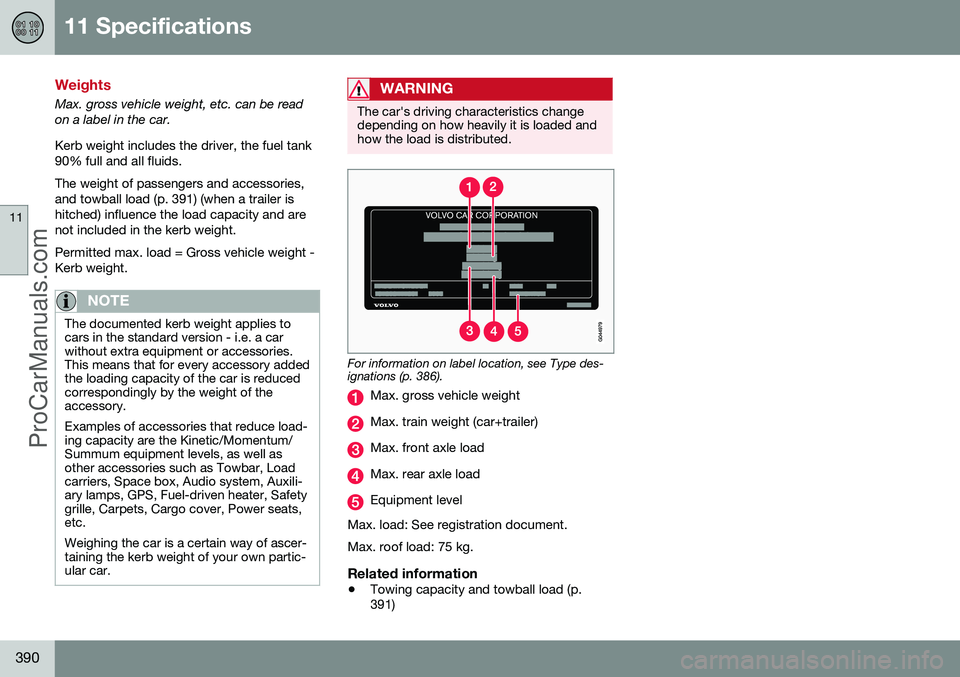
Weights
Max. gross vehicle weight, etc. can be read on a label in the car. Kerb weight includes the driver, the fuel tank 90% full and all fluids. The weight of passengers and accessories, and towball load (p. 391) (when a trailer ishitched) influence the load capacity and arenot included in the kerb weight. Permitted max. load = Gross vehicle weight - Kerb weight.
NOTE
The documented kerb weight applies to cars in the standard version - i.e. a carwithout extra equipment or accessories.This means that for every accessory addedthe loading capacity of the car is reducedcorrespondingly by the weight of theaccessory. Examples of accessories that reduce load- ing capacity are the Kinetic/Momentum/Summum equipment levels, as well asother accessories such as Towbar, Loadcarriers, Space box, Audio system, Auxili-ary lamps, GPS, Fuel-driven heater, Safetygrille, Carpets, Cargo cover, Power seats,etc. Weighing the car is a certain way of ascer- taining the kerb weight of your own partic-ular car.
WARNING
The car's driving characteristics change depending on how heavily it is loaded andhow the load is distributed.
For information on label location, see Type des- ignations (p. 386).
Max. gross vehicle weight
Max. train weight (car+trailer)
Max. front axle load
Max. rear axle load
Equipment level
Max. load: See registration document. Max. roof load: 75 kg.
Related information
• Towing capacity and towball load (p. 391)
ProCarManuals.co’