service VOLVO V60 2014 Owner's Manual
[x] Cancel search | Manufacturer: VOLVO, Model Year: 2014, Model line: V60, Model: VOLVO V60 2014Pages: 442, PDF Size: 13.85 MB
Page 229 of 442
07 Driver support
07
}}
* Option/accessory, for more information, see Introduction.227
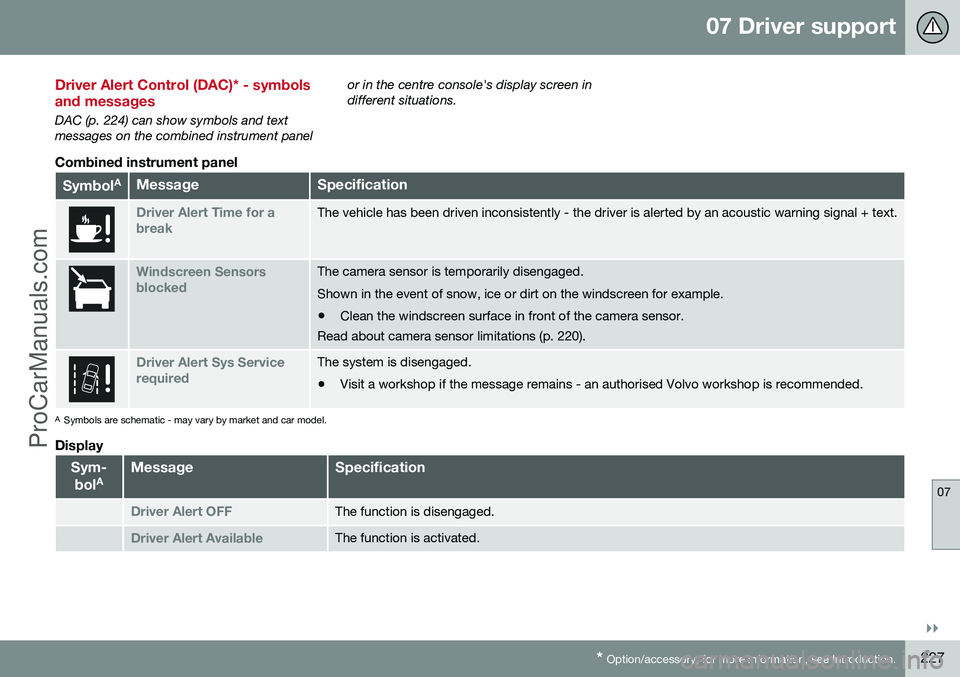
Driver Alert Control (DAC)* - symbols and messages
DAC (p. 224) can show symbols and text messages on the combined instrument panel or in the centre console's display screen indifferent situations.
Combined instrument panel
Symbol
AMessageSpecification
Driver Alert Time for a breakThe vehicle has been driven inconsistently - the driver is alerted by an acoustic warning signal + text.
Windscreen Sensors blockedThe camera sensor is temporarily disengaged. Shown in the event of snow, ice or dirt on the windscreen for example.
• Clean the windscreen surface in front of the camera sensor.
Read about camera sensor limitations (p. 220).
Driver Alert Sys Service requiredThe system is disengaged.
• Visit a workshop if the message remains - an authorised Volvo workshop is recommended.
A
Symbols are schematic - may vary by market and car model.
Display
Sym-
bol AMessageSpecification
Driver Alert OFFThe function is disengaged.
Driver Alert AvailableThe function is activated.
ProCarManuals.co’
Page 234 of 442
07 Driver support
07
232
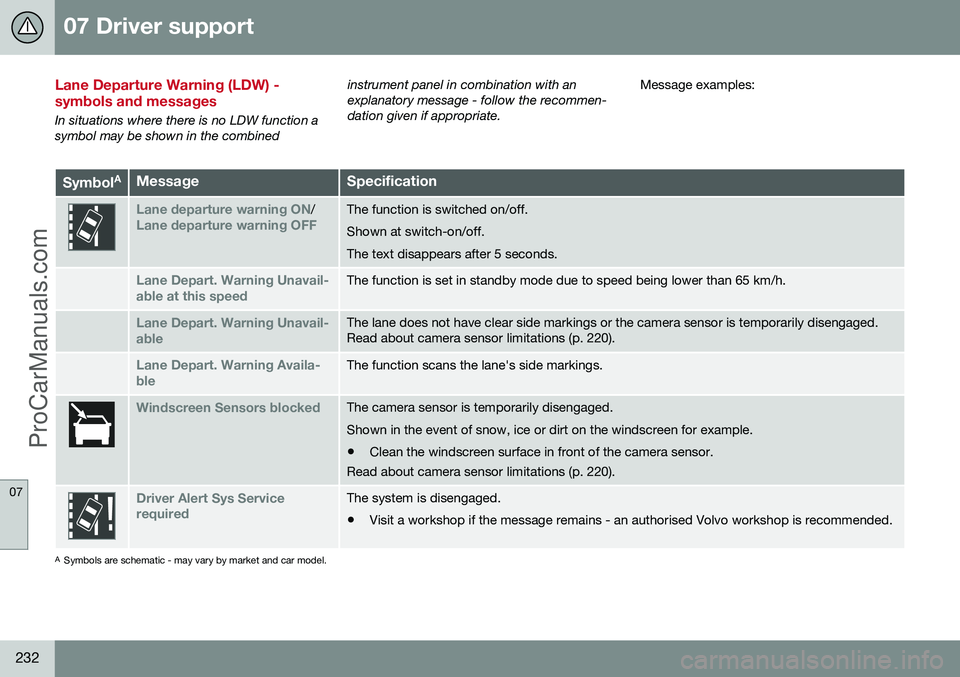
Lane Departure Warning (LDW) - symbols and messages
In situations where there is no LDW function a symbol may be shown in the combinedinstrument panel in combination with anexplanatory message - follow the recommen-dation given if appropriate.
Message examples:
Symbol
AMessageSpecification
Lane departure warning ON/Lane departure warning OFFThe function is switched on/off. Shown at switch-on/off.The text disappears after 5 seconds.
Lane Depart. Warning Unavail-
able at this speedThe function is set in standby mode due to speed being lower than 65 km/h.
Lane Depart. Warning Unavail-
ableThe lane does not have clear side markings or the camera sensor is temporarily disengaged. Read about camera sensor limitations (p. 220).
Lane Depart. Warning Availa-
bleThe function scans the lane's side markings.
Windscreen Sensors blockedThe camera sensor is temporarily disengaged. Shown in the event of snow, ice or dirt on the windscreen for example.
• Clean the windscreen surface in front of the camera sensor.
Read about camera sensor limitations (p. 220).
Driver Alert Sys Service requiredThe system is disengaged.
• Visit a workshop if the message remains - an authorised Volvo workshop is recommended.
A
Symbols are schematic - may vary by market and car model.
ProCarManuals.co’
Page 240 of 442
07 Driver support
07
238* Option/accessory, for more information, see Introduction.
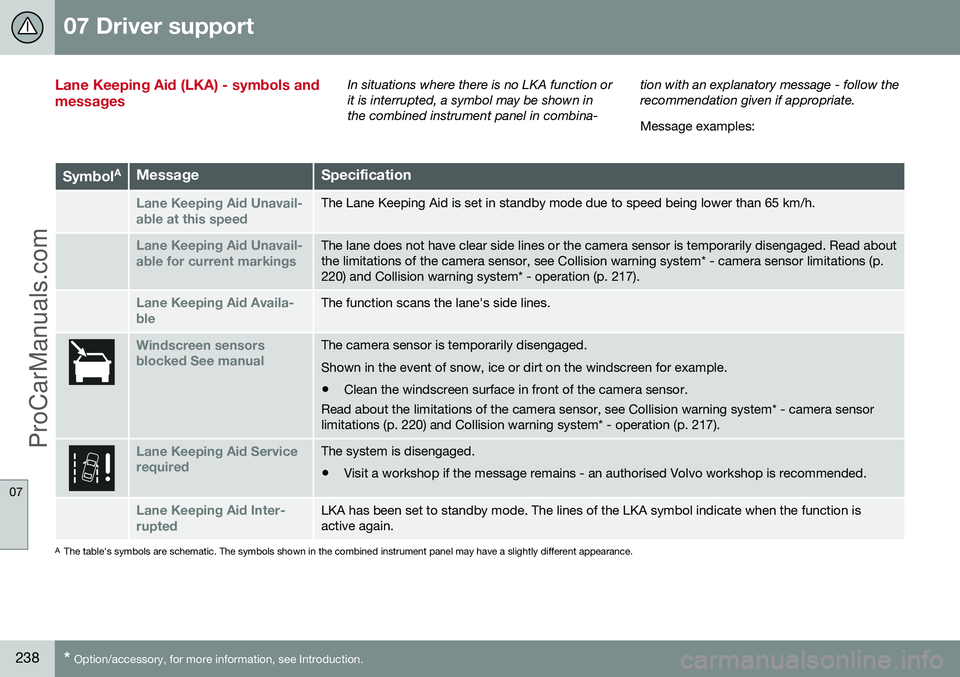
Lane Keeping Aid (LKA) - symbols and messagesIn situations where there is no LKA function or it is interrupted, a symbol may be shown inthe combined instrument panel in combina- tion with an explanatory message - follow therecommendation given if appropriate. Message examples:
Symbol
AMessageSpecification
Lane Keeping Aid Unavail-
able at this speedThe Lane Keeping Aid is set in standby mode due to speed being lower than 65 km/h.
Lane Keeping Aid Unavail-
able for current markingsThe lane does not have clear side lines or the camera sensor is temporarily disengaged. Read about the limitations of the camera sensor, see Collision warning system* - camera sensor limitations (p.220) and Collision warning system* - operation (p. 217).
Lane Keeping Aid Availa-
bleThe function scans the lane's side lines.
Windscreen sensors blocked See manualThe camera sensor is temporarily disengaged. Shown in the event of snow, ice or dirt on the windscreen for example.
• Clean the windscreen surface in front of the camera sensor.
Read about the limitations of the camera sensor, see Collision warning system* - camera sensor limitations (p. 220) and Collision warning system* - operation (p. 217).
Lane Keeping Aid Service requiredThe system is disengaged.
• Visit a workshop if the message remains - an authorised Volvo workshop is recommended.
Lane Keeping Aid Inter- ruptedLKA has been set to standby mode. The lines of the LKA symbol indicate when the function is active again.
A
The table's symbols are schematic. The symbols shown in the combined instrument panel may have a slightly different appearance.
ProCarManuals.co’
Page 245 of 442
07 Driver support
07
* Option/accessory, for more information, see Introduction.243
Park assist syst* - fault indication
Parking assistance is used as an aid to park- ing. An acoustic signal as well as symbols onthe centre console's display screen indicatethe distance to the detected obstacle.
If the combined instrument panel'sinformation symbol illuminates withconstant glow and the text message
Park assist syst Service required is shown
then parking assistance is disengaged.
IMPORTANT
In certain conditions the parking assis- tance system may produce incorrect warn-ing signals that are caused by externalsound sources that emit the same ultra-sonic frequencies that the system workswith. Examples of such sources include horns, wet tyres on asphalt, pneumatic brakesand exhaust noises from motorcycles etc.
Related information
• Park Assist* (p. 240)
• Park assist syst* - cleaning the sensors (p. 243)
• Park assist syst* - function (p. 240)
• Park assist syst* - forward (p. 242)
• Park assist syst* - backward (p. 241)
• Park assist camera (p. 244)
Park assist syst* - cleaning the sensors
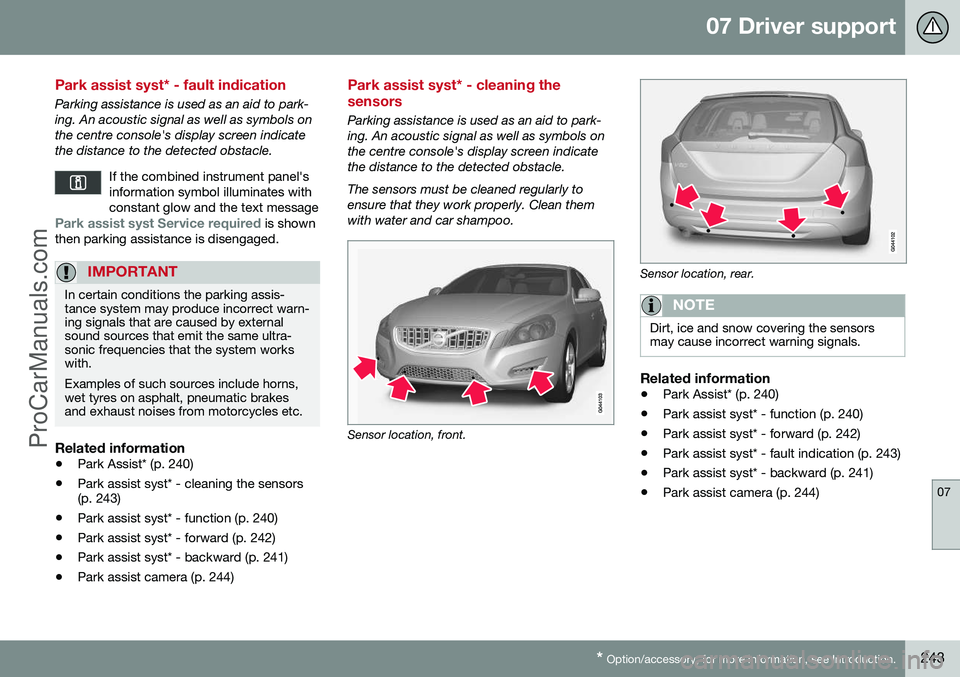
Parking assistance is used as an aid to park- ing. An acoustic signal as well as symbols onthe centre console's display screen indicatethe distance to the detected obstacle. The sensors must be cleaned regularly to ensure that they work properly. Clean themwith water and car shampoo.
Sensor location, front.
Sensor location, rear.
NOTE
Dirt, ice and snow covering the sensors may cause incorrect warning signals.
Related information
•Park Assist* (p. 240)
• Park assist syst* - function (p. 240)
• Park assist syst* - forward (p. 242)
• Park assist syst* - fault indication (p. 243)
• Park assist syst* - backward (p. 241)
• Park assist camera (p. 244)
ProCarManuals.co’
Page 264 of 442
||
08 Starting and driving
08
262* Option/accessory, for more information, see Introduction.
Calibration and serviceThe Alcolock must be checked and calibrated at a workshop 2
every 12 months.
30 days before recalibration is necessary the combined instrument panel shows the mes- sage
Alcoguard Calibr. required. If calibra-
tion is not carried out within these 30 days then normal engine starting will be blocked -only starting with the Bypass function willthen be possible, see the following heading"Emergency situation". The message can be cleared by pressing the send button (3) once. Otherwise it goes outon its own after approx. 2 minutes but thenreappears each time the engine is started - only recalibration at a workshop 2
can clear
the message permanently.
Cold or hot weatherThe colder the weather the longer it takes before the Alcolock is ready for use:
Temperature (ºC)Maximum heat-
ing time (sec- onds)
+10 to +8510
-5 to +1060
-40 to -5180
At temperatures below -20 ºC or above +60 ºC the Alcolock requires additional powersupply. The combined instrument panel shows
Alcoguard insert power cable. In
which case, connect the power supply cable from the glovebox and wait until indicatorlamp (6) is green. In extremely cold weather the heating time can be reduced by taking the Alcolockindoors.
Emergency situationIn the event of an emergency situation or theAlcolock is out of order, it is possible tobypass the Alcolock in order to drive the car.
NOTE
All Bypass activation is logged and saved in memory, see Recording data (p. 16).
After the Bypass function has been activated the combined instrument panel shows
Alcoguard Bypass enabled the whole time
while driving and can only be reset by a work- shop 2
.
The Bypass function can be tested without the error message being logged - in whichcase, carry out all the steps without startingthe car. The error message is cleared whenthe car is locked. When the Alcolock is installed, either theBypass or Emergency function is selected asthe bypassing option. This setting can be changed afterwards at a workshop
2
.
Activating the Bypass function
• Depress and hold the left-hand stalk switch
OK button and the button for haz-
ard warning flashers simultaneously forapprox. 5 seconds - the combined instru- ment panel first shows
Bypass activated
Wait 1 minute and then Alcoguard
Bypass enabled - after which the engine
can be started.
This function can be activated several times. The error message shown during driving can only be cleared at a workshop 2
.
Activating the Emergency function • Depress and hold the left-hand stalk switch
OK button and the button for haz-
ard warning flashers simultaneously forapprox. 5 seconds - the combined instru- ment panel shows
Alcoguard Bypass
enabled and the engine can be started.
This function can be used once, after which a reset must be made at a workshop 2
.
Related information
• Alcolock* - functions and operation (p. 259)
• Alcolock* - storage (p. 260)
2
An authorised Volvo workshop is recommended.
ProCarManuals.co’
Page 265 of 442
08 Starting and driving
08
* Option/accessory, for more information, see Introduction.263
•
Alcolock* - before starting the engine (p. 260)
• Alcolock* (p. 259)
• Alcolock* - symbols and text messages(p. 263)
Alcolock* - symbols and text messages
In addition to the previously described mes- sages related to how the alcolock worksbefore starting the engine (p. 260) the com-bined instrument panel's display can alsoshow the following:
Display textMeaning/Action
Alcoguard Restart possi-bleThe engine has been switched off for less than30 minutes - engine star-ting possible withoutnew test.
Alcoguard ServicerequiredContact a workshop A
.
Alcoguard No signalTransmission failed - send manually with but-ton (3) or take a newbreath test.
Alcoguard Invalid testTest failed - take a new breath test.
Alcoguard Blow longerBlowing too short - blow for longer.
Alcoguard Blow softerBlowing too hard - blow more gently.
Display textMeaning/Action
Alcoguard Blow harderBlowing too weak - blow harder.
Alcoguard wait Preheat-ingHeating not finished - wait for text Alcoguard
Blow 5 seconds.
A An authorised Volvo workshop is recommended.
Related information
• Alcolock* - functions and operation (p. 259)
• Alcolock* - to bear in mind (p. 261)
• Alcolock* - storage (p. 260)
• Alcolock* (p. 259)
ProCarManuals.co’
Page 268 of 442
08 Starting and driving
08
266* Option/accessory, for more information, see Introduction.
Remote start (ERS)*
Remote start (ERS – Engine Remote Start) means that the car's engine can be startedremotely using the remote control key or thePCC key. This is so that the passenger com-partment can be warmed up/cooled downbefore departure. The climate control system and audio system start with the same settings that were in usewhen the car was parked. An ERS-started engine is activated for a maximum of 15 minutes, then it is switchedoff. After two ERS-activations the enginemust be started in the normal way beforeERS can be re-used. The optional ERS function is available on most cars with automatic gearbox.
NOTE
The service life of the remote control key's battery is affected by the ERS function. Inthe event of frequent use of ERS the bat-tery should therefore be changed once peryear, see Remote control key/PCC -replacing the battery (p. 158).
NOTE
Follow local/national rules/regulations on idling.
WARNING
To remote-start the engine, the following criteria must be met:
• The car must be supervised.
• There must be no people or animals inside the car.
• The car must not be parked in aclosed, unventilated area - the exhaustgases may seriously injure humansand animals.
Related information
•
Remote start (ERS) - operation (p. 266)
• Remote start (ERS) - symbols and mes- sages (p. 268)
Remote start (ERS) - operation
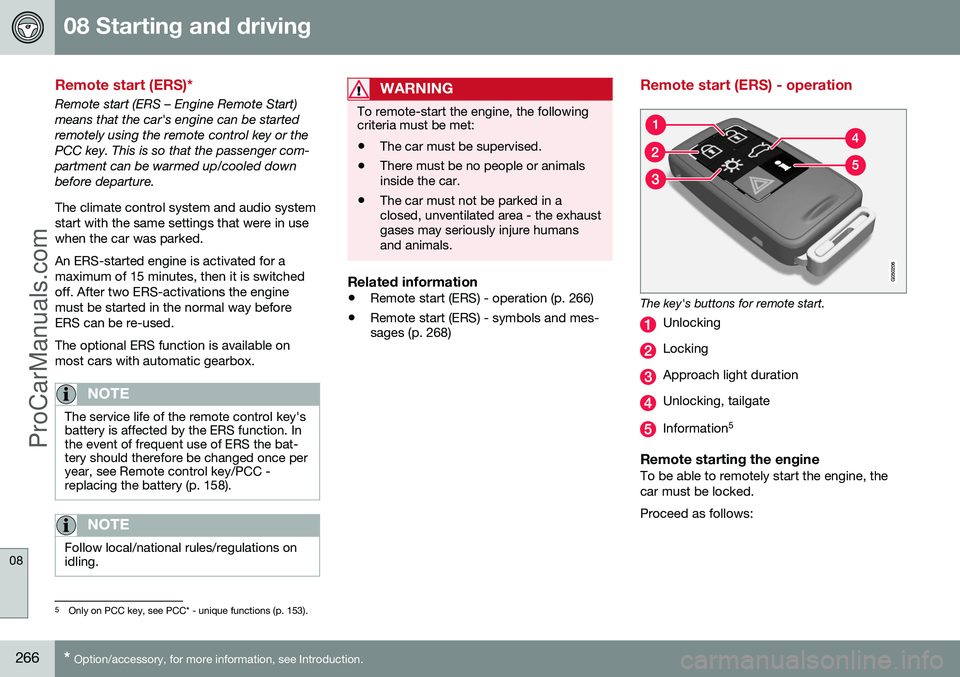
The key's buttons for remote start.
Unlocking
Locking
Approach light duration
Unlocking, tailgate
Information 5
Remote starting the engineTo be able to remotely start the engine, the car must be locked. Proceed as follows:
5
Only on PCC key, see PCC* - unique functions (p. 153).
ProCarManuals.co’
Page 292 of 442
08 Starting and driving
08
290* Option/accessory, for more information, see Introduction.
All Wheel Drive - AWD*
The best traction possible is achieved with all- wheel drive.
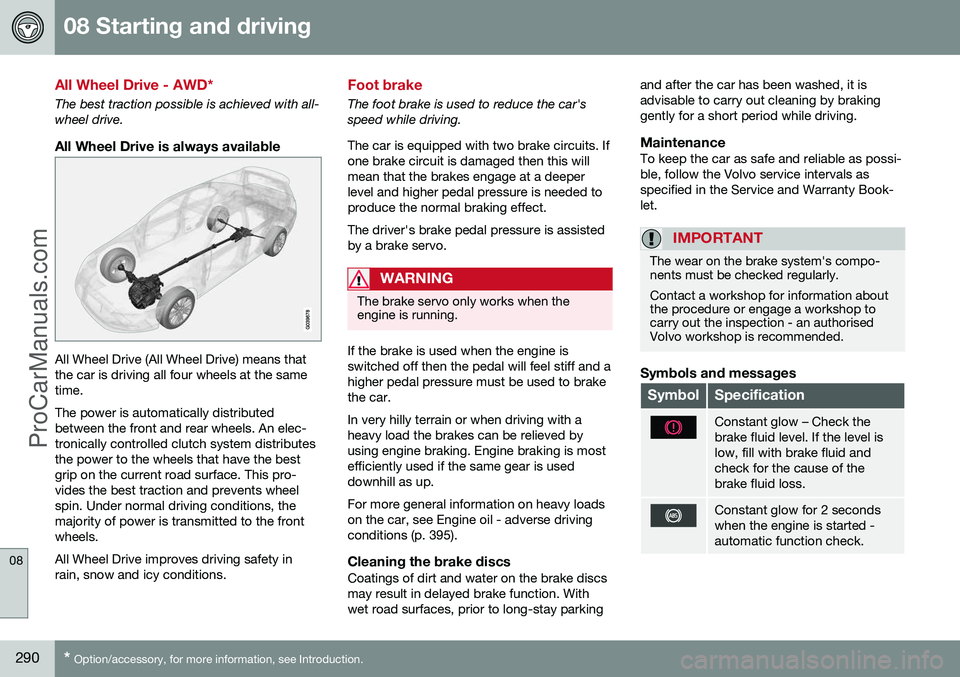
All Wheel Drive is always available
All Wheel Drive (All Wheel Drive) means that the car is driving all four wheels at the sametime. The power is automatically distributed between the front and rear wheels. An elec-tronically controlled clutch system distributesthe power to the wheels that have the bestgrip on the current road surface. This pro-vides the best traction and prevents wheelspin. Under normal driving conditions, themajority of power is transmitted to the frontwheels. All Wheel Drive improves driving safety in rain, snow and icy conditions.
Foot brake
The foot brake is used to reduce the car's speed while driving. The car is equipped with two brake circuits. If one brake circuit is damaged then this willmean that the brakes engage at a deeperlevel and higher pedal pressure is needed toproduce the normal braking effect. The driver's brake pedal pressure is assisted by a brake servo.
WARNING
The brake servo only works when the engine is running.
If the brake is used when the engine is switched off then the pedal will feel stiff and ahigher pedal pressure must be used to brakethe car. In very hilly terrain or when driving with a heavy load the brakes can be relieved byusing engine braking. Engine braking is mostefficiently used if the same gear is useddownhill as up. For more general information on heavy loads on the car, see Engine oil - adverse drivingconditions (p. 395).
Cleaning the brake discsCoatings of dirt and water on the brake discsmay result in delayed brake function. Withwet road surfaces, prior to long-stay parking and after the car has been washed, it isadvisable to carry out cleaning by brakinggently for a short period while driving.
MaintenanceTo keep the car as safe and reliable as possi-ble, follow the Volvo service intervals asspecified in the Service and Warranty Book-let.
IMPORTANT
The wear on the brake system's compo- nents must be checked regularly. Contact a workshop for information about the procedure or engage a workshop tocarry out the inspection - an authorisedVolvo workshop is recommended.
Symbols and messages
SymbolSpecification
Constant glow – Check the brake fluid level. If the level islow, fill with brake fluid andcheck for the cause of thebrake fluid loss.
Constant glow for 2 seconds when the engine is started -automatic function check.
ProCarManuals.co’
Page 298 of 442
||
08 Starting and driving
08
296
SymbolMessageMeaning/Action
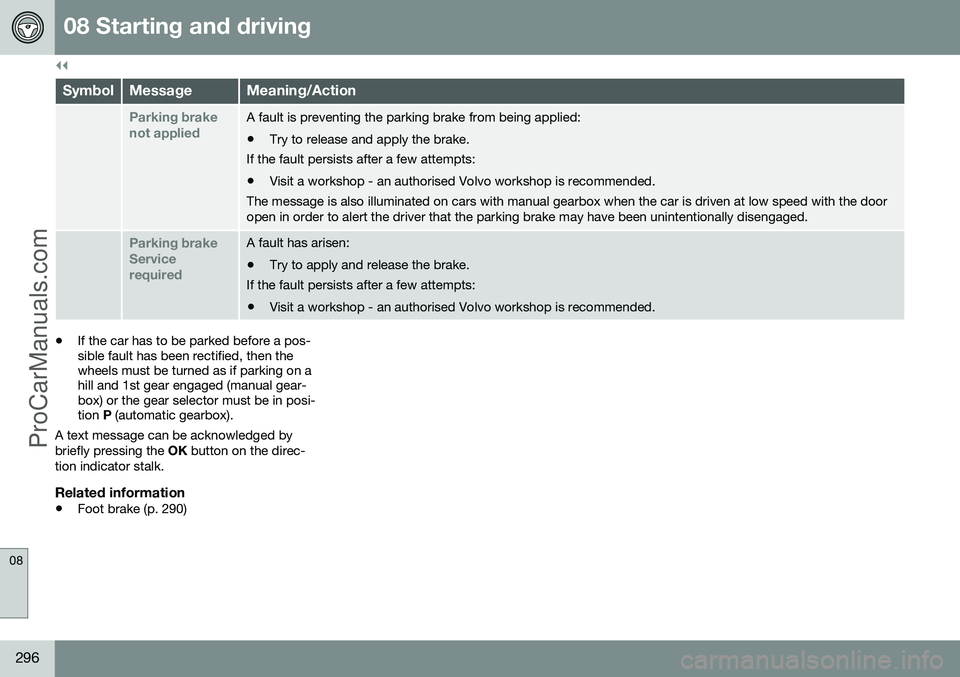
Parking brake not appliedA fault is preventing the parking brake from being applied: •Try to release and apply the brake.
If the fault persists after a few attempts:
• Visit a workshop - an authorised Volvo workshop is recommended.
The message is also illuminated on cars with manual gearbox when the car is driven at low speed with the door open in order to alert the driver that the parking brake may have been unintentionally disengaged.
Parking brake ServicerequiredA fault has arisen:
• Try to apply and release the brake.
If the fault persists after a few attempts:
• Visit a workshop - an authorised Volvo workshop is recommended.
• If the car has to be parked before a pos- sible fault has been rectified, then thewheels must be turned as if parking on ahill and 1st gear engaged (manual gear-box) or the gear selector must be in posi-tion
P (automatic gearbox).
A text message can be acknowledged by briefly pressing the OK button on the direc-
tion indicator stalk.
Related information
• Foot brake (p. 290)
ProCarManuals.co’
Page 299 of 442
08 Starting and driving
08
297
Fording
Fording means that the car is driven through a water-covered roadway. Fording must be car-ried out with great caution. The car can be driven through water at a maximum depth of 25 cm at a maximumspeed of 10 km/h. Extra caution should beexercised when passing through flowingwater. During driving in water, maintain a low speed and do not stop the car. When the water hasbeen passed, depress the brake pedal lightlyand check that full brake function is achieved.Water and mud for example can make thebrake linings wet resulting in delayed brakefunction. •Clean the electric contacts of the electric engine block heater and trailer couplingafter driving in water and mud.
• Do not let the car stand with water overthe sills for any long period of time - thiscould cause electrical malfunctions.IMPORTANT
Engine damage can occur if water enters the air filter. In depths greater than 25 cm, water could enter the transmission. This reduces thelubricating ability of the oils and shortensthe service life of these systems. In the event of the engine stalling in water, do not try restart - tow the car from thewater to a workshop - an authorised Volvoworkshop is recommended. Risk of enginebreakdown.
Related information
•Recovery (p. 316)
• Towing (p. 313)
Overheating
Under special conditions, for example hard driving in hilly terrain and hot climate, there isa risk that the engine and drive system mayoverheat - in particular with a heavy load. For information about overheating when driv- ing with a trailer, see Driving with a trailer (p.306). • Remove any auxiliary lamps from in front of the grille when driving in hot climates.
• If the temperature in the engine's coolingsystem is too high then a warning symbolis illuminated in the combined instrumentpanel's information display and a text message
High engine temp Stop safelyis shown there - stop the car in a safe way and allow the engine to run at idlingspeed for several minutes in order to cooldown.
• If the text message
High engine temp
Stop engine or Coolant level low, Stop
engine is shown then the engine must be
switched off after stopping the car.
• In the event of overheating in the gearbox a built-in protection function is activatedwhich, amongst other things, illuminatesa warning symbol in the combined instru-ment panel, and its display shows the text message
Transmission hot Reduce
speed or Transmission hot Stop safely- follow the recommendation given and lower the speed and stop the car in a safeway and allow the engine to run at idling
ProCarManuals.co’