light VOLVO V60 2014 Service Manual
[x] Cancel search | Manufacturer: VOLVO, Model Year: 2014, Model line: V60, Model: VOLVO V60 2014Pages: 442, PDF Size: 13.85 MB
Page 161 of 442
06 Locks and alarm
06
* Option/accessory, for more information, see Introduction.159
NOTE
Volvo recommends that the batteries to be used in the remote control key/PCC fulfilUN Manual of Test and Criteria, Part III,sub-section 38.3. Batteries fitted in thefactory or replaced by an authorised Volvoworkshop fulfil the above criteria.
Assembly1. Press the remote control key together.
2. Hold the remote control key with the slot
pointed up and lower the key blade into its slot.
3. Lightly press the key blade. You should hear a "click" when the key blade islocked in.
IMPORTANT
Make sure that exhausted batteries are disposed of in a manner which is kind tothe environment.
Related information
• Remote control key with key blade (p. 149)
• Remote control key - functions (p. 151)
Keyless drive*
Keyless drive, only with PCC (p. 153) 2
means
that the car's lock and starting systems can be operated keylessly. The Keyless drive function in the PCC allows the car to be unlocked (p. 161), driven andlocked without the need for a key. You simplyhave to have the PCC with you. The systemmakes it easier and more convenient to openthe car, e.g. when your hands are full. Both of the car's PCCs incorporate the Keyless function. Additional PCCs can beordered, see Remote control key with keyblade (p. 149). The car's electrical system can be set to three different levels - key position 0, I and II
(p. 70) - with the remote control key.
Related information
• Keyless drive* - PCC range (p. 159)
• Keyless drive* - handling the PCC safely (p. 160)
• Keyless drive* - interference to PCC func-tion (p. 160)
Keyless drive* - PCC range
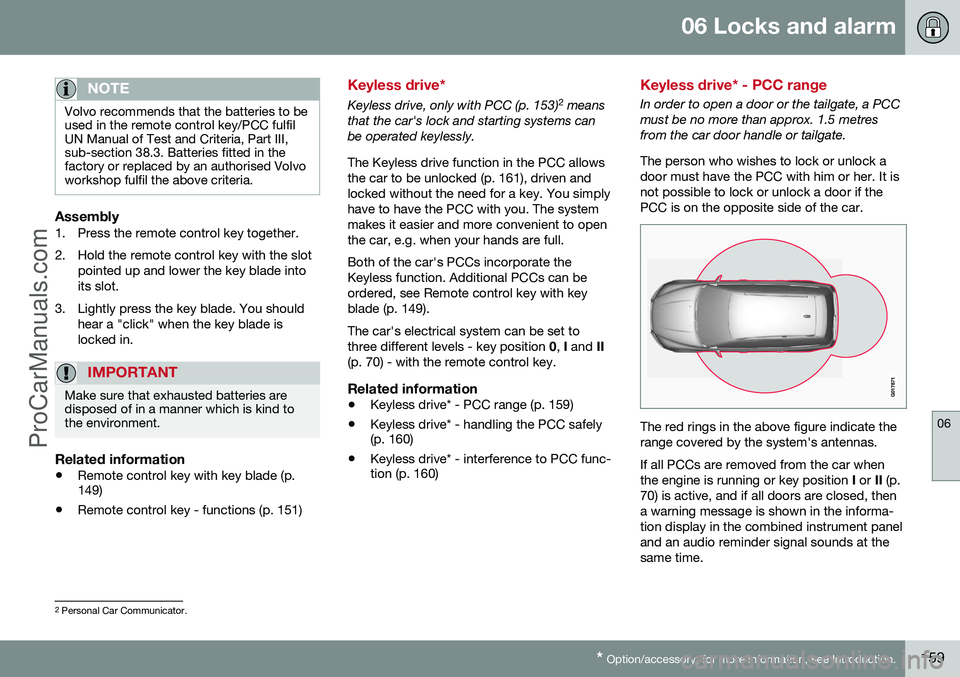
In order to open a door or the tailgate, a PCC must be no more than approx. 1.5 metresfrom the car door handle or tailgate. The person who wishes to lock or unlock a door must have the PCC with him or her. It isnot possible to lock or unlock a door if thePCC is on the opposite side of the car.
The red rings in the above figure indicate the range covered by the system's antennas. If all PCCs are removed from the car when the engine is running or key position
I or II (p.
70) is active, and if all doors are closed, thena warning message is shown in the informa-tion display in the combined instrument paneland an audio reminder signal sounds at thesame time.
2 Personal Car Communicator.
ProCarManuals.co’
Page 170 of 442
||
06 Locks and alarm
06
168* Option/accessory, for more information, see Introduction.
The doors remain locked and armed.
• The tailgate is unlocked, but remains closed - press lightly on the rubberisedpressure plate under the outer handle andlift the tailgate.
If the tailgate is not opened within 2 minutes then it is relocked and the alarm is re-armed.
Unlocking the car from inside
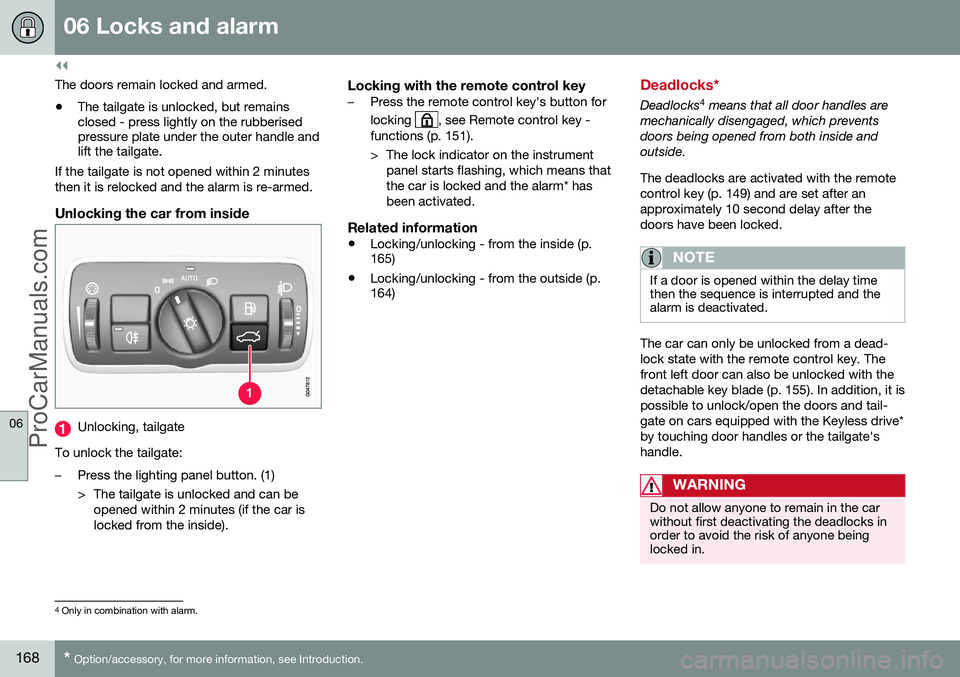
Unlocking, tailgate
To unlock the tailgate:
–Press the lighting panel button. (1)
> The tailgate is unlocked and can be opened within 2 minutes (if the car is locked from the inside).
Locking with the remote control key–Press the remote control key's button for locking
, see Remote control key -
functions (p. 151).
> The lock indicator on the instrument panel starts flashing, which means that the car is locked and the alarm* hasbeen activated.
Related information
• Locking/unlocking - from the inside (p. 165)
• Locking/unlocking - from the outside (p.164)
Deadlocks*
Deadlocks 4
means that all door handles are
mechanically disengaged, which prevents doors being opened from both inside andoutside. The deadlocks are activated with the remote control key (p. 149) and are set after anapproximately 10 second delay after thedoors have been locked.
NOTE
If a door is opened within the delay time then the sequence is interrupted and thealarm is deactivated.
The car can only be unlocked from a dead- lock state with the remote control key. Thefront left door can also be unlocked with thedetachable key blade (p. 155). In addition, it ispossible to unlock/open the doors and tail-gate on cars equipped with the Keyless drive*by touching door handles or the tailgate'shandle.
WARNING
Do not allow anyone to remain in the car without first deactivating the deadlocks inorder to avoid the risk of anyone beinglocked in.
4 Only in combination with alarm.
ProCarManuals.co’
Page 180 of 442
07 Driver support
07
178
Stability and traction control system (DSTC) - symbols and messages
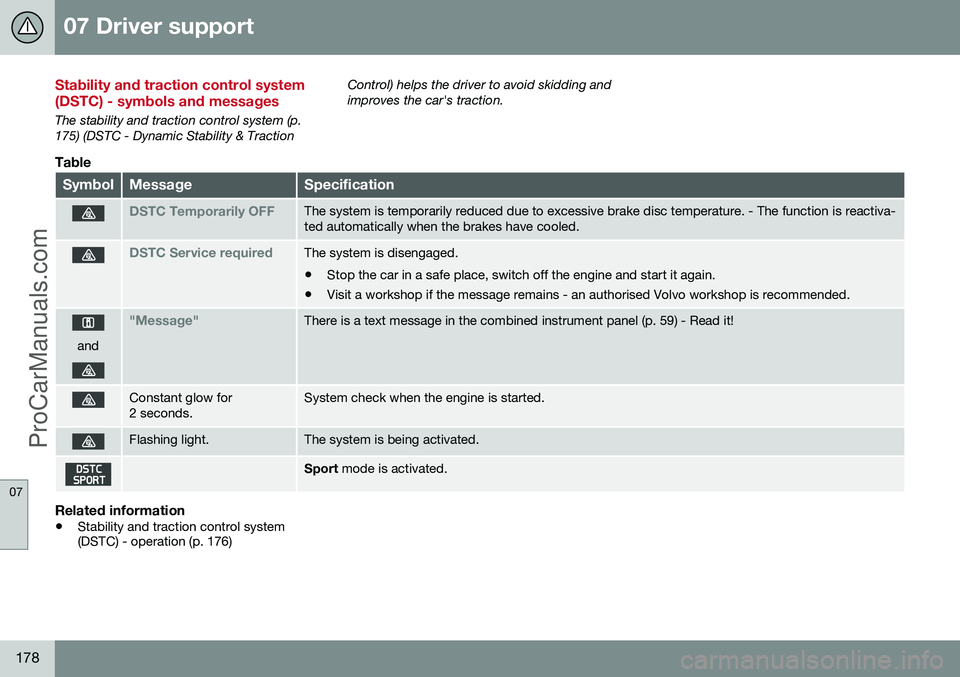
The stability and traction control system (p. 175) (DSTC - Dynamic Stability & TractionControl) helps the driver to avoid skidding andimproves the car's traction.
Table
SymbolMessageSpecification
DSTC Temporarily OFFThe system is temporarily reduced due to excessive brake disc temperature. - The function is reactiva- ted automatically when the brakes have cooled.
DSTC Service requiredThe system is disengaged.
• Stop the car in a safe place, switch off the engine and start it again.
• Visit a workshop if the message remains - an authorised Volvo workshop is recommended.
and
"Message"There is a text message in the combined instrument panel (p. 59) - Read it!
Constant glow for 2 seconds.System check when the engine is started.
Flashing light.The system is being activated.
Sport
mode is activated.
Related information
•Stability and traction control system (DSTC) - operation (p. 176)
ProCarManuals.co’
Page 192 of 442
||
07 Driver support
07
190* Option/accessory, for more information, see Introduction.
If the car needs to be braked more heavily than cruise control capacity and the driverdoes not brake, then cruise control uses thewarning lamp and warning sound from theCollision warning system (p. 212) in order toalert the driver that immediate intervention isrequired.
NOTE
The warning lamp may be difficult to see in strong sunlight or when wearing sun-glasses.
WARNING
Cruise Control warns only of vehicles which the radar sensor has detected.Hence the warning may not be given, or itmay be given with a certain delay. Do notwait for a warning without braking when sorequired.
Steep roads and/or heavy loadBear in mind that the adaptive cruise control is primarily intended for use when driving onlevel road surfaces. It may have difficulty inkeeping the correct distance from the vehicleahead when driving on steep downhill slopes,with a heavy load or with a trailer - in whichcase, be extra attentive and ready to slowdown.
Related information
• Adaptive cruise control - ACC* (p. 188)
• Adaptive cruise control* - deactivate (p. 194)
• Adaptive cruise control* - overtakinganother vehicle (p. 194)
Adaptive cruise control* - overview
Operation of the adaptive cruise control and steering wheel keypad varies depending onwhether or not the car is equipped with speed limiter 8
.
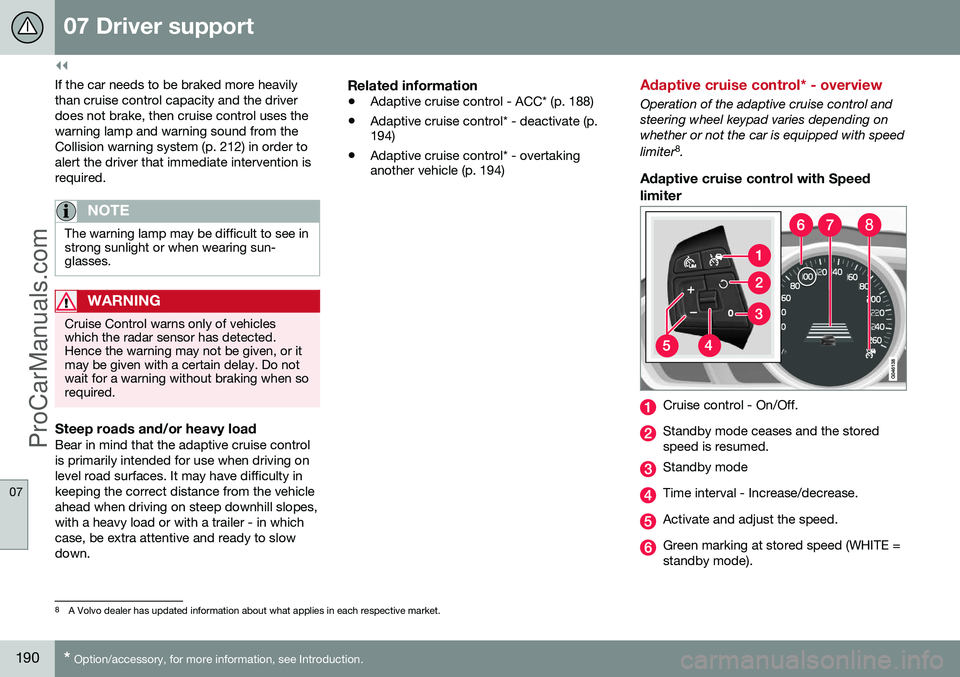
Adaptive cruise control with Speed
limiter
Cruise control - On/Off.
Standby mode ceases and the stored speed is resumed.
Standby mode
Time interval - Increase/decrease.
Activate and adjust the speed.
Green marking at stored speed (WHITE = standby mode).
8 A Volvo dealer has updated information about what applies in each respective market.
ProCarManuals.co’
Page 194 of 442
||
07 Driver support
07
192* Option/accessory, for more information, see Introduction.
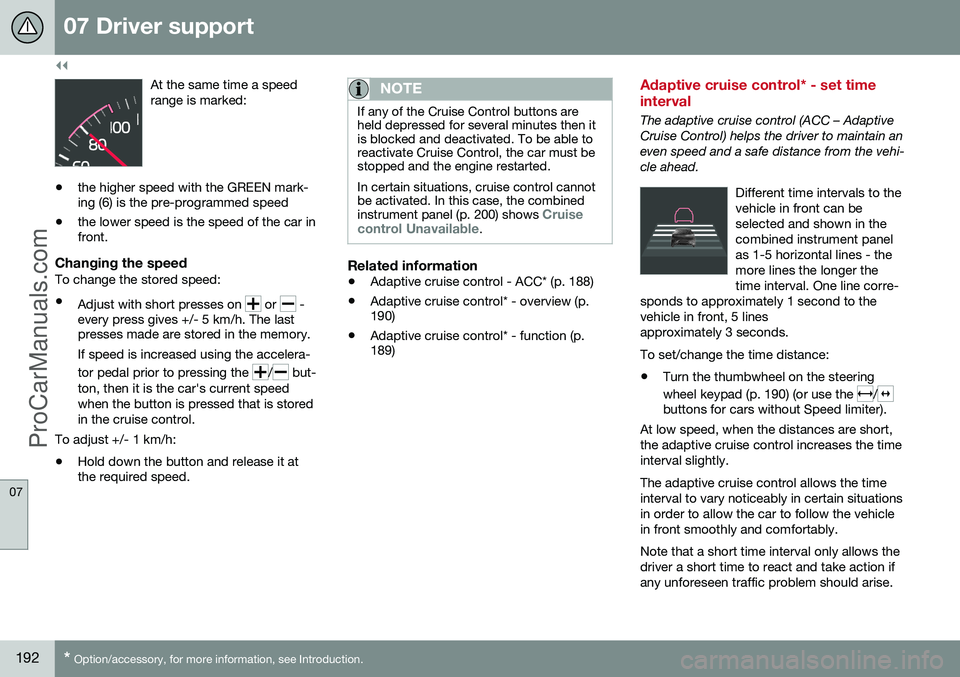
At the same time a speed range is marked:
• the higher speed with the GREEN mark- ing (6) is the pre-programmed speed
• the lower speed is the speed of the car infront.
Changing the speedTo change the stored speed: •
Adjust with short presses on
or -
every press gives +/- 5 km/h. The last presses made are stored in the memory.
If speed is increased using the accelera- tor pedal prior to pressing the
/ but-
ton, then it is the car's current speed when the button is pressed that is storedin the cruise control.
To adjust +/- 1 km/h: • Hold down the button and release it at the required speed.
NOTE
If any of the Cruise Control buttons are held depressed for several minutes then itis blocked and deactivated. To be able toreactivate Cruise Control, the car must bestopped and the engine restarted. In certain situations, cruise control cannot be activated. In this case, the combined instrument panel (p. 200) shows
Cruise
control Unavailable.
Related information
• Adaptive cruise control - ACC* (p. 188)
• Adaptive cruise control* - overview (p. 190)
• Adaptive cruise control* - function (p.189)
Adaptive cruise control* - set time interval
The adaptive cruise control (ACC – Adaptive Cruise Control) helps the driver to maintain aneven speed and a safe distance from the vehi-cle ahead.
Different time intervals to thevehicle in front can beselected and shown in thecombined instrument panelas 1-5 horizontal lines - themore lines the longer thetime interval. One line corre-
sponds to approximately 1 second to thevehicle in front, 5 linesapproximately 3 seconds.
To set/change the time distance:
• Turn the thumbwheel on the steering wheel keypad (p. 190) (or use the
/buttons for cars without Speed limiter).
At low speed, when the distances are short, the adaptive cruise control increases the timeinterval slightly. The adaptive cruise control allows the time interval to vary noticeably in certain situationsin order to allow the car to follow the vehiclein front smoothly and comfortably. Note that a short time interval only allows the driver a short time to react and take action ifany unforeseen traffic problem should arise.
ProCarManuals.co’
Page 197 of 442
07 Driver support
07
}}
* Option/accessory, for more information, see Introduction.195
Adaptive Cruise Control* - Queue Assist
The adaptive cruise control (ACC – Adaptive Cruise Control) helps the driver to maintain aneven speed and a safe distance from the vehi-cle ahead. Queue Assist also provides theAdaptive Cruise Control with enhanced func-tionality at speeds below 30 km/h.. In cars with automatic gearbox the adaptive cruise control is supplemented with theQueue Assist function (also referred to as"Queue Assist"). Queue Assistant has the following functions:
• Extended speed range - also below 30 km/h and when stationary
• Change of target
• Automatic braking ceases when station-ary
• Automatic activation parking brake.
Note that the lowest programmable speed for the adaptive cruise control is 30 km/h - eventhough it is capable of following another vehi-cle down to a standstill, a lower speed can-
not be selected.
Extended speed range
NOTE
In order to activate the cruise control the driver's door must be closed and the drivermust be wearing the seatbelt.
With an automatic gearbox, the adaptive cruise control can follow another vehiclewithin the range 0-200 km/h.
NOTE
Activation of the cruise control below 30 km/h requires a vehicle in front within areasonable distance.
For shorter stops in connection with inching in slow traffic or at traffic lights driving isautomatically resumed if the stops do notexceed about 3 seconds - if it takes longerbefore the car in front starts moving againthen the Adaptive cruise control is set instandby mode with automatic braking. Thedriver must then reactivate it in one of the fol-lowing ways:
• Press the steering wheel button
.
or
• Depress the accelerator pedal.
> The cruise control will then resume fol- lowing the vehicle in front.
NOTE
Queue Assist can hold the car stationary for a maximum of 4 minutes - then theparking brake is applied and Cruise Con-trol is disengaged.
• The driver has to release the parking brake before the cruise control can bereactivated.
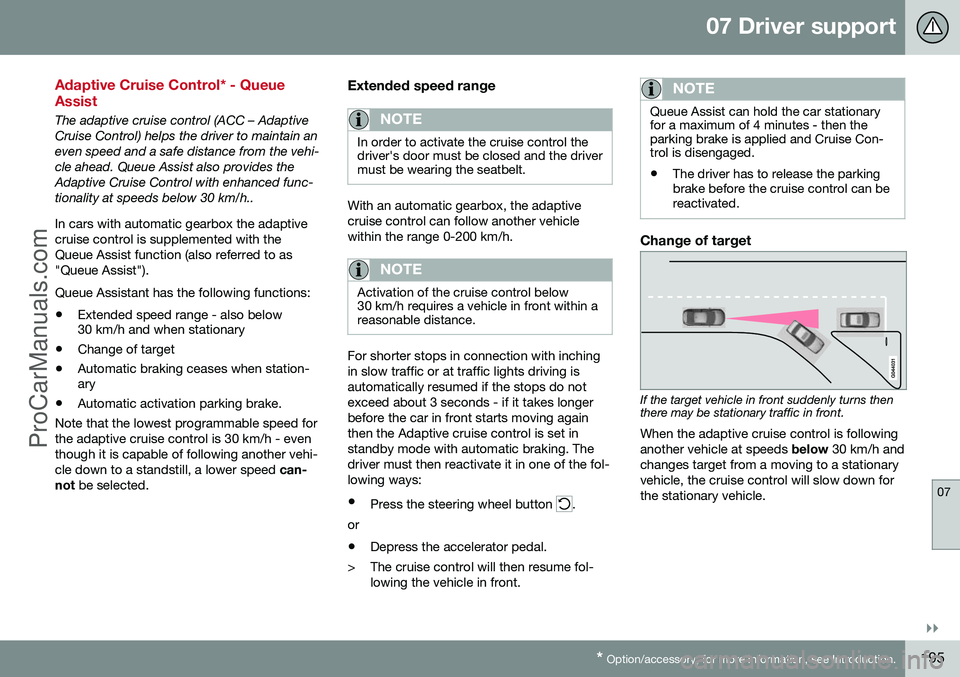
Change of target
If the target vehicle in front suddenly turns then there may be stationary traffic in front.
When the adaptive cruise control is following another vehicle at speeds below 30 km/h and
changes target from a moving to a stationaryvehicle, the cruise control will slow down forthe stationary vehicle.
ProCarManuals.co’
Page 205 of 442
07 Driver support
07
* Option/accessory, for more information, see Introduction.203
The same symbol is also shown when adap- tive cruise control is activated.
NOTE
The higher the speed the longer the calcu- lated distance in metres for a given timeinterval. The set time interval is also used by the function adaptive cruise control (p. 189). Only use the time intervals permitted by local traffic regulations.
Related information
•
Distance Warning* - limitations (p. 203)
Distance Warning* - limitations
Distance Warning (Distance Alert) is a function that informs the driver about the distance tovehicles in front. The function uses the sameradar sensor as the Adaptive cruise control (p.188) and Collision warning with auto brake (p.212), has some limitations.
NOTE
Strong sunlight, reflections or strong varia- tions in light intensity, as well as wearingsunglasses, could mean that the warninglight in the windscreen cannot be seen. Poor weather or winding roads could affect the radar sensor's capacity to detectvehicles in front. The size of other vehicles could also affect detection capacity, e.g. motorcycles. Thiscould mean that the warning lamp illumi-nates at a shorter distance than the settingor that the warning is temporarily absent. Extremely high speeds can also cause the lamp to illuminate at a shorter distancethan that set due to limitations in sensorrange.
For further information on radar sensor limita- tions, see Radar sensor - limitations (p. 197)and (p. 218).
Related information
•Distance Warning* (p. 202)
• Distance Warning* - symbols and mes- sages (p. 204)
ProCarManuals.co’
Page 208 of 442
||
07 Driver support
07
206
Laser sensor transmitter and receiver window13
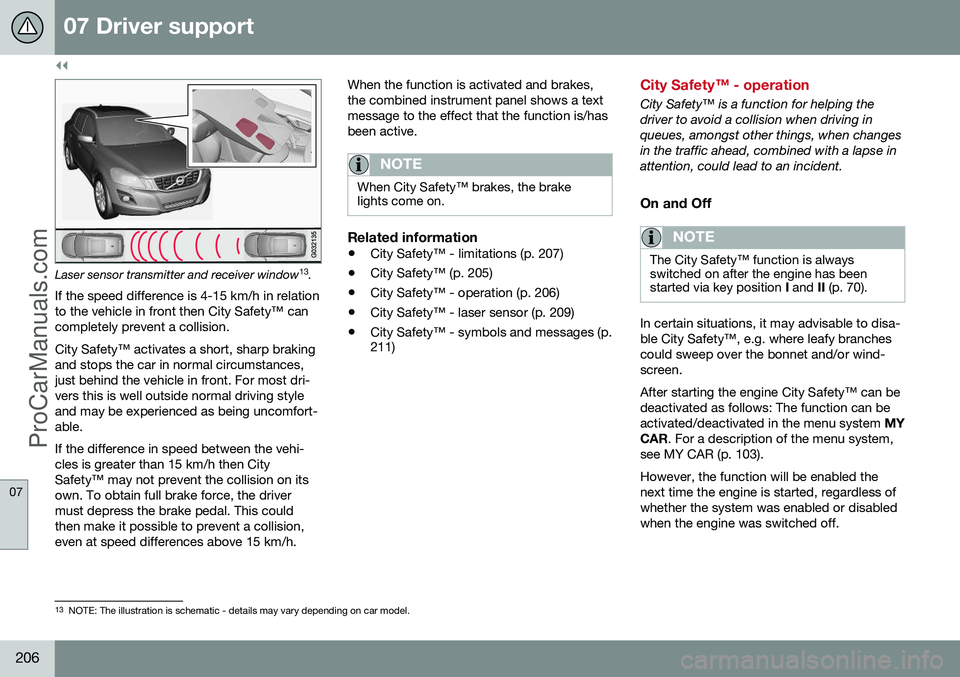
.
If the speed difference is 4-15 km/h in relation to the vehicle in front then City Safety™ cancompletely prevent a collision. City Safety™ activates a short, sharp braking and stops the car in normal circumstances,just behind the vehicle in front. For most dri-vers this is well outside normal driving styleand may be experienced as being uncomfort-able. If the difference in speed between the vehi- cles is greater than 15 km/h then CitySafety™ may not prevent the collision on itsown. To obtain full brake force, the drivermust depress the brake pedal. This couldthen make it possible to prevent a collision,even at speed differences above 15 km/h. When the function is activated and brakes,the combined instrument panel shows a textmessage to the effect that the function is/hasbeen active.
NOTE
When City Safety™ brakes, the brake lights come on.
Related information
•
City Safety™ - limitations (p. 207)
• City Safety™ (p. 205)
• City Safety™ - operation (p. 206)
• City Safety™ - laser sensor (p. 209)
• City Safety™ - symbols and messages (p. 211)
City Safety™ - operation
City Safety™ is a function for helping the driver to avoid a collision when driving inqueues, amongst other things, when changesin the traffic ahead, combined with a lapse inattention, could lead to an incident.
On and Off
NOTE
The City Safety™ function is always switched on after the engine has beenstarted via key position
I and II (p. 70).
In certain situations, it may advisable to disa- ble City Safety™, e.g. where leafy branchescould sweep over the bonnet and/or wind-screen. After starting the engine City Safety™ can be deactivated as follows: The function can beactivated/deactivated in the menu system MY
CAR . For a description of the menu system,
see MY CAR (p. 103). However, the function will be enabled the next time the engine is started, regardless ofwhether the system was enabled or disabledwhen the engine was switched off.
13 NOTE: The illustration is schematic - details may vary depending on car model.
ProCarManuals.co’
Page 209 of 442
07 Driver support
07
207
WARNING
The laser sensor also transmits laser light when City Safety™ is disabled manually.
Related information
•City Safety™ (p. 205)
• City Safety™ - limitations (p. 207)
• City Safety™ - function (p. 205)
• City Safety™ - laser sensor (p. 209)
• City Safety™ - symbols and messages (p. 211)
• MY CAR (p. 103)
City Safety™ - limitations
The sensor in City Safety™ is designed to detect cars and other large vehicles in front ofthe car irrespective of whether it is day ornight. However, the function has a number oflimitations. However, the sensor has limitations and has poorer functionality - or none at all - in e.g.heavy snowfall or rain, dense fog, duststorms or white-out situations. Mist, dirt, iceor snow on the windscreen may disrupt thefunction. Low-hanging objects, e.g. a flag/pennant for projecting load, or accessories such as auxili-ary lamps and bull bars that are higher thanthe bonnet limit the function. The laser beam from the sensor in City Safety™ measures how the light is reflected.The sensor cannot detect objects with lowreflection capacity. The rear sections of thevehicle generally reflect the light sufficientlythanks to the number plate and rear lightreflectors. On slippery road surfaces the braking dis- tance is extended, which may reduce thecapacity of City Safety™ to avoid a collision.In such situations the ABS and DSTC sys-tems will provide best possible braking forcewith maintained stability. When your own car is reversing, City Safety™ is temporarily deactivated. City Safety™ is not activated at low speeds -under 4 km/h, which is why the system doesnot intervene in situations where a vehicle infront is being approached very slowly, e.g.when parking. Driver commands are always prioritised, which is why City Safety™ does not intervenein situations where the driver is steering oraccelerating in a clear manner, even if a colli-sion is unavoidable. When City Safety™ has prevented a collision with a stationary object the car remains sta-tionary for a maximum of 1.5 seconds. If thecar is braked for a vehicle in front that is mov-ing, then speed is reduced to the same speedas that maintained by the vehicle in front. On a car with manual gearbox the engine stops when City Safety™ has stopped thecar, unless the driver manages to depress theclutch pedal beforehand.
NOTE
•
Keep the windscreen surface in front of the laser sensor free from ice, snowand dirt (see the illustration for sensorlocation (p. 205)).
• Do not affix or mount anything on thewindscreen in front of the laser sensor
• Remove ice and snow from the bonnet- snow and ice must not exceed aheight of 5 cm.
ProCarManuals.co’
Page 211 of 442
07 Driver support
07
}}}}
209
City Safety™ - laser sensor
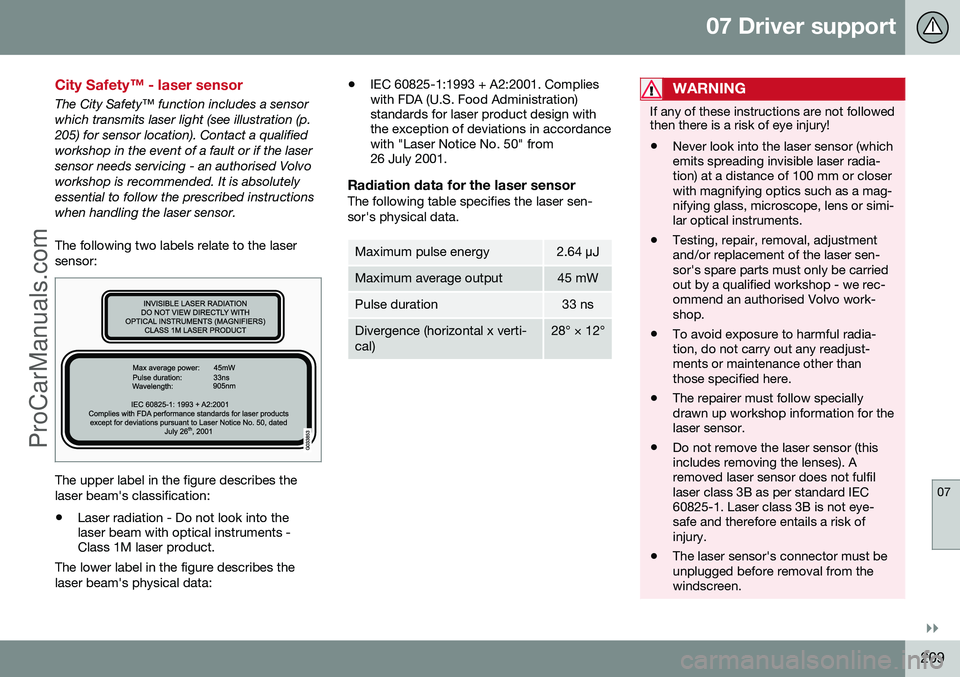
The City Safety™ function includes a sensor which transmits laser light (see illustration (p.205) for sensor location). Contact a qualifiedworkshop in the event of a fault or if the lasersensor needs servicing - an authorised Volvoworkshop is recommended. It is absolutelyessential to follow the prescribed instructionswhen handling the laser sensor. The following two labels relate to the laser sensor:
The upper label in the figure describes the laser beam's classification:• Laser radiation - Do not look into the laser beam with optical instruments -Class 1M laser product.
The lower label in the figure describes the laser beam's physical data: •
IEC 60825-1:1993 + A2:2001. Complies with FDA (U.S. Food Administration)standards for laser product design withthe exception of deviations in accordancewith "Laser Notice No. 50" from26 July 2001.
Radiation data for the laser sensorThe following table specifies the laser sen- sor's physical data.
Maximum pulse energy2.64
µJ
Maximum average output45 mW
Pulse duration33 ns
Divergence (horizontal x verti- cal)28° × 12°
WARNING
If any of these instructions are not followed then there is a risk of eye injury!
• Never look into the laser sensor (which emits spreading invisible laser radia-tion) at a distance of 100 mm or closerwith magnifying optics such as a mag-nifying glass, microscope, lens or simi-lar optical instruments.
• Testing, repair, removal, adjustmentand/or replacement of the laser sen-sor's spare parts must only be carriedout by a qualified workshop - we rec-ommend an authorised Volvo work-shop.
• To avoid exposure to harmful radia-tion, do not carry out any readjust-ments or maintenance other thanthose specified here.
• The repairer must follow speciallydrawn up workshop information for thelaser sensor.
• Do not remove the laser sensor (thisincludes removing the lenses). Aremoved laser sensor does not fulfillaser class 3B as per standard IEC60825-1. Laser class 3B is not eye-safe and therefore entails a risk ofinjury.
• The laser sensor's connector must beunplugged before removal from thewindscreen.
ProCarManuals.co’