light VOLVO V60 2014 Repair Manual
[x] Cancel search | Manufacturer: VOLVO, Model Year: 2014, Model line: V60, Model: VOLVO V60 2014Pages: 442, PDF Size: 13.85 MB
Page 237 of 442
07 Driver support
07
}}
235
Lane Keeping Aid (LKA) - function
Certain settings can be made for the Lane Departure Warning function.
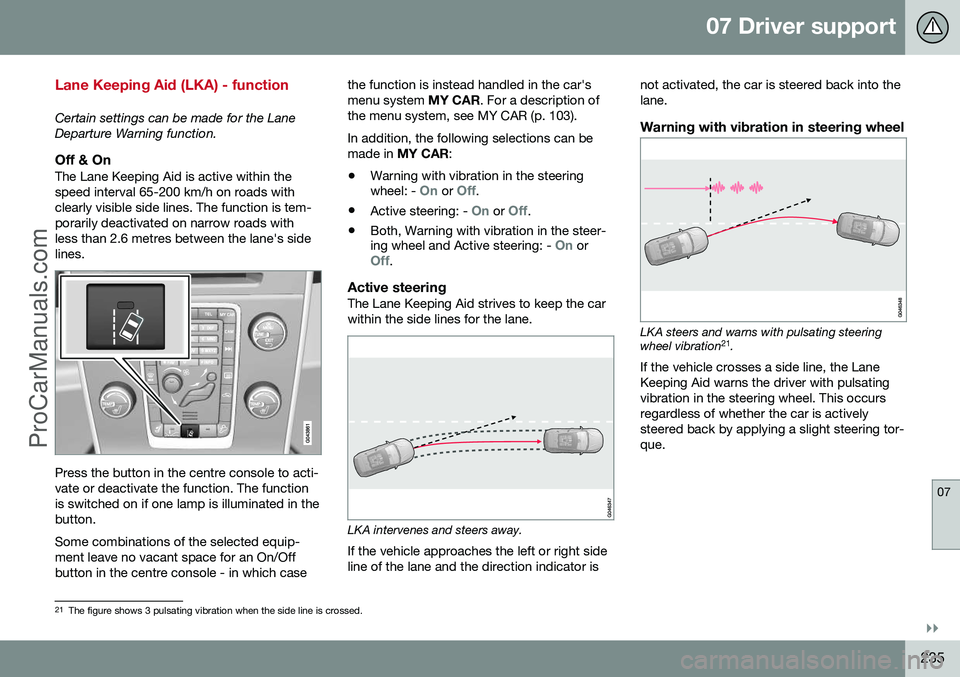
Off & OnThe Lane Keeping Aid is active within thespeed interval 65-200 km/h on roads withclearly visible side lines. The function is tem-porarily deactivated on narrow roads withless than 2.6 metres between the lane's sidelines.
Press the button in the centre console to acti- vate or deactivate the function. The functionis switched on if one lamp is illuminated in thebutton. Some combinations of the selected equip- ment leave no vacant space for an On/Offbutton in the centre console - in which casethe function is instead handled in the car'smenu system
MY CAR. For a description of
the menu system, see MY CAR (p. 103). In addition, the following selections can be made in MY CAR :
• Warning with vibration in the steering wheel: -
On or Off.
• Active steering: -
On or Off.
• Both, Warning with vibration in the steer- ing wheel and Active steering: -
On orOff.
Active steeringThe Lane Keeping Aid strives to keep the car within the side lines for the lane.
LKA intervenes and steers away.
If the vehicle approaches the left or right side line of the lane and the direction indicator is not activated, the car is steered back into thelane.
Warning with vibration in steering wheel
LKA steers and warns with pulsating steering wheel vibration
21
.
If the vehicle crosses a side line, the Lane Keeping Aid warns the driver with pulsatingvibration in the steering wheel. This occursregardless of whether the car is activelysteered back by applying a slight steering tor-que.
21 The figure shows 3 pulsating vibration when the side line is crossed.
ProCarManuals.co’
Page 240 of 442
07 Driver support
07
238* Option/accessory, for more information, see Introduction.
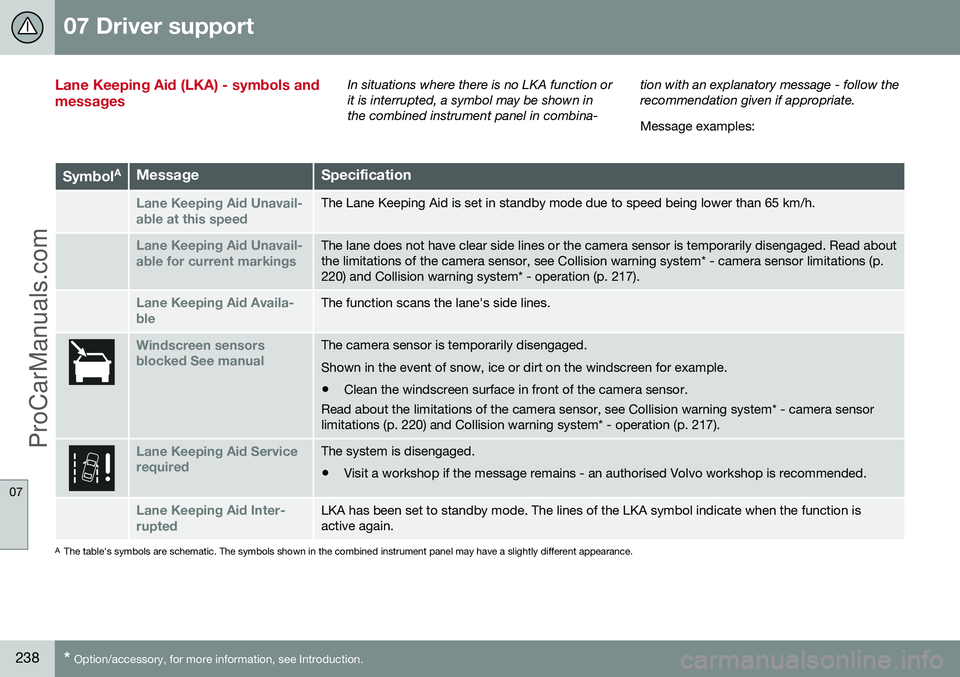
Lane Keeping Aid (LKA) - symbols and messagesIn situations where there is no LKA function or it is interrupted, a symbol may be shown inthe combined instrument panel in combina- tion with an explanatory message - follow therecommendation given if appropriate. Message examples:
Symbol
AMessageSpecification
Lane Keeping Aid Unavail-
able at this speedThe Lane Keeping Aid is set in standby mode due to speed being lower than 65 km/h.
Lane Keeping Aid Unavail-
able for current markingsThe lane does not have clear side lines or the camera sensor is temporarily disengaged. Read about the limitations of the camera sensor, see Collision warning system* - camera sensor limitations (p.220) and Collision warning system* - operation (p. 217).
Lane Keeping Aid Availa-
bleThe function scans the lane's side lines.
Windscreen sensors blocked See manualThe camera sensor is temporarily disengaged. Shown in the event of snow, ice or dirt on the windscreen for example.
• Clean the windscreen surface in front of the camera sensor.
Read about the limitations of the camera sensor, see Collision warning system* - camera sensor limitations (p. 220) and Collision warning system* - operation (p. 217).
Lane Keeping Aid Service requiredThe system is disengaged.
• Visit a workshop if the message remains - an authorised Volvo workshop is recommended.
Lane Keeping Aid Inter- ruptedLKA has been set to standby mode. The lines of the LKA symbol indicate when the function is active again.
A
The table's symbols are schematic. The symbols shown in the combined instrument panel may have a slightly different appearance.
ProCarManuals.co’
Page 246 of 442
07 Driver support
07
244* Option/accessory, for more information, see Introduction.
Park assist camera
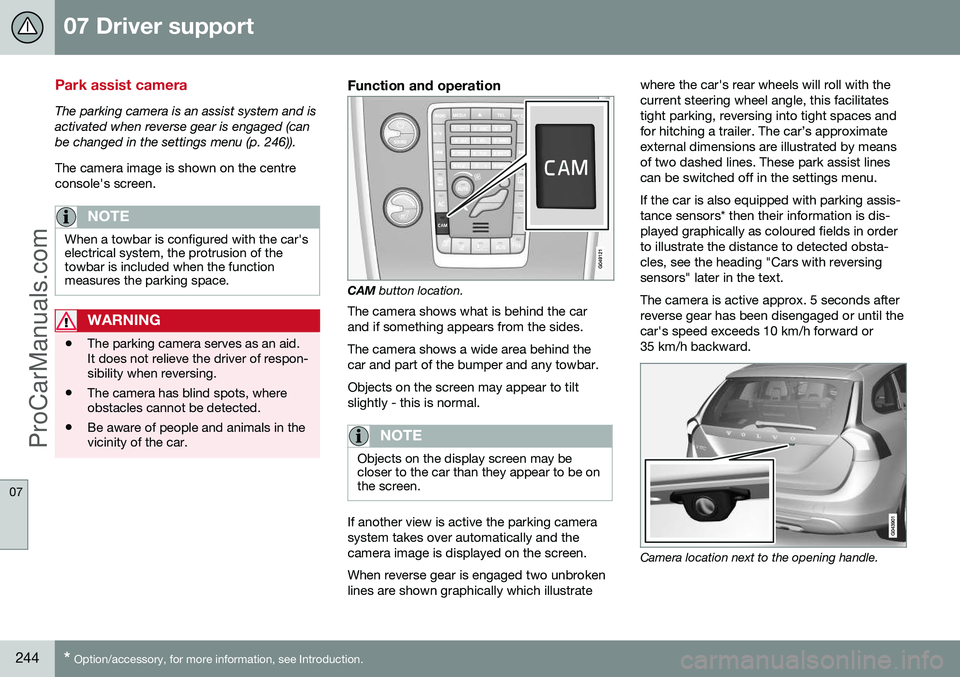
The parking camera is an assist system and is activated when reverse gear is engaged (canbe changed in the settings menu (p. 246)). The camera image is shown on the centre console's screen.
NOTE
When a towbar is configured with the car's electrical system, the protrusion of thetowbar is included when the functionmeasures the parking space.
WARNING
• The parking camera serves as an aid. It does not relieve the driver of respon-sibility when reversing.
• The camera has blind spots, whereobstacles cannot be detected.
• Be aware of people and animals in thevicinity of the car.
Function and operation
CAM
button location.
The camera shows what is behind the car and if something appears from the sides. The camera shows a wide area behind the car and part of the bumper and any towbar. Objects on the screen may appear to tilt slightly - this is normal.
NOTE
Objects on the display screen may be closer to the car than they appear to be onthe screen.
If another view is active the parking camera system takes over automatically and thecamera image is displayed on the screen. When reverse gear is engaged two unbroken lines are shown graphically which illustrate where the car's rear wheels will roll with thecurrent steering wheel angle, this facilitatestight parking, reversing into tight spaces andfor hitching a trailer. The car’s approximateexternal dimensions are illustrated by meansof two dashed lines. These park assist linescan be switched off in the settings menu. If the car is also equipped with parking assis- tance sensors* then their information is dis-played graphically as coloured fields in orderto illustrate the distance to detected obsta-cles, see the heading "Cars with reversingsensors" later in the text. The camera is active approx. 5 seconds after reverse gear has been disengaged or until thecar's speed exceeds 10 km/h forward or35 km/h backward.
Camera location next to the opening handle.
ProCarManuals.com
Page 247 of 442
07 Driver support
07
}}
245
Light conditionsThe camera image is adjusted automatically according to prevailing light conditions.Because of this, the image may vary slightlyin brightness and quality. Poor light condi-tions can result in a slightly reduced imagequality.
NOTE
Keep the camera lens clear of dirt, snow and ice to ensure optimum function. Thisis particularly important in poor light.
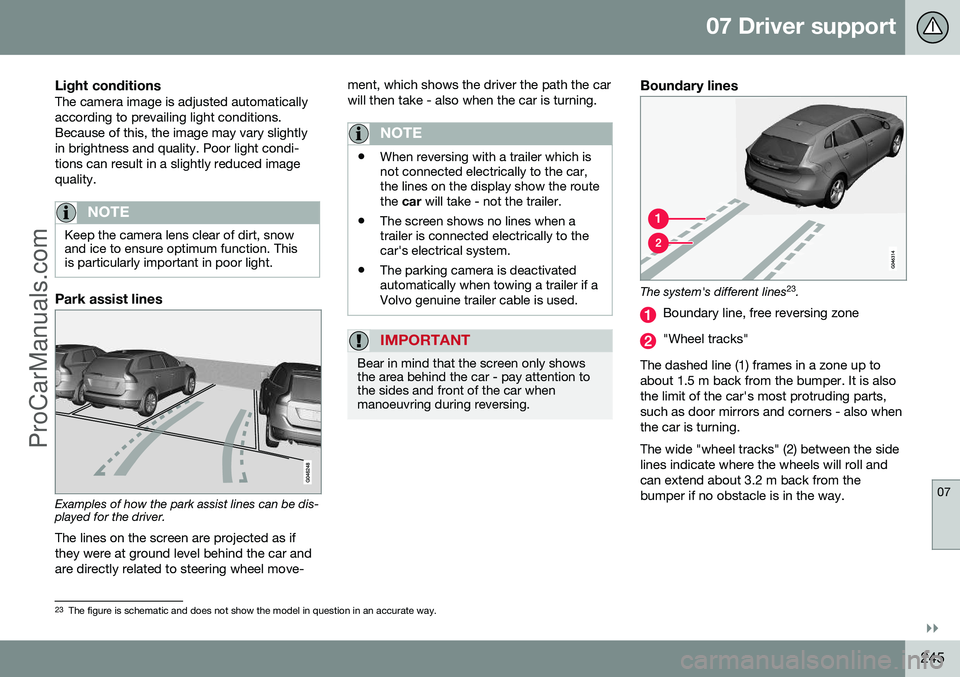
Park assist lines
Examples of how the park assist lines can be dis- played for the driver.The lines on the screen are projected as if they were at ground level behind the car andare directly related to steering wheel move- ment, which shows the driver the path the carwill then take - also when the car is turning.
NOTE
•
When reversing with a trailer which is not connected electrically to the car,the lines on the display show the routethe
car will take - not the trailer.
• The screen shows no lines when atrailer is connected electrically to thecar's electrical system.
• The parking camera is deactivatedautomatically when towing a trailer if aVolvo genuine trailer cable is used.
IMPORTANT
Bear in mind that the screen only shows the area behind the car - pay attention tothe sides and front of the car whenmanoeuvring during reversing.
Boundary lines
The system's different lines 23
.
Boundary line, free reversing zone
"Wheel tracks"
The dashed line (1) frames in a zone up to about 1.5 m back from the bumper. It is alsothe limit of the car's most protruding parts,such as door mirrors and corners - also whenthe car is turning. The wide "wheel tracks" (2) between the side lines indicate where the wheels will roll andcan extend about 3.2 m back from thebumper if no obstacle is in the way.
23 The figure is schematic and does not show the model in question in an accurate way.
ProCarManuals.co’
Page 248 of 442
||
07 Driver support
07
246* Option/accessory, for more information, see Introduction.
Cars with reversing sensors*
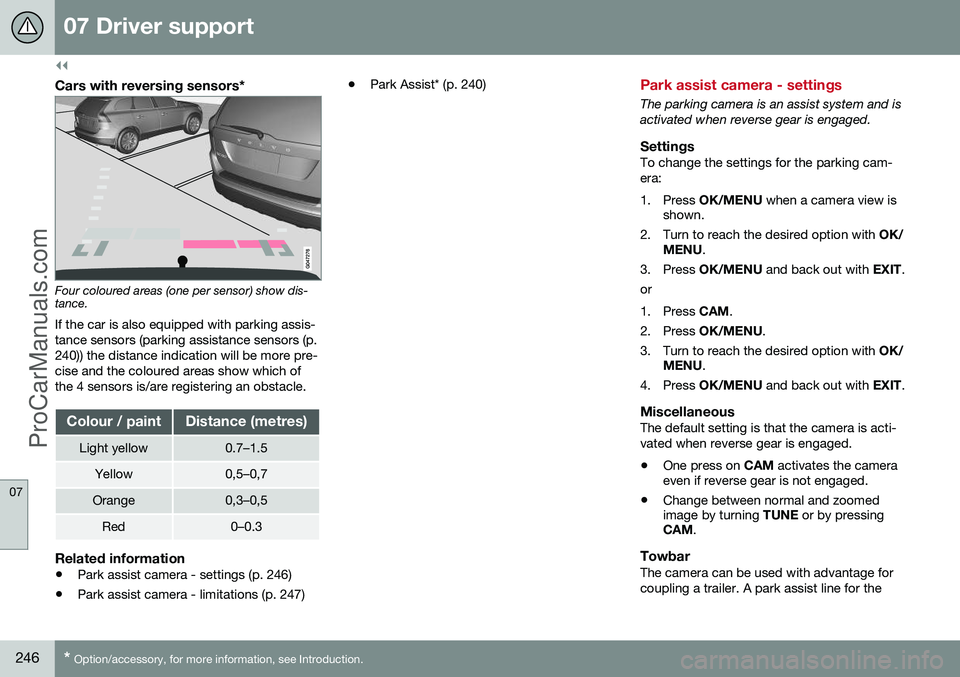
Four coloured areas (one per sensor) show dis- tance.
If the car is also equipped with parking assis- tance sensors (parking assistance sensors (p.240)) the distance indication will be more pre-cise and the coloured areas show which ofthe 4 sensors is/are registering an obstacle.
Colour / paintDistance (metres)
Light yellow0.7–1.5
Yellow0,5–0,7
Orange0,3–0,5
Red0–0.3
Related information
• Park assist camera - settings (p. 246)
• Park assist camera - limitations (p. 247) •
Park Assist* (p. 240)
Park assist camera - settings
The parking camera is an assist system and is activated when reverse gear is engaged.
SettingsTo change the settings for the parking cam-era:
1. Press
OK/MENU when a camera view is
shown.
2. Turn to reach the desired option with OK/
MENU .
3. Press OK/MENU and back out with EXIT.
or
1. Press CAM.
2. Press OK/MENU .
3. Turn to reach the desired option with OK/
MENU .
4. Press OK/MENU and back out with EXIT.
MiscellaneousThe default setting is that the camera is acti- vated when reverse gear is engaged. •One press on
CAM activates the camera
even if reverse gear is not engaged.
• Change between normal and zoomed image by turning
TUNE or by pressing
CAM .
TowbarThe camera can be used with advantage for coupling a trailer. A park assist line for the
ProCarManuals.co’
Page 256 of 442
07 Driver support
07
254* Option/accessory, for more information, see Introduction.
BLIS* (Blind Spot Information System) - operation
BLIS (Blind Spot Information System) is a function designed for providing support forthe driver when driving in dense traffic onroads with several lanes in the same direction.
Activate/deactivate BLISBLIS is activated when the engine is started.This is confirmed by the indicator lamps inthe door panels flashing once.
Button for activating/deactivating.
The BLIS function can be deactivated/acti-
vated by pressing the BLIS button on the
centre console. Some combinations of the selected equip- ment leave no vacant space for a button inthe centre console - in which case the func-tion is handled by the car's menu system (p.103) MY CAR . When BLIS is deactivated/activated the lampin the button extinguishes/illuminates and thecombined instrument panel confirms thechange with a text message. The door panelindicator lamps flash once upon activation. To extinguish the message:
• Press the left stalk switch
OK button.
or
• Wait approx. 5 seconds - the message extinguishes.
When BLIS operates
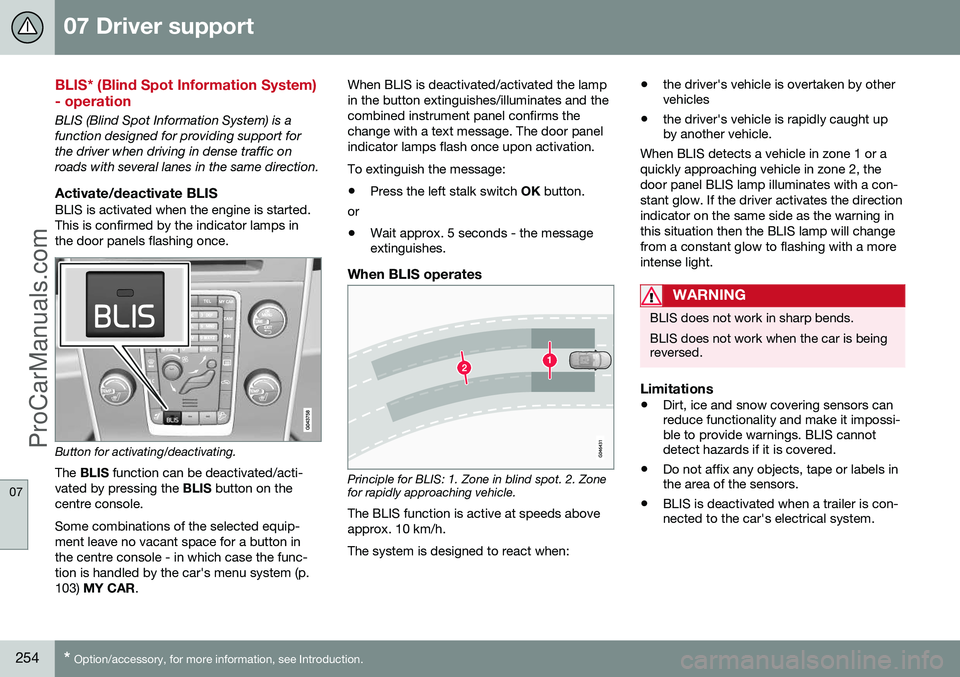
Principle for BLIS: 1. Zone in blind spot. 2. Zone for rapidly approaching vehicle.
The BLIS function is active at speeds above approx. 10 km/h. The system is designed to react when: •
the driver's vehicle is overtaken by other vehicles
• the driver's vehicle is rapidly caught upby another vehicle.
When BLIS detects a vehicle in zone 1 or a quickly approaching vehicle in zone 2, thedoor panel BLIS lamp illuminates with a con-stant glow. If the driver activates the directionindicator on the same side as the warning inthis situation then the BLIS lamp will changefrom a constant glow to flashing with a moreintense light.
WARNING
BLIS does not work in sharp bends. BLIS does not work when the car is being reversed.
Limitations
• Dirt, ice and snow covering sensors can reduce functionality and make it impossi-ble to provide warnings. BLIS cannotdetect hazards if it is covered.
• Do not affix any objects, tape or labels inthe area of the sensors.
• BLIS is deactivated when a trailer is con-nected to the car's electrical system.
ProCarManuals.co’
Page 259 of 442
07 Driver support
07
* Option/accessory, for more information, see Introduction.257
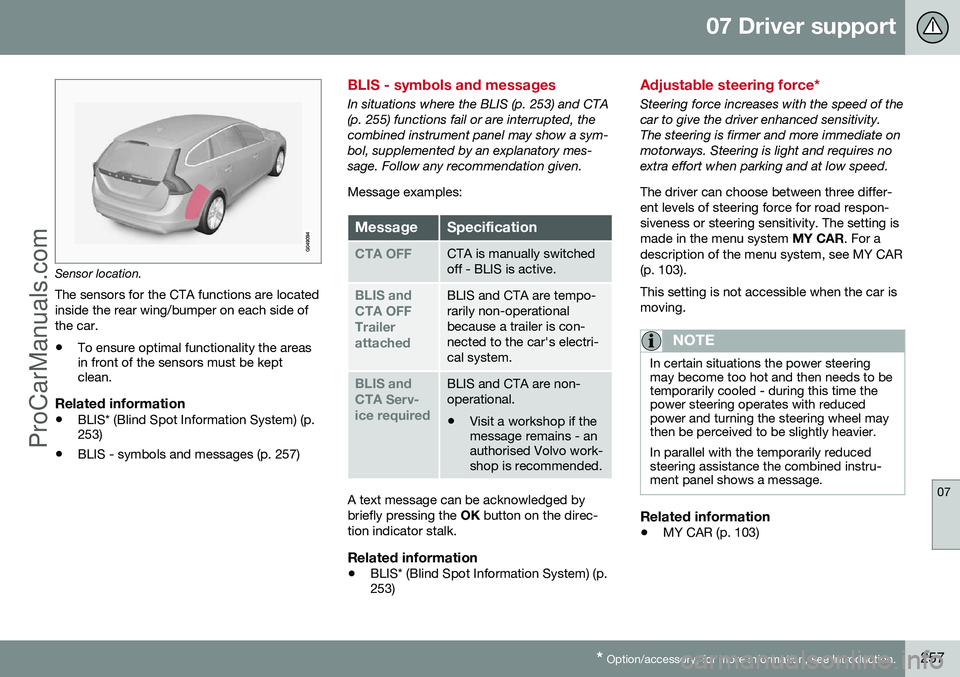
Sensor location.
The sensors for the CTA functions are located inside the rear wing/bumper on each side ofthe car.
• To ensure optimal functionality the areas in front of the sensors must be keptclean.
Related information
•BLIS* (Blind Spot Information System) (p.253)
• BLIS - symbols and messages (p. 257)
BLIS - symbols and messages
In situations where the BLIS (p. 253) and CTA (p. 255) functions fail or are interrupted, thecombined instrument panel may show a sym-bol, supplemented by an explanatory mes-sage. Follow any recommendation given. Message examples:
MessageSpecification
CTA OFFCTA is manually switched off - BLIS is active.
BLIS and CTA OFFTrailerattachedBLIS and CTA are tempo- rarily non-operationalbecause a trailer is con-nected to the car's electri-cal system.
BLIS and CTA Serv-ice requiredBLIS and CTA are non- operational.
• Visit a workshop if the message remains - anauthorised Volvo work-shop is recommended.
A text message can be acknowledged by briefly pressing the
OK button on the direc-
tion indicator stalk.
Related information
• BLIS* (Blind Spot Information System) (p. 253)
Adjustable steering force*
Steering force increases with the speed of the car to give the driver enhanced sensitivity.The steering is firmer and more immediate onmotorways. Steering is light and requires noextra effort when parking and at low speed. The driver can choose between three differ- ent levels of steering force for road respon-siveness or steering sensitivity. The setting ismade in the menu system
MY CAR. For a
description of the menu system, see MY CAR(p. 103). This setting is not accessible when the car is moving.
NOTE
In certain situations the power steering may become too hot and then needs to betemporarily cooled - during this time thepower steering operates with reducedpower and turning the steering wheel maythen be perceived to be slightly heavier. In parallel with the temporarily reduced steering assistance the combined instru-ment panel shows a message.
Related information
• MY CAR (p. 103)
ProCarManuals.co’
Page 262 of 442
08 Starting and driving
08
260* Option/accessory, for more information, see Introduction.
Alcolock* - storage
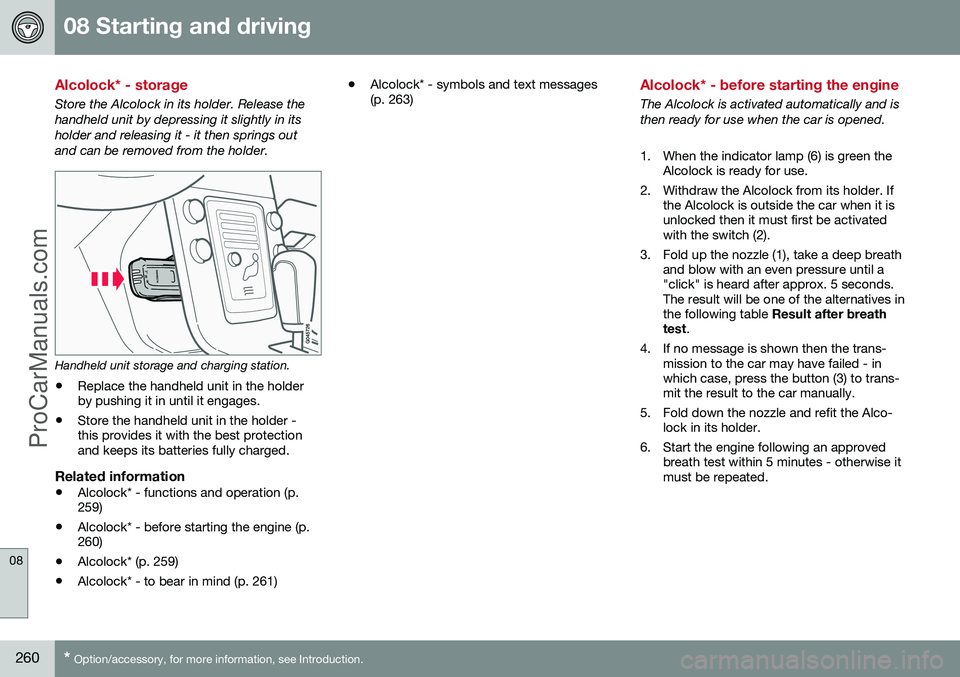
Store the Alcolock in its holder. Release the handheld unit by depressing it slightly in itsholder and releasing it - it then springs outand can be removed from the holder.
Handheld unit storage and charging station.
• Replace the handheld unit in the holder by pushing it in until it engages.
• Store the handheld unit in the holder -this provides it with the best protectionand keeps its batteries fully charged.
Related information
• Alcolock* - functions and operation (p.259)
• Alcolock* - before starting the engine (p.260)
• Alcolock* (p. 259)
• Alcolock* - to bear in mind (p. 261) •
Alcolock* - symbols and text messages(p. 263)
Alcolock* - before starting the engine
The Alcolock is activated automatically and is then ready for use when the car is opened.
1. When the indicator lamp (6) is green the
Alcolock is ready for use.
2. Withdraw the Alcolock from its holder. If the Alcolock is outside the car when it is unlocked then it must first be activatedwith the switch (2).
3. Fold up the nozzle (1), take a deep breath and blow with an even pressure until a"click" is heard after approx. 5 seconds.The result will be one of the alternatives inthe following table Result after breath
test .
4. If no message is shown then the trans- mission to the car may have failed - inwhich case, press the button (3) to trans-mit the result to the car manually.
5. Fold down the nozzle and refit the Alco- lock in its holder.
6. Start the engine following an approved breath test within 5 minutes - otherwise itmust be repeated.
ProCarManuals.co’
Page 268 of 442
08 Starting and driving
08
266* Option/accessory, for more information, see Introduction.
Remote start (ERS)*
Remote start (ERS – Engine Remote Start) means that the car's engine can be startedremotely using the remote control key or thePCC key. This is so that the passenger com-partment can be warmed up/cooled downbefore departure. The climate control system and audio system start with the same settings that were in usewhen the car was parked. An ERS-started engine is activated for a maximum of 15 minutes, then it is switchedoff. After two ERS-activations the enginemust be started in the normal way beforeERS can be re-used. The optional ERS function is available on most cars with automatic gearbox.
NOTE
The service life of the remote control key's battery is affected by the ERS function. Inthe event of frequent use of ERS the bat-tery should therefore be changed once peryear, see Remote control key/PCC -replacing the battery (p. 158).
NOTE
Follow local/national rules/regulations on idling.
WARNING
To remote-start the engine, the following criteria must be met:
• The car must be supervised.
• There must be no people or animals inside the car.
• The car must not be parked in aclosed, unventilated area - the exhaustgases may seriously injure humansand animals.
Related information
•
Remote start (ERS) - operation (p. 266)
• Remote start (ERS) - symbols and mes- sages (p. 268)
Remote start (ERS) - operation
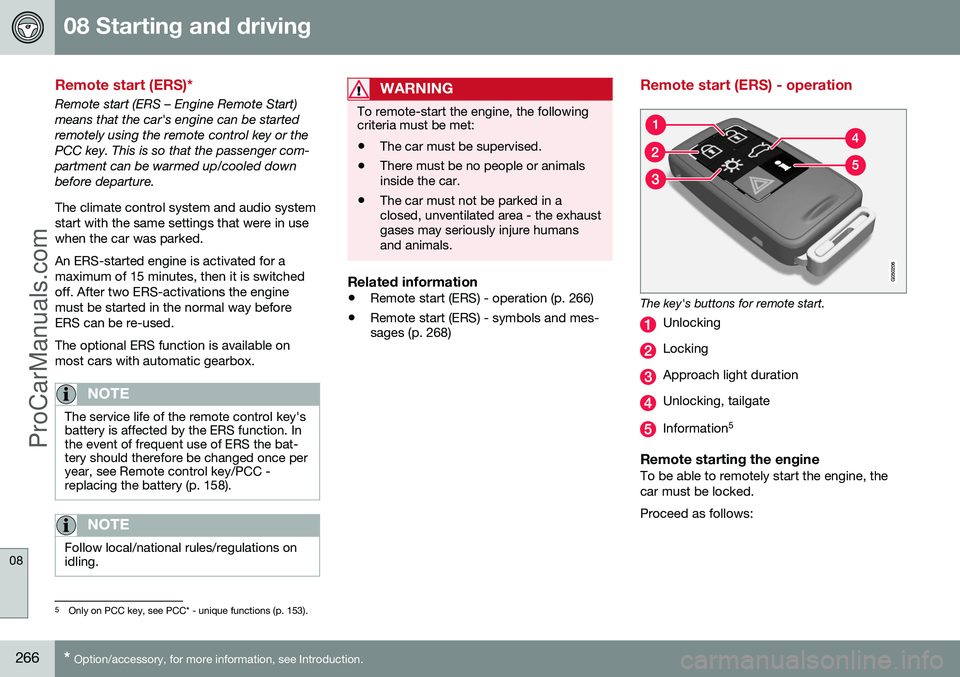
The key's buttons for remote start.
Unlocking
Locking
Approach light duration
Unlocking, tailgate
Information 5
Remote starting the engineTo be able to remotely start the engine, the car must be locked. Proceed as follows:
5
Only on PCC key, see PCC* - unique functions (p. 153).
ProCarManuals.co’
Page 269 of 442
08 Starting and driving
08
* Option/accessory, for more information, see Introduction.267
1. Briefly press on the key's button (2).
2. Follow this immediately afterwards with a
long press - at least 2 seconds - on button (3).
If the conditions for ERS are fulfilled then the following takes place:
1. The direction indicators flash quickly sev- eral times.
2. The engine starts.
3. The direction indicators illuminate with a constant glow for 3 seconds to verify that the engine has started.
NOTE
After remote starting, the car continues to be locked but with deactivated movementdetector*.
With PCC 6
keyThe light indication for Approach lighting 7
flashes several times when
the button is pressed and then goes to constant glow if all criteria for
ERS have been fulfilled. However, this doesnot mean that ERS has started the engine. To check whether ERS has started the engine, the user can press the button (5) - ifthe engine has started, there is a light indica-tion by the buttons (2) and (3).
Active functionsThe following functions are activated with a remote started engine: • Ventilation system
• Audio/video system
• Approach light duration.
Deactivated functionsThe following functions are deactivated with a remote started engine: • Headlamps
• Position lamps
• Number plate lighting
• Windscreen wiper.
ERS is interruptedThe following steps switch off an ERS-started engine: • The remote control key's button (1), (2) or (4) is depressed
• The car is unlocked
• A door is opened
• Accelerator pedal or brake pedal isdepressed
• The gear selector is moved out of
P posi-
tion
• There is approx.10 litres left in the fueltank •
Active ERS time exceeds 15 minutes.
When an ERS-started engine is switched off, the direction indicators illuminate with a con-stant glow for 3 seconds.
Related information
• Remote start (ERS)* (p. 266)
• Remote start (ERS) - symbols and mes- sages (p. 268)
6
For more information on the PCC key, see PCC* - unique functions (p. 153).7
For more information on Approach lighting, see Remote control key - functions (p. 151) and Approach light duration (p. 89).
ProCarManuals.co’