Eco VOLVO V60 2017 Owner´s Manual
[x] Cancel search | Manufacturer: VOLVO, Model Year: 2017, Model line: V60, Model: VOLVO V60 2017Pages: 406, PDF Size: 9.65 MB
Page 155 of 406
LOCKS AND ALARM
}}
* Option/accessory, for more information, see Introduction.153
MessageMeaning
Insert car keyRemote key not recognized dur- ing start. Try to start the vehicleagain.
Car key not foundVehicles with keyless drive*
only. Remote key not recog- nized during start. Try to startthe vehicle again. If the problem continues, insert the remote key into the ignitionslot and try to start the vehicleagain.
Immobil- izer Trystart againRemote key fault during start. Contact an authorized Volvoworkshop.
CAUTION
Never use force when inserting the remote key in the ignition slot. The vehicle cannot bestarted if the transponder is damaged.
USA–FCC ID: LTQWFS 125VO This device complies with part 15 of the FCC rules. Operation is subject to the following condi-tion: (1) This device may not cause harmful inter-ference, and (2) this device must accept anyinterference received, including interference thatmay cause undesired operation. Canada–IC: 3659A-WFS125VO Operation is subject to the following conditions: (1) this device may not cause interference, and(2) this device must accept any interference,including interference that may cause undesiredoperation of the device. For information on starting the vehicle, see Star- ting the engine (p. 258).
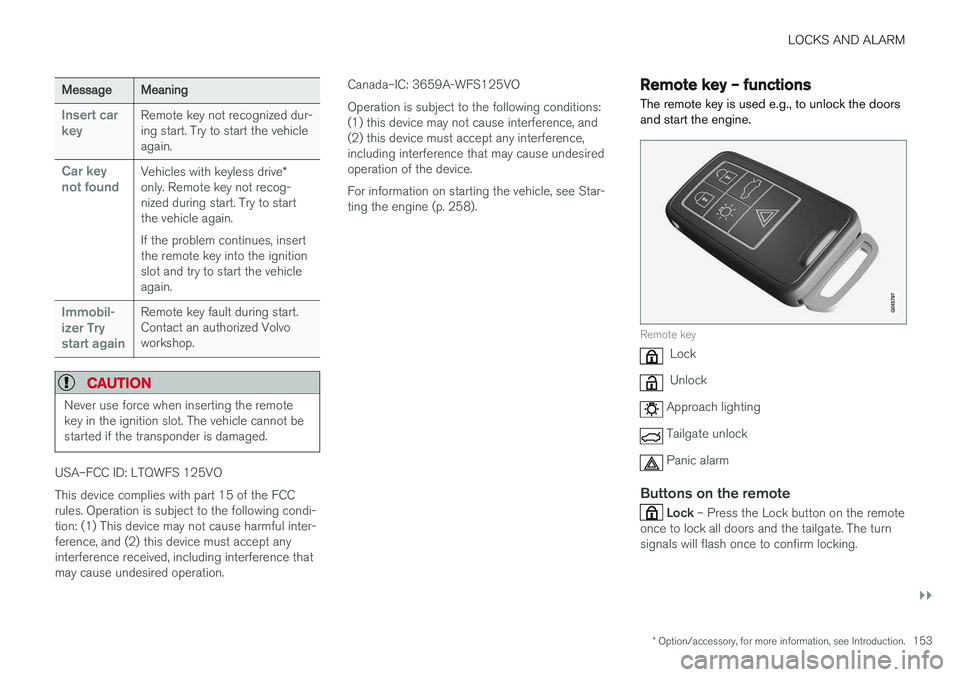
Remote key – functions
The remote key is used e.g., to unlock the doors and start the engine.
Remote key
Lock
Unlock
Approach lighting
Tailgate unlock
Panic alarm
Buttons on the remote
Lock – Press the Lock button on the remote
once to lock all doors and the tailgate. The turn signals will flash once to confirm locking.
Page 156 of 406
||
LOCKS AND ALARM
* Option/accessory, for more information, see Introduction.
154
Unlock – Press the Unlock button on the
remote once to unlock the driver's door. After a short pause, press the Unlock button a second time within 10 seconds to unlock theother doors and the tailgate. This function can be changed so that all doors unlock at the same time by pressing My Car and
going to
SettingsCar settingsLock
settings
Change doors unlock setting. For
a description of the menu system, see My Car – introduction (p. 77).
Approach lighting – As you approach the
vehicle, press the button on the remote key to light the interior lighting, parking lights, license plate lighting and the lights in the door mirrors *.
These lights will switch off automatically after 30, 60 or 90 seconds. For a description of the menusystem, see My Car – introduction (p. 77).
Unlock tailgate – Press the button twice
within several seconds to disarm the alarm sys- tem (the alarm indicator light on the dashboardwill go out), and unlock only the tailgate.
NOTE
As an added safety precaution, the parking lights will come on automatically for a shortperiod when the tailgate has been opened.
After closing, the tailgate will not automatically relock. Press Lock to relock it and rearm thealarm. For information on opening the tailgate from the passenger compartment, see Locking/unlocking– tailgate (p. 166)
Panic alarm – This button can be used to
attract attention during emergency situations. To activate the panic alarm, press and hold this button for at least 3 seconds or press it twicewithin 3 seconds. The turn signals and horn willbe activated. The panic alarm will stop automati-cally after 2 minutes and 45 seconds. To deactivate, wait approximately 5 seconds and press the button again. The Panic alarm button will not unlock the vehi- cle.
Related information
• Locking/unlocking – from inside (p. 164)
• Locking/unlocking – from the outside(p. 163)
• Locking/unlocking confirmation (p. 152)
Remote key – range The remote key has a range of approximately 60 ft. (20 m) from the vehicle.
NOTE
Buildings or other obstacles may interfere with the function of the remote key. The vehi-cle can also be locked or unlocked with thekey blade, see Alarm-related functions(p. 170).
If the remote key is removed from the vehicle while the engine is running or if the ignition is in mode
I or II and all of the doors are closed, a
message will appear in the instrument panel dis- play and there will be an audible signal. When the remote key is returned to the vehicle, the message will be erased and the audible sig-nal will stop after one of the following has beendone:
• The remote key is inserted in the ignition slot
• The vehicle's speed exceeds 20 mph(30 km/h)
• The
OK button on the left steering wheel
lever is pressed
Related information
• Remote key – functions (p. 153)
Page 157 of 406
LOCKS AND ALARM
155
Detachable key blade – general informationEach remote key contains a detachable metal key blade (p. 150) for mechanically locking orunlocking the driver's door and the glove com-partment, and to enable the private lock-ing(p. 156) function. For more information onthe key blade. The key blades have a uniquecode, which is used if new ones need to be pro-duced. This code is available at an authorizedVolvo retailer. The visible ends of these key blades are unique to make it easier to identify "your" remote key.
Related information
• Detachable key blade – unlocking (p. 156)
• Detachable key blade – detaching/reinsert- ing (p. 155)
Detachable key blade – detaching/ reinserting
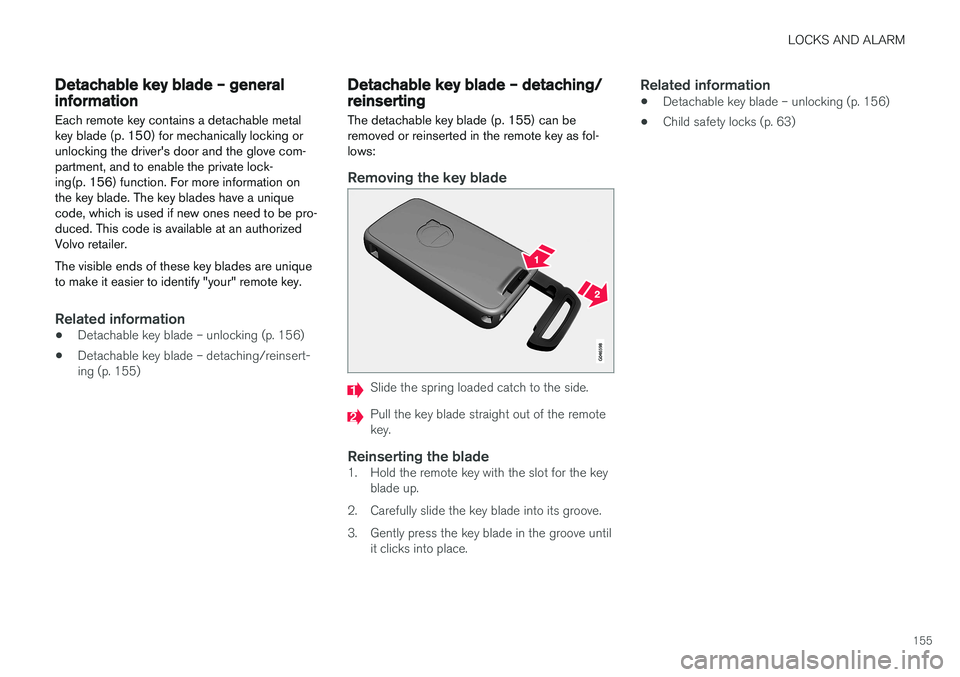
The detachable key blade (p. 155) can be removed or reinserted in the remote key as fol-lows:
Removing the key blade
Slide the spring loaded catch to the side.
Pull the key blade straight out of the remote key.
Reinserting the blade1. Hold the remote key with the slot for the key blade up.
2. Carefully slide the key blade into its groove.
3. Gently press the key blade in the groove until it clicks into place.
Related information
• Detachable key blade – unlocking (p. 156)
• Child safety locks (p. 63)
Page 159 of 406
LOCKS AND ALARM
}}
157
G017870
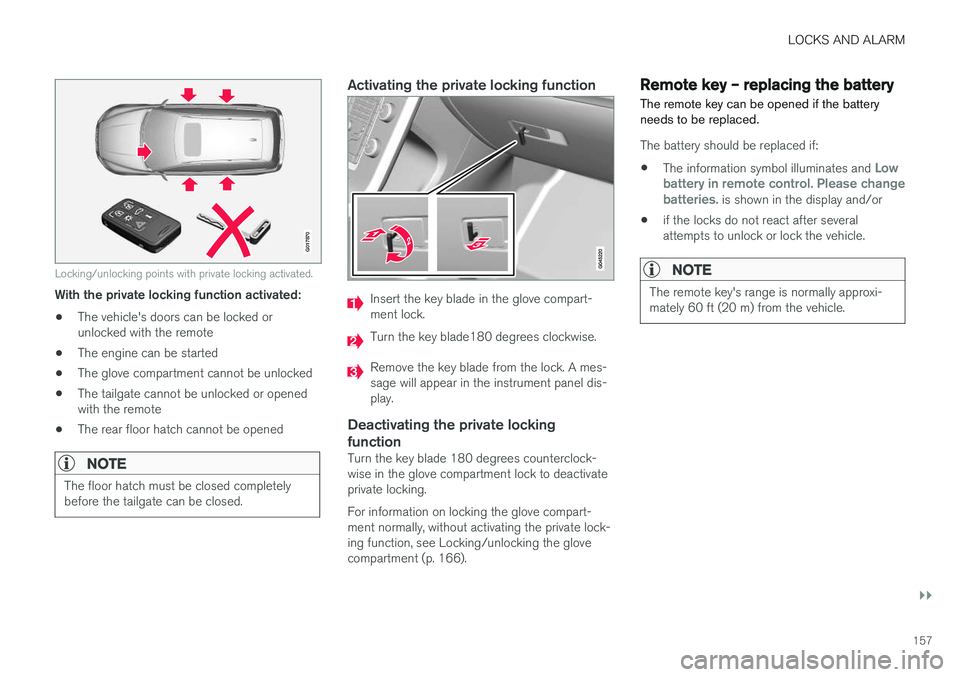
Locking/unlocking points with private locking activated.
With the private locking function activated:• The vehicle's doors can be locked or unlocked with the remote
• The engine can be started
• The glove compartment cannot be unlocked
• The tailgate cannot be unlocked or openedwith the remote
• The rear floor hatch cannot be opened
NOTE
The floor hatch must be closed completely before the tailgate can be closed.
Activating the private locking function
Insert the key blade in the glove compart- ment lock.
Turn the key blade180 degrees clockwise.
Remove the key blade from the lock. A mes- sage will appear in the instrument panel dis-play.
Deactivating the private locking function
Turn the key blade 180 degrees counterclock- wise in the glove compartment lock to deactivateprivate locking. For information on locking the glove compart- ment normally, without activating the private lock-ing function, see Locking/unlocking the glovecompartment (p. 166).
Remote key – replacing the battery The remote key can be opened if the battery needs to be replaced.
The battery should be replaced if:
• The information symbol illuminates and
Low
battery in remote control. Please change batteries.
is shown in the display and/or
• if the locks do not react after several attempts to unlock or lock the vehicle.
NOTE
The remote key's range is normally approxi- mately 60 ft (20 m) from the vehicle.
Page 160 of 406
||
LOCKS AND ALARM
158
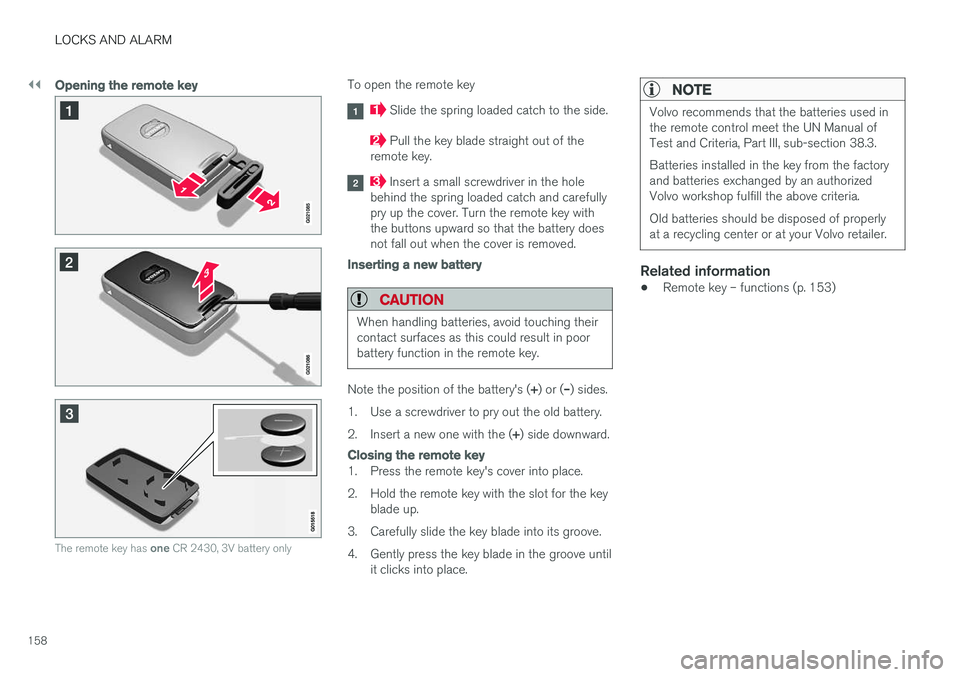
Opening the remote key
The remote key has one CR 2430, 3V battery only
To open the remote key
Slide the spring loaded catch to the side.
Pull the key blade straight out of the
remote key.
Insert a small screwdriver in the hole
behind the spring loaded catch and carefully pry up the cover. Turn the remote key withthe buttons upward so that the battery doesnot fall out when the cover is removed.
Inserting a new battery
CAUTION
When handling batteries, avoid touching their contact surfaces as this could result in poorbattery function in the remote key.
Note the position of the battery's ( +) or ( –) sides.
1. Use a screwdriver to pry out the old battery. 2. Insert a new one with the ( +) side downward.
Closing the remote key
1. Press the remote key's cover into place.
2. Hold the remote key with the slot for the key
blade up.
3. Carefully slide the key blade into its groove.
4. Gently press the key blade in the groove until it clicks into place.
NOTE
Volvo recommends that the batteries used in the remote control meet the UN Manual ofTest and Criteria, Part III, sub-section 38.3. Batteries installed in the key from the factory and batteries exchanged by an authorizedVolvo workshop fulfill the above criteria. Old batteries should be disposed of properly at a recycling center or at your Volvo retailer.
Related information
• Remote key – functions (p. 153)
Page 164 of 406
LOCKS AND ALARM
* Option/accessory, for more information, see Introduction.
162
CAUTION
• Keyless drive remote keys should never be left in the vehicle. In the event of abreak-in, a remote found in the vehiclecould make it possible to start theengine.
• Electromagnetic fields or metal obstruc-tions can interfere with the keyless drivesystem. The remote key should never beplaced closer than approximately 4-6 in.(10-15 cm) to cell phones, metallicobjects or e.g., stored in a metal brief-case.
USA – FCC ID:KR55WK48952, KR55WK48964 NOTEThis device complies with part 15 of the FCC Rules. Operation is subject to the following twoconditions: (1) This device may not cause harmfulinterference, and (2) this device must acceptinterference received, including interference thatmay cause undesired operation. CAUTIONChanges or modifications not expressly approved by the manufacturer could void the user's author-ity to operate the equipment. Siemens VDO5WK48891 Tested To Comply With FCC StandardsFor Automobile UseCanada – IC:267T-5WK48952, 267T-5WK48964, 267T-5WK48891 NOTEThis device complies with RSS -210 of Industry Canada. Operation is subject to the following twoconditions: (1) This device may not cause harmfulinterference, and (2) this device must acceptinterference received, including interference thatmay cause undesired operation. CAUTIONChanges or modifications not expressly approved by the manufacturer could void the user's author-ity to operate the equipment.
Keyless drive
* – antenna locations
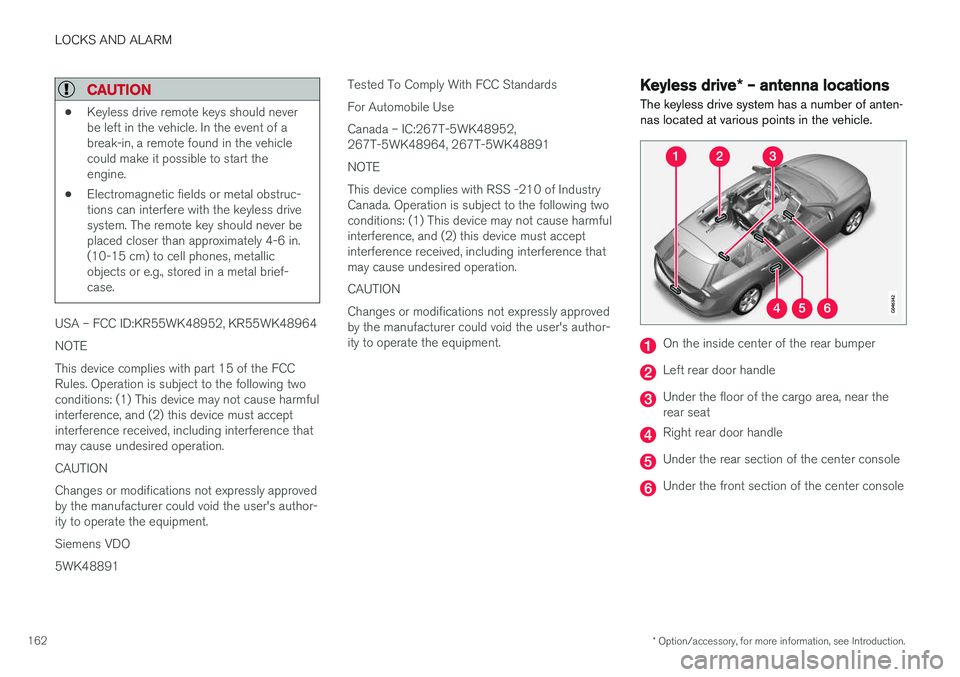
The keyless drive system has a number of anten- nas located at various points in the vehicle.
On the inside center of the rear bumper
Left rear door handle
Under the floor of the cargo area, near the rear seat
Right rear door handle
Under the rear section of the center console
Under the front section of the center console
Page 165 of 406
LOCKS AND ALARM
* Option/accessory, for more information, see Introduction.163
WARNING
People with implanted pacemakers should not allow the pacemaker to come closer than9 inches (22 cm) to any of the keyless drivesystem's antennas. This is to help preventinterference between the pacemaker and thekeyless drive system.
Related information
•Keyless drive
*– locking/unlocking (p. 159)
Locking/unlocking – from the outside
The remote key (p. 150) is used to lock/unlock all of the doors and the tailgate at the same time.Different settings for unlocking the vehicle canbe selected, see Remote key – functions(p. 153). Before the vehicle can be locked from the out- side with the remote key, the driver's door mustbe closed. If the tailgate or any other door isopen, it will be locked and the alarm will bearmed.
NOTE
Be sure the remote key is outside of the vehi- cle before the other doors/tailgate are closedto help avoid locking the remote inside thevehicle.
If the vehicle is equipped with the optional key- less drive system, all doors/tailgate must beclosed before the vehicle can be locked. The first press on the unlock button unlocks the driver's door and a second press unlocks theother doors and the tailgate (see also remote keyand key blade (p. 150)). This setting can be changed in the menu system. See MY
CAR (p. 77) for a description.
If the locks repeatedly do not react when the unlock button is pressed, it may be necessary to replace the battery in the remote, see Remotekey – replacing the battery (p. 157). In this casethe vehicle can be unlocked with the detachablekey blade (p. 156).
Related information
•
Locking/unlocking – from inside (p. 164)
Page 170 of 406
LOCKS AND ALARM
168
Alarm – general information
The alarm system provides a warning if an attempt is made to break into the vehicle. The alarm is automatically armed (p. 169) whenever the vehicle is locked with the remotekey. When armed, the alarm continuously monitors a number of points on the vehicle. The followingconditions will trigger the alarm:
• The hood is forced open.
• The tailgate is forced open.
• A door is forced open.
• The ignition slot is tampered with.
• An attempt is made to start the vehicle with a non-approved key (a key not coded to thecar's ignition).
• The battery is disconnected (while the alarmis armed).
• The siren is disconnected when the alarm isdisarmed.
A message will appear in the information displayif a fault should occur in the alarm system. Con-tact a trained and qualified Volvo service techni-cian.
NOTE
Do not attempt to repair any of the compo- nents in the alarm system yourself. This couldaffect the insurance policy on the vehicle.
Related information
• Alarm – turning off (p. 170)
• Alarm signal (p. 169)
• Alarm indicator (p. 168)
Alarm indicator
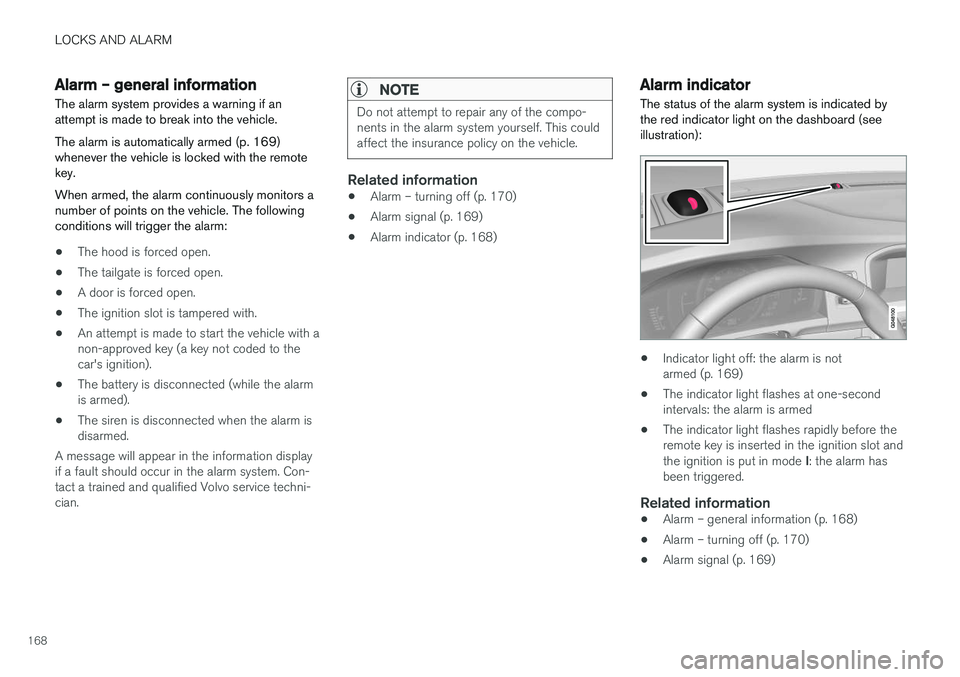
The status of the alarm system is indicated by the red indicator light on the dashboard (seeillustration):
• Indicator light off: the alarm is not armed (p. 169)
• The indicator light flashes at one-secondintervals: the alarm is armed
• The indicator light flashes rapidly before theremote key is inserted in the ignition slot and the ignition is put in mode
I: the alarm has
been triggered.
Related information
• Alarm – general information (p. 168)
• Alarm – turning off (p. 170)
• Alarm signal (p. 169)
Page 177 of 406
DRIVER SUPPORT
}}
175
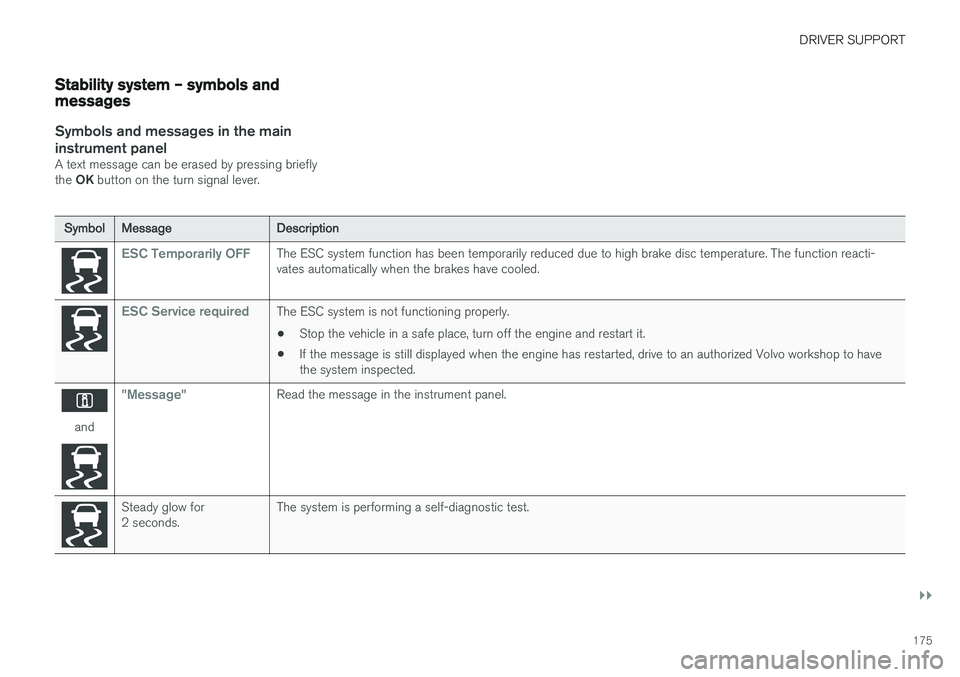
Stability system – symbols and messages
Symbols and messages in the maininstrument panel
A text message can be erased by pressing briefly the OK button on the turn signal lever.
SymbolMessageDescription
ESC Temporarily OFFThe ESC system function has been temporarily reduced due to high brake disc temperature. The function reacti- vates automatically when the brakes have cooled.
ESC Service requiredThe ESC system is not functioning properly.
• Stop the vehicle in a safe place, turn off the engine and restart it.
• If the message is still displayed when the engine has restarted, drive to an authorized Volvo workshop to have the system inspected.
and
"Message"Read the message in the instrument panel.
Steady glow for 2 seconds.The system is performing a self-diagnostic test.
Page 179 of 406
DRIVER SUPPORT
* Option/accessory, for more information, see Introduction.177
Adjustable steering force*
Steering force increases with the speed of the vehicle to give the driver enhanced sense ofcontrol and stability. At low speed the vehicle iseasy to steer in order to facilitate parking, etc.
Adjustable steering force *Steering force can be changed under MY CAR
Car settingsSteering wheel force.
Select Low, Medium or High. For a description
of the menu system, My Car – introduction (p. 77).
NOTE
This steering force level menu function can- not be accessed when the vehicle is inmotion.
NOTE
In certain situations, the power steering may become too warm and will have to be tempo-rarily cooled down. While this is happening,the power steering effect will be reducedslightly and somewhat more effort may berequired to turn the steering wheel. If this occurs, a message will be displayed in the instrument panel.
Related information
• Active chassis
* (Four C) (p. 172)
Road Sign Information (RSI) * –
introduction
RSI is a feature that helps the driver see road signs with the posted speed limit.
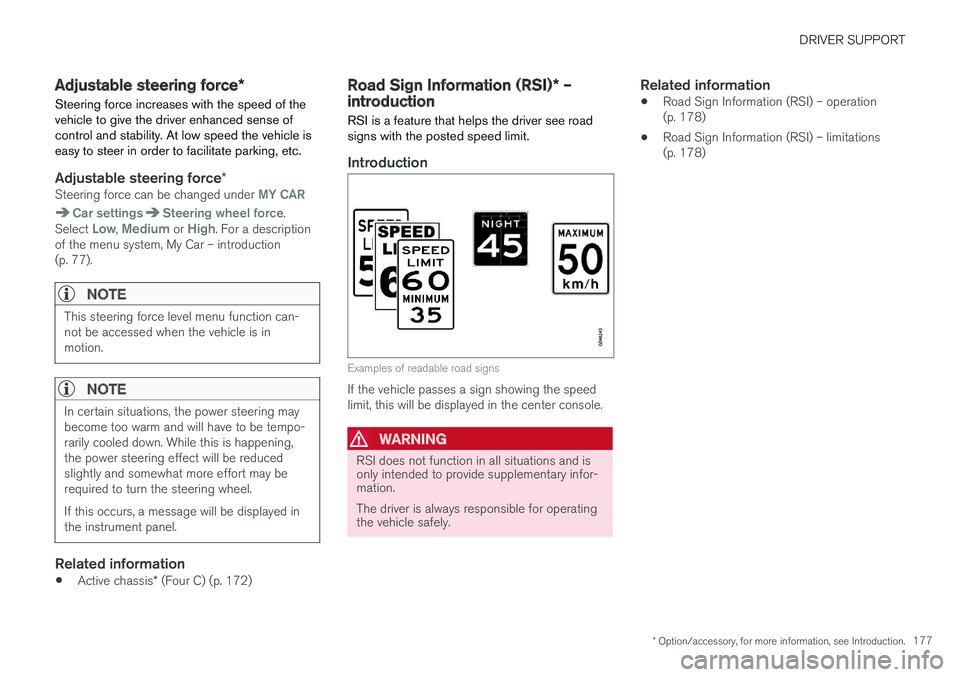
Introduction
Examples of readable road signs
If the vehicle passes a sign showing the speed limit, this will be displayed in the center console.
WARNING
RSI does not function in all situations and is only intended to provide supplementary infor-mation. The driver is always responsible for operating the vehicle safely.
Related information
• Road Sign Information (RSI) – operation (p. 178)
• Road Sign Information (RSI) – limitations(p. 178)