key battery VOLVO V60 2018 Owner´s Manual
[x] Cancel search | Manufacturer: VOLVO, Model Year: 2018, Model line: V60, Model: VOLVO V60 2018Pages: 406, PDF Size: 9.59 MB
Page 172 of 406
LOCKS AND ALARM
170
Alarm – general information
The alarm system provides a warning if an attempt is made to break into the vehicle. The alarm is automatically armed (p. 171) whenever the vehicle is locked with the remotekey. When armed, the alarm continuously monitors a number of points on the vehicle. The followingconditions will trigger the alarm:
• The hood is forced open.
• The tailgate is forced open.
• A door is forced open.
• The ignition slot is tampered with.
• An attempt is made to start the vehicle with a non-approved key (a key not coded to thecar's ignition).
• The battery is disconnected (while the alarmis armed).
• The siren is disconnected when the alarm isdisarmed.
A message will appear in the information displayif a fault should occur in the alarm system. Con-tact a trained and qualified Volvo service techni-cian.
NOTE
Do not attempt to repair any of the compo- nents in the alarm system yourself. This couldaffect the insurance policy on the vehicle.
Related information
• Alarm – turning off (p. 172)
• Alarm signal (p. 171)
• Alarm indicator (p. 170)
Alarm indicator
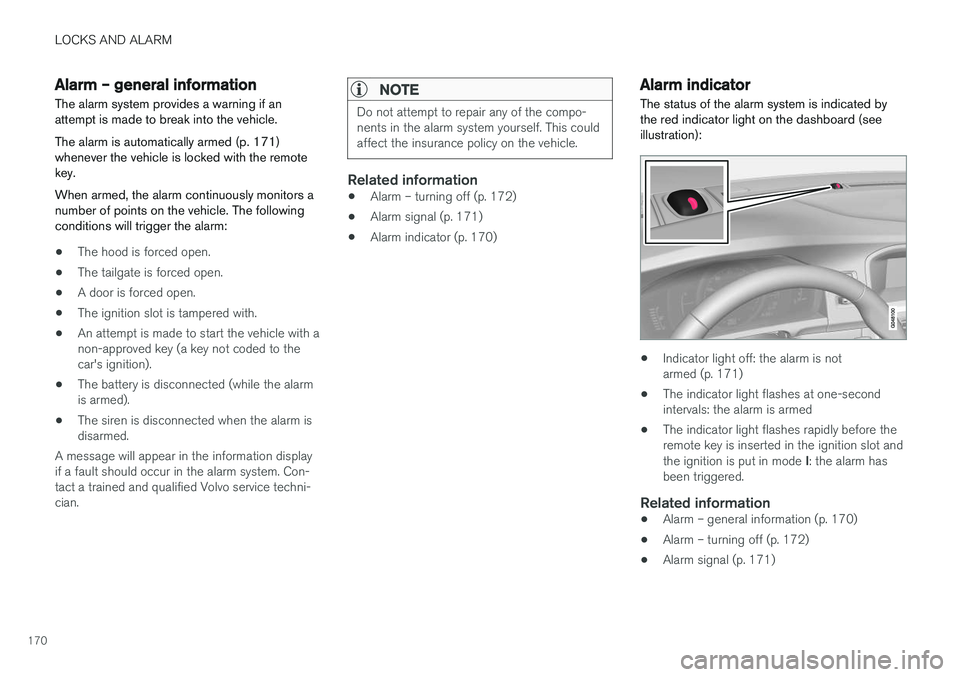
The status of the alarm system is indicated by the red indicator light on the dashboard (seeillustration):
• Indicator light off: the alarm is not armed (p. 171)
• The indicator light flashes at one-secondintervals: the alarm is armed
• The indicator light flashes rapidly before theremote key is inserted in the ignition slot and the ignition is put in mode
I: the alarm has
been triggered.
Related information
• Alarm – general information (p. 170)
• Alarm – turning off (p. 172)
• Alarm signal (p. 171)
Page 173 of 406
LOCKS AND ALARM
171
Alarm – arming/disarming The alarm system provides a warning if an attempt is made to break into the vehicle.
Arming the alarm
–Press the Lock button on the remote key. One long flash of the turn signals will confirmthat the alarm (p. 170) is armed.
Alarm confirmation settings can be changed in MY CAR , under
Car settingsLock settings
Keyless entry. For a description of the menu
system, see My Car – introduction (p. 79).
USA FCC ID: MAYDA 5823(3) This device complies with part 15 of the FCC rules. Operation is subject to the following condi-tions: (1) This device may not cause harmfulinterference, and (2) this device must accept anyinterference received, including interference thatmay cause undesired operation.
Canada IC: 4405A-DA 5823(3)
This device is subject to the following conditions:(1) this device may not cause interference, and(2) this device must accept any interference,including interference that may cause undesiredoperation of the device.
Disarming the alarm
–Press the Unlock button on the remote key.
> Two short flashes from the car's direction indicators confirm that the alarm has been deactivated and that all doors areunlocked.
Related information
• Alarm indicator (p. 170)
• Alarm signal (p. 171)
• Alarm – turning off (p. 172)
• Alarm-related functions (p. 172)
Alarm signal
An audible (p. 170) signal is given by a battery powered siren. The alarm cycle lasts for 30 sec-onds.
The visual alarm signal is given by flashing all turn signals for approximately 5 minutes or untilthe alarm is turned off.
Related information
• Alarm indicator (p. 170)
• Alarm – arming/disarming (p. 171)
• Alarm – turning off (p. 172)
Page 174 of 406
LOCKS AND ALARM
172
Alarm – turning off
The alarm system provides a warning if an attempt is made to break into the vehicle.
If the alarm is sounding, it can be stopped by pressing the Unlock button on the remote key orby inserting the remote key in the ignition slot.Two short flashes from the car's turn signals con-firm that the alarm has been turned off.
Related information
• Alarm indicator (p. 170)
• Alarm – arming/disarming (p. 171)
• Remote key – replacing the battery (p. 159)
Alarm-related functions
The following is general information regarding the alarm system in your vehicle.
Automatic re-armingIf the doors are unlocked, the locks will automati- cally re-engage (re-lock) and the alarm will re-arm after 2 minutes unless a door or the tailgatehas been opened.
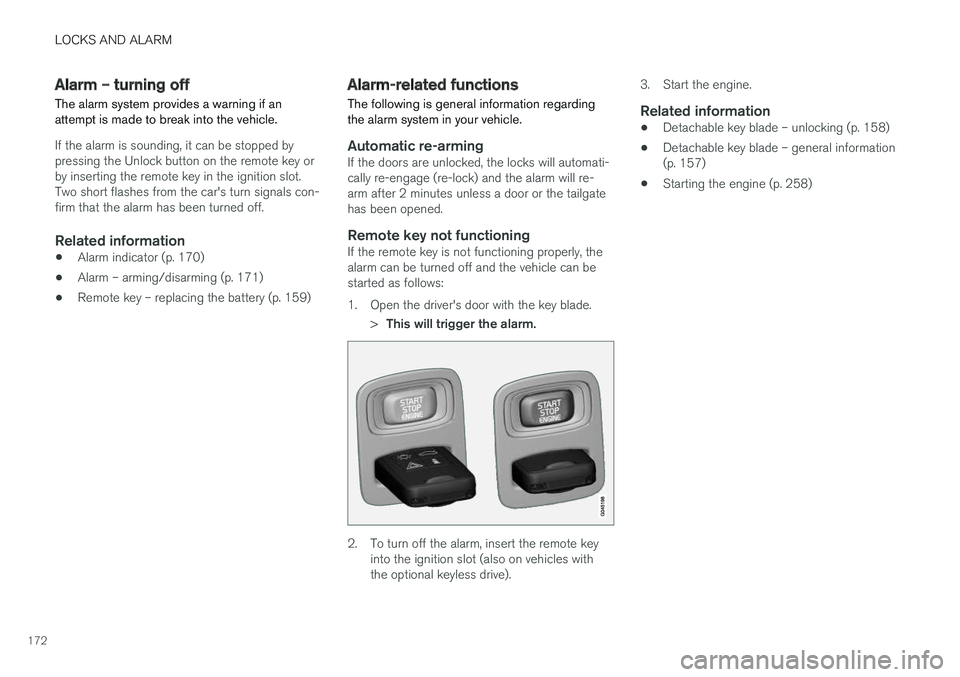
Remote key not functioningIf the remote key is not functioning properly, thealarm can be turned off and the vehicle can bestarted as follows:
1. Open the driver's door with the key blade.
>This will trigger the alarm.
2. To turn off the alarm, insert the remote key
into the ignition slot (also on vehicles with the optional keyless drive). 3. Start the engine.
Related information
•
Detachable key blade – unlocking (p. 158)
• Detachable key blade – general information(p. 157)
• Starting the engine (p. 258)
Page 260 of 406
STARTING AND DRIVING
* Option/accessory.
258
Starting the engine
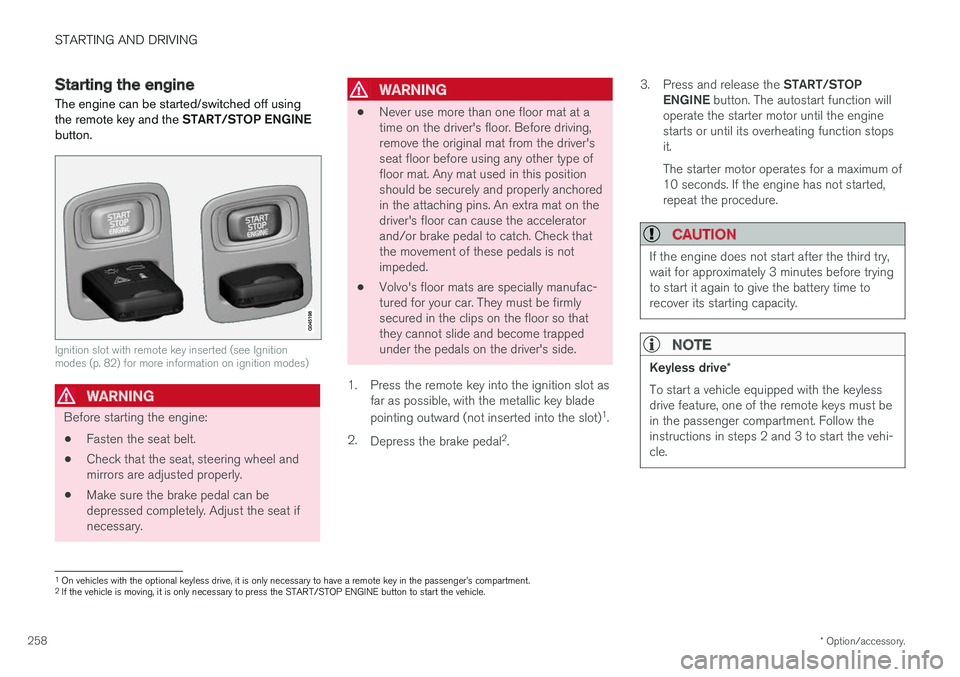
The engine can be started/switched off using the remote key and the START/STOP ENGINE
button.
Ignition slot with remote key inserted (see Ignition modes (p. 82) for more information on ignition modes)
WARNING
Before starting the engine:
• Fasten the seat belt.
• Check that the seat, steering wheel and mirrors are adjusted properly.
• Make sure the brake pedal can bedepressed completely. Adjust the seat ifnecessary.
WARNING
•Never use more than one floor mat at a time on the driver's floor. Before driving,remove the original mat from the driver'sseat floor before using any other type offloor mat. Any mat used in this positionshould be securely and properly anchoredin the attaching pins. An extra mat on thedriver's floor can cause the acceleratorand/or brake pedal to catch. Check thatthe movement of these pedals is notimpeded.
• Volvo's floor mats are specially manufac-tured for your car. They must be firmlysecured in the clips on the floor so thatthey cannot slide and become trappedunder the pedals on the driver's side.
1. Press the remote key into the ignition slot as far as possible, with the metallic key blade pointing outward (not inserted into the slot) 1
.
2. Depress the brake pedal 2
. 3.
Press and release the START/STOP
ENGINE button. The autostart function will
operate the starter motor until the engine starts or until its overheating function stopsit. The starter motor operates for a maximum of 10 seconds. If the engine has not started,repeat the procedure.
CAUTION
If the engine does not start after the third try, wait for approximately 3 minutes before tryingto start it again to give the battery time torecover its starting capacity.
NOTE
Keyless drive *
To start a vehicle equipped with the keyless drive feature, one of the remote keys must bein the passenger compartment. Follow theinstructions in steps 2 and 3 to start the vehi-cle.
1 On vehicles with the optional keyless drive, it is only necessary to have a remote key in the passenger
Page 262 of 406
STARTING AND DRIVING
* Option/accessory.
260
Switching off the engine Switch off the engine by pressing the START/
STOP ENGINE button.
If the gear selector is not in the P position or if
the vehicle is moving, press the START/STOP
ENGINE button twice or press and hold it in until
the engine switches off.
Related information
• Ignition modes (p. 82)
Engine Remote Start (ERS)
* –
introduction
ERS is a feature that makes it possible to remotely start the engine using the remote key tocool or heat the passenger compartment beforedriving.
The climate system will start using automatic set- tings. When the engine is started using ERS, it will run for a maximum of 15 minutes before automati-cally switching off again. After 2 ERS starts, theengine must be started in the normal way beforeERS can be used again.
NOTE
• Always adhere to applicable State, Prov- ince and/or Local laws regarding engineidling when using ERS.
• The service life of the remote key's bat-tery is affected by ERS use. If this featureis used frequently, the battery should bereplaced once a year, see Remote key –replacing the battery (p. 159).
WARNING
Keep the following in mind before using ERS:
• The vehicle should be in view.
• The vehicle should be unoccupied.
• The vehicle must not be parked indoors or in an enclosed area. Exhaust fumes areharmful to the health.
Related information
•
Engine Remote Start (ERS)
* – starting the
engine (p. 261)
• Engine Remote Start (ERS)
* – switching off
the engine (p. 261)
Page 297 of 406
STARTING AND DRIVING
}}
295
Towing the vehicle Always check with state and local authorities before attempting to tow another vehiclebecause this type of towing is subject to regula-tions regarding maximum towing speed, lengthand type of towing device, lighting, etc.
1. With the remote key fully pressed into theignition slot 13
, press START/STOP ENGINE
for approximately 2 seconds to activate igni- tion mode II.
2. The remote key must remain in the ignition slot14
for the entire time that the vehicle is
being towed.
3. Keep the tow rope taut when the towing vehicle slows down by applying light pressure on the brake pedal. This will help prevent jar-ring movements of the vehicle being towed.
4. Be prepared to apply the brakes to stop the vehicle being towed.
CAUTION
General towing precautions:
• Please check with state and local author- ities before attempting this type of tow-ing, as vehicles being towed are subjectto regulations regarding maximum towingspeed, length and type of towing device,lighting, etc.
• If the vehicle's battery is dead, see Jumpstarting (p. 262) to provide current forreleasing the electric parking brake and to move the gear selector from the
P
position to N. If this is not possible, see
Transmission – shiftlock override (p. 267) for information about manually overridingthe shiftlock system to move the gear selector from P to N.
• Maximum speed: 50 mph (80 km/h). Do not exceed the maximum allowable tow-ing speed.
• Maximum distance with front wheels onground: 50 miles (80 km).
• The vehicle should only be towed in theforward direction.
Related information
• Towing eyelet (p. 295)
• Remote key – functions (p. 155)
Towing eyelet
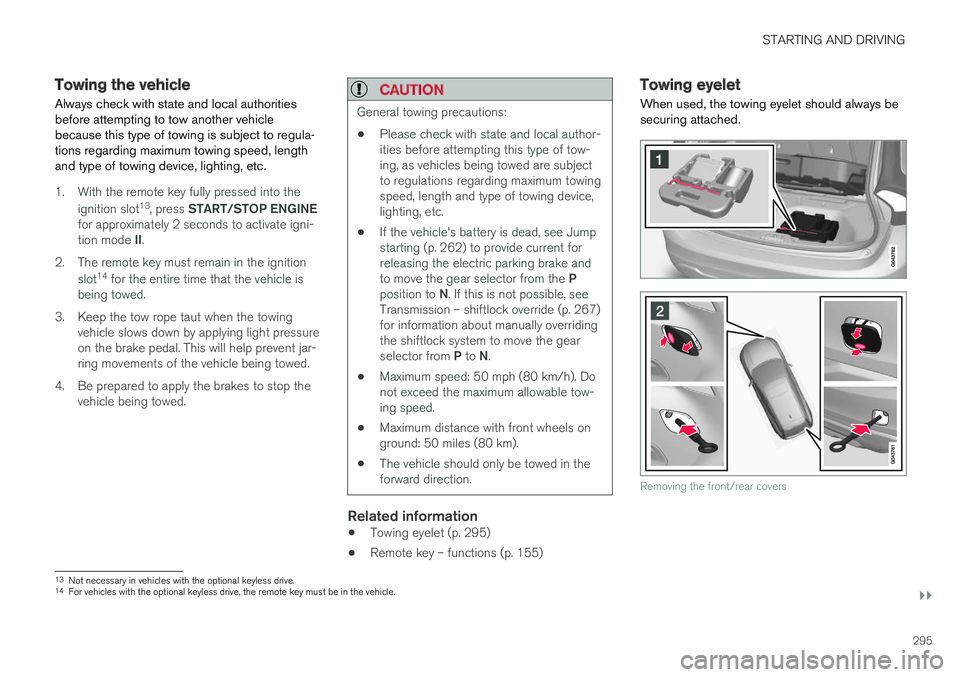
When used, the towing eyelet should always be securing attached.
Removing the front/rear covers
13 Not necessary in vehicles with the optional keyless drive.
14 For vehicles with the optional keyless drive, the remote key must be in the vehicle.
Page 340 of 406
MAINTENANCE AND SERVICING
338
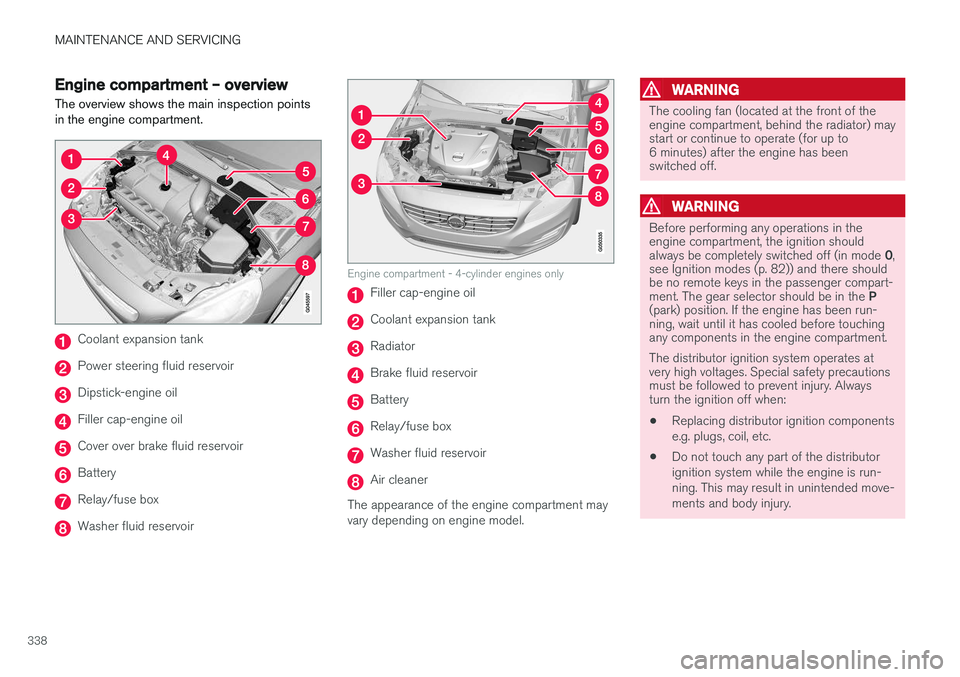
Engine compartment – overviewThe overview shows the main inspection points in the engine compartment.
Coolant expansion tank
Power steering fluid reservoir
Dipstick-engine oil
Filler cap-engine oil
Cover over brake fluid reservoir
Battery
Relay/fuse box
Washer fluid reservoir
Engine compartment - 4-cylinder engines only
Filler cap-engine oil
Coolant expansion tank
Radiator
Brake fluid reservoir
Battery
Relay/fuse box
Washer fluid reservoir
Air cleaner
The appearance of the engine compartment may vary depending on engine model.
WARNING
The cooling fan (located at the front of the engine compartment, behind the radiator) maystart or continue to operate (for up to6 minutes) after the engine has beenswitched off.
WARNING
Before performing any operations in the engine compartment, the ignition should always be completely switched off (in mode 0,
see Ignition modes (p. 82)) and there should be no remote keys in the passenger compart- ment. The gear selector should be in the P
(park) position. If the engine has been run- ning, wait until it has cooled before touchingany components in the engine compartment. The distributor ignition system operates at very high voltages. Special safety precautionsmust be followed to prevent injury. Alwaysturn the ignition off when:
• Replacing distributor ignition components e.g. plugs, coil, etc.
• Do not touch any part of the distributorignition system while the engine is run-ning. This may result in unintended move-ments and body injury.
Page 358 of 406
||
MAINTENANCE AND SERVICING
356
Related information
•Battery – changing (p. 357)
• Battery – maintenance (p. 356)
• Battery – symbols (p. 354)
Battery – maintenance
Proper battery maintenance can help prolong its service life.
Maintenance
• Use a screw driver to open the caps or cover and a flashlight to inspect the level.
• If necessary, add distilled water. The levelshould never be above the indicator.
• The fluid level should be checked if the bat-tery has been recharged.
• After inspection, be sure the cap over eachbattery cell or the cover is securely in place.
• Check that the battery cables are correctlyconnected and properly tightened.
• Never disconnect the battery when theengine is running, or when the key is in theignition. This could damage the vehicle'selectrical system.
• The battery should be disconnected from thevehicle when a battery charger is useddirectly on the battery.
• To help keep the battery in good condition,the vehicle should be driven for at least 15minutes a week or connected to a chargerwith an automatic charging function.
• If the battery is fully discharged a number oftimes, this may shorten its service life. Keep-ing the battery fully charged helps prolong itsservice life. •
The service life of a battery is affected byfactors such as driving conditions and cli-mate. Extreme cold may also furtherdecrease the battery
Page 360 of 406
||
MAINTENANCE AND SERVICING
* Option/accessory.
358
Removal
Switch off the ignition, remove the remote key from the ignition slot and wait at least 5 minutesbefore disconnecting the battery so that all infor-mation in the vehicle's electrical system can bestored in the control modules.
Open the clips on the front cover and remove the cover.
Release the rubber molding so that the rear cover is free.
Remove the rear cover by pulling it away.
Detach the black negative cable.
Detach the red positive cable
Detach the ventilation hose from the bat-
tery
Loosen the screw holding the battery
clamp.
Move the battery to the side and lift it up.
WARNING
PROPOSITION 65 WARNING! Battery posts, terminals, and related accesso- ries contain lead and lead compounds, chemi-cals known to the state of California to causecancer and reproductive harm. Wash handsafter handling.
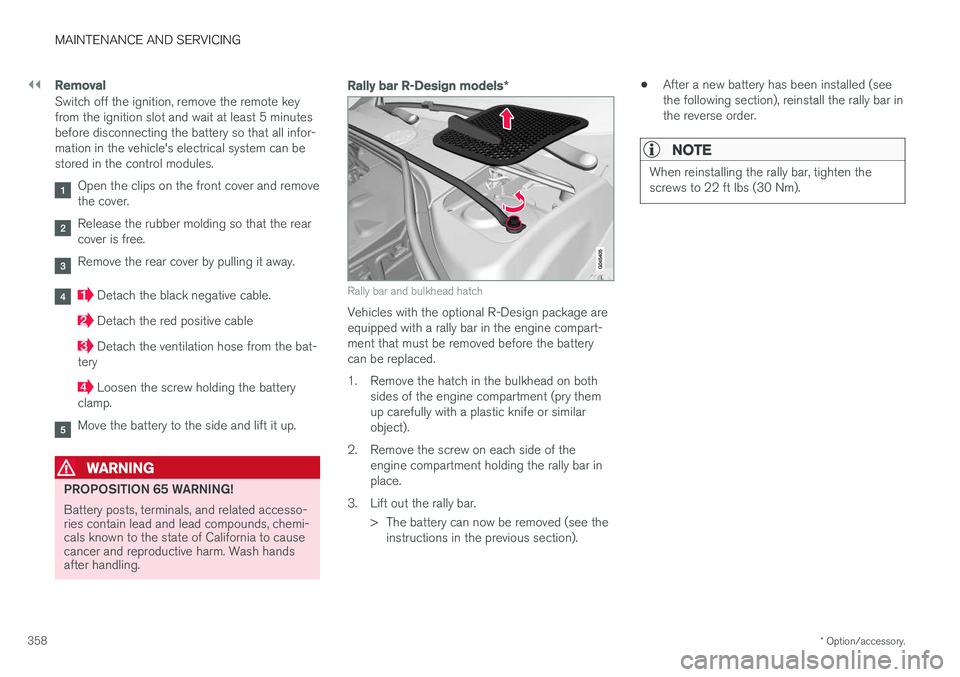
Rally bar R-Design models *
Rally bar and bulkhead hatch
Vehicles with the optional R-Design package are equipped with a rally bar in the engine compart-ment that must be removed before the batterycan be replaced.
1. Remove the hatch in the bulkhead on both
sides of the engine compartment (pry them up carefully with a plastic knife or similarobject).
2. Remove the screw on each side of the engine compartment holding the rally bar inplace.
3. Lift out the rally bar. > The battery can now be removed (see theinstructions in the previous section). •
After a new battery has been installed (seethe following section), reinstall the rally bar inthe reverse order.
NOTE
When reinstalling the rally bar, tighten the screws to 22 ft lbs (30 Nm).
Page 402 of 406
INDEX
400Rearview mirror
auto-dim function 108
compass 109
Rear window defroster 108
Recalls 28
Recalls, child restraints 50
Refrigerant 389
Refueling 286, 287 fuel filler cap 290
fuel filler door 289, 290
fuel tank volume 387
Registering child restraints 50 Remote control private locking 158
Remote key 152, 153, 154, 156, 159 approach lighting 155
immobilizer 154
key blade 152, 153, 154, 156, 157,158 , 159
locking the vehicle 155
replacing the battery 160
unlocking the vehicle 155
Reporting safety defects 29
Roadside Assistance 25
Road sign information (RSI) 178
Roof loads 146
S
Safety, occupant 28
Safety defects, reporting 29
Safety mode 46Seat belt reminder 32
Seat belts Automatic locking retractor/Emergency
locking retractor 50
buckling 31
maintenance 31
pretensioners 30
reminder 32
reminder warning light 77
securing child restraint systems 52, 54, 56
unbuckling 31
use during pregnancy 33
using 30
Seats, front 83, 84
Sensus 115Service connected service booking 335
Shiftlock 15 override 267
Side door mirrors 106, 107
Side impact airbags 41
Sign information (RSI) 178
Snow chains 315
Snow tires 315, 316
Spare tire 306
Spin control 174, 175SRS 33
Stability system 174, 175, 176 Corner Traction Control (CTC) 174
Engine Drag Control (EDC) 174
indicator light 76
Start/Stop (engine function) 268, 269, 270, 271, 272
Starting the engine 258 remote start 260
with keyless drive 258
Starting the vehicle after a crash (crash mode) 46, 47
Start inhibitor (immobilizer) 154
Steel grid in cargo compartment 150Steering wheel adjusting 91
heated 92
horn 91
keypad 91
Steering wheel paddles 91
Stone chips, touching up 373