towing VOLVO V60 2018 Owner´s Manual
[x] Cancel search | Manufacturer: VOLVO, Model Year: 2018, Model line: V60, Model: VOLVO V60 2018Pages: 406, PDF Size: 9.59 MB
Page 4 of 406
2
INTRODUCTION
On-board owner's manual12
Owner's information 14
Contacting Volvo 15
About this manual 15
Change of ownership 19
Crash event data 19
Volvo Structural Parts Statement 20
Information on the Internet 21
Volvo ID 22
Open Source Software Notice 22
Volvo and the environment 23
Important warnings 24
Volvo Roadside Assistance 25
Technician certification 25
SAFETY
Occupant safety28
Recall information 28
Reporting safety defects 29
Seat belts – general 30
Seat belts – buckling/unbuckling 31
Seat belt reminder 32
Seat belts – pregnancy 33
Supplemental Restraint System (SRS) 33
Front airbags 35
Occupant Weight Sensor 38
Side impact protection (SIPS) airbags 41
Inflatable Curtain (IC) 43
Whiplash Protection System (WHIPS) 44
Crash mode – general information 46
Crash mode – starting the vehicle 47
Crash mode – moving the vehicle 47
Child safety 48
Child restraints 50
Infant seats 52
Convertible seats 54
Booster cushions 56
ISOFIX/LATCH lower anchors 57
Top tether anchors 59
Integrated booster cushion – general information 60
Integrated booster cushion – using
62
Integrated booster cushion – stowing 64
Child safety locks 65
TABLE OF CONTENTS
Page 9 of 406
7
Brakes – symbols 278
Anti-lock braking system (ABS) 279
Brake lights 279
Emergency Brake Assistance (EBA) 279
Parking brake – general information 280
Parking brake – applying 281
Parking brake – releasing 281
Parking brake – symbols and messages 283
Driving through water 284
Engine and cooling system 284
Conserving electrical current 285
Before a long distance trip 285
Driving in cold weather 286
Refueling – fuel requirements 286
Refueling – octane rating 287
Refueling – opening/closing fuel filler door 289
Refueling – opening/closing fuel cap 290
Emission controls 290
Economical driving 291
Towing a trailer 292
Trailer Stability Assist (TSA) 294
Towing the vehicle 295
Towing eyelet 295
Towing by tow truck 296
WHEELS AND TIRES
Tires – general information300
Tires – storage and age 301
Tires – tread wear indicator 302
Tires – tire economy 302
Changing a wheel – direction of rotation 303
Changing a wheel – removing wheel 303
Changing a wheel – spare wheel 306
Changing a wheel – accessing the spare wheel 307
Changing a wheel – installing a wheel 307
Tire inflation – general information 308
Tire inflation – checking pressure 309
Tire specifications 310
Loading specifications 312
Loading specifications – load limit 312
Tire specifications – terminology 313
Tire specifications – Uniform TireQuality Grading 314
Snow chains 315
Snow tires/studded tires 316
Tire pressure monitoring - overview 316
Tire Monitor - introduction 317
Calibrating Tire Monitor 318
Tire Monitor status information 319
Tire Monitor – messages 319
Tire Pressure Monitoring System (TPMS) – general information320
Tire Pressure Monitoring System(TPMS) – changing wheels 321
Tire Pressure Monitoring System(TPMS) – recalibrating 322
Tire Pressure Monitoring System(TPMS) – activating/deactivating 322
Tire Pressure Monitoring System(TPMS) – messages 323
Tire sealing system * – general infor-
mation 324
Tire sealing system * – overview
325
Tire sealing system * – sealing a hole
327
Tire sealing system – checking infla-tion pressure 329
Tire sealing system * – inflating tires
329
Tire sealing system * – sealing com-
pound container 330
Page 66 of 406
SAFETY
64
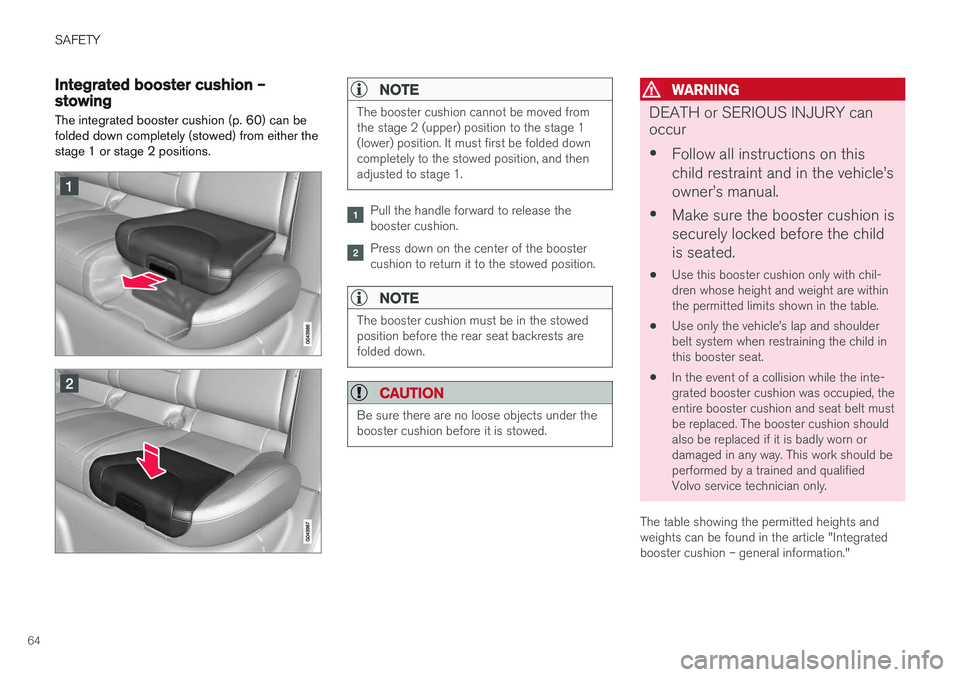
Integrated booster cushion – stowing
The integrated booster cushion (p. 60) can be folded down completely (stowed) from either thestage 1 or stage 2 positions.NOTE
The booster cushion cannot be moved from the stage 2 (upper) position to the stage 1(lower) position. It must first be folded downcompletely to the stowed position, and thenadjusted to stage 1.
Pull the handle forward to release the booster cushion.
Press down on the center of the booster cushion to return it to the stowed position.
NOTE
The booster cushion must be in the stowed position before the rear seat backrests arefolded down.
CAUTION
Be sure there are no loose objects under the booster cushion before it is stowed.
WARNING
DEATH or SERIOUS INJURY can occur • Follow all instructions on this child restraint and in the vehicle
Page 80 of 406

||
INSTRUMENTS AND CONTROLS
78
Engine temperature
Engine overheating can result from low oil or coolant levels, towing or hard driving at high heatand altitude, or mechanical malfunction. Engineoverheating will be signaled with text and a redwarning triangle in the middle of the instrumentdisplay. The exact text will depend on the degree of overheating. It may range from
High engine
temp Reduce speed to High engine temp
Stop engine. If appropriate, other messages,
such as Coolant level low, Stop safely will
also be displayed. If your engine does overheat so that you must stop the engine, always allowthe engine to cool before attempting to check oiland coolant levels. See Engine compartment – coolant (p. 342) for more information.
Fault in brake system
If this symbol lights, the brake fluid level may be too low. Stop the vehicle in a safe place andcheck the level in the brake fluid reservoir, seeEngine compartment – brake fluid (p. 343). If the level in the reservoir is below MIN, the vehicle
should be transported to an authorized Volvo workshop to have the brake system checked. If the
and symbols come on at
the same time, there may be a fault in the brake force distribution system. 1. Stop the vehicle in a safe place and turn off
the engine.
2. Restart the engine.
• If both symbols extinguish, continue driving.
• If the symbols remain on, check the level inthe brake fluid reservoir, see Engine com-partment – brake fluid (p. 343). If the brakefluid level is normal but the symbols are stilllit, the vehicle can be driven, with great care,to an authorized Volvo workshop to have thebrake system checked.
• If the level in the reservoir is below
MIN, the
vehicle should be transported to an author-ized Volvo workshop to have the brake sys-tem checked.
WARNING
• If the fluid level is below the
MIN mark in
the reservoir or if a warning message is displayed in the text window: DO NOT
DRIVE . Have the vehicle towed to a
trained and qualified Volvo service techni- cian and have the brake system inspec-ted.
• If the
and symbols are
on at the same time, there is a risk of reduced vehicle stability.
Warning symbol
The red warning symbol lights up to indicate a problem related to safety and/or drivability. Amessage will also appear in the instrument panel.The symbol remains visible until the fault hasbeen rectified but the text message can be cleared with the OK button, see Information dis-
play – menu controls (p. 116). The warning sym- bol can also come on in conjunction with othersymbols. Action:
1. Stop in a safe place. Do not drive the vehicle further.
2. Read the information on the display. Imple- ment the action in accordance with the mes- sage in the display. Clear the message using OK.
Page 85 of 406

INSTRUMENTS AND CONTROLS
* Option/accessory.83
Ignition mode I
–With the remote key fully pressed into the ignition slot8
, press START/STOP ENGINE
briefly.
Ignition mode II
–With the remote key fully pressed into the ignition slot 8
, press START/STOP ENGINE
for approximately 2 seconds.
Returning to mode 0
To return to mode 0 from mode II or I, press
START/STOP ENGINE briefly.
Starting and stopping the engineSee Starting the engine (p. 258) and Switching off the engine (p. 260) for information on star-ting the engine and switching it off.
Emergency towingSee Towing the vehicle (p. 295) for importantinformation about the remote key when the vehi-cle is being towed.
Related information
•Inserting/removing remote key (p. 81)
Front seats
The front seats can be adjusted in a number of ways to help provide the most comfortable seat-ing position.
Raise/lower the seat, pump up/down.
Front-rear adjustment: lift the bar and move the seat to the position of your choice.
Raise/lower front edge of seat cushion, pump up/down.
Backrest tilt: turn the control to adjust the angle of the backrest.
Electronic lumbar support *. Press the button
to adjust.
Control panel for power seat *, see Front
seats – power seat (p. 84).
WARNING
• Do not adjust the seat while driving. The seat should be adjusted so that the brakepedal can be depressed fully. In addition,position the seat as far rearward as com-fort and control allow.
• Check that the seat is securely lockedinto position after adjusting.
Related information
• Front seats – power seat (p. 84)
• Rear seats – folding backrest (p. 89)
• Rear seats – head restraints (p. 87)
8
Not necessary in vehicles with the optional keyless drive.
Page 176 of 406
DRIVER SUPPORT
174
Stability system – introduction The Electronic Stability Control (ESC) system consists of a number of functions designed tohelp reduce wheel spin, counteract skidding andto generally help improve directional stability.
A pulsating sound will be audible when the system is actively operating and isnormal. Acceleration will also beslightly slower than normal.
WARNING
•The stability system (ESC) is intended to help improve driving safety but cannotdeal with all situations, or traffic, road andweather conditions. Speed and drivingstyle should always be adapted to thecurrent driving situation.
• ESC supplements, but can never replace,the driver's judgment and responsibilitywhen operating the vehicle. The driver isalways responsible for operating the vehi-cle in a safe manner in accordance withapplicable traffic regulations.
ESC consists of the following functions:
• Traction control
• Spin control
• Active Yaw Control
• Engine Drag Control •
Corner Traction Control
Traction Control (TC)
This function is designed to help reduce wheel spin at low speeds by transferring power from adrive wheel that begins to lose traction to thewheel on the opposite side of the vehicle (on thesame axle).
Spin Control (SC)
The SC function is designed to help prevent the drive wheels from spinning while the vehicle isaccelerating.
Active Yaw Control (AYC)
This function helps maintain directional stability, for example when cornering, by braking one ormore of the wheels if the vehicle shows a ten-dency to skid or slide laterally.
Corner Traction Control (CTC)
CTC compensates for understeering and helps provide additional stability when acceleratingthrough a curve by preventing the inside wheelfrom spinning. This is particularly useful whenaccelerating on a curving highway on-ramp. CTC is most effective if the stability system's Sport
mode is selected. See the section about
Sport mode.
Engine Drag Control (EDC)
EDC helps keep the engine running if the wheels show a tendency to lock, e.g., when shifting downin the Geartronic manual shifting mode or whileusing the engine's braking function on a slipperysurface. If the engine were to stop, power steer- ing would not function, making the vehicle moredifficult to steer.
Trailer Stability Assist (TSA)
The TSA helps stabilize a vehicle that is towing a trailer when the vehicle and trailer have begun tosway. See Trailer Stability Assist (TSA) (p. 294)for more information. This system is automatically deactivated if the driver selects
Sport mode.
Related information
•Stability system – operation (p. 175)
• Stability system – symbols and messages (p. 176)
• Trailer Stability Assist (TSA) (p. 294)
Page 188 of 406
||
DRIVER SUPPORT
* Option/accessory.
186
WARNING
The brake pedal moves when the adaptive cruise control system modulates the brakes.Do not rest your foot under the brake pedal.
The ACC system is designed to smoothly regu- late speed. However, the driver must apply thebrakes in situations that require immediate brak-ing. This applies when there are great differencesin speed between vehicles, or if the vehicle aheadbrakes suddenly.
WARNING
Due to limitations in the radar sensor, braking may occur unexpectedly or not at all, seeAdaptive Cruise Control – limitations (p. 193).
Adaptive Cruise Control can be put in active mode at any permitted speed. However, if thevehicle's speed falls below 18 mph (30 km/h) orif engine speed (rpm) becomes too low, ACC dis-engages (goes into standby mode) and will nolonger modulate the brakes. The driver will thenhave to maintain a safe distance to the vehicleahead.
WARNING
When Adaptive Cruise Control is in standby mode or is switched off completely, thebrakes will not be modulated automatically.The driver must assume full control over thevehicle.
Warning light—driver braking requiredAdaptive Cruise Control can exert brake force that is equivalent to approximately 40% of thevehicle's total braking capacity. In situationsrequiring more brake force than ACC can provideand if the driver does not apply the brakes, anaudible signal from the Collision Warning systemwill sound and warning light will illuminate (see Collision warning * – function (p. 211)) in the
windshield to alert the driver to react.
NOTE
Strong sunlight, reflections, extreme light con- trasts, the use of sunglasses, or if the driver isnot looking straight ahead may make thewarning symbol in the windshield difficult tosee.
WARNING
Adaptive Cruise Control only warns of vehicles detected by the radar sensor, see AdaptiveCruise Control – limitations (p. 193). In somecases there may be no warning or the warn-ing may be delayed. The driver should alwaysapply the brakes when necessary.
Steep inclines and/or heavy loadsACC is primarily intended for use on fairly level roads. The system may have difficulty maintainingthe correct distance to a vehicle ahead on steepinclines, if the vehicle is carrying a heavy load oris towing a trailer. In these situations, the drivershould always be prepared to apply the brakes ifnecessary.
Related information
• Adaptive Cruise Control – introduction(p. 183)
Page 241 of 406
DRIVER SUPPORT
}}
239
Audible signal
The Park Assist system uses an intermittent tone that pulses faster as you come close to an object,and becomes constant when you are withinapproximately 1 ft (30 cm) of an object in front ofor behind the vehicle. If there are objects withinthis distance both behind and in front of the vehi-cle, the tone alternates between front and rearspeakers.
NOTE
The level of the audible signal can be low- ered/raised with the infotainment volumecontrol. The level can also be set in the MYCAR menu system. See My Car – introduction(p. 79) for a description of the menu system.
If the volume of another source from the audio system is high, this will be automatically lowered.
Rear park assist
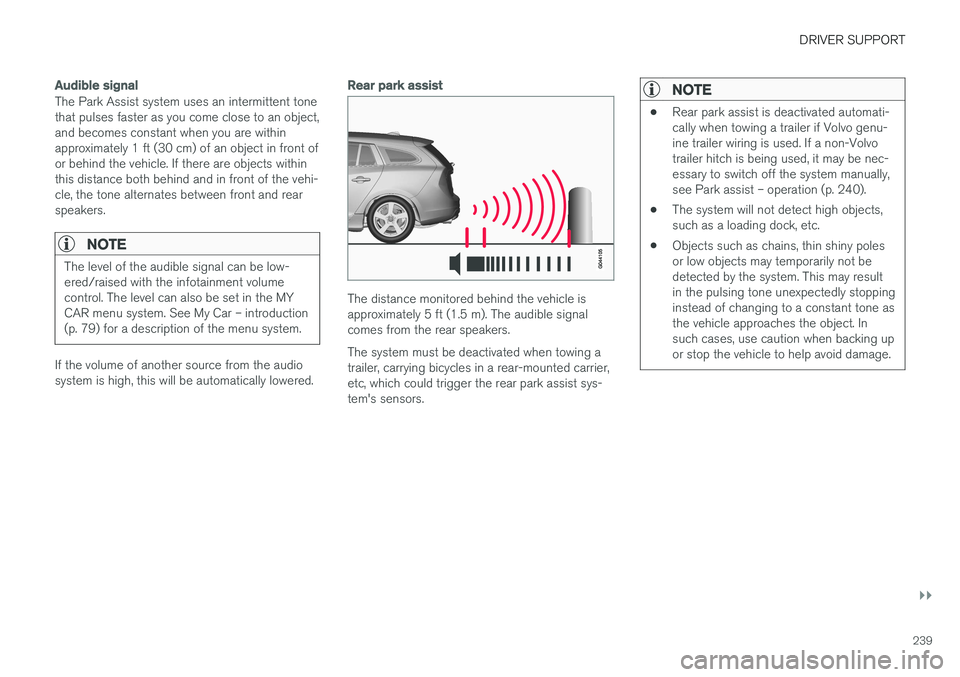
The distance monitored behind the vehicle is approximately 5 ft (1.5 m). The audible signalcomes from the rear speakers. The system must be deactivated when towing a trailer, carrying bicycles in a rear-mounted carrier,etc, which could trigger the rear park assist sys-tem's sensors.
NOTE
•Rear park assist is deactivated automati- cally when towing a trailer if Volvo genu-ine trailer wiring is used. If a non-Volvotrailer hitch is being used, it may be nec-essary to switch off the system manually,see Park assist – operation (p. 240).
• The system will not detect high objects,such as a loading dock, etc.
• Objects such as chains, thin shiny polesor low objects may temporarily not bedetected by the system. This may resultin the pulsing tone unexpectedly stoppinginstead of changing to a constant tone asthe vehicle approaches the object. Insuch cases, use caution when backing upor stop the vehicle to help avoid damage.
Page 244 of 406
DRIVER SUPPORT
* Option/accessory.
242
Park Assist Pilot (PAP) * –
introduction
The Park Assist Pilot provides assistance when parallel parking by measuring the parking spaceand turning the steering wheel.
Introduction
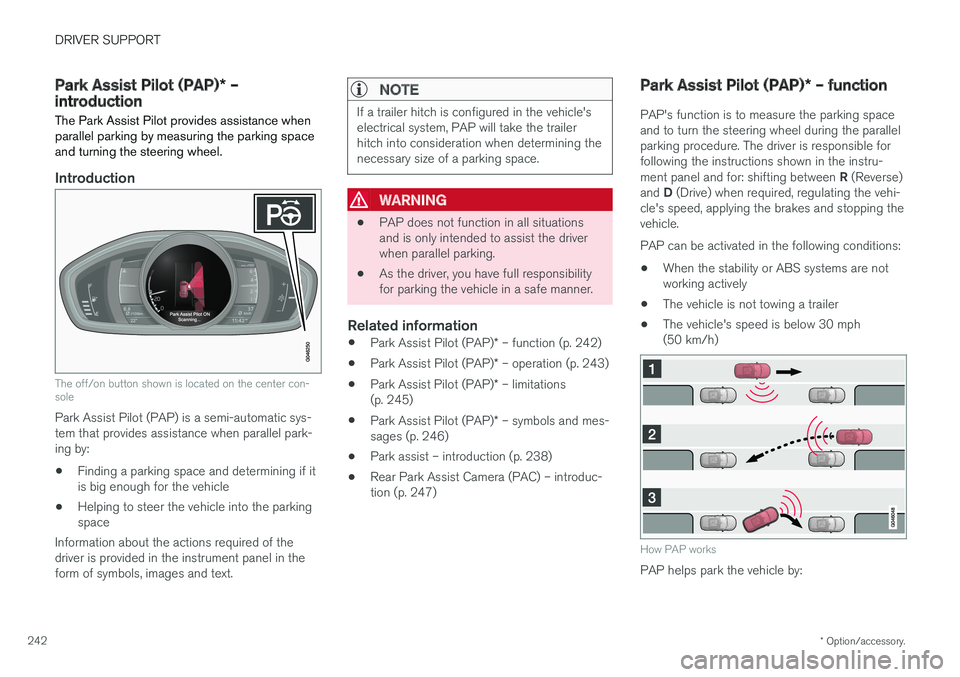
The off/on button shown is located on the center con- sole
Park Assist Pilot (PAP) is a semi-automatic sys- tem that provides assistance when parallel park-ing by:
• Finding a parking space and determining if itis big enough for the vehicle
• Helping to steer the vehicle into the parkingspace
Information about the actions required of thedriver is provided in the instrument panel in theform of symbols, images and text.
NOTE
If a trailer hitch is configured in the vehicle's electrical system, PAP will take the trailerhitch into consideration when determining thenecessary size of a parking space.
WARNING
• PAP does not function in all situations and is only intended to assist the driverwhen parallel parking.
• As the driver, you have full responsibilityfor parking the vehicle in a safe manner.
Related information
•
Park Assist Pilot (PAP)
* – function (p. 242)
• Park Assist Pilot (PAP)
* – operation (p. 243)
• Park Assist Pilot (PAP)
* – limitations
(p. 245)
• Park Assist Pilot (PAP)
* – symbols and mes-
sages (p. 246)
• Park assist – introduction (p. 238)
• Rear Park Assist Camera (PAC) – introduc-tion (p. 247)
Park Assist Pilot (PAP)
* – function
PAP's function is to measure the parking space and to turn the steering wheel during the parallelparking procedure. The driver is responsible forfollowing the instructions shown in the instru- ment panel and for: shifting between R (Reverse)
and D (Drive) when required, regulating the vehi-
cle's speed, applying the brakes and stopping the vehicle. PAP can be activated in the following conditions:
• When the stability or ABS systems are not working actively
• The vehicle is not towing a trailer
• The vehicle's speed is below 30 mph(50 km/h)
How PAP works
PAP helps park the vehicle by:
Page 279 of 406
STARTING AND DRIVING
}}
* Option/accessory.277
Brakes – general The brake system is a hydraulic system consist- ing of two separate brake circuits. If a problemshould occur in one of these circuits, it is stillpossible to stop the vehicle with the other brakecircuit.
If the brake pedal must be depressed farther than normal and requires greater foot pressure,the stopping distance will be longer. A warning light in the instrument panel will light up to warn the driver that a fault has occurred. If this light comes on while driving or braking, stop immediately and check the brake fluid levelin the reservoir.
NOTE
Press the brake pedal hard and maintain pressure on the pedal – do not pump thebrakes.
WARNING
If the fluid level is below the MIN mark in the
reservoir or if a brake system message is shown in the information display: DO NOT
DRIVE . Have the vehicle towed to a trained
and qualified Volvo service technician and have the brake system inspected.
Brake pad inspection
On vehicles equipped with a jack *, the condition
of the brake pads can be checked by raising the vehicle (see Changing a wheel – removing wheel(p. 303) for information about using the jack andremoving a wheel) and performing a visualinspection of the brake pads.
WARNING
• If the vehicle has been driven immediately prior to a brake pad inspection, the wheelhub, brake components, etc., will be veryhot. Allow time for these components tocool before carrying out the inspection.
• Apply the parking brake and put the gear selector in the Park (
P) position.
• Block the wheels standing on the ground, use rigid wooden blocks or large stones.
WARNING
• Use the jack intended for the vehicle when changing a tire. For any other job,use stands to support the vehicle.
• The jack should be kept well-greased andclean, and should not be damaged.
• Be sure the jack is on a firm, level, non-slippery surface.
• No objects should be placed between thebase of jack and the ground, or betweenthe jack and the attachment bar on thevehicle.
• The jack must correctly engage the jackattachment.
• Never allow any part of your body to beextended under a vehicle supported by ajack.
Power brakes function only when the engine is running
The power brakes utilize vacuum pressure which is only created when the engine is running. Neverlet the vehicle roll to a stop with the engineswitched off. If the power brakes are not working, considerably higher pressure will be required on the brakepedal to compensate for the lack of power assis-tance. This can happen for example when towingyour vehicle or if the engine is switched off when