wheel VOLVO V60 2021 Owners Manual
[x] Cancel search | Manufacturer: VOLVO, Model Year: 2021, Model line: V60, Model: VOLVO V60 2021Pages: 661, PDF Size: 12.68 MB
Page 344 of 661
DRIVER SUPPORT
342
Symbols and messages for steering assistance during collisionrisks
A number of symbols and messages related to steering assistance may be displayed in the instrument panel. Several examples areprovided below.
Symbol Message
Meaning
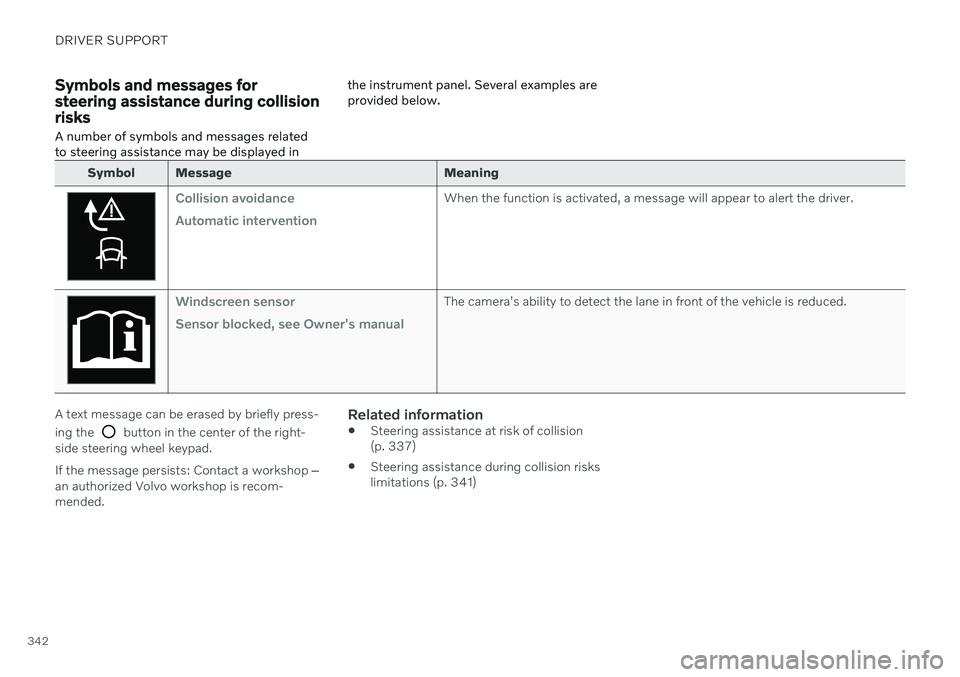
Collision avoidance Automatic interventionWhen the function is activated, a message will appear to alert the driver.
Windscreen sensor Sensor blocked, see Owner's manualThe camera's ability to detect the lane in front of the vehicle is reduced.
A text message can be erased by briefly press- ing the
button in the center of the right-
side steering wheel keypad. If the message persists: Contact a workshop ‒
an authorized Volvo workshop is recom- mended.
Related information
Steering assistance at risk of collision(p. 337)
Steering assistance during collision riskslimitations (p. 341)
Page 349 of 661
DRIVER SUPPORT
* Option/accessory.347
BLIS messages
A number of messages related to BLIS 92
may
be displayed in the instrument panel. Several examples are provided below.
Message Meaning
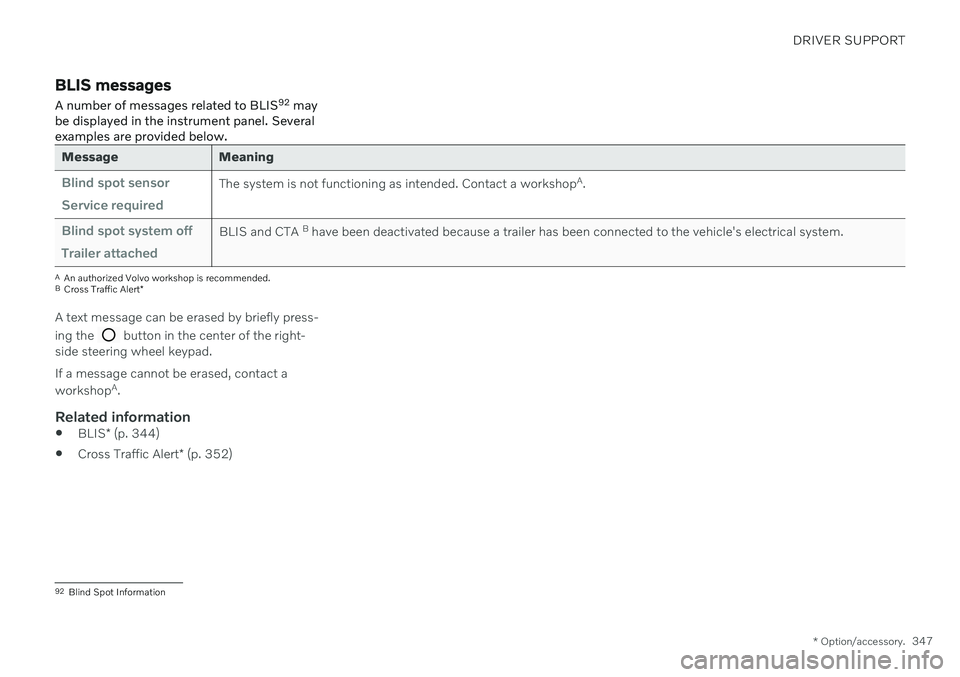
Blind spot sensor Service requiredThe system is not functioning as intended. Contact a workshop A
.
Blind spot system off Trailer attachedBLIS and CTA B
have been deactivated because a trailer has been connected to the vehicle's electrical system.
A An authorized Volvo workshop is recommended.
B Cross Traffic Alert *
A text message can be erased by briefly press- ing the
button in the center of the right-
side steering wheel keypad. If a message cannot be erased, contact a workshop A
.
Related information
BLIS
* (p. 344)
Cross Traffic Alert
* (p. 352)
92
Blind Spot Information
Page 350 of 661
DRIVER SUPPORT
* Option/accessory.
348
Driver Alert Control
The Driver Alert Control (DAC) function is designed to help alert the driver to erraticbehavior, e.g. if the driver is distracted orshowing signs of fatigue.
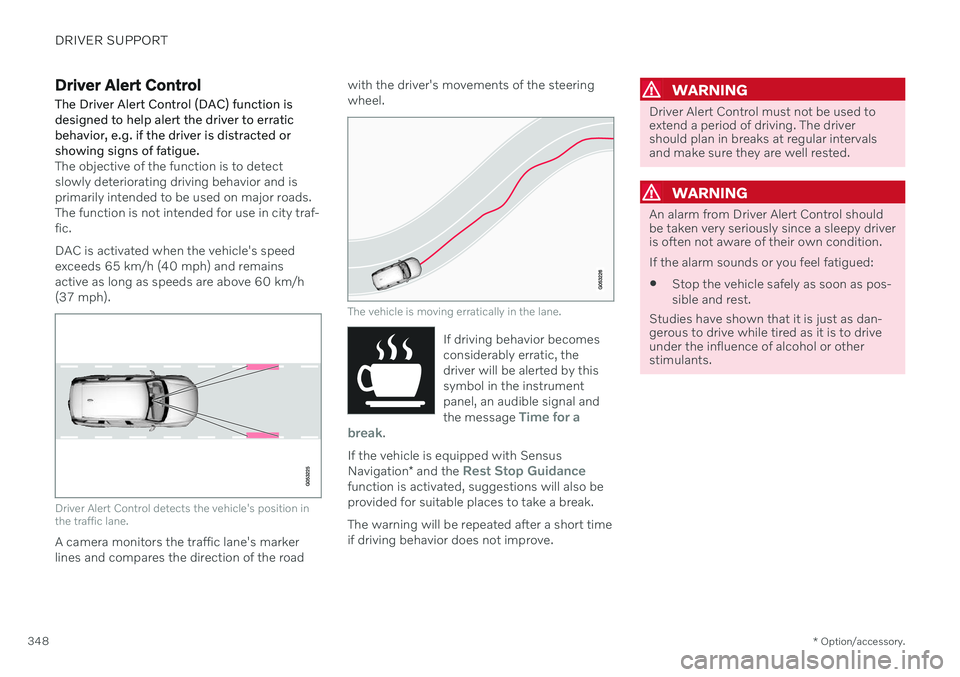
The objective of the function is to detect slowly deteriorating driving behavior and isprimarily intended to be used on major roads.The function is not intended for use in city traf-fic. DAC is activated when the vehicle's speed exceeds 65 km/h (40 mph) and remainsactive as long as speeds are above 60 km/h(37 mph).
Driver Alert Control detects the vehicle's position in the traffic lane.
A camera monitors the traffic lane's marker lines and compares the direction of the road with the driver's movements of the steeringwheel.
The vehicle is moving erratically in the lane.
If driving behavior becomes considerably erratic, thedriver will be alerted by thissymbol in the instrumentpanel, an audible signal and the message
Time for a
break.
If the vehicle is equipped with Sensus Navigation * and the Rest Stop Guidancefunction is activated, suggestions will also be provided for suitable places to take a break. The warning will be repeated after a short time if driving behavior does not improve.
WARNING
Driver Alert Control must not be used to extend a period of driving. The drivershould plan in breaks at regular intervalsand make sure they are well rested.
WARNING
An alarm from Driver Alert Control should be taken very seriously since a sleepy driveris often not aware of their own condition. If the alarm sounds or you feel fatigued:
Stop the vehicle safely as soon as pos- sible and rest.
Studies have shown that it is just as dan- gerous to drive while tired as it is to driveunder the influence of alcohol or otherstimulants.
Page 357 of 661
DRIVER SUPPORT
* Option/accessory.355
Cross Traffic Alert *100
messages
A number of messages related to Cross Traffic Alert (CTA) may be displayed in the instrument panel. Several examples are provi-ded below.
Message Meaning
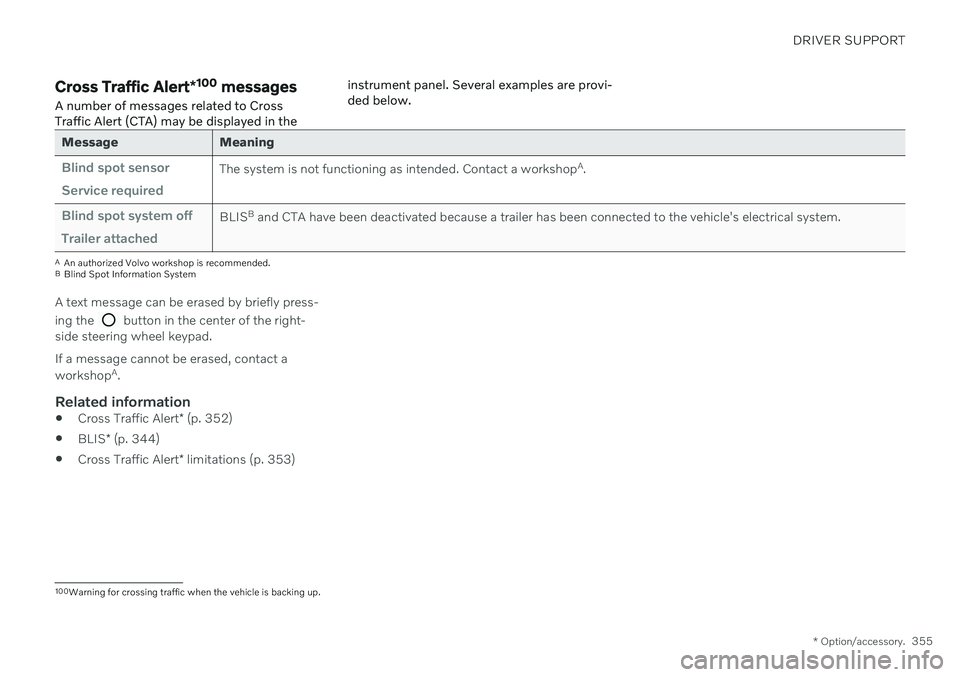
Blind spot sensor Service requiredThe system is not functioning as intended. Contact a workshop
A
.
Blind spot system off Trailer attachedBLIS B
and CTA have been deactivated because a trailer has been connected to the vehicle's electrical system.
A An authorized Volvo workshop is recommended.
B Blind Spot Information System
A text message can be erased by briefly press- ing the
button in the center of the right-
side steering wheel keypad. If a message cannot be erased, contact a workshop A
.
Related information
Cross Traffic Alert
* (p. 352)
BLIS
* (p. 344)
Cross Traffic Alert
* limitations (p. 353)
100
Warning for crossing traffic when the vehicle is backing up.
Page 360 of 661
||
DRIVER SUPPORT
* Option/accessory.
358 The rear sensors will be activated if the vehicle begins rolling backward or if reverse gear isengaged. The distance monitored extends approx. 1.5 meters (5 ft) behind the vehicle. The Park Assist system's rear sensors will be automatically deactivated if the vehicle isbacking up with a trailer connected to thevehicle's electrical system.
NOTE
When reversing with e.g. a trailer or bike carrier on the trailer hitch – without Volvooriginal trailer cables – the Parking Assistsystem may have to be turned off manuallyto prevent the sensors from reacting tothese.
Side sensors
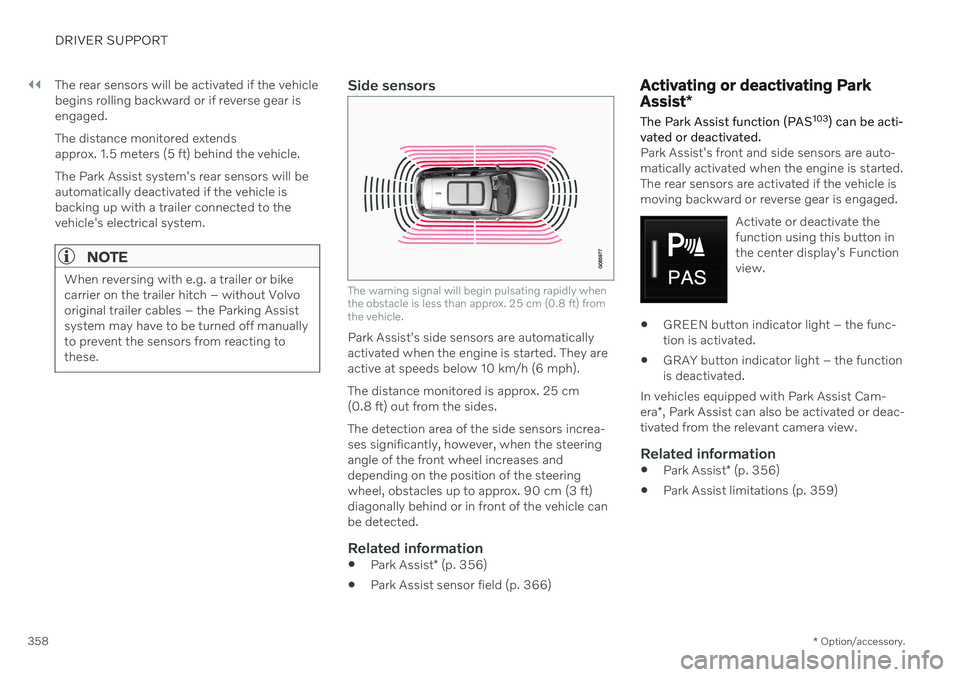
The warning signal will begin pulsating rapidly when the obstacle is less than approx. 25 cm (0.8 ft) fromthe vehicle.
Park Assist's side sensors are automatically activated when the engine is started. They areactive at speeds below 10 km/h (6 mph). The distance monitored is approx. 25 cm (0.8 ft) out from the sides. The detection area of the side sensors increa- ses significantly, however, when the steeringangle of the front wheel increases anddepending on the position of the steeringwheel, obstacles up to approx. 90 cm (3 ft)diagonally behind or in front of the vehicle canbe detected.
Related information
Park Assist
* (p. 356)
Park Assist sensor field (p. 366)
Activating or deactivating Park Assist
*
The Park Assist function (PAS 103
) can be acti-
vated or deactivated.
Park Assist's front and side sensors are auto- matically activated when the engine is started.The rear sensors are activated if the vehicle ismoving backward or reverse gear is engaged.
Activate or deactivate thefunction using this button inthe center display's Functionview.
GREEN button indicator light – the func- tion is activated.
GRAY button indicator light – the functionis deactivated.
In vehicles equipped with Park Assist Cam- era *, Park Assist can also be activated or deac-
tivated from the relevant camera view.
Related information
Park Assist
* (p. 356)
Park Assist limitations (p. 359)
Page 362 of 661
DRIVER SUPPORT
* Option/accessory.
360
Park Assist symbols and messages
Symbols and messages for the Park Assist system (PAS 105
) may be displayed in the instrument panel and/or the center display. Several examples are provided below.
Symbol Message Meaning
The rear Park Assist sensors are
turned off and no acoustic warnings for obstacles/
objects will be provided.
Park Assist System Sensors blocked, cleaning neededOne or more of the sensors are blocked. Check and clean/remove the obstacle as soon as possible.
Park Assist System Unavailable Service requiredThe system is not functioning as intended. Contact a workshop A
.
A An authorized Volvo workshop is recommended.
A text message can be erased by briefly press- ing the
button in the center of the right-
side steering wheel keypad. If a message cannot be erased, contact a workshop A
.
Related information
Park Assist
* (p. 356)
Park Assist limitations (p. 359)
105
Park Assist System
Page 366 of 661
||
DRIVER SUPPORT
* Option/accessory.
364
Side cameras
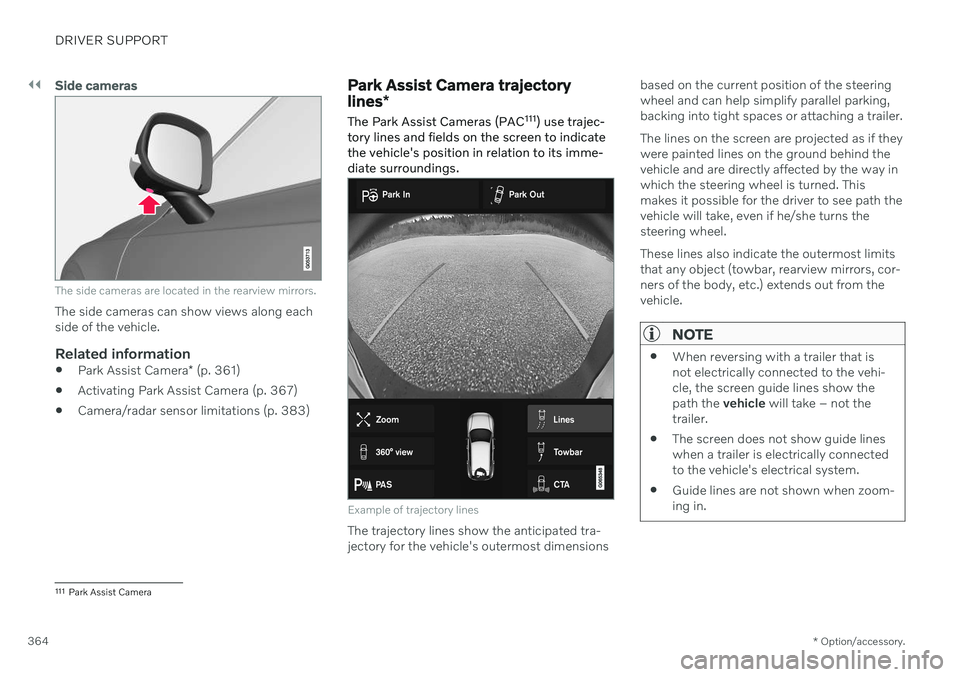
The side cameras are located in the rearview mirrors.
The side cameras can show views along each side of the vehicle.
Related information
Park Assist Camera
* (p. 361)
Activating Park Assist Camera (p. 367)
Camera/radar sensor limitations (p. 383)
Park Assist Camera trajectory lines
*
The Park Assist Cameras (PAC 111
) use trajec-
tory lines and fields on the screen to indicate the vehicle's position in relation to its imme-diate surroundings.
Example of trajectory lines
The trajectory lines show the anticipated tra- jectory for the vehicle's outermost dimensions based on the current position of the steeringwheel and can help simplify parallel parking,backing into tight spaces or attaching a trailer. The lines on the screen are projected as if they were painted lines on the ground behind thevehicle and are directly affected by the way inwhich the steering wheel is turned. Thismakes it possible for the driver to see path thevehicle will take, even if he/she turns thesteering wheel. These lines also indicate the outermost limits that any object (towbar, rearview mirrors, cor-ners of the body, etc.) extends out from thevehicle.
NOTE
When reversing with a trailer that is not electrically connected to the vehi-cle, the screen guide lines show thepath the
vehicle will take – not the
trailer.
The screen does not show guide lineswhen a trailer is electrically connectedto the vehicle's electrical system.
Guide lines are not shown when zoom-ing in.
111
Park Assist Camera
Page 369 of 661
DRIVER SUPPORT
}}
* Option/accessory.367
Side sensor fields
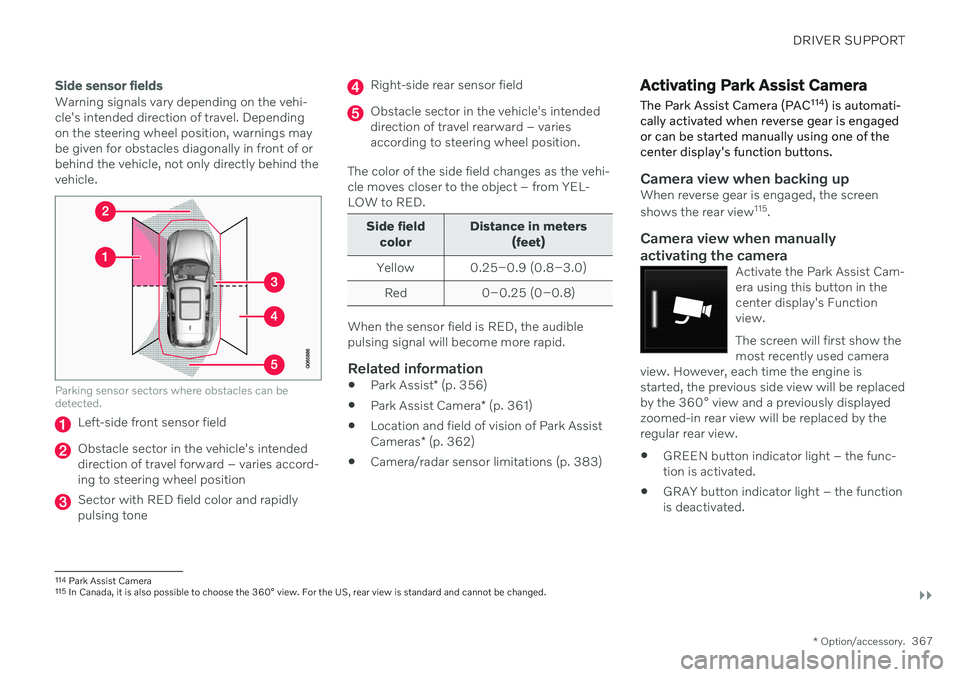
Warning signals vary depending on the vehi- cle's intended direction of travel. Dependingon the steering wheel position, warnings maybe given for obstacles diagonally in front of orbehind the vehicle, not only directly behind thevehicle.
Parking sensor sectors where obstacles can be detected.
Left-side front sensor field
Obstacle sector in the vehicle's intended direction of travel forward – varies accord-ing to steering wheel position
Sector with RED field color and rapidly pulsing tone
Right-side rear sensor field
Obstacle sector in the vehicle's intended direction of travel rearward – variesaccording to steering wheel position.
The color of the side field changes as the vehi-cle moves closer to the object – from YEL-LOW to RED.
Side field color Distance in meters
(feet)
Yellow 0.25–0.9 (0.8–3.0) Red 0–0.25 (0–0.8)
When the sensor field is RED, the audible pulsing signal will become more rapid.
Related information
Park Assist
* (p. 356)
Park Assist Camera
* (p. 361)
Location and field of vision of Park Assist Cameras
* (p. 362)
Camera/radar sensor limitations (p. 383)
Activating Park Assist Camera
The Park Assist Camera (PAC 114
) is automati-
cally activated when reverse gear is engaged or can be started manually using one of thecenter display's function buttons.
Camera view when backing upWhen reverse gear is engaged, the screen shows the rear view 115
.
Camera view when manually
activating the camera
Activate the Park Assist Cam- era using this button in thecenter display's Functionview. The screen will first show the most recently used camera
view. However, each time the engine isstarted, the previous side view will be replacedby the 360° view and a previously displayedzoomed-in rear view will be replaced by theregular rear view.
GREEN button indicator light – the func- tion is activated.
GRAY button indicator light – the functionis deactivated.
114
Park Assist Camera
115 In Canada, it is also possible to choose the 360° view. For the US, rear view is standard and cannot be changed.
Page 372 of 661
||
DRIVER SUPPORT
* Option/accessory.
370 A text message can be erased by briefly press- ing the
button in the center of the right-
side steering wheel keypad. If a message cannot be erased, contact a workshop A
.
Related information
Park Assist Camera
* (p. 361)
Camera/radar sensor limitations (p. 383)
Page 376 of 661
||
DRIVER SUPPORT
3741.
Tap
Park In in Function view or in Camera
view.
> The function will search for a potential parking space and measure it to deter- mine if it is big enough.
2. Be prepared to stop the vehicle when a graphic and message in the center displayindicate that a suitable parking space hasbeen found.
> A pop-up window will appear.
3. Select
Parallel parking or Perpendicular
parking and engage reverse gear.
NOTE
The function searches for space for park- ing, shows instructions and guides thevehicle on its passenger side. But, if sodesired the vehicle can be parked on thedriver's side of the street:
Activate the turn signals on the driver'sside – the system will then search forspace to park on that side of the vehi-cle instead.
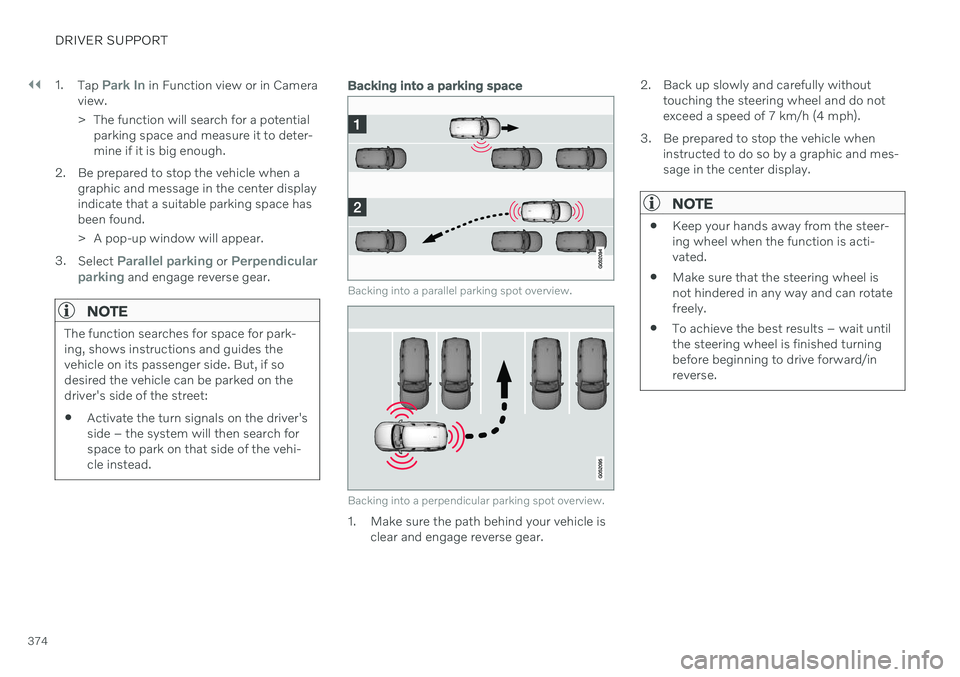
Backing into a parking space
Backing into a parallel parking spot overview.
Backing into a perpendicular parking spot overview.
1. Make sure the path behind your vehicle is
clear and engage reverse gear. 2. Back up slowly and carefully without
touching the steering wheel and do not exceed a speed of 7 km/h (4 mph).
3. Be prepared to stop the vehicle when instructed to do so by a graphic and mes-sage in the center display.
NOTE
Keep your hands away from the steer- ing wheel when the function is acti-vated.
Make sure that the steering wheel isnot hindered in any way and can rotatefreely.
To achieve the best results – wait untilthe steering wheel is finished turningbefore beginning to drive forward/inreverse.