lane assist VOLVO V60 2021 Owners Manual
[x] Cancel search | Manufacturer: VOLVO, Model Year: 2021, Model line: V60, Model: VOLVO V60 2021Pages: 661, PDF Size: 12.68 MB
Page 9 of 661
7
DRIVER SUPPORT
Driver support systems270
Speed-dependent steering wheel resistance 270
Electronic Stability Control 271
Electronic Stability Control insport mode 272
Activating or deactivating Sportmode for Electronic Stability Control 273
Electronic Stability Control sym-bols and messages 274
Connected Safety 276
Activating or deactivatingConnected Safety 277
Connected Safety limitations 277
Road Sign Information *
278
Activating or deactivating Road Sign Information * 279
Road Sign Information * display
279
Road Sign Information andSensus Navigation * 280
Speed limit and speed camerawarnings from Road Sign Information *280
Activating or deactivating warn-ings from Road Sign Information *281
Road Sign Information * limitations
282
Cruise control 283
Selecting and activating cruise control 284
Deactivating cruise control 285
Cruise control standby mode286
Adaptive Cruise Control *
286
Adaptive Cruise Control * controls
288
Adaptive Cruise Control * displays
288
Selecting and activating Adaptive Cruise Control * 289
Deactivating Adaptive Cruise Control *
290
Adaptive Cruise Control * standby
mode 291
Adaptive Cruise Control * limitations
292
Switching between cruise controland Adaptive Cruise Control * in
the center display 293
Symbols and messages for Adap-tive Cruise Control * 294
Pilot Assist *
296
Pilot Assist * controls
298
Pilot Assist * displays
299
Selecting and activating Pilot Assist *
300
Deactivating Pilot Assist *
301
Pilot Assist * standby mode
302
Temporarily deactivating steeringassistance with Pilot Assist *303
Pilot Assist * limitations
304
Pilot Assist * symbols and messages
306
Curve Speed Assist (CSA) *
308
Activating or deactivating Curve Speed Assist (CSA) * 309
Curve Speed Assist (CSA) * limitations
309
Passing assistance *
310
Using passing assistance 310
Collision risk warning from driver support 311
Switching target vehicles withdriver support 312
Adjusting set speed for driver support 313
Setting time interval to the vehicleahead 314
Drive modes when using timeinterval to vehicle 315
Auto-hold braking with driver support 315
Lane Keeping Aid 316
Activating or deactivating LaneKeeping Aid 318
Selecting type of assistance forLane Keeping Aid 319
Lane Keeping Aid limitations 319
Lane Keeping Aid symbols andmessages 320
Lane Keeping Aid display 322
City Safety ™
323
City Safety sub-functions 324
Setting a warning distance forCity Safety 326
Page 31 of 661
YOUR VOLVO
* Option/accessory.29
IntelliSafe – driver support and safety
IntelliSafe is Volvo Cars' philosophy regarding vehicle safety. IntelliSafe consists of a num- ber of systems 3
that are designed to help
make driving safer, prevent accidents and protect passengers and other road users.
WARNING
The functions are supplementary aids – they cannot manage all situations in allconditions. The driver is always responsible for ensur- ing that the vehicle is driven in a safe man-ner and in accordance with applicable traf-fic rules and regulations.
SupportIntelliSafe has the following functions designed to help the driver operate the vehiclemore safely.
Active high beam
Tunnel detection
Pilot Assist
Cross Traffic Alert
*
Blind Spot Information
*
Park Assist
*
Park Assist Pilot
*
Park Assist Camera
*
Road Sign Information
*
Electronic Stability Control
Roll Stability Control
Cruise control
Adaptive Cruise Control
*
Rear Collision Warning
Driver Alert Control
All-Wheel Drive (AWD) 4
PreventionIntelliSafe has the following functionsdesigned to help the driver prevent accidents.
City Safety
Distance Alert
*
Lane Keeping Aid
Collision Avoidance
ProtectionIntelliSafe has the following interacting func- tions to help protect the driver and passengersin certain situations in the event of an acci-dent.
Whiplash Protection System
Seat belt with seat belt tensioner
Airbags
NOTE
Read the individual parts about each sys- tem to fully understand the functions andbe notified of important warnings.
Related information
Active high beam (p. 155)
Safety (p. 44)
Driver support systems (p. 270)
3
Some of these systems are standard, while others are options. This may vary depending on market, vehicle model and model year.
4 All Wheel Drive
Page 117 of 661
DISPLAYS AND VOICE CONTROL
}}
* Option/accessory.115
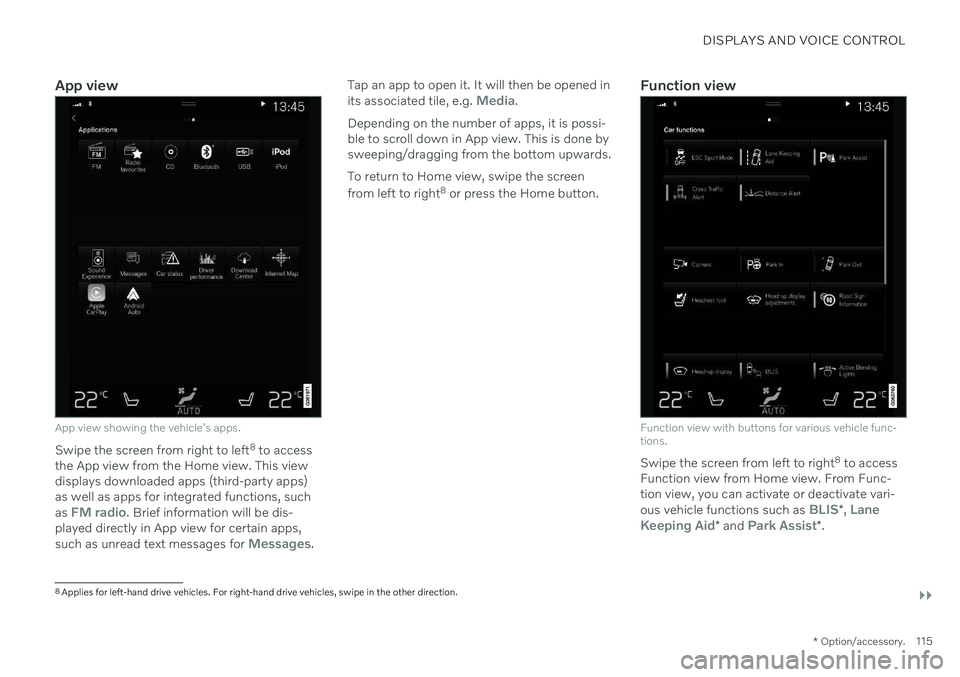
App view
App view showing the vehicle's apps.
Swipe the screen from right to left 8
to access
the App view from the Home view. This view displays downloaded apps (third-party apps)as well as apps for integrated functions, such as
FM radio. Brief information will be dis-
played directly in App view for certain apps, such as unread text messages for
Messages. Tap an app to open it. It will then be opened in its associated tile, e.g.
Media.
Depending on the number of apps, it is possi- ble to scroll down in App view. This is done bysweeping/dragging from the bottom upwards. To return to Home view, swipe the screen from left to right 8
or press the Home button.Function view
Function view with buttons for various vehicle func- tions.
Swipe the screen from left to right 8
to access
Function view from Home view. From Func- tion view, you can activate or deactivate vari- ous vehicle functions such as
BLIS* , Lane
Keeping Aid* and Park Assist*.
8
Applies for left-hand drive vehicles. For right-hand drive vehicles, swipe in the other direction.
Page 272 of 661

DRIVER SUPPORT
* Option/accessory.
270
Driver support systems
The vehicle is equipped with a number of driver support systems that can provide thedriver with active or passive assistance in var-ious situations.
The systems can, for example, help the driver:
maintain a set speed
maintain a set time interval to the vehicle ahead
help prevent a collision by warning thedriver and applying the brakes
park the vehicle.
Some of the systems are standard and othersare options. This also varies from market tomarket.
Related information
IntelliSafe – driver support and safety(p. 29)
Speed-dependent steering wheel resis-tance (p. 270)
Electronic Stability Control (p. 271)
Connected Safety (p. 276)
City Safety
™ (p. 323)
Road Sign Information
* (p. 278)
Cruise control (p. 283)
Adaptive Cruise Control
* (p. 286)
Pilot Assist
* (p. 296)
Curve Speed Assist (CSA)
* (p. 308)
Passing assistance
* (p. 310)
Lane Keeping Aid (p. 316)
Steering assistance at risk of collision(p. 337)
Rear Collision Warning
* (p. 343)
BLIS
* (p. 344)
Driver Alert Control (p. 348)
Distance Alert
* (p. 350)
Cross Traffic Alert
* (p. 352)
Park Assist
* (p. 356)
Park Assist Camera
* (p. 361)
Radar sensor (p. 380)
Camera (p. 383)
Speed-dependent steering wheel resistance Speed-dependent power steering increases the steering wheel resistance in pace withthe vehicle's speed, which can help give thedriver an enhanced feeling of control and sta-bility. Steering is stiffer on highways. Whenparking and at low speeds, it will be easier tomove the steering wheel.
Reduced powerIn rare situations, the power steering may need to work at reduced power and the steer-ing wheel may then feel more difficult tomove. This may happen when the powersteering becomes too hot and needs to betemporarily cooled. It can also happen if thereis a disturbance in power supply.
If there is reduced power, the message
Power steering
Assistance temporarily reduced
and this symbol are
shown in the instrument panel.
While the power steering is working at reduced power, the driver support functionsand systems with steering assistance are notavailable.
Page 289 of 661

DRIVER SUPPORT
* Option/accessory.287
cle. When there are no longer slower-moving vehicles ahead, the vehicle will return to theset speed. If the Curve Speed Assist (CSA)
* function is
activated, it may also affect the vehicle's speed. Adaptive Cruise Control is designed to: smoothly regulate speed. The driver must apply the brakes in situations requiringimmediate braking. For example, whenthere are great differences in speedbetween vehicles or if the vehicle aheadbrakes suddenly. Due to limitations in theradar sensor, braking may occur unexpect-edly or not at all.
follow a vehicle ahead in the same laneand maintain a time interval to that vehicleset by the driver. If the radar sensor doesnot detect a vehicle ahead, it will insteadmaintain the speed set by the driver. Thiswill also happen if the speed of the vehicleahead exceeds the set speed for your vehi-cle.
WARNING
The function is supplementary driver support intended to facilitate drivingand help make it safer – it cannot han-dle all situations in all traffic, weatherand road conditions.
The driver is advised to read all sec-tions in the Owner's Manual about thisfunction to learn of its limitations,which the driver must be aware ofbefore using the function.
Driver support functions are not a sub-stitute for the driver's attention andjudgment. The driver is always respon-sible for ensuring the vehicle is drivenin a safe manner, at the appropriatespeed, with an appropriate distance toother vehicles, and in accordance withcurrent traffic rules and regulations.
CAUTION
Only a workshop may perform mainte- nance on driver support components – anauthorized Volvo workshop is recom-mended.
Related information
Driver support systems (p. 270)
Adaptive Cruise Control
* controls (p. 288)
Adaptive Cruise Control
* displays (p. 288)
Selecting and activating Adaptive Cruise Control
* (p. 289)
Adaptive Cruise Control
* limitations
(p. 292)
Symbols and messages for AdaptiveCruise Control
* (p. 294)
Collision risk warning from driver support (p. 311)
Setting time interval to the vehicle ahead(p. 314)
Adjusting set speed for driver support(p. 313)
Auto-hold braking with driver support(p. 315)
Switching target vehicles with driver sup-port (p. 312)
Passing assistance
* (p. 310)
Contacting Volvo (p. 26)
Page 298 of 661

DRIVER SUPPORT
* Option/accessory.
296
Pilot Assist *53
Pilot Assist can help the driver keep the vehi- cle in the current traffic lane and maintain aneven speed and a set time interval to thevehicle ahead.
Get to know Pilot Assist
The camera/radar sensor monitors the distance to the vehicle ahead and detects lane markings.
Camera and radar sensor
Distance monitor
Lane marker line monitors
Pilot Assist helps to steer the vehicle, and you may need to drive a few miles with Pilot Assistbefore you feel completely at home with the function. It is important to be familiar with all of the function's applications and limitations in order to take advantage of all it has to offer. The Pilot Assist function is primarily intended for use on highways and other major roadswhere it can help provide a more comfortableand relaxing driving experience. The driver sets the desired speed and distance to the vehicle ahead. Pilot Assist monitors thedistance to the vehicle ahead and the trafficlane's side markers using the camera. The sys-tem maintains the set time interval to the vehi-cle ahead by automatically adjusting your vehi-cle's speed and keeps your vehicle in its laneby providing steering assistance. If the Curve Speed Assist (CSA)
* function is
activated, it may also affect the vehicle's speed. Pilot Assist regulates speed by accelerating and braking. It is normal for the brakes to emita slight sound when they are being used toadjust speed. Pilot Assist is designed to:
smoothly regulate speed. The driver must apply the brakes in situations requiringimmediate braking. For example, whenthere are great differences in speedbetween vehicles or if the vehicle aheadbrakes suddenly. Due to limitations in the camera and radar sensor, braking mayoccur unexpectedly or not at all.
follow a vehicle ahead in the same laneand maintain a time interval to that vehicleset by the driver. If the radar sensor doesnot detect a vehicle ahead, it will insteadmaintain the speed set by the driver. Thiswill also happen if the speed of the vehicleahead exceeds the set speed for your vehi-cle.
The vehicle's position in the traffic
lane
When Pilot Assist helps to steer, it attempts toposition the vehicle halfway between the visi-ble lane marking lines. For a smoother drive, itis a good idea to allow the vehicle to find agood position. The driver can always adjustthe position him/herself by increasing steeringinput. It is important for the driver to makesure the vehicle is positioned safely in the lane. If Pilot Assist does not position the vehicle appropriately in the lane, the driver should turnoff Pilot Assist or switch to Adaptive Cruise Control *.
53
Depending on market, this function can be either standard or optional.
Page 299 of 661
DRIVER SUPPORT
}}
297
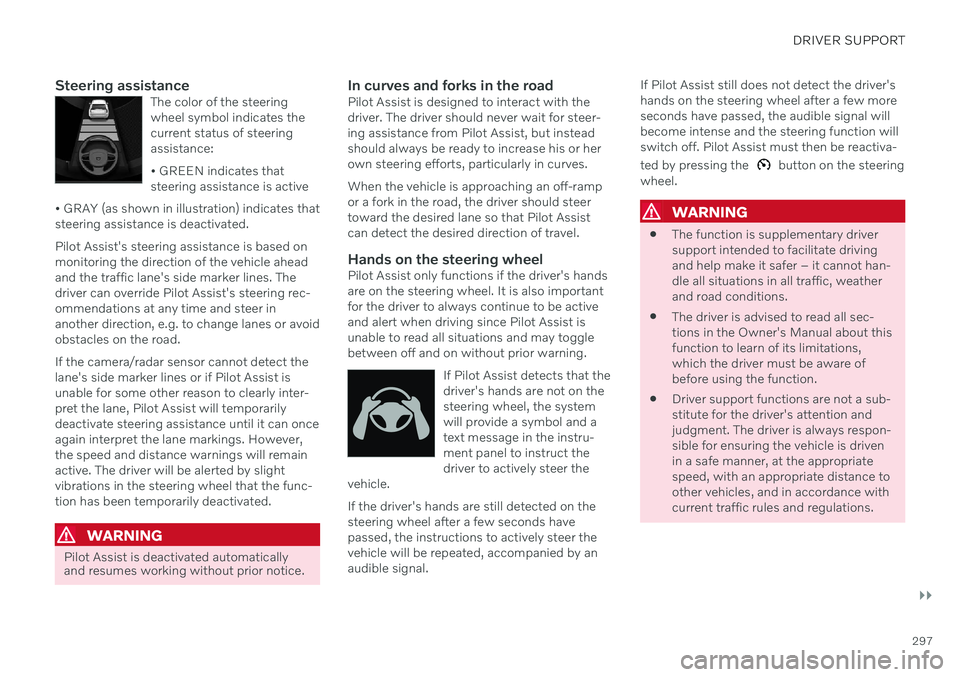
Steering assistanceThe color of the steering wheel symbol indicates thecurrent status of steeringassistance: • GREEN indicates that steering assistance is active
• GRAY (as shown in illustration) indicates thatsteering assistance is deactivated.
Pilot Assist's steering assistance is based on monitoring the direction of the vehicle aheadand the traffic lane's side marker lines. Thedriver can override Pilot Assist's steering rec-ommendations at any time and steer inanother direction, e.g. to change lanes or avoidobstacles on the road. If the camera/radar sensor cannot detect the lane's side marker lines or if Pilot Assist isunable for some other reason to clearly inter-pret the lane, Pilot Assist will temporarilydeactivate steering assistance until it can onceagain interpret the lane markings. However,the speed and distance warnings will remainactive. The driver will be alerted by slightvibrations in the steering wheel that the func-tion has been temporarily deactivated.
WARNING
Pilot Assist is deactivated automatically and resumes working without prior notice.
In curves and forks in the roadPilot Assist is designed to interact with the driver. The driver should never wait for steer-ing assistance from Pilot Assist, but insteadshould always be ready to increase his or herown steering efforts, particularly in curves. When the vehicle is approaching an off-ramp or a fork in the road, the driver should steertoward the desired lane so that Pilot Assistcan detect the desired direction of travel.
Hands on the steering wheelPilot Assist only functions if the driver's handsare on the steering wheel. It is also importantfor the driver to always continue to be activeand alert when driving since Pilot Assist isunable to read all situations and may togglebetween off and on without prior warning.
If Pilot Assist detects that thedriver's hands are not on thesteering wheel, the systemwill provide a symbol and atext message in the instru-ment panel to instruct thedriver to actively steer the
vehicle.
If the driver's hands are still detected on the steering wheel after a few seconds havepassed, the instructions to actively steer thevehicle will be repeated, accompanied by anaudible signal. If Pilot Assist still does not detect the driver'shands on the steering wheel after a few moreseconds have passed, the audible signal willbecome intense and the steering function willswitch off. Pilot Assist must then be reactiva- ted by pressing the
button on the steering
wheel.
WARNING
The function is supplementary driver support intended to facilitate drivingand help make it safer – it cannot han-dle all situations in all traffic, weatherand road conditions.
The driver is advised to read all sec-tions in the Owner's Manual about thisfunction to learn of its limitations,which the driver must be aware ofbefore using the function.
Driver support functions are not a sub-stitute for the driver's attention andjudgment. The driver is always respon-sible for ensuring the vehicle is drivenin a safe manner, at the appropriatespeed, with an appropriate distance toother vehicles, and in accordance withcurrent traffic rules and regulations.
Page 301 of 661
DRIVER SUPPORT
}}
* Option/accessory.299
Pilot Assist*55
displays
The following illustrations show how Pilot Assist can appear in the various displays indifferent situations.
Speed
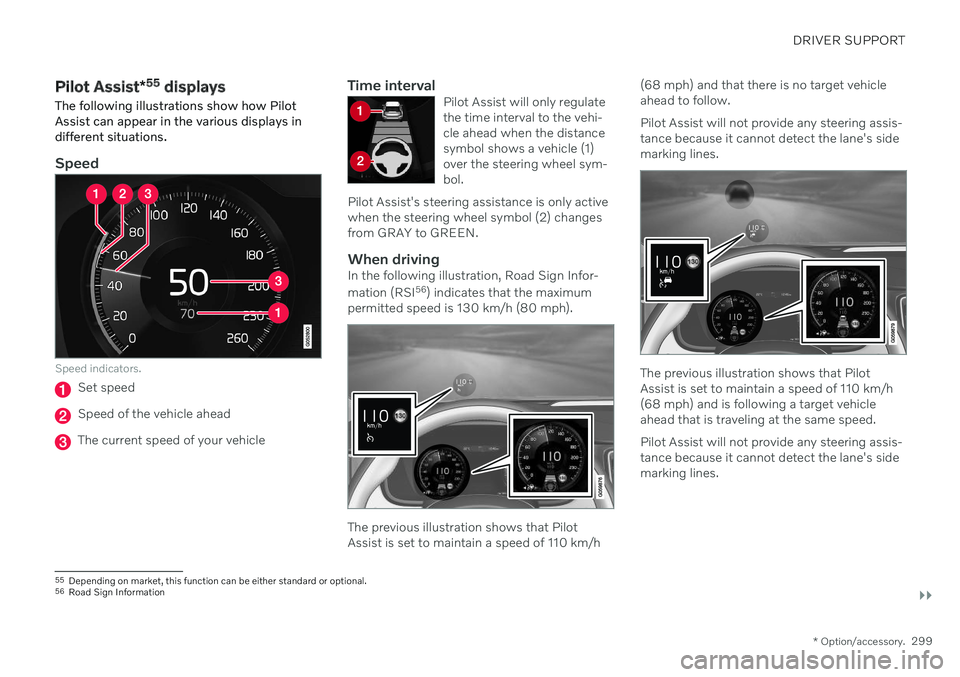
Speed indicators.
Set speed
Speed of the vehicle ahead
The current speed of your vehicle
Time intervalPilot Assist will only regulate the time interval to the vehi-cle ahead when the distancesymbol shows a vehicle (1)over the steering wheel sym-bol.
Pilot Assist's steering assistance is only activewhen the steering wheel symbol (2) changesfrom GRAY to GREEN.
When drivingIn the following illustration, Road Sign Infor- mation (RSI 56
) indicates that the maximum
permitted speed is 130 km/h (80 mph).
The previous illustration shows that Pilot Assist is set to maintain a speed of 110 km/h (68 mph) and that there is no target vehicleahead to follow. Pilot Assist will not provide any steering assis- tance because it cannot detect the lane's sidemarking lines.
The previous illustration shows that Pilot Assist is set to maintain a speed of 110 km/h(68 mph) and is following a target vehicleahead that is traveling at the same speed. Pilot Assist will not provide any steering assis- tance because it cannot detect the lane's sidemarking lines.
55
Depending on market, this function can be either standard or optional.
56 Road Sign Information
Page 302 of 661
||
DRIVER SUPPORT
* Option/accessory.
300
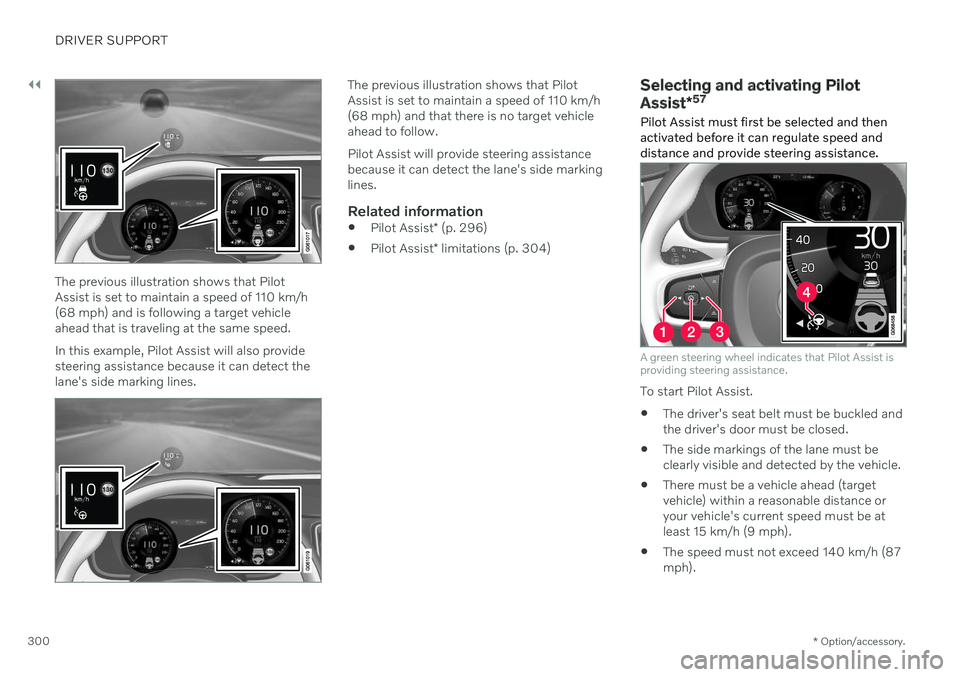
The previous illustration shows that Pilot Assist is set to maintain a speed of 110 km/h(68 mph) and is following a target vehicleahead that is traveling at the same speed. In this example, Pilot Assist will also provide steering assistance because it can detect thelane's side marking lines.
The previous illustration shows that Pilot Assist is set to maintain a speed of 110 km/h(68 mph) and that there is no target vehicleahead to follow. Pilot Assist will provide steering assistance because it can detect the lane's side markinglines.
Related information
Pilot Assist
* (p. 296)
Pilot Assist
* limitations (p. 304)
Selecting and activating Pilot Assist *57
Pilot Assist must first be selected and then activated before it can regulate speed anddistance and provide steering assistance.
A green steering wheel indicates that Pilot Assist is providing steering assistance.
To start Pilot Assist.
The driver's seat belt must be buckled and the driver's door must be closed.
The side markings of the lane must beclearly visible and detected by the vehicle.
There must be a vehicle ahead (targetvehicle) within a reasonable distance oryour vehicle's current speed must be atleast 15 km/h (9 mph).
The speed must not exceed 140 km/h (87mph).
Page 305 of 661
DRIVER SUPPORT
* Option/accessory.303
Your vehicle's speed goes below 5 km/h (3 mph) and Pilot Assist cannot determineif the vehicle ahead is stationary or if it isanother object, e.g. a speed bump.
Your vehicle's speed goes below 5 km/h(3 mph) and the vehicle ahead turns sothat Pilot Assist no longer has a vehicle tofollow.
Related information
Pilot Assist
* (p. 296)
Selecting and activating Pilot Assist
*
(p. 300)
Deactivating Pilot Assist
* (p. 301)
Pilot Assist
* limitations (p. 304)
Temporarily deactivating steering assistance with Pilot Assist *61
Pilot Assist steering assistance can be tem- porarily deactivated and reactivated withoutprior warning.
When the turn signals are used, Pilot Assist's steering assistance will be temporarily deacti-vated. When the direction indicator is turnedoff, steering assistance is reactivated automat-ically if the lane's edge markings can still bedetected. If Pilot Assist cannot clearly interpret the lane's side marker lines or if the camera/radarsensor is unable for some other reason toclearly interpret the lane, Pilot Assist will tem-porarily deactivate steering assistance. How-ever, the speed and distance warnings willremain active. Steering assistance will resumewhen the side marker lines can once again beinterpreted. In these situations, the driver maybe alerted through slight vibrations in thesteering wheel that steering assistance is tem-porarily deactivated.
Related information
Pilot Assist
* (p. 296)
Selecting and activating Pilot Assist
*
(p. 300)
Deactivating Pilot Assist
* (p. 301)
Pilot Assist
* limitations (p. 304)
60
Electronic Stability Control
61 Depending on market, this function can be either standard or optional.