light VOLVO V60 2021 Owners Manual
[x] Cancel search | Manufacturer: VOLVO, Model Year: 2021, Model line: V60, Model: VOLVO V60 2021Pages: 661, PDF Size: 12.68 MB
Page 440 of 661
STARTING AND DRIVING
438
Towing using a towline
This section refers to one vehicle being towed behind another using a towline.
Before towing another vehicle, check applica- ble speed limit regulations.
Preparations and towing
CAUTION
For some transmission variants, it is not possible to shift from P position if theengine is switched off. Contact an author-ized Volvo workshop for assistance towingor call a professional towing service.
CAUTION
Note that the vehicle must always be towed with the wheels rolling forward.
Do not tow a vehicle with automatictransmission at a speed greater than80 km/h (50 mph) or for a distancegreater than 80 km (50 miles).
WARNING
Ignition mode
II must be active – all
airbags are deactivated in ignition mode I.
Always have the remote key in thevehicle when it is towed.
WARNING
The brake and steering servos do not work when the engine is off – it takesabout 5 times more pressure on the brakepedal and steering requires much moreeffort than normal.
1. Turn on the hazard warning flashers.
2. Attach the towline to the towing eyelet.
3. Put the vehicle in ignition mode II – with-
out pressing the brake pedal, turn the start knob clockwise and hold it there for about4 seconds. Release the knob, which willautomatically return to its original position.
4. Move the gear selector to neutral (N) and release the parking brake. If the battery charge level is too low, it may not be possible to release the parkingbrake. Connect an auxiliary battery to thevehicle if the battery is discharged.
> The towing vehicle can now start driv-ing. 5. Keep the towline taut when the towing
vehicle slows down by applying light pres- sure to the brake pedal. This will helpavoid jarring movements.
6. Be prepared to apply the brakes to stop the vehicle.
Jump startingDo not tow the vehicle to start the engine. Usean auxiliary battery if the start battery's chargelevel is so low that the engine cannot bestarted.
CAUTION
Attempting to tow with the engine running could result in damage to the three-waycatalytic converter.
Related information
Attaching and removing the towing eyelet (p. 439)
Hazard warning flashers (p. 159)
Recovery (p. 440)
Jump starting using another battery(p. 431)
Selecting ignition mode (p. 396)
Transmission (p. 406)
Page 443 of 661
STARTING AND DRIVING
* Option/accessory.441
CAUTION
Note that the vehicle must always be towed with the wheels rolling forward.
Related information
Attaching and removing the towing eyelet (p. 439)
HomeLink ®
*20
HomeLink ®
21
is a programmable remote con-
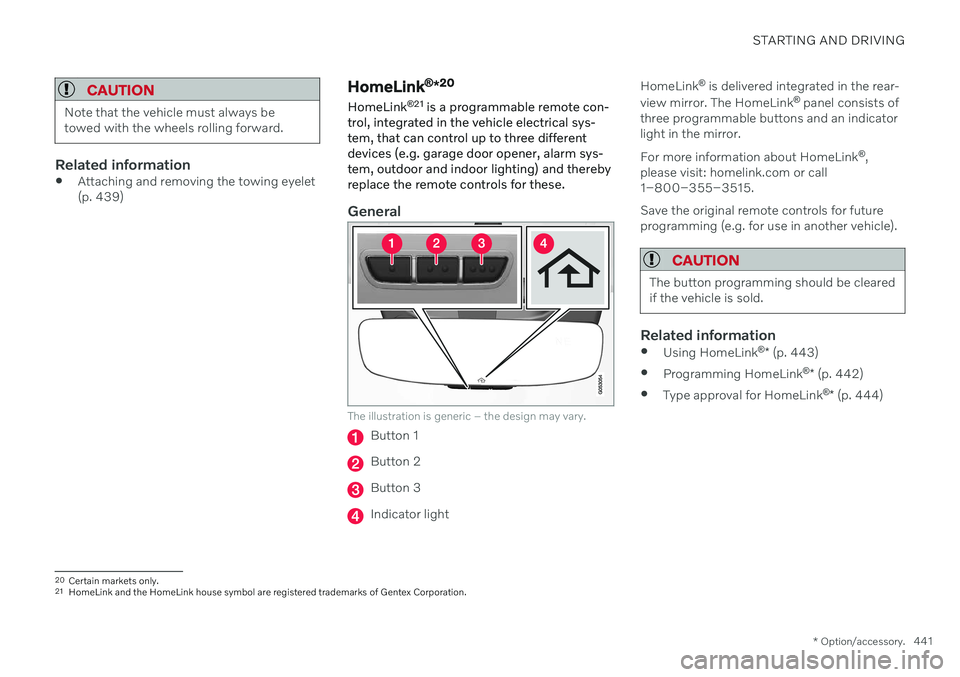
trol, integrated in the vehicle electrical sys- tem, that can control up to three differentdevices (e.g. garage door opener, alarm sys-tem, outdoor and indoor lighting) and therebyreplace the remote controls for these.
General
The illustration is generic – the design may vary.
Button 1
Button 2
Button 3
Indicator light HomeLink
®
is delivered integrated in the rear-
view mirror. The HomeLink ®
panel consists of
three programmable buttons and an indicator light in the mirror. For more information about HomeLink ®
,
please visit: homelink.com or call 1–800–355–3515. Save the original remote controls for future programming (e.g. for use in another vehicle).
CAUTION
The button programming should be cleared if the vehicle is sold.
Related information
Using HomeLink ®
* (p. 443)
Programming HomeLink ®
* (p. 442)
Type approval for HomeLink ®
* (p. 444)
20
Certain markets only.
21 HomeLink and the HomeLink house symbol are registered trademarks of Gentex Corporation.
Page 444 of 661
STARTING AND DRIVING
* Option/accessory.
442
Programming HomeLink ®
*22
Follow these instructions to program HomeLink ®
, reset all programming, or pro-
gram individual buttons.
NOTE
In some vehicles, the ignition must be on or in the "accessory position" before HomeLink ®
can be programmed or used. It
can be a good idea to put new batteries in the remote control being replaced by HomeLink ®
for faster programming and
better radio signal transmission. TheHomeLink ®
buttons should be reset before
programming.
WARNING
While HomeLink ®
is being programmed,
the garage door or gate being programmed may be activated. Make sure that no one isnear the door or gate during programming.When programming a garage door opener,it is advised to park outside of the garage. 1. Point the remote control at the
HomeLink ®
button to be programmed and
hold it about 2-8 cm (1-3 inches) from the button. Do not obstruct the HomeLink ®
indicator light. Note: Some remote controls are more
effective at programming HomeLink ®
from
a distance of about 15-20 cm (6-12 inches). Keep this in mind if you experi-ence any programming difficulties.
2. Press and hold both the remote control button and the HomeLink ®
button to be
programmed. 3. Do not release the buttons until the indica-
tor light has stopped flashing slowly(about once a second) and either flashesquickly (about 10 times a second) orglows steadily. >If the indicator light glows steadily: Indication that programming is com-plete. Press the programmed buttontwice to activate. If the indicator light flashes quickly: The device being programmed with HomeLink ®
may have a security func-
tion that requires an extra step. Try pressing the programmed button twiceto see whether the programmingworks. Otherwise, continue with thefollowing steps.
22 Certain markets only.
Page 445 of 661
STARTING AND DRIVING
}}
* Option/accessory.443
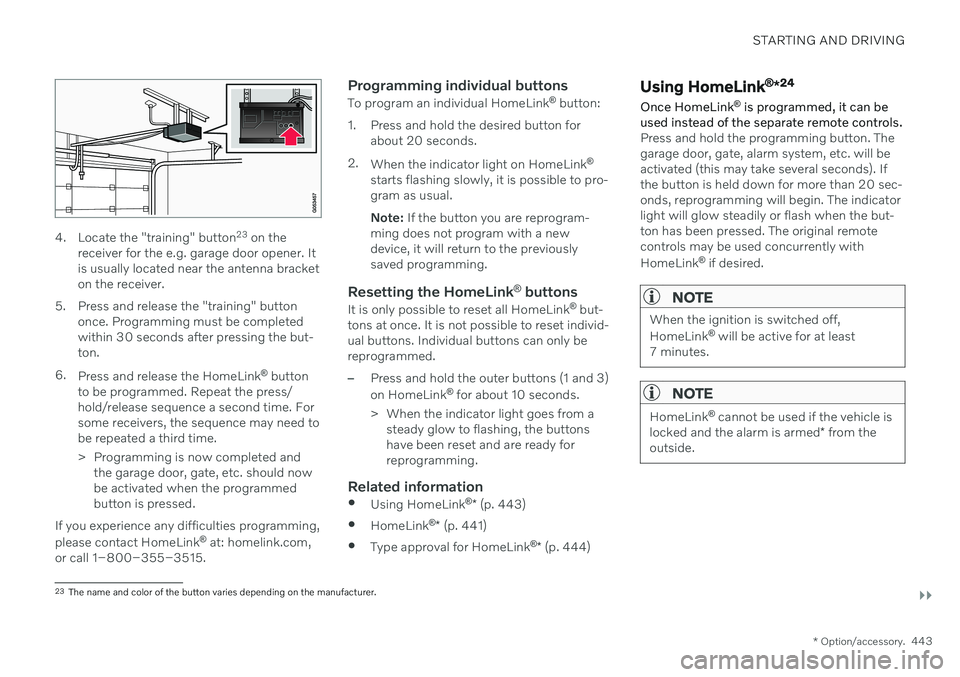
4. Locate the "training" button 23
on the
receiver for the e.g. garage door opener. It is usually located near the antenna bracketon the receiver.
5. Press and release the "training" button once. Programming must be completedwithin 30 seconds after pressing the but-ton.
6. Press and release the HomeLink ®
button
to be programmed. Repeat the press/hold/release sequence a second time. Forsome receivers, the sequence may need tobe repeated a third time.
> Programming is now completed and the garage door, gate, etc. should now be activated when the programmedbutton is pressed.
If you experience any difficulties programming, please contact HomeLink ®
at: homelink.com,
or call 1–800–355–3515.
Programming individual buttons
To program an individual HomeLink ®
button:
1. Press and hold the desired button for about 20 seconds.
2. When the indicator light on HomeLink ®
starts flashing slowly, it is possible to pro- gram as usual. Note: If the button you are reprogram-
ming does not program with a new device, it will return to the previouslysaved programming.
Resetting the HomeLink ®
buttons
It is only possible to reset all HomeLink ®
but-
tons at once. It is not possible to reset individ-ual buttons. Individual buttons can only bereprogrammed.
–Press and hold the outer buttons (1 and 3) on HomeLink ®
for about 10 seconds.
> When the indicator light goes from a steady glow to flashing, the buttons have been reset and are ready forreprogramming.
Related information
Using HomeLink ®
* (p. 443)
HomeLink ®
* (p. 441)
Type approval for HomeLink ®
* (p. 444)
Using HomeLink ®
*24
Once HomeLink ®
is programmed, it can be
used instead of the separate remote controls.
Press and hold the programming button. The garage door, gate, alarm system, etc. will beactivated (this may take several seconds). Ifthe button is held down for more than 20 sec-onds, reprogramming will begin. The indicatorlight will glow steadily or flash when the but-ton has been pressed. The original remotecontrols may be used concurrently with HomeLink ®
if desired.
NOTE
When the ignition is switched off, HomeLink ®
will be active for at least
7 minutes.
NOTE
HomeLink ®
cannot be used if the vehicle is
locked and the alarm is armed * from the
outside.
23 The name and color of the button varies depending on the manufacturer.
Page 486 of 661
AUDIO, MEDIA AND INTERNET
* Option/accessory.
484
Settings for Android Auto *
Settings for Android devices initially con- nected with Android Auto 18
.
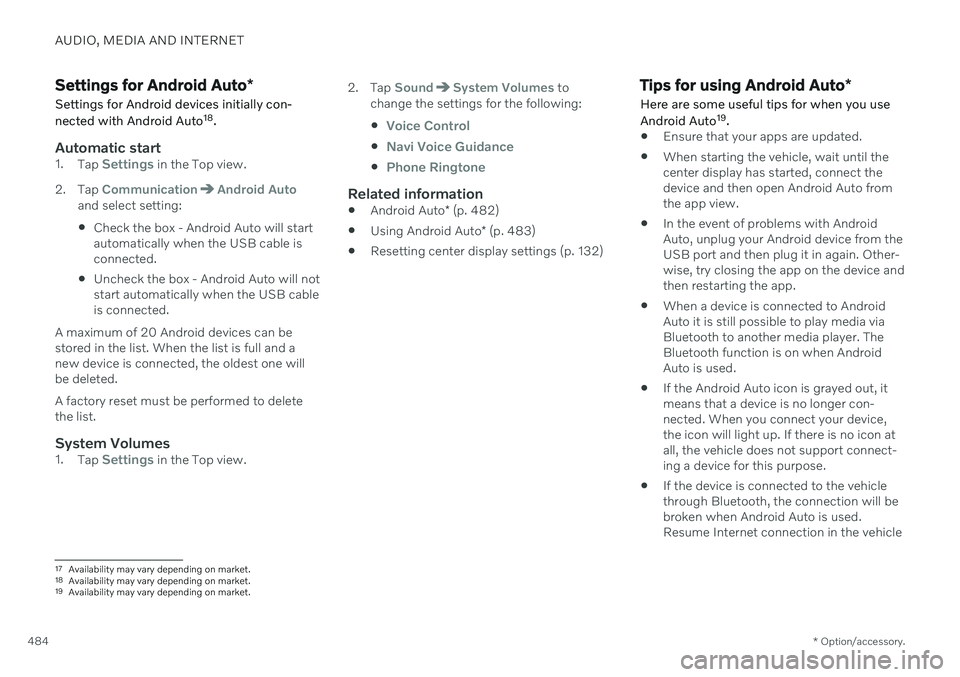
Automatic start1. Tap Settings in the Top view.
2. Tap
CommunicationAndroid Autoand select setting: Check the box - Android Auto will start automatically when the USB cable isconnected.
Uncheck the box - Android Auto will notstart automatically when the USB cableis connected.
A maximum of 20 Android devices can bestored in the list. When the list is full and anew device is connected, the oldest one willbe deleted. A factory reset must be performed to delete the list.
System Volumes1. Tap Settings in the Top view. 2. Tap
SoundSystem Volumes to
change the settings for the following:
Voice Control
Navi Voice Guidance
Phone Ringtone
Related information
Android Auto
* (p. 482)
Using Android Auto
* (p. 483)
Resetting center display settings (p. 132)
Tips for using Android Auto
*
Here are some useful tips for when you use Android Auto 19
.
Ensure that your apps are updated.
When starting the vehicle, wait until the center display has started, connect thedevice and then open Android Auto fromthe app view.
In the event of problems with AndroidAuto, unplug your Android device from theUSB port and then plug it in again. Other-wise, try closing the app on the device andthen restarting the app.
When a device is connected to AndroidAuto it is still possible to play media viaBluetooth to another media player. TheBluetooth function is on when AndroidAuto is used.
If the Android Auto icon is grayed out, it means that a device is no longer con- nected. When you connect your device,the icon will light up. If there is no icon atall, the vehicle does not support connect-ing a device for this purpose.
If the device is connected to the vehiclethrough Bluetooth, the connection will bebroken when Android Auto is used.Resume Internet connection in the vehicle
17
Availability may vary depending on market.
18 Availability may vary depending on market.
19 Availability may vary depending on market.
Page 538 of 661
||
WHEELS AND TIRES
* Option/accessory.
536
WARNING
The wheel bolts may need to be tightened again several days after a wheel change.Temperature fluctuations and vibrationscan cause them to loosen slightly.
NOTE
After inflating a tire, always replace the valve cap to help prevent valve damagecaused by gravel, dirt, etc.
Use plastic valve caps only. Metal capscould corrode and become difficult toremove.
Related information
Hoisting the vehicle (p. 573)
Tool kit (p. 536)
Saving new reference values for tire infla- tion pressure monitoring
* (p. 531)
Tool kit
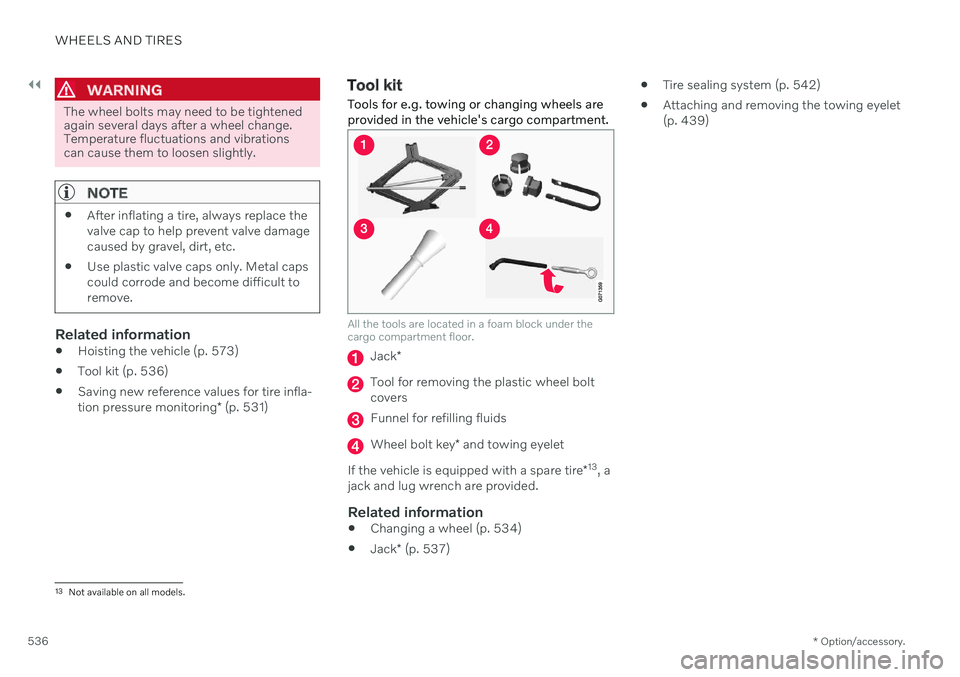
Tools for e.g. towing or changing wheels are provided in the vehicle's cargo compartment.
All the tools are located in a foam block under the cargo compartment floor.
Jack *
Tool for removing the plastic wheel bolt covers
Funnel for refilling fluids
Wheel bolt key * and towing eyelet
If the vehicle is equipped with a spare tire *13
, a
jack and lug wrench are provided.
Related information
Changing a wheel (p. 534)
Jack
* (p. 537)
Tire sealing system (p. 542)
Attaching and removing the towing eyelet (p. 439)
13
Not available on all models.
Page 539 of 661
WHEELS AND TIRES
}}
* Option/accessory.537
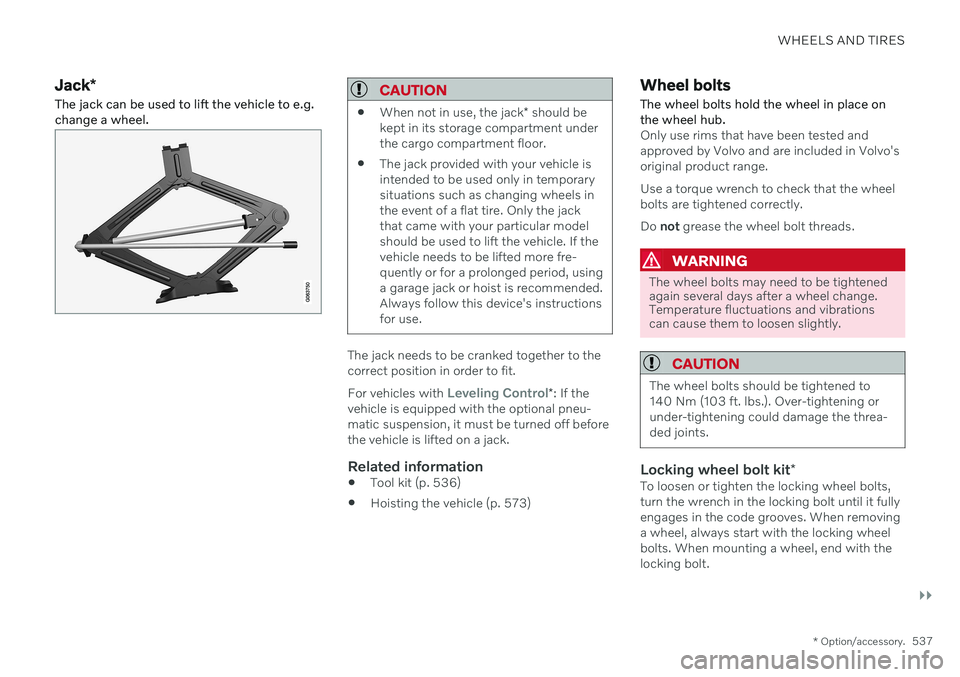
Jack*
The jack can be used to lift the vehicle to e.g. change a wheel.CAUTION
When not in use, the jack
* should be
kept in its storage compartment under the cargo compartment floor.
The jack provided with your vehicle isintended to be used only in temporarysituations such as changing wheels inthe event of a flat tire. Only the jackthat came with your particular modelshould be used to lift the vehicle. If thevehicle needs to be lifted more fre-quently or for a prolonged period, usinga garage jack or hoist is recommended.Always follow this device's instructionsfor use.
The jack needs to be cranked together to the correct position in order to fit. For vehicles with
Leveling Control*
: If the
vehicle is equipped with the optional pneu- matic suspension, it must be turned off beforethe vehicle is lifted on a jack.
Related information
Tool kit (p. 536)
Hoisting the vehicle (p. 573)
Wheel bolts
The wheel bolts hold the wheel in place on the wheel hub.
Only use rims that have been tested and approved by Volvo and are included in Volvo'soriginal product range. Use a torque wrench to check that the wheel bolts are tightened correctly. Do not grease the wheel bolt threads.
WARNING
The wheel bolts may need to be tightened again several days after a wheel change.Temperature fluctuations and vibrationscan cause them to loosen slightly.
CAUTION
The wheel bolts should be tightened to 140 Nm (103 ft. lbs.). Over-tightening orunder-tightening could damage the threa-ded joints.
Locking wheel bolt kit *To loosen or tighten the locking wheel bolts, turn the wrench in the locking bolt until it fullyengages in the code grooves. When removinga wheel, always start with the locking wheelbolts. When mounting a wheel, end with thelocking bolt.
Page 557 of 661
LOADING, STORAGE AND PASSENGER COMPARTMENT
* Option/accessory.555
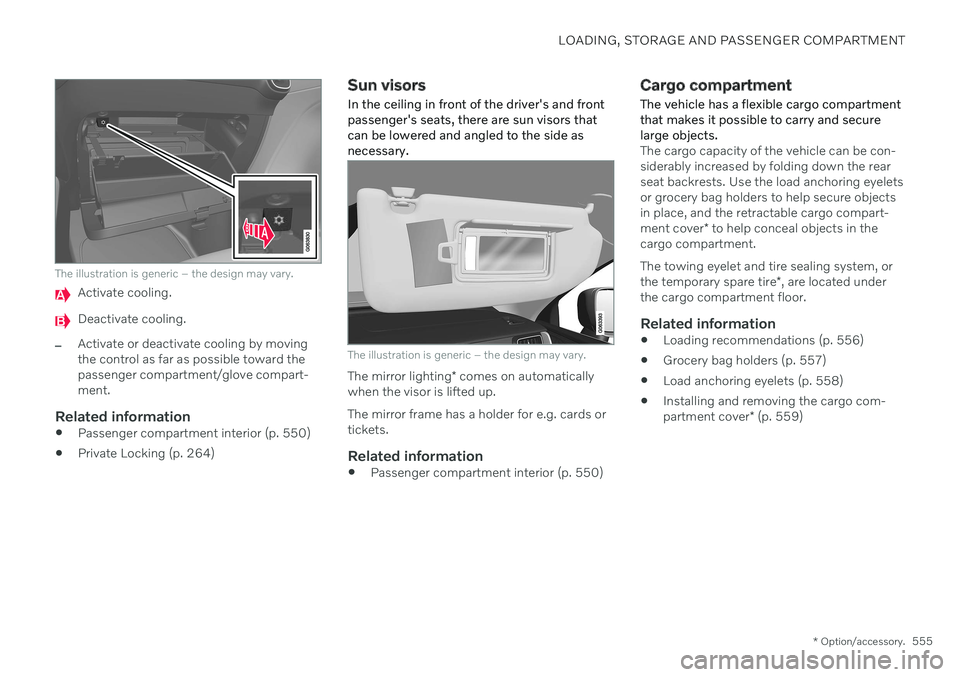
The illustration is generic – the design may vary.
Activate cooling.
Deactivate cooling.
–Activate or deactivate cooling by moving the control as far as possible toward thepassenger compartment/glove compart-ment.
Related information
Passenger compartment interior (p. 550)
Private Locking (p. 264)
Sun visors
In the ceiling in front of the driver's and front passenger's seats, there are sun visors thatcan be lowered and angled to the side asnecessary.
The illustration is generic – the design may vary.
The mirror lighting * comes on automatically
when the visor is lifted up. The mirror frame has a holder for e.g. cards or tickets.
Related information
Passenger compartment interior (p. 550)
Cargo compartment
The vehicle has a flexible cargo compartment that makes it possible to carry and securelarge objects.
The cargo capacity of the vehicle can be con- siderably increased by folding down the rearseat backrests. Use the load anchoring eyeletsor grocery bag holders to help secure objectsin place, and the retractable cargo compart- ment cover * to help conceal objects in the
cargo compartment. The towing eyelet and tire sealing system, or the temporary spare tire *, are located under
the cargo compartment floor.
Related information
Loading recommendations (p. 556)
Grocery bag holders (p. 557)
Load anchoring eyelets (p. 558)
Installing and removing the cargo com-partment cover
* (p. 559)
Page 562 of 661
LOADING, STORAGE AND PASSENGER COMPARTMENT
* Option/accessory.
560
Operating the cargo compartment cover *
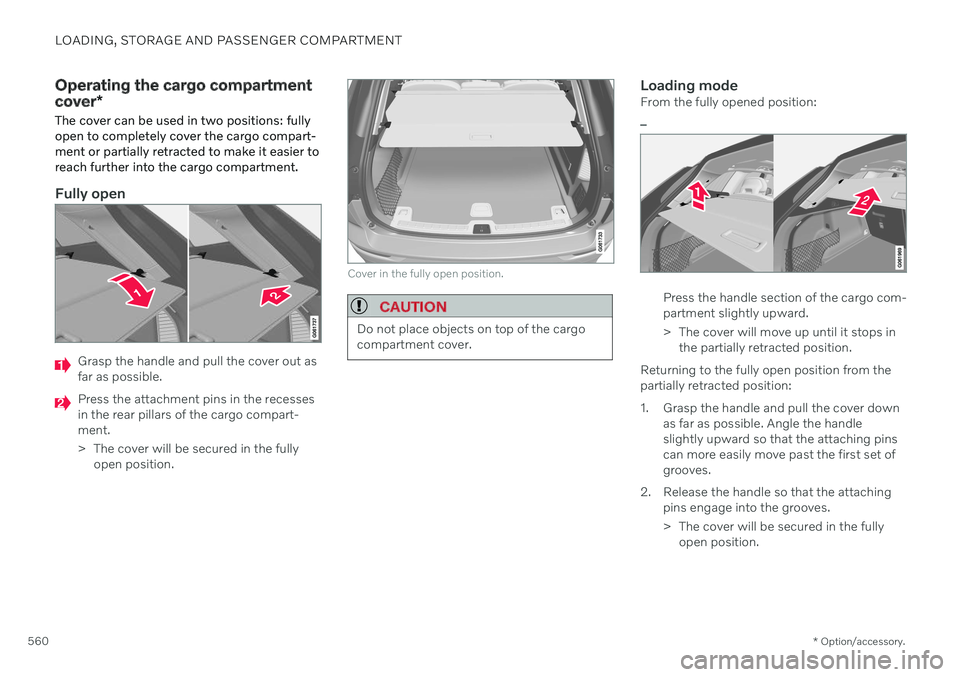
The cover can be used in two positions: fully open to completely cover the cargo compart-ment or partially retracted to make it easier toreach further into the cargo compartment.
Fully open
Grasp the handle and pull the cover out as far as possible.
Press the attachment pins in the recesses in the rear pillars of the cargo compart-ment.
> The cover will be secured in the fully open position.
Cover in the fully open position.
CAUTION
Do not place objects on top of the cargo compartment cover.
Loading modeFrom the fully opened position:
–
Press the handle section of the cargo com- partment slightly upward.
> The cover will move up until it stops in the partially retracted position.
Returning to the fully open position from the partially retracted position:
1. Grasp the handle and pull the cover down as far as possible. Angle the handle slightly upward so that the attaching pinscan more easily move past the first set ofgrooves.
2. Release the handle so that the attaching pins engage into the grooves.
> The cover will be secured in the fullyopen position.
Page 566 of 661
||
LOADING, STORAGE AND PASSENGER COMPARTMENT
5644.
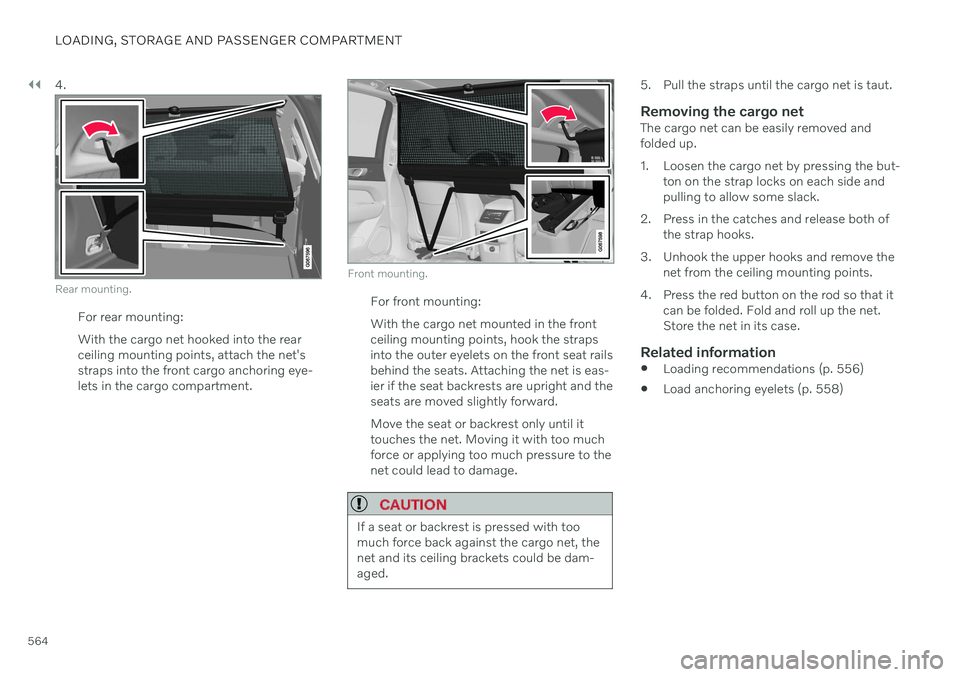
Rear mounting.
For rear mounting: With the cargo net hooked into the rear ceiling mounting points, attach the net'sstraps into the front cargo anchoring eye-lets in the cargo compartment.
Front mounting.
For front mounting: With the cargo net mounted in the front ceiling mounting points, hook the strapsinto the outer eyelets on the front seat railsbehind the seats. Attaching the net is eas-ier if the seat backrests are upright and theseats are moved slightly forward. Move the seat or backrest only until it touches the net. Moving it with too muchforce or applying too much pressure to thenet could lead to damage.
CAUTION
If a seat or backrest is pressed with too much force back against the cargo net, thenet and its ceiling brackets could be dam-aged.
5. Pull the straps until the cargo net is taut.
Removing the cargo netThe cargo net can be easily removed and folded up.
1. Loosen the cargo net by pressing the but-
ton on the strap locks on each side and pulling to allow some slack.
2. Press in the catches and release both of the strap hooks.
3. Unhook the upper hooks and remove the net from the ceiling mounting points.
4. Press the red button on the rod so that it can be folded. Fold and roll up the net.Store the net in its case.
Related information
Loading recommendations (p. 556)
Load anchoring eyelets (p. 558)