brake VOLVO V60 2021 User Guide
[x] Cancel search | Manufacturer: VOLVO, Model Year: 2021, Model line: V60, Model: VOLVO V60 2021Pages: 661, PDF Size: 12.68 MB
Page 95 of 661
DISPLAYS AND VOICE CONTROL
}}
93
Change the measurement standard for the temperature sensor etc. via system settings inthe center display's Top view.
Related information
Instrument panel (p. 82)
Changing system units of measurement(p. 130)
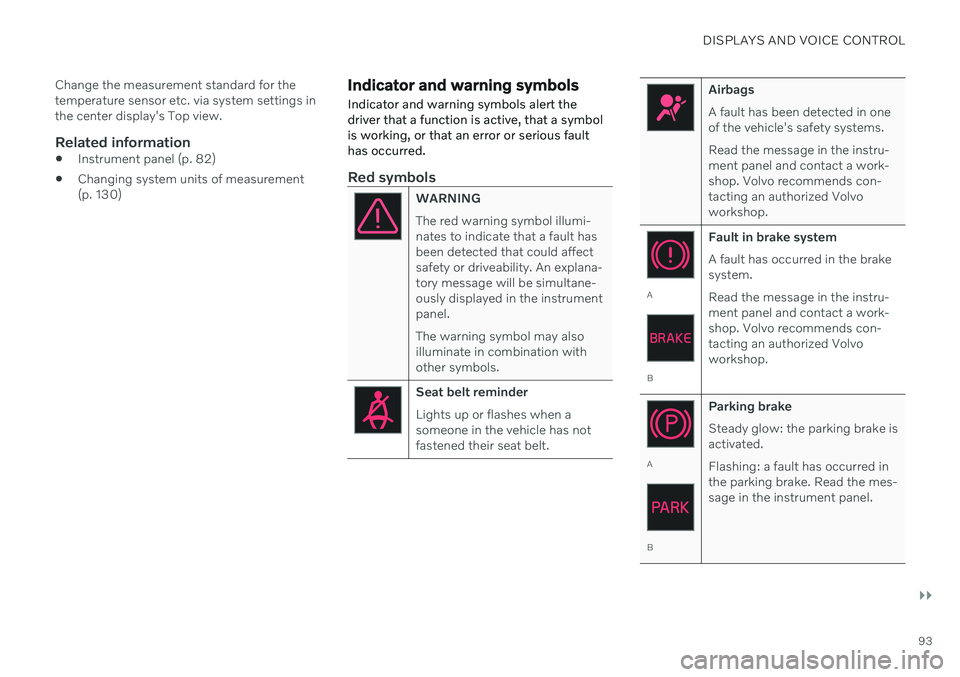
Indicator and warning symbols Indicator and warning symbols alert the driver that a function is active, that a symbolis working, or that an error or serious faulthas occurred.
Red symbols
WARNING The red warning symbol illumi- nates to indicate that a fault hasbeen detected that could affectsafety or driveability. An explana-tory message will be simultane-ously displayed in the instrumentpanel. The warning symbol may also illuminate in combination withother symbols.
Seat belt reminder Lights up or flashes when a someone in the vehicle has notfastened their seat belt.
Airbags A fault has been detected in one of the vehicle's safety systems. Read the message in the instru- ment panel and contact a work-shop. Volvo recommends con-tacting an authorized Volvoworkshop.
A
B Fault in brake system A fault has occurred in the brake system. Read the message in the instru- ment panel and contact a work-shop. Volvo recommends con-tacting an authorized Volvoworkshop.
A
B
Parking brake Steady glow: the parking brake is activated. Flashing: a fault has occurred in the parking brake. Read the mes-sage in the instrument panel.
Page 96 of 661
||
DISPLAYS AND VOICE CONTROL
94
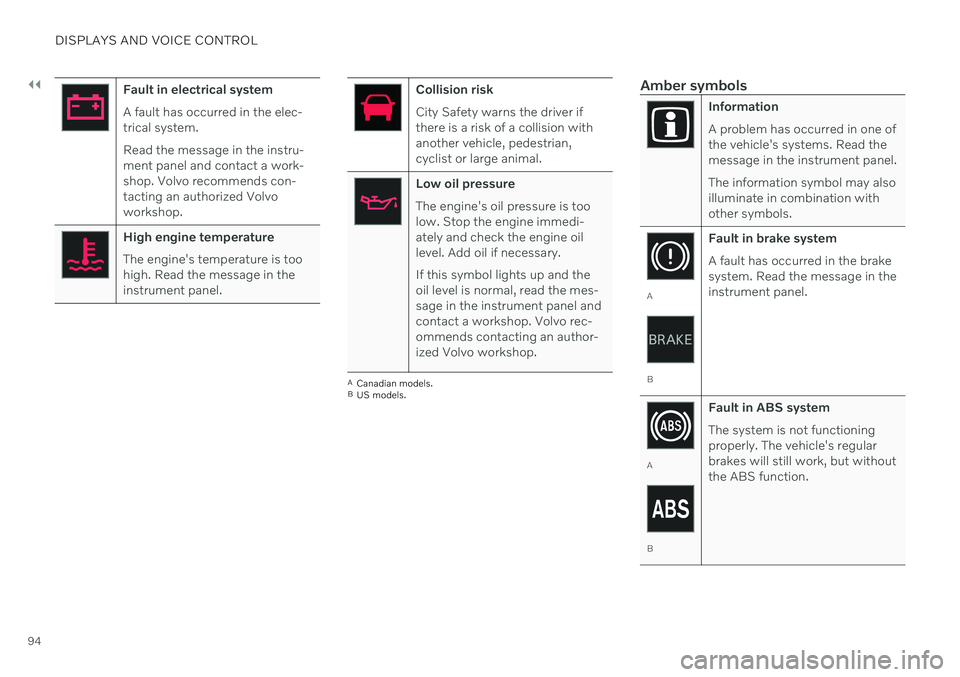
Fault in electrical system A fault has occurred in the elec- trical system. Read the message in the instru- ment panel and contact a work-shop. Volvo recommends con-tacting an authorized Volvoworkshop.
High engine temperature The engine's temperature is too high. Read the message in theinstrument panel.
Collision risk City Safety warns the driver if there is a risk of a collision withanother vehicle, pedestrian,cyclist or large animal.
Low oil pressure The engine's oil pressure is too low. Stop the engine immedi-ately and check the engine oillevel. Add oil if necessary. If this symbol lights up and the oil level is normal, read the mes-sage in the instrument panel andcontact a workshop. Volvo rec-ommends contacting an author-ized Volvo workshop.
ACanadian models.
B US models.
Amber symbols
Information A problem has occurred in one of the vehicle's systems. Read themessage in the instrument panel. The information symbol may also illuminate in combination withother symbols.
A
B Fault in brake system A fault has occurred in the brake system. Read the message in theinstrument panel.
A
B
Fault in ABS system The system is not functioning properly. The vehicle's regularbrakes will still work, but withoutthe ABS function.
Page 97 of 661
DISPLAYS AND VOICE CONTROL
}}
95
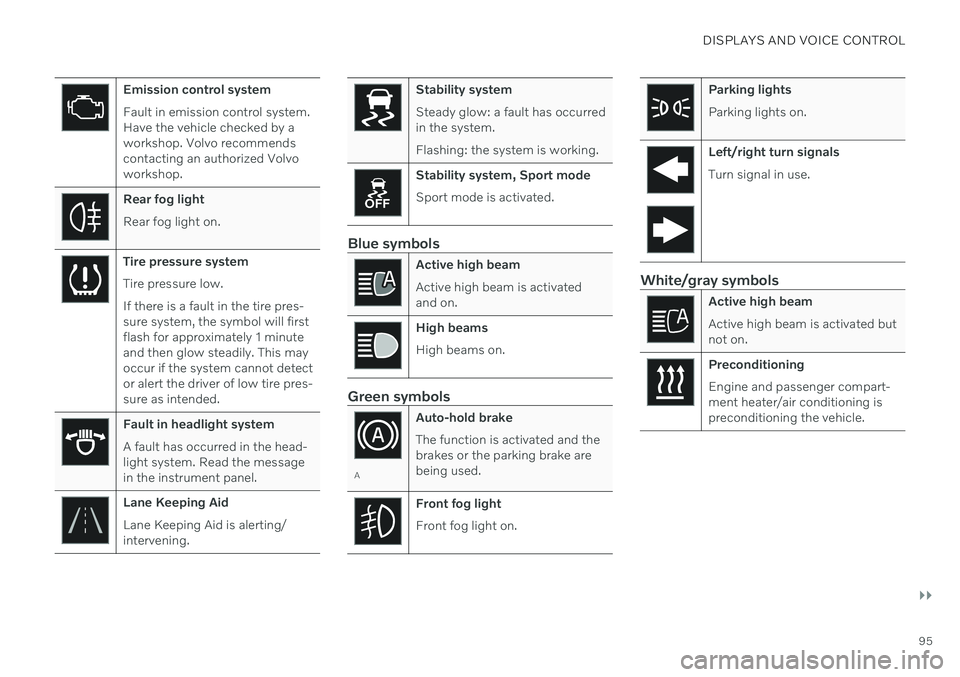
Emission control system Fault in emission control system. Have the vehicle checked by aworkshop. Volvo recommendscontacting an authorized Volvoworkshop.
Rear fog light Rear fog light on.
Tire pressure system Tire pressure low. If there is a fault in the tire pres- sure system, the symbol will firstflash for approximately 1 minuteand then glow steadily. This mayoccur if the system cannot detector alert the driver of low tire pres-sure as intended.
Fault in headlight system A fault has occurred in the head- light system. Read the messagein the instrument panel.
Lane Keeping Aid Lane Keeping Aid is alerting/ intervening.
Stability system Steady glow: a fault has occurred in the system. Flashing: the system is working.
Stability system, Sport mode Sport mode is activated.
Blue symbols
Active high beam Active high beam is activated and on.
High beams High beams on.
Green symbols
AAuto-hold brake The function is activated and the brakes or the parking brake arebeing used.
Front fog light Front fog light on.
Parking lights Parking lights on.
Left/right turn signals Turn signal in use.
White/gray symbols
Active high beam Active high beam is activated but not on.
Preconditioning Engine and passenger compart- ment heater/air conditioning ispreconditioning the vehicle.
Page 135 of 661
DISPLAYS AND VOICE CONTROL
}}
* Option/accessory.133
Table of settings in the center display
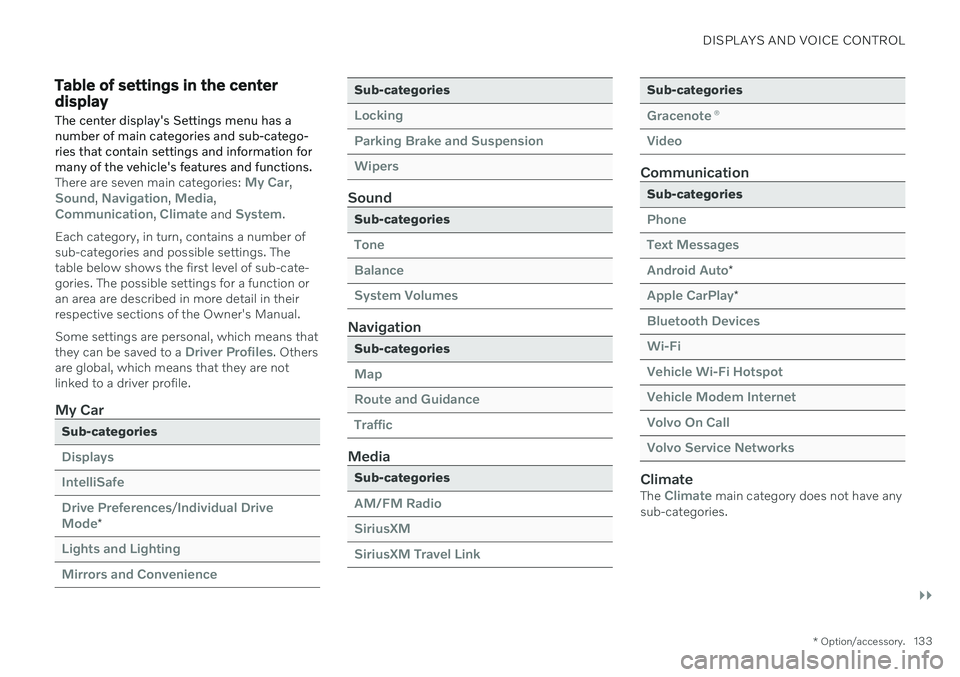
The center display's Settings menu has a number of main categories and sub-catego-ries that contain settings and information formany of the vehicle's features and functions.
There are seven main categories: My Car,Sound, Navigation, Media,Communication, Climate and System.
Each category, in turn, contains a number of sub-categories and possible settings. Thetable below shows the first level of sub-cate-gories. The possible settings for a function oran area are described in more detail in theirrespective sections of the Owner's Manual. Some settings are personal, which means that they can be saved to a
Driver Profiles. Others
are global, which means that they are not linked to a driver profile.
My Car
Sub-categories
Displays IntelliSafeDrive Preferences
/Individual Drive
Mode*
Lights and Lighting Mirrors and Convenience
Sub-categories
Locking Parking Brake and SuspensionWipers
Sound
Sub-categories
Tone BalanceSystem Volumes
Navigation
Sub-categories
Map Route and GuidanceTraffic
Media
Sub-categories
AM/FM Radio SiriusXMSiriusXM Travel Link
Sub-categories
Gracenote ®
Video
Communication
Sub-categories
Phone Text MessagesAndroid Auto
*
Apple CarPlay*
Bluetooth Devices Wi-FiVehicle Wi-Fi Hotspot Vehicle Modem Internet Volvo On Call Volvo Service Networks
ClimateThe Climate main category does not have any
sub-categories.
Page 153 of 661
LIGHTING
* Option/accessory.151
WARNING
The vehicle lighting system cannot in all sit- uations determine when the daylight is tooweak or not strong enough, e.g. whenthere is fog or rain. The driver is always responsible for driving the vehicle with lighting that is safe for thetraffic conditions and as specified by appli-cable traffic regulations.
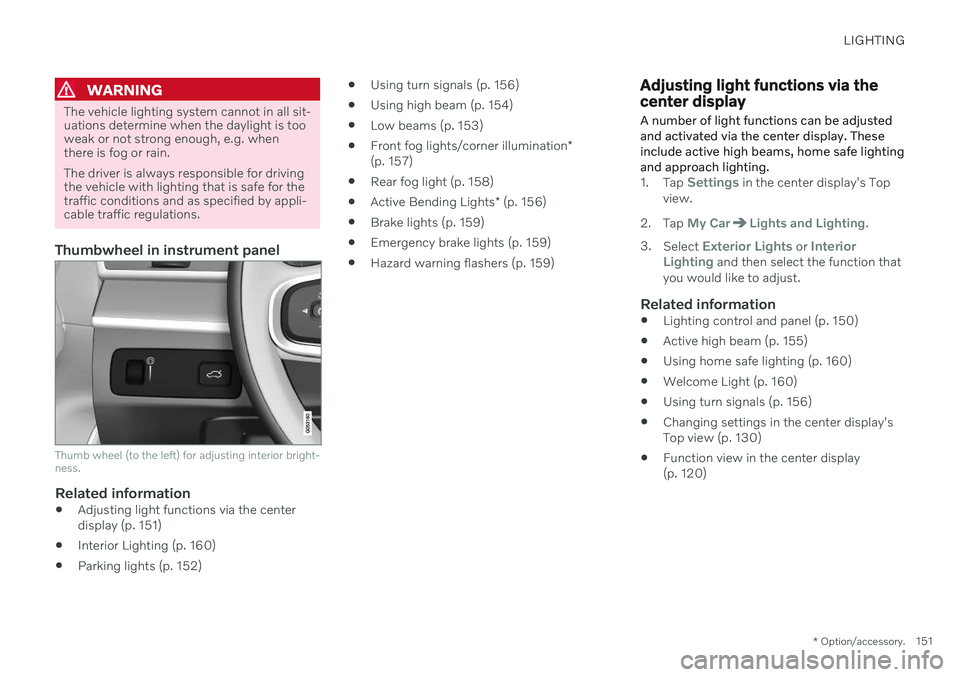
Thumbwheel in instrument panel
Thumb wheel (to the left) for adjusting interior bright- ness.
Related information
Adjusting light functions via the center display (p. 151)
Interior Lighting (p. 160)
Parking lights (p. 152)
Using turn signals (p. 156)
Using high beam (p. 154)
Low beams (p. 153)
Front fog lights/corner illumination
*
(p. 157)
Rear fog light (p. 158)
Active Bending Lights
* (p. 156)
Brake lights (p. 159)
Emergency brake lights (p. 159)
Hazard warning flashers (p. 159)
Adjusting light functions via the center display A number of light functions can be adjusted and activated via the center display. Theseinclude active high beams, home safe lightingand approach lighting.
1.
Tap Settings in the center display's Top
view.
2. Tap
My CarLights and Lighting.
3. Select
Exterior Lights or Interior
Lighting and then select the function that
you would like to adjust.
Related information
Lighting control and panel (p. 150)
Active high beam (p. 155)
Using home safe lighting (p. 160)
Welcome Light (p. 160)
Using turn signals (p. 156)
Changing settings in the center display's Top view (p. 130)
Function view in the center display(p. 120)
Page 161 of 661
LIGHTING
159
Brake lights
The brake lights are automatically illuminated when braking.
The brake lights are illuminated when the brake pedal is depressed and when the brakesare automatically applied by a driver supportsystem.
Related information
Emergency brake lights (p. 159)
Brake functions (p. 397)
Driver support systems (p. 270)
Emergency brake lights
The emergency brake lights are activated to warn following vehicles of hard braking. This function causes an additional taillight on each side of the vehicle to illuminate.
The emergency brake lights are activated in the event of hard braking or if the ABS systemis activated and the vehicle is traveling at ahigh speed. After the driver decelerates to a low speed and then releases the brake, the brake lightsresume their normal brightness.
Related information
Brake lights (p. 159)
Brakes (p. 397)
Hazard warning flashers (p. 159)
Hazard warning flashers
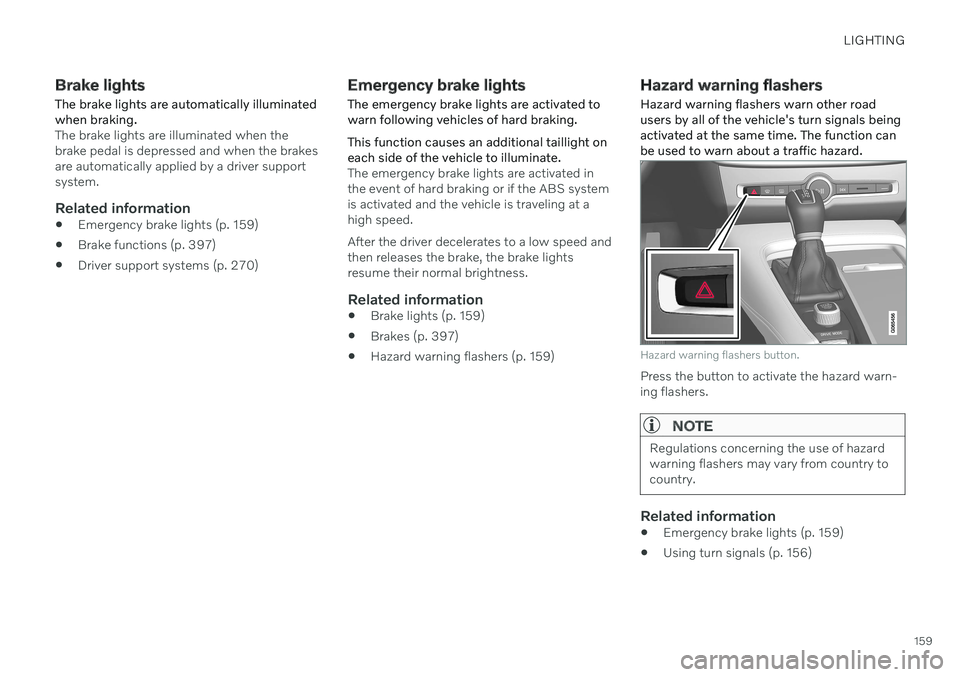
Hazard warning flashers warn other road users by all of the vehicle's turn signals beingactivated at the same time. The function canbe used to warn about a traffic hazard.
Hazard warning flashers button.
Press the button to activate the hazard warn- ing flashers.
NOTE
Regulations concerning the use of hazard warning flashers may vary from country tocountry.
Related information
Emergency brake lights (p. 159)
Using turn signals (p. 156)
Page 184 of 661
SEATS AND STEERING WHEEL
* Option/accessory.
182
Manual front seats
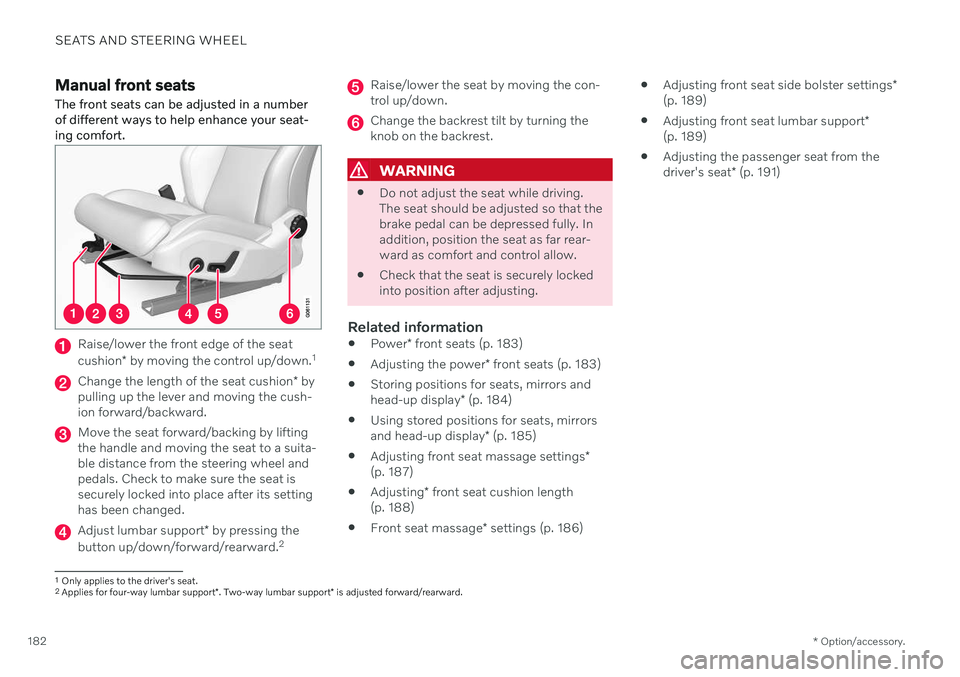
The front seats can be adjusted in a number of different ways to help enhance your seat-ing comfort.
Raise/lower the front edge of the seat cushion * by moving the control up/down. 1
Change the length of the seat cushion
* by
pulling up the lever and moving the cush- ion forward/backward.
Move the seat forward/backing by lifting the handle and moving the seat to a suita-ble distance from the steering wheel andpedals. Check to make sure the seat issecurely locked into place after its settinghas been changed.
Adjust lumbar support * by pressing the
button up/down/forward/rearward. 2
Raise/lower the seat by moving the con- trol up/down.
Change the backrest tilt by turning the knob on the backrest.
WARNING
Do not adjust the seat while driving. The seat should be adjusted so that thebrake pedal can be depressed fully. Inaddition, position the seat as far rear-ward as comfort and control allow.
Check that the seat is securely lockedinto position after adjusting.
Related information
Power
* front seats (p. 183)
Adjusting the power
* front seats (p. 183)
Storing positions for seats, mirrors and head-up display
* (p. 184)
Using stored positions for seats, mirrorsand head-up display
* (p. 185)
Adjusting front seat massage settings
*
(p. 187)
Adjusting
* front seat cushion length
(p. 188)
Front seat massage
* settings (p. 186)
Adjusting front seat side bolster settings
*
(p. 189)
Adjusting front seat lumbar support
*
(p. 189)
Adjusting the passenger seat from thedriver's seat
* (p. 191)
1
Only applies to the driver's seat.
2 Applies for four-way lumbar support *. Two-way lumbar support * is adjusted forward/rearward.
Page 188 of 661
||
SEATS AND STEERING WHEEL
* Option/accessory.
186
Front door closed
–Press and hold one of the memory buttons 1 (
) or 2 () until the seat, door mirrors
and head-up display stop in the positions stored in that memory button.
If the memory button is released, the seat,door mirrors and head-up display will stopmoving.
WARNING
This list point needs to be translated exactly to: "Because the driver's seatcan be adjusted with the ignition off,children should never be left unatten-ded in the vehicle.
Movement of the seat can be STOP-PED at any time by pressing any but-ton on the power seat control panel.
Do not adjust the seat while driving.
The seat should be adjusted so that thebrake pedal can be depressed fully. Inaddition, position the seat as far rear-ward as comfort and control allow.
The seat rails on the floor must not beobstructed in any way when the seat isin motion.
NOTE
For the stored positions to work, all driver profiles need to be in Protect Profilemode.
Related information
Manual front seats (p. 182)
Power
* front seats (p. 183)
Adjusting the power
* front seats (p. 183)
Storing positions for seats, mirrors and head-up display
* (p. 184)
Adjusting front seat massage settings
*
(p. 187)
Adjusting
* front seat cushion length
(p. 188)
Front seat massage
* settings (p. 186)
Adjusting front seat side bolster settings
*
(p. 189)
Adjusting front seat lumbar support
*
(p. 189)
Adjusting the passenger seat from thedriver's seat
* (p. 191)
Adjusting the door mirrors (p. 168)
Head-up display settings
* (p. 142)
Front seat massage * settings
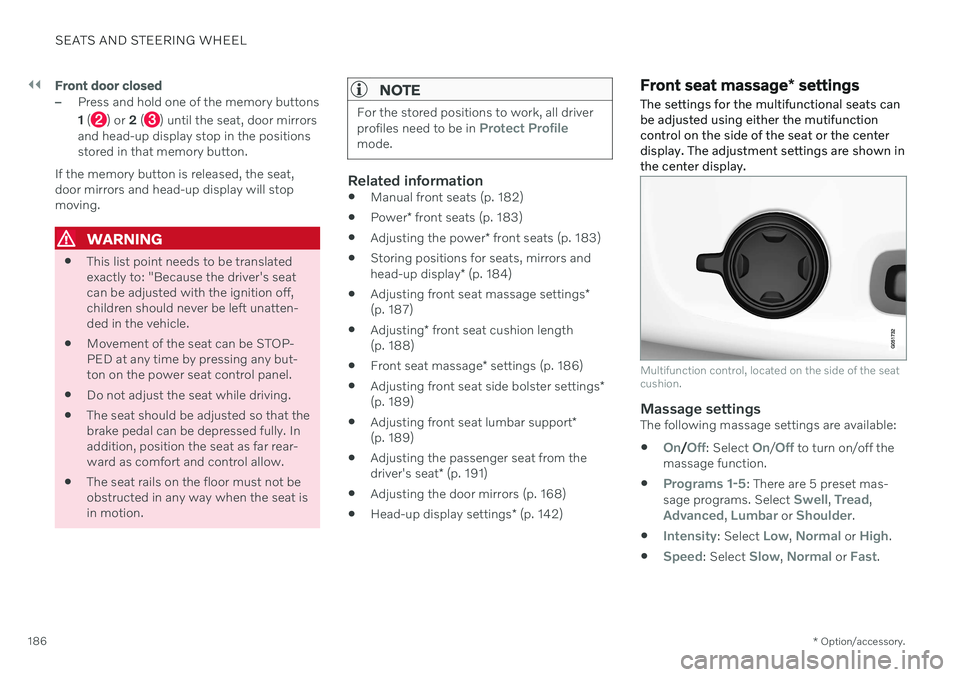
The settings for the multifunctional seats can be adjusted using either the mutifunctioncontrol on the side of the seat or the centerdisplay. The adjustment settings are shown inthe center display.
Multifunction control, located on the side of the seat cushion.
Massage settingsThe following massage settings are available:
On/Off: Select On/Off to turn on/off the
massage function.
Programs 1-5: There are 5 preset mas-
sage programs. Select Swell, Tread,Advanced, Lumbar or Shoulder.
Intensity: Select Low, Normal or High.
Speed: Select Slow, Normal or Fast.
Page 194 of 661
SEATS AND STEERING WHEEL
* Option/accessory.
192
Folding down the rear seat backrests The rear seat backrest is split into two sec- tions. The two sections can be folded forwardindividually.
WARNING
Adjust the seat and ensure it locks into position before driving. Use cautionwhen adjusting the seat. Uncontrolledor careless adjustments could lead toinjury.
Long objects must always be securelytied down to help prevent injury ordamage in the event of sudden brak-ing.
Always turn off the engine and applythe parking brake when loading orunloading the vehicle.
Put the gear selector in
P to help pre-
vent the gear selector from being inad-vertently moved.
CAUTION
When the backrest is folded down, make sure there are no objects in the rear seat,and the seat belts are not buckled. Other-wise there is a risk of damage to theupholstery.
CAUTION
The armrest * in the center seat must be
raised before the seat backrest is folded down. The ski hatch must be closed before the seat backrest is folded down.
NOTE
The front seats may need to be pushed for- ward and/or the backrest adjusted so thatthe rear seat backrests can be fully low-ered.
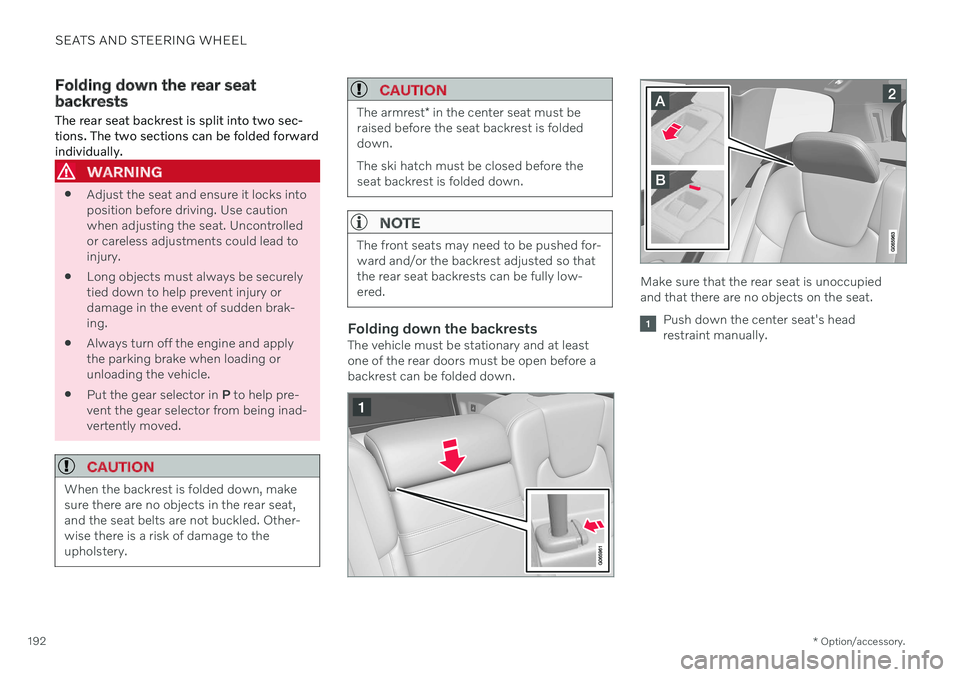
Folding down the backrestsThe vehicle must be stationary and at least one of the rear doors must be open before abackrest can be folded down.
Make sure that the rear seat is unoccupied and that there are no objects on the seat.
Push down the center seat's head restraint manually.
Page 272 of 661

DRIVER SUPPORT
* Option/accessory.
270
Driver support systems
The vehicle is equipped with a number of driver support systems that can provide thedriver with active or passive assistance in var-ious situations.
The systems can, for example, help the driver:
maintain a set speed
maintain a set time interval to the vehicle ahead
help prevent a collision by warning thedriver and applying the brakes
park the vehicle.
Some of the systems are standard and othersare options. This also varies from market tomarket.
Related information
IntelliSafe – driver support and safety(p. 29)
Speed-dependent steering wheel resis-tance (p. 270)
Electronic Stability Control (p. 271)
Connected Safety (p. 276)
City Safety
™ (p. 323)
Road Sign Information
* (p. 278)
Cruise control (p. 283)
Adaptive Cruise Control
* (p. 286)
Pilot Assist
* (p. 296)
Curve Speed Assist (CSA)
* (p. 308)
Passing assistance
* (p. 310)
Lane Keeping Aid (p. 316)
Steering assistance at risk of collision(p. 337)
Rear Collision Warning
* (p. 343)
BLIS
* (p. 344)
Driver Alert Control (p. 348)
Distance Alert
* (p. 350)
Cross Traffic Alert
* (p. 352)
Park Assist
* (p. 356)
Park Assist Camera
* (p. 361)
Radar sensor (p. 380)
Camera (p. 383)
Speed-dependent steering wheel resistance Speed-dependent power steering increases the steering wheel resistance in pace withthe vehicle's speed, which can help give thedriver an enhanced feeling of control and sta-bility. Steering is stiffer on highways. Whenparking and at low speeds, it will be easier tomove the steering wheel.
Reduced powerIn rare situations, the power steering may need to work at reduced power and the steer-ing wheel may then feel more difficult tomove. This may happen when the powersteering becomes too hot and needs to betemporarily cooled. It can also happen if thereis a disturbance in power supply.
If there is reduced power, the message
Power steering
Assistance temporarily reduced
and this symbol are
shown in the instrument panel.
While the power steering is working at reduced power, the driver support functionsand systems with steering assistance are notavailable.