carplay VOLVO V60 2021 Owners Manual
[x] Cancel search | Manufacturer: VOLVO, Model Year: 2021, Model line: V60, Model: VOLVO V60 2021Pages: 661, PDF Size: 12.68 MB
Page 12 of 661
10
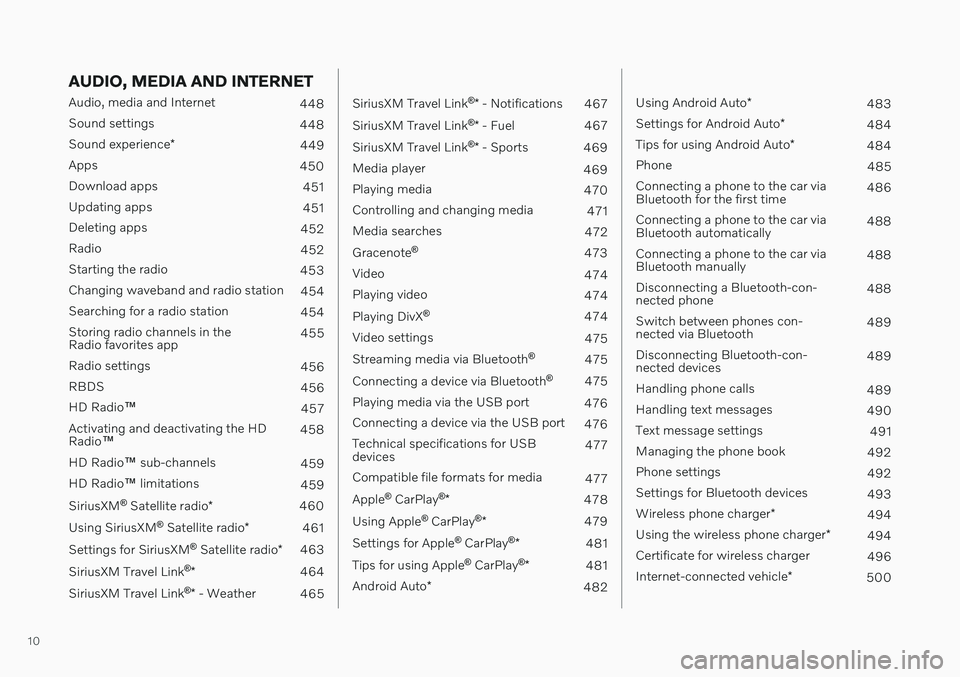
AUDIO, MEDIA AND INTERNET
Audio, media and Internet448
Sound settings 448
Sound experience *
449
Apps 450
Download apps 451
Updating apps 451
Deleting apps 452
Radio 452
Starting the radio 453
Changing waveband and radio station 454
Searching for a radio station 454
Storing radio channels in the Radio favorites app 455
Radio settings 456
RBDS 456
HD Radio ™
457
Activating and deactivating the HDRadio ™ 458
HD Radio ™ sub-channels
459
HD Radio ™ limitations
459
SiriusXM ®
Satellite radio *
460
Using SiriusXM ®
Satellite radio *
461
Settings for SiriusXM ®
Satellite radio *
463
SiriusXM Travel Link ®
* 464
SiriusXM Travel Link ®
* - Weather
465
SiriusXM Travel Link ®
* - Notifications
467
SiriusXM Travel Link ®
* - Fuel
467
SiriusXM Travel Link ®
* - Sports
469
Media player 469
Playing media 470
Controlling and changing media 471
Media searches 472
Gracenote ®
473
Video 474
Playing video 474
Playing DivX ®
474
Video settings 475
Streaming media via Bluetooth ®
475
Connecting a device via Bluetooth ®
475
Playing media via the USB port 476
Connecting a device via the USB port 476
Technical specifications for USB devices 477
Compatible file formats for media 477
Apple ®
CarPlay ®
* 478
Using Apple ®
CarPlay ®
* 479
Settings for Apple ®
CarPlay ®
* 481
Tips for using Apple ®
CarPlay ®
* 481
Android Auto *
482
Using Android Auto*
483
Settings for Android Auto *
484
Tips for using Android Auto *
484
Phone 485
Connecting a phone to the car via Bluetooth for the first time 486
Connecting a phone to the car viaBluetooth automatically 488
Connecting a phone to the car viaBluetooth manually 488
Disconnecting a Bluetooth-con-nected phone 488
Switch between phones con-nected via Bluetooth 489
Disconnecting Bluetooth-con-nected devices 489
Handling phone calls 489
Handling text messages 490
Text message settings 491
Managing the phone book 492
Phone settings 492
Settings for Bluetooth devices 493
Wireless phone charger *
494
Using the wireless phone charger *
494
Certificate for wireless charger 496
Internet-connected vehicle *
500
Page 135 of 661
DISPLAYS AND VOICE CONTROL
}}
* Option/accessory.133
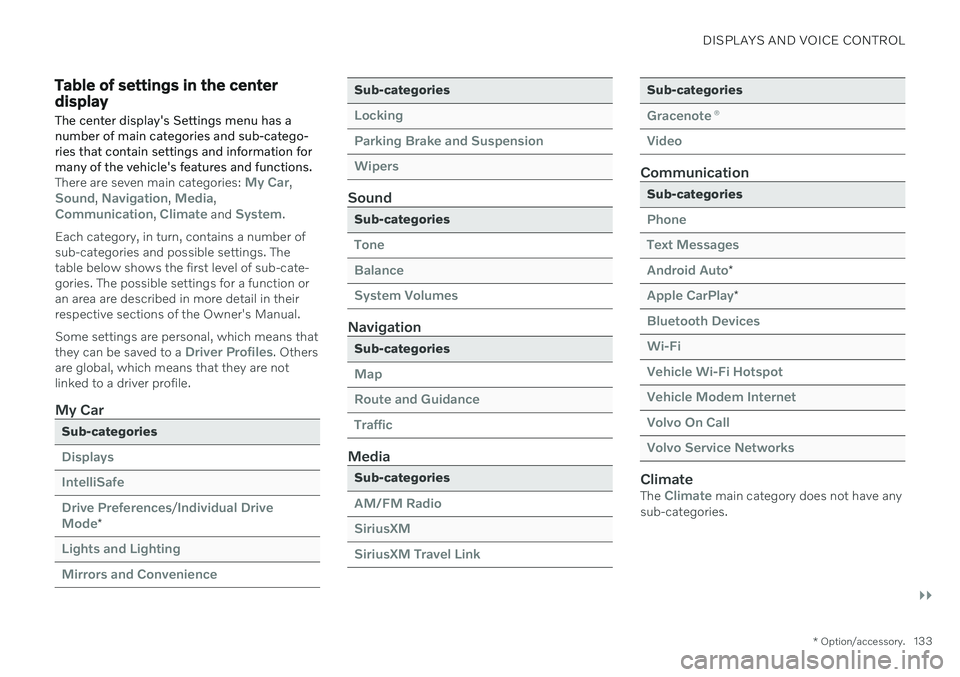
Table of settings in the center display
The center display's Settings menu has a number of main categories and sub-catego-ries that contain settings and information formany of the vehicle's features and functions.
There are seven main categories: My Car,Sound, Navigation, Media,Communication, Climate and System.
Each category, in turn, contains a number of sub-categories and possible settings. Thetable below shows the first level of sub-cate-gories. The possible settings for a function oran area are described in more detail in theirrespective sections of the Owner's Manual. Some settings are personal, which means that they can be saved to a
Driver Profiles. Others
are global, which means that they are not linked to a driver profile.
My Car
Sub-categories
Displays IntelliSafeDrive Preferences
/Individual Drive
Mode*
Lights and Lighting Mirrors and Convenience
Sub-categories
Locking Parking Brake and SuspensionWipers
Sound
Sub-categories
Tone BalanceSystem Volumes
Navigation
Sub-categories
Map Route and GuidanceTraffic
Media
Sub-categories
AM/FM Radio SiriusXMSiriusXM Travel Link
Sub-categories
Gracenote ®
Video
Communication
Sub-categories
Phone Text MessagesAndroid Auto
*
Apple CarPlay*
Bluetooth Devices Wi-FiVehicle Wi-Fi Hotspot Vehicle Modem Internet Volvo On Call Volvo Service Networks
ClimateThe Climate main category does not have any
sub-categories.
Page 452 of 661
AUDIO, MEDIA AND INTERNET
* Option/accessory.
450
Apps
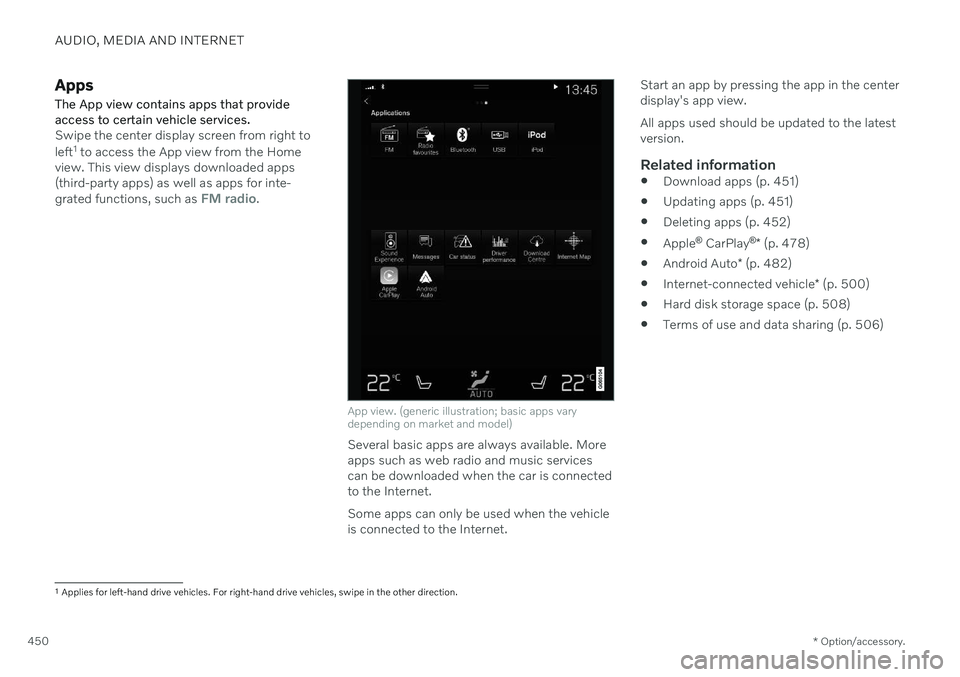
The App view contains apps that provide access to certain vehicle services.
Swipe the center display screen from right to left 1
to access the App view from the Home
view. This view displays downloaded apps (third-party apps) as well as apps for inte- grated functions, such as
FM radio.
App view. (generic illustration; basic apps vary depending on market and model)
Several basic apps are always available. More apps such as web radio and music servicescan be downloaded when the car is connectedto the Internet. Some apps can only be used when the vehicle is connected to the Internet. Start an app by pressing the app in the centerdisplay's app view. All apps used should be updated to the latest version.
Related information
Download apps (p. 451)
Updating apps (p. 451)
Deleting apps (p. 452)
Apple ®
CarPlay ®
* (p. 478)
Android Auto
* (p. 482)
Internet-connected vehicle
* (p. 500)
Hard disk storage space (p. 508)
Terms of use and data sharing (p. 506)
1
Applies for left-hand drive vehicles. For right-hand drive vehicles, swipe in the other direction.
Page 473 of 661
AUDIO, MEDIA AND INTERNET
}}
* Option/accessory.471
Media with Internet connection
Medial playback from apps with Internet con- nection:
1. Connect the vehicle to the Internet.
2. Open the app from the App view.
> Playback will begin.
Read the separate section on how to down- load apps.
Video
1. Connect a media source. 2. Open the
USB app from App view.
3. Tap the title you would like to play. > Playback will begin.
Apple CarPlay
CarPlay is described in a separate section.
Android Auto
Android Auto is described in a separate sec- tion.
Related information
Handling the App menu in the instrumentpanel (p. 103)
Radio (p. 452)
Controlling and changing media (p. 471)
Connecting a device via the USB port(p. 476)
Connecting a device via Bluetooth ®
(p. 475)
Download apps (p. 451)
Internet-connected vehicle
* (p. 500)
Video (p. 474)
Apple ®
CarPlay ®
* (p. 478)
Android Auto
* (p. 482)
Voice control for radio and media (p. 147)
Compatible file formats for media (p. 477)
Controlling and changing media
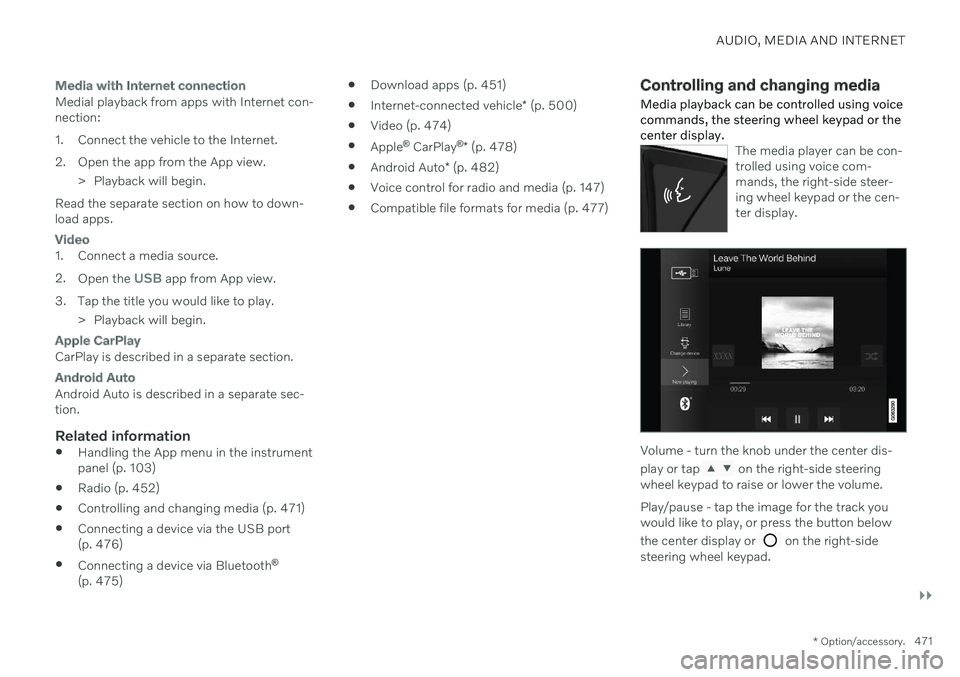
Media playback can be controlled using voice commands, the steering wheel keypad or thecenter display.
The media player can be con- trolled using voice com-mands, the right-side steer-ing wheel keypad or the cen-ter display.
Volume - turn the knob under the center dis- play or tap
on the right-side steering
wheel keypad to raise or lower the volume. Play/pause - tap the image for the track you would like to play, or press the button below the center display or
on the right-side
steering wheel keypad.
Page 478 of 661

AUDIO, MEDIA AND INTERNET
* Option/accessory.
476
Playing media via the USB port
External audio sources, such as an iPod ® or
MP3 player, can be connected to the audio system via the vehicle's USB port.
Devices with rechargeable batteries can be charged when they are connected via the USBport and the ignition is in mode I, II or the
engine is running. The content on the external source can be read faster if it only contains data of a compat-ible format. Video files can also be played viathe USB port. Some MP3 players have their own file system that the vehicle has support for.
Related information
Connecting a device via the USB port(p. 476)
Playing media (p. 470)
Video (p. 474)
Ignition modes (p. 395)
Technical specifications for USB devices(p. 477)
Apple ®
CarPlay ®
* (p. 478)
Android Auto
* (p. 482)
Connecting a device via the USB port
External audio sources, such as an iPod ®
or
MP3 player, can be connected to the audio system via any of the vehicle's USB ports.
If the vehicle has two USB ports, the phone must be connected to the port with the white frame to use Apple CarPlay * or Android Auto *.
USB ports (type A) in the tunnel console. Route the cable forward to help avoid pinching when the coveris closed.
USB ports (type C) on rear of tunnel console for charging phones, tablets, etc. 7
.
Related information
Playing media (p. 470)
Playing media via the USB port (p. 476)
Media player (p. 469)
Technical specifications for USB devices (p. 477)
Technical specifications for USB devices(p. 477)
Apple ®
CarPlay ®
* (p. 478)
Android Auto
* (p. 482)
7
It is not possible to playback media in the car's audio or media system via this input.
Page 480 of 661
||
AUDIO, MEDIA AND INTERNET
* Option/accessory.
478
Format File extension
AVI .avi
AVI (DivX) .avi, .divx
ASF .asf, .wmv
Subtitles
Format File extension
SubViewer .sub
SubRip .srt
SSA .ssa
DivX ®
DivX-certified devices have been tested for high-quality DivX (.divx, .avi) video playback.When you see the DivX logo, you have thefreedom to play your favorite DivX videos.
Profile DivX Home Theater
Video codec DivX, MPEG-4
Resolution 720x576Audio speed (bit rate) 4.8Mbps
Frame rate 30 fps
File extension .divx, .avi
Max. file size 4 GB
Audio codec MP3, AC3
Subtitles XSUBSpecial func- tions Multiple subtitles, multi-ple audio, resume play
Reference Meets all requirements of the DivX Home Theaterprofile. Visit divx.com formore information andsoftware tools to convertyour files into DivX HomeTheater video.
Related information
Media player (p. 469)
Video (p. 474)
Playing DivX ®
(p. 474)
Apple ®
CarPlay ®
*
With CarPlay 8
, you can listen to music, make
phone calls, get driving instructions, send/ receive messages and use Siri, all whileremaining focused on driving.
CarPlay works with select iOS devices. If the car doesnot already support CarPlay,this can be retrofitted. Con-tact a Volvo retailer to installCarPlay.
Information about supported apps and com- patible iOS devices are available on the Applewebsite: www.apple.com/ios/carplay/. Usingapps that are not compatible with CarPlaymay sometimes mean that the connectionbetween the device and the vehicle is broken.Please note that Volvo is not responsible forthe content of CarPlay. When using map navigation via CarPlay, guid- ance will only be shown on the center displayand not in the instrument panel or head-updisplay. When navigation is started through Apple CarPlay, any current route guidance from thevehicle's own systems will be discontinued. CarPlay apps can be controlled from the cen- ter display, an iOS device or with the right-side steering wheel keypad (for certain func-tions). The apps can also be voice-controlled
Page 481 of 661
AUDIO, MEDIA AND INTERNET
}}
* Option/accessory.479
using Siri. Press and hold the
button on
the steering wheel to start voice control with Siri. Press briefly to activate the vehicle's ownvoice control system. If Siri cuts off too soon, press and hold the
9 button on the steer-
ing wheel..
By using Apple CarPlay you acknowledge the following: Apple CarPlay is a serviceprovided by Apple Inc. under its terms andconditions. Volvo Cars is thus notresponsible for Apple CarPlay or itsfeatures/applications. When using AppleCarPlay, certain information from your car(including its position) is transferred toyour iPhone. In relation to Volvo Cars, youare fully responsible for your and anyothers person
Page 482 of 661
||
AUDIO, MEDIA AND INTERNET
* Option/accessory.
480
Starting CarPlay
To start CarPlay from an iOS device that has previously been connected:
1. Connect an iOS device to the USB port. If
there are two USB ports, use the one with the white frame. >If the auto start setting is selected –
the name of the device will be dis- played. The CarPlay tile will open auto-matically when Home view is displayedwhen the iOS device is connected.
2. If the CarPlay tile does not open automati- cally, tap the name of the device. TheCarPlay tile will open and compatible appswill be displayed.
3. If any other app is active in the same tile, tap
Apple CarPlay in App view.
> The CarPlay tile will open and compati- ble apps will be displayed.
4. Tap the desired app. > The app will start up.
CarPlay will run in the background if another app is started, or is already active when thedevice is connected, in the same view. To dis-play CarPlay in the tile, tap the CarPlay icon inApp view.
Switching connection between CarPlay and iPod
CarPlay to iPod
1.
Tap Settings in the Top view.
2. Proceed to
CommunicationApple
CarPlay.
3. Uncheck the box for the iOS device that should no longer start CarPlay automati- cally when the USB cable is connected.
4. Remove and then reinsert the iOS device into the USB port.
5. Open the
iPod app from App view.
iPod to CarPlay
1.
Tap Apple CarPlay in App view.
2. Read the information in the pop-up win- dow and then tap
OK.
3. Remove and then reinsert the iOS device into the USB port.
> The Apple CarPlay tile will open and
compatible apps will be displayed 11
.
Related information
Connecting a device via the USB port (p. 476)
Apple ®
CarPlay ®
* (p. 478)
Settings for Apple ®
CarPlay ®
* (p. 481)
Connecting the vehicle to the Internet viaa phone (Wi-Fi) (p. 501)
Connecting the vehicle to the Internet viavehicle modem (SIM card) (p. 502)
Voice Control (p. 143)
11
Apple, CarPlay, iPhone and iPod are registered trademarks of Apple Inc.
Page 483 of 661
AUDIO, MEDIA AND INTERNET
}}
* Option/accessory.481
Settings for Apple ®
CarPlay ®
*
Settings for an iOS device connected through CarPlay 12
,13
.
Automatic start1. Tap Settings in the Top view.
2. Tap
CommunicationApple CarPlayand select the desired setting: Check the box - CarPlay will start auto- matically when the USB cable is con-nected.
Uncheck the box - CarPlay will not startautomatically when the USB cable isconnected.
A maximum of 20 iOS devices can be storedin the list, which may be worth noting if manypeople share the vehicle, e.g. in a car pool.When the list is full and a new device is con-nected, the oldest one will be deleted. To delete the list, the settings must be rest in the center display (factory reset).
System Volumes1. Tap Settings in the Top view. 2. Tap
SoundSystem Volumes to
change the settings for the following:
Voice Control
Navi Voice Guidance
Phone Ringtone
Related information
Apple ®
CarPlay ®
* (p. 478)
Using Apple ®
CarPlay ®
* (p. 479)
Resetting center display settings (p. 132)
Tips for using Apple ®
CarPlay ®
*
Here are some useful tips for when you use CarPlay ®
14
.
Update your iOS device with the latest version of the iOS operating system andensure that the apps have been updated.
In the event of a problem with CarPlay,unplug the iOS device from the USB portand then plug it in again. Otherwise, try toclose the app on the device that is notworking and then restart the app, or tryclosing all apps and restart your device.
If the apps do not appear when CarPlaystarts (black screen), try minimizing andexpanding the tile for CarPlay.
Using apps that are not compatible withCarPlay may sometimes cause the con-nection between the iOS device and thevehicle to be broken. Information aboutsupported apps and compatible devicescan be found on Apple's website. You canalso search for CarPlay in the App Store tofind information about apps that are com-patible with CarPlay in your market.
You can use Siri to write or dictate mes-sages or have them read aloud. Messagesare read aloud and dictated in the lan-guage selected in the Siri settings. When
12
Apple and CarPlay are registered trademarks of Apple Inc.
13 Availability may vary depending on market.
14 Availability may vary depending on market.
Page 484 of 661
||
AUDIO, MEDIA AND INTERNET
* Option/accessory.
482 you write/dictate messages, no text will be shown in the vehicle's center display,but the text will be shown in your iOSdevice. When using Siri, note that it is thephone's microphones that are used andthe quality therefore depends on thephone's location.
If the device is connected to the vehiclethrough Bluetooth, the connection will bebroken when CarPlay is used. ResumeInternet connection in the vehicle by teth-ering using the device's Wi-Fi hotspot.
Some of CarPlay's functions (such asvoice calls and messages) interrupt theuse of the vehicle's own functions andCarPlay will instead be automatically dis-played. If you do not wish this to happen,deselect display of the correspondingfunction in CarPlay under the phone'snotification settings.
CarPlay only works with iPhone 15
.
NOTE
Availability and functionality can vary depending on market.
Related information
Apple ®
CarPlay ®
* (p. 478)
Connecting the vehicle to the Internet via a phone (Wi-Fi) (p. 501)
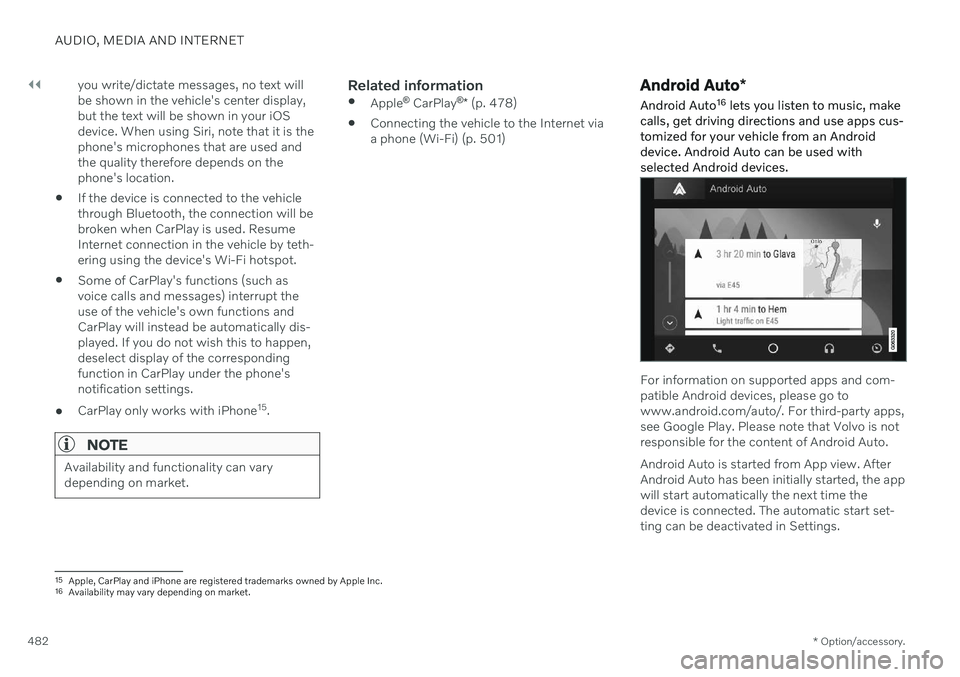
Android Auto
*
Android Auto 16
lets you listen to music, make
calls, get driving directions and use apps cus- tomized for your vehicle from an Androiddevice. Android Auto can be used withselected Android devices.
For information on supported apps and com- patible Android devices, please go towww.android.com/auto/. For third-party apps,see Google Play. Please note that Volvo is notresponsible for the content of Android Auto. Android Auto is started from App view. After Android Auto has been initially started, the appwill start automatically the next time thedevice is connected. The automatic start set-ting can be deactivated in Settings.
15 Apple, CarPlay and iPhone are registered trademarks owned by Apple Inc.
16 Availability may vary depending on market.