light VOLVO V60 2021 User Guide
[x] Cancel search | Manufacturer: VOLVO, Model Year: 2021, Model line: V60, Model: VOLVO V60 2021Pages: 661, PDF Size: 12.68 MB
Page 82 of 661
DISPLAYS AND VOICE CONTROL
* Option/accessory.
80
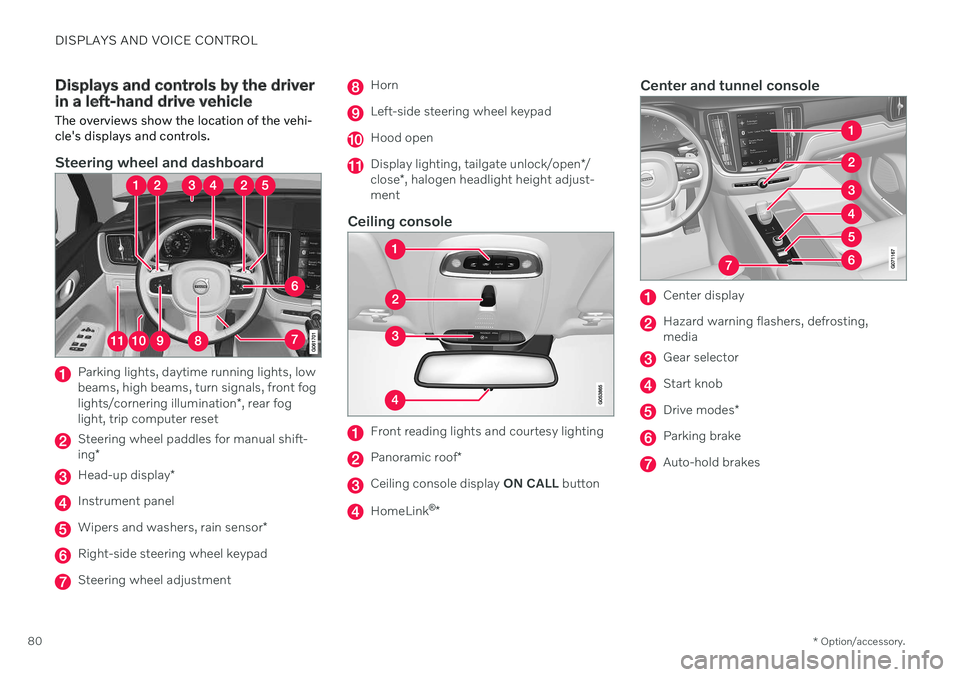
Displays and controls by the driver in a left-hand drive vehicle
The overviews show the location of the vehi- cle's displays and controls.
Steering wheel and dashboard
Parking lights, daytime running lights, low beams, high beams, turn signals, front fog lights/cornering illumination *, rear fog
light, trip computer reset
Steering wheel paddles for manual shift- ing *
Head-up display *
Instrument panel
Wipers and washers, rain sensor *
Right-side steering wheel keypad
Steering wheel adjustment
Horn
Left-side steering wheel keypad
Hood open
Display lighting, tailgate unlock/open */
close *, halogen headlight height adjust-
ment
Ceiling console
Front reading lights and courtesy lighting
Panoramic roof *
Ceiling console display ON CALL button
HomeLink ®
*
Center and tunnel console
Center display
Hazard warning flashers, defrosting, media
Gear selector
Start knob
Drive modes *
Parking brake
Auto-hold brakes
Page 83 of 661
DISPLAYS AND VOICE CONTROL
* Option/accessory.81
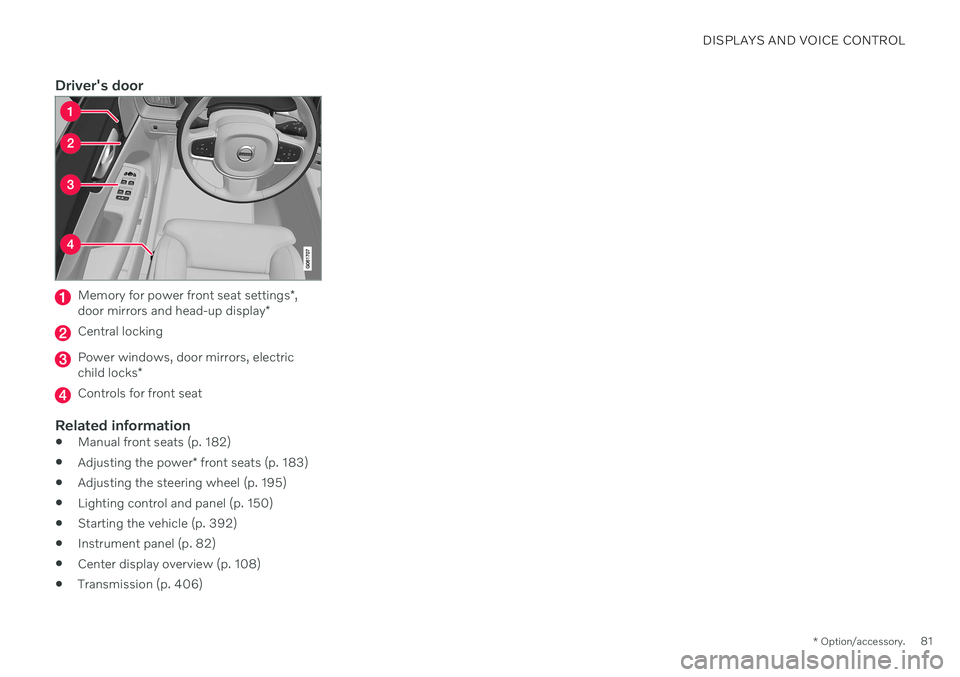
Driver's door
Memory for power front seat settings *,
door mirrors and head-up display *
Central locking
Power windows, door mirrors, electric child locks*
Controls for front seat
Related information
Manual front seats (p. 182)
Adjusting the power
* front seats (p. 183)
Adjusting the steering wheel (p. 195)
Lighting control and panel (p. 150)
Starting the vehicle (p. 392)
Instrument panel (p. 82)
Center display overview (p. 108)
Transmission (p. 406)
Page 89 of 661

DISPLAYS AND VOICE CONTROL
}}
87
Fuel gauge The fuel gauge in the instrument panel shows the fuel level in the tank.
The illustration is generic - details may vary accord- ing to vehicle model.
Fuel gauge in 12" instrument panel: The beige area in the fuel gauge indicates the amount of fuel left in the tank. When the fuel level is low, the fuel pump sym- bol will illuminate with an amber-colored light.The trip computer also indicates the approxi-mate distance that can be driven on the fuelremaining in the tank.
The illustration is generic - details may vary accord- ing to vehicle model.
Fuel gauge in 8" instrument panel: The bars in the fuel gauge indicate the amount of fuel left in the tank. When the fuel level is low, the fuel pump sym- bol will illuminate with an amber-colored light.The trip computer also indicates the approxi-mate distance that can be driven on the fuelremaining in the tank.
Related information
Instrument panel (p. 82)
Refueling (p. 426)
Fuel tank volume (p. 637)
Trip computer
The vehicle's trip computer registers data while driving such as mileage, fuel consump-tion and average speed.
To help promote fuel-efficient driving, data is recorded on both current and average fuelconsumption. Data from the trip computer canbe displayed in the instrument panel.
Page 94 of 661
DISPLAYS AND VOICE CONTROL
* Option/accessory.
92
Date and time The clock is displayed in both the instrument panel and the center display.
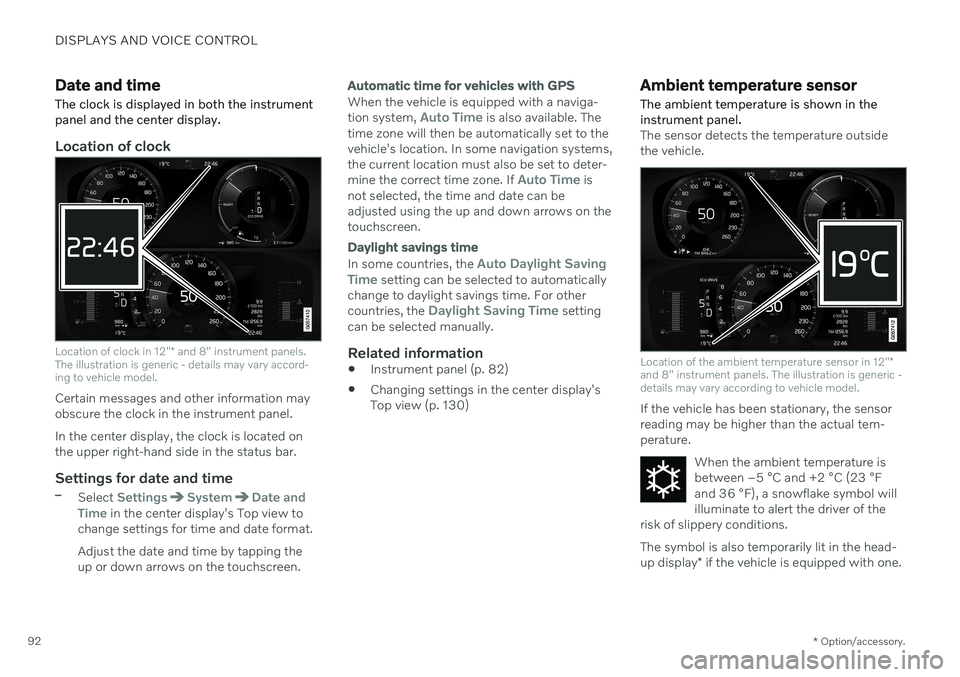
Location of clock
Location of clock in 12" * and 8" instrument panels.
The illustration is generic - details may vary accord- ing to vehicle model.
Certain messages and other information may obscure the clock in the instrument panel. In the center display, the clock is located on the upper right-hand side in the status bar.
Settings for date and time–Select SettingsSystemDate and
Time in the center display's Top view to
change settings for time and date format. Adjust the date and time by tapping the up or down arrows on the touchscreen.
Automatic time for vehicles with GPS
When the vehicle is equipped with a naviga- tion system, Auto Time is also available. The
time zone will then be automatically set to the vehicle's location. In some navigation systems,the current location must also be set to deter- mine the correct time zone. If
Auto Time is
not selected, the time and date can be adjusted using the up and down arrows on thetouchscreen.
Daylight savings time
In some countries, the Auto Daylight Saving
Time setting can be selected to automatically
change to daylight savings time. For other countries, the
Daylight Saving Time setting
can be selected manually.
Related information
Instrument panel (p. 82)
Changing settings in the center display's Top view (p. 130)
Ambient temperature sensor
The ambient temperature is shown in the instrument panel.
The sensor detects the temperature outside the vehicle.
Location of the ambient temperature sensor in 12" *
and 8" instrument panels. The illustration is generic - details may vary according to vehicle model.
If the vehicle has been stationary, the sensor reading may be higher than the actual tem-perature.
When the ambient temperature isbetween –5 °C and +2 °C (23 °F
and 36 °F), a snowflake symbol will
illuminate to alert the driver of the
risk of slippery conditions. The symbol is also temporarily lit in the head- up display * if the vehicle is equipped with one.
Page 95 of 661
DISPLAYS AND VOICE CONTROL
}}
93
Change the measurement standard for the temperature sensor etc. via system settings inthe center display's Top view.
Related information
Instrument panel (p. 82)
Changing system units of measurement(p. 130)
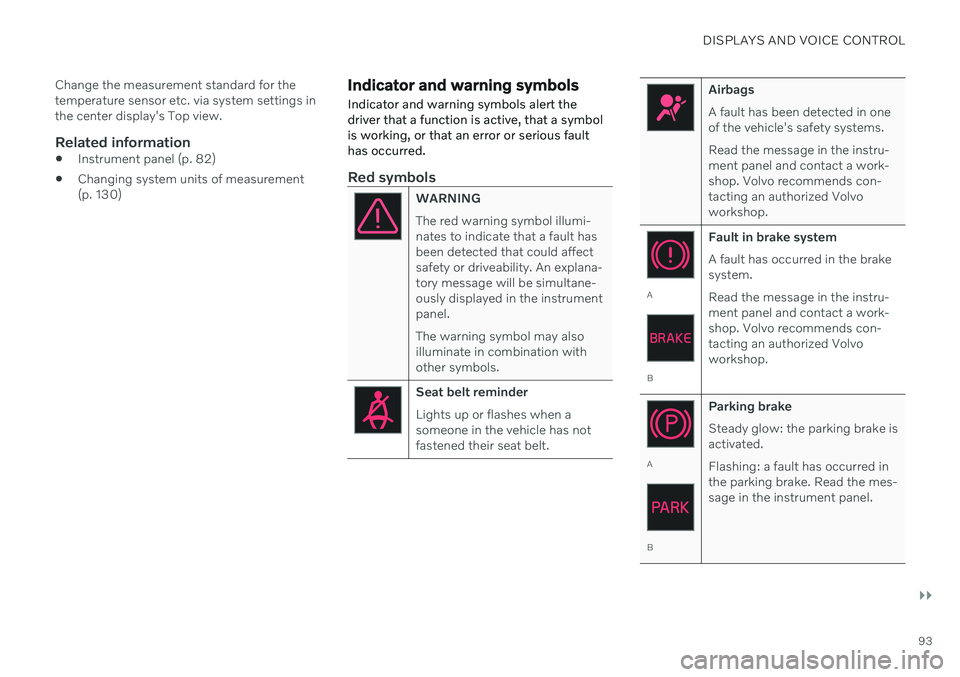
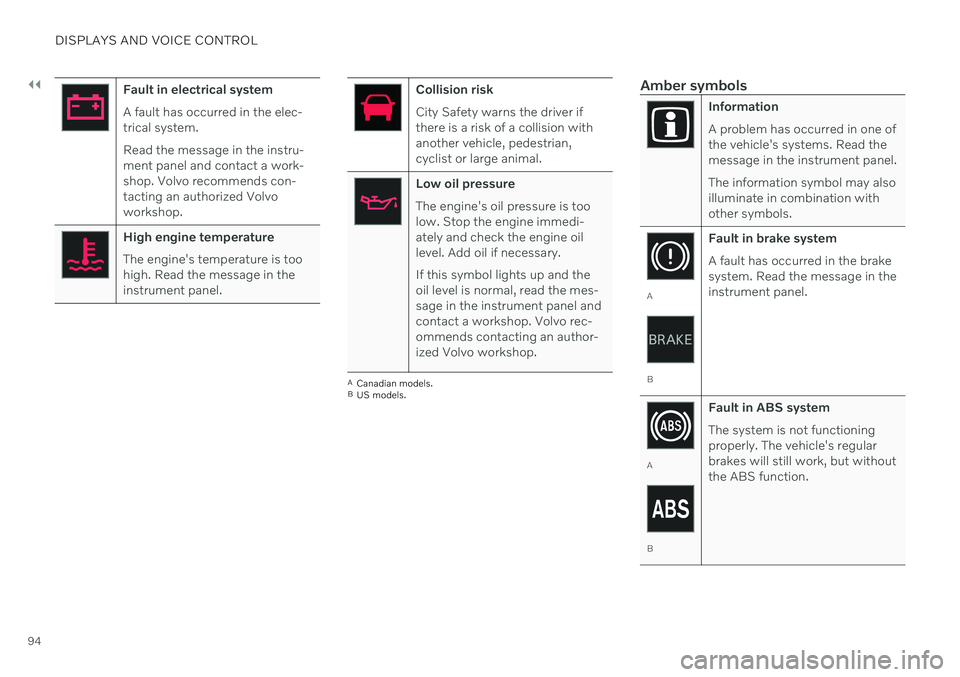
Indicator and warning symbols Indicator and warning symbols alert the driver that a function is active, that a symbolis working, or that an error or serious faulthas occurred.
Red symbols
WARNING The red warning symbol illumi- nates to indicate that a fault hasbeen detected that could affectsafety or driveability. An explana-tory message will be simultane-ously displayed in the instrumentpanel. The warning symbol may also illuminate in combination withother symbols.
Seat belt reminder Lights up or flashes when a someone in the vehicle has notfastened their seat belt.
Airbags A fault has been detected in one of the vehicle's safety systems. Read the message in the instru- ment panel and contact a work-shop. Volvo recommends con-tacting an authorized Volvoworkshop.
A
B Fault in brake system A fault has occurred in the brake system. Read the message in the instru- ment panel and contact a work-shop. Volvo recommends con-tacting an authorized Volvoworkshop.
A
B
Parking brake Steady glow: the parking brake is activated. Flashing: a fault has occurred in the parking brake. Read the mes-sage in the instrument panel.
Page 96 of 661
||
DISPLAYS AND VOICE CONTROL
94
Fault in electrical system A fault has occurred in the elec- trical system. Read the message in the instru- ment panel and contact a work-shop. Volvo recommends con-tacting an authorized Volvoworkshop.
High engine temperature The engine's temperature is too high. Read the message in theinstrument panel.
Collision risk City Safety warns the driver if there is a risk of a collision withanother vehicle, pedestrian,cyclist or large animal.
Low oil pressure The engine's oil pressure is too low. Stop the engine immedi-ately and check the engine oillevel. Add oil if necessary. If this symbol lights up and the oil level is normal, read the mes-sage in the instrument panel andcontact a workshop. Volvo rec-ommends contacting an author-ized Volvo workshop.
ACanadian models.
B US models.
Amber symbols
Information A problem has occurred in one of the vehicle's systems. Read themessage in the instrument panel. The information symbol may also illuminate in combination withother symbols.
A
B Fault in brake system A fault has occurred in the brake system. Read the message in theinstrument panel.
A
B
Fault in ABS system The system is not functioning properly. The vehicle's regularbrakes will still work, but withoutthe ABS function.
Page 97 of 661
DISPLAYS AND VOICE CONTROL
}}
95
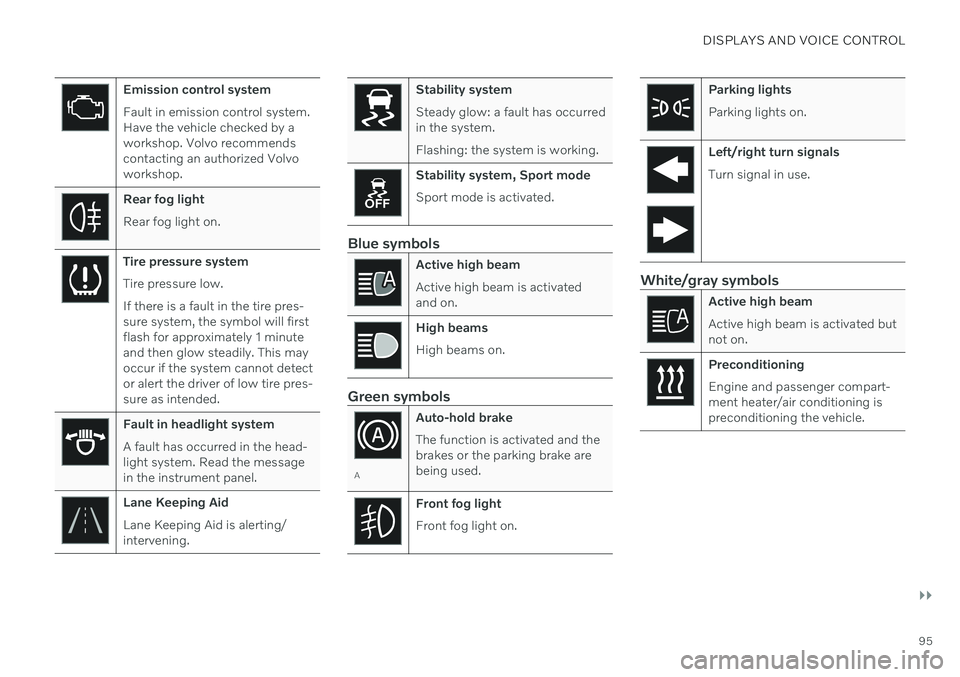
Emission control system Fault in emission control system. Have the vehicle checked by aworkshop. Volvo recommendscontacting an authorized Volvoworkshop.
Rear fog light Rear fog light on.
Tire pressure system Tire pressure low. If there is a fault in the tire pres- sure system, the symbol will firstflash for approximately 1 minuteand then glow steadily. This mayoccur if the system cannot detector alert the driver of low tire pres-sure as intended.
Fault in headlight system A fault has occurred in the head- light system. Read the messagein the instrument panel.
Lane Keeping Aid Lane Keeping Aid is alerting/ intervening.
Stability system Steady glow: a fault has occurred in the system. Flashing: the system is working.
Stability system, Sport mode Sport mode is activated.
Blue symbols
Active high beam Active high beam is activated and on.
High beams High beams on.
Green symbols
AAuto-hold brake The function is activated and the brakes or the parking brake arebeing used.
Front fog light Front fog light on.
Parking lights Parking lights on.
Left/right turn signals Turn signal in use.
White/gray symbols
Active high beam Active high beam is activated but not on.
Preconditioning Engine and passenger compart- ment heater/air conditioning ispreconditioning the vehicle.
Page 112 of 661

DISPLAYS AND VOICE CONTROL
110
Handling the center displayMany of the vehicle's functions and features can be controlled and adjusted from the cen-ter display. The center display is atouchscreen that reacts to taps and othergestures.
Using the center display's touchscreen
The screen reacts differently depending on whether it is touched by dragging, swiping or tapping. It is possible to e.g. move betweendifferent views, mark objects and scroll in alist by touching the screen in various ways. An infrared light curtain just above the surface of the screen enables the screen to detectwhen a finger is directly in front of the screen.This technology makes it possible to use thescreen even while wearing gloves. Two people can interact with the screen at the same time, e.g. to adjust climate system set-tings for both the driver and passenger sides.
CAUTION
Do not use sharp objects on the screen as this could cause scratches.
The following table presents the various pro- cedures for using the screen:
Procedure Gesture Result
Tap once. Marks an object, confirms a selection or activates a function.
Double-tap. Zooms in on a digital object, such as a map.
Press and hold. Grabs hold of an object so it can be moved. Can be used to move apps or points on a map. Press and hold
your finger on the screen and drag the object to the desired position.
Tap once with two fingers.Zooms out from a digital object, such as a map.
Page 122 of 661
DISPLAYS AND VOICE CONTROL
120
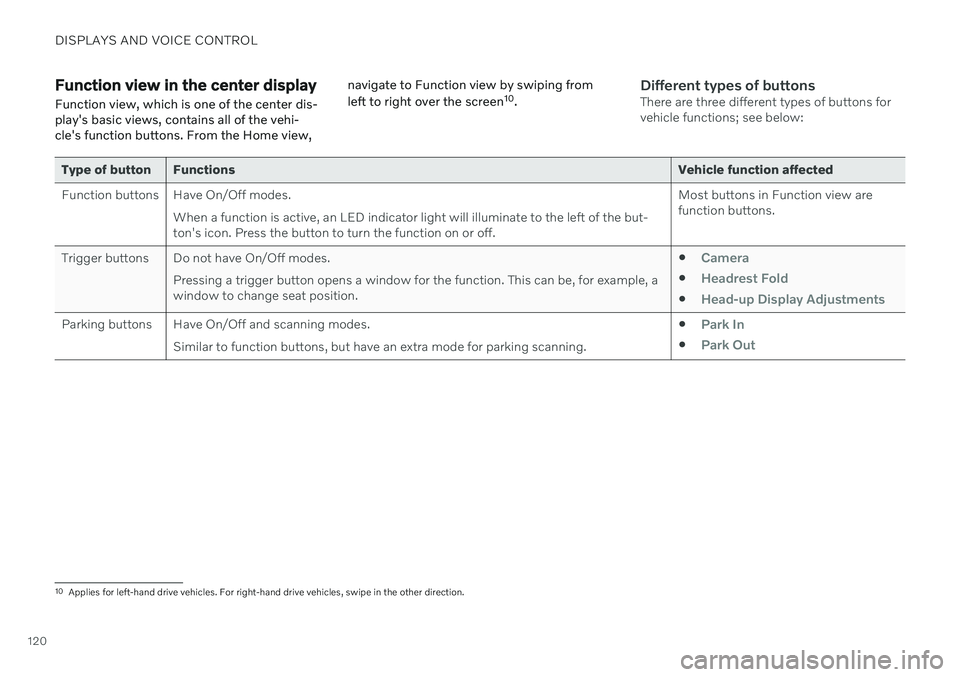
Function view in the center displayFunction view, which is one of the center dis- play's basic views, contains all of the vehi-cle's function buttons. From the Home view, navigate to Function view by swiping from left to right over the screen
10
.Different types of buttonsThere are three different types of buttons for vehicle functions; see below:
Type of button Functions Vehicle function affected
Function buttons Have On/Off modes. When a function is active, an LED indicator light will illuminate to the left of the but- ton's icon. Press the button to turn the function on or off. Most buttons in Function view arefunction buttons.
Trigger buttons Do not have On/Off modes. Pressing a trigger button opens a window for the function. This can be, for example, awindow to change seat position.
Camera
Headrest Fold
Head-up Display Adjustments
Parking buttons Have On/Off and scanning modes.
Similar to function buttons, but have an extra mode for parking scanning. Park In
Park Out
10
Applies for left-hand drive vehicles. For right-hand drive vehicles, swipe in the other direction.
Page 123 of 661
DISPLAYS AND VOICE CONTROL
121
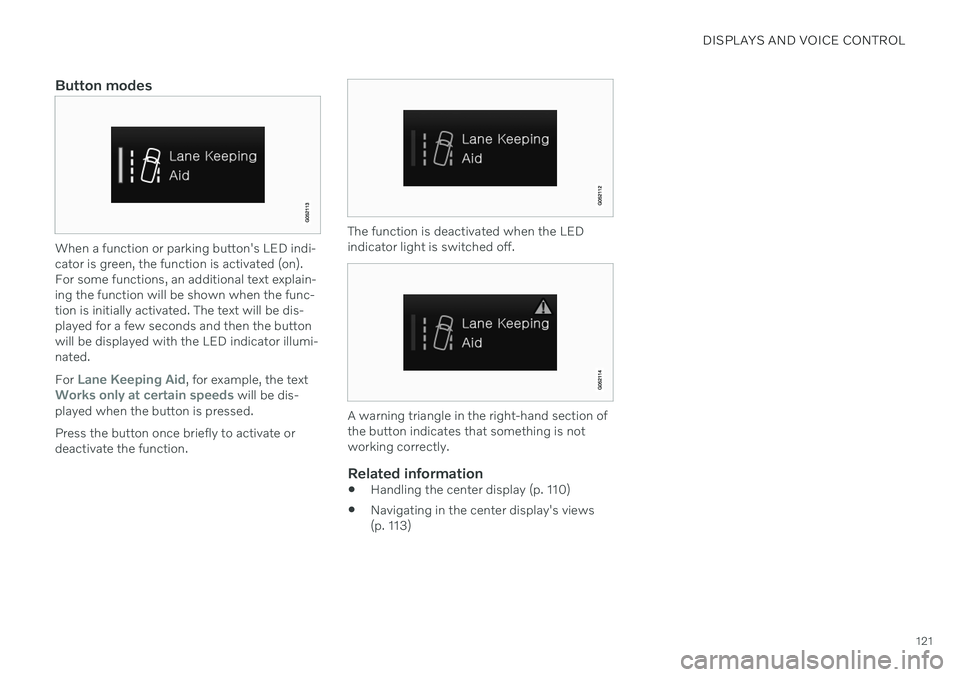
Button modes
When a function or parking button's LED indi- cator is green, the function is activated (on).For some functions, an additional text explain-ing the function will be shown when the func-tion is initially activated. The text will be dis-played for a few seconds and then the buttonwill be displayed with the LED indicator illumi-nated. For
Lane Keeping Aid, for example, the textWorks only at certain speeds will be dis-
played when the button is pressed. Press the button once briefly to activate or deactivate the function.
The function is deactivated when the LED indicator light is switched off.
A warning triangle in the right-hand section of the button indicates that something is notworking correctly.
Related information
Handling the center display (p. 110)
Navigating in the center display's views (p. 113)