trailer VOLVO V60 2021 User Guide
[x] Cancel search | Manufacturer: VOLVO, Model Year: 2021, Model line: V60, Model: VOLVO V60 2021Pages: 661, PDF Size: 12.68 MB
Page 356 of 661
||
DRIVER SUPPORT
* Option/accessory.
354
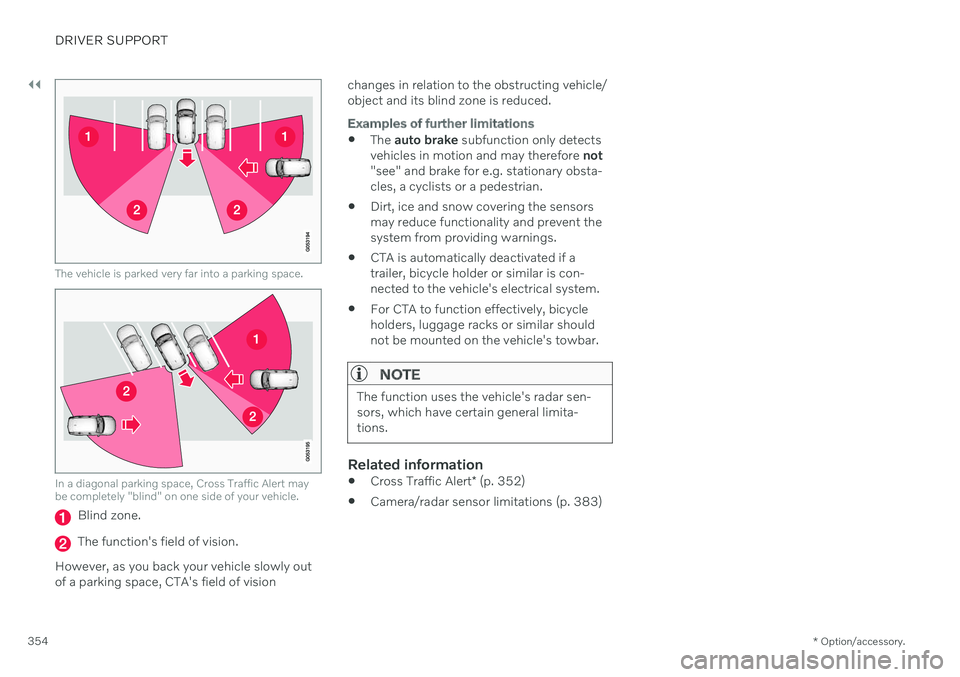
The vehicle is parked very far into a parking space.
In a diagonal parking space, Cross Traffic Alert may be completely "blind" on one side of your vehicle.
Blind zone.
The function's field of vision.
However, as you back your vehicle slowly out of a parking space, CTA's field of vision changes in relation to the obstructing vehicle/object and its blind zone is reduced.
Examples of further limitations
The
auto brake subfunction only detects
vehicles in motion and may therefore not
"see" and brake for e.g. stationary obsta- cles, a cyclists or a pedestrian.
Dirt, ice and snow covering the sensorsmay reduce functionality and prevent thesystem from providing warnings.
CTA is automatically deactivated if atrailer, bicycle holder or similar is con-nected to the vehicle's electrical system.
For CTA to function effectively, bicycleholders, luggage racks or similar shouldnot be mounted on the vehicle's towbar.
NOTE
The function uses the vehicle's radar sen- sors, which have certain general limita-tions.
Related information
Cross Traffic Alert
* (p. 352)
Camera/radar sensor limitations (p. 383)
Page 357 of 661
DRIVER SUPPORT
* Option/accessory.355
Cross Traffic Alert *100
messages
A number of messages related to Cross Traffic Alert (CTA) may be displayed in the instrument panel. Several examples are provi-ded below.
Message Meaning
Blind spot sensor Service requiredThe system is not functioning as intended. Contact a workshop
A
.
Blind spot system off Trailer attachedBLIS B
and CTA have been deactivated because a trailer has been connected to the vehicle's electrical system.
A An authorized Volvo workshop is recommended.
B Blind Spot Information System
A text message can be erased by briefly press- ing the
button in the center of the right-
side steering wheel keypad. If a message cannot be erased, contact a workshop A
.
Related information
Cross Traffic Alert
* (p. 352)
BLIS
* (p. 344)
Cross Traffic Alert
* limitations (p. 353)
100
Warning for crossing traffic when the vehicle is backing up.
Page 360 of 661
||
DRIVER SUPPORT
* Option/accessory.
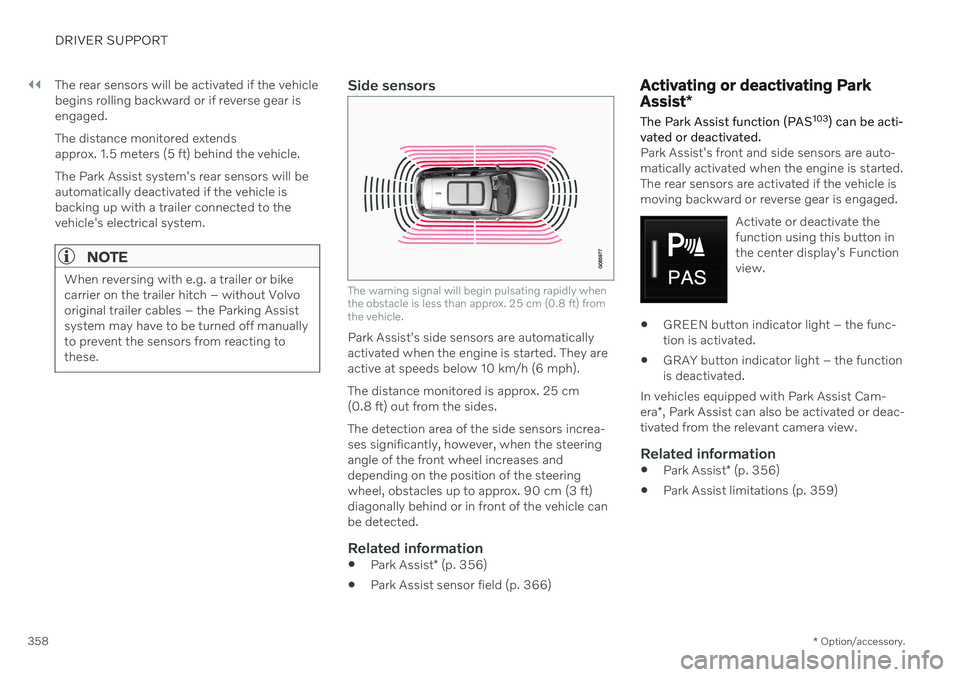
358 The rear sensors will be activated if the vehicle begins rolling backward or if reverse gear isengaged. The distance monitored extends approx. 1.5 meters (5 ft) behind the vehicle. The Park Assist system's rear sensors will be automatically deactivated if the vehicle isbacking up with a trailer connected to thevehicle's electrical system.
NOTE
When reversing with e.g. a trailer or bike carrier on the trailer hitch – without Volvooriginal trailer cables – the Parking Assistsystem may have to be turned off manuallyto prevent the sensors from reacting tothese.
Side sensors
The warning signal will begin pulsating rapidly when the obstacle is less than approx. 25 cm (0.8 ft) fromthe vehicle.
Park Assist's side sensors are automatically activated when the engine is started. They areactive at speeds below 10 km/h (6 mph). The distance monitored is approx. 25 cm (0.8 ft) out from the sides. The detection area of the side sensors increa- ses significantly, however, when the steeringangle of the front wheel increases anddepending on the position of the steeringwheel, obstacles up to approx. 90 cm (3 ft)diagonally behind or in front of the vehicle canbe detected.
Related information
Park Assist
* (p. 356)
Park Assist sensor field (p. 366)
Activating or deactivating Park Assist
*
The Park Assist function (PAS 103
) can be acti-
vated or deactivated.
Park Assist's front and side sensors are auto- matically activated when the engine is started.The rear sensors are activated if the vehicle ismoving backward or reverse gear is engaged.
Activate or deactivate thefunction using this button inthe center display's Functionview.
GREEN button indicator light – the func- tion is activated.
GRAY button indicator light – the functionis deactivated.
In vehicles equipped with Park Assist Cam- era *, Park Assist can also be activated or deac-
tivated from the relevant camera view.
Related information
Park Assist
* (p. 356)
Park Assist limitations (p. 359)
Page 361 of 661
DRIVER SUPPORT
* Option/accessory.359
Park Assist limitations Park Assist (PAS104
) may not be able to
detect all conditions in all situations and func- tionality may therefore be limited in certaincases.
The driver should be aware of the following limitations for Park Assist:
WARNING
The parking sensors have dead/blind spots where objects cannot bedetected.
Pay particular attention to people andanimals near the vehicle.
Bear in mind that the front end of thevehicle may swing out towards oncom-ing traffic during the parking maneuver.
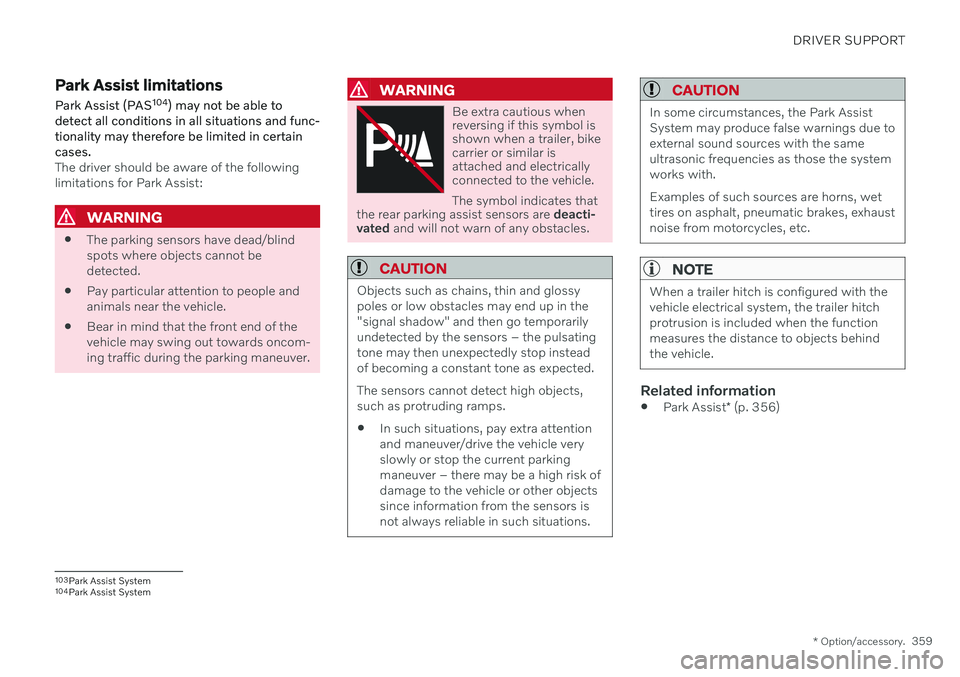
WARNING
Be extra cautious when reversing if this symbol isshown when a trailer, bikecarrier or similar isattached and electricallyconnected to the vehicle. The symbol indicates that
the rear parking assist sensors are deacti-
vated and will not warn of any obstacles.
CAUTION
Objects such as chains, thin and glossy poles or low obstacles may end up in the"signal shadow" and then go temporarilyundetected by the sensors – the pulsatingtone may then unexpectedly stop insteadof becoming a constant tone as expected. The sensors cannot detect high objects, such as protruding ramps. In such situations, pay extra attention and maneuver/drive the vehicle veryslowly or stop the current parkingmaneuver – there may be a high risk ofdamage to the vehicle or other objectssince information from the sensors isnot always reliable in such situations.
CAUTION
In some circumstances, the Park Assist System may produce false warnings due toexternal sound sources with the sameultrasonic frequencies as those the systemworks with. Examples of such sources are horns, wet tires on asphalt, pneumatic brakes, exhaustnoise from motorcycles, etc.
NOTE
When a trailer hitch is configured with the vehicle electrical system, the trailer hitchprotrusion is included when the functionmeasures the distance to objects behindthe vehicle.
Related information
Park Assist
* (p. 356)
103
Park Assist System
104 Park Assist System
Page 366 of 661
||
DRIVER SUPPORT
* Option/accessory.
364
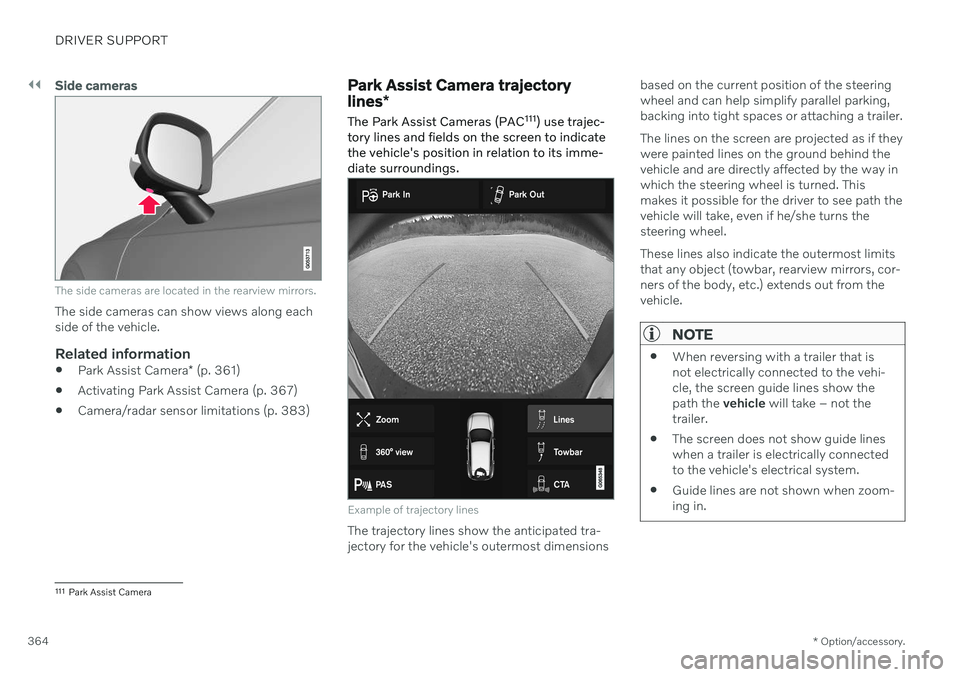
Side cameras
The side cameras are located in the rearview mirrors.
The side cameras can show views along each side of the vehicle.
Related information
Park Assist Camera
* (p. 361)
Activating Park Assist Camera (p. 367)
Camera/radar sensor limitations (p. 383)
Park Assist Camera trajectory lines
*
The Park Assist Cameras (PAC 111
) use trajec-
tory lines and fields on the screen to indicate the vehicle's position in relation to its imme-diate surroundings.
Example of trajectory lines
The trajectory lines show the anticipated tra- jectory for the vehicle's outermost dimensions based on the current position of the steeringwheel and can help simplify parallel parking,backing into tight spaces or attaching a trailer. The lines on the screen are projected as if they were painted lines on the ground behind thevehicle and are directly affected by the way inwhich the steering wheel is turned. Thismakes it possible for the driver to see path thevehicle will take, even if he/she turns thesteering wheel. These lines also indicate the outermost limits that any object (towbar, rearview mirrors, cor-ners of the body, etc.) extends out from thevehicle.
NOTE
When reversing with a trailer that is not electrically connected to the vehi-cle, the screen guide lines show thepath the
vehicle will take – not the
trailer.
The screen does not show guide lineswhen a trailer is electrically connectedto the vehicle's electrical system.
Guide lines are not shown when zoom-ing in.
111
Park Assist Camera
Page 367 of 661
DRIVER SUPPORT
}}
* Option/accessory.365
CAUTION
Bear in mind that when the rearward camera view is selected, the screenonly shows the area behind the vehicle– pay attention to the sides and frontof the vehicle when steering whilereversing.
The same applies to the reverse – payattention to what is happening withthe rear parts of the vehicle when thefront camera view is selected.
Note that the guide lines show theshortest
path – pay extra attention to
ensure that the vehicle sides do notcome in contact with/travel over any-thing when steering while driving for-ward or that the vehicle front movestoward/over anything when steeringwhile reversing.
Trajectory lines in 360° view *
360° view with trajectory lines
In the 360° view, trajectory lines are shown behind, in front of, or to the sides of the vehi-cle, depending on the direction of travel. When driving forward: Front lines
When backing up: Side lines and rear lines
When the front or rear camera is selected, the trajectory lines will be shown regardless of thevehicle's direction of travel. With a side camera selected, the trajectory lines will only be shown if the vehicle is back-ing up.
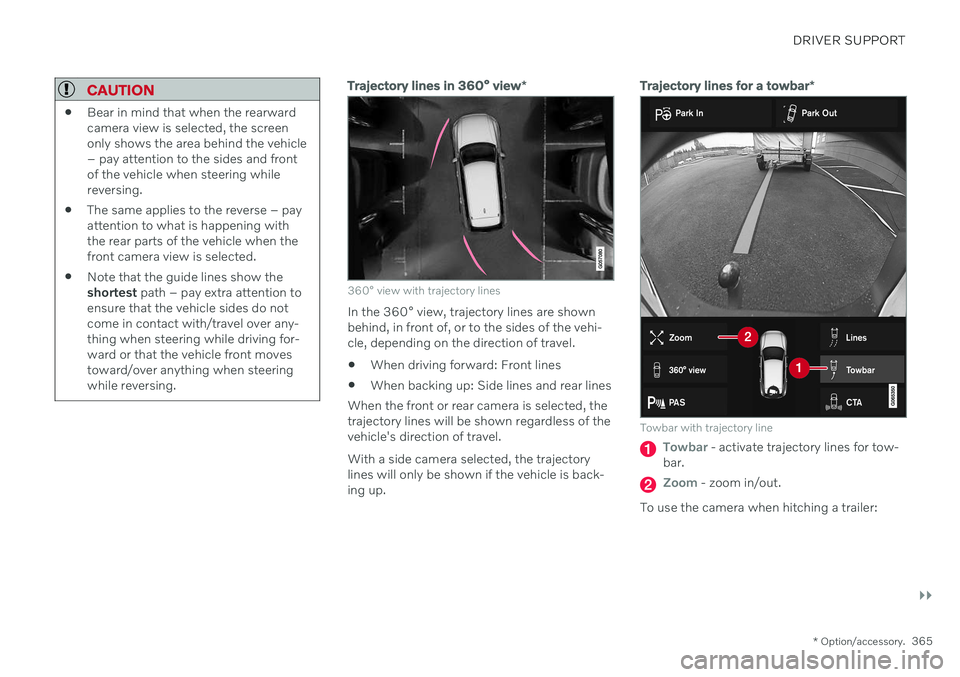
Trajectory lines for a towbar *
Towbar with trajectory line
Towbar - activate trajectory lines for tow-
bar.
Zoom - zoom in/out.
To use the camera when hitching a trailer:
Page 375 of 661

DRIVER SUPPORT
}}
* Option/accessory.373
Using Park Assist Pilot *
Park Assist Pilot (PAP 119
) helps the driver
park using three different steps. The function can also help the driver pull out of a parkingspace.
The function measures the space and steers the vehicle. The driver's role is to:
keep close watch of the area around thevehicle
follow the instructions on the center dis-play
change gears (reverse/forward) – an audi-ble signal indicates when the driver needsto change gears
regulating and maintaining a safe speed
applying the brakes and stopping the vehi-cle.
Information about the actions required by thedriver are provided in the center display usingsymbols, graphics and/or text. The function can be activated if the following criteria have been met after the engine isstarted:
No trailer is hitched to the vehicle
Your vehicle's speed is lower than30 km/h (20 mph).
NOTE
The distance between the vehicle and parking spots should be 0.5–1.5 meters(1.6–5.0 ft) when the function is lookingfor parking.
Parking with Park Assist PilotThe function helps park the vehicle using the following steps:
1. The system searches for and measures
potential parking spaces.
2. The vehicle is steered while it is backing into the parking space.
3. The vehicle is positioned in the parking space (the driver may be prompted to shift gears and apply the brakes).
Searching and measuring potential parking spots
The function can be activated in the center display's Func-tion view. It can also be accessed from the camera views.
GREEN button indicator light – the func- tion is activated.
GRAY button indicator light – the functionis deactivated.
Parallel parking search overview.
Perpendicular parking search overview.
Vehicle speed may not exceed 30 km/h (20 mph) when parking.
119
Park Assist Pilot
Page 387 of 661
DRIVER SUPPORT
}}
* Option/accessory.385
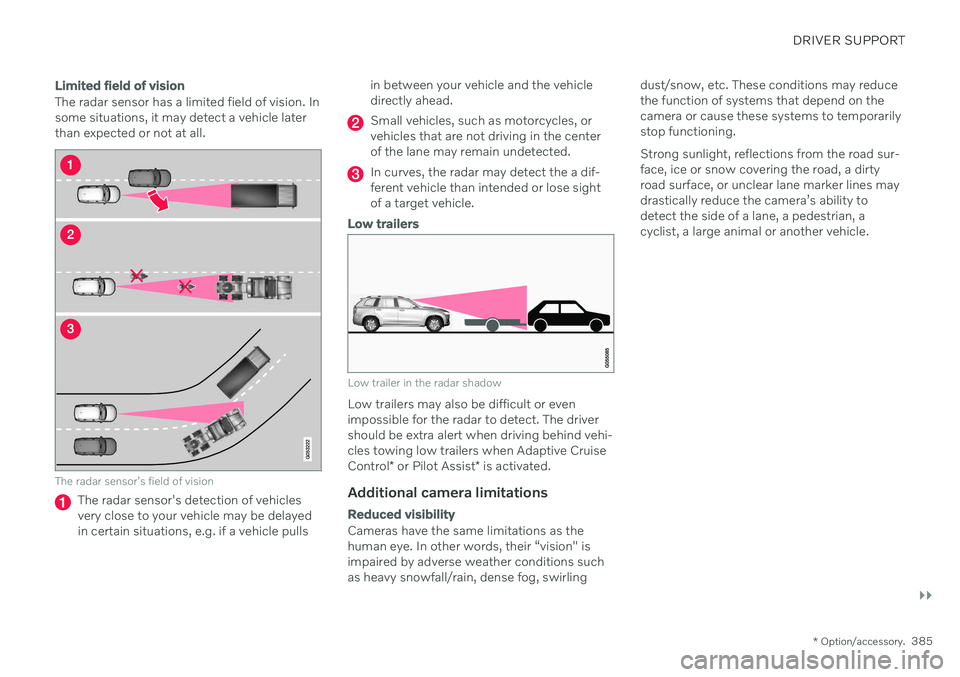
Limited field of vision
The radar sensor has a limited field of vision. In some situations, it may detect a vehicle laterthan expected or not at all.
The radar sensor's field of vision
The radar sensor's detection of vehicles very close to your vehicle may be delayedin certain situations, e.g. if a vehicle pulls in between your vehicle and the vehicledirectly ahead.
Small vehicles, such as motorcycles, or vehicles that are not driving in the centerof the lane may remain undetected.
In curves, the radar may detect the a dif- ferent vehicle than intended or lose sightof a target vehicle.
Low trailers
Low trailer in the radar shadow
Low trailers may also be difficult or even impossible for the radar to detect. The drivershould be extra alert when driving behind vehi- cles towing low trailers when Adaptive Cruise Control
* or Pilot Assist
* is activated.
Additional camera limitations
Reduced visibility
Cameras have the same limitations as the human eye. In other words, their “vision" isimpaired by adverse weather conditions suchas heavy snowfall/rain, dense fog, swirling dust/snow, etc. These conditions may reducethe function of systems that depend on thecamera or cause these systems to temporarilystop functioning. Strong sunlight, reflections from the road sur- face, ice or snow covering the road, a dirtyroad surface, or unclear lane marker lines maydrastically reduce the camera
Page 391 of 661

DRIVER SUPPORT
389
Defective cameraIf a camera sector is dark and contains this symbol, thisindicates that the camera isnot functioning properly.
The vehicle's left-side camera is malfunctioning.
A dark camera sector may also be displayed in the following situations, but without the
defective camera symbol: a door is open
the tailgate is open
a rearview mirror is folded in
Rear Park Assist Camera
WARNING
Be extra cautious when reversing if this symbol isshown when a trailer, bikecarrier or similar isattached and electricallyconnected to the vehicle. The symbol indicates that
the rear parking assist sensors are deacti-
vated and will not warn of any obstacles.
Related information
Camera (p. 383)
Radar sensor (p. 380)
Camera/radar sensor limitations (p. 383)
Volvo Cars support site (p. 21)
Page 404 of 661
STARTING AND DRIVING
402
Settings for automatically activating the parking brake Choose whether the parking brake should be activated automatically when the vehicle isswitched off.
To change this setting: 1.Tap
Settings in the center display's Top
view.
2. Tap
My CarParking Brake and
Suspension and select or deselect theAuto Activate Parking Brake function.
Related information
Activating and deactivating the parking brake (p. 400)
Parking brake (p. 400)
Parking on a hill
Always use the parking brake when parking on a hill.
WARNING
Always apply the parking brake when park- ing on an incline. Selecting a gear or put-ting the automatic transmission in P may
not be sufficient to keep the vehicle sta-tionary in all situations.
If the vehicle is pointing uphill:
Turn the front wheels so they are pointing away from
the curb.
If the vehicle is pointing downhill:
Turn the front wheels so they are pointingtoward
the curb.
Heavy load uphill
Heavy loads, such as a trailer, could cause the vehicle to roll backward when the parkingbrake is released automatically on steep uphillgradients. To help avoid this, pull the controlupward while you are driving away. Releasethe control when the vehicle gains traction.
Related information
Activating and deactivating the parkingbrake (p. 400)
Parking brake malfunction
If you are unable to deactivate or activate the parking brake after several attempts, contactan authorized Volvo workshop.
A audible warning signal will sound if the park- ing brake is activated while the vehicle isbeing driven. If the vehicle must be parked before the prob- lem is rectified, turn the wheels as when park-ing on an incline and put the gear selector inP .
Low battery charge levelIf the battery charge level is too low, it will notbe possible to activate or deactivate the park-ing brake. Connect an auxiliary battery to thevehicle if the battery is discharged.
Replacing brake padsDue to the design of the electric parkingbrake, the rear brake pads must be replacedby a workshop. An authorized Volvo workshopis recommended.