brake light VOLVO V60 2021 Owner's Manual
[x] Cancel search | Manufacturer: VOLVO, Model Year: 2021, Model line: V60, Model: VOLVO V60 2021Pages: 661, PDF Size: 12.68 MB
Page 332 of 661
DRIVER SUPPORT
330
Limitations of City Safety in crossing traffic
In certain situations, it may be difficult for
City Safety to help the driver avoid a collisionwith crossing traffic.
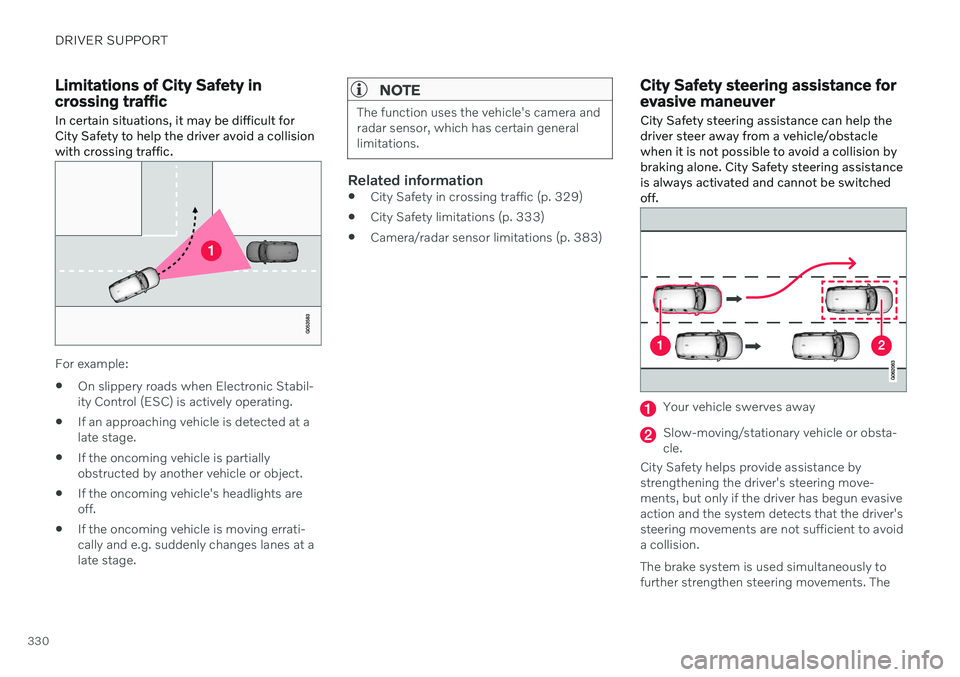
For example:
On slippery roads when Electronic Stabil- ity Control (ESC) is actively operating.
If an approaching vehicle is detected at alate stage.
If the oncoming vehicle is partiallyobstructed by another vehicle or object.
If the oncoming vehicle's headlights areoff.
If the oncoming vehicle is moving errati-cally and e.g. suddenly changes lanes at alate stage.
NOTE
The function uses the vehicle's camera and radar sensor, which has certain generallimitations.
Related information
City Safety in crossing traffic (p. 329)
City Safety limitations (p. 333)
Camera/radar sensor limitations (p. 383)
City Safety steering assistance for evasive maneuver City Safety steering assistance can help the driver steer away from a vehicle/obstaclewhen it is not possible to avoid a collision bybraking alone. City Safety steering assistanceis always activated and cannot be switchedoff.
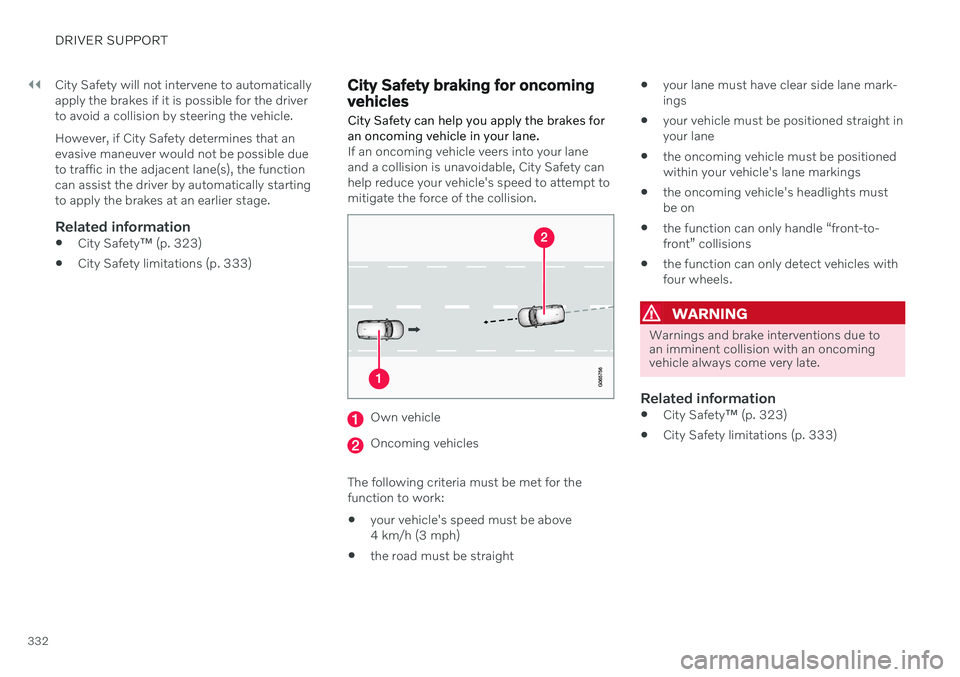
Your vehicle swerves away
Slow-moving/stationary vehicle or obsta- cle.
City Safety helps provide assistance bystrengthening the driver's steering move-ments, but only if the driver has begun evasiveaction and the system detects that the driver'ssteering movements are not sufficient to avoida collision. The brake system is used simultaneously to further strengthen steering movements. The
Page 334 of 661
||
DRIVER SUPPORT
332City Safety will not intervene to automatically apply the brakes if it is possible for the driverto avoid a collision by steering the vehicle. However, if City Safety determines that an evasive maneuver would not be possible dueto traffic in the adjacent lane(s), the functioncan assist the driver by automatically startingto apply the brakes at an earlier stage.
Related information
City Safety
™ (p. 323)
City Safety limitations (p. 333)
City Safety braking for oncoming vehicles City Safety can help you apply the brakes for an oncoming vehicle in your lane.
If an oncoming vehicle veers into your lane and a collision is unavoidable, City Safety canhelp reduce your vehicle's speed to attempt tomitigate the force of the collision.
Own vehicle
Oncoming vehicles
The following criteria must be met for the function to work:
your vehicle's speed must be above4 km/h (3 mph)
the road must be straight
your lane must have clear side lane mark-ings
your vehicle must be positioned straight inyour lane
the oncoming vehicle must be positionedwithin your vehicle's lane markings
the oncoming vehicle's headlights mustbe on
the function can only handle “front-to-front” collisions
the function can only detect vehicles withfour wheels.
WARNING
Warnings and brake interventions due to an imminent collision with an oncomingvehicle always come very late.
Related information
City Safety
™ (p. 323)
City Safety limitations (p. 333)
Page 336 of 661
||
DRIVER SUPPORT
334
Important warnings
WARNING
The driver support system only issues a warning for obstacles detected by its radarsensor – thus, a warning may come after adelay or not at all. Never wait for a warning or assistance. Apply the brakes when necessary.
WARNING
Warnings and brake interventions can be triggered late or not at all if the traf-fic situation or external influences pre-vent the camera and radar unit fromproperly detecting pedestrians,cyclists, large animals or vehiclesahead of the vehicle.
To be able to detect vehicles at night,its front and rear lights must work andilluminate clearly.
The camera and radar unit have a lim-ited range for pedestrians and cyclists– the system can provide effectivewarnings and brake interventions if therelative speed is lower than 50 km/h(30 mph). For stationary or slow-mov-ing vehicles, warnings and brake inter-ventions are effective at vehicle speedsof up to 70 km/h (43 mph). Speedreduction for large animals is less than15 km/h (9 mph) and can be achievedat vehicle speeds over 70 km/h(43 mph). At lower speeds, the warn-ing and brake intervention for large ani-mals is less effective.
Warnings for stationary or slow-mov-ing vehicles and large animals can bedisengaged due to darkness or poorvisibility.
Warnings and brake interventions for pedestrians and cyclists are disen-gaged at vehicle speeds over 80 km/h(50 mph).
Do not place, affix or mount anythingon the inside or outside of the wind-shield, or in front of or around the cam-era and radar unit – this could disruptcamera-based functions.
Objects, snow, ice or dirt in the area ofthe camera sensor can reduce thefunction, disengage it completely orgive an improper function response.
Page 355 of 661
DRIVER SUPPORT
}}
* Option/accessory.353
Related information
Driver support systems (p. 270)
Activating or deactivating Cross Traffic Alert
* (p. 353)
Cross Traffic Alert
* limitations (p. 353)
Cross Traffic Alert
* messages (p. 355)
BLIS
* (p. 344)
Park Assist
* (p. 356)
Activating or deactivating Cross Traffic Alert *98
The driver can choose to deactivate the Cross
Traffic Alert (CTA) function.
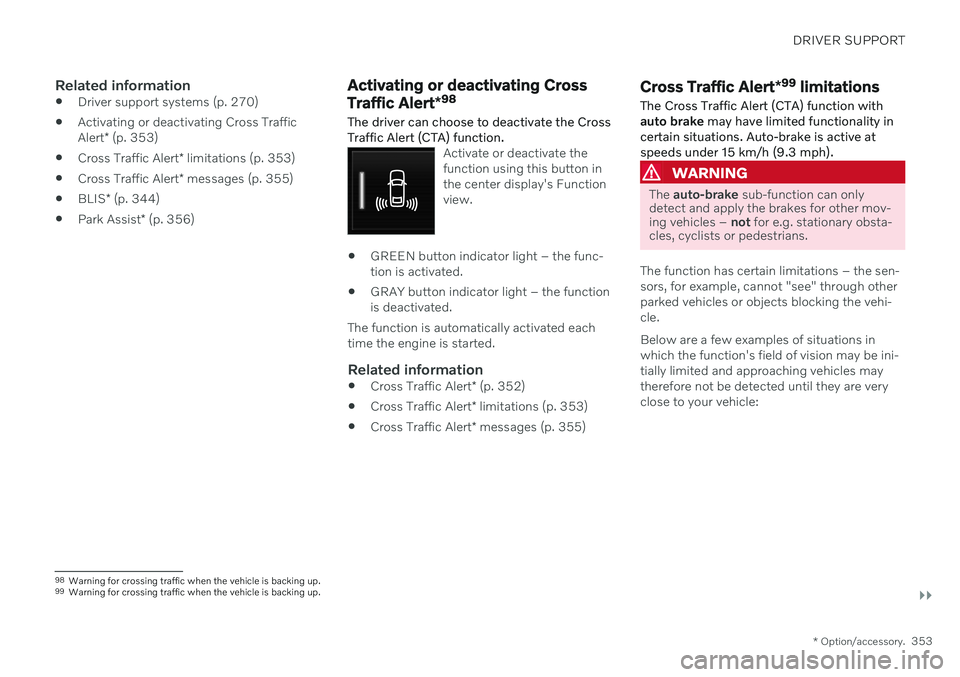
Activate or deactivate the function using this button inthe center display's Functionview.
GREEN button indicator light – the func- tion is activated.
GRAY button indicator light – the functionis deactivated.
The function is automatically activated eachtime the engine is started.
Related information
Cross Traffic Alert
* (p. 352)
Cross Traffic Alert
* limitations (p. 353)
Cross Traffic Alert
* messages (p. 355)
Cross Traffic Alert *99
limitations
The Cross Traffic Alert (CTA) function with auto brake may have limited functionality in
certain situations. Auto-brake is active atspeeds under 15 km/h (9.3 mph).
WARNING
The auto-brake sub-function can only
detect and apply the brakes for other mov- ing vehicles – not for e.g. stationary obsta-
cles, cyclists or pedestrians.
The function has certain limitations – the sen- sors, for example, cannot "see" through otherparked vehicles or objects blocking the vehi-cle. Below are a few examples of situations in which the function's field of vision may be ini-tially limited and approaching vehicles maytherefore not be detected until they are veryclose to your vehicle:
98 Warning for crossing traffic when the vehicle is backing up.
99 Warning for crossing traffic when the vehicle is backing up.
Page 359 of 661
DRIVER SUPPORT
}}
* Option/accessory.357
Related information
Driver support systems (p. 270)
Park Assist front, rear and sides
* (p. 357)
Activating or deactivating Park Assist
*
(p. 358)
Park Assist symbols and messages (p. 360)
Park Assist limitations (p. 359)
Park Assist front, rear and sides
*
Park Assist (PAS 102
) behaves differently
depending on which part of the vehicle is approaching an obstacle.
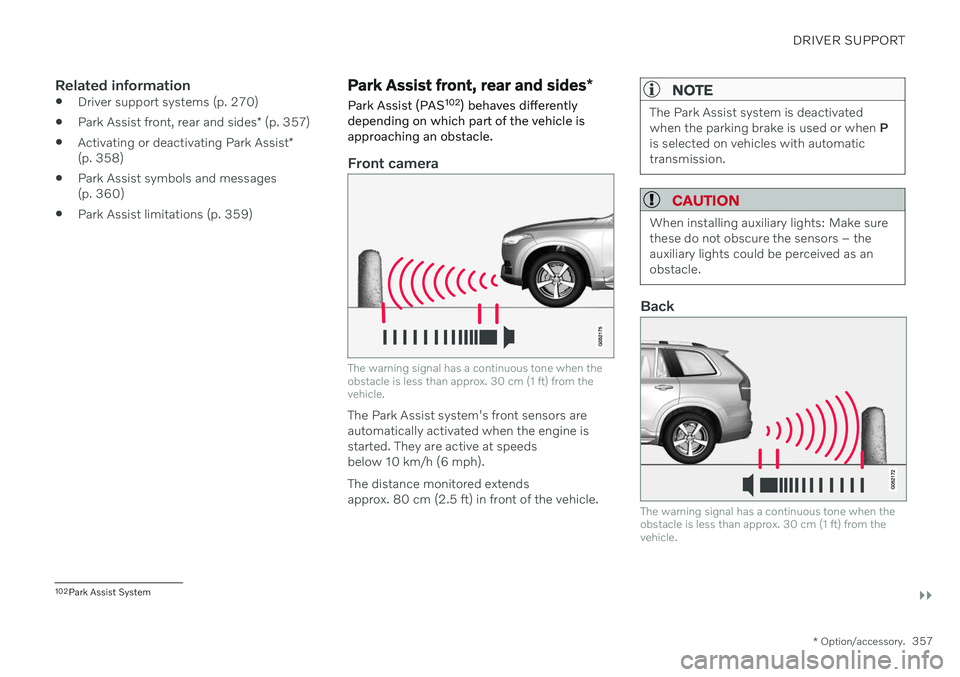
Front camera
The warning signal has a continuous tone when the obstacle is less than approx. 30 cm (1 ft) from thevehicle.
The Park Assist system's front sensors are automatically activated when the engine isstarted. They are active at speedsbelow 10 km/h (6 mph). The distance monitored extends approx. 80 cm (2.5 ft) in front of the vehicle.
NOTE
The Park Assist system is deactivated when the parking brake is used or when P
is selected on vehicles with automatictransmission.
CAUTION
When installing auxiliary lights: Make sure these do not obscure the sensors – theauxiliary lights could be perceived as anobstacle.
Back
The warning signal has a continuous tone when the obstacle is less than approx. 30 cm (1 ft) from thevehicle.
102 Park Assist System
Page 375 of 661

DRIVER SUPPORT
}}
* Option/accessory.373
Using Park Assist Pilot *
Park Assist Pilot (PAP 119
) helps the driver
park using three different steps. The function can also help the driver pull out of a parkingspace.
The function measures the space and steers the vehicle. The driver's role is to:
keep close watch of the area around thevehicle
follow the instructions on the center dis-play
change gears (reverse/forward) – an audi-ble signal indicates when the driver needsto change gears
regulating and maintaining a safe speed
applying the brakes and stopping the vehi-cle.
Information about the actions required by thedriver are provided in the center display usingsymbols, graphics and/or text. The function can be activated if the following criteria have been met after the engine isstarted:
No trailer is hitched to the vehicle
Your vehicle's speed is lower than30 km/h (20 mph).
NOTE
The distance between the vehicle and parking spots should be 0.5–1.5 meters(1.6–5.0 ft) when the function is lookingfor parking.
Parking with Park Assist PilotThe function helps park the vehicle using the following steps:
1. The system searches for and measures
potential parking spaces.
2. The vehicle is steered while it is backing into the parking space.
3. The vehicle is positioned in the parking space (the driver may be prompted to shift gears and apply the brakes).
Searching and measuring potential parking spots
The function can be activated in the center display's Func-tion view. It can also be accessed from the camera views.
GREEN button indicator light – the func- tion is activated.
GRAY button indicator light – the functionis deactivated.
Parallel parking search overview.
Perpendicular parking search overview.
Vehicle speed may not exceed 30 km/h (20 mph) when parking.
119
Park Assist Pilot
Page 395 of 661
STARTING AND DRIVING
}}
393
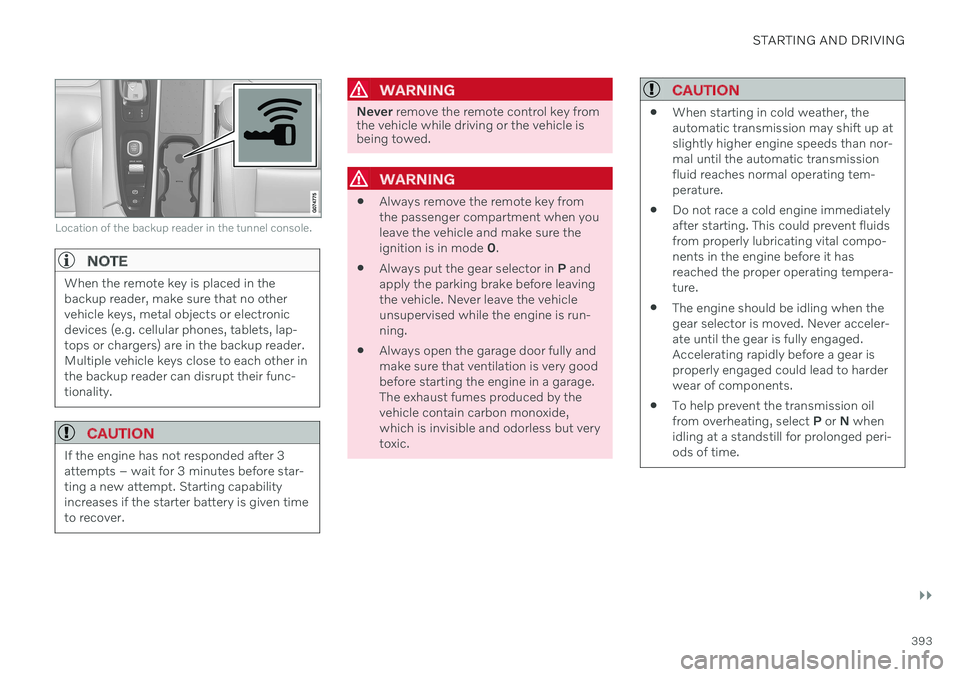
Location of the backup reader in the tunnel console.
NOTE
When the remote key is placed in the backup reader, make sure that no othervehicle keys, metal objects or electronicdevices (e.g. cellular phones, tablets, lap-tops or chargers) are in the backup reader.Multiple vehicle keys close to each other inthe backup reader can disrupt their func-tionality.
CAUTION
If the engine has not responded after 3 attempts – wait for 3 minutes before star-ting a new attempt. Starting capabilityincreases if the starter battery is given timeto recover.
WARNING
Never remove the remote control key from
the vehicle while driving or the vehicle is being towed.
WARNING
Always remove the remote key from the passenger compartment when youleave the vehicle and make sure theignition is in mode
0.
Always put the gear selector in
P and
apply the parking brake before leavingthe vehicle. Never leave the vehicleunsupervised while the engine is run-ning.
Always open the garage door fully andmake sure that ventilation is very goodbefore starting the engine in a garage.The exhaust fumes produced by thevehicle contain carbon monoxide,which is invisible and odorless but verytoxic.
CAUTION
When starting in cold weather, the automatic transmission may shift up atslightly higher engine speeds than nor-mal until the automatic transmissionfluid reaches normal operating tem-perature.
Do not race a cold engine immediatelyafter starting. This could prevent fluidsfrom properly lubricating vital compo-nents in the engine before it hasreached the proper operating tempera-ture.
The engine should be idling when thegear selector is moved. Never acceler-ate until the gear is fully engaged.Accelerating rapidly before a gear isproperly engaged could lead to harderwear of components.
To help prevent the transmission oilfrom overheating, select
P or N when
idling at a standstill for prolonged peri-ods of time.
Page 399 of 661
STARTING AND DRIVING
}}
397
Brake functions
The vehicle's brakes are used to reduce speed or prevent the vehicle from rolling.
In addition to the wheel brakes and parking brakes, the vehicle is also equipped with anumber of automatic brake assist functions.These systems provide assistance by e.g. thedriver not needing to depress the brake pedalat a traffic light or when starting up a hill. Depending on how the vehicle is equipped, the following brake assist functions may beincluded:
Auto-hold brake function at a standstill(Auto Hold)
Hill Start Assist (Hill Start Assist)
Braking assist after a collision
City Safety
Related information
Brakes (p. 397)
Parking brake (p. 400)
Auto-hold brakes (p. 403)
Braking assist after a collision (p. 405)
Hill Start Assist (p. 405)
City Safety
™ (p. 323)
Brakes
The brake pedal is used to apply the vehicle's regular brakes, which are part of the brakesystem.
The vehicle is equipped with two brake cir- cuits. If one brake circuit is damaged, thebrake pedal may go down further whendepressed. More pressure will then berequired from the driver for normal brakingeffect. The driver's pressure on the brake pedal is enhanced by a power braking function.
WARNING
Power braking only functions if the engine is running.
If the brake pedal is used when the engine is turned off, the pedal will feel stiffer than usualand greater pressure must be applied to brakethe vehicle. In very hilly areas or when driving with a heavy load, manual gear shifting can be used to aug-ment the brakes with engine braking. Enginebraking is most effective if the same gear isused both uphill and downhill.
Anti-lock brakesThe vehicle is equipped with an Anti-lock Braking System (ABS 2
), which helps prevent
the wheels from locking and helps maintain steering control when braking. Vibrations maybe felt from the brake pedal when ABS isoperating, which is normal. After the vehicle is started, a brief test of the ABS system is automatically performed whenthe driver releases the brake pedal. An addi-tional automatic test of the system may beperformed when the vehicle is traveling at alow speed. During the test, the brake pedalmay feel as though it is pulsating.
2 Anti-lock Braking System
Page 400 of 661
||
STARTING AND DRIVING
398
Symbols in the instrument panel
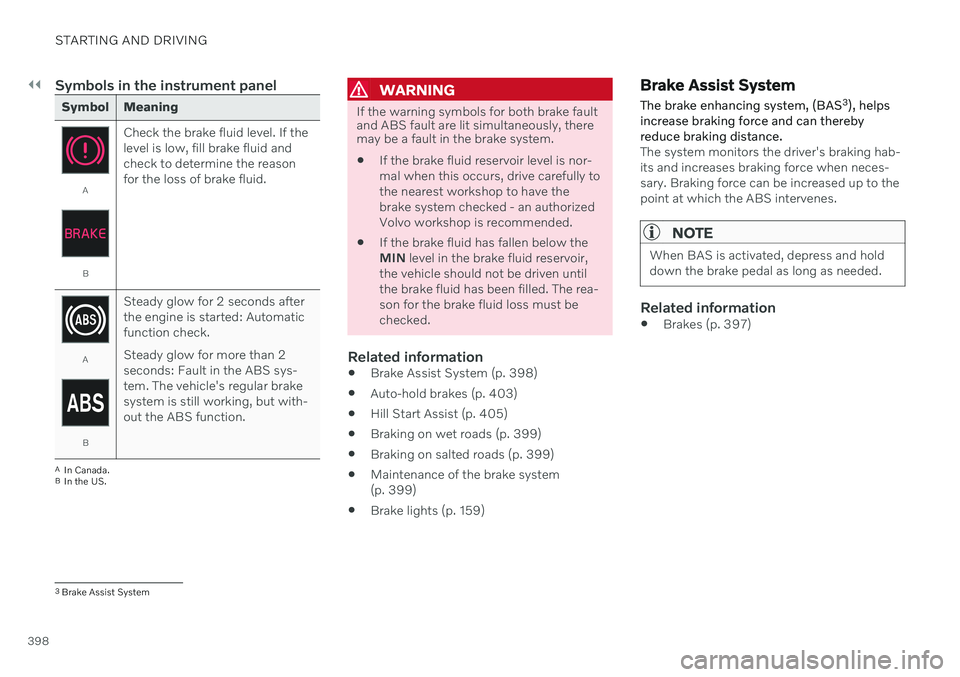
Symbol Meaning
A
BCheck the brake fluid level. If the level is low, fill brake fluid andcheck to determine the reasonfor the loss of brake fluid.
A
BSteady glow for 2 seconds after the engine is started: Automaticfunction check. Steady glow for more than 2 seconds: Fault in the ABS sys-tem. The vehicle's regular brakesystem is still working, but with-out the ABS function.
A
In Canada.
B In the US.
WARNING
If the warning symbols for both brake fault and ABS fault are lit simultaneously, theremay be a fault in the brake system.
If the brake fluid reservoir level is nor- mal when this occurs, drive carefully tothe nearest workshop to have thebrake system checked - an authorizedVolvo workshop is recommended.
If the brake fluid has fallen below theMIN
level in the brake fluid reservoir,
the vehicle should not be driven untilthe brake fluid has been filled. The rea-son for the brake fluid loss must bechecked.
Related information
Brake Assist System (p. 398)
Auto-hold brakes (p. 403)
Hill Start Assist (p. 405)
Braking on wet roads (p. 399)
Braking on salted roads (p. 399)
Maintenance of the brake system(p. 399)
Brake lights (p. 159)
Brake Assist System The brake enhancing system, (BAS 3
), helps
increase braking force and can thereby reduce braking distance.
The system monitors the driver's braking hab- its and increases braking force when neces-sary. Braking force can be increased up to thepoint at which the ABS intervenes.
NOTE
When BAS is activated, depress and hold down the brake pedal as long as needed.
Related information
Brakes (p. 397)
3
Brake Assist System
Page 401 of 661
STARTING AND DRIVING
399
Braking on wet roadsProlonged driving in heavy rain without brak- ing may cause braking effect to be slightlydelayed the first time the brakes are applied.
This may also occur after washing the vehicle. It will then be necessary to apply greater pres-sure to the brake pedal. You should thereforemaintain a greater distance to the vehicleahead. Firmly apply the brakes after washing the vehicle or driving on wet roads. This helpswarm up the brake discs, enabling them to drymore quickly and protecting them against cor-rosion. Consider the current traffic situationwhen braking.
Related information
Brakes (p. 397)
Braking on salted roads (p. 399)
Braking on salted roads
When driving on salted roads, a layer of salt may form on the brake discs and brake pads.
This could increase stopping distance. Main- tain an extra large safety distance to the vehi-cle ahead. Make sure to also:
Apply the brakes from time to time to helpremove salt. Make sure braking does notpose a risk to any other road users.
Gently apply the brakes when you havefinished driving and before driving again.
Related information
Brakes (p. 397)
Braking on wet roads (p. 399)
Maintenance of the brake system
Regularly check the brake system compo- nents for wear.
To keep the vehicle as safe and reliable as possible, follow the Volvo service schedulespecified in the Warranty and MaintenanceRecords Information booklet. After replacingbrake pads and brake discs, braking effect isnot adapted until they are "broken in" by driv-ing a few hundred kilometers (miles). Com-pensate for the reduced braking effect byapplying greater pressure to the brake pedal.Volvo recommends only using brake padsapproved for your Volvo.
CAUTION
The brake system's components should be regularly checked for wear. Contact a workshop for advice on how to do this or let a workshop perform theinspection - an authorized Volvo workshopis recommended.
Related information
Brakes (p. 397)