climate control VOLVO V60 2021 Owner's Manual
[x] Cancel search | Manufacturer: VOLVO, Model Year: 2021, Model line: V60, Model: VOLVO V60 2021Pages: 661, PDF Size: 12.68 MB
Page 206 of 661
CLIMATE CONTROL
* Option/accessory.
204
Passenger compartment air filter
All air entering the passenger compartment through the climate control system intake isfiltered.
Replacing the passenger compartment filter
To maintain the high performance of the cli- mate control system, the filter must bereplaced regularly. Follow Volvo's serviceschedule for recommended replacement inter-vals. When driving in areas with a lot of smog,dust, etc., the filter may need to be changedmore frequently.
NOTE
There are two types of passenger compart- ment filters. Make sure that the correct fil-ter is installed.
Related information
Air quality (p. 201)
CleanZone
* (p. 202)
Clean Zone Interior Package
* (p. 202)
Interior Air Quality System
* (p. 203)
Advanced Air Cleaner *
Advanced Air Cleaner is a fully automatic air cleaner that traps airborne particulate matter,exhaust and other pollutants in the passengercompartment air filter, which improves theclimate in the passenger compartment.
The function starts automatically when the blower starts. Airborne particulate matter are also known as PM 2.5 (particles smaller than 2.5 µm), and the
concentrations of these particles in the vehicleare measured by one of the vehicle's climatecontrol sensors. The concentration in the vehi-cle is presented in the downloadable app AirQuality.
Related information
Air quality (p. 201)
Interior Air Quality System
* (p. 203)
CleanZone
* (p. 202)
Clean Zone Interior Package
* (p. 202)
Passenger compartment air filter (p. 204)
Climate control sensors (p. 199)
Air distribution
The climate system distributes incoming air through a number of vents in the passengercompartment.
Automatic and manual air distributionWhen the auto-climate feature is on, air distri- bution is regulated automatically. Air distribu-tion can also be controlled manually.
Adjustable air ventsCertain air vents in the vehicle are adjustable,which means they can be opened/closed andthe direction of the air flow from the vent canbe adjusted.
Page 207 of 661
CLIMATE CONTROL
* Option/accessory.205
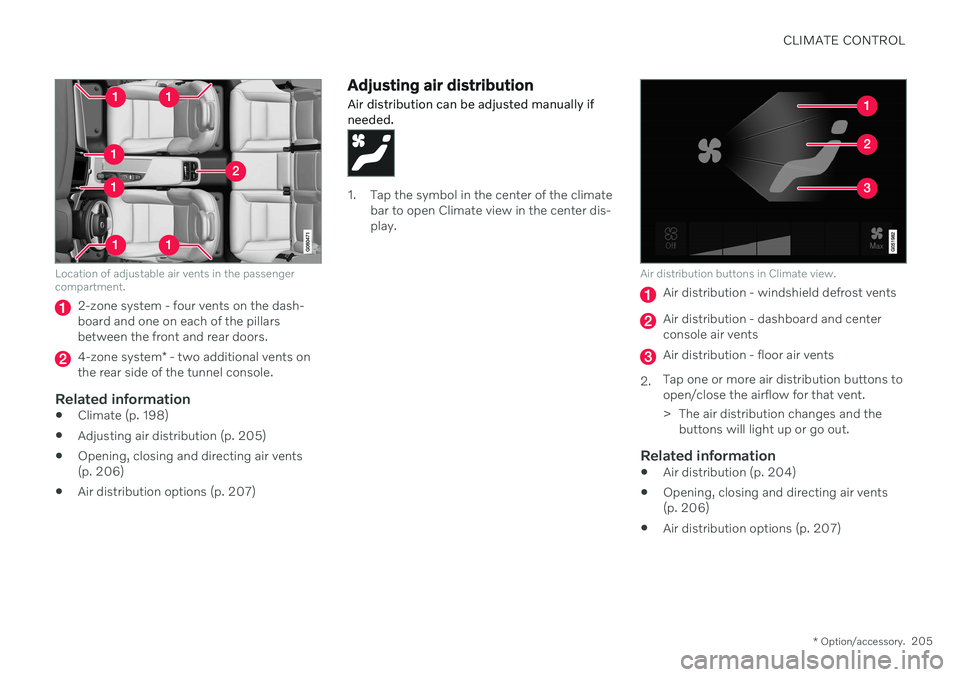
Location of adjustable air vents in the passenger compartment.
2-zone system - four vents on the dash- board and one on each of the pillarsbetween the front and rear doors.
4-zone system* - two additional vents on
the rear side of the tunnel console.
Related information
Climate (p. 198)
Adjusting air distribution (p. 205)
Opening, closing and directing air vents (p. 206)
Air distribution options (p. 207)
Adjusting air distribution
Air distribution can be adjusted manually if needed.
1. Tap the symbol in the center of the climate bar to open Climate view in the center dis- play.
Air distribution buttons in Climate view.
Air distribution - windshield defrost vents
Air distribution - dashboard and center console air vents
Air distribution - floor air vents
2. Tap one or more air distribution buttons to open/close the airflow for that vent.
> The air distribution changes and the
buttons will light up or go out.
Related information
Air distribution (p. 204)
Opening, closing and directing air vents (p. 206)
Air distribution options (p. 207)
Page 208 of 661
CLIMATE CONTROL
* Option/accessory.
206
Opening, closing and directing air vents
Some of the air vents in the passenger com- partment can be individually opened, closedand directed.
Misting can be eliminated by directing the outer air vents towards the door windows. Direct the outer air vents into the passenger compartment to maintain a comfortable tem-perature in warm weather.
Opening and closing the air ventsAir vents on the dashboard:
–Turn the knob in the center of the air vent to open/close airflow from the vent. When the mark on the knob is vertical, the airflow is strongest.
Air vents on the door pillars:
–Move the lever in the center of the air vent up/down to open/close the airflow fromthe vent. The airflow is stopped when the lever is in the lowest position. In other positions, theairflow is constant. Air vents on the rear side of the tunnel con- sole
*:
–Turn the thumb wheel under the air vent to open/close the airflow from the vent. The more white lines that are visible, the stronger the airflow.
Directing air flow–Move the lever in the center of the air vent horizontally or vertically to direct the air-flow from the vent.
Related information
Air distribution (p. 204)
Adjusting air distribution (p. 205)
Air distribution options (p. 207)
Page 209 of 661
CLIMATE CONTROL
}}
207
Air distribution options
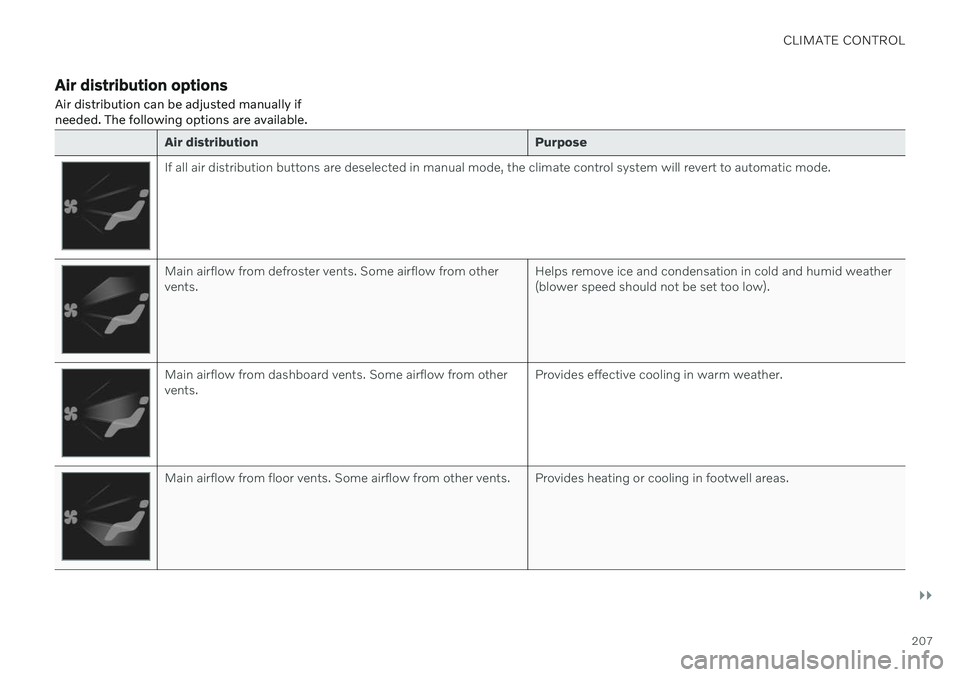
Air distribution can be adjusted manually if needed. The following options are available.
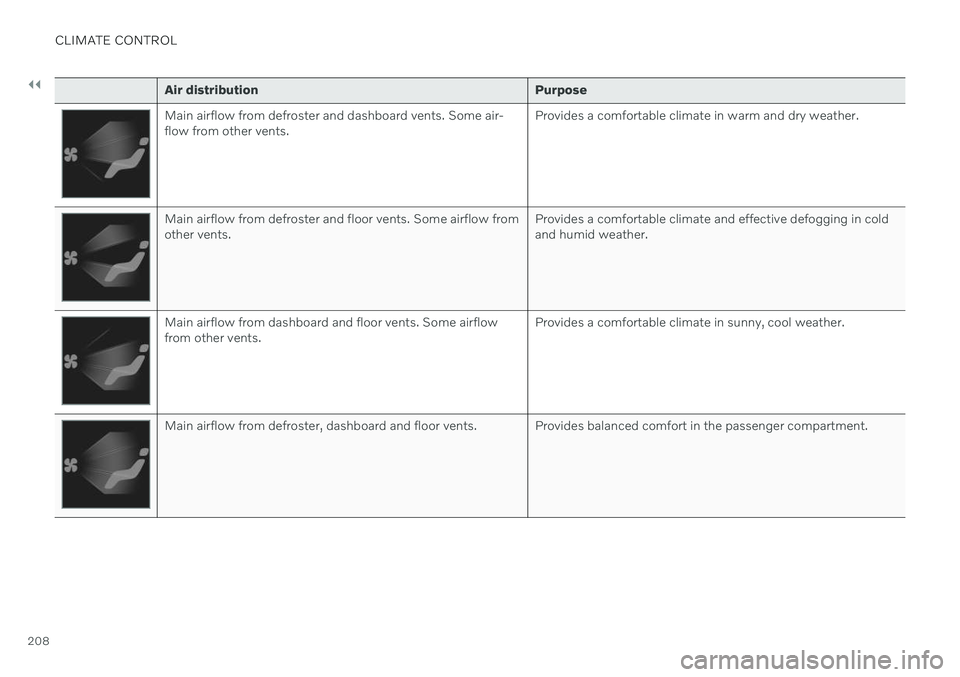
Air distribution Purpose
If all air distribution buttons are deselected in manual mode, the climate control system will revert to automatic mode.
Main airflow from defroster vents. Some airflow from other vents.Helps remove ice and condensation in cold and humid weather(blower speed should not be set too low).
Main airflow from dashboard vents. Some airflow from other vents.Provides effective cooling in warm weather.
Main airflow from floor vents. Some airflow from other vents. Provides heating or cooling in footwell areas.
Page 210 of 661
||
CLIMATE CONTROL
208
Air distributionPurpose
Main airflow from defroster and dashboard vents. Some air- flow from other vents.Provides a comfortable climate in warm and dry weather.
Main airflow from defroster and floor vents. Some airflow from other vents.Provides a comfortable climate and effective defogging in coldand humid weather.
Main airflow from dashboard and floor vents. Some airflow from other vents.Provides a comfortable climate in sunny, cool weather.
Main airflow from defroster, dashboard and floor vents. Provides balanced comfort in the passenger compartment.
Page 211 of 661
CLIMATE CONTROL
209
Related information
Air distribution (p. 204)
Opening, closing and directing air vents (p. 206)
Adjusting air distribution (p. 205)
Page 212 of 661
CLIMATE CONTROL
* Option/accessory.
210
Climate system controls
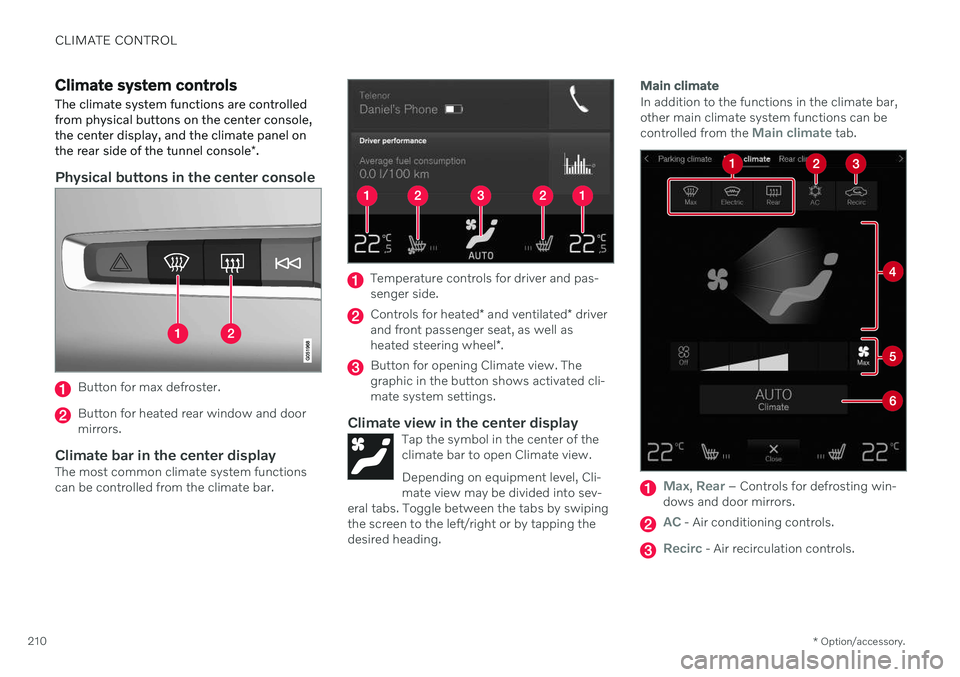
The climate system functions are controlled from physical buttons on the center console,the center display, and the climate panel on the rear side of the tunnel console *.
Physical buttons in the center console
Button for max defroster.
Button for heated rear window and door mirrors.
Climate bar in the center displayThe most common climate system functionscan be controlled from the climate bar.
Temperature controls for driver and pas- senger side.
Controls for heated * and ventilated * driver
and front passenger seat, as well as heated steering wheel *.
Button for opening Climate view. The graphic in the button shows activated cli-mate system settings.
Climate view in the center displayTap the symbol in the center of theclimate bar to open Climate view. Depending on equipment level, Cli- mate view may be divided into sev-
eral tabs. Toggle between the tabs by swipingthe screen to the left/right or by tapping thedesired heading.
Main climate
In addition to the functions in the climate bar, other main climate system functions can be controlled from the
Main climate tab.
Max, Rear – Controls for defrosting win-
dows and door mirrors.
AC - Air conditioning controls.
Recirc - Air recirculation controls.
Page 213 of 661
CLIMATE CONTROL
}}
* Option/accessory.211
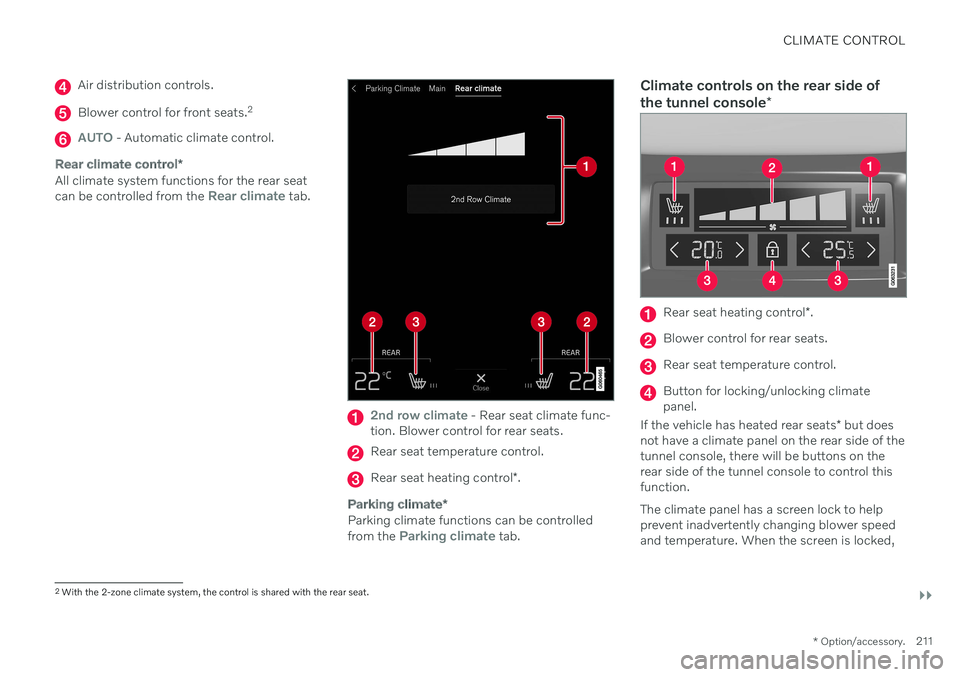
Air distribution controls.
Blower control for front seats. 2
AUTO - Automatic climate control.
Rear climate control
*
All climate system functions for the rear seat can be controlled from the Rear climate tab.
2nd row climate - Rear seat climate func-
tion. Blower control for rear seats.
Rear seat temperature control.
Rear seat heating control *.
Parking climate *
Parking climate functions can be controlled from the Parking climate tab.
Climate controls on the rear side of the tunnel console *
Rear seat heating control *.
Blower control for rear seats.
Rear seat temperature control.
Button for locking/unlocking climate panel.
If the vehicle has heated rear seats * but does
not have a climate panel on the rear side of thetunnel console, there will be buttons on therear side of the tunnel console to control thisfunction. The climate panel has a screen lock to help prevent inadvertently changing blower speedand temperature. When the screen is locked,
2 With the 2-zone climate system, the control is shared with the rear seat.
Page 214 of 661
||
CLIMATE CONTROL
* Option/accessory.
212 only the controls for seat adjustment
* and the
unlock button will be displayed. After unlocking, blower speed and tempera- ture can also be changed from the climatepanel and all selected climate settings will bedisplayed. The screen locks automatically aftera period of inactivity.
Related information
Climate (p. 198)
Activating and deactivating power front seats
* (p. 212)
Activating and deactivating the heatedrear seats
* (p. 213)
Activating and deactivating front seat ven-tilation
* (p. 215)
Activating and deactivating the heatedsteering wheel
* (p. 215)
Activating auto climate control (p. 216)
Activating and deactivating recirculation (p. 217)
Activating and deactivating max defroster(p. 218)
Activating and deactivating the heatedrear window and door mirrors (p. 219)
Setting the blower speed for the frontseats (p. 220)
Setting the blower speed for the rear seats
* (p. 221)
Synchronize temperature (p. 224)
Activating and deactivating air condition- ing (p. 225)
Activating and deactivating power front seats
*
The seats can be heated for added comfort for the driver and passengers in cold weather.
1. Tap the left- or right-side steering wheel and seat button in the center display's cli- mate bar to open the controls for steeringwheel and seat heating. If the vehicle is not equipped with ventila- ted seats or heated steering wheel (for thedriver's side), the button for seat heating isdirectly accessible in the climate bar.
2. Tap the seat heating button repeatedly to
select one of the four levels: Off, High,Medium or Low.
> The level is changed and the set level is displayed in the button.
Page 215 of 661
CLIMATE CONTROL
}}
* Option/accessory.213
WARNING
Heated seats should not be used by people who have difficulty detecting temperatureincreases due to nerve damage or numb-ness or who for another reason may havedifficulty operating the controls for seatheating.
Related information
Climate system controls (p. 210)
Activating and deactivating the heated front seat
* (p. 213)
Activating and deactivating the heated front seat *
The seats can be heated for added comfort for the driver and passengers in cold weather.
Seat heating can be set to automatically acti- vate when the engine is started. When set toautomatically activate, heating will be turnedon at low ambient temperatures. 1. Tap
Settings in the Top view in the center
display.
2. Tap
Climate.
3. Select
Auto Driver Seat Heating Leveland Auto Passenger Seat Heating Levelto activate/deactivate automatic start of heated driver's and passenger seat.
> An "A" will be displayed next to the rel-
evant seat heating button in the climate bar when auto start has been activated.
4. Select
Low, Medium or High to select
level after the function has been activated.
Related information
Climate system controls (p. 210)
Activating and deactivating power front seats
* (p. 212)
Activating and deactivating the heated rear seats *
The seats can be heated for added comfort for the driver and passengers in cold weather.
Activating and deactivating the heated rear seats from the front seats *
1. Tap the symbol in the center of the climate
bar to open Climate view in the center dis- play.
2. Select the
Rear climate tab.
3. Tap the seat heating button repeatedly to
select one of the four levels: Off, High,Medium or Low.
> The level is changed and the set level is displayed in the button.