climate settings VOLVO V60 2021 Owner's Manual
[x] Cancel search | Manufacturer: VOLVO, Model Year: 2021, Model line: V60, Model: VOLVO V60 2021Pages: 661, PDF Size: 12.68 MB
Page 221 of 661
CLIMATE CONTROL
219
Activating and deactivating the heated rear window and doormirrors The heated rear window and door mirrors are used to quickly remove condensation and icefrom the glass.
Activating and deactivating the heated rear window and door mirrors fromthe center console
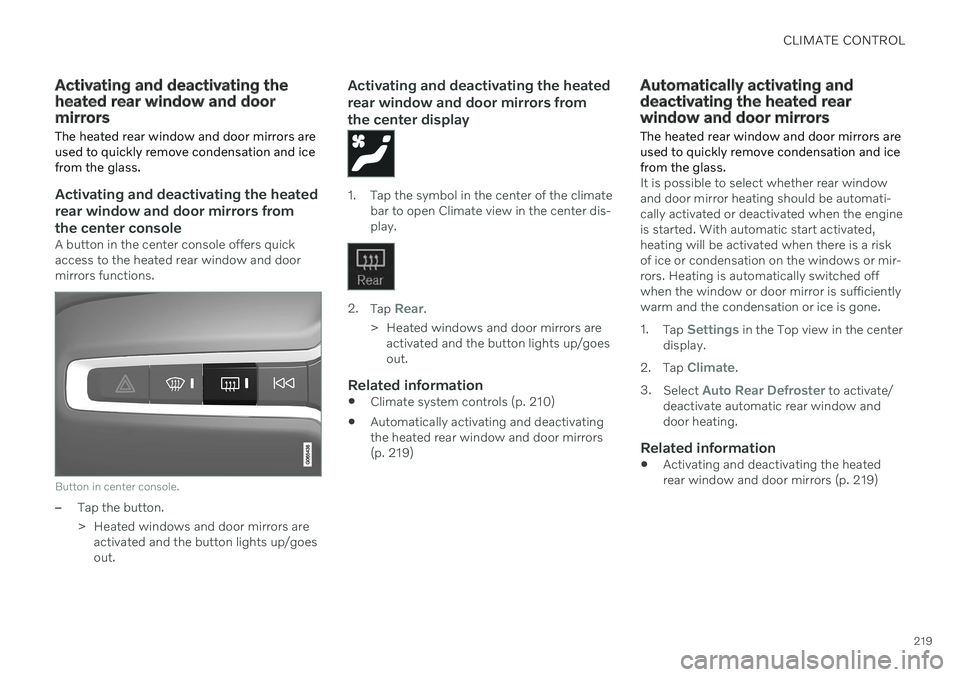
A button in the center console offers quick access to the heated rear window and doormirrors functions.
Button in center console.
–Tap the button.
> Heated windows and door mirrors areactivated and the button lights up/goes out.
Activating and deactivating the heated rear window and door mirrors fromthe center display
1. Tap the symbol in the center of the climate bar to open Climate view in the center dis- play.
2.Tap Rear.
> Heated windows and door mirrors are activated and the button lights up/goes out.
Related information
Climate system controls (p. 210)
Automatically activating and deactivatingthe heated rear window and door mirrors(p. 219)
Automatically activating and deactivating the heated rearwindow and door mirrors
The heated rear window and door mirrors are used to quickly remove condensation and icefrom the glass.
It is possible to select whether rear window and door mirror heating should be automati-cally activated or deactivated when the engineis started. With automatic start activated,heating will be activated when there is a riskof ice or condensation on the windows or mir-rors. Heating is automatically switched offwhen the window or door mirror is sufficientlywarm and the condensation or ice is gone. 1. Tap
Settings in the Top view in the center
display.
2. Tap
Climate.
3. Select
Auto Rear Defroster to activate/
deactivate automatic rear window and door heating.
Related information
Activating and deactivating the heatedrear window and door mirrors (p. 219)
Page 229 of 661
CLIMATE CONTROL
}}
* Option/accessory.227
Starting from appA device with the Volvo On Call * app can be
used to start preconditioning or check set- tings. Preconditioning ventilates the passen-ger compartment by blowing in air from out-side. The passenger compartment can also be pre- conditioned using the Engine Remote Start (ERS) 6
function using the Volvo On Call * app.
Related information
Parking climate
* (p. 226)
Preconditioning
* (p. 226)
Preconditioning timer
* (p. 227)
Pre-cleaning
* (p. 230)
Preconditioning timer *
The timer can be set to finish preconditioning at a predetermined time.
The timer can store up to 8 preset times for
a time on a particular date
a time on one or more days of the week, with or without the repeat function.
Related information
Preconditioning
* (p. 226)
Adding and editing timer settings for pre- conditioning
* (p. 227)
Activating and deactivating precondition-ing timer
* (p. 228)
Deleting preconditioning timer settings
*
(p. 229)
Adding and editing timer settings for preconditioning *
The preconditioning timer can store up to 8 preset timer settings.
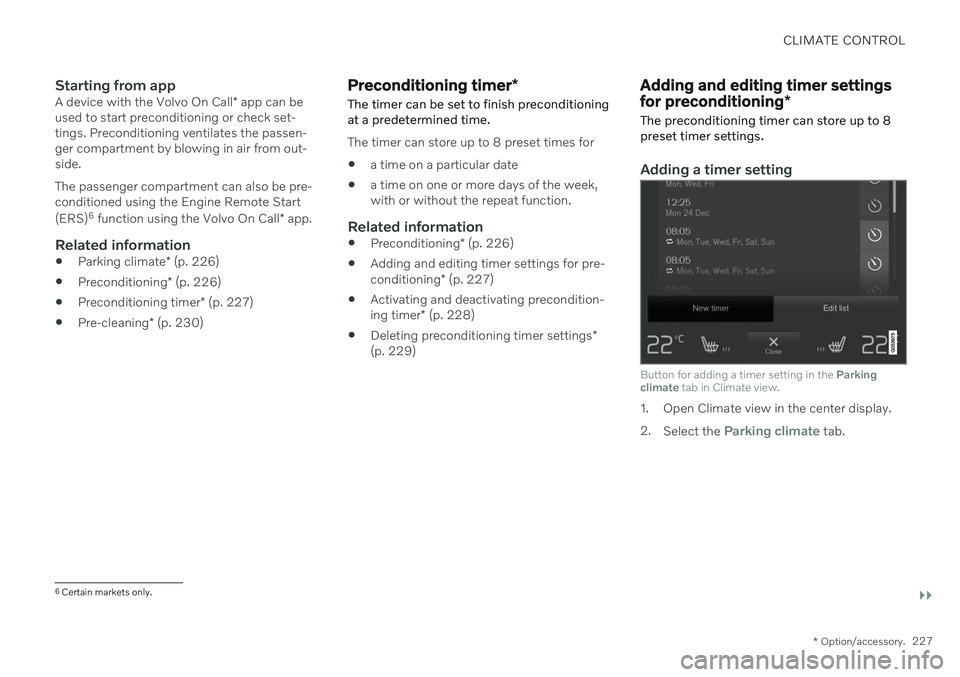
Adding a timer setting
Button for adding a timer setting in the Parking
climate tab in Climate view.
1. Open Climate view in the center display. 2.
Select the
Parking climate tab.
6
Certain markets only.
Page 230 of 661
||
CLIMATE CONTROL
* Option/accessory.
228 3.
Tap
Add timer.
> A pop-up window will appear.
NOTE
It is not possible to add a time setting if there are already 8 settings for the timer.Delete a time setting to be able to add anew one.
4. Tap Date to set a time for a specific date.
Tap
Days to set a time for one or more
days of the week. With
Days: Activate/deactivate the repeat
function by selecting/deselecting the
Repeat weekly checkbox.
5. With
Date: Select a date for precondition-
ing by scrolling in the date list using the arrows. With
Days: Select days of the week for
preconditioning by tapping the buttons for the days.
6. Set the time at which preconditioning should be completed by scrolling usingthe arrows in the clock.
7. Tap
Confirm to add a timer setting.
> The timer setting will be added to the list and activated.
Editing the timer setting1. Open Climate view in the center display. 2. Select the
Parking climate tab.
3. Tap the timer setting you would like to change.
> A pop-up window will appear.
4. To edit a timer setting, follow the proce- dures described under the heading "Add- ing a timer setting" above.
Related information
Preconditioning
* (p. 226)
Preconditioning timer
* (p. 227)
Activating and deactivating precondition- ing timer
* (p. 228)
Deleting preconditioning timer settings
*
(p. 229)
Activating and deactivating preconditioning timer *
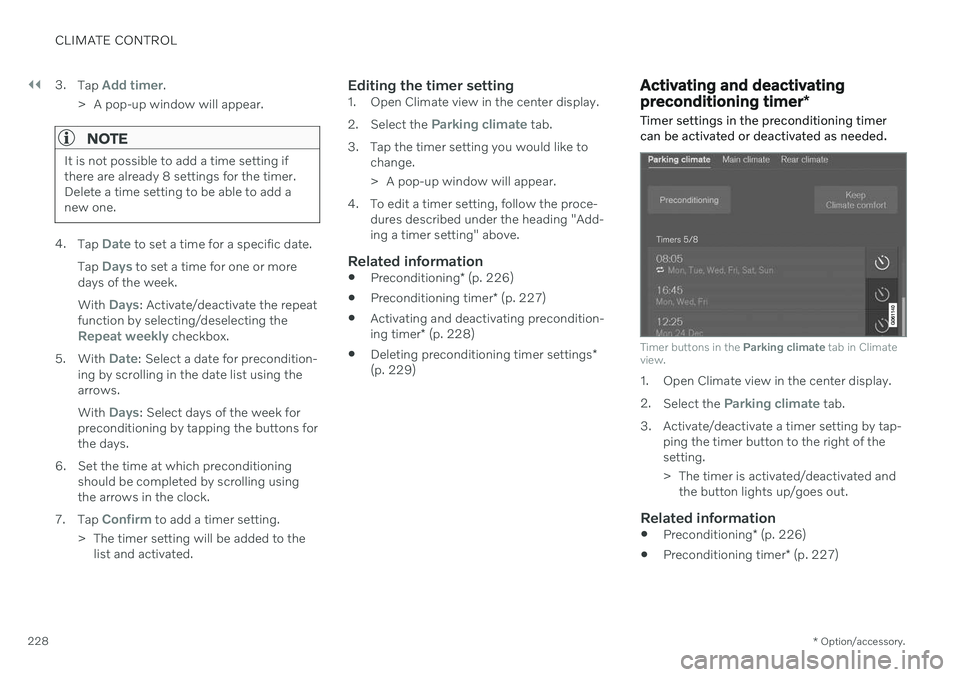
Timer settings in the preconditioning timer can be activated or deactivated as needed.
Timer buttons in the Parking climate tab in Climate
view.
1. Open Climate view in the center display. 2. Select the
Parking climate tab.
3. Activate/deactivate a timer setting by tap- ping the timer button to the right of the setting.
> The timer is activated/deactivated andthe button lights up/goes out.
Related information
Preconditioning
* (p. 226)
Preconditioning timer
* (p. 227)
Page 231 of 661
CLIMATE CONTROL
* Option/accessory.229
Adding and editing timer settings for pre- conditioning
* (p. 227)
Deleting preconditioning timer settings
*
(p. 229)
Deleting preconditioning timer settings *
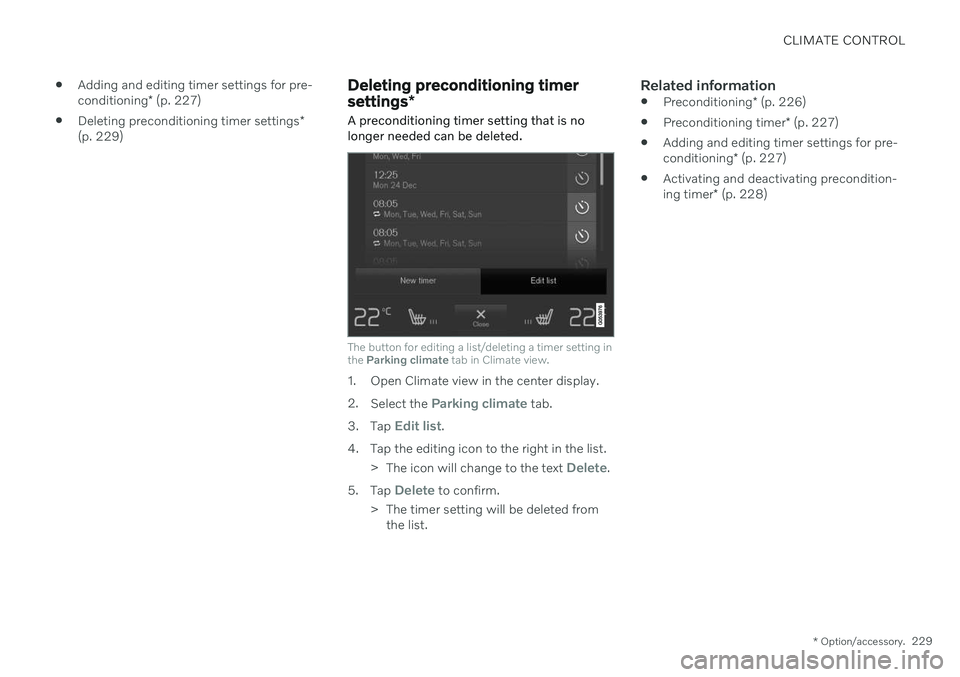
A preconditioning timer setting that is no longer needed can be deleted.
The button for editing a list/deleting a timer setting in the Parking climate tab in Climate view.
1. Open Climate view in the center display. 2.
Select the
Parking climate tab.
3. Tap
Edit list.
4. Tap the editing icon to the right in the list. >The icon will change to the text
Delete.
5. Tap
Delete to confirm.
> The timer setting will be deleted from the list.
Related information
Preconditioning
* (p. 226)
Preconditioning timer
* (p. 227)
Adding and editing timer settings for pre- conditioning
* (p. 227)
Activating and deactivating precondition-ing timer
* (p. 228)
Page 232 of 661
CLIMATE CONTROL
* Option/accessory.
230
Pre-cleaning *
Pre-cleaning of the vehicle before driving is used to improve the air quality in the passen-ger compartment.
It is only possible to activate pre-cleaning manually from the center display, but the func-tion is also started automatically when pre-conditioning has finished. The function uses the ventilation system to blow fresh air into the passenger compart-ment and then circulates the air through theclimate system's passenger compartment airfilter.
Related information
Parking climate
* (p. 226)
Starting and stopping pre-cleaning
*
(p. 230)
Preconditioning
* (p. 226)
Starting and stopping pre- cleaning *
Pre-cleaning improves the air quality in the
passenger compartment before driving. The function can be started in the center displayor from a cellular phone.
Starting and stopping from the vehicle
1. Tap the symbol in the center of the climate bar to open Climate view in the center dis- play.
2. Select the
Parking climate tab.
3. Tap
Start Pre-cleaning.
> Pre-cleaning starts/stops and the but- ton lights up/goes out.
Starting from app *A device with the Volvo On Call * app can be
used to start pre-cleaning or check settings.
NOTE
Precleaning always starts automatically when preconditioning is complete.
Related information
Parking climate
* (p. 226)
Pre-cleaning
* (p. 230)
Preconditioning
* (p. 226)
Page 233 of 661
CLIMATE CONTROL
}}
* Option/accessory.231
Climate comfort retaining function*
The climate in the passenger compartment can be maintained when the vehicle isparked, e.g. if the engine is turned off but thedriver or passengers remain in the vehicle.
This function can only be direct-started from the center display. The function utilizes several of the vehicle's systems:
Residual heat from the engine is used tohelp heat the passenger compartment to acomfortable temperature.
In warm weather, the ventilation systemcools the passenger compartment byblowing air in from outside.
NOTE
Climate comfort maintenance will be deac- tivated if the vehicle is locked from the out-side in order to avoid using residual engineheat unnecessarily. This function isintended to be used to maintain climatecomfort when the driver or a passengerremains in the vehicle after the engine isturned off. The climate comfort retaining function is limited in duration in cold weather depend-ing on the amount of residual warmthavailable.
Related information
Parking climate
* (p. 226)
Starting and switching off the climate retaining function when parking
* (p. 231)
Starting and switching off the climate retaining function when parking *
The climate retaining function maintains the climate settings in the vehicle after theengine has been switched off. The functioncan be activated in the center display.
1. Tap the symbol in the center of the climate bar to open Climate view in the center dis- play.
2. Select the
Parking climate tab.
3. Tap
Keep climate comfort.
> The climate comfort retaining function will be activated/deactivated and the button light will go on/off.
NOTE
Maintained climate comfort is not possible when there is not sufficient residual engineheat to maintain the climate settings in thepassenger compartment, or if the outsidetemperature is above approximately 20 °C(68 °F).
Page 415 of 661
STARTING AND DRIVING
}}
* Option/accessory.413
Automatic transmission symbols and messages If a problem occurs with the transmission, a symbol and a message are displayed in theinstrument panel.
CAUTION
Check the operating temperature of the transmission to help avoid damage to anyof the drive system components. If there isa risk of overheating, a warning symbol willappear in the instrument panel and a textmessage will be displayed. Follow the rec-ommendations given.
Symbol Meaning
A fault has occurred in the trans- mission. Read the message in the instru- ment panel.
Hot or overheated transmission. Read the message in the instru- ment panel.
Temporary fault in driveline. Read the message in the instru- ment panel.
Related information
Automatic transmission (p. 406)
All Wheel Drive (AWD)
*
All-wheel drive (AWD 9
), also called four-
wheel drive, means that power is distributed to all four wheels, which improves traction.
To achieve the best traction, power is auto- matically directed to the wheels that have thebest grip. The system continuously calculatesthe need for torque to the rear wheels, andcan immediately redistribute up to half of theengine's torque to the rear wheels. All-wheel drive also has a stabilizing effect at higher speeds. In normal driving conditions,most of the engine's power is directed to thefront wheels. When the vehicle is stationary,all-wheel drive is always activated in prepara-tion for maximum traction during acceleration. All-wheel drive reacts differently depending on which drive mode is selected.
Related information
Drive modes
* (p. 413)
Transmission (p. 406)
Drive modes
*
Drive modes affect the vehicle's driving cha- racteristics in different ways to enhance andsimplify the driving experience in certaintypes of situations.
Drive modes enable easy access to the vehi- cle's many functions and settings in differentdriving situations. The following systems areadapted to help optimize driving characteris-tics in each drive mode: Steering
Engine/transmission/all-wheel drive
*
Brakes
Shock absorbers
Instrument panel
Start/Stop function
Climate control settings
Select the drive mode that is adapted to the current driving conditions. Keep in mind thatnot all drive modes are available in all situa-tions.
Available drive modesWhen the engine is started, the vehicle will be in Comfort mode and the start/stop function
will be activated. Drive mode can be changed once the vehicle is started, e.g. to
Individualmode. Once Individual mode is selected, you
can adjust settings to personal preferences, e.g. to show the tachometer.
Page 416 of 661
||
STARTING AND DRIVING
* Option/accessory.
414
Comfort
Comfort is the vehicle's default mode. The
settings offer driving comfort, light steering and soft suspension adapted for normal driv-ing. In
Comfort mode, no tachometer will be dis-
played in the instrument panel 10
.
Eco
Adapt the vehicle for more fuel-efficient and eco-friendly driving with Eco mode.
In this mode, the Start/Stop function is acti- vated, suspension is soft and certain climatesettings are reduced. When driving in
Eco mode, an ECO gauge
indicating how economical the driving is will be displayed in the instrument panel.
Dynamic
Dynamic mode is designed to help pro-
vide sportier driving characteristics and a faster acceleration response.
Gear shifting will be faster and more distinctand the transmission will prioritize gears witha higher traction force. Steering response is faster and suspension is stiffer 11
to help reduce body roll when corner-
ing. The Start/Stop function is deactivated.
Dynamic mode is also available in a Polestar
Engineered* version.
Individual
Customizes drive mode to personal prefer- ences.
Select one of the drive modes as a basis andadjust the settings to achieve your preferreddriving characteristics. These settings will bestored in the active driver profile and will beavailable every time the vehicle is unlockedwith that remote key. Individual drive mode is only available if it has been activated in the center display.
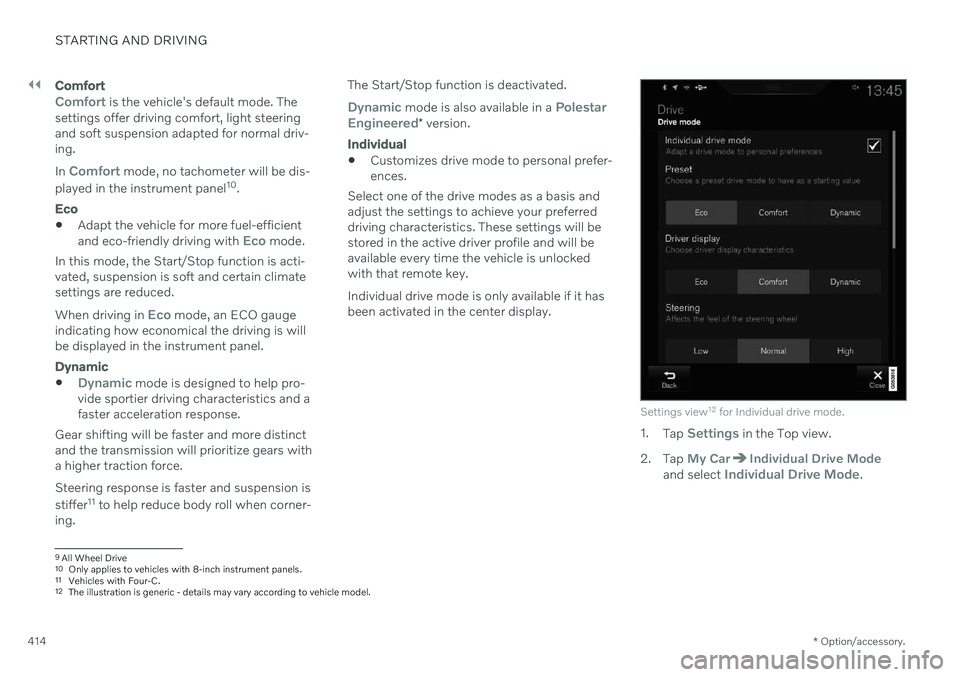
Settings view 12
for Individual drive mode.
1. Tap Settings in the Top view.
2. Tap
My CarIndividual Drive Modeand select Individual Drive Mode.
9 All Wheel Drive
10 Only applies to vehicles with 8-inch instrument panels.
11 Vehicles with Four-C.
12 The illustration is generic - details may vary according to vehicle model.
Page 417 of 661

STARTING AND DRIVING
* Option/accessory.415
3.
Under
Presets, select one of the following
drive modes as a basis: Eco, Comfort,Dynamic or Polestar Engineered* .
The following settings can be modified:
Driver Display
Steering Force
Powertrain Characteristics
Brake Characteristics
Suspension Control
ECO Climate
Start/Stop.
Related information
Changing drive mode
* (p. 415)
Eco drive mode (p. 416)
Economical driving (p. 423)
Start/Stop function (p. 418)
All Wheel Drive (AWD)
* (p. 413)
Driver profiles (p. 134)
Regenerative braking
* (p. 405)
Changing drive mode *
Select the drive mode that is adapted to the current driving conditions. The drive mode is changed using the control in the tunnel console.
Keep in mind that not all drive modes are available in all situations. To change drive mode:
1. Press the DRIVE MODE control.
> A pop-up menu will appear in the cen- ter display.
2. Roll the wheel upward or downward to the desired drive mode. 3. Press the drive mode control or tap its
button in the center display to confirm the selection.
> The selected drive mode is shown inthe instrument panel.
Related information
Drive modes
* (p. 413)
Activating and deactivating Eco drive mode using the function button (p. 418)
Page 418 of 661
STARTING AND DRIVING
* Option/accessory.
416
Eco drive mode
Eco drive mode can help make driving more
fuel-efficient and eco-friendly.
Use this mode to save fuel and promote eco- friendly driving. When
Eco mode is activated, the following
characteristics are modified:
The automatic transmission's shifting points.
Engine control and accelerator pedalresponse.
Eco Coast functionality is activated andengine braking is disabled when the accel-erator pedal is released at speedsbetween 65 and 140 km/h(40 and 87 mph).
Some of the climate system settings willbe reduced or switched off.
Information will be shown in the ECOgauge in the instrument panel to help pro-mote more eco-friendly and economicaldriving.
Coast function Eco CoastEco Coast essentially deactivates engine brak-ing, allowing the vehicle's kinetic energy to beused to roll greater distances. When the driverreleases the accelerator pedal, the transmis-sion is automatically disengaged from theengine. Engine speed is reduced to idlingspeed to reduce fuel consumption. This function is most effective in driving situa-tions where the vehicle can roll freely for along distance e.g. on roads with slight down-grades or when a decrease in speed is antici-pated such as when approaching an area witha lower speed limit.
Activating Eco Coast
The function is activated when the accelerator pedal is fully released and the following condi-tions are met:
Eco drive mode is activated.
The gear selector is in
D.
The vehicle's speed is approximately 65-140 km/h (40-87 mph).
The gradient of the downgrade is less thanapproximately 6%.
COASTING will be displayed in the instrument
panel when Eco Coast is being used.
Limitations
Eco Coast is not available if
the engine and/or transmission are not at normal working temperatures
the gear selector is moved from
D to man-
ual shifting mode
the vehicle's speed is not within the65-140 km/h (40-87 mph) range
the gradient of the downgrade is morethan approximately 6%
the steering wheel paddles
* are being
used for manual shifting.
Deactivating and turning off Eco Coast
In certain situations, it may be advisable to deactivate or turn off Eco Coast so that enginebraking can be used. These situations mightinclude driving down steep hills or beforepassing another vehicle to help ensure thiscan be done as safely as possible. Deactivate Eco Coast by
pressing the accelerator or brake pedal
moving the gear selector to manual mode
using the steering wheel paddles
* to shift.
Turn off Eco Coast by
switching to another drive mode
*
deactivating
Eco drive mode in Function
view.
It is possible to roll short distances even with- out Eco Coast in order to help conserve fuel.However, for the best fuel economy, EcoCoast should be activated and used to rolllonger distances.
Cruise control Eco CruiseWhen cruise control is activated in the Ecodrive mode, the vehicle's acceleration and deceleration will be slower than in other drivemodes to help further conserve fuel. Becauseof this, the vehicle's actual speed may beslightly above or below the set speed.