remote control VOLVO V60 2021 Owner's Manual
[x] Cancel search | Manufacturer: VOLVO, Model Year: 2021, Model line: V60, Model: VOLVO V60 2021Pages: 661, PDF Size: 12.68 MB
Page 444 of 661
STARTING AND DRIVING
* Option/accessory.
442
Programming HomeLink ®
*22
Follow these instructions to program HomeLink ®
, reset all programming, or pro-
gram individual buttons.
NOTE
In some vehicles, the ignition must be on or in the "accessory position" before HomeLink ®
can be programmed or used. It
can be a good idea to put new batteries in the remote control being replaced by HomeLink ®
for faster programming and
better radio signal transmission. TheHomeLink ®
buttons should be reset before
programming.
WARNING
While HomeLink ®
is being programmed,
the garage door or gate being programmed may be activated. Make sure that no one isnear the door or gate during programming.When programming a garage door opener,it is advised to park outside of the garage. 1. Point the remote control at the
HomeLink ®
button to be programmed and
hold it about 2-8 cm (1-3 inches) from the button. Do not obstruct the HomeLink ®
indicator light. Note: Some remote controls are more
effective at programming HomeLink ®
from
a distance of about 15-20 cm (6-12 inches). Keep this in mind if you experi-ence any programming difficulties.
2. Press and hold both the remote control button and the HomeLink ®
button to be
programmed. 3. Do not release the buttons until the indica-
tor light has stopped flashing slowly(about once a second) and either flashesquickly (about 10 times a second) orglows steadily. >If the indicator light glows steadily: Indication that programming is com-plete. Press the programmed buttontwice to activate. If the indicator light flashes quickly: The device being programmed with HomeLink ®
may have a security func-
tion that requires an extra step. Try pressing the programmed button twiceto see whether the programmingworks. Otherwise, continue with thefollowing steps.
22 Certain markets only.
Page 445 of 661
STARTING AND DRIVING
}}
* Option/accessory.443
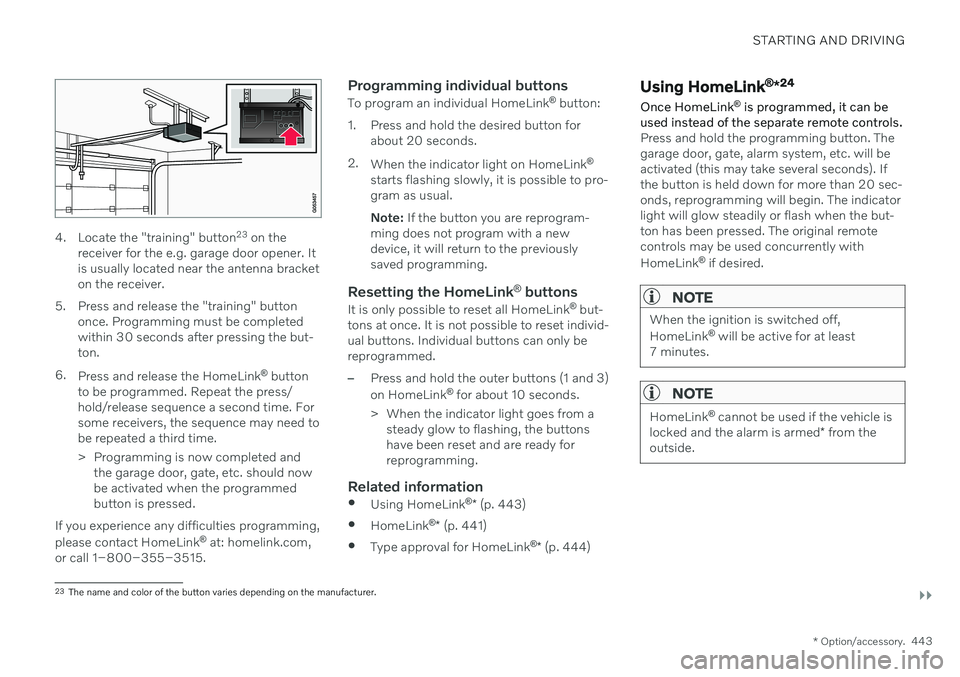
4. Locate the "training" button 23
on the
receiver for the e.g. garage door opener. It is usually located near the antenna bracketon the receiver.
5. Press and release the "training" button once. Programming must be completedwithin 30 seconds after pressing the but-ton.
6. Press and release the HomeLink ®
button
to be programmed. Repeat the press/hold/release sequence a second time. Forsome receivers, the sequence may need tobe repeated a third time.
> Programming is now completed and the garage door, gate, etc. should now be activated when the programmedbutton is pressed.
If you experience any difficulties programming, please contact HomeLink ®
at: homelink.com,
or call 1–800–355–3515.
Programming individual buttons
To program an individual HomeLink ®
button:
1. Press and hold the desired button for about 20 seconds.
2. When the indicator light on HomeLink ®
starts flashing slowly, it is possible to pro- gram as usual. Note: If the button you are reprogram-
ming does not program with a new device, it will return to the previouslysaved programming.
Resetting the HomeLink ®
buttons
It is only possible to reset all HomeLink ®
but-
tons at once. It is not possible to reset individ-ual buttons. Individual buttons can only bereprogrammed.
–Press and hold the outer buttons (1 and 3) on HomeLink ®
for about 10 seconds.
> When the indicator light goes from a steady glow to flashing, the buttons have been reset and are ready forreprogramming.
Related information
Using HomeLink ®
* (p. 443)
HomeLink ®
* (p. 441)
Type approval for HomeLink ®
* (p. 444)
Using HomeLink ®
*24
Once HomeLink ®
is programmed, it can be
used instead of the separate remote controls.
Press and hold the programming button. The garage door, gate, alarm system, etc. will beactivated (this may take several seconds). Ifthe button is held down for more than 20 sec-onds, reprogramming will begin. The indicatorlight will glow steadily or flash when the but-ton has been pressed. The original remotecontrols may be used concurrently with HomeLink ®
if desired.
NOTE
When the ignition is switched off, HomeLink ®
will be active for at least
7 minutes.
NOTE
HomeLink ®
cannot be used if the vehicle is
locked and the alarm is armed * from the
outside.
23 The name and color of the button varies depending on the manufacturer.
Page 487 of 661
AUDIO, MEDIA AND INTERNET
}}
* Option/accessory.485
by tethering using the device's Wi-Fi hot- spot.
Related information
Android Auto
* (p. 482)
Connecting the vehicle to the Internet viaa phone (Wi-Fi) (p. 501)
Phone
A phone equipped with Bluetooth can be wirelessly connected to the vehicle's inte-grated hands-free system.
The audio and media system offers hands-free functionality for remotely controlling a numberof the phone's features. The phone's inte-grated controls can also be used, even when itis connected to the vehicle. When the phone has been paired and con- nected to the vehicle, it can be used as anInternet connection or to make or receivecalls, send or receive text messages or wire-lessly play music. The phone is controlled from the center dis- play, and the App menu (accessed using theright-side steering wheel keypad) and voicecommands can also be used to control certainfunctions.
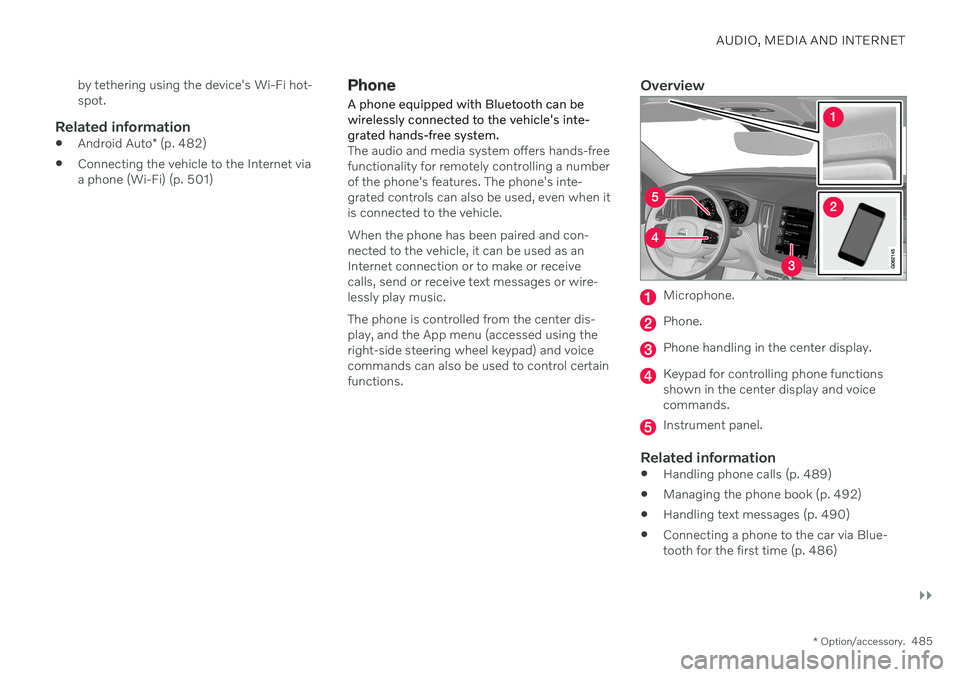
Overview
Microphone.
Phone.
Phone handling in the center display.
Keypad for controlling phone functions shown in the center display and voicecommands.
Instrument panel.
Related information
Handling phone calls (p. 489)
Managing the phone book (p. 492)
Handling text messages (p. 490)
Connecting a phone to the car via Blue- tooth for the first time (p. 486)
Page 552 of 661
LOADING, STORAGE AND PASSENGER COMPARTMENT
* Option/accessory.
550
Passenger compartment interior
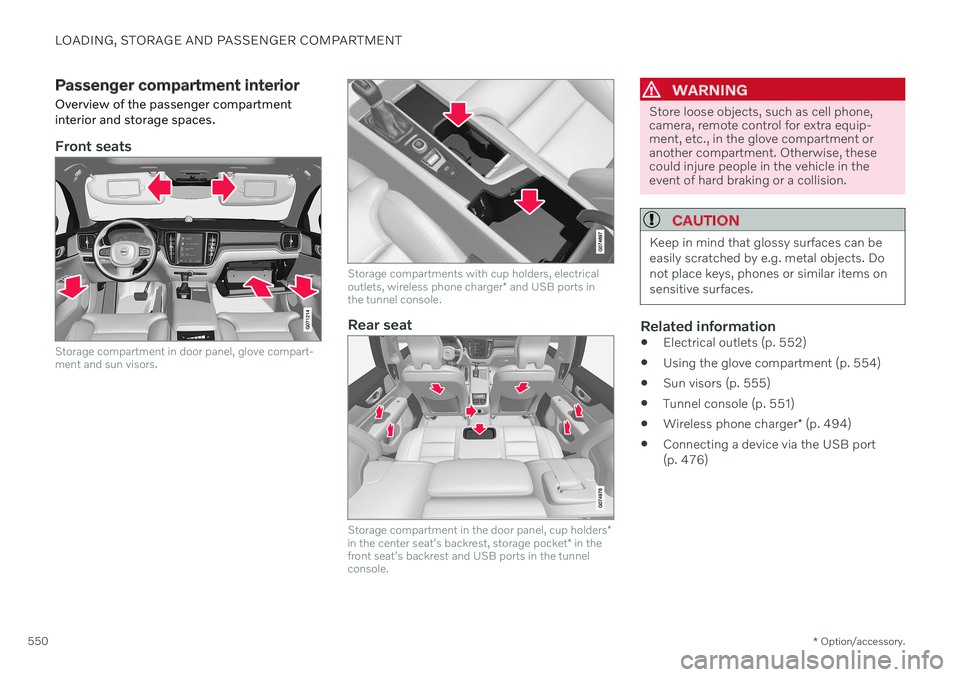
Overview of the passenger compartment interior and storage spaces.
Front seats
Storage compartment in door panel, glove compart- ment and sun visors.
Storage compartments with cup holders, electrical outlets, wireless phone charger * and USB ports in
the tunnel console.
Rear seat
Storage compartment in the door panel, cup holders *
in the center seat's backrest, storage pocket * in the
front seat's backrest and USB ports in the tunnel console.
WARNING
Store loose objects, such as cell phone, camera, remote control for extra equip-ment, etc., in the glove compartment oranother compartment. Otherwise, thesecould injure people in the vehicle in theevent of hard braking or a collision.
CAUTION
Keep in mind that glossy surfaces can be easily scratched by e.g. metal objects. Donot place keys, phones or similar items onsensitive surfaces.
Related information
Electrical outlets (p. 552)
Using the glove compartment (p. 554)
Sun visors (p. 555)
Tunnel console (p. 551)
Wireless phone charger
* (p. 494)
Connecting a device via the USB port (p. 476)
Page 553 of 661
LOADING, STORAGE AND PASSENGER COMPARTMENT
* Option/accessory.551
Tunnel console
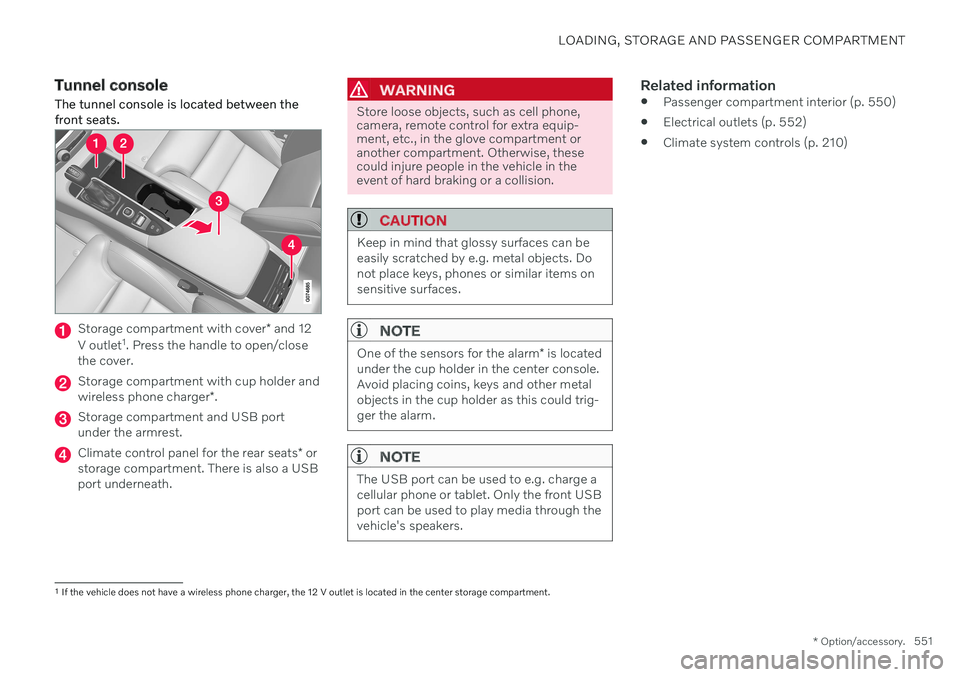
The tunnel console is located between the front seats.
Storage compartment with cover * and 12
V outlet 1
. Press the handle to open/close
the cover.
Storage compartment with cup holder and wireless phone charger *.
Storage compartment and USB port under the armrest.
Climate control panel for the rear seats * or
storage compartment. There is also a USB port underneath.
WARNING
Store loose objects, such as cell phone, camera, remote control for extra equip-ment, etc., in the glove compartment oranother compartment. Otherwise, thesecould injure people in the vehicle in theevent of hard braking or a collision.
CAUTION
Keep in mind that glossy surfaces can be easily scratched by e.g. metal objects. Donot place keys, phones or similar items onsensitive surfaces.
NOTE
One of the sensors for the alarm * is located
under the cup holder in the center console. Avoid placing coins, keys and other metalobjects in the cup holder as this could trig-ger the alarm.
NOTE
The USB port can be used to e.g. charge a cellular phone or tablet. Only the front USBport can be used to play media through thevehicle's speakers.
Related information
Passenger compartment interior (p. 550)
Electrical outlets (p. 552)
Climate system controls (p. 210)
1
If the vehicle does not have a wireless phone charger, the 12 V outlet is located in the center storage compartment.
Page 570 of 661
||
MAINTENANCE AND SERVICE
568
Monthly:
Check cold tire pressure in all tires. Inspect the tires for wear.
Check that engine coolant and other fluidlevels are between the indicated "min"and "max" markings.
Clean interior glass surfaces with a glasscleaner and soft paper towels.
Wipe driver information displays with asoft cloth.
Visually inspect battery terminals for cor-rosion. Corrosion may indicate a loose ter-minal connector, or a battery near the endof its useful service life. Consult your Volvoretailer for additional information.
As needed:
Wash the vehicle, including the undercarriage, to reduce wear that can be caused by abuildup of dirt, and corrosion that can becaused by salt residues. Clean leaves and twigs from air intake vents at the base of the windshield, and from other pla-ces where they may collect.
NOTE
Complete service information for qualified technicians is available online for purchaseor subscription at www.volvotechinfo.com.
Related information
Vehicle status (p. 570)
Scheduling service and repairs (p. 571)
Connecting equipment to the vehicle's data link connector (p. 37)
Technician certification (p. 38)
Climate control system service (p. 576)
Maintenance of the brake system (p. 399)
Engine compartment overview (p. 578)
Data transfer between vehicle and workshop over Wi-Fi
Volvo workshops have a designated Wi-Fi network for data transfer between your vehi-cle and the workshop. Your visit to the work-shop will be easier and more effective whendiagnostics information and software can betransferred over the workshop's network.
At the workshop, your service technician can connect your vehicle to the workshop's Wi-Finetwork to perform troubleshooting anddownload software. For this type of communi-cation, the vehicle only connects to a work-shop's network. It is not possible to connectthe vehicle to another Wi-Fi network (e.g. yourhome network) in the same way as to a work-shop's network.
Connecting with remote keyConnection is usually managed by the servicetechnician, who will use the remote key but-tons. It is therefore important to bring a keywith buttons with you when you visit theworkshop. Pressing the lock button on theremote key three times will connect the vehi-cle to the workshop's Wi-Fi network. When the car is connected to a Wi-Fi net- work, the
symbol appears in the center
display.
Page 644 of 661
INDEX
642Auto-hold brakes 403
activating/deactivating 404
after collision 405
driver support 270
Automatic car wash 616 Automatic engine stop auto-stop 418
Automatic high beam 155
Automatic locking 260
Automatic relocking 241, 255
Automatic transmission 406, 407 kickdown 412
oil 636
Trailer 434
B
Backrestfront seat, adjusting 182, 183, 186, 187 , 188, 189
rear seat, folding 192
Battery jump-start 431
Maintenance 584
recycling 588
starter battery 584
support 586
symbols on the battery 588
Blind Spot Information 344
BLIS 344 activating/deactivating 345
limitations 346
Symbols and messages 347
Blower adjusting 220, 221
air distribution 205
air vents 206
Bluetooth connect 475
connecting vehicle to Internet 501
phone 485
settings 493
Book service and repair 571
Booster cushions 74 Brake assist after collision 405
Brake fluid grade 637
Brake functions 397
Brakes 397 anti-lock brakes, ABS 397
auto-brake with Pilot Assist 315auto-braking with Adaptive Cruise
Control 315automatic when stationary 403
Brake Assist System, BAS 398
brake lights 159
brake system 397
emergency brake lights 159
Maintenance 399
on salted roads 399
on wet roads 399
parking brake 400
brake system fluid 637
C
Camera sensorsee Camera 383
Camera unit 383 limitations 383
maintenance and cleaning 386
Symbols and messages 388
Capacity weight 547, 633 Care Key restricted remote key 248
settings 249
Cargo compartment 555 attachment points 558
cargo net 563
Page 649 of 661
INDEX
647
HomeLink
® remote control
programmable 441
Home safe lighting, Homesafe Lighting, Follow me home lighting, follow-me-
home lighting 160
Honk 195
Hood, opening 576
Horn 195
I
IAQS (Interior Air Quality System) 203
IC (Inflatable Curtain) 63
ID, Volvo 26
Identification number 39
Ignition mode 395, 396
Immobilizer 252 Electronic immobilizer 252
Indicator symbols 93
Individual drive mode 413
Infant seats 70
Inflatable curtain 63
Inflatable Curtain 63
Inflating tires 546
Inflation pressure adjusting 528
Checking 527
decal with recommended pressure 529
Inflation pressure monitoring 529 action 533
save new inflation pressure 531
Status 532
Inflation pressure table 639
Information display 82, 86
Infotainment (Audio and media) 448
Instrument cluster 82 settings 86
Instrument illumination 162
Instrument lighting 162
Instrument panel 82 app menu 102, 103
messages 104
settings 86
Instruments and controls 80 Instruments overview left-hand drive vehicle 80
IntelliSafe driver support 29
Interior Air Quality System 203
Intermittent wiping 175Internet, see Internet-connected vehi- cle 500
Internet-connected vehicle 500 book service and repair 571
No connection or poor connection 505
send car data 572
system updates 569
iPod ®, connecting 476
ISOFIX/LATCH anchors 77
J
Jack 537
Jump-start 431
K
Key 238
Keyboard 124, 127 change language 127
Keyless locking/unlocking 255
settings 256
touch-sensitive surfaces 254
Key tag 238
Page 650 of 661
INDEX
648
L
Labelslocation 628
Laminated glass 164 Lamps changing 607
Trailer 437
Lane Keeping Aid 316 activating/deactivating 318
display 322
limitations 319
see Lane Keeping Aid 316
select assistance option 319
Symbols and messages 320
Language 130
Large Animal Detection (LAD) 327
Launch function 412Leather upholstery, cleaning instruc-
tions 611 Leveling control suspension 422
License agreement 96, 509
Lifting tools 537 Light bulbs changing 607
Light control 150, 162
Lighting Active Bending Lights 156
approach lighting 160
automatic high beam 155
brake lights 159
control, instrument, display 162
controls 150, 160
cornering illumination 157
daytime running lights 152
emergency brake lights 159
front fog lights 157
Hazard warning flashers 159
high beams 154, 155
home safe lighting 160
in passenger compartment 160
low beams 153
position lights 152
rear fog light 158
settings 151
Turn signals 156
Lighting, replacing bulbs 607
Limp home 406 Load anchoring eyelets cargo compartment 558
Load anchoring hooks 557
Load carriers 557
Load index 524Loading general 556
load anchoring eyelets 558
long load 556
Lock indication 236 setting 238
Locking/unlocking Tailgate 243, 256
Locking wheel bolts 537 Locks locking/unlocking 241
Locks and remote keys 236Low battery charge level start battery 431
Low beams 153
M
Maintained climate comfort 231 start/stop 231
Maintenance 566 corrosion protection 620
Max. axle weight 633
Max. roof load 633
Page 653 of 661
INDEX
651
Symbols and messages 388
type approval 381
Radio 452 changing radio waveband and radio
station 454
HD radio 457
RBDS 456
search radio station 454
settings 456SiriusXM ®
Satellite radio 460, 461, 463
start 453
voice control 147
Radio favorites 455
Rain sensor 175, 176
Rain sensor's memory function 176
Rear camera 361
Rear Collision Warning 343 limitations 343
Rear seat blower 221
climate 210
folding backrest 192
head restraint 193
heating 213
temperature 223
Rearview/door mirrors adjusting door mirrors 168
dimming 168
heating 219
interior 167
Rearview mirror 167 dimming 168
Rear window heating 219
washers 178, 179
wipers 178, 179
Recalls 47
Recommendations when driving 424
Recommendations when loading 556
Recovery 440
Refrigerant 576 climate system 637
Refueling filling 426
fuel filler door, fuel flap 425
Regenerative braking 405
Remote immobilizer 252
Remote key 238 battery replacement 244
connecting to driver profile 136
detachable key blade 249
loss 248
Range 243
Remote updates 569
Reporting safety defects 46Resetting door mirrors 168
Resetting settings 132 change of owner 132
Driver profile 137
Resetting trip odometer 90
Road Sign Information 278 activate/deactivate warnings 281
activating/deactivating 279
display 279
limitations 282
Sensus Navigation 280
speed camera information 280
Speed warning 280
Road trip 424
Roll-over protection 271
Roll Stability Control 271
Roof load, max. weight 633
Run-off Mitigation 338
S
Safety 44 pregnancy 45
Safety belt, see Seat belt 49
Safety defects, reporting 46