heating VOLVO V60 2021 Owners Manual
[x] Cancel search | Manufacturer: VOLVO, Model Year: 2021, Model line: V60, Model: VOLVO V60 2021Pages: 661, PDF Size: 12.68 MB
Page 7 of 661
5
SEATS AND STEERING WHEEL
Manual front seats182
Power * front seats
183
Adjusting the power * front seats
183
Storing positions for seats, mir- rors and head-up display *184
Using stored positions for seats,mirrors and head-up display *185
Front seat massage * settings
186
Adjusting front seat massage set-tings * 187
Adjusting * front seat cushion length
188
Adjusting front seat side bolstersettings * 189
Adjusting front seat lumbar support *
189
Adjusting the passenger seat fromthe driver's seat * 191
Folding down the rear seat backrests 192
Adjusting the rear seat head restraints 193
Steering wheel controls and horn 195
Adjusting the steering wheel 195
CLIMATE CONTROL
Climate198
Climate zones 198
Climate control sensors 199
Perceived temperature 200
Climate control system voice commands 200
Air quality 201
CleanZone *
202
Clean Zone Interior Package *
202
Interior Air Quality System *
203
Activating and deactivating the air quality sensor * 203
Passenger compartment air filter 204
Advanced Air Cleaner *
204
Air distribution 204
Adjusting air distribution 205
Opening, closing and directing air vents 206
Air distribution options 207
Climate system controls 210
Activating and deactivating power front seats * 212
Activating and deactivating theheated front seat * 213
Activating and deactivating theheated rear seats * 213
Activating and deactivating front seat ventilation
* 215
Activating and deactivating theheated steering wheel *215
Activating and deactivating auto-matic steering wheel heating *216
Activating auto climate control 216
Activating and deactivating recir- culation 217
Activating and deactivating therecirculation timer setting 217
Activating and deactivating maxdefroster 218
Activating and deactivating theheated rear window and door mirrors 219
Automatically activating and deac-tivating the heated rear windowand door mirrors 219
Setting the blower speed for thefront seats 220
Setting the blower speed for the rear seats * 221
Setting the temperature for the front seats 222
Setting the temperature for the rear seats * 223
Synchronize temperature 224
Activating and deactivating air conditioning 225
Page 11 of 661
9
STARTING AND DRIVING
Starting the vehicle392
Switching off the vehicle 394
Ignition modes 395
Selecting ignition mode 396
Brake functions 397
Brakes 397
Brake Assist System 398
Braking on wet roads 399
Braking on salted roads 399
Maintenance of the brake system 399
Parking brake 400
Activating and deactivating the parking brake 400
Settings for automatically activat-ing the parking brake 402
Parking on a hill 402
Parking brake malfunction 402
Auto-hold brakes 403
Activating and deactivating Auto-hold at a standstill 404
Hill Start Assist 405
Braking assist after a collision 405
Regenerative braking *
405
Transmission 406
Automatic transmission 406
Shifting gears with automatic transmission 407
Using the steering wheel paddles *
to shift 409
Shiftlock 411
Deactivating the automatic shiftlock 411
The kickdown function 412
The Launch function *
412
Automatic transmission symbolsand messages 413
All Wheel Drive (AWD) *
413
Drive modes *
413
Changing drive mode *
415
Eco drive mode 416
Activating and deactivating Ecodrive mode using the function button 418
Start/Stop function 418
Driving with the Start/Stop function 418
Deactivating the Start/Stop function 420
Conditions for the Start/Stop function 420
Leveling control * and suspension
422
Economical driving 423
Preparing for a long trip 424
Winter driving 424
Driving through standing water 425
Opening/closing the fuel filler door 425
Refueling426
Fuel 427
Octane rating 428
Emission controls 429
Overheating of engine and trans- mission 430
Battery drain 431
Jump starting using another battery 431
Driving with a trailer 434
Trailer Stability Assist *
436
Checking trailer lights 437
Towing using a towline 438
Attaching and removing the tow-ing eyelet 439
Recovery 440
HomeLink ®
* 441
Programming HomeLink ®
* 442
Using HomeLink ®
* 443
Type approval for HomeLink ®
* 444
Compass *
445
Activating and deactivating the compass * 445
Calibrating the compass *
445
Page 111 of 661
DISPLAYS AND VOICE CONTROL
* Option/accessory.109
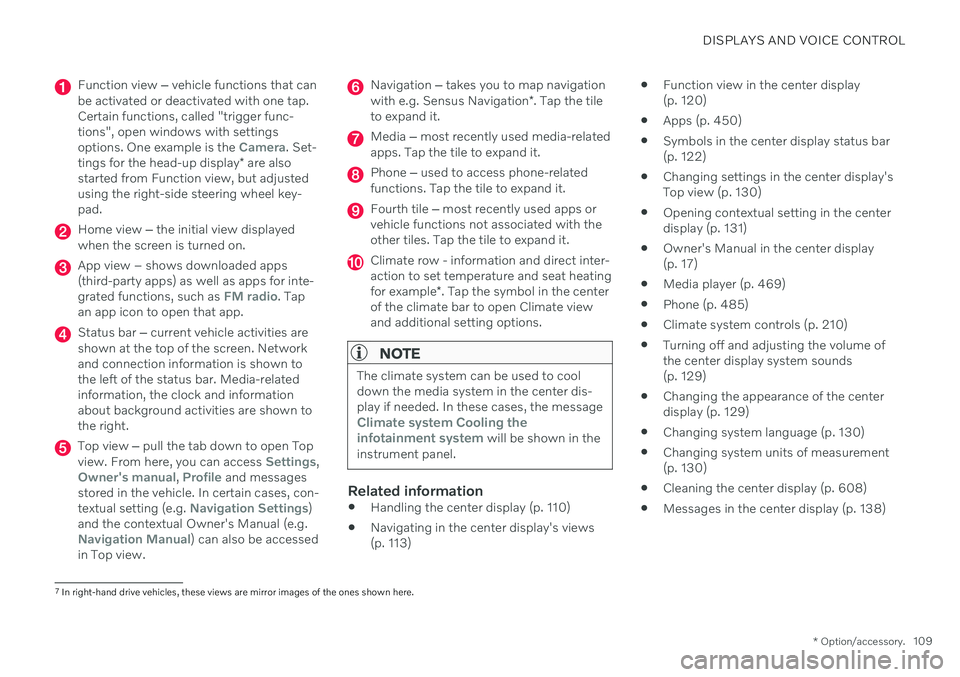
Function view ‒ vehicle functions that can
be activated or deactivated with one tap. Certain functions, called "trigger func-tions", open windows with settingsoptions. One example is the
Camera. Set-
tings for the head-up display * are also
started from Function view, but adjusted using the right-side steering wheel key-pad.
Home view ‒ the initial view displayed
when the screen is turned on.
App view – shows downloaded apps (third-party apps) as well as apps for inte-grated functions, such as
FM radio. Tap
an app icon to open that app.
Status bar ‒ current vehicle activities are
shown at the top of the screen. Network and connection information is shown tothe left of the status bar. Media-relatedinformation, the clock and informationabout background activities are shown tothe right.
Top view ‒ pull the tab down to open Top
view. From here, you can access Settings,Owner's manual, Profile and messages
stored in the vehicle. In certain cases, con- textual setting (e.g.
Navigation Settings)
and the contextual Owner's Manual (e.g.
Navigation Manual) can also be accessed
in Top view.
Navigation ‒ takes you to map navigation
with e.g. Sensus Navigation *. Tap the tile
to expand it.
Media ‒ most recently used media-related
apps. Tap the tile to expand it.
Phone ‒ used to access phone-related
functions. Tap the tile to expand it.
Fourth tile ‒ most recently used apps or
vehicle functions not associated with the other tiles. Tap the tile to expand it.
Climate row - information and direct inter- action to set temperature and seat heating for example *. Tap the symbol in the center
of the climate bar to open Climate view and additional setting options.
NOTE
The climate system can be used to cool down the media system in the center dis-play if needed. In these cases, the message
Climate system Cooling the
infotainment system will be shown in the
instrument panel.
Related information
Handling the center display (p. 110)
Navigating in the center display's views (p. 113)
Function view in the center display(p. 120)
Apps (p. 450)
Symbols in the center display status bar(p. 122)
Changing settings in the center display'sTop view (p. 130)
Opening contextual setting in the centerdisplay (p. 131)
Owner's Manual in the center display(p. 17)
Media player (p. 469)
Phone (p. 485)
Climate system controls (p. 210)
Turning off and adjusting the volume ofthe center display system sounds(p. 129)
Changing the appearance of the centerdisplay (p. 129)
Changing system language (p. 130)
Changing system units of measurement(p. 130)
Cleaning the center display (p. 608)
Messages in the center display (p. 138)
7
In right-hand drive vehicles, these views are mirror images of the ones shown here.
Page 116 of 661
||
DISPLAYS AND VOICE CONTROL
* Option/accessory.
114
NOTE
In Home view's standard mode – short press on the Home button. An animationdescribing access to the various views isshown on the screen.
NOTE
When the vehicle is moving:
Certain functions (e.g. using the center display's keyboard) may be deacti-vated.
Certain texts (e.g. those generated byapps) will be shortened to three rows. Tap the
Read out button to have the
entire message read aloud.
Text messages will be shortened to one row. Tap the
Read out button to
have the entire message read aloud.
Status barCurrent vehicle activities are shown at the top of the screen in the status bar. Network andconnection information is shown to the left ofthe status bar. Media-related information, theclock and information about background activ-ities are shown to the right.
Top view
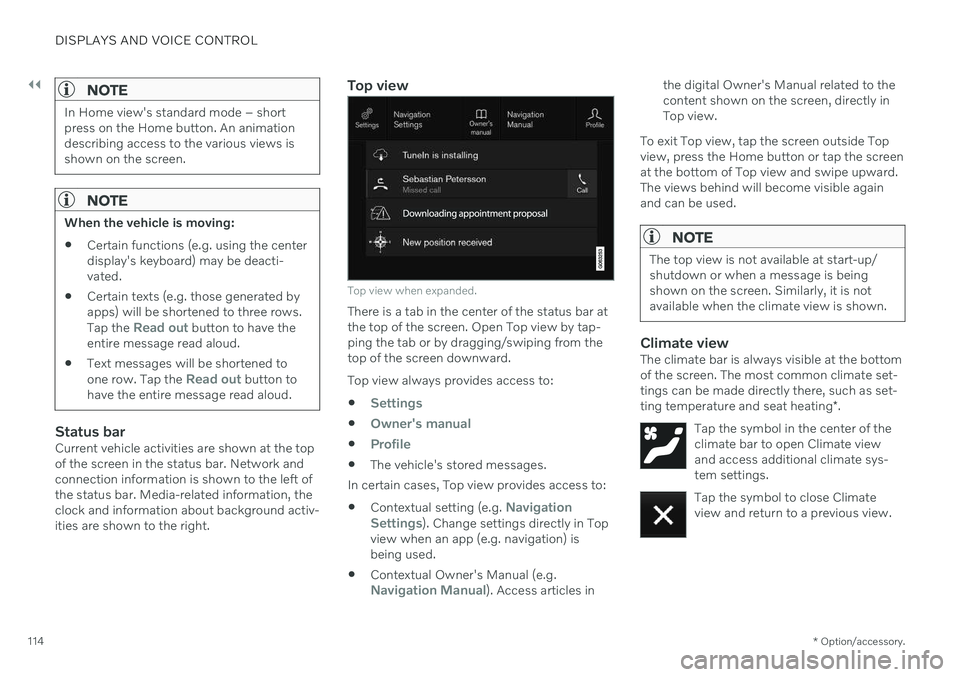
Top view when expanded.
There is a tab in the center of the status bar at the top of the screen. Open Top view by tap-ping the tab or by dragging/swiping from thetop of the screen downward. Top view always provides access to:
Settings
Owner's manual
Profile
The vehicle's stored messages.
In certain cases, Top view provides access to: Contextual setting (e.g.
Navigation
Settings). Change settings directly in Top
view when an app (e.g. navigation) is being used.
Contextual Owner's Manual (e.g.
Navigation Manual). Access articles in the digital Owner's Manual related to the content shown on the screen, directly inTop view.
To exit Top view, tap the screen outside Topview, press the Home button or tap the screenat the bottom of Top view and swipe upward.The views behind will become visible againand can be used.
NOTE
The top view is not available at start-up/ shutdown or when a message is beingshown on the screen. Similarly, it is notavailable when the climate view is shown.
Climate viewThe climate bar is always visible at the bottom of the screen. The most common climate set-tings can be made directly there, such as set- ting temperature and seat heating *.
Tap the symbol in the center of the climate bar to open Climate viewand access additional climate sys-tem settings.
Tap the symbol to close Climate view and return to a previous view.
Page 176 of 661
WINDOWS, GLASS AND MIRRORS
* Option/accessory.
174
Keyless locking and unlocking
* (p. 255)
Locking and unlocking using the remote key (p. 241)
Wiper blades and washer fluid The wipers and the washer fluid are designed to improve visibility and the headlight pat-tern.
Washer fluid direct from the wiper blades and heating
* of the wiper blades gives improved
vision. When there is approximately 1 liter (1 qt) of washer fluid remaining, a message to refill willappear in the instrument panel.
Related information
Using the rain sensor (p. 175)
Using the windshield and headlight wash-ers (p. 177)
Using automatic rear window wipingwhen backing up (p. 179)
Activating and deactivating the rain sen-sor's memory function (p. 176)
Using the rear window wiper/washer(p. 178)
Filling washer fluid (p. 626)
Putting the wiper blades in service posi-tion (p. 625)
Replacing windshield wiper blades(p. 624)
Changing rear window wipers (p. 622)
Using the windshield wipers (p. 174)
Using the windshield wipers
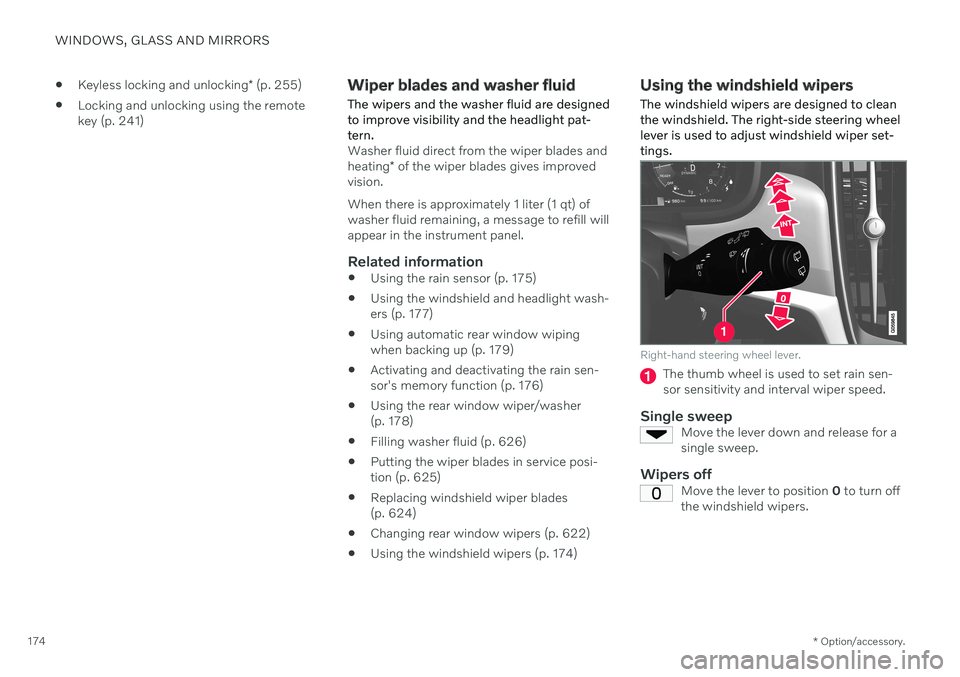
The windshield wipers are designed to clean the windshield. The right-side steering wheellever is used to adjust windshield wiper set-tings.
Right-hand steering wheel lever.
The thumb wheel is used to set rain sen- sor sensitivity and interval wiper speed.
Single sweepMove the lever down and release for asingle sweep.
Wipers offMove the lever to position 0 to turn off
the windshield wipers.
Page 180 of 661
WINDOWS, GLASS AND MIRRORS
178
Filling washer fluid (p. 626)
Putting the wiper blades in service posi- tion (p. 625)
Replacing windshield wiper blades(p. 624)
Changing rear window wipers (p. 622)
Using the windshield wipers (p. 174)
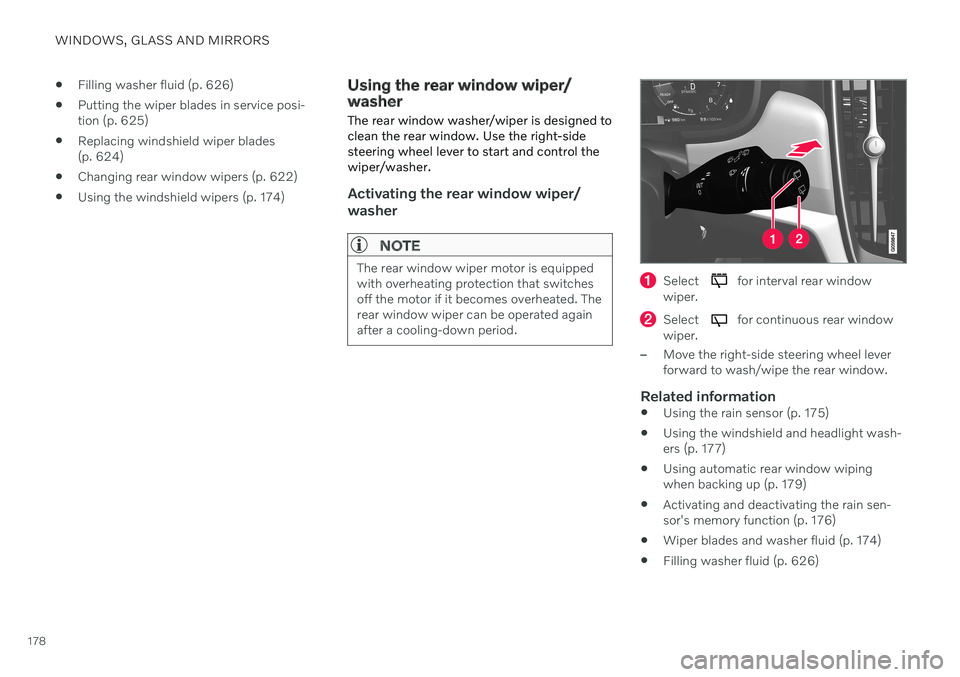
Using the rear window wiper/ washer The rear window washer/wiper is designed to clean the rear window. Use the right-sidesteering wheel lever to start and control thewiper/washer.
Activating the rear window wiper/ washer
NOTE
The rear window wiper motor is equipped with overheating protection that switchesoff the motor if it becomes overheated. Therear window wiper can be operated againafter a cooling-down period.Select for interval rear window
wiper.
Select for continuous rear window
wiper.
–Move the right-side steering wheel lever forward to wash/wipe the rear window.
Related information
Using the rain sensor (p. 175)
Using the windshield and headlight wash-ers (p. 177)
Using automatic rear window wipingwhen backing up (p. 179)
Activating and deactivating the rain sen-sor's memory function (p. 176)
Wiper blades and washer fluid (p. 174)
Filling washer fluid (p. 626)
Page 202 of 661
CLIMATE CONTROL
* Option/accessory.
200
Perceived temperature
The climate control system regulates the cli- mate in the passenger compartment basedon perceived temperature, not actual tem-perature.
The selected passenger compartment tem- perature is based on the physical perception ofthe current ambient temperature, airflowspeed, humidity, sunlight in the passengercompartment, etc. The system has a sunlight sensor that detects which side of the vehicle the sunlight is shin-ing on and adjusts the temperature accord-ingly. This means that the temperature of theair coming out of the vents may be differentfor the left and right sides, even if the tem-perature setting is the same for both sides.
Related information
Climate (p. 198)
Climate control system voice commands 1
Voice commands can be used for the climate control system to e.g. change temperature, activate seat heating * or change blower
speed.
Tap and say one of the following com-
mands: "
Climate" - starts a command dialog for
climate controls and provides examples of commands that can be used.
"
Set temperature to X degrees" - sets
desired temperature.
"
Raise temperature"/"Lower
temperature" - raises/lowers the set tem-
perature.
"
Sync temperature" - synchronizes the
temperature for all climate zones in the vehicle with the temperature set for thedriver's side.
"
Air on feet"/"Air on body" - opens the
desired air vent.
"
Air on feet off"/"Air on body off" -
closes the desired air vent.
"
Set fan to max"/"Turn off fan" -
changes blower speed to Max/Off.
"
Raise fan speed"/"Lower fan speed" -
raises/lowers the set blower speed.
"
Turn on auto" - activates automatic cli-
mate control.
"
Air condition on"/"Air condition off" -
activates/deactivates air conditioning.
"
Recirculation on"/"Recirculation off" -
activates/deactivates air recirculation.
"
Turn on defroster "/"Turn off
defroster" - activates/deactivates win-
dow and door mirror defrosting.
"
Turn on max defroster"/"Turn off max
defroster" - activates/deactivates max
defroster.
"
Turn on rear defroster"/"Turn off rear
defroster" - Activates/deactivates heated
rear window and door mirrors.
"
Turn steering wheel heat on"/"Turn
steering wheel heat off" - activates/
deactivates heated steering wheel *.
"
Raise steering wheel heat"/"Lower
steering wheel heat" - raises/lowers the
level of steering wheel heating *.
"
Turn on seat heat"/"Turn off seat heat"
- activates/deactivates seat heating *.
"
Raise seat heat"/"Lower seat heat" -
raises/lowers the level of seat heating *.
1
Certain markets only.
Page 209 of 661
CLIMATE CONTROL
}}
207
Air distribution options
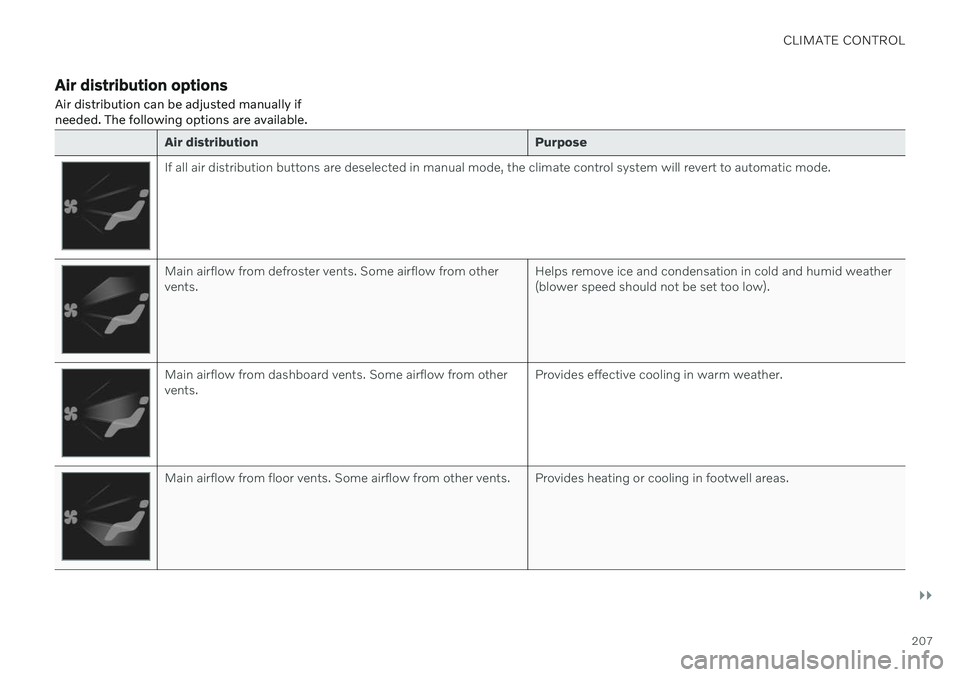
Air distribution can be adjusted manually if needed. The following options are available.
Air distribution Purpose
If all air distribution buttons are deselected in manual mode, the climate control system will revert to automatic mode.
Main airflow from defroster vents. Some airflow from other vents.Helps remove ice and condensation in cold and humid weather(blower speed should not be set too low).
Main airflow from dashboard vents. Some airflow from other vents.Provides effective cooling in warm weather.
Main airflow from floor vents. Some airflow from other vents. Provides heating or cooling in footwell areas.
Page 213 of 661
CLIMATE CONTROL
}}
* Option/accessory.211
Air distribution controls.
Blower control for front seats. 2
AUTO - Automatic climate control.
Rear climate control
*
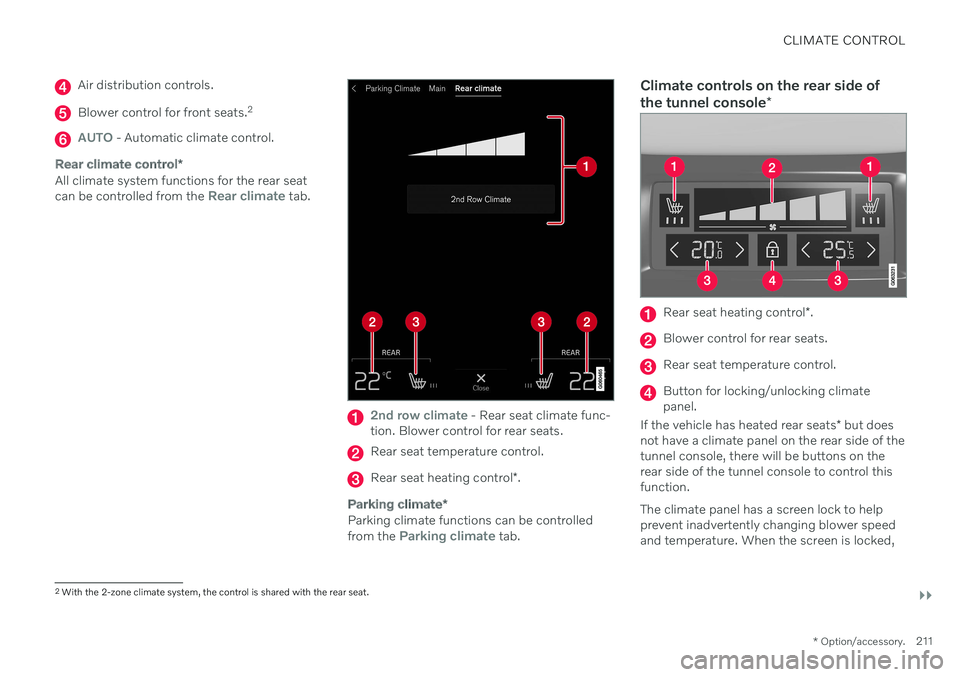
All climate system functions for the rear seat can be controlled from the Rear climate tab.
2nd row climate - Rear seat climate func-
tion. Blower control for rear seats.
Rear seat temperature control.
Rear seat heating control *.
Parking climate *
Parking climate functions can be controlled from the Parking climate tab.
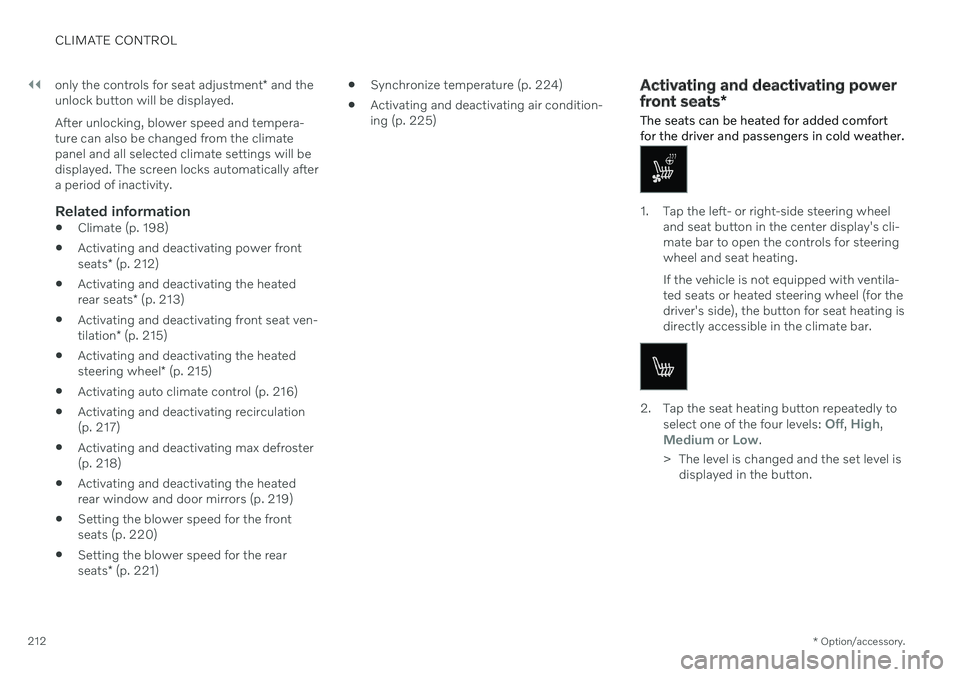
Climate controls on the rear side of the tunnel console *
Rear seat heating control *.
Blower control for rear seats.
Rear seat temperature control.
Button for locking/unlocking climate panel.
If the vehicle has heated rear seats * but does
not have a climate panel on the rear side of thetunnel console, there will be buttons on therear side of the tunnel console to control thisfunction. The climate panel has a screen lock to help prevent inadvertently changing blower speedand temperature. When the screen is locked,
2 With the 2-zone climate system, the control is shared with the rear seat.
Page 214 of 661
||
CLIMATE CONTROL
* Option/accessory.
212 only the controls for seat adjustment
* and the
unlock button will be displayed. After unlocking, blower speed and tempera- ture can also be changed from the climatepanel and all selected climate settings will bedisplayed. The screen locks automatically aftera period of inactivity.
Related information
Climate (p. 198)
Activating and deactivating power front seats
* (p. 212)
Activating and deactivating the heatedrear seats
* (p. 213)
Activating and deactivating front seat ven-tilation
* (p. 215)
Activating and deactivating the heatedsteering wheel
* (p. 215)
Activating auto climate control (p. 216)
Activating and deactivating recirculation (p. 217)
Activating and deactivating max defroster(p. 218)
Activating and deactivating the heatedrear window and door mirrors (p. 219)
Setting the blower speed for the frontseats (p. 220)
Setting the blower speed for the rear seats
* (p. 221)
Synchronize temperature (p. 224)
Activating and deactivating air condition- ing (p. 225)
Activating and deactivating power front seats
*
The seats can be heated for added comfort for the driver and passengers in cold weather.
1. Tap the left- or right-side steering wheel and seat button in the center display's cli- mate bar to open the controls for steeringwheel and seat heating. If the vehicle is not equipped with ventila- ted seats or heated steering wheel (for thedriver's side), the button for seat heating isdirectly accessible in the climate bar.
2. Tap the seat heating button repeatedly to
select one of the four levels: Off, High,Medium or Low.
> The level is changed and the set level is displayed in the button.