cruise control VOLVO V60 2021 Owner's Guide
[x] Cancel search | Manufacturer: VOLVO, Model Year: 2021, Model line: V60, Model: VOLVO V60 2021Pages: 661, PDF Size: 12.68 MB
Page 315 of 661
DRIVER SUPPORT
* Option/accessory.313
Adjusting set speed for driver support
It is possible to adjust set speeds for the cruise control, Adaptive Cruise Control * and
Pilot Assist * functions.
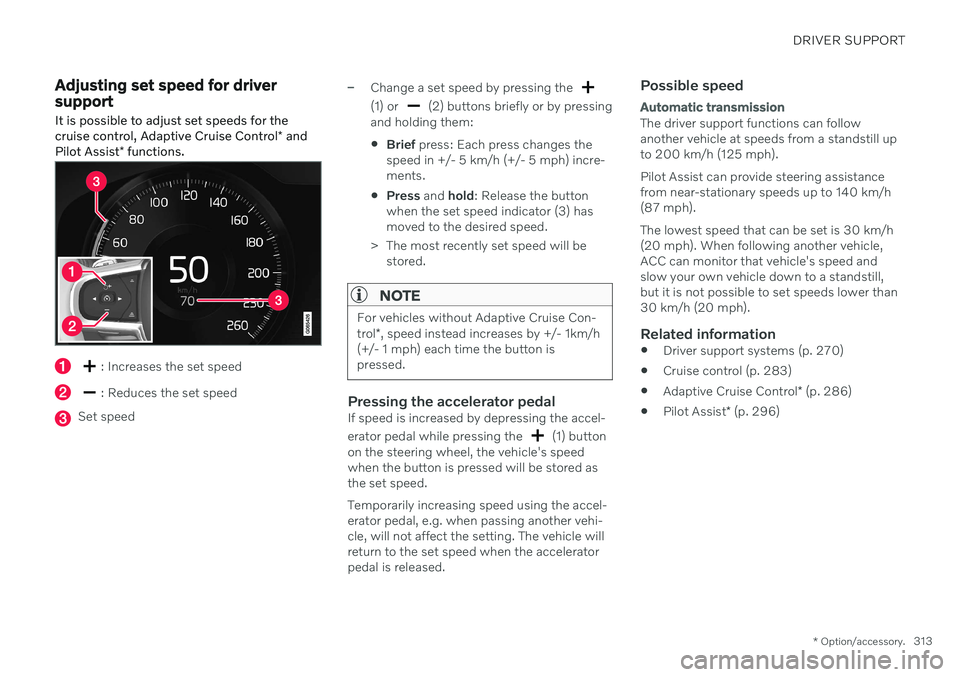
: Increases the set speed
: Reduces the set speed
Set speed
–Change a set speed by pressing the
(1) or (2) buttons briefly or by pressing
and holding them:
Brief
press: Each press changes the
speed in +/- 5 km/h (+/- 5 mph) incre- ments.
Press
and hold: Release the button
when the set speed indicator (3) hasmoved to the desired speed.
> The most recently set speed will be stored.
NOTE
For vehicles without Adaptive Cruise Con- trol *, speed instead increases by +/- 1km/h
(+/- 1 mph) each time the button is pressed.
Pressing the accelerator pedalIf speed is increased by depressing the accel- erator pedal while pressing the
(1) button
on the steering wheel, the vehicle's speed when the button is pressed will be stored asthe set speed. Temporarily increasing speed using the accel- erator pedal, e.g. when passing another vehi-cle, will not affect the setting. The vehicle willreturn to the set speed when the acceleratorpedal is released.
Possible speed
Automatic transmission
The driver support functions can follow another vehicle at speeds from a standstill upto 200 km/h (125 mph). Pilot Assist can provide steering assistance from near-stationary speeds up to 140 km/h(87 mph). The lowest speed that can be set is 30 km/h (20 mph). When following another vehicle,ACC can monitor that vehicle's speed andslow your own vehicle down to a standstill,but it is not possible to set speeds lower than30 km/h (20 mph).
Related information
Driver support systems (p. 270)
Cruise control (p. 283)
Adaptive Cruise Control
* (p. 286)
Pilot Assist
* (p. 296)
Page 316 of 661
DRIVER SUPPORT
* Option/accessory.
314
Setting time interval to the vehicle ahead The time interval to the vehicle ahead can be set for the functions Adaptive Cruise Control *,
Pilot Assist * and Distance Alert *.
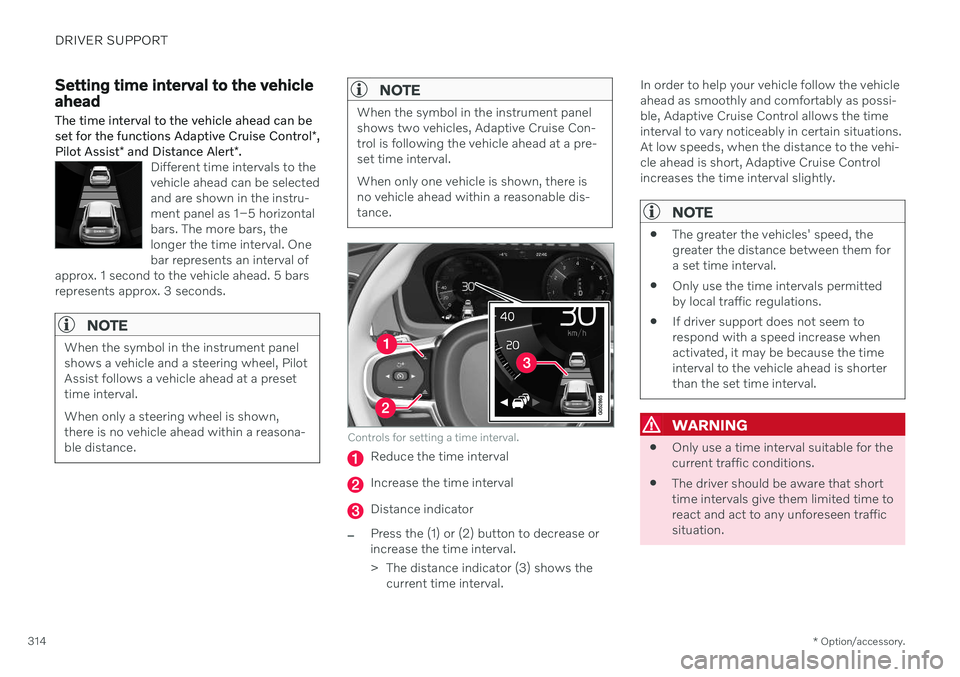
Different time intervals to the vehicle ahead can be selectedand are shown in the instru-ment panel as 1–5 horizontalbars. The more bars, thelonger the time interval. Onebar represents an interval of
approx. 1 second to the vehicle ahead. 5 barsrepresents approx. 3 seconds.
NOTE
When the symbol in the instrument panel shows a vehicle and a steering wheel, PilotAssist follows a vehicle ahead at a presettime interval. When only a steering wheel is shown, there is no vehicle ahead within a reasona-ble distance.
NOTE
When the symbol in the instrument panel shows two vehicles, Adaptive Cruise Con-trol is following the vehicle ahead at a pre-set time interval. When only one vehicle is shown, there is no vehicle ahead within a reasonable dis-tance.
Controls for setting a time interval.
Reduce the time interval
Increase the time interval
Distance indicator
–Press the (1) or (2) button to decrease or increase the time interval.
> The distance indicator (3) shows the current time interval. In order to help your vehicle follow the vehicle ahead as smoothly and comfortably as possi-ble, Adaptive Cruise Control allows the timeinterval to vary noticeably in certain situations.At low speeds, when the distance to the vehi-cle ahead is short, Adaptive Cruise Controlincreases the time interval slightly.
NOTE
The greater the vehicles' speed, the greater the distance between them fora set time interval.
Only use the time intervals permittedby local traffic regulations.
If driver support does not seem torespond with a speed increase whenactivated, it may be because the timeinterval to the vehicle ahead is shorterthan the set time interval.
WARNING
Only use a time interval suitable for the current traffic conditions.
The driver should be aware that shorttime intervals give them limited time toreact and act to any unforeseen trafficsituation.
Page 317 of 661
DRIVER SUPPORT
}}
* Option/accessory.315
Related information
Drive modes when using time interval to vehicle (p. 315)
Driver support systems (p. 270)
Adaptive Cruise Control
* (p. 286)
Pilot Assist
* (p. 296)
Distance Alert
* (p. 350)
Head-up display
* (p. 140)
Drive modes when using time interval to vehicle
The driver can choose different drive modes to determine how driver support shouldmaintain a time interval to the vehicle ahead.
Settings are made using the DRIVE MODE
controls. Select one of the following:
Eco - Driver support will focus on provid-
ing good fuel economy, which will increase the time interval to the vehicleahead.
Comfort - Driver support will focus on fol-
lowing the set time interval to the vehicle ahead as smoothly as possible.
Dynamic* - Driver support will focus on
following the set time interval to the vehi- cle ahead more exactly, which could meanfaster acceleration and heavier braking.
Related information
Setting time interval to the vehicle ahead(p. 314)
Driver support systems (p. 270)
Drive modes
* (p. 413)
Auto-hold braking with driver support
The driver support functions Adaptive Cruise Control * and Pilot Assist * have a special brake
function in slow traffic and while stationary. In certain situations, the parking brake will beapplied to keep the vehicle at a standstill.
Braking function in slow traffic and at a standstill
In slow-moving, stop-and-go traffic or when stopped at a traffic light, driving will resumeautomatically if the vehicle is stopped for lessthan approx. 3 seconds. If it takes more than 3seconds for the vehicle ahead to begin movingagain, the driver support function will go intostandby mode and the auto-hold brake func-tion will activate.
–The function can be reactivated by:
Pressing the
button on the steer-
ing wheel keypad.
Pressing the accelerator pedal.
> The function will resume following the vehicle ahead if it begins to move within approx. 6 seconds.
WARNING
A noticeable increase in speed may follow when the speed is resumed with the
steering wheel button.
Page 318 of 661
||
DRIVER SUPPORT
* Option/accessory.
316
WARNING
The driver support system only issues a warning for obstacles detected by its radarsensor – thus, a warning may come after adelay or not at all.
Never wait for a warning or assistance. Apply the brakes when necessary.
NOTE
Driver support can keep the vehicle sta- tionary for no more than 5 minutes – afterthat time the parking brake is applied andthe function is deactivated. The parking brake must be released before driver support can be reactivated.
Deactivation of the Auto-hold brake function
In certain situations, auto-hold will be deacti- vated when the vehicle is at a standstill andthe function will go into standby mode. This means that the brakes will be released and the vehicle could begin to roll. The driver mustactively apply the brakes to keep the vehiclestationary. This can occur if:
The driver depresses the brake pedal.
The parking brake is applied.
The gear selector is moved to the
P, N or
R position.
The driver puts Adaptive Cruise Control or Pilot Assist in standby mode.
Auto Activate Parking BrakeThe parking brake will be applied if the func-tion is keeping the vehicle stationary using thebrakes and:
The driver opens the door or unbuckleshis/her seat belt.
The function has kept the vehicle at astandstill for more than approx. 5 minutes.
The brakes overheat.
The driver switches off the engine.
Related information
Driver support systems (p. 270)
Adaptive Cruise Control
* (p. 286)
Pilot Assist
* (p. 296)
Brake functions (p. 397)
Lane Keeping Aid
Lane Keeping Aid (LKA 69
) is designed to
actively steer the vehicle on freeways, high- ways and other major roads to help the driverreduce the risk of the vehicle unintentionallyveering out of the lane.
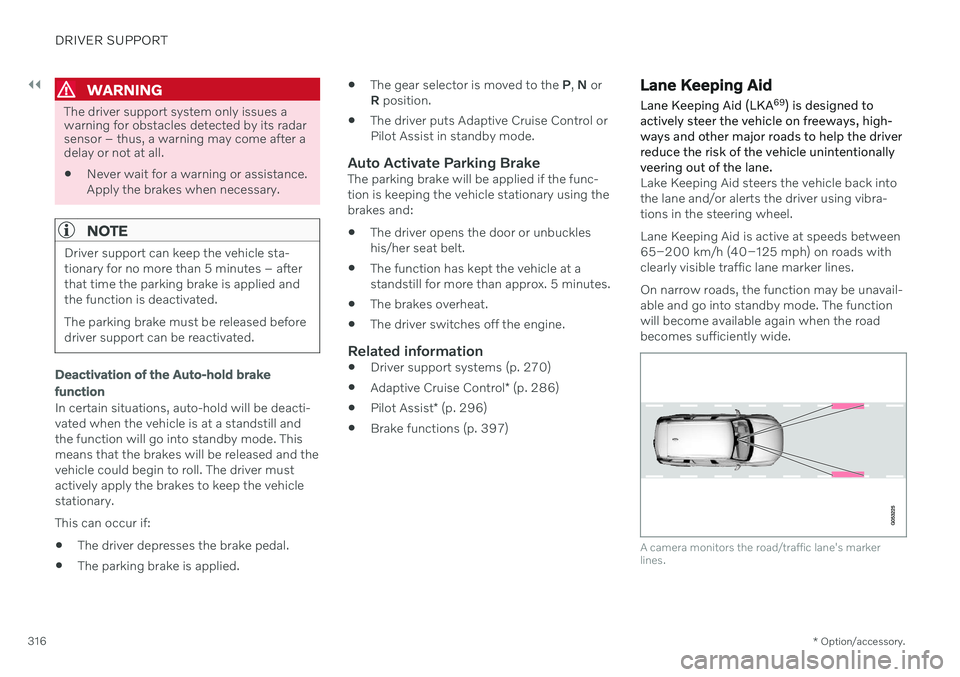
Lake Keeping Aid steers the vehicle back into the lane and/or alerts the driver using vibra-tions in the steering wheel. Lane Keeping Aid is active at speeds between 65–200 km/h (40–125 mph) on roads withclearly visible traffic lane marker lines. On narrow roads, the function may be unavail- able and go into standby mode. The functionwill become available again when the roadbecomes sufficiently wide.
A camera monitors the road/traffic lane's marker lines.
Page 352 of 661
DRIVER SUPPORT
* Option/accessory.
350
Driver Alert Control limitations
Driver Alert Control (DAC) functionality may be reduced in certain situations.
In certain situations, the system may provide a warning even if it has not detected a change indriving behavior, e.g.: in strong crosswinds
on grooved road surfaces.
WARNING
In certain cases, driving behavior might not be affected despite the driver's fatigue – when using the Pilot Assist
* function –
resulting in the driver not getting a warning from DAC. It is therefore very important to always stop and take a break at the slightest signof fatigue, regardless of whether the func-tion has issued a warning or not.
NOTE
The function uses the vehicle's camera and radar sensor, which has certain generallimitations.
Related information
Driver Alert Control (p. 348)
Camera/radar sensor limitations (p. 383)
Distance Alert
*93
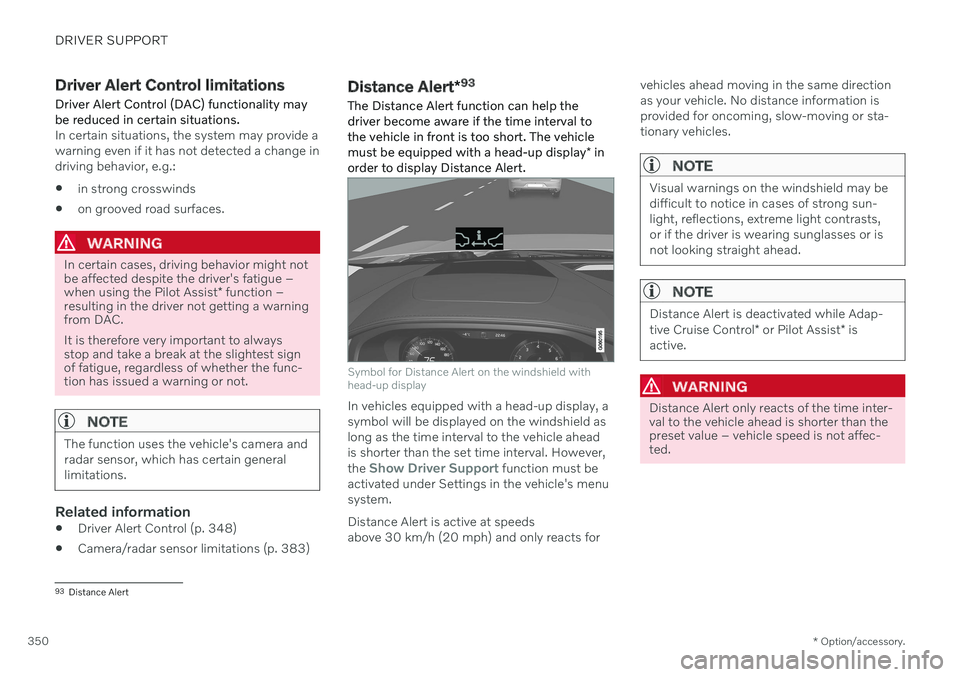
The Distance Alert function can help the driver become aware if the time interval tothe vehicle in front is too short. The vehicle must be equipped with a head-up display * in
order to display Distance Alert.
Symbol for Distance Alert on the windshield with head-up display
In vehicles equipped with a head-up display, a symbol will be displayed on the windshield aslong as the time interval to the vehicle aheadis shorter than the set time interval. However, the
Show Driver Support function must be
activated under Settings in the vehicle's menu system. Distance Alert is active at speeds above 30 km/h (20 mph) and only reacts for vehicles ahead moving in the same directionas your vehicle. No distance information isprovided for oncoming, slow-moving or sta-tionary vehicles.
NOTE
Visual warnings on the windshield may be difficult to notice in cases of strong sun-light, reflections, extreme light contrasts,or if the driver is wearing sunglasses or isnot looking straight ahead.
NOTE
Distance Alert is deactivated while Adap- tive Cruise Control
* or Pilot Assist * is
active.
WARNING
Distance Alert only reacts of the time inter- val to the vehicle ahead is shorter than thepreset value – vehicle speed is not affec-ted.
93 Distance Alert
Page 382 of 661
DRIVER SUPPORT
* Option/accessory.
380
Radar sensor
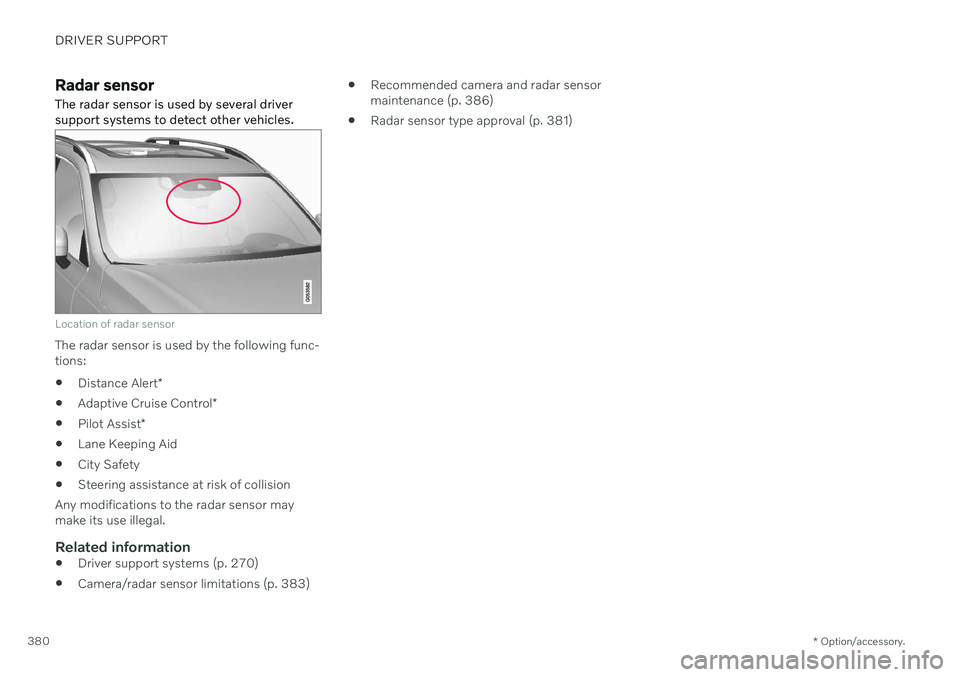
The radar sensor is used by several driver support systems to detect other vehicles.
Location of radar sensor
The radar sensor is used by the following func- tions:
Distance Alert
*
Adaptive Cruise Control
*
Pilot Assist
*
Lane Keeping Aid
City Safety
Steering assistance at risk of collision
Any modifications to the radar sensor maymake its use illegal.
Related information
Driver support systems (p. 270)
Camera/radar sensor limitations (p. 383)
Recommended camera and radar sensormaintenance (p. 386)
Radar sensor type approval (p. 381)
Page 383 of 661
DRIVER SUPPORT
}}
* Option/accessory.381
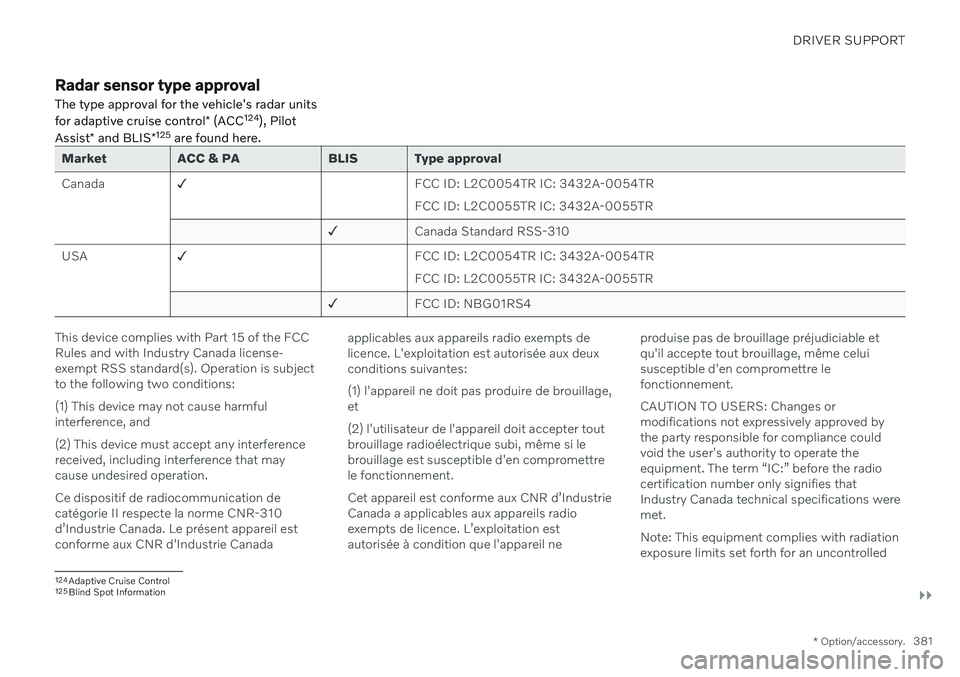
Radar sensor type approval
The type approval for the vehicle's radar units for adaptive cruise control * (ACC 124
), Pilot
Assist * and BLIS *125
are found here.
Market ACC & PA BLIS Type approval Canada ✓
FCC ID: L2C0054TR IC: 3432A-0054TR FCC ID: L2C0055TR IC: 3432A-0055TR
✓ Canada Standard RSS-310
USA ✓
FCC ID: L2C0054TR IC: 3432A-0054TRFCC ID: L2C0055TR IC: 3432A-0055TR
✓ FCC ID: NBG01RS4
This device complies with Part 15 of the FCC Rules and with Industry Canada license-exempt RSS standard(s). Operation is subjectto the following two conditions: (1) This device may not cause harmful interference, and (2) This device must accept any interference received, including interference that maycause undesired operation. Ce dispositif de radiocommunication de catégorie II respecte la norme CNR-310d
Page 384 of 661
||
DRIVER SUPPORT
* Option/accessory.
382 environment. This equipment should be installed and operated with minimum distanceof 20 cm between the radiator and your body. For detailed information about type approval, go to volvocars.com/support.
Related information
Radar sensor (p. 380)
Adaptive Cruise Control
* (p. 286)
Pilot Assist
* (p. 296)
BLIS
* (p. 344)
Page 385 of 661
DRIVER SUPPORT
}}
* Option/accessory.383
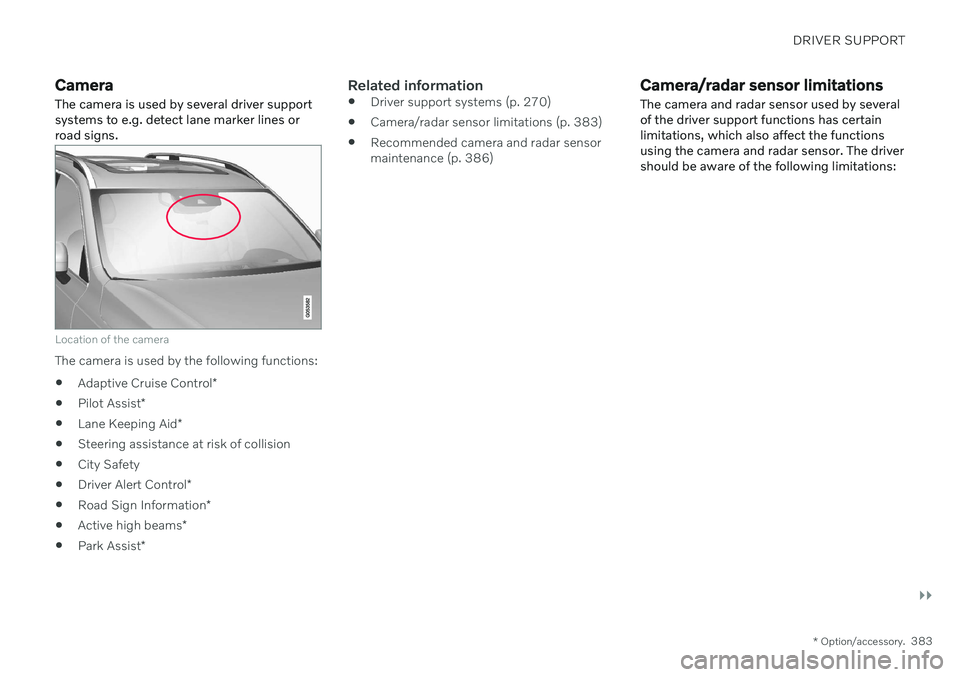
Camera The camera is used by several driver support systems to e.g. detect lane marker lines orroad signs.
Location of the camera
The camera is used by the following functions:
Adaptive Cruise Control
*
Pilot Assist
*
Lane Keeping Aid
*
Steering assistance at risk of collision
City Safety
Driver Alert Control
*
Road Sign Information
*
Active high beams
*
Park Assist
*
Related information
Driver support systems (p. 270)
Camera/radar sensor limitations (p. 383)
Recommended camera and radar sensor maintenance (p. 386)
Camera/radar sensor limitations The camera and radar sensor used by several of the driver support functions has certainlimitations, which also affect the functionsusing the camera and radar sensor. The drivershould be aware of the following limitations:
Page 387 of 661
DRIVER SUPPORT
}}
* Option/accessory.385
Limited field of vision
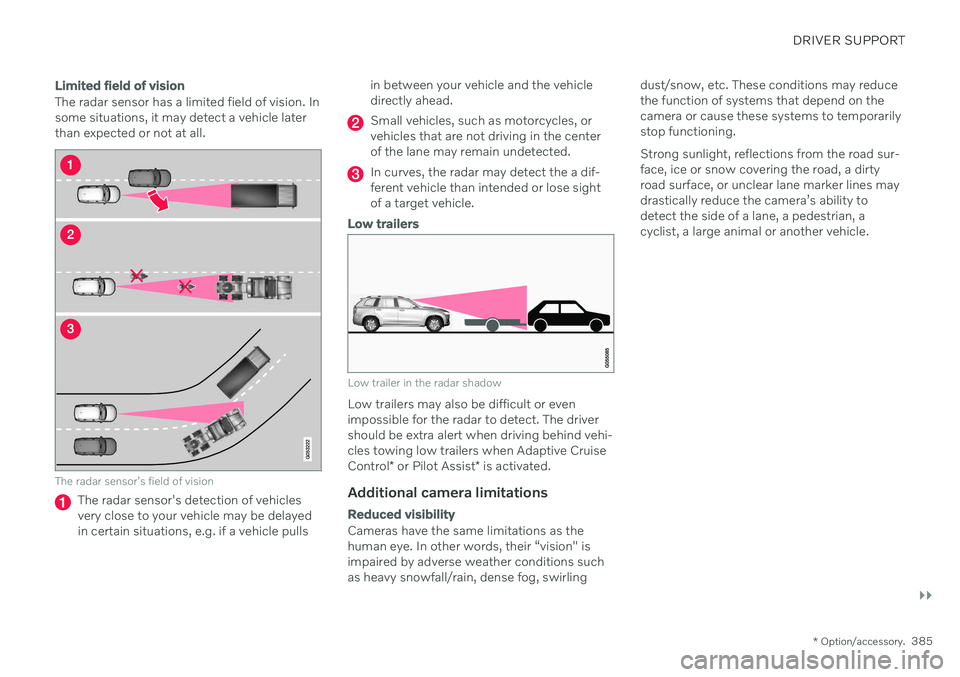
The radar sensor has a limited field of vision. In some situations, it may detect a vehicle laterthan expected or not at all.
The radar sensor's field of vision
The radar sensor's detection of vehicles very close to your vehicle may be delayedin certain situations, e.g. if a vehicle pulls in between your vehicle and the vehicledirectly ahead.
Small vehicles, such as motorcycles, or vehicles that are not driving in the centerof the lane may remain undetected.
In curves, the radar may detect the a dif- ferent vehicle than intended or lose sightof a target vehicle.
Low trailers
Low trailer in the radar shadow
Low trailers may also be difficult or even impossible for the radar to detect. The drivershould be extra alert when driving behind vehi- cles towing low trailers when Adaptive Cruise Control
* or Pilot Assist
* is activated.
Additional camera limitations
Reduced visibility
Cameras have the same limitations as the human eye. In other words, their “vision" isimpaired by adverse weather conditions suchas heavy snowfall/rain, dense fog, swirling dust/snow, etc. These conditions may reducethe function of systems that depend on thecamera or cause these systems to temporarilystop functioning. Strong sunlight, reflections from the road sur- face, ice or snow covering the road, a dirtyroad surface, or unclear lane marker lines maydrastically reduce the camera