cruise control VOLVO V60 2021 Owner's Manual
[x] Cancel search | Manufacturer: VOLVO, Model Year: 2021, Model line: V60, Model: VOLVO V60 2021Pages: 661, PDF Size: 12.68 MB
Page 297 of 661
DRIVER SUPPORT
* Option/accessory.295
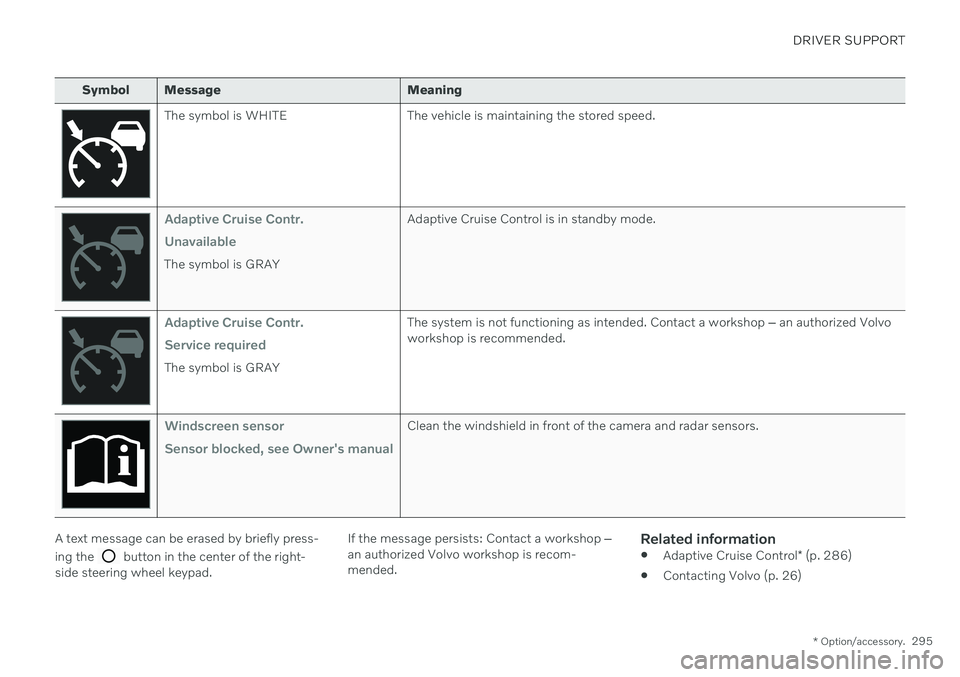
Symbol Message Meaning
The symbol is WHITE The vehicle is maintaining the stored speed.
Adaptive Cruise Contr. Unavailable
The symbol is GRAY Adaptive Cruise Control is in standby mode.
Adaptive Cruise Contr. Service required
The symbol is GRAYThe system is not functioning as intended. Contact a workshop
‒ an authorized Volvo
workshop is recommended.
Windscreen sensor Sensor blocked, see Owner's manualClean the windshield in front of the camera and radar sensors.
A text message can be erased by briefly press- ing the
button in the center of the right-
side steering wheel keypad. If the message persists: Contact a workshop
‒
an authorized Volvo workshop is recom- mended.
Related information
Adaptive Cruise Control
* (p. 286)
Contacting Volvo (p. 26)
Page 298 of 661

DRIVER SUPPORT
* Option/accessory.
296
Pilot Assist *53
Pilot Assist can help the driver keep the vehi- cle in the current traffic lane and maintain aneven speed and a set time interval to thevehicle ahead.
Get to know Pilot Assist
The camera/radar sensor monitors the distance to the vehicle ahead and detects lane markings.
Camera and radar sensor
Distance monitor
Lane marker line monitors
Pilot Assist helps to steer the vehicle, and you may need to drive a few miles with Pilot Assistbefore you feel completely at home with the function. It is important to be familiar with all of the function's applications and limitations in order to take advantage of all it has to offer. The Pilot Assist function is primarily intended for use on highways and other major roadswhere it can help provide a more comfortableand relaxing driving experience. The driver sets the desired speed and distance to the vehicle ahead. Pilot Assist monitors thedistance to the vehicle ahead and the trafficlane's side markers using the camera. The sys-tem maintains the set time interval to the vehi-cle ahead by automatically adjusting your vehi-cle's speed and keeps your vehicle in its laneby providing steering assistance. If the Curve Speed Assist (CSA)
* function is
activated, it may also affect the vehicle's speed. Pilot Assist regulates speed by accelerating and braking. It is normal for the brakes to emita slight sound when they are being used toadjust speed. Pilot Assist is designed to:
smoothly regulate speed. The driver must apply the brakes in situations requiringimmediate braking. For example, whenthere are great differences in speedbetween vehicles or if the vehicle aheadbrakes suddenly. Due to limitations in the camera and radar sensor, braking mayoccur unexpectedly or not at all.
follow a vehicle ahead in the same laneand maintain a time interval to that vehicleset by the driver. If the radar sensor doesnot detect a vehicle ahead, it will insteadmaintain the speed set by the driver. Thiswill also happen if the speed of the vehicleahead exceeds the set speed for your vehi-cle.
The vehicle's position in the traffic
lane
When Pilot Assist helps to steer, it attempts toposition the vehicle halfway between the visi-ble lane marking lines. For a smoother drive, itis a good idea to allow the vehicle to find agood position. The driver can always adjustthe position him/herself by increasing steeringinput. It is important for the driver to makesure the vehicle is positioned safely in the lane. If Pilot Assist does not position the vehicle appropriately in the lane, the driver should turnoff Pilot Assist or switch to Adaptive Cruise Control *.
53
Depending on market, this function can be either standard or optional.
Page 300 of 661
||
DRIVER SUPPORT
* Option/accessory.
298
CAUTION
Only a workshop may perform mainte- nance on driver support components – anauthorized Volvo workshop is recom-mended.
Related information
Driver support systems (p. 270)
Selecting and activating Pilot Assist
*
(p. 300)
Pilot Assist
* displays (p. 299)
Pilot Assist
* limitations (p. 304)
Pilot Assist
* symbols and messages
(p. 306)
Pilot Assist
* controls (p. 298)
Collision risk warning from driver support (p. 311)
Switching target vehicles with driver sup-port (p. 312)
Setting time interval to the vehicle ahead(p. 314)
Adjusting set speed for driver support(p. 313)
Auto-hold braking with driver support(p. 315)
Passing assistance
* (p. 310)
Contacting Volvo (p. 26)
Pilot Assist
*54
controls
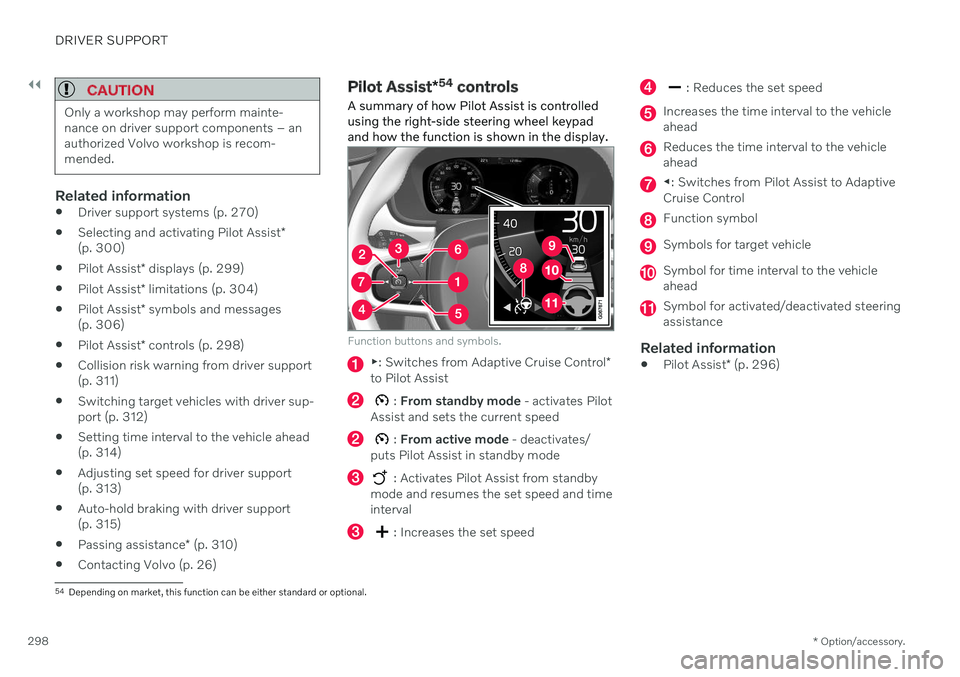
A summary of how Pilot Assist is controlled using the right-side steering wheel keypadand how the function is shown in the display.
Function buttons and symbols.
▶ : Switches from Adaptive Cruise Control *
to Pilot Assist
: From standby mode - activates Pilot
Assist and sets the current speed
: From active mode - deactivates/
puts Pilot Assist in standby mode
: Activates Pilot Assist from standby
mode and resumes the set speed and time interval
: Increases the set speed
: Reduces the set speed
Increases the time interval to the vehicle ahead
Reduces the time interval to the vehicle ahead
◀ : Switches from Pilot Assist to Adaptive
Cruise Control
Function symbol
Symbols for target vehicle
Symbol for time interval to the vehicle ahead
Symbol for activated/deactivated steering assistance
Related information
Pilot Assist
* (p. 296)
54
Depending on market, this function can be either standard or optional.
Page 303 of 661
DRIVER SUPPORT
}}
* Option/accessory.301
The driver must keep their hands on the steering wheel.
There must be a vehicle ahead (targetvehicle) within a reasonable distance oryour vehicle's current speed must be atleast 15 km/h (9 mph).
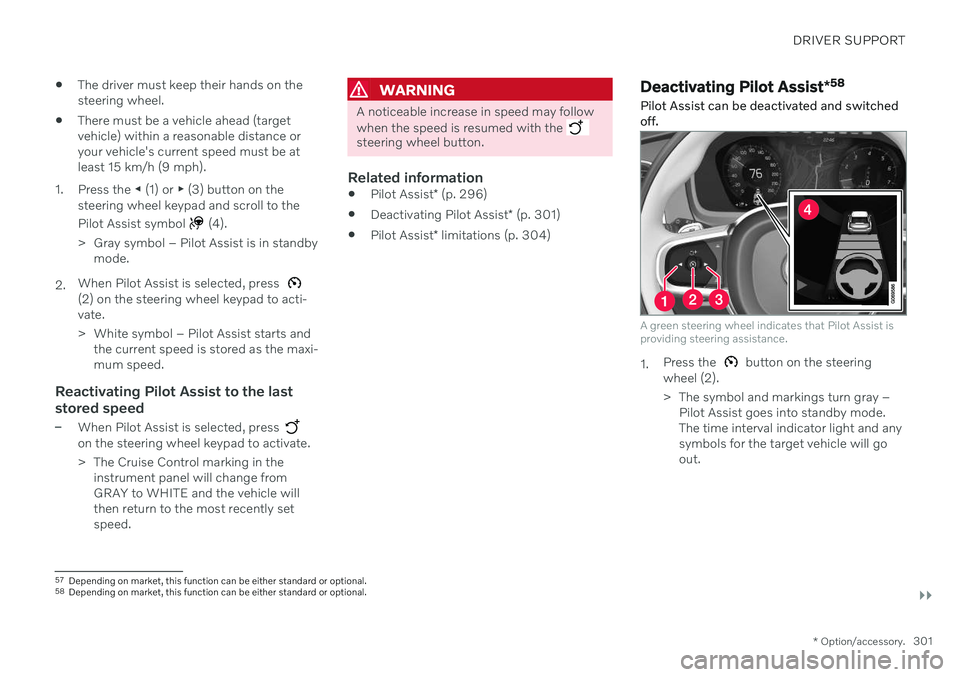
1. Press the ◀ (1) or ▶ (3) button on the
steering wheel keypad and scroll to the Pilot Assist symbol
(4).
> Gray symbol – Pilot Assist is in standby mode.
2. When Pilot Assist is selected, press
(2) on the steering wheel keypad to acti- vate.
> White symbol – Pilot Assist starts and
the current speed is stored as the maxi- mum speed.
Reactivating Pilot Assist to the last stored speed
–When Pilot Assist is selected, press on the steering wheel keypad to activate.
> The Cruise Control marking in theinstrument panel will change from GRAY to WHITE and the vehicle willthen return to the most recently setspeed.
WARNING
A noticeable increase in speed may follow when the speed is resumed with the
steering wheel button.
Related information
Pilot Assist
* (p. 296)
Deactivating Pilot Assist
* (p. 301)
Pilot Assist
* limitations (p. 304)
Deactivating Pilot Assist *58
Pilot Assist can be deactivated and switched off.
A green steering wheel indicates that Pilot Assist is providing steering assistance.
1. Press the button on the steering
wheel (2).
> The symbol and markings turn gray – Pilot Assist goes into standby mode. The time interval indicator light and anysymbols for the target vehicle will goout.
57Depending on market, this function can be either standard or optional.
58 Depending on market, this function can be either standard or optional.
Page 304 of 661
||
DRIVER SUPPORT
* Option/accessory.
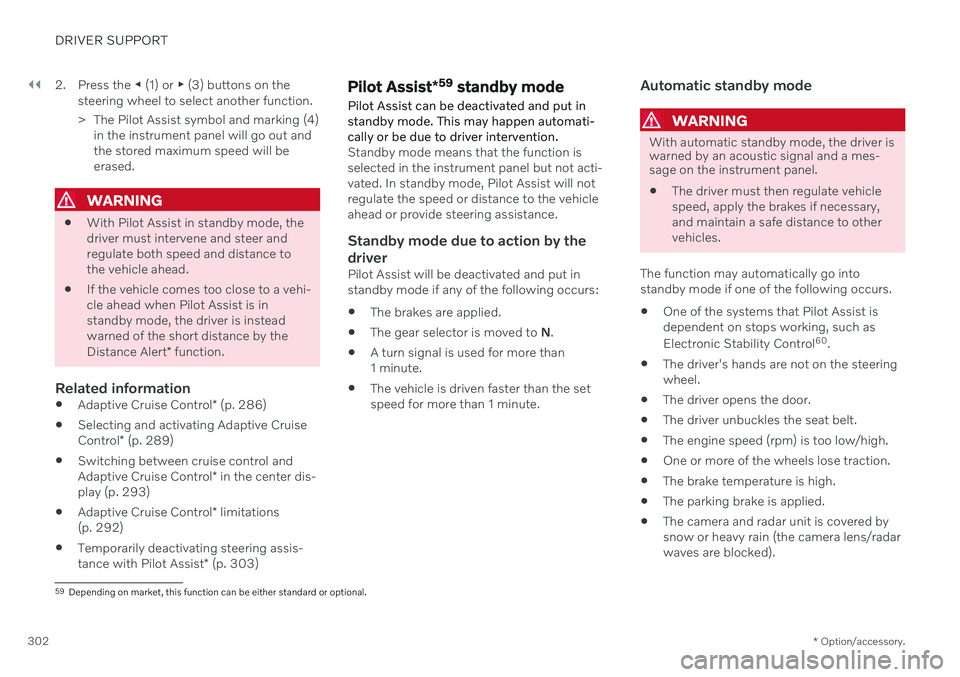
302 2. Press the
◀ (1) or ▶ (3) buttons on the
steering wheel to select another function.
> The Pilot Assist symbol and marking (4) in the instrument panel will go out and the stored maximum speed will beerased.
WARNING
With Pilot Assist in standby mode, the driver must intervene and steer andregulate both speed and distance tothe vehicle ahead.
If the vehicle comes too close to a vehi-cle ahead when Pilot Assist is instandby mode, the driver is insteadwarned of the short distance by the Distance Alert
* function.
Related information
Adaptive Cruise Control
* (p. 286)
Selecting and activating Adaptive CruiseControl
* (p. 289)
Switching between cruise control andAdaptive Cruise Control
* in the center dis-
play (p. 293)
Adaptive Cruise Control
* limitations
(p. 292)
Temporarily deactivating steering assis-tance with Pilot Assist
* (p. 303)
Pilot Assist *59
standby mode
Pilot Assist can be deactivated and put in standby mode. This may happen automati-cally or be due to driver intervention.
Standby mode means that the function is selected in the instrument panel but not acti-vated. In standby mode, Pilot Assist will notregulate the speed or distance to the vehicleahead or provide steering assistance.
Standby mode due to action by the
driver
Pilot Assist will be deactivated and put instandby mode if any of the following occurs:
The brakes are applied.
The gear selector is moved to
N.
A turn signal is used for more than1 minute.
The vehicle is driven faster than the setspeed for more than 1 minute.
Automatic standby mode
WARNING
With automatic standby mode, the driver is warned by an acoustic signal and a mes-sage on the instrument panel.
The driver must then regulate vehicle speed, apply the brakes if necessary,and maintain a safe distance to othervehicles.
The function may automatically go intostandby mode if one of the following occurs. One of the systems that Pilot Assist isdependent on stops working, such as Electronic Stability Control 60
.
The driver's hands are not on the steering wheel.
The driver opens the door.
The driver unbuckles the seat belt.
The engine speed (rpm) is too low/high.
One or more of the wheels lose traction.
The brake temperature is high.
The parking brake is applied.
The camera and radar unit is covered bysnow or heavy rain (the camera lens/radarwaves are blocked).
59
Depending on market, this function can be either standard or optional.
Page 310 of 661
DRIVER SUPPORT
* Option/accessory.
308
Curve Speed Assist (CSA) *64
Curve Speed Assist can help the driver
reduce speed before sharp turns if the preset speed for the driver support function Adap- tive Cruise Control * or Pilot Assist * is deter-
mined to be too high.
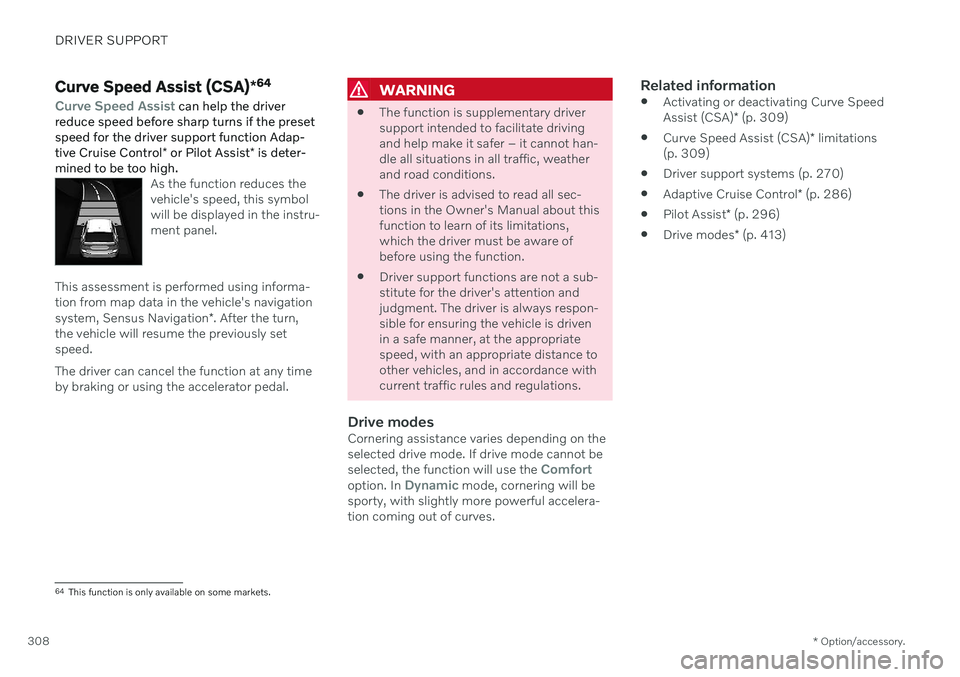
As the function reduces the vehicle's speed, this symbolwill be displayed in the instru-ment panel.
This assessment is performed using informa- tion from map data in the vehicle's navigation system, Sensus Navigation *. After the turn,
the vehicle will resume the previously set speed. The driver can cancel the function at any time by braking or using the accelerator pedal.
WARNING
The function is supplementary driver support intended to facilitate drivingand help make it safer – it cannot han-dle all situations in all traffic, weatherand road conditions.
The driver is advised to read all sec-tions in the Owner's Manual about thisfunction to learn of its limitations,which the driver must be aware ofbefore using the function.
Driver support functions are not a sub-stitute for the driver's attention andjudgment. The driver is always respon-sible for ensuring the vehicle is drivenin a safe manner, at the appropriatespeed, with an appropriate distance toother vehicles, and in accordance withcurrent traffic rules and regulations.
Drive modesCornering assistance varies depending on theselected drive mode. If drive mode cannot be selected, the function will use the
Comfortoption. In Dynamic mode, cornering will be
sporty, with slightly more powerful accelera- tion coming out of curves.
Related information
Activating or deactivating Curve Speed Assist (CSA)
* (p. 309)
Curve Speed Assist (CSA)
* limitations
(p. 309)
Driver support systems (p. 270)
Adaptive Cruise Control
* (p. 286)
Pilot Assist
* (p. 296)
Drive modes
* (p. 413)
64
This function is only available on some markets.
Page 311 of 661
DRIVER SUPPORT
* Option/accessory.309
Activating or deactivating Curve Speed Assist (CSA) *
The Curve Speed Assist (CSA) function can be activated as a supplement to Adaptive Cruise Control * or Pilot Assist *. The driver can
also deactivate the function.
Activate or deactivate the function using this button inthe center display's Functionview.
GREEN button indicator light – the func- tion is activated.
GRAY button indicator light – the functionis deactivated.
The next time the engine is started, the lastused setting is reactivated or the key's driver profile settings are followed 65
.
Related information
Curve Speed Assist (CSA)
* (p. 308)
Curve Speed Assist (CSA)
* limitations
(p. 309)
Curve Speed Assist (CSA) *66
limitations
Curve Speed Assist (CSA) functionality may be reduced in certain situations. The drivershould be aware of the following limitations:
Curve Speed Assist (CSA) may have lim- ited performance on small roads and indensely populated areas.
At off-ramps or intersections, CurveSpeed Assist (CSA) may temporarilyswitch off.
If the satellite navigator's 67
map data is
not updated, Curve Speed Assist (CSA)may have limited functionality.
Curve Speed Assist (CSA) functionality may be limited if the satellite navigator 67
has lost contact with the satellite system.
On new or rebuilt roads, map data may be incorrect.
The risk of reduced grip due to adverseweather or road conditions is not takeninto account when calculating suitablecornering speed.
NOTE
The function uses the vehicle's camera and radar sensor, which has certain generallimitations.
Related information
Curve Speed Assist (CSA)
* (p. 308)
Activating or deactivating Curve Speed Assist (CSA)
* (p. 309)
Camera/radar sensor limitations (p. 383)
65
These alternatives are market dependent.
66 This function is only available on some markets.
67 Only with Volvo Sensus Navigation * installed.
Page 312 of 661
DRIVER SUPPORT
* Option/accessory.
310
Passing assistance *
Passing assistance can assist the driver when passing other vehicles. The function can be used with Adaptive Cruise Control * or Pilot
Assist *.
When Adaptive Cruise Control or Pilot Assist is following another vehicle and you indicatethat you intend to pass that vehicle by using the turn signal 68
, the system will begin accel-
erating toward the vehicle ahead before your
vehicle has moved into the passing lane. The function will then delay a speed reduction to avoid early braking as your vehicleapproaches a slower-moving vehicle. The function remains active until your vehicle has passed the other vehicle.
WARNING
Please note that this function can be acti- vated in more situations than just passinganother vehicle, such as when a directionindicator is used to indicate a lane changeor before exiting to another road – the vehi-cle will then briefly accelerate.
WARNING
The function is supplementary driver support intended to facilitate drivingand help make it safer – it cannot han-dle all situations in all traffic, weatherand road conditions.
The driver is advised to read all sec-tions in the Owner's Manual about thisfunction to learn of its limitations,which the driver must be aware ofbefore using the function.
Driver support functions are not a sub-stitute for the driver's attention andjudgment. The driver is always respon-sible for ensuring the vehicle is drivenin a safe manner, at the appropriatespeed, with an appropriate distance toother vehicles, and in accordance withcurrent traffic rules and regulations.
Related information
Driver support systems (p. 270)
Using passing assistance (p. 310)
Adaptive Cruise Control
* (p. 286)
Pilot Assist
* (p. 296)
Using passing assistance Passing assistance can be used with Adap- tive Cruise Control * or Pilot Assist *. Several
conditions must be met for passing assis- tance to be possible.
In order to activate passing assistance:
your vehicle must be following a vehicle ahead (target vehicle)
your vehicle's
current speed must be
at least 70 km/h (43 mph)
the set speed
must be high enough to
safely pass another vehicle.
To start passing assistance:
–Turn on the left turn signal.
> Passing assistance will start.
68 Only the left-hand turn signal for left-hand drive vehicles, or right-hand turn signal for right-hand drive vehicles.
Page 313 of 661
DRIVER SUPPORT
}}
* Option/accessory.311
WARNING
The driver should be aware that if condi- tions suddenly change when using PassingAssistance, the function may implement anundesired acceleration in certain condi-tions. Some situations should be avoided, e.g. if: the vehicle is approaching an exit in the same direction as passing would nor-mally occur
the vehicle ahead slows before yourvehicle has had time to switch to thepassing lane
traffic in the passing lane slows down
Situations of this type can be avoided by temporarily putting Adaptive Cruise Controlor Pilot Assist in standby mode.
Related information
Passing assistance
* (p. 310)
Adaptive Cruise Control
* (p. 286)
Pilot Assist
* (p. 296)
Adaptive Cruise Control
* standby mode
(p. 291)
Pilot Assist
* standby mode (p. 302)
Collision risk warning from driver support
The driver support systems Adaptive Cruise Control * and Pilot Assist * can help alert the
driver if the distance to the vehicle ahead suddenly decreases to an unsafe distance.
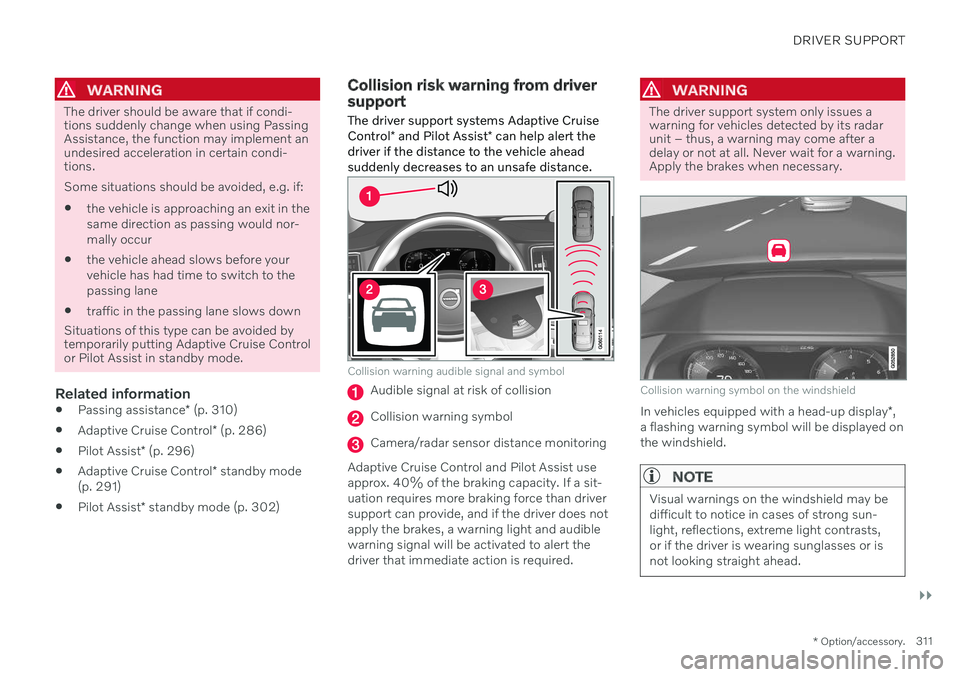
Collision warning audible signal and symbol
Audible signal at risk of collision
Collision warning symbol
Camera/radar sensor distance monitoring
Adaptive Cruise Control and Pilot Assist use approx. 40% of the braking capacity. If a sit-uation requires more braking force than driversupport can provide, and if the driver does not apply the brakes, a warning light and audible warning signal will be activated to alert thedriver that immediate action is required.
WARNING
The driver support system only issues a warning for vehicles detected by its radarunit – thus, a warning may come after adelay or not at all. Never wait for a warning.Apply the brakes when necessary.
Collision warning symbol on the windshield
In vehicles equipped with a head-up display *,
a flashing warning symbol will be displayed on the windshield.
NOTE
Visual warnings on the windshield may be difficult to notice in cases of strong sun-light, reflections, extreme light contrasts,or if the driver is wearing sunglasses or isnot looking straight ahead.
Page 314 of 661
||
DRIVER SUPPORT
* Option/accessory.
312
Related information
Driver support systems (p. 270)
Adaptive Cruise Control
* (p. 286)
Pilot Assist
* (p. 296)
Distance Alert
* (p. 350)
Head-up display
* (p. 140)
Switching target vehicles with driver support
At certain speeds, vehicles with automatic transmissions and the driver support func- tions Adaptive Cruise Control * and Pilot
Assist * can switch target vehicles.
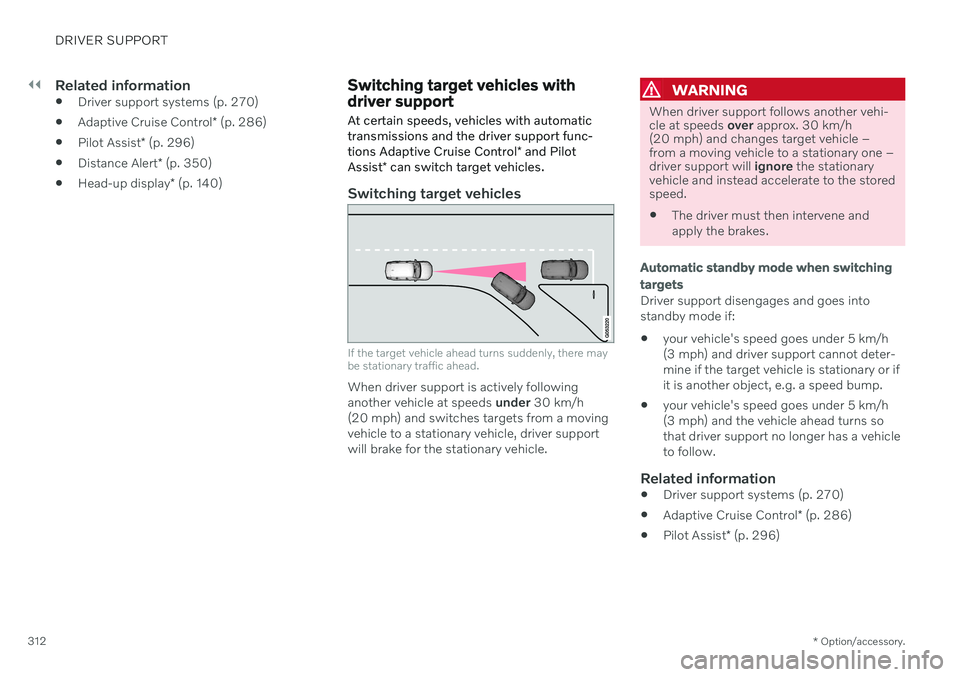
Switching target vehicles
If the target vehicle ahead turns suddenly, there may be stationary traffic ahead.
When driver support is actively following another vehicle at speeds under 30 km/h
(20 mph) and switches targets from a movingvehicle to a stationary vehicle, driver supportwill brake for the stationary vehicle.
WARNING
When driver support follows another vehi- cle at speeds over approx. 30 km/h
(20 mph) and changes target vehicle –from a moving vehicle to a stationary one –driver support will ignore the stationary
vehicle and instead accelerate to the storedspeed. The driver must then intervene and apply the brakes.
Automatic standby mode when switching targets
Driver support disengages and goes into standby mode if:
your vehicle's speed goes under 5 km/h(3 mph) and driver support cannot deter-mine if the target vehicle is stationary or ifit is another object, e.g. a speed bump.
your vehicle's speed goes under 5 km/h(3 mph) and the vehicle ahead turns sothat driver support no longer has a vehicleto follow.
Related information
Driver support systems (p. 270)
Adaptive Cruise Control
* (p. 286)
Pilot Assist
* (p. 296)