tow VOLVO V60 2021 Repair Manual
[x] Cancel search | Manufacturer: VOLVO, Model Year: 2021, Model line: V60, Model: VOLVO V60 2021Pages: 661, PDF Size: 12.68 MB
Page 575 of 661
MAINTENANCE AND SERVICE
}}
* Option/accessory.573
Hoisting the vehicle
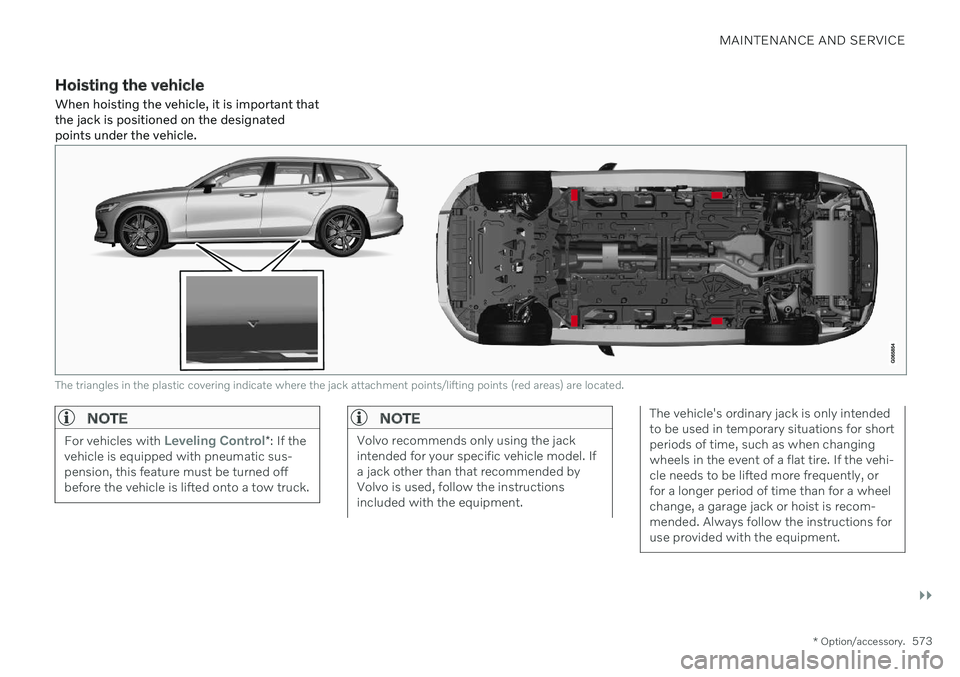
When hoisting the vehicle, it is important that the jack is positioned on the designatedpoints under the vehicle.
The triangles in the plastic covering indicate where the jack attachment points/lifting points (red areas) are located.
NOTE
For vehicles with Leveling Control* : If the
vehicle is equipped with pneumatic sus- pension, this feature must be turned offbefore the vehicle is lifted onto a tow truck.
NOTE
Volvo recommends only using the jack intended for your specific vehicle model. Ifa jack other than that recommended byVolvo is used, follow the instructionsincluded with the equipment.
The vehicle's ordinary jack is only intended to be used in temporary situations for shortperiods of time, such as when changingwheels in the event of a flat tire. If the vehi-cle needs to be lifted more frequently, orfor a longer period of time than for a wheelchange, a garage jack or hoist is recom-mended. Always follow the instructions foruse provided with the equipment.
Page 576 of 661
||
MAINTENANCE AND SERVICE
* Option/accessory.
574
WARNING
Apply the parking brake and put the gear selector in the Park (
P) position.
Block the wheels standing on theground, use rigid wooden blocks orlarge stones.
Check that the jack is not damaged,the threads are properly lubricated andit is free from dirt.
Be sure the jack is on a firm, level, non-slippery surface and that it is uprightand not leaning.
The jack must correctly engage in thejack attachment.
No objects should be placed betweenthe base of the jack and the ground, orbetween the jack and the attachmentbar on the vehicle.
Never let anyone remain in the vehiclewhen it is raised on a jack.
If a tire must be changed near passingtraffic, make sure all passengers moveto a safe location.
Use a jack intended for the vehiclewhen changing a tire. For any otherjob, use stands to support the vehicle.
Never crawl under or allow any part of your body to be extended under a vehi-cle supported by a jack.
WARNING
If the vehicle is lifted on a garage jack, the jack must be placed under one of the fourlifting points. Make sure that the vehicle iscorrectly positioned on the jack and that itcannot slide off. Make sure the jack platehas a rubber pad to help keep the vehiclestable and prevent damage. Always useaxle stands or similar.
When not in use, the jack * should be kept in
its storage compartment under the cargo compartment floor. Read through all instructions before starting. Before raising the vehicle using a jack or lift,take out all the tools you will need.
1. Turn on the vehicle's hazard warning flashers if e.g. a wheel change must be performed in an area with traffic.
2. Apply the parking brake and put the gear selector in P, or first gear if the vehicle has
a manual transmission. If the vehicle is equipped with
Leveling
Control* , this feature must be turned off
before the vehicle is lifted onto a tow truck. 3. Place chocks in front of and behind the
wheels that are still on the ground. Forexample, use heavy wooden blocks orlarge stones.
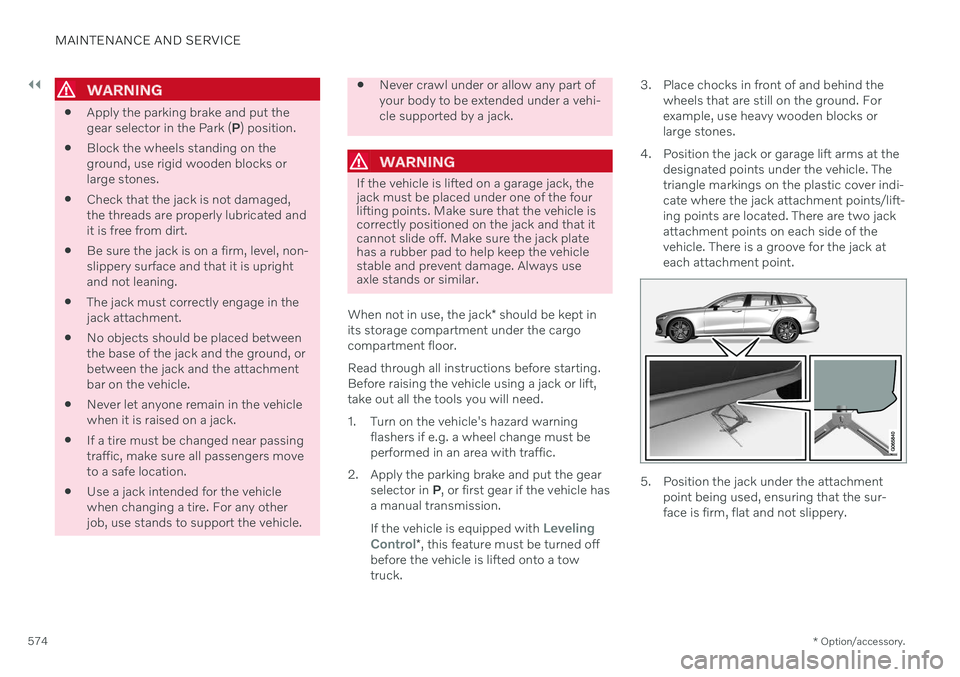
4. Position the jack or garage lift arms at the designated points under the vehicle. Thetriangle markings on the plastic cover indi-cate where the jack attachment points/lift-ing points are located. There are two jackattachment points on each side of thevehicle. There is a groove for the jack ateach attachment point.
5. Position the jack under the attachmentpoint being used, ensuring that the sur- face is firm, flat and not slippery.
Page 582 of 661
||
MAINTENANCE AND SERVICE
580and display messages are used to alert the driver. Some engine variants have both sys-tems. Contact a Volvo retailer for more infor-mation. Change the engine oil and oil filter according to the schedule specified in the Warranty andMaintenance Records Information booklet.Oils of a higher grade than that specified maybe used. If the vehicle is driven in adverse con-ditions, Volvo recommends using an oil with ahigher grade than that specified.
Related information
Checking and filling engine oil (p. 580)
Engine oil specifications (p. 636)
Volvo Cars support site (p. 21)
Checking and filling engine oil
The engine oil level is monitored by an elec- tronic oil level sensor.
Viewing oil level in the center display
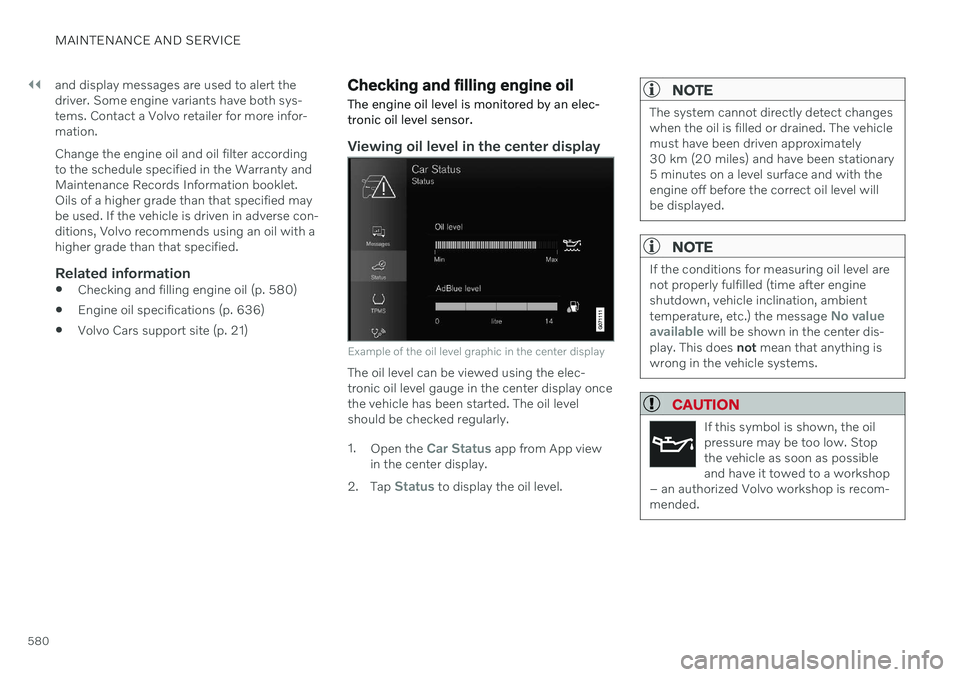
Example of the oil level graphic in the center display
The oil level can be viewed using the elec- tronic oil level gauge in the center display oncethe vehicle has been started. The oil levelshould be checked regularly. 1. Open the
Car Status app from App view
in the center display.
2. Tap
Status to display the oil level.
NOTE
The system cannot directly detect changes when the oil is filled or drained. The vehiclemust have been driven approximately30 km (20 miles) and have been stationary5 minutes on a level surface and with theengine off before the correct oil level willbe displayed.
NOTE
If the conditions for measuring oil level are not properly fulfilled (time after engineshutdown, vehicle inclination, ambient temperature, etc.) the message
No value
available will be shown in the center dis-
play. This does not mean that anything is
wrong in the vehicle systems.
CAUTION
If this symbol is shown, the oil pressure may be too low. Stopthe vehicle as soon as possibleand have it towed to a workshop
– an authorized Volvo workshop is recom-mended.
Page 584 of 661
MAINTENANCE AND SERVICE
582
Refilling coolant
When refilling coolant, follow the instructions on the package. Never fill the cooling systemwith only water. The risk of freezing isincreased with too low or too high amountsof coolant.
If there is coolant under the vehicle, smoke from the cooling system, or if more than2 liters (about 2 quarts) of coolant has beenadded to the system, there could be some-thing wrong with the cooling system and star-ting the vehicle could damage the engine. Calla tow truck and do not attempt to start theengine.
WARNING
The coolant may be very hot. Never unscrew the cap when the coolant is hot. Ifcoolant must be filled, unscrew the expan-sion tank cap slowly to relieve overpres-sure.
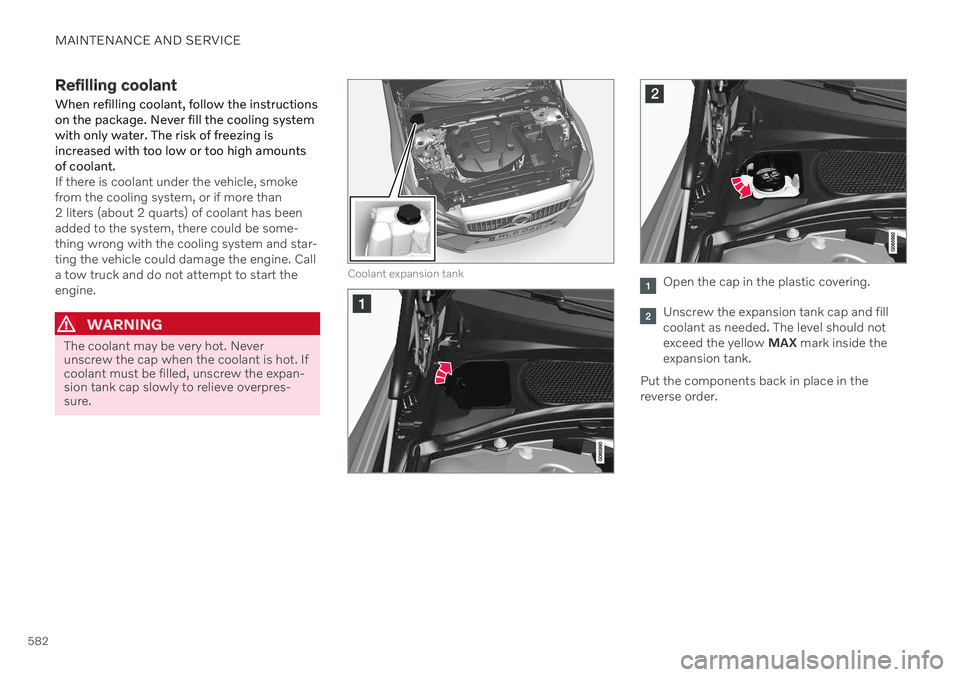
Coolant expansion tankOpen the cap in the plastic covering.
Unscrew the expansion tank cap and fill coolant as needed. The level should notexceed the yellow MAX mark inside the
expansion tank.
Put the components back in place in thereverse order.
Page 606 of 661

||
MAINTENANCE AND SERVICE
* Option/accessory.
604
Positions
Function Ampere Type
– –
MCaseA
–
–
MCaseA
Pneumatic suspension
* compressor 40
MCaseA
–
–
MCaseA
–
–
MCaseA
–
–
MCaseA
Door module right side, rear
20
MCaseA
–
–
MCaseA
– –
– –
Power tailgate* 25
MCaseA
Power front passenger seat
*
Door module right side, front 20
MCaseA
Towbar
* control module 40
MCaseA
Seat belt tensioner module (right side)
40
MCaseA
Internal relay windings
5 Micro
Page 607 of 661
MAINTENANCE AND SERVICE
}}
* Option/accessory.605
Function Ampere Type
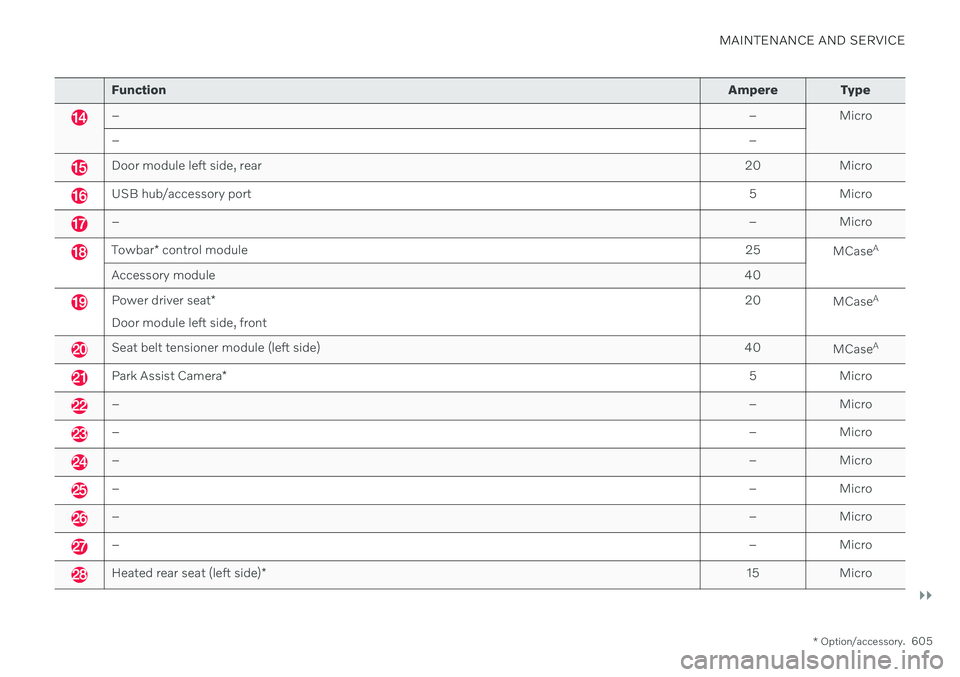
– – Micro
– –
Door module left side, rear20 Micro
USB hub/accessory port 5 Micro
–– Micro
Towbar* control module 25
MCaseA
Accessory module 40
Power driver seat*
Door module left side, front 20
MCaseA
Seat belt tensioner module (left side)
40
MCaseA
Park Assist Camera
* 5 Micro
–
– Micro
–– Micro
–– Micro
–– Micro
–– Micro
–– Micro
Heated rear seat (left side)* 15 Micro
Page 610 of 661
||
MAINTENANCE AND SERVICE
* Option/accessory.
608
Related information
Cleaning the center display (p. 608)
Cleaning fabric upholstery and ceiling liner (p. 609)
Cleaning the seat belt (p. 610)
Cleaning textile floor and inlay mats(p. 611)
Cleaning leather upholstery
* (p. 611)
Cleaning the leather steering wheel(p. 612)
Cleaning interior plastic, metal and woodsurfaces (p. 613)
Cleaning the center display
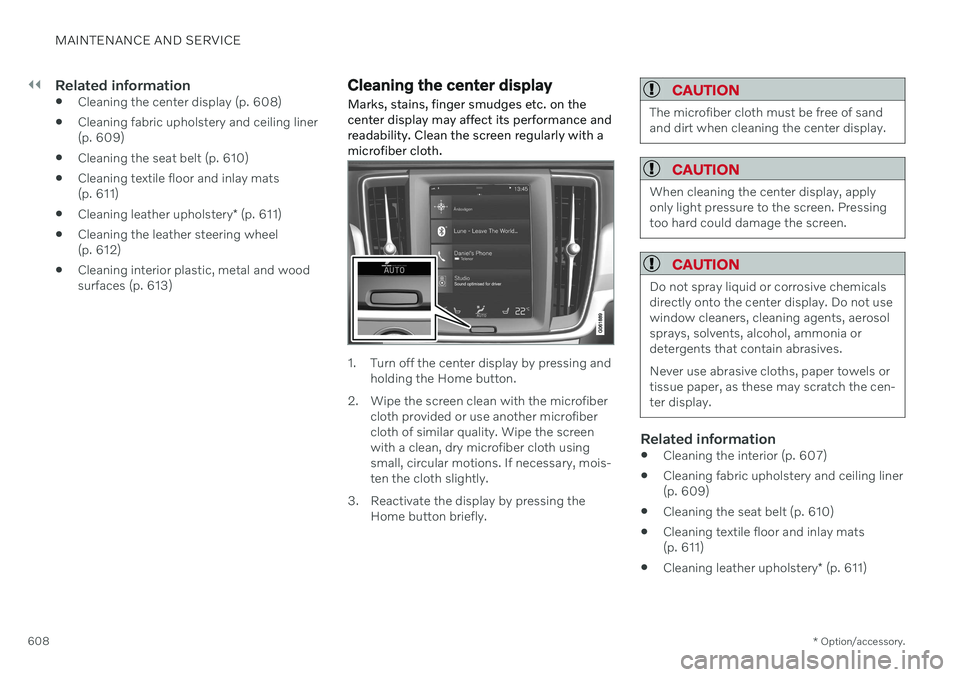
Marks, stains, finger smudges etc. on the center display may affect its performance andreadability. Clean the screen regularly with amicrofiber cloth.
1. Turn off the center display by pressing and holding the Home button.
2. Wipe the screen clean with the microfiber cloth provided or use another microfiber cloth of similar quality. Wipe the screenwith a clean, dry microfiber cloth usingsmall, circular motions. If necessary, mois-ten the cloth slightly.
3. Reactivate the display by pressing the Home button briefly.
CAUTION
The microfiber cloth must be free of sand and dirt when cleaning the center display.
CAUTION
When cleaning the center display, apply only light pressure to the screen. Pressingtoo hard could damage the screen.
CAUTION
Do not spray liquid or corrosive chemicals directly onto the center display. Do not usewindow cleaners, cleaning agents, aerosolsprays, solvents, alcohol, ammonia ordetergents that contain abrasives. Never use abrasive cloths, paper towels or tissue paper, as these may scratch the cen-ter display.
Related information
Cleaning the interior (p. 607)
Cleaning fabric upholstery and ceiling liner (p. 609)
Cleaning the seat belt (p. 610)
Cleaning textile floor and inlay mats(p. 611)
Cleaning leather upholstery
* (p. 611)
Page 614 of 661
||
MAINTENANCE AND SERVICE
* Option/accessory.
612 2. Move the sponge in circular motions to
apply the foam to the stain.
3. Dampen the stain thoroughly with the sponge. Let the sponge absorb the stain and do not rub.
4. Dry the stain using a soft towel and let the leather dry completely.
Protecting the leather upholstery1. Apply a small amount of leather protector to a cloth and then apply the protector tothe leather using light circular movements.
2. Let it dry for approximately 20 minutes. > Protecting the leather upholsterymakes it better able to withstand sun-light's harmful UV rays.
Related information
Cleaning the interior (p. 607)
Cleaning the center display (p. 608)
Cleaning fabric upholstery and ceiling liner(p. 609)
Cleaning the seat belt (p. 610)
Cleaning textile floor and inlay mats(p. 611)
Cleaning the leather steering wheel(p. 612)
Cleaning interior plastic, metal and wood surfaces (p. 613)
Cleaning the leather steering wheel
Use cleaning agents and car care products recommended by Volvo. Clean regularly andtreat stains immediately. It is important tovacuum before using a cleaning agent.
Leather needs to breathe. Never cover the leather steering wheel with a plastic protector.Volvo Leather Care Kit 951 0251 and LeatherSoftener 943 7429 are recommended forcleaning the leather steering wheel. First,remove dirt, dust, etc. with a damp sponge orcloth.
CAUTION
Sharp objects such as rings could damage the leather on the steering wheel.
Treating stains on the steering wheel:Type 1 (ink, wine, coffee, milk, sweat or blood)
–Use a soft cloth or sponge. Wipe the steering wheel using a solution of 5%ammonia. For blood stains, mix approxi-mately 2 dl (1 cup) of water with 25 g(one ounce) of salt and wipe the stain.
Type 2 (grease, oil, sauces or chocolate)
1. Same procedure as for Type 1 stains.
2. Finish by wiping the wheel with an absorbent paper or towel. Type 3
(dry dirt or dust)
1. Remove the dirt/dust using a soft brush.
2. Same procedure as for Type 1 stains.
Related information
Cleaning the interior (p. 607)
Cleaning the center display (p. 608)
Cleaning fabric upholstery and ceiling liner (p. 609)
Cleaning the seat belt (p. 610)
Cleaning textile floor and inlay mats(p. 611)
Cleaning leather upholstery
* (p. 611)
Cleaning interior plastic, metal and woodsurfaces (p. 613)
Page 625 of 661
MAINTENANCE AND SERVICE
623
Changing rear window wipers
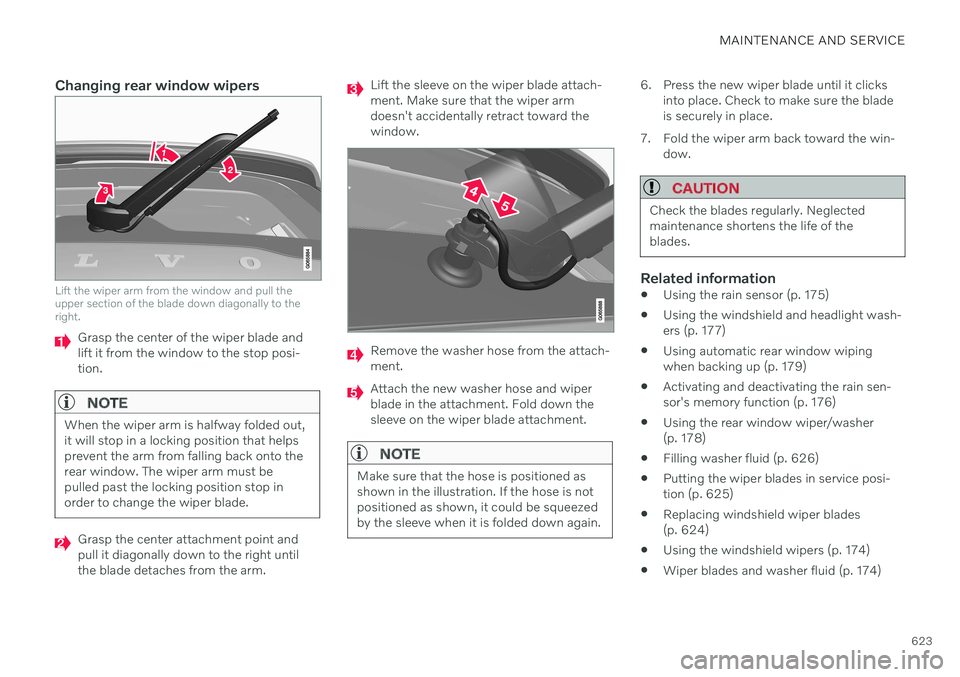
Lift the wiper arm from the window and pull the upper section of the blade down diagonally to theright.
Grasp the center of the wiper blade and lift it from the window to the stop posi-tion.
NOTE
When the wiper arm is halfway folded out, it will stop in a locking position that helpsprevent the arm from falling back onto therear window. The wiper arm must bepulled past the locking position stop inorder to change the wiper blade.
Grasp the center attachment point and pull it diagonally down to the right untilthe blade detaches from the arm.
Lift the sleeve on the wiper blade attach- ment. Make sure that the wiper armdoesn't accidentally retract toward thewindow.
Remove the washer hose from the attach- ment.
Attach the new washer hose and wiper blade in the attachment. Fold down thesleeve on the wiper blade attachment.
NOTE
Make sure that the hose is positioned as shown in the illustration. If the hose is notpositioned as shown, it could be squeezedby the sleeve when it is folded down again.
6. Press the new wiper blade until it clicksinto place. Check to make sure the blade is securely in place.
7. Fold the wiper arm back toward the win- dow.
CAUTION
Check the blades regularly. Neglected maintenance shortens the life of theblades.
Related information
Using the rain sensor (p. 175)
Using the windshield and headlight wash- ers (p. 177)
Using automatic rear window wipingwhen backing up (p. 179)
Activating and deactivating the rain sen-sor's memory function (p. 176)
Using the rear window wiper/washer(p. 178)
Filling washer fluid (p. 626)
Putting the wiper blades in service posi-tion (p. 625)
Replacing windshield wiper blades(p. 624)
Using the windshield wipers (p. 174)
Wiper blades and washer fluid (p. 174)
Page 626 of 661
MAINTENANCE AND SERVICE
624
Replacing windshield wiper bladesThe wiper blades help remove water from the windshield and rear window. Along with thewasher fluid, they are designed to clean theglass and help improve visibility while driving.The windshield and rear window wiperblades can be replaced.
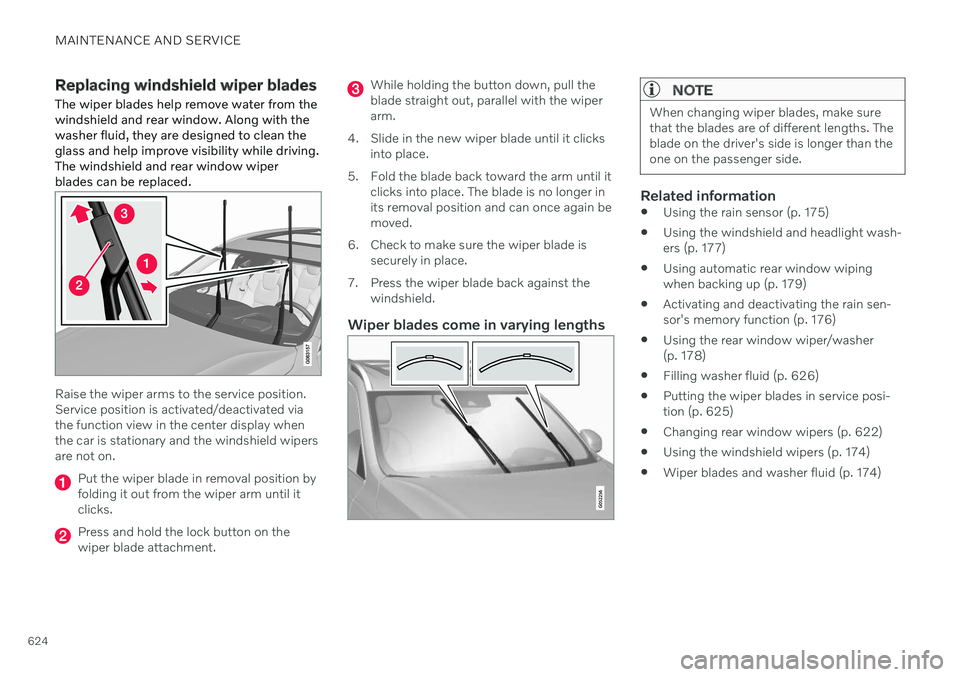
Raise the wiper arms to the service position. Service position is activated/deactivated viathe function view in the center display whenthe car is stationary and the windshield wipersare not on.
Put the wiper blade in removal position by folding it out from the wiper arm until itclicks.
Press and hold the lock button on the wiper blade attachment.
While holding the button down, pull the blade straight out, parallel with the wiperarm.
4. Slide in the new wiper blade until it clicks into place.
5. Fold the blade back toward the arm until it clicks into place. The blade is no longer inits removal position and can once again bemoved.
6. Check to make sure the wiper blade is securely in place.
7. Press the wiper blade back against the windshield.
Wiper blades come in varying lengths
NOTE
When changing wiper blades, make sure that the blades are of different lengths. Theblade on the driver's side is longer than theone on the passenger side.
Related information
Using the rain sensor (p. 175)
Using the windshield and headlight wash- ers (p. 177)
Using automatic rear window wipingwhen backing up (p. 179)
Activating and deactivating the rain sen-sor's memory function (p. 176)
Using the rear window wiper/washer(p. 178)
Filling washer fluid (p. 626)
Putting the wiper blades in service posi-tion (p. 625)
Changing rear window wipers (p. 622)
Using the windshield wipers (p. 174)
Wiper blades and washer fluid (p. 174)