display VOLVO V60 2021 Manual PDF
[x] Cancel search | Manufacturer: VOLVO, Model Year: 2021, Model line: V60, Model: VOLVO V60 2021Pages: 661, PDF Size: 12.68 MB
Page 129 of 661
DISPLAYS AND VOICE CONTROL
}}
127
Changing keyboard language in the center display
In order to toggle between keyboard lan- guages, the languages must first be added under
Settings.
Adding or deleting languages in Settings
The keyboard is automatically set to the same language as the system language. The key-board language can be manually changedwithout affecting the system language.
1. Tap
Settings in Top view.
2. Tap
SystemSystem Languages and
Units
Keyboard Layouts.
3. Select one or more languages in the list. > It is now possible to toggle betweenthe selected languages using the key- board.
If no language has been selected under
Settings, the keyboard will remain in the
same language as the vehicle's system lan- guage.
Toggling between keyboard languagesIf more than one languagehas been selected in
Settings, the button in the
keyboard can be used to switch between the differentlanguages.
To toggle between keyboard languages from the list:
1. Press and hold the button.
> A list will appear.
2. Select the desired language. If more than four languages have been selected under
Settings, you can scroll through the list
shown on the keyboard.
> The keyboard and word suggestions will be adapted to the selected lan- guage.
To change keyboard language without display-ing the list:
–Tap the button.
> The keyboard layout will change to the next language in the list without dis- playing the list.
Related information
Changing system language (p. 130)
Using the center display keyboard (p. 124)
Entering characters, letters and words by hand in the centerdisplay
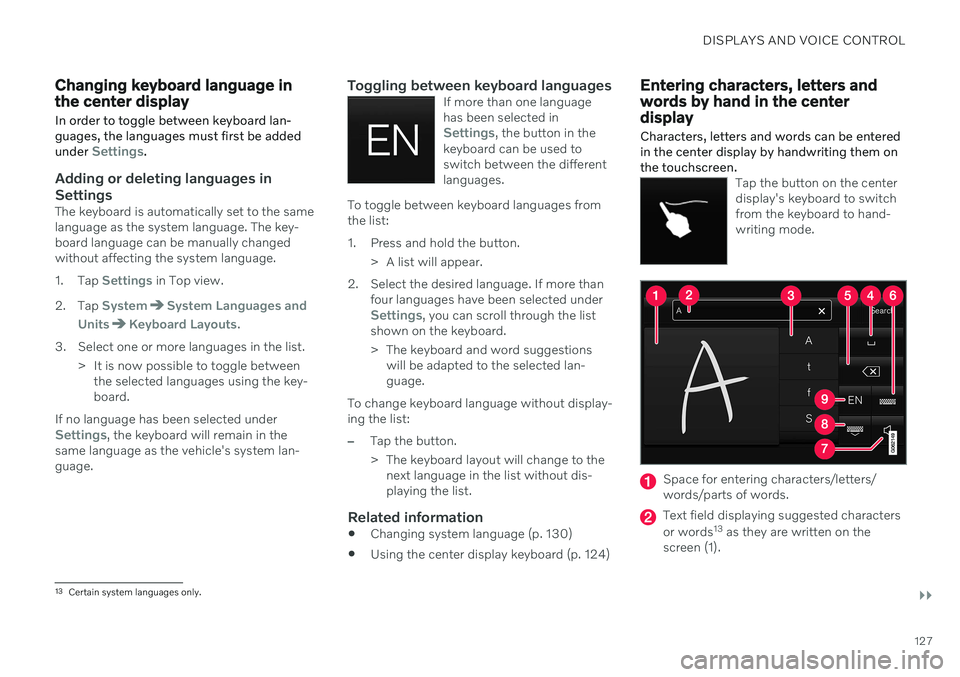
Characters, letters and words can be entered in the center display by handwriting them onthe touchscreen.
Tap the button on the center display's keyboard to switchfrom the keyboard to hand-writing mode.
Space for entering characters/letters/ words/parts of words.
Text field displaying suggested characters or words 13
as they are written on the
screen (1).
13 Certain system languages only.
Page 130 of 661
||
DISPLAYS AND VOICE CONTROL
128
Suggestions for characters/letters/words/ parts of words. You can scroll through thelist.
Space bar. Blank spaces can be created by writing a dash (‒) in the field for hand-
written letters (1). See "Writing blankspaces in free-text fields" below.
Delete. Tap once to erase one character/ letter at a time. Wait a moment beforetapping again to erase the next character,letter etc.
Return to the standard keyboard layout.
Switch off/on screen tap sounds.
Hide the keyboard. In cases where this is not possible, the button will not be dis-played.
Change language for text input.
Handwriting characters/letters/words
1. Write a character, a letter, a word or parts of a word in the field for handwritten let- ters (1). Write the word or part of the wordvertically or horizontally.
> A number of suggestions for charac-ters, letters or words will be displayed (3). The most likely will be shown at thetop of the list.
CAUTION
Do not use sharp objects on the screen as this could cause scratches.
2. The character/letter/word will be entered automatically after a short pause if no other action is taken.
> The character/letter/word at the top ofthe list will be used. Tap one of the other characters/letters/words in thelist to use it instead.
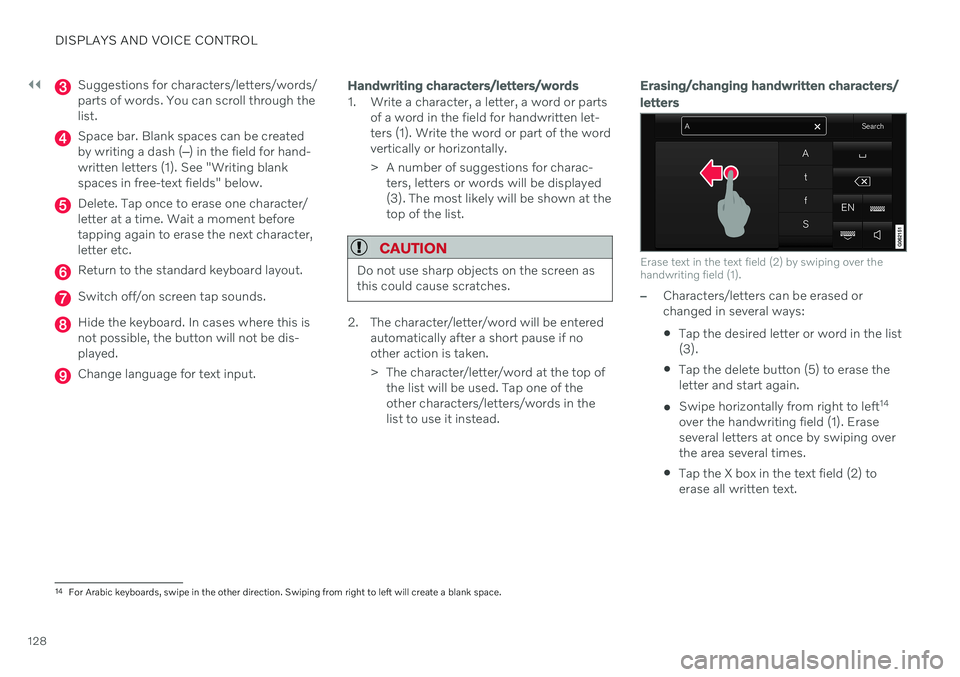
Erasing/changing handwritten characters/ letters
Erase text in the text field (2) by swiping over the handwriting field (1).
–Characters/letters can be erased or changed in several ways: Tap the desired letter or word in the list (3).
Tap the delete button (5) to erase theletter and start again.
Swipe horizontally from right to left 14
over the handwriting field (1). Eraseseveral letters at once by swiping overthe area several times.
Tap the X box in the text field (2) toerase all written text.
14
For Arabic keyboards, swipe in the other direction. Swiping from right to left will create a blank space.
Page 131 of 661
DISPLAYS AND VOICE CONTROL
129
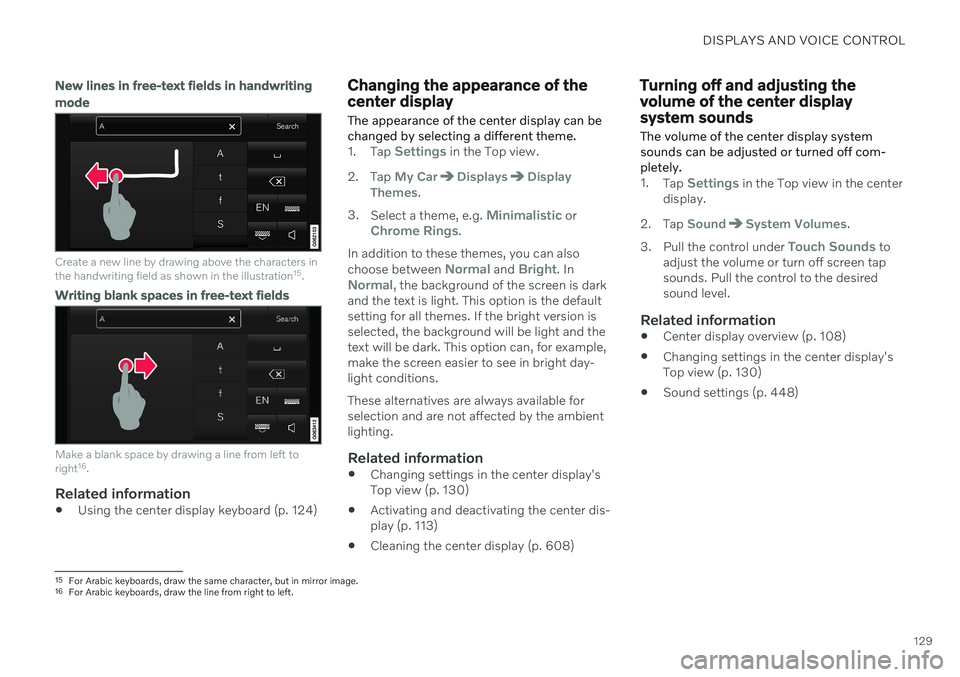
New lines in free-text fields in handwriting mode
Create a new line by drawing above the characters in the handwriting field as shown in the illustration15
.
Writing blank spaces in free-text fields
Make a blank space by drawing a line from left to right 16
.
Related information
Using the center display keyboard (p. 124)
Changing the appearance of the center display The appearance of the center display can be changed by selecting a different theme.
1.
Tap Settings in the Top view.
2. Tap
My CarDisplaysDisplay
Themes.
3. Select a theme, e.g.
Minimalistic orChrome Rings.
In addition to these themes, you can also choose between
Normal and Bright. InNormal, the background of the screen is dark
and the text is light. This option is the default setting for all themes. If the bright version isselected, the background will be light and thetext will be dark. This option can, for example,make the screen easier to see in bright day-light conditions. These alternatives are always available for selection and are not affected by the ambientlighting.
Related information
Changing settings in the center display'sTop view (p. 130)
Activating and deactivating the center dis-play (p. 113)
Cleaning the center display (p. 608)
Turning off and adjusting the volume of the center displaysystem sounds
The volume of the center display system sounds can be adjusted or turned off com-pletely.
1. Tap Settings in the Top view in the center
display.
2. Tap
SoundSystem Volumes.
3. Pull the control under
Touch Sounds to
adjust the volume or turn off screen tap sounds. Pull the control to the desiredsound level.
Related information
Center display overview (p. 108)
Changing settings in the center display'sTop view (p. 130)
Sound settings (p. 448)
15
For Arabic keyboards, draw the same character, but in mirror image.
16 For Arabic keyboards, draw the line from right to left.
Page 132 of 661
DISPLAYS AND VOICE CONTROL
130
Changing system units of measurement
Unit settings are adjusted in the
Settingsmenu in the center display.1. Tap Settings in the Top view in the center
display.
2. Proceed to
SystemSystem
Languages and Units
Units of
Measurement.
3. Choose a measurement standard:
Metric - kilometers, liters and degrees
Celsius.
Imperial - miles, gallons and degrees
Celsius.
US - miles, gallons and degrees Fah-
renheit.
> The units in the instrument panel, cen- ter display and head-up display are changed.
Related information
Center display overview (p. 108)
Changing settings in the center display'sTop view (p. 130)
Changing system language (p. 130)
Changing system language
Language settings are adjusted in the
Settings menu in the center display.
NOTE
Changing languages in the center display could mean that certain owner's informa-tion will not comply with national or locallaws and regulations. Do not change to alanguage you do not speak well, as it canbe difficult to find your way back throughthe menu.
1. Tap Settings in the Top view in the center
display.
2. Proceed to
SystemSystem
Languages and Units.
3. Select
System Language.
A voice control symbol indicates that the language can be used for voice com-mands.
> Languages in the instrument panel, center display and head-up display are changed.
Related information
Center display overview (p. 108)
Changing settings in the center display'sTop view (p. 130)
Changing system units of measurement(p. 130)
Changing settings in the center display's Top view
You can change settings and information for many of the vehicle's functions via the centerdisplay.
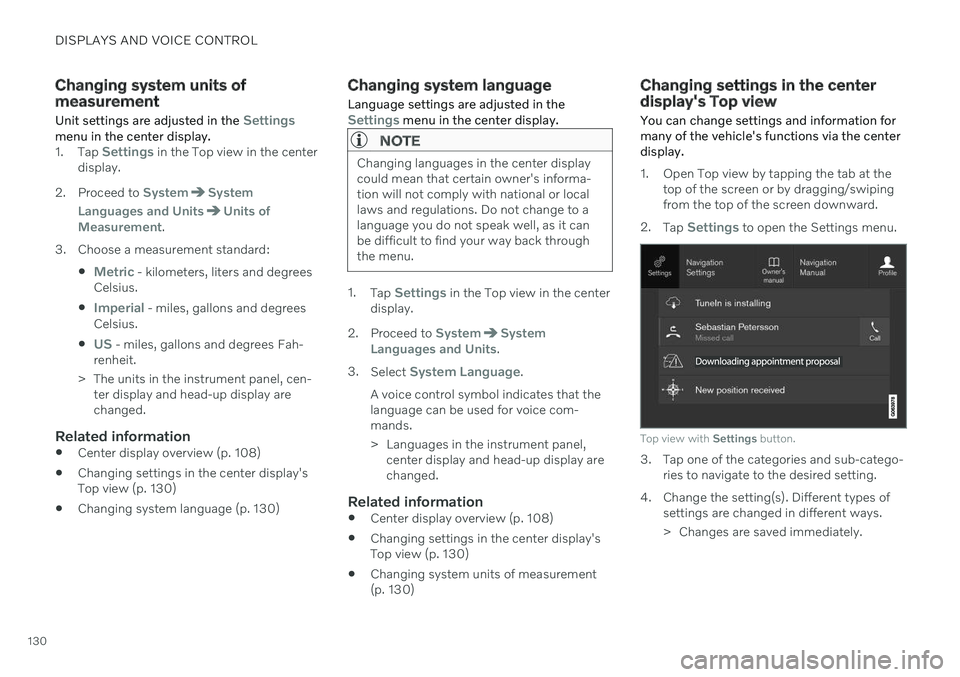
1. Open Top view by tapping the tab at the top of the screen or by dragging/swiping from the top of the screen downward.
2. Tap
Settings to open the Settings menu.
Top view with Settings button.
3. Tap one of the categories and sub-catego-
ries to navigate to the desired setting.
4. Change the setting(s). Different types of settings are changed in different ways.
> Changes are saved immediately.
Page 133 of 661
DISPLAYS AND VOICE CONTROL
131
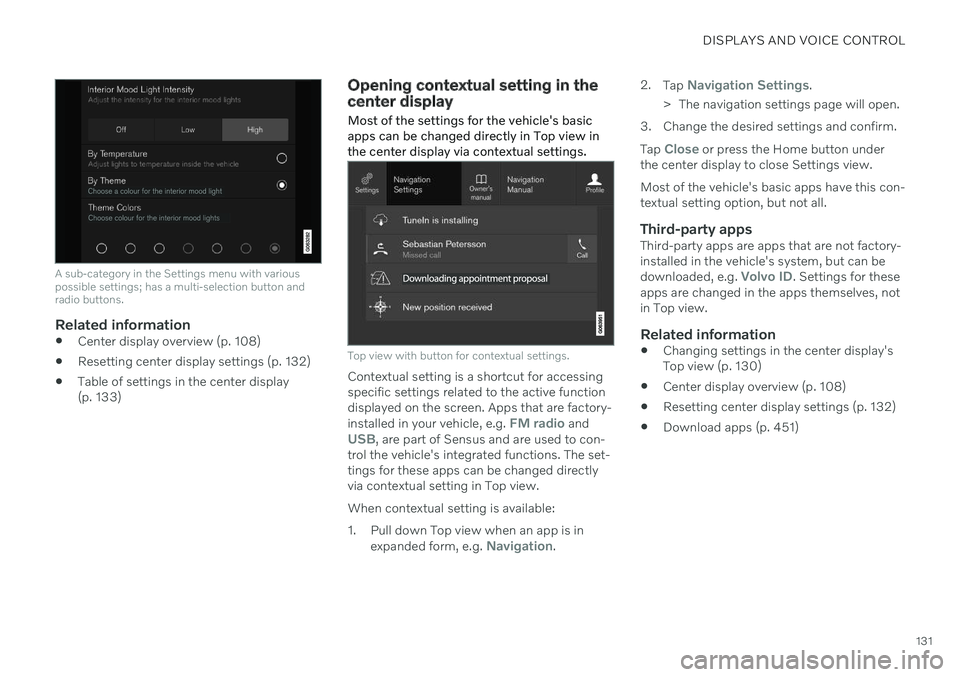
A sub-category in the Settings menu with various possible settings; has a multi-selection button andradio buttons.
Related information
Center display overview (p. 108)
Resetting center display settings (p. 132)
Table of settings in the center display (p. 133)
Opening contextual setting in the center display Most of the settings for the vehicle's basic apps can be changed directly in Top view inthe center display via contextual settings.
Top view with button for contextual settings.
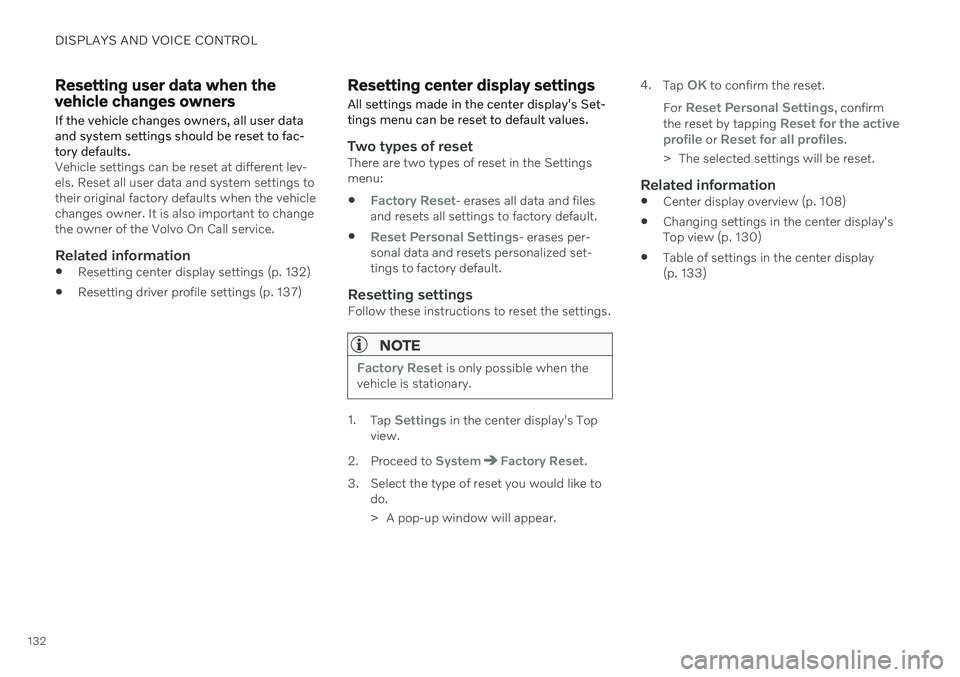
Contextual setting is a shortcut for accessing specific settings related to the active functiondisplayed on the screen. Apps that are factory- installed in your vehicle, e.g.
FM radio andUSB, are part of Sensus and are used to con-
trol the vehicle's integrated functions. The set- tings for these apps can be changed directlyvia contextual setting in Top view. When contextual setting is available:
1. Pull down Top view when an app is in
expanded form, e.g.
Navigation. 2.
Tap
Navigation Settings.
> The navigation settings page will open.
3. Change the desired settings and confirm. Tap
Close or press the Home button under
the center display to close Settings view. Most of the vehicle's basic apps have this con- textual setting option, but not all.
Third-party appsThird-party apps are apps that are not factory-installed in the vehicle's system, but can be downloaded, e.g.
Volvo ID. Settings for these
apps are changed in the apps themselves, not in Top view.
Related information
Changing settings in the center display'sTop view (p. 130)
Center display overview (p. 108)
Resetting center display settings (p. 132)
Download apps (p. 451)
Page 134 of 661
DISPLAYS AND VOICE CONTROL
132
Resetting user data when the vehicle changes owners
If the vehicle changes owners, all user data and system settings should be reset to fac-tory defaults.
Vehicle settings can be reset at different lev- els. Reset all user data and system settings totheir original factory defaults when the vehiclechanges owner. It is also important to changethe owner of the Volvo On Call service.
Related information
Resetting center display settings (p. 132)
Resetting driver profile settings (p. 137)
Resetting center display settings
All settings made in the center display's Set- tings menu can be reset to default values.
Two types of resetThere are two types of reset in the Settings menu:
Factory Reset- erases all data and files
and resets all settings to factory default.
Reset Personal Settings- erases per-
sonal data and resets personalized set- tings to factory default.
Resetting settingsFollow these instructions to reset the settings.
NOTE
Factory Reset is only possible when the
vehicle is stationary.
1. Tap Settings in the center display's Top
view.
2. Proceed to
SystemFactory Reset.
3. Select the type of reset you would like to do.
> A pop-up window will appear. 4.
Tap
OK to confirm the reset.
For
Reset Personal Settings, confirm
the reset by tapping Reset for the active
profile or Reset for all profiles.
> The selected settings will be reset.
Related information
Center display overview (p. 108)
Changing settings in the center display's Top view (p. 130)
Table of settings in the center display(p. 133)
Page 135 of 661
DISPLAYS AND VOICE CONTROL
}}
* Option/accessory.133
Table of settings in the center display
The center display's Settings menu has a number of main categories and sub-catego-ries that contain settings and information formany of the vehicle's features and functions.
There are seven main categories: My Car,Sound, Navigation, Media,Communication, Climate and System.
Each category, in turn, contains a number of sub-categories and possible settings. Thetable below shows the first level of sub-cate-gories. The possible settings for a function oran area are described in more detail in theirrespective sections of the Owner's Manual. Some settings are personal, which means that they can be saved to a
Driver Profiles. Others
are global, which means that they are not linked to a driver profile.
My Car
Sub-categories
Displays IntelliSafeDrive Preferences
/Individual Drive
Mode*
Lights and Lighting Mirrors and Convenience
Sub-categories
Locking Parking Brake and SuspensionWipers
Sound
Sub-categories
Tone BalanceSystem Volumes
Navigation
Sub-categories
Map Route and GuidanceTraffic
Media
Sub-categories
AM/FM Radio SiriusXMSiriusXM Travel Link
Sub-categories
Gracenote ®
Video
Communication
Sub-categories
Phone Text MessagesAndroid Auto
*
Apple CarPlay*
Bluetooth Devices Wi-FiVehicle Wi-Fi Hotspot Vehicle Modem Internet Volvo On Call Volvo Service Networks
ClimateThe Climate main category does not have any
sub-categories.
Page 136 of 661
||
DISPLAYS AND VOICE CONTROL
* Option/accessory.
134
System
Sub-categories
Driver Profile Date and TimeSystem Languages and UnitsPrivacy and DataKeyboard LayoutsVoice Control
*
Factory Reset System Information
Related information
Center display overview (p. 108)
Changing settings in the center display's Top view (p. 130)
Resetting center display settings (p. 132)
Driver profiles
Many of the vehicle's settings can be cus- tomized to the driver's personal preferencesand saved in one or more driver profiles.
These personal settings are automatically saved in the active driver profile. Each key canbe linked to one driver profile. When the linkedkey is used, the vehicle is customized to thespecific settings of that driver profile.
Which settings are saved in driver
profiles?
Many of the settings made in the vehicle willbe automatically stored in the active driverprofile if the profile is not protected. The vehi-cle has settings that can be made either per-sonal or global. The personal settings aresaved in driver profiles. Settings that can be saved in a driver profile include, among other things, screens, mirrors, front seats, navigation *, audio and media sys-
tem, language and voice control. Some settings are global settings. These set- tings can be changed but are not saved to aspecific driver profile. Changes to global set-tings affect all profiles.
Global settings
Global settings do not change when driver profiles are changed. They remain the sameregardless of which driver profile is currentlyactive. Keyboard layout is an example of a global set-ting. If driver profile X is used to add additionalkeyboard languages, these languages will alsobe available for driver profile Y. The settingsfor keyboard layout are not saved to a specificdriver profile - the settings are global.
Personal settings
If driver profile X has been used to e.g., set the brightness for the center display, driver profileY will not be affected by this setting. It willonly be saved to driver profile X becausebrightness setting is a personal setting.
Related information
Selecting a driver profile (p. 135)
Changing a driver profile's name (p. 135)
Linking a remote key to a driver profile(p. 136)
Protecting a driver profile (p. 136)
Resetting driver profile settings (p. 137)
Table of settings in the center display(p. 133)
Page 137 of 661
DISPLAYS AND VOICE CONTROL
135
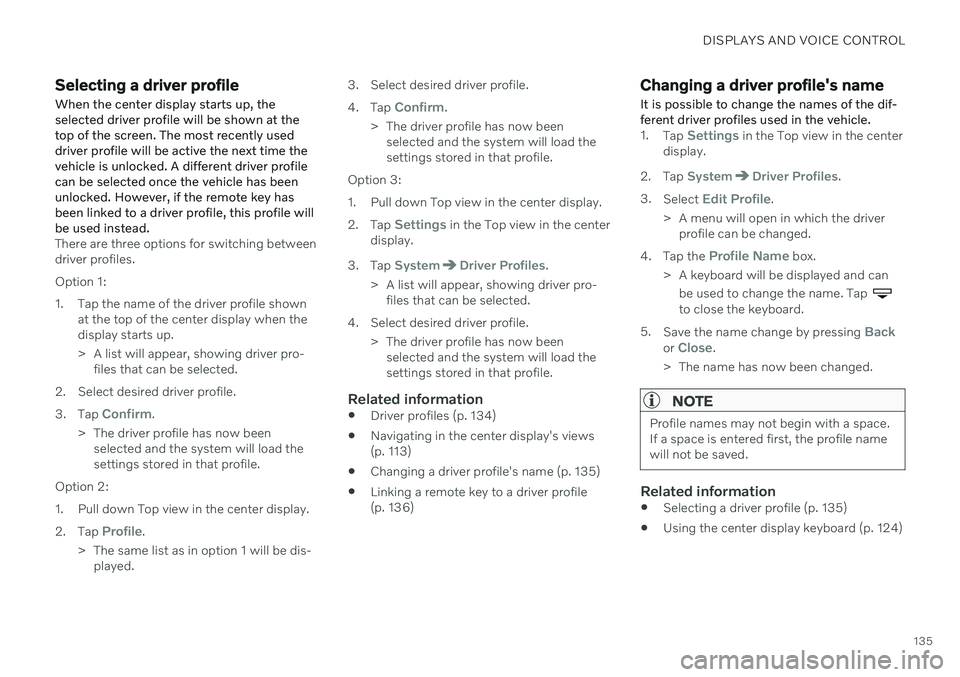
Selecting a driver profileWhen the center display starts up, the selected driver profile will be shown at thetop of the screen. The most recently useddriver profile will be active the next time thevehicle is unlocked. A different driver profilecan be selected once the vehicle has beenunlocked. However, if the remote key hasbeen linked to a driver profile, this profile willbe used instead.
There are three options for switching between driver profiles. Option 1:
1. Tap the name of the driver profile shown at the top of the center display when the display starts up.
> A list will appear, showing driver pro-files that can be selected.
2. Select desired driver profile. 3. Tap
Confirm.
> The driver profile has now been selected and the system will load the settings stored in that profile.
Option 2:
1. Pull down Top view in the center display.2. Tap
Profile.
> The same list as in option 1 will be dis- played. 3. Select desired driver profile. 4.
Tap
Confirm.
> The driver profile has now been selected and the system will load the settings stored in that profile.
Option 3:
1. Pull down Top view in the center display.2. Tap
Settings in the Top view in the center
display.
3. Tap
SystemDriver Profiles.
> A list will appear, showing driver pro- files that can be selected.
4. Select desired driver profile. > The driver profile has now beenselected and the system will load the settings stored in that profile.
Related information
Driver profiles (p. 134)
Navigating in the center display's views(p. 113)
Changing a driver profile's name (p. 135)
Linking a remote key to a driver profile(p. 136)
Changing a driver profile's name
It is possible to change the names of the dif- ferent driver profiles used in the vehicle.
1. Tap Settings in the Top view in the center
display.
2. Tap
SystemDriver Profiles.
3. Select
Edit Profile.
> A menu will open in which the driver profile can be changed.
4. Tap the
Profile Name box.
> A keyboard will be displayed and can be used to change the name. Tap
to close the keyboard.
5. Save the name change by pressing
Backor Close.
> The name has now been changed.
NOTE
Profile names may not begin with a space. If a space is entered first, the profile namewill not be saved.
Related information
Selecting a driver profile (p. 135)
Using the center display keyboard (p. 124)
Page 138 of 661
DISPLAYS AND VOICE CONTROL
136
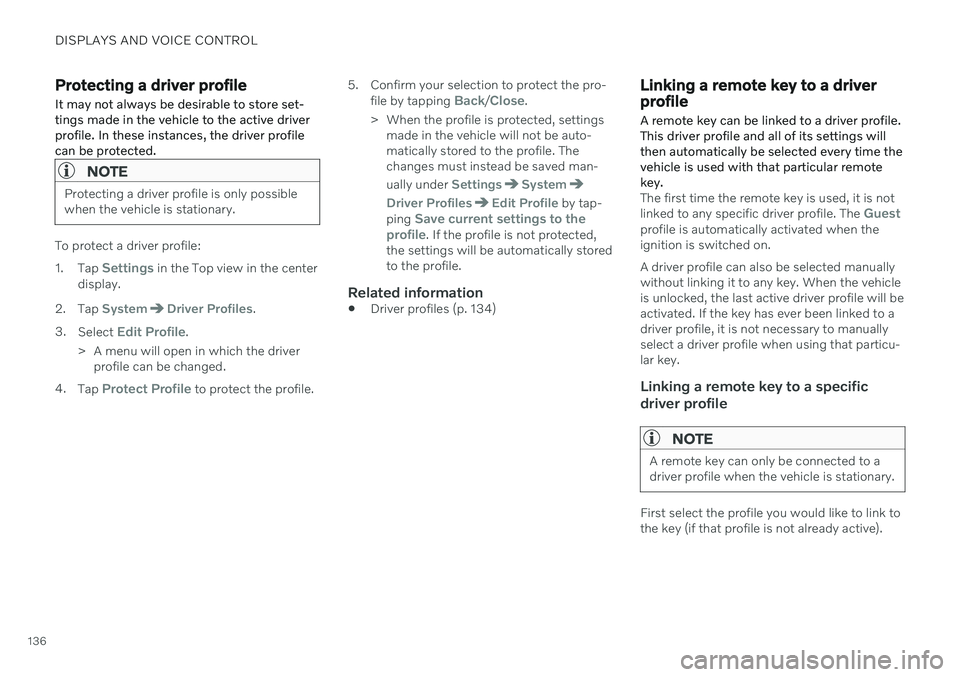
Protecting a driver profile
It may not always be desirable to store set- tings made in the vehicle to the active driverprofile. In these instances, the driver profilecan be protected.
NOTE
Protecting a driver profile is only possible when the vehicle is stationary.
To protect a driver profile: 1. Tap
Settings in the Top view in the center
display.
2. Tap
SystemDriver Profiles.
3. Select
Edit Profile.
> A menu will open in which the driver profile can be changed.
4. Tap
Protect Profile to protect the profile. 5. Confirm your selection to protect the pro-
file by tapping
Back/Close.
> When the profile is protected, settings made in the vehicle will not be auto- matically stored to the profile. Thechanges must instead be saved man- ually under
SettingsSystem
Driver ProfilesEdit Profile by tap-
ping Save current settings to the
profile. If the profile is not protected,
the settings will be automatically stored to the profile.
Related information
Driver profiles (p. 134)
Linking a remote key to a driver profile
A remote key can be linked to a driver profile. This driver profile and all of its settings willthen automatically be selected every time thevehicle is used with that particular remotekey.
The first time the remote key is used, it is not linked to any specific driver profile. The Guestprofile is automatically activated when the ignition is switched on. A driver profile can also be selected manually without linking it to any key. When the vehicleis unlocked, the last active driver profile will beactivated. If the key has ever been linked to adriver profile, it is not necessary to manuallyselect a driver profile when using that particu-lar key.
Linking a remote key to a specific driver profile
NOTE
A remote key can only be connected to a driver profile when the vehicle is stationary.
First select the profile you would like to link to the key (if that profile is not already active).