key battery VOLVO V60 TWIN ENGINE 2020 User Guide
[x] Cancel search | Manufacturer: VOLVO, Model Year: 2020, Model line: V60 TWIN ENGINE, Model: VOLVO V60 TWIN ENGINE 2020Pages: 673, PDF Size: 14.2 MB
Page 248 of 673

KEY, LOCKS AND ALARM
246
Locking and unlocking with detachable key blade
The detachable key blade can be used to unlock the vehicle from the outside, e.g. if thebattery in the remote key is discharged.
Unlocking
Pull the front left-hand door handle to its end position to access the lock cylinder.
Put the key in the lock cylinder.
Turn the key clockwise 45 degrees so that the key blade is pointing straight rear-ward.
Turn the key blade back 45 degrees to its original position. Remove the key from thelock cylinder and release the handle sothat it returns to its original positionagainst the vehicle.
5. Pull the door handle. > The door will open. Lock the door in the same way, but turn thekey 45 degrees counterclockwise in step (3).
Disarming the alarm and starting the vehicle
NOTE
When the door is unlocked using the detachable key blade and then opened, thealarm will be triggered.
Location of the backup key reader in the cup holder.
Turn off the alarm by:
1. Place the remote control key on the key
symbol in the backup reader in the bottom of the cup holder in the tunnel console.
2. Turn the start knob clockwise and release it.
> The alarm signal will stop and the alarmwill switch off.
LockingThe vehicle can also be locked using the remote key's detachable key blade, e.g. ifeither the vehicle's or remote key's batteriesare discharged. The left-hand front door can be locked by inserting the detachable key into the door'slock cylinder. This is the only door with a lock cylinder. The other doors have lock mechanisms in the sideof the door that must be pushed in using thekey blade. The door will then be lockedmechanically and cannot be opened from theoutside. The doors can still be opened from inside.
Manual door lock. This is not the child lock.
Page 249 of 673

KEY, LOCKS AND ALARM
}}
247
–Remove the detachable key blade from the remote key. Insert the key blade intothe opening for the lock mechanism andpush the key in as far as possible, about12 mm (0.5 in).
The door can be opened from both the outside and the inside.
The door cannot be opened from the out- side. To return to position A, open the doorusing the inside door handle.
The doors can also be unlocked by pressingthe unlock button on the remote key or thecentral lock button in the driver's door.
NOTE
The door's lock controls only lock that specific door, not all doors simultane-ously.
A manually locked rear door with anactivated manual or electric childsafety lock cannot be opened fromeither the outside or inside of the vehi-cle. A rear door locked in this way canonly be unlocked using the remote keyor the central unlocking button.
Related information
Starting the vehicle (p. 400)
Detachable key blade (p. 245)
Arming and disarming the alarm (p. 264)
Replacing the remote key's battery (p. 239)
Remote key (p. 234)
Electronic immobilizer The electronic immobilizer is a start inhibitor that helps prevent the vehicle from beingstarted by an unauthorized person.
The vehicle can only be started with the right remote key. The following instrument panel error mes- sages are related to the electronic immobil-izer:
Symbol Message Meaning
Vehicle key not found See Owner'smanualRemote key not recognized dur-ing start. Placethe remote keyon the key sym-bol in the cupholder and try tostart the vehicleagain.
Remote immobilizer with tracking system 9
The vehicle is equipped with a system that makes it possible to track and locate the vehi-cle and to remotely activate the immobilizer toprevent the vehicle from being started. Con-tact your nearest Volvo retailer for more infor-mation and assistance activating the system.
Page 265 of 673

KEY, LOCKS AND ALARM
}}
263
Related information
Private Locking (p. 261)
Alarm The alarm emits sound and light signals if anyone without a valid remote key attemptsto break into the vehicle or interferes with thestart battery or alarm siren.
When armed, the alarm will be triggered if:
the hood, tailgate or any door is opened.
a battery cable is disconnected.
the alarm siren is disconnected.
Alarm signalsThe following occurs if the alarm is triggered:
A siren will sound for 30 seconds or until the alarm is turned off.
The hazard warning flashers will flash for5 minutes or until the alarm is turned off.
If the reason the alarm was triggered is notrectified, the alarm cycle will repeat up to 10 times 14
.
Alarm indicator
A red indicator light on the dashboard shows the status of the alarm:
Indicator off - the alarm is disarmed.
Indicator flashes once every two seconds -the alarm is armed.
The indicator flashes quickly after thealarm has been disabled for up to30 seconds or until the ignition is put in
I
mode – the alarm has been triggered.
14 Certain markets only.
Page 267 of 673

KEY, LOCKS AND ALARM
265
Disarming the alarm without a functioning remote key
The vehicle can be unlocked and disarmed even if the remote key is not functioning, e.g. ifthe battery is discharged.
1. Open the driver's door using the detacha-ble key blade.
> This will trigger the alarm.
Location of the backup key reader in the cup holder.
2. Place the remote key on the key symbol inthe backup reader in the tunnel console's cup holder.
3. Turn the start knob clockwise and release. > The alarm will be disarmed.
Turning off a triggered alarm–Press the unlock button on the remote key or put the ignition into mode I by turning
the start knob clockwise and then releas-ing it.
Automatically arming and disarming the alarm
Automatically arming the alarm helps prevent inadvertently leaving the vehicle without alarmprotection. If the vehicle is unlocked using the remote key (and the alarm is disarmed) but none of thedoors or tailgate are opened within twominutes, the alarm will be automaticallyrearmed. The vehicle will also re-lock. On some markets, the alarm will be automati- cally armed following a slight delay after thedriver's door has been opened and closedwithout being locked. To change this setting:1. Tap
Settings in the center display's Top
view.
2. Tap
My CarLocking.
3. Select
Passive Arming Deactivation to
temporarily deactivate the function.
Related information
Alarm (p. 263)
Page 396 of 673
HYBRID INFORMATION
* Option/accessory.
394
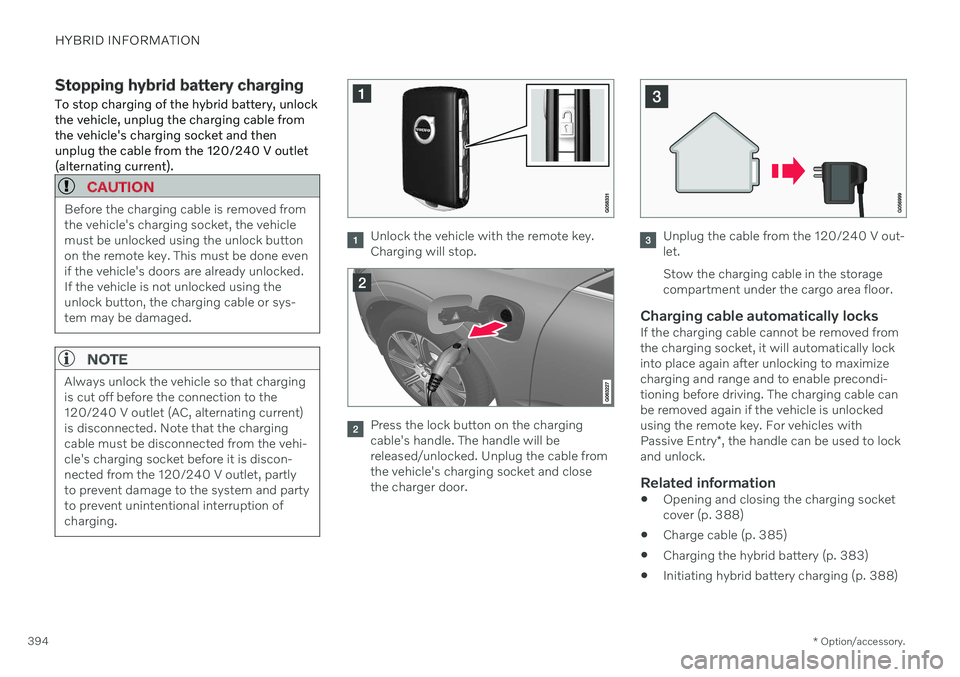
Stopping hybrid battery charging To stop charging of the hybrid battery, unlock the vehicle, unplug the charging cable fromthe vehicle's charging socket and thenunplug the cable from the 120/240 V outlet(alternating current).
CAUTION
Before the charging cable is removed from the vehicle's charging socket, the vehiclemust be unlocked using the unlock buttonon the remote key. This must be done evenif the vehicle's doors are already unlocked.If the vehicle is not unlocked using theunlock button, the charging cable or sys-tem may be damaged.
NOTE
Always unlock the vehicle so that charging is cut off before the connection to the120/240 V outlet (AC, alternating current)is disconnected. Note that the chargingcable must be disconnected from the vehi-cle's charging socket before it is discon-nected from the 120/240 V outlet, partlyto prevent damage to the system and partyto prevent unintentional interruption ofcharging.
Unlock the vehicle with the remote key. Charging will stop.
Press the lock button on the charging cable's handle. The handle will bereleased/unlocked. Unplug the cable fromthe vehicle's charging socket and closethe charger door.
Unplug the cable from the 120/240 V out- let. Stow the charging cable in the storage compartment under the cargo area floor.
Charging cable automatically locksIf the charging cable cannot be removed fromthe charging socket, it will automatically lockinto place again after unlocking to maximizecharging and range and to enable precondi-tioning before driving. The charging cable canbe removed again if the vehicle is unlockedusing the remote key. For vehicles with Passive Entry *, the handle can be used to lock
and unlock.
Related information
Opening and closing the charging socket cover (p. 388)
Charge cable (p. 385)
Charging the hybrid battery (p. 383)
Initiating hybrid battery charging (p. 388)
Page 403 of 673

STARTING AND DRIVING
}}
401
will go out and the selected theme will be dis- played to indicate that the electric motor isactivated. In some situations, such as in cold weather or if the hybrid battery's charge level is too low,the gasoline engine will start instead.
Error messagesIf the Vehicle key not found message is
shown in the instrument panel at start, place the remote key at the backup reader and thenmake a new start attempt.
Location of the backup reader in the tunnel console.
NOTE
When the remote key is placed in the backup reader, make sure that no othervehicle keys, metal objects or electronicdevices (e.g. cellular phones, tablets, lap-tops or chargers) are in the backup reader.Multiple vehicle keys close to each other inthe backup reader can disrupt their func-tionality.
If Vehicle start System check, wait is dis-
played in the instrument panel while attempt- ing to start the vehicle, wait until the messagedisappears and try again to start the vehicle.
CAUTION
If the engine has not responded after 3 attempts – wait for 3 minutes before star-ting a new attempt. Starting capabilityincreases if the starter battery is given timeto recover.
NOTE
The vehicle cannot be started if the hybrid battery is discharged.
WARNING
Never remove the remote control key from
the vehicle while driving.
WARNING
Always remove the remote key from the passenger compartment when youleave the vehicle and make sure theignition is in mode
0.
Always put the gear selector in
P and
apply the parking brake before leavingthe vehicle. Never leave the vehicleunsupervised while the engine is run-ning.
Always open the garage door fully andmake sure that ventilation is very goodbefore starting the engine in a garage.The exhaust fumes produced by thevehicle contain carbon monoxide,which is invisible and odorless but verytoxic.
Page 406 of 673

||
STARTING AND DRIVING
* Option/accessory.
404
Mode Functions
I The panoramic roof, power windows, 12-volt electricalsocket in the passenger com-partment, Bluetooth, naviga-tion, phone, blower and wind-shield wipers can be used.
The power seats can beadjusted.
The 12-volt electrical socket
* in
the cargo compartment can beused.
Electrical current will be taken
from the battery in this ignitionmode.
II The headlights illuminate.
Warning/indicator lights illumi-nate for 5 seconds.
A number of other systems areactivated. However, seat andrear window heating can onlybe activated when the engineis running.
This ignition mode uses a lot of
current from the battery andshould be avoided wheneverpossible!
A Also activated when the door is opened.
Related information
Starting the vehicle (p. 400)
Adjusting the steering wheel (p. 197)
Jump starting using another battery (p. 442)
Selecting ignition mode (p. 404)
Selecting ignition mode
The vehicle's ignition can be put in various modes (levels) to make different functionsavailable.
Selecting an ignition mode
Start knob in the tunnel console.
Ignition mode 0
– Unlock the vehicle and
keep the remote key in the passenger compartment.
NOTE
To set level I or II without engine start –
do not depress the brake pedal (or clutch
pedal for vehicles with manual transmis- sion) when selecting this ignition mode.
Ignition mode I
– Turn the start knob
clockwise and release it. The control will
Page 450 of 673
||
STARTING AND DRIVING
* Option/accessory.
448
Checking trailer lights *
Automatic check
When the trailer has been connected to the vehicle's electrical system, its lights can bechecked by automatically activating them.This function helps the driver check that thetrailer's lights are functioning correctly beforestarting to drive. In order to perform this check, the vehicle must be switched off.
1. When a trailer is connected to the towbar,
the message
Automatic Trailer Lamp
Check will appear in the instrument panel.
2. Acknowledge the message by pressing the O button on the right-side steering
wheel keypad.
> The light check will begin.
3. Get out of the vehicle to perform the check.
> All of the lights on the trailer will beginflashing, and then illuminate separately one at a time.
4. Visually check that all of the trailer's lights are functioning correctly.
5. After a short time, all of the trailer's lights will start flashing again.
> The light check is completed.
Disabling the automatic check
The automatic light check can be disabled in the center display. 1.Tap
Settings in the Top view.
2. Tap
My CarLights and Lighting.
3. Deselect
Automatic Trailer Lamp
Check.
Manual check
If the automatic check has been disabled, the check can be started manually. 1. Tap
Settings in the Top view.
2. Tap
My CarLights and Lighting.
3. Select
Manual Trailer Lamp Check.
> The light check will begin. Get out of the vehicle to perform the check.
Related information
Driving with a trailer (p. 444)
Towing using a towline
This section refers to one vehicle being towed behind another using a towline.
Never attempt to tow a Twin Engine vehicle behind another vehicle as this could damagethe electric motor. The vehicle must instead belifted onto a tow truck and transported with allfour wheels on the bed or lifting platform ofthe truck (no wheels may touch the road).
Towing another vehicleTowing another vehicle requires a lot of power - use the Constant AWD drive mode. This
helps charge the hybrid battery and improve the vehicle's driving and roadholding characte-ristics. Before towing another vehicle, check applica- ble speed limit regulations.
Jump startingNever attempt to tow the vehicle to start theengine, as this could damage the electricmotor. Use an auxiliary battery if the start bat-tery's charge level is so low that the enginecannot be started.
CAUTION
Attempts to tow-start the vehicle could cause damage to the electrical drive motorand three-way catalytic converter.
Page 657 of 673

INDEX
655
keyboard 123
messages 137, 138
operation 109, 112, 116, 121
overview 107
settings 129, 130
switch off and change volume 128
symbols in status bar 121
views 112
Central locking 253
Change of owner 131
Changing a wheel 540 Charge vehicle function 432
Charge level vehicle function 432
Charging hybrid battery 383 opening and closing the charging
door 388
start charging 388
Status 390, 391, 392
stop charging 394
Charging cable 385
Charging current 385
Checking engine oil level 589
Child restraints 63, 65 booster cushions 72
convertible seats 69
infant seats 67
ISOFIX/LATCH anchors 75
lower attachment points 74
recalls and registration 65
top tether anchors 73
Child safety 63
Child safety locks 255
Circuit breaker 387
City Safety 314 braking for oncoming vehicles 323
crossing traffic 320
delayed evasive maneuver 323
detecting obstacles 318
evasive maneuver 322
limitations 324
limitations for evasive maneuvers 322
limitations in crossing traffic 321
setting warning distance 317
sub-functions 315
Symbols and messages 327
Cleaning 621, 623 automatic car wash 627
car wash 624, 625, 627, 628, 629,630
center display 619
Seat belts 621
textile upholstery 619, 621, 622
upholstery 619, 621, 622, 623
wheels 630Cleaning wheels 630
Cleaning wiper blades 628
Clean Zone 203
Clean Zone Interior Package 204
Climate 200
auto-regulation 215
blower control 218
parking 221
perceived temperature 201
Sensors 200
temperature control 219, 220
voice control 201
zones 200
Climate controls 211 center display 211
rear seat 211
Climate system 200, 211 Refrigerant 650
repairs 585
Clock, setting 90
Collision 42, 47, 52, 61 Collision warner crossing traffic rear 333
see City Safety 314
Collision warning from the rear 328
Color code, paintwork 632
Page 661 of 673
INDEX
659
Home safe lighting, Homesafe Lighting, Follow me home lighting, follow-me-
home lighting 160
Honk 197
Hood, opening 585
Horn 197
Hybrid battery 597
Charging 383
Hybrid battery gauge 84
Hybrid gauge 83
Hybrid mode 421, 426
I
IAQS (Interior Air Quality System) 204
IC (Inflatable Curtain) 60
ID, Volvo 26
Identification number 38
Ignition mode 403, 404
Immobilizer 247 Electronic immobilizer 247
Indicator symbols 91
Individual drive mode 421
Infant seats 67
Inflatable curtain 60
Inflatable Curtain 60
Inflating tires 553Inflation pressure adjusting 534
Checking 533
decal with recommended pressure 535
Inflation pressure monitoring 535 action 539
save new inflation pressure 537
Status 538
Inflation pressure table 651
Information display 80, 82
Infotainment (Audio and media) 458
Instrument cluster 80 settings 82
Instrument illumination 162
Instrument lighting 162
Instrument panel 80 App menu 101, 102 hybrid-related symbols and mes-
sages 395
messages 103
settings 82
Instruments and controls 78 Instruments overview left-hand drive vehicle 78IntelliSafe
driver support 29
Interior Air Quality System 204
Intermittent wiping 177Internet, see Internet-connected vehi- cle 504
Internet-connected vehicle 504 book service and repair 581
No connection or poor connection 509
send car data 582
system updates 580
iPod ®
, connecting 486
ISOFIX/LATCH anchors 75
J
Jack 541
Jump-start 442
K
Key 234
Keyboard 123, 126 change language 126