seats VOLVO V60 TWIN ENGINE 2020 Repair Manual
[x] Cancel search | Manufacturer: VOLVO, Model Year: 2020, Model line: V60 TWIN ENGINE, Model: VOLVO V60 TWIN ENGINE 2020Pages: 673, PDF Size: 14.2 MB
Page 568 of 673

||
LOADING, STORAGE AND PASSENGER COMPARTMENT
* Option/accessory.
566
WARNING
In a head-on collision at a speed of 50 km/h (30 mph), an unsecured objectweighing 20 kg (44 pounds) can reach aprojectile weight equivalent to 1000 kg(2200 pounds).
WARNING
If objects are loaded higher than the upper edge of the side windows, leave a 10 cm(4 in.) space between the objects and thewindow. Objects placed closer to thiscould impede the function of the inflatablecurtain concealed inside the headlining.
WARNING
Always secure the load. Otherwise, it may shift during heavy braking and injure peo-ple in the vehicle. Cover sharp edges and sharp corners with something soft. Turn off the engine and apply the parking brake when loading/unloading longobjects. Otherwise, it is possible for theload to reach the gear lever or gear selectorand move it to a drive position – whichcould cause the vehicle to begin rolling.
Extra cargo space
The rear seat backrests can be folded down to increase cargo space in the cargo compart- ment/trunk and simplify loading. If the rearseat backrests are folded down, make surethat no objects loaded into the vehicle preventthe WHIPS system for the front seats fromfunctioning correctly. The ski hatch in the rear seat can be folded down to carry skis or other long, thin objects.
Related information
Load anchoring eyelets (p. 568)
Folding down the rear seat backrests(p. 194)
Rear seat ski hatch (p. 568)
Roof loads and load carriers (p. 566)
Leveling control
* and suspension (p. 427)
Weights (p. 645)
Roof loads and load carriers
Volvo-developed load carriers are recom- mended for carrying loads on the roof of thevehicle.
Volvo load carriers are specially designed to help prevent damage to your vehicle and helpensure maximum safety while driving. Volvoload carriers are available from authorizedVolvo retailers. Carefully follow the installation instructions provided with the load carriers. Distribute the load evenly throughout the load carriers. Place heavier cargo at thebottom of the load.
Check periodically to ensure that the loadcarriers and load are properly secured.Secure the load firmly using tie straps orsimilar.
If the load is longer than the vehicle, suchas a canoe or kayak, attach the towingeyelet in its front outlet and secure the tiestraps in it.
The vehicle's wind resistance and fuelconsumption increase with the size of theload.
Drive smoothly. Avoid rapid acceleration,hard braking and fast cornering.
Page 574 of 673
||
LOADING, STORAGE AND PASSENGER COMPARTMENT
* Option/accessory.
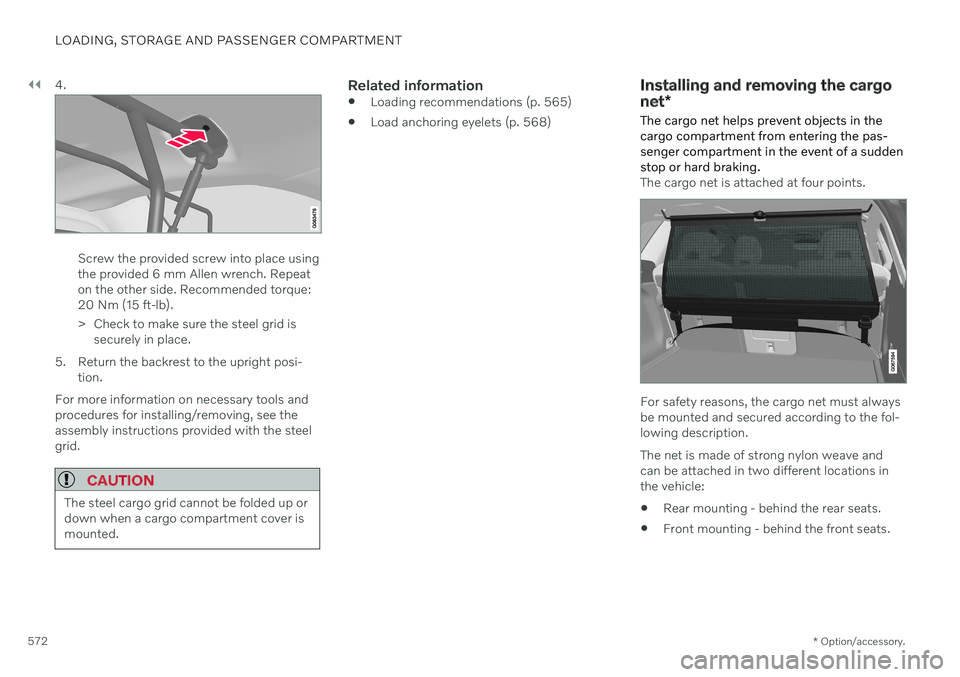
572 4.
Screw the provided screw into place using the provided 6 mm Allen wrench. Repeaton the other side. Recommended torque:20 Nm (15 ft-lb).
> Check to make sure the steel grid is
securely in place.
5. Return the backrest to the upright posi- tion.
For more information on necessary tools and procedures for installing/removing, see theassembly instructions provided with the steelgrid.
CAUTION
The steel cargo grid cannot be folded up or down when a cargo compartment cover ismounted.
Related information
Loading recommendations (p. 565)
Load anchoring eyelets (p. 568)
Installing and removing the cargo net
*
The cargo net helps prevent objects in the cargo compartment from entering the pas-senger compartment in the event of a suddenstop or hard braking.
The cargo net is attached at four points.
For safety reasons, the cargo net must always be mounted and secured according to the fol-lowing description. The net is made of strong nylon weave and can be attached in two different locations inthe vehicle:
Rear mounting - behind the rear seats.
Front mounting - behind the front seats.
Page 576 of 673
||
LOADING, STORAGE AND PASSENGER COMPARTMENT
574
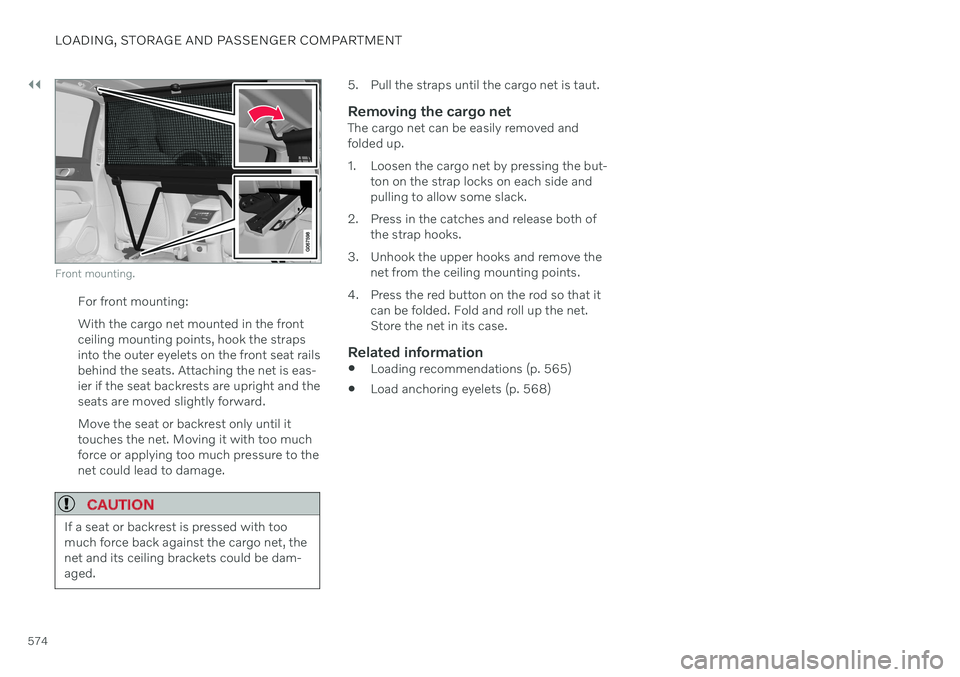
Front mounting.
For front mounting: With the cargo net mounted in the front ceiling mounting points, hook the strapsinto the outer eyelets on the front seat railsbehind the seats. Attaching the net is eas-ier if the seat backrests are upright and theseats are moved slightly forward. Move the seat or backrest only until it touches the net. Moving it with too muchforce or applying too much pressure to thenet could lead to damage.
CAUTION
If a seat or backrest is pressed with too much force back against the cargo net, thenet and its ceiling brackets could be dam-aged.
5. Pull the straps until the cargo net is taut.
Removing the cargo netThe cargo net can be easily removed and folded up.
1. Loosen the cargo net by pressing the but-ton on the strap locks on each side and pulling to allow some slack.
2. Press in the catches and release both of the strap hooks.
3. Unhook the upper hooks and remove the net from the ceiling mounting points.
4. Press the red button on the rod so that it can be folded. Fold and roll up the net.Store the net in its case.
Related information
Loading recommendations (p. 565)
Load anchoring eyelets (p. 568)
Page 605 of 673
MAINTENANCE AND SERVICE
}}
* Option/accessory.603
Function Ampere Type
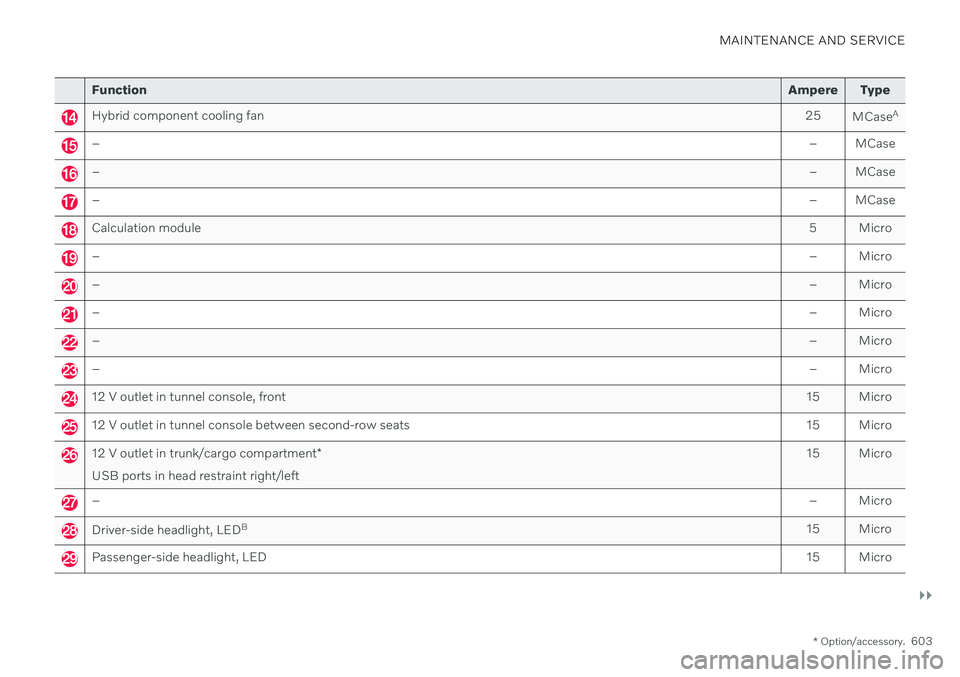
Hybrid component cooling fan 25
MCaseA
–
– MCase
–– MCase
–– MCase
Calculation module 5 Micro
–– Micro
–– Micro
–– Micro
–– Micro
–– Micro
12 V outlet in tunnel console, front15 Micro
12 V outlet in tunnel console between second-row seats15 Micro
12 V outlet in trunk/cargo compartment*
USB ports in head restraint right/left 15 Micro
–
– Micro
Driver-side headlight, LEDB
15 Micro
Passenger-side headlight, LED 15 Micro
Page 613 of 673
MAINTENANCE AND SERVICE
}}
* Option/accessory.611
Function Ampere Type
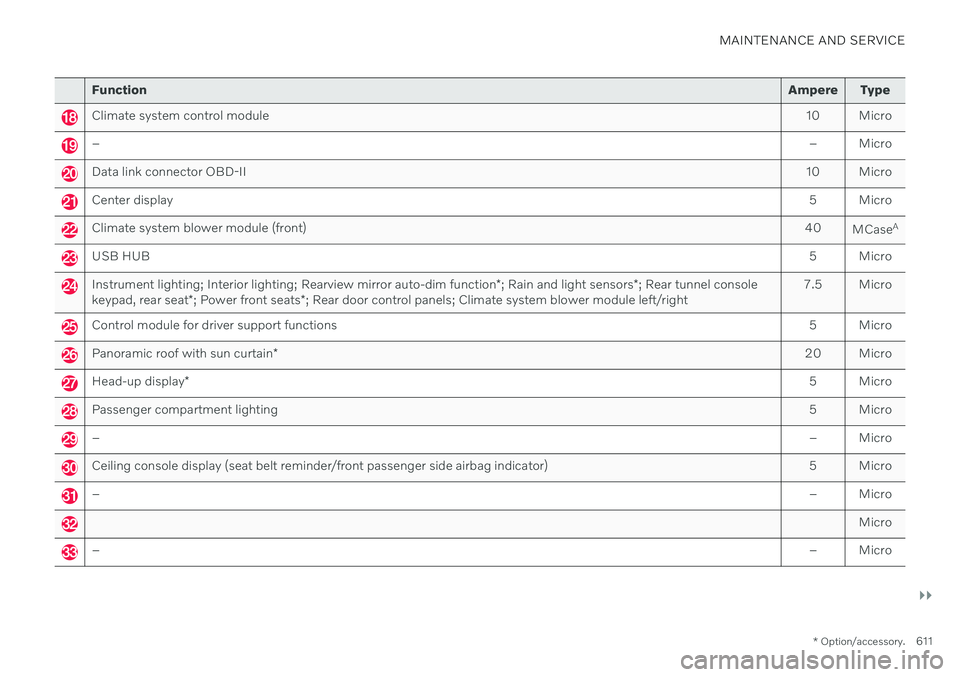
Climate system control module 10 Micro
– – Micro
Data link connector OBD-II10 Micro
Center display 5 Micro
Climate system blower module (front)40
MCaseA
USB HUB
5 Micro
Instrument lighting; Interior lighting; Rearview mirror auto-dim function*; Rain and light sensors *; Rear tunnel console
keypad, rear seat *; Power front seats *; Rear door control panels; Climate system blower module left/right 7.5 Micro
Control module for driver support functions
5 Micro
Panoramic roof with sun curtain* 20 Micro
Head-up display
* 5 Micro
Passenger compartment lighting
5 Micro
–– Micro
Ceiling console display (seat belt reminder/front passenger side airbag indicator) 5 Micro
–– Micro
Micro
–– Micro
Page 616 of 673
MAINTENANCE AND SERVICE
* Option/accessory.
614
Fuses in the cargo compartment
The fuses in the cargo compartment help pro- tect electrical components such as the power seats *, airbags and seat belt tensioners.
Page 657 of 673

INDEX
655
keyboard 123
messages 137, 138
operation 109, 112, 116, 121
overview 107
settings 129, 130
switch off and change volume 128
symbols in status bar 121
views 112
Central locking 253
Change of owner 131
Changing a wheel 540 Charge vehicle function 432
Charge level vehicle function 432
Charging hybrid battery 383 opening and closing the charging
door 388
start charging 388
Status 390, 391, 392
stop charging 394
Charging cable 385
Charging current 385
Checking engine oil level 589
Child restraints 63, 65 booster cushions 72
convertible seats 69
infant seats 67
ISOFIX/LATCH anchors 75
lower attachment points 74
recalls and registration 65
top tether anchors 73
Child safety 63
Child safety locks 255
Circuit breaker 387
City Safety 314 braking for oncoming vehicles 323
crossing traffic 320
delayed evasive maneuver 323
detecting obstacles 318
evasive maneuver 322
limitations 324
limitations for evasive maneuvers 322
limitations in crossing traffic 321
setting warning distance 317
sub-functions 315
Symbols and messages 327
Cleaning 621, 623 automatic car wash 627
car wash 624, 625, 627, 628, 629,630
center display 619
Seat belts 621
textile upholstery 619, 621, 622
upholstery 619, 621, 622, 623
wheels 630Cleaning wheels 630
Cleaning wiper blades 628
Clean Zone 203
Clean Zone Interior Package 204
Climate 200
auto-regulation 215
blower control 218
parking 221
perceived temperature 201
Sensors 200
temperature control 219, 220
voice control 201
zones 200
Climate controls 211 center display 211
rear seat 211
Climate system 200, 211 Refrigerant 650
repairs 585
Clock, setting 90
Collision 42, 47, 52, 61 Collision warner crossing traffic rear 333
see City Safety 314
Collision warning from the rear 328
Color code, paintwork 632
Page 658 of 673

INDEX
656Color codes 632
Compass 454, 455
calibration 455
Condensation in headlights 625, 627, 628, 629
Connecting vehicle to Internet No connection or poor connection 509
via a mobile device (WiFi) 505
via cellular phone (Bluetooth) 505
via vehicle's modem 506
Connect phone 496
Contact information 26
Convertible seats 69
coolant 649 filling 590
Cooling system overheating 441
Cornering assistance 302 activating/deactivating 303
limitations 303
Cornering illumination 158
Corner Traction Control 269
Corrosion protection 630 Covering cargo compartment 569
Crash, see Collision 42
Crash event data 33
Cross Traffic Alert 333 activating/deactivating 334
limitations 334
messages 336
Cruise control 275 activating 276
manage speed 298
standby mode 277
turn off 277
Curb weight 645
Customer Privacy Policy 35
CZIP (Clean Zone Interior Package) 204
D
Data recording 33 transferring between vehicle and
workshop 579
Data sharing 510, 511
Daytime running lights 153Decals location 640
Defrosting 216 Detecting obstacles City Safety 318
Dimensions 643
Dipstick, electronic 589
Direction of rotation 528Display
driver information 80
Display lighting 162
Distance Alert 273 activating/deactivating 274
limitations 274
Set time interval 299
DivX ®
484
Door mirrors 169 compass 454, 455
dimming 170
outer 169
power folding 170
resetting 170
store position 186, 187
Download Center 579 use 580
Driveline transmission 414
Drive mode 421 changing 425
driver support 301
Driver Alert Control 342 activating/deactivating 343
Page 660 of 673

INDEX
658Front seat manual 184
Front seats, power 185
adjusting passenger seat from driv-
er's seat 193
adjusting seat 185
Lumbar support 191
massage 188, 189, 190
multifunction control 188, 189, 190, 191
Side bolsters 191
store position 186, 187
FSC, environmental labeling 23
Fuel 437 Travel Link service 477
Fuel filling 436
Fuel gauge 83
Fuel requirements 437, 438Fuel tank volume 650
Fuse box 599
Fuses 599 below the glove compartment 608
in engine compartment 601
in the cargo compartment 614
replacing 599
G
Gasoline grade 437 Gauge fuel gauge 83
hybrid battery 84
Gear selector positions automatic transmission 415
Glass, laminated/reinforced 166
Glove compartment 563Gracenote ® 483
Grocery bag holders 567
Gross vehicle weight 645
H
Handbrake 408
Hand wash 625 Hard disk space 512
Hazard warning flashers 160
HD radio 467 Headlamp beam adjustment 152
Headlight pattern, adjustment 152
Head restraint 195
Head-up display 139 activating/deactivating 141
cleaning 620
Distance Alert 273
replacing windshield 585
settings 141
store position 141, 186, 187
Heated wiper blades 176
Heater 229 auxiliary heater 229
parking heater 229
Heating Seats 212, 213
steering wheel 214
windows 217
high beams 154, 155
High engine temperature 441
Hill Start Assist 413 Hill Start Assist (HSA) 413
Hoisting the vehicle 583Hold vehicle function 432
HomeLink ® 450
programming 451
type approval 454
use 453
HomeLink ® remote control
programmable 450
Page 661 of 673
INDEX
659
Home safe lighting, Homesafe Lighting, Follow me home lighting, follow-me-
home lighting 160
Honk 197
Hood, opening 585
Horn 197
Hybrid battery 597
Charging 383
Hybrid battery gauge 84
Hybrid gauge 83
Hybrid mode 421, 426
I
IAQS (Interior Air Quality System) 204
IC (Inflatable Curtain) 60
ID, Volvo 26
Identification number 38
Ignition mode 403, 404
Immobilizer 247 Electronic immobilizer 247
Indicator symbols 91
Individual drive mode 421
Infant seats 67
Inflatable curtain 60
Inflatable Curtain 60
Inflating tires 553Inflation pressure adjusting 534
Checking 533
decal with recommended pressure 535
Inflation pressure monitoring 535 action 539
save new inflation pressure 537
Status 538
Inflation pressure table 651
Information display 80, 82
Infotainment (Audio and media) 458
Instrument cluster 80 settings 82
Instrument illumination 162
Instrument lighting 162
Instrument panel 80 App menu 101, 102 hybrid-related symbols and mes-
sages 395
messages 103
settings 82
Instruments and controls 78 Instruments overview left-hand drive vehicle 78IntelliSafe
driver support 29
Interior Air Quality System 204
Intermittent wiping 177Internet, see Internet-connected vehi- cle 504
Internet-connected vehicle 504 book service and repair 581
No connection or poor connection 509
send car data 582
system updates 580
iPod ®
, connecting 486
ISOFIX/LATCH anchors 75
J
Jack 541
Jump-start 442
K
Key 234
Keyboard 123, 126 change language 126