wheel VOLVO V60 TWIN ENGINE 2020 Manual PDF
[x] Cancel search | Manufacturer: VOLVO, Model Year: 2020, Model line: V60 TWIN ENGINE, Model: VOLVO V60 TWIN ENGINE 2020Pages: 673, PDF Size: 14.2 MB
Page 271 of 673

DRIVER SUPPORT
}}
* Option/accessory.269
WARNING
If the temperature rises too high, the power steering may be forced to switch off com-pletely. In such a situation, the driver dis- play shows the message
Power steering
failure Stop safely along with a symbol.
Changing the level of steering wheel resistance *
In INDIVIDUAL drive mode, the level of steer- ing wheel resistance can be adjusted. 1.
Tap
Settings in the center display's Top
view.
2. Select
My CarDrive ModesSteering Force.
Steering wheel resistance settings can only be accessed if the vehicle is stationary or is mov-ing straight ahead at a low speed.
Related information
Driver support systems (p. 268)
Drive modes (p. 421)
Electronic Stability Control
The Electronic Stability Control (ESC 1
) func-
tion helps the driver avoid skidding and improves the vehicle's directional stability.
This symbol will be displayed in the instrument panel whenthe system is intervening. When the system has inter- vened to apply the brakes, apulsing sound may be heard
and the vehicle may accelerate more slowlythan expected when the accelerator pedal isdepressed.
The system consists of the following sub-func- tions:
Stability control 2
Spin control and active yaw control
Engine drag control
Trailer Stability Assist
WARNING
The function is supplementary driver support intended to facilitate drivingand help make it safer – it cannot han-dle all situations in all traffic, weatherand road conditions.
The driver is advised to read all sec-tions in the Owner's Manual about thisfunction to learn of its limitations,which the driver must be aware ofbefore using the function.
Driver support functions are not a sub-stitute for the driver's attention andjudgment. The driver is always respon-sible for ensuring the vehicle is drivenin a safe manner, at the appropriatespeed, with an appropriate distance toother vehicles, and in accordance withcurrent traffic rules and regulations.
Stability control 2This function helps control the driving andbraking force of each individual wheel in anattempt to stabilize the vehicle.
Spin control and active yaw controlThis function is active at low speeds andbrakes the wheels that are spinning to transfer
1
Electronic Stability Control
2 Also called traction control.
Page 272 of 673
||
DRIVER SUPPORT
* Option/accessory.
270 additional power from wheels that are not spinning. This function can also help prevent the wheels from spinning while the vehicle is accelerating.
Engine drag control
Engine drag control (EDC
3
) can help prevent
inadvertent wheel lock, e.g. after downshiftingor using engine braking when driving at lowspeeds on a slippery surface. Inadvertent wheel lock while driving could impair the driver's ability to steer the vehicle.
Trailer Stability Assist *4
Trailer Stability Assist (TSA
5
) is designed to
help stabilize a vehicle that is towing a trailer ifthe vehicle and trailer have begun to sway.
NOTE
Trailer Stability Assist is deactivated if ESC
Sport Mode is activated.
Related information
Driver support systems (p. 268)
Activating or deactivating Sport mode for Electronic Stability Control (p. 271)
Electronic Stability Control symbols andmessages (p. 272)
Trailer Stability Assist
* (p. 446)
Electronic Stability Control in sport mode The stability system (ESC 6
) is always acti-
vated and cannot be switched off. However, the driver can select
ESC Sport Mode,
which offers more active driving characteris- tics.
With the ESC Sport Mode sub-function
selected, intervention from the system is reduced and more lateral movement is permit-ted, giving the driver more control of the vehi-cle than usual. When
ESC Sport Mode is selected, the func-
tion may seem to be disabled even though it continues to assist the driver.
NOTE
When ESC Sport Mode is selected, the
trailer stabilizer (TSA 7
) is switched off.
ESC Sport Mode also helps provide more
traction, even if the vehicle gets stuck or is driving on a loose surface such as deep snowor loose sand.
3 Engine Drag Control4Trailer Stability Assist is included if the vehicle is equipped with a Volvo original towbar.5 Trailer Stability Assist
6 Electronic Stability Control
7 Trailer Stability Assist
Page 274 of 673

DRIVER SUPPORT
272
Electronic Stability Control symbols and messagesA number of symbols and messages related to Electronic Stability Control (ESC 9
) may be displayed in the instrument panel. Several examples are provided below.
Symbol Message Meaning
Steady glow for approx. 2 seconds. System check when the engine is started.
Flashing light. The system is actively operating.
Steady glow. Sport mode is activated.
NOTE! The system is not deactivated in this mode, but has partially
reduced functionality.
ESC Temporarily offThe system's functionality has been temporarily reduced due to high brake system temperatures. The function will be automatically reactivated when the brakes have cooled.
ESC Service requiredThe system is not functioning properly. Stop the vehicle in a safe place, turn off the engine and then restart it.
A text message can be erased by briefly press- ing the
button in the center of the right-
side steering wheel keypad. If the message persists: Contact a workshop
‒
an authorized Volvo workshop is recom- mended.
Related information
Electronic Stability Control (p. 269)
9
Electronic Stability Control
Page 278 of 673

||
DRIVER SUPPORT
* Option/accessory.
276 To disengage CC:
–Press the accelerator pedal about halfway down and then release it.
> Cruise Control will automatically disen-
gage the automatic brake function and speed will only be reduced using theengine braking function.
Related information
Driver support systems (p. 268)
Selecting and activating cruise control(p. 276)
Deactivating cruise control (p. 277)
Cruise control standby mode (p. 277)
Adjusting set speed for driver support(p. 298)
Switching between cruise control and Adaptive Cruise Control
* in the center dis-
play (p. 284)
Selecting and activating cruise control The Cruise Control (CC 15
) function must be
selected and activated in order to regulate speed.
In order to start Cruise Control from standby mode, the vehicle's current speed must be30 km/h (20 mph) or higher.
1. Press the ◀ (1) or ▶ (3) button on the
steering wheel keypad and scroll to the cruise control symbol
(4).
> Gray symbol – cruise control is in standby mode. 2.
When cruise control is selected, press
(2) on the steering wheel keypad to acti- vate.
> White symbol – cruise control starts
and the current speed is stored as the maximum speed. The lowest speedthat can be set is 30 km/h (20 mph).
Reactivating cruise control to the last stored speed
–When cruise control is selected, press on the steering wheel keypad to activate.
> The Cruise Control marking in theinstrument panel will change from GRAY to WHITE and the vehicle willthen return to the most recently setspeed.
WARNING
A noticeable increase in speed may follow when the speed is resumed with the
steering wheel button.
Related information
Cruise control (p. 275)
Deactivating cruise control (p. 277)
Cruise control standby mode (p. 277)
15
Cruise Control
Page 279 of 673
DRIVER SUPPORT
}}
* Option/accessory.277
Deactivating cruise control
Cruise control (CC 16
) can be deactivated and
switched off.
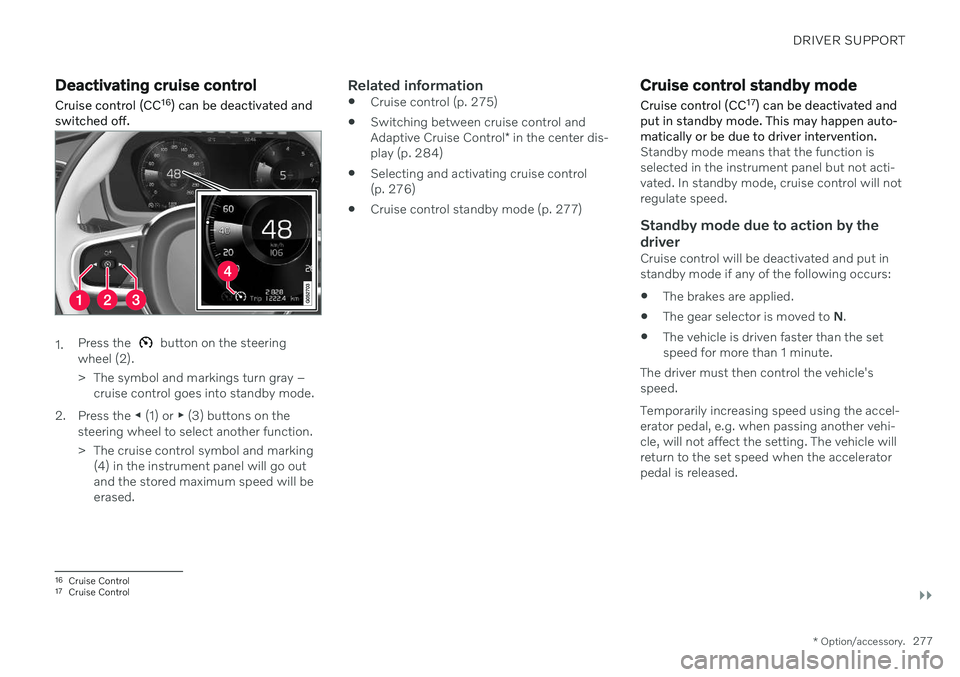
1. Press the button on the steering
wheel (2).
> The symbol and markings turn gray – cruise control goes into standby mode.
2. Press the ◀ (1) or ▶ (3) buttons on the
steering wheel to select another function.
> The cruise control symbol and marking (4) in the instrument panel will go out and the stored maximum speed will beerased.
Related information
Cruise control (p. 275)
Switching between cruise control and Adaptive Cruise Control
* in the center dis-
play (p. 284)
Selecting and activating cruise control (p. 276)
Cruise control standby mode (p. 277)
Cruise control standby mode Cruise control (CC 17
) can be deactivated and
put in standby mode. This may happen auto- matically or be due to driver intervention.
Standby mode means that the function is selected in the instrument panel but not acti-vated. In standby mode, cruise control will notregulate speed.
Standby mode due to action by the
driver
Cruise control will be deactivated and put instandby mode if any of the following occurs:
The brakes are applied.
The gear selector is moved to
N.
The vehicle is driven faster than the setspeed for more than 1 minute.
The driver must then control the vehicle'sspeed. Temporarily increasing speed using the accel- erator pedal, e.g. when passing another vehi-cle, will not affect the setting. The vehicle willreturn to the set speed when the acceleratorpedal is released.
16 Cruise Control
17 Cruise Control
Page 280 of 673

||
DRIVER SUPPORT
* Option/accessory.
278
Automatic standby modeAdaptive Cruise Control may go into standby mode if:
the wheels lose traction
the engine speed (rpm) is too low/high
the temperature in the brake systembecomes too high
the vehicle's speed goes below 30 km/h(20 mph).
The driver must then control the vehicle'sspeed.
Related information
Cruise control (p. 275)
Selecting and activating cruise control(p. 276)
Deactivating cruise control (p. 277)
Adaptive Cruise Control
*18
Adaptive Cruise Control (ACC 19
) helps the
driver maintain a constant speed with a set time interval to the vehicle ahead.
Adaptive Cruise Control can help provide a more relaxed driving experience on long tripson highways or long, straight roads with eventraffic flows.
The camera/radar sensor measures the distance to the vehicle ahead.
The driver sets a speed and a time interval to the vehicle ahead. If the camera/radar sensordetects a slower-moving vehicle ahead, yourvehicle's speed will be automatically adaptedaccording to the set time interval to that vehi-cle. When there are no longer slower-moving vehicles ahead, the vehicle will return to theset speed. If the Curve Speed Assist (CSA)
* function is
activated, it may also affect the vehicle's speed.
WARNING
The function is supplementary driver support intended to facilitate drivingand help make it safer – it cannot han-dle all situations in all traffic, weatherand road conditions.
The driver is advised to read all sec-tions in the Owner's Manual about thisfunction to learn of its limitations,which the driver must be aware ofbefore using the function.
Driver support functions are not a sub-stitute for the driver's attention andjudgment. The driver is always respon-sible for ensuring the vehicle is drivenin a safe manner, at the appropriatespeed, with an appropriate distance toother vehicles, and in accordance withcurrent traffic rules and regulations.
Adaptive Cruise Control regulates speed byaccelerating and braking. It is normal for the
18 Depending on market, this function can be either standard or optional.
19 Adaptive Cruise Control
Page 281 of 673
DRIVER SUPPORT
}}
* Option/accessory.279
brakes to emit a slight sound when they are being used to adjust speed. Adaptive Cruise Control always attempts to regulate speed smoothly. The driver mustapply the brakes in situations requiring imme-diate braking. For example, when there aregreat differences in speed between vehicles orif the vehicle ahead brakes suddenly. Due tolimitations in the radar sensor, braking mayoccur unexpectedly or not at all. Adaptive Cruise Control is designed to follow a vehicle ahead in the same lane and maintaina time interval to that vehicle set by the driver.If the radar sensor does not detect a vehicleahead, it will instead maintain the speed setby the driver. This will also happen if the speedof the vehicle ahead exceeds the set speed foryour vehicle.
CAUTION
Only a workshop may perform mainte- nance on driver support components – anauthorized Volvo workshop is recom-mended.
Related information
Driver support systems (p. 268)
Adaptive Cruise Control
* controls and dis-
play (p. 279)
Selecting and activating Adaptive Cruise Control
* (p. 280)
Adaptive Cruise Control
* limitations
(p. 283)
Symbols and messages for AdaptiveCruise Control
* (p. 285)
Collision risk warning from driver support (p. 296)
Setting time interval to the vehicle ahead(p. 299)
Adjusting set speed for driver support(p. 298)
Auto-hold braking with driver support(p. 300)
Switching target vehicles with driver sup-port (p. 297)
Passing assistance (p. 304)
Adaptive Cruise Control
*20
controls and display A summary of how Adaptive Cruise Control (ACC 21
) is controlled using the left-side steer-
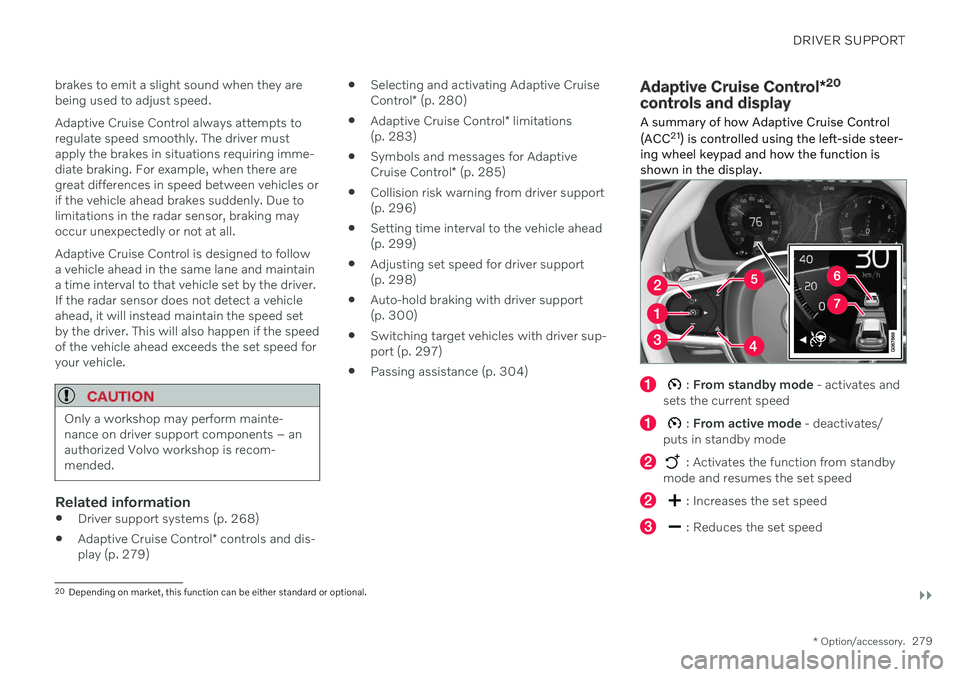
ing wheel keypad and how the function is shown in the display.
: From standby mode - activates and
sets the current speed
: From active mode - deactivates/
puts in standby mode
: Activates the function from standby
mode and resumes the set speed
: Increases the set speed
: Reduces the set speed
20 Depending on market, this function can be either standard or optional.
Page 283 of 673

DRIVER SUPPORT
}}
* Option/accessory.281
your vehicle's current speed must be at least 15 km/h (9 mph).
1. Press the ◀ (2) or ▶ (3) button on the
steering wheel keypad and scroll to the Adaptive Cruise Control symbol
(4).
> Gray symbol – Adaptive Cruise Control is in standby mode.
2. When Speed Limiter is selected, press
(1) on the steering wheel keypad to
activate.
> White symbol – Speed Limiter starts and the current speed is stored as the maximum speed.
Reactivating Adaptive Cruise Control to the last stored speed
–When Adaptive Cruise Control is selected, press
on the steering wheel keypad to
activate.
> The Cruise Control marking in the instrument panel will change from GRAY to WHITE and the vehicle willthen return to the most recently setspeed.
WARNING
A noticeable increase in speed may follow when the speed is resumed with the
steering wheel button.
Additional markings in the instrument panel
ACC will only regulate the time interval to the vehicleahead when the distancesymbol shows two vehicles.
A speed interval will be marked at the same time. The higher speed is the stored speed for your vehicleand the lower speed is thespeed of the vehicle ahead
(target vehicle).
Related information
Adaptive Cruise Control
* (p. 278)
Deactivating Adaptive Cruise Control
*
(p. 281)
Switching between cruise control and Adaptive Cruise Control
* in the center dis-
play (p. 284)
Adaptive Cruise Control
* limitations
(p. 283)
Deactivating Adaptive Cruise Control *24
Adaptive Cruise Control (ACC 25
) can be deac-
tivated and switched off.
1. Press the button on the steering
wheel (2).
> The symbol and markings turn gray – Adaptive Cruise Control goes into standby mode. The time interval indica-tor light and any symbols for the targetvehicle will go out.
2. Press the ◀ (1) or ▶ (3) buttons on the
steering wheel to select another function.
> The Adaptive Cruise Control symbol and marking (4) in the instrument panel will go out and the stored maximumspeed will be erased.
Page 285 of 673
DRIVER SUPPORT
}}
* Option/accessory.283
WARNING
With automatic standby mode, the driver is warned by an acoustic signal and a mes-sage on the instrument panel.
The driver must then regulate vehicle speed, apply the brakes if necessary,and maintain a safe distance to othervehicles.
Adaptive Cruise Control may go into standbymode if: your vehicle's speed goes below 5 km/h(3 mph) and ACC cannot determine if thevehicle ahead is stationary or if it isanother object, e.g. a speed bump.
your vehicle's speed goes under 5 km/h(3 mph) and the vehicle ahead turns sothat ACC no longer has a vehicle to follow.
the driver opens the door.
the driver unbuckles the seat belt.
the engine speed (rpm) is too low/high.
one or more of the wheels lose traction.
the brake temperature is high.
the parking brake is applied.
the camera/radar sensor is covered bysnow or heavy rain (the camera lens/radarwaves are blocked).
Related information
Adaptive Cruise Control
* (p. 278)
Selecting and activating Adaptive Cruise Control
* (p. 280)
Deactivating Adaptive Cruise Control
*
(p. 281)
Adaptive Cruise Control
* limitations
(p. 283)Adaptive Cruise Control *29
limitations
Adaptive Cruise Control (ACC 30
) may have
limited functionality in certain situations.
Steep roads and/or heavy loadsAdaptive Cruise Control is primarily intended to be driven on flat roads. The function maynot be able to maintain the correct time inter-val to the vehicle ahead when driving downsteep hills. The driver should be extra attentiveand prepared to apply the brakes. Do not use Adaptive Cruise Control if the vehi- cle is carrying a heavy load or towing a trailer.
Other limitationsThe Off Road drive mode cannot be selected
if Adaptive Cruise Control is activated.
29 Depending on market, this function can be either standard or optional.
30 Adaptive Cruise Control
Page 288 of 673

||
DRIVER SUPPORT
* Option/accessory.
286
Symbol Message Meaning
The symbol is WHITE. The vehicle is maintaining the stored speed.
Adaptive Cruise Contr. Unavailable
The symbol is GRAY. Adaptive Cruise Control is in standby mode.
Adaptive Cruise Contr. Service required
The symbol is GRAY.The system is not functioning as intended. Contact a workshop
‒ an authorized Volvo work-
shop is recommended.
Windscreen sensor Sensor blocked, see Owner's manualClean the windshield in front of the camera and radar sensors.
A text message can be erased by briefly press- ing the
button in the center of the right-
side steering wheel keypad. If the message persists: Contact a workshop ‒
an authorized Volvo workshop is recom- mended.
Related information
Adaptive Cruise Control
* (p. 278)